

Duplicate a landing page
Need to create a new landing page similar to one you already have? Duplicating saves time and lets you build on what’s already working. Instead of starting from scratch, copy your best-performing page and modify it for new campaigns.
Why Duplicate Landing Pages?
Save time – No need to rebuild layouts and designs from scratch.
Keep consistency – Maintain your brand look across campaigns.
Build on success – Start with pages that already convert.
Easy A/B testing – Create variations to test different elements.
Scale campaigns – Quickly launch multiple similar campaigns.
How to Duplicate a Landing Page
Step 1: Access Your Landing Pages
Log into your Sender account
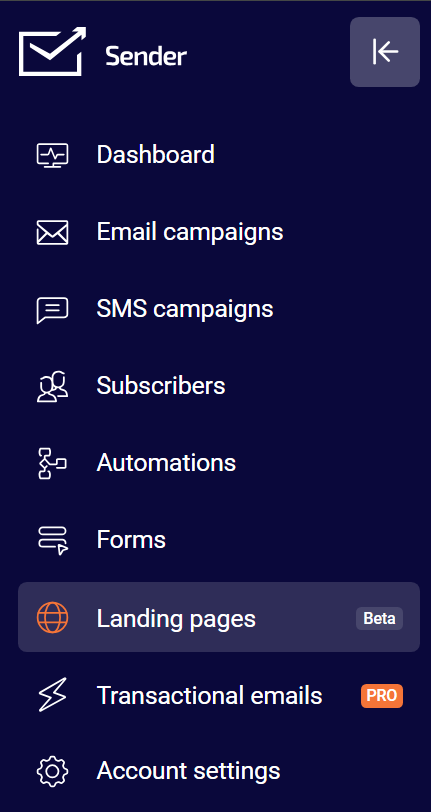
Go to Landing pages in the left sidebar
Find the page you want to duplicate
Step 2: Duplicate the Page
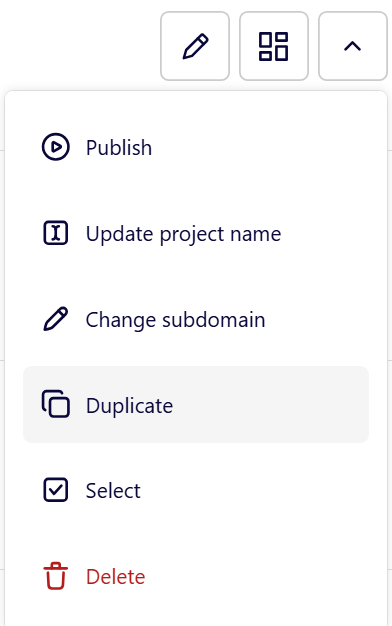
Click the Little Arrow (^) next to your chosen page
Select “Duplicate” from the dropdown
Your page is copied instantly
Step 3: Customize Your Copy and Update:
- Page name and subdomain
- Headlines and offers
- Images and graphics
- Call-to-action button text
- Form fields if needed
Best Practices
Choose the Right Page to Copy
Start with your highest-converting pages
Pick pages with similar goals to your new campaign
Consider your target audience
What to Always Change
- Page title and headlines
- Offer details and pricing
- Images and graphics
- Call-to-action button text
Smart Organization
Use clear names: “Summer Sale – Facebook Ads”
Update subdomains for different campaigns
Keep track of which page came from which
Common Use Cases
- Seasonal campaigns – Copy holiday pages for new seasons
- Different traffic sources – Adapt the same offer for Facebook vs Google ads
- A/B testing – Test different headlines while keeping everything else the same
- Product launches – Use successful product pages as templates
- Audience targeting – Create versions for different customer segments
After Duplication:
Test Everything:
- Check all links and buttons work
- Verify forms submit properly
- Test on mobile and desktop
- Make sure images load correctly
- Check that conversion tracking works
- Monitor performance vs the original
Troubleshooting
- Page won’t load? Check for broken links or missing images.
- Changes not saving? Make sure you’re in edit mode and try refreshing.
- Looks different? Some elements might need to be reconfigured after copying.
The Bottom Line
Duplicating landing pages is the fastest way to scale your marketing. Start with what works, customize for new campaigns, and launch faster than building from scratch.
That’s it!
If you got stuck on a specific task or can’t find a way to execute a particular job, contact our support team via LiveChat or support@sender.net – we’re here to help 24/7.