

Merge SPF records
If your domain is used by multiple services to send emails e.g. Sender, Gmail, or your web host, you need to merge SPF records into one.
Having multiple SPF records for a domain causes validation errors, which can lead to email delivery issues.
What Is an SPF Record?
An SPF (Sender Policy Framework) record is a type of DNS TXT record that tells mail servers which services are allowed to send emails on your domain’s behalf.
Example of a simple SPF record:
v=spf1 include:sendersrv.com ~allWhy You Should Merge SPF Records?
You can only have one SPF record per domain.
If you add a new email-sending service and create another TXT record (for example, one for Google Workspace and one for Sender), your SPF setup becomes invalid.
Incorrect setup:
v=spf1 include:_spf.google.com ~all
v=spf1 include:sendersrv.com ~all
Correct setup (merged):
v=spf1 include:_spf.google.com include:sendersrv.com ~allHow to Merge SPF Records
1. Find all your existing SPF records
Check your DNS settings for TXT records starting with v=spf1
Common examples:
- Google Workspace →
v=spf1 include:_spf.google.com ~all - Microsoft 365 →
v=spf1 include:spf.protection.outlook.com ~all - Sender →
v=spf1 include:sendersrv.com ~all
2. Combine all “include” mechanisms into one record
- Keep only one
v=spf1at the start. - Add all
include:entries you need (separated by spaces). - End with
~allor-all.
3. Save your final merged record
Example:
v=spf1 include:_spf.google.com include:sendersrv.com ~all4. Wait for DNS propagation
Changes may take up to 48 hours to take effect.
Examples of Common Merged SPF Records:
Scenario
Correct SPF Record
Sender + Google Workspace
v=spf1 include:_spf.google.com include:sendersrv.com ~allSender + Microsoft 365
v=spf1 include:spf.protection.outlook.com include:sendersrv.com ~allSender + Web Host (Hostinger)
v=spf1 include:_spf.hostinger.com include:sendersrv.com ~allSender + Gmail + Zoho
v=spf1 include:_spf.google.com include:zoho.eu include:sendersrv.com ~allSender + Domain’s Own Mail Server
(MX allowed)
v=spf1 mx include:sendersrv.com ~allSender + Custom Web Server
(A record allowed)
v=spf1 a include:sendersrv.com ~allSender + Dedicated IP
v=spf1 ip4:206.0.114.42 include:sendersrv.com ~allIf unsure, contact your DNS provider or Sender’s support for help verifying that you merged the record correctly.
Once you are done, head to your Sender account, go to Account Settings -> Domains and click “Recheck DNS records” next to the domain that you were merging records for.

If everything is merged correctly, you will receive a green verification mark.
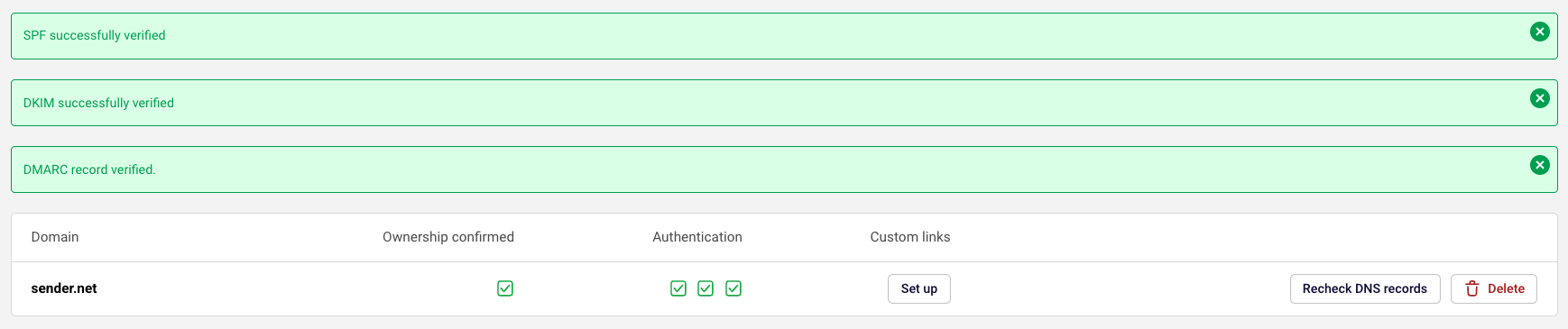
Please note that it may take up to 48 hours for the records to propagate.
That’s it!
If you got stuck on a specific task or can’t find a way to execute a particular job, contact our support team via LiveChat or support@sender.net – we’re here to help 24/7.