

Change link language and design
Here’s how you can change the language of the unsubscribe and preview links.
Go to Template settings and choose the language under General settings.
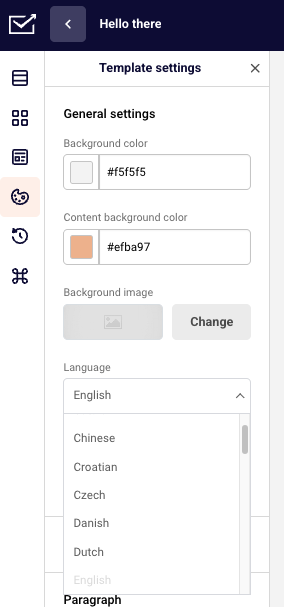
As you can see there’re additional buttons to hide both of these links. However, to do so and be able to send out a campaign you’ll need to add this code: {$unsubscribe_text} to it.
All of the supported languages:
-
Catalan
-
Chinese
-
Croatian
-
Czech
-
Danish
-
Dutch
-
English
-
Estonian
-
Finnish
-
French
-
German
-
Greek
-
Hungarian
-
Italian
-
Japanese
-
Latvian
-
Lithuanian
-
Norwegian
-
Persian
-
Polish
-
Portuguese (Brazilian)
-
Portuguese (Portugal)
-
Romanian
-
Russian
-
Serbian
-
Slovak
-
Slovenian
-
Spanish
-
Swedish
-
Turkish
If the language you need is not in the list – you can send us proper translations to support@sender.net and we will implement the language for you with no additional cost. The list below consists of sentences that we need you to translate:
- Is this email not displaying correctly? View it in your browser.
- If you want to unsubscribe, click here.
- You have successfully unsubscribed.
- From now on you won’t receive our newsletters.
- Error occurred.
That’s it!
If you got stuck on a specific task or can’t find a way to execute a particular job, contact our support team via LiveChat or support@sender.net – we’re here to help 24/7.