

Add products with product block
The product block is designed mainly for e-commerce clients but can be used by all. With product block, you can easily import items from any online store. The most significant part about that – no integrations are needed.
Simply pick the product block and drag it to a particular section. When the block appears, copy the product’s URL from the online store and paste it into the “Product URL” field on the right side.
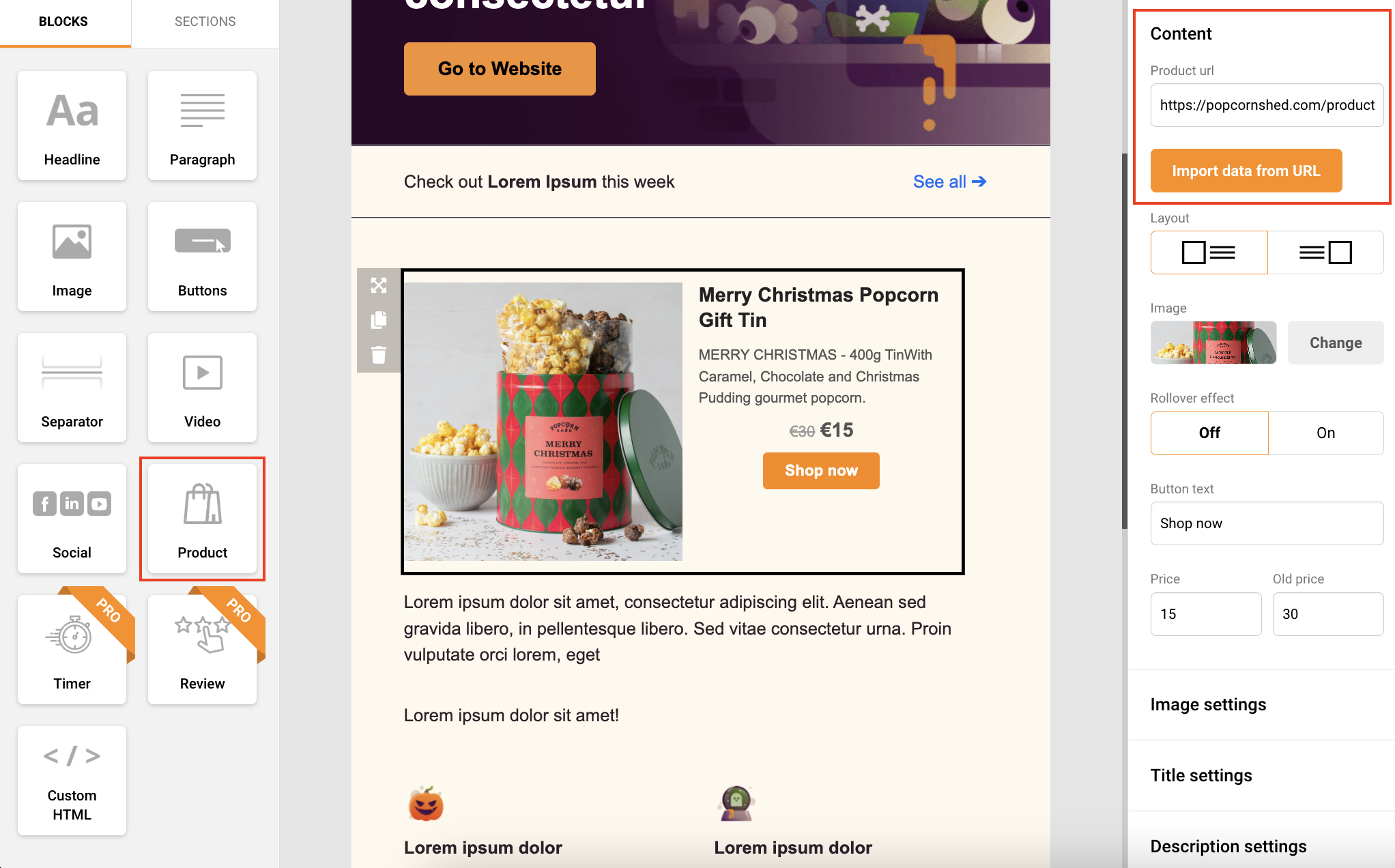
When the URL link is the imported system will extract the following information:
- Name
- Image
- Description
- Price
- Special price
- Category
- Currency
- Quantity
- Rating
Each part of the product block can be modified individually in settings. Click on the block, and settings will appear on the right side.
In case of an error, please implement JSON snippets or Open Graph tags upon your products.
{
  "name": "",
  "image": "",
  "description": "",
  "price": "",
  "special_price": "",
  "currency": "",
  "quantity": "",
  "rating": ""
}
That’s it!
If you are stuck on a specific task or can’t find a way to execute a particular job, contact our support team via LiveChat or support@sender.net – we’re here to help 24/7.