

Understand segments and rules
Segments are dynamic groups of users or customers that are automatically updated based on specific criteria you define. They allow you to organize and target your audience based on shared characteristics, behaviors, or attributes.
Unlike static lists, segments update in real-time as users meet or no longer meet your criteria, ensuring your targeting is always current and accurate.
Why use segments?
Segments help you:
- Personalize communication – Send targeted messages to specific groups based on their interests or behavior
- Improve engagement – Reach the right people with relevant content at the right time
- Analyze user groups – Understand how different segments behave and perform
- Automate workflows – Trigger actions when users enter or exit specific segments
- Optimize campaigns – Test and refine your approach with different audience groups
Common segment types
- Demographic segments Group users by characteristics like location, age, language, or company size.
- Behavioral segments Target users based on actions they’ve taken, such as pages visited, features used, or purchases made.
- Engagement segments Identify active, inactive, or at-risk users based on their level of engagement with your product or service.
- Lifecycle segments Organize users by where they are in the customer journey, from new signups to loyal customers.
How segments work
Segments are built using conditions and filters. When a user matches all the conditions you’ve set, they’re automatically added to the segment. If they stop matching the conditions, they’re removed.
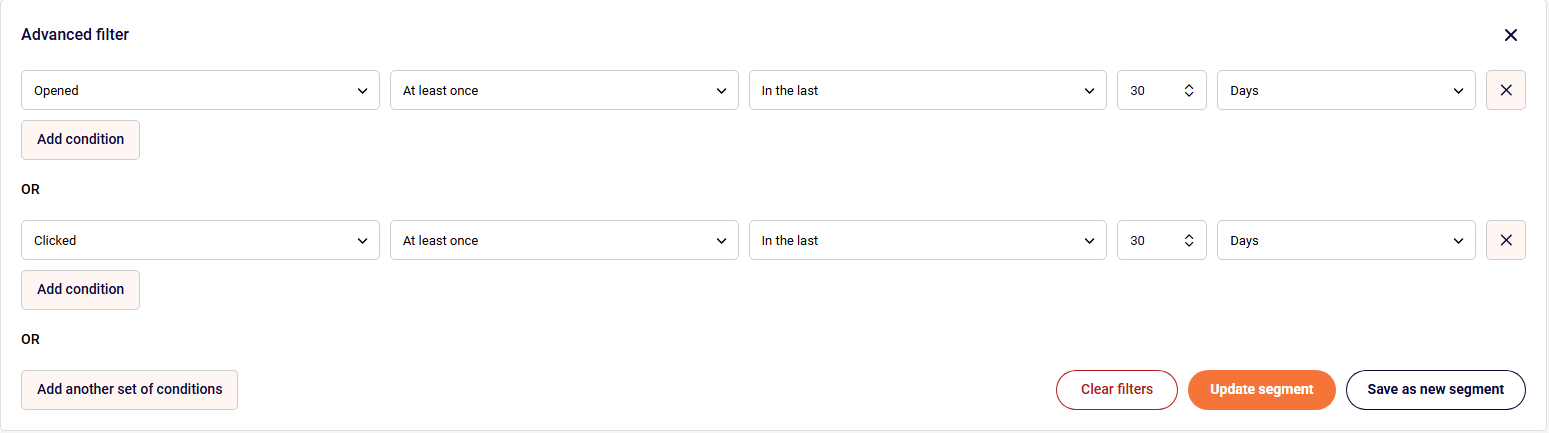
For example, you might create a segment for “Active Users” that includes anyone who:
- Opened at least once in the last 30 days
- Clicked at least once in the last 30 days
As soon as someone meets these criteria, they join the segment. If they stop meeting the conditions, they’re automatically removed. You may see an example here:
Best practices
- Start simple – Begin with broad segments and refine them as you learn more about your audience
- Name clearly – Use descriptive names that make it obvious who’s in the segment
- Review regularly – Check that your segment criteria still align with your goals
- Avoid over-segmentation – Too many small segments can be difficult to manage
- Test and iterate – Experiment with different criteria to find what works best
That’s it!
If you got stuck on a specific task or can’t find a way to execute a particular job, contact our support team via LiveChat or support@sender.net – we’re here to help 24/7.