

Create import file format
Learn how to properly format your contact files for a smooth import into Sender.
Supported File Formats
Sender accepts the following file types:
- CSV (.csv)
- TXT (.txt)
- MS Excel (.xlsx)
Maximum file size: 64MB
File Structure Requirements
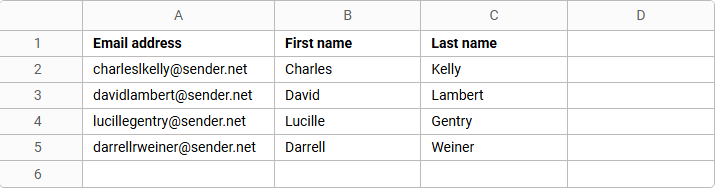
Column Headers (First Row)
Your file must include headers in the first row to identify each field:
- Email address (required)
- First name (optional)
- Last name (optional)
- Custom fields (optional)
Data Rows
- Each subscriber must be on a separate row
- All subscriber information should be in separate columns
- No empty rows between contacts
File Example
Download Templates
Not sure how to format your file? Download our ready-to-use templates:
- Excel template – For .xlsx files
- CSV template – For .csv files
Simply fill in your contact information following the template structure.
Tips for Success
- Ensure email addresses are valid and properly formatted
- Remove any duplicate entries before importing (Our system does catch duplicates whether you remove them or not, but this helps the import itself)
- Double-check that all data is in the correct columns
- Save your file in one of the supported formats
That’s it!
If you got stuck on a specific task or can’t find a way to execute a particular job, contact our support team via LiveChat or support@sender.net – we’re here to help 24/7.