

View subscriber activity report
It’s necessary to track and manage subscribers by their activity – its report can give you a great insight into your subscribers’ behavior.
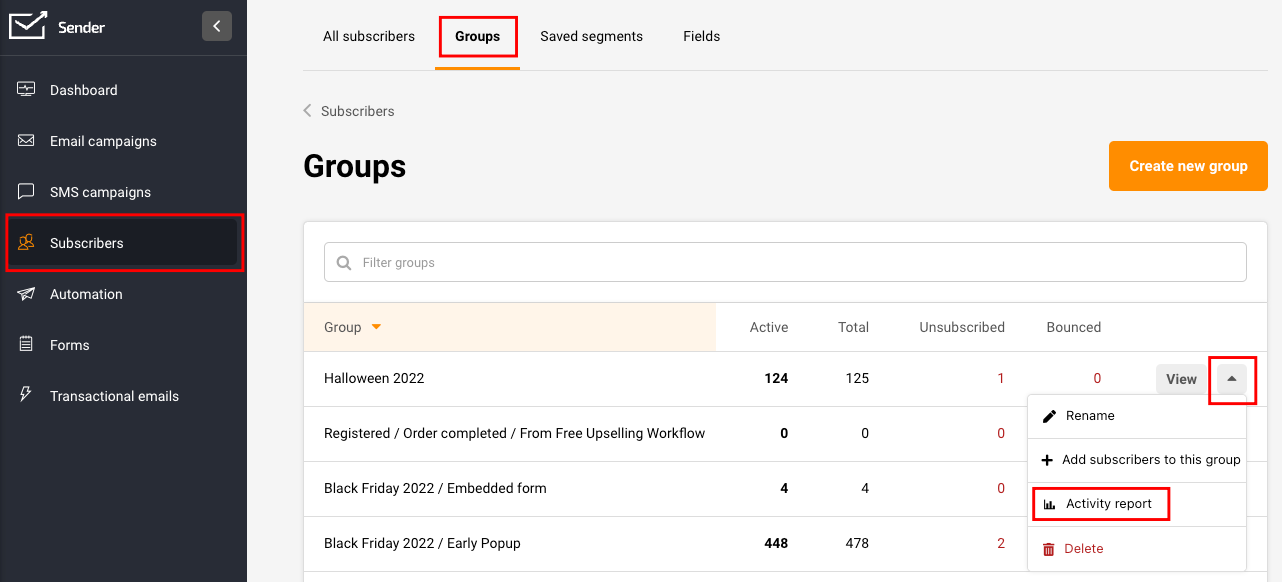
The process is relatively simple: go to the Subscribers’ section, and click “Groups”. Then click the arrow button next to the desired group and choose “Activity report”.
Next, click on the arrow icon on the far right side of the screen and select “Activity report.” At this point, the activity report will get generated and downloaded.
The information that will be found in the report:
- Email address
- Phone number
- First name
- Last name
- Email status
- SMS status
- Emails sent
- Emails opened
- Emails clicked
That’s it!
If you got stuck on a specific task or can’t find a way to execute a particular job, contact our support team via LiveChat or support@sender.net – we’re here to help 24/7.