

SMS Limits by Plan
This guide explains the SMS sending limits included with each Sender plan so you can choose the right plan and manage your SMS credits effectively.
Where to Find This Feature
In the Sender dashboard, go to: Account settings → Billing
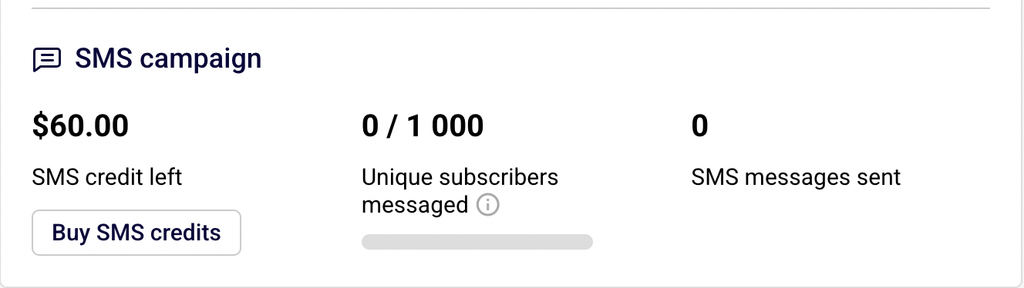
On the Billing page, you will see an SMS campaign section that displays three key metrics: your current SMS credit left balance, the number of Unique subscribers messaged during the current billing period, and the total SMS messages sent. You can also click Buy SMS credits to purchase additional credits, or click Change or renew plan to upgrade your plan for higher SMS limits.
Steps to Check and Manage Your SMS Limits
Step 1 — Confirm Your Current Plan Supports SMS
Not all Sender plans include SMS. The Free Forever plan and the Pay as you go plan do not support SMS campaigns. To send SMS messages, you need a Standard, Professional, or Enterprise plan. To check your current plan, go to Account settings → Billing and look at the Your plan card in the top-left corner. If you are on a plan that does not support SMS, click Change or renew plan to upgrade.
Step 2 — Review Your SMS Usage and Credit Balance
On the Billing page, locate the SMS campaign section. This displays three values: your SMS credit left (the remaining monetary balance available for sending SMS), the Unique subscribers messaged count (distinct subscribers who received at least one SMS during this billing period, shown against your plan limit), and the SMS messages sent total. Monitor these values to avoid reaching your limits mid-campaign.
Step 3 — Understand SMS Limits by Plan Tier
SMS limits depend on which plan you are on and the subscriber tier you selected:
Standard — Includes SMS messaging capability, but no free monthly SMS credits. You must purchase SMS credits separately by clicking Buy SMS credits on the Billing page. Your unique subscribers messaged limit matches your plan’s subscriber tier (for example, 1,000 on a 1k-subscriber plan).
Professional — Includes free monthly SMS credits that are automatically added to your account each billing period. The credit value scales with your subscriber tier (for example, $20/month on the 1k plan, $320/month on the 30k plan). Your unique subscribers messaged limit also matches your subscriber tier. Free SMS credits expire after one month and do not roll over.
Enterprise — Includes everything in the Professional plan. Contact Sender’s sales team for details on SMS credit allocations and custom limits.
Step 4 — Purchase Additional SMS Credits if Needed
If you run out of SMS credits or need more than your plan provides, go to Account settings → Billing and click Buy SMS credits. On the purchase page, select a credit package or enter a Custom amount.
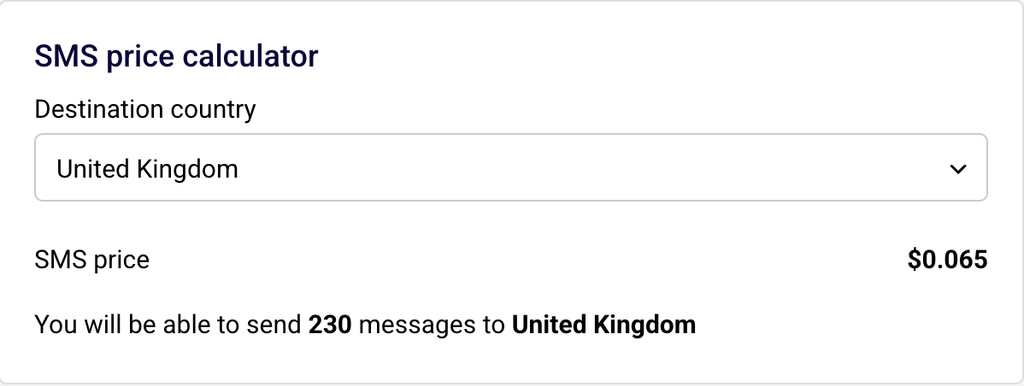
Use the SMS price calculator to check the cost per message for your destination country — SMS pricing is character-based and varies by country. Select your payment method and click Purchase to add credits to your account. Additional credits are available on both the Standard and Professional plans.
SMS Compliance Requirements
Character-based billing — Sender bills SMS messages based on character count. A standard SMS using GSM-7 encoding (the default character set for Latin-alphabet text messages) supports up to 160 characters per message segment. If your message exceeds 160 characters, it is billed as two or more SMS messages. Keep messages concise to control costs.
Opt-out requirements — Every marketing SMS must include opt-out instructions such as “Reply STOP to unsubscribe.” You can configure your default opt-out text in Account settings → SMS settings under SMS Message Add-ons. This is required by most carrier regulations and Sender’s own SMS policies.
TCPA (US) — The Telephone Consumer Protection Act requires prior express written consent before sending marketing text messages to US recipients. Collect consent through signup forms with a clear opt-in statement. Consult a legal professional for jurisdiction-specific guidance.
GDPR (EU) — The General Data Protection Regulation requires a lawful basis (typically explicit consent) for processing personal data, including phone numbers, for marketing purposes. Ensure your SMS consent collection process meets GDPR requirements. Consult a legal professional for guidance specific to your situation.
Carrier restrictions — Some countries and carriers impose restrictions on sender IDs, message content, or sending hours. SMS pricing also varies by destination country. Check the SMS price calculator on the Buy SMS credits page or contact Sender support for details about restrictions in your target countries.
Always consult a legal professional for advice specific to your jurisdiction and use case.
What Happens Next
After confirming your plan supports SMS, check your SMS credit left balance on the Billing page to ensure you have enough credits before sending a campaign.
If you are on the Professional plan, your free monthly SMS credits will appear automatically at the start of each billing period — remember that unused credits expire after one month.
To verify your setup is working correctly, send a test SMS to your own phone number from the SMS campaigns section before launching a campaign to a larger audience.
You can monitor your SMS usage at any time by returning to Account settings → Billing and reviewing the SMS campaign section.
Common Issues
SMS campaigns option is not available → Your account is on the Free Forever or Pay as you go plan, neither of which supports SMS. Upgrade to a Standard or Professional plan under Account settings → Billing → Change or renew plan.
SMS credit balance is zero or too low → Your free monthly credits (Professional plan) may have expired, or you have used all purchased credits. Go to Account settings → Billing and click Buy SMS credits to add more. Professional plan credits expire after one month and do not carry over.
Unique subscribers messaged limit reached → You have sent SMS messages to the maximum number of distinct subscribers allowed by your plan tier during this billing period. To increase this limit, upgrade to a higher subscriber tier under Account settings → Billing → Change or renew plan.
Message billed as multiple SMS → Your message exceeded 160 characters (GSM-7 encoding), so it was split into multiple message segments. Each segment counts as a separate SMS. Shorten your message or account for the additional cost when budgeting credits.
SMS price varies by country → SMS pricing depends on the destination country. Use the SMS price calculator on the Buy SMS credits page to check the per-message cost for your target country before purchasing credits.
FAQs
Which Sender plans include SMS?
SMS campaigns are available on the Standard, Professional, and Enterprise plans. The Free Forever and Pay as you go plans do not include SMS.
Does the Professional plan include free SMS credits?
Yes. The Professional plan includes a monthly SMS credit allocation that scales with your subscriber tier. For example, the 1k-subscriber Professional plan includes $20/month in free SMS credits. These credits expire after one month and do not roll over to the next billing period.
Does the Standard plan include free SMS credits?
No. The Standard plan enables SMS messaging, but you must purchase SMS credits separately through Account settings → Billing → Buy SMS credits.
What is the unique subscribers messaged limit?
This is the maximum number of distinct subscribers you can send at least one SMS to during a single billing period. The limit matches your plan’s subscriber tier (for example, 1,000 on a 1k-subscriber plan, 30,000 on a 30k-subscriber plan).
How is SMS pricing calculated?
SMS pricing is character-based and varies by destination country. A single SMS supports up to 160 characters using GSM-7 encoding. Messages longer than 160 characters are billed as multiple SMS. Use the SMS price calculator on the Buy SMS credits page to estimate costs for your target country.
What SMS credit packages are available?
Sender offers preset credit packages as well as a Custom amount option. You can purchase credits on the Buy SMS credits page under Account settings → Billing.
Do unused SMS credits expire?
Free monthly SMS credits included with the Professional plan expire after one month. Separately purchased SMS credits may have different expiration terms — check your Billing page for details on your current credit balance.
How do I check my remaining SMS credits?
Go to Account settings → Billing and look at the SMS campaign section. Your remaining balance is displayed under SMS credit left.