

SMS Pricing Explained
This guide walks you through how SMS pricing works in Sender, including how credits are calculated, what affects the cost per message, and how to purchase SMS credits for the first time.
Where to Find This Feature
In the Sender dashboard, go to: Account settings → Billing
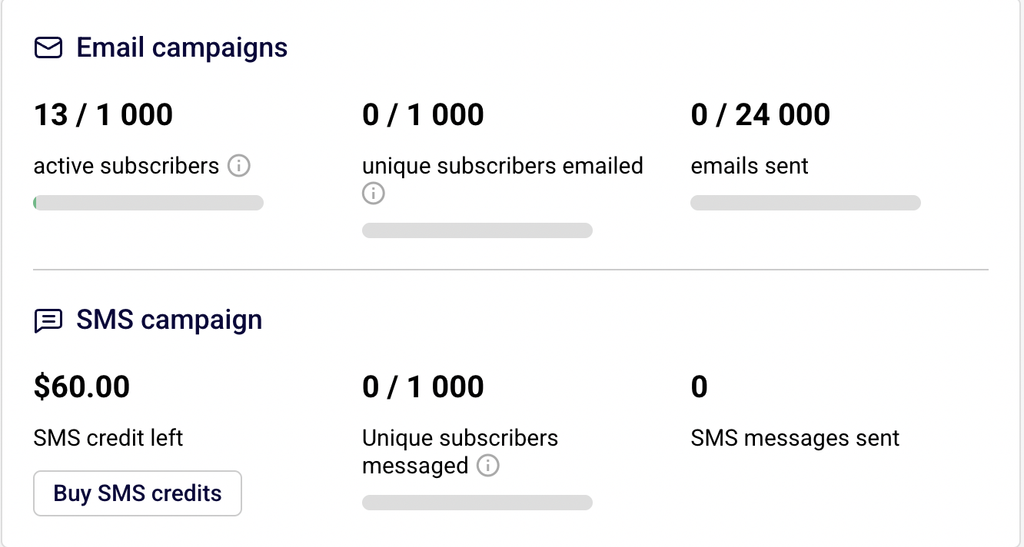
On the Billing page, you will see an SMS campaign section that displays your current SMS credit left balance, the number of Unique subscribers messaged, and total SMS messages sent. Click Buy SMS credits to open the credit purchase page, where you can select a credit package, view per-message pricing by country, and complete your purchase.
Steps to Understand and Purchase SMS Credits
Step 1 — Check your current SMS credit balance
Go to Account settings → Billing. Under the SMS campaign heading, you will see your current balance displayed as a dollar or euro amount next to SMS credit left. This balance represents the total value of credits available for sending SMS messages. Below it, you will see how many Unique subscribers messaged and SMS messages sent during the current billing period. If your balance is low or zero, click Buy SMS credits to add more.
Step 2 — Select a credit package
On the Buy SMS credits page, choose your preferred currency using the € EUR or $ USD toggle at the top of the SMS credits section. Then select a preset credit amount — $15, $50, $100, $200, or $500 (or equivalent in EUR: 13€, 43.32€, 86.65€, 173.29€, 433.23€). If none of the preset amounts fit your needs, click Custom and enter a specific amount in the Custom amount field. The Order summary panel on the right updates automatically to show the total excluding tax, applicable VAT, and the final total.
Step 3 — Use the SMS price calculator to estimate costs
Below the credit packages, locate the SMS price calculator. Select your target Destination country from the dropdown. The calculator displays the SMS price per message for that country and shows how many messages you can send with your selected credit amount. For example, a $15 credit package at $0.015 per SMS to the United States lets you send approximately 1,000 messages, while the same amount at $0.065 per SMS to the United Kingdom lets you send approximately 230 messages. Pricing varies by destination country, so always check the calculator before purchasing.
Step 4 — Complete your purchase
In the Payment method section, enter your card details under New credit or debit card, or select PayPal as an alternative. Review your Billing information and click Edit if any details need updating. Once everything is correct, click Purchase to complete the transaction. Your SMS credit balance on the Billing page updates immediately after a successful purchase.
Step 5 — Understand how credits are included with your plan
If you are on a Professional plan, Sender includes free SMS credits equal to your monthly subscription fee each billing cycle. For example, the Professional plan includes free SMS credits worth 10.00$/month. These credits are added automatically and can be used to send messages without an additional purchase. If you need to send more messages than your included credits cover, purchase additional credits using the steps above.
SMS Compliance Requirements
TCPA (Telephone Consumer Protection Act) — This US regulation generally requires businesses to obtain prior express written consent before sending marketing SMS messages to recipients. Sender’s opt-out tools help you comply by including unsubscribe instructions in every message, but consult a legal professional for guidance specific to your situation.
GDPR (General Data Protection Regulation) — This EU regulation generally requires a lawful basis, such as explicit consent, for processing personal data including phone numbers used for SMS marketing. Sender allows you to collect consent through signup forms and manage subscriber preferences. Consult a legal professional for jurisdiction-specific requirements.
Carrier requirements — Mobile carriers in many countries enforce rules about sender identification, message content, and opt-out handling. Sender provides configurable Opt-out text and Opt-out link text fields in Account settings → SMS settings to help you meet these requirements. Some carriers also restrict sending hours or require specific sender ID formats.
Sender’s SMS policies — Sender requires that every marketing SMS include opt-out instructions. The SMS Message Add-ons section in SMS settings lets you configure an Organizational prefix (a recognizable name so recipients know who sent the message), Opt-out text (which must include “STOP”), and an Opt-out link text for unsubscribe links. These add-ons are appended to your messages automatically.
Always consult a legal professional for advice specific to your jurisdiction and industry before launching SMS campaigns.
What Happens Next
After purchasing SMS credits, your updated balance appears on the Billing page under SMS campaign. You can manage your credits and view usage at any time by returning to Account settings → Billing.
To verify that your setup is working, send a test SMS to your own phone number before launching a campaign. Your credit balance decreases with each message sent, and the per-message cost depends on the recipient’s country.
SMS credits can be used for both SMS campaigns (created under SMS campaigns in the main menu) and SMS steps within automations. Monitor your SMS credit left balance regularly to avoid running out of credits mid-campaign.
Common Issues
SMS credit balance not updating after purchase → This can happen if the payment is still processing. Wait a few minutes and refresh the Billing page. If the balance still does not update, check your payment method for errors or contact Sender support.
Higher-than-expected credit usage → SMS pricing varies by destination country. Messages to some countries cost significantly more per SMS than others. Use the SMS price calculator on the Buy SMS credits page to check per-message rates before sending.
Cannot find the Buy SMS credits button → The Buy SMS credits button is located on the Billing page under the SMS campaign section. If you do not see it, ensure you are on a Standard, Professional, or Enterprise plan, as SMS features are not available on the Free Forever plan.
Credits running out during a campaign → If your credit balance reaches zero, remaining messages in the campaign will not be sent. Purchase additional credits on the Buy SMS credits page and resend the campaign to the unsent recipients.
VAT added to the total → Sender applies VAT based on your billing country. The Order summary on the Buy SMS credits page shows the amount excluding tax, the VAT percentage and amount, and the final total. Update your billing information by clicking Edit in the Billing information section if your tax details are incorrect.
FAQs
How does SMS pricing work in Sender?
Sender uses a credit-based system for SMS. You purchase credits in a dollar or euro amount, and each SMS message you send deducts from your balance based on the per-message rate for the recipient’s country. There are no recurring SMS fees — you buy credits as needed, and they remain in your account until used.
What credit packages are available?
Sender offers preset packages of $15, $50, $100, $200, and $500 (or equivalent amounts in EUR). You can also enter a custom amount by selecting the Custom option on the Buy SMS credits page.
Why does SMS pricing vary by country?
Carrier and network costs differ by country. Sender’s per-message rate reflects these underlying costs. For example, sending an SMS to the United States costs approximately $0.015 per message, while sending to the United Kingdom costs approximately $0.065 per message. Always use the SMS price calculator to check rates for your target country.
Do any plans include free SMS credits?
Yes. The Professional plan includes free SMS credits each billing cycle. The free credit amount equals your monthly subscription fee. For example, the Professional plan includes free SMS credits worth approximately 12.00$ per month. Any additional sending beyond these included credits requires purchasing more credits.
Is SMS available on the Free Forever plan?
No. SMS messaging is available starting from the Standard plan. To access SMS features, upgrade to a Standard, Professional, or Enterprise plan.
What payment methods can I use to buy SMS credits?
You can pay with a credit or debit card or through PayPal. Both options are available on the Buy SMS credits page under the Payment method section.
How do I check my remaining SMS credit balance?
Go to Account settings → Billing. Your current balance is displayed under the SMS campaign section next to SMS credit left.
Can I switch between EUR and USD when purchasing credits?
Yes. On the Buy SMS credits page, use the € EUR and $ USD toggle at the top of the SMS credits section to switch currencies before selecting a package.