

Why campaigns get paused
This guide explains why Sender may pause or prevent your email campaigns from sending and how to resolve the underlying compliance or policy issues.
Why This Matters
When Sender pauses a campaign, it means your sending activity or email content has triggered a compliance or policy threshold. Paused campaigns do not reach your subscribers, which directly impacts your marketing performance. If the underlying issue is not resolved, continued violations can escalate to a full account suspension, permanent loss of sending privileges, and potential legal liability under regulations like CAN-SPAM or GDPR.
What Is Required
Spam complaint rate below 0.1% — Sender’s anti-spam policy requires that spam reports stay below 0.1% when sending to over 1,000 subscribers, and never exceed 50 reports per day in total. Exceeding this threshold can result in your campaign being paused or your account being suspended.
Hard bounce rate below 10% — Sender monitors hard bounces across all campaigns. A hard bounce rate exceeding 10% indicates poor list quality and may trigger a campaign pause or account review.
Unsubscribe rate below 1% — Your unsubscribe rate must remain below 1%, and the number of unsubscribes must not exceed the number of clicks. Campaigns that exceed this threshold may be paused automatically.
No spamtrap hits or abuse complaints — Any spamtrap hits, SpamCop reports, or abuse complaints can result in an immediate campaign pause or account suspension, regardless of other metrics.
Working unsubscribe link in every email — Every marketing email must contain a functional unsubscribe link. Sender blocks campaigns from sending if the email template does not include one. This is required by CAN-SPAM, GDPR, and Sender’s own policies.
Valid physical mailing address — CAN-SPAM requires a valid physical postal address in every commercial email. Sender pulls this from your account settings and includes it in your email footer.
No prohibited content — Sender strictly prohibits content related to affiliate marketing, gambling, forex or “get rich quick” schemes, pornography, drugs, solo email ads, loans, and weight loss products. Campaigns containing this content are paused or rejected.
Opt-in consent for all subscribers — You must be able to provide proof of opt-in consent for your contacts at any time when requested by Sender’s compliance team. Sending to purchased, rented, or scraped lists violates Sender’s anti-spam policy.
Always consult a legal professional for jurisdiction-specific guidance on your obligations under CAN-SPAM, GDPR, CASL, or other applicable email regulations.
Steps to Resolve a Paused Campaign
Step 1 — Review your campaign metrics
Go to Dashboard and check your Traffic and reach report for the metrics that may have triggered the pause. Look at Total spams, Bounce rate, Unsubscribe rate, and Average spam rate.
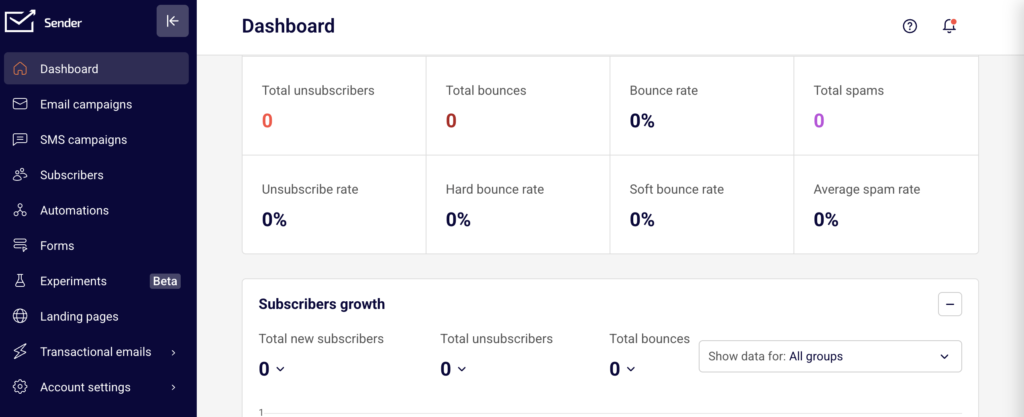
Compare these values against Sender’s thresholds: spam complaints below 0.1%, hard bounces below 10%, and unsubscribes below 1%. This tells you which metric caused the issue.
Step 2 — Clean your subscriber list
Go to Subscribers from the left sidebar. Use the Email status and Advanced filter options to identify inactive, bounced, or unsubscribed contacts. Remove subscribers who hard bounced, never engaged, or did not provide opt-in consent.
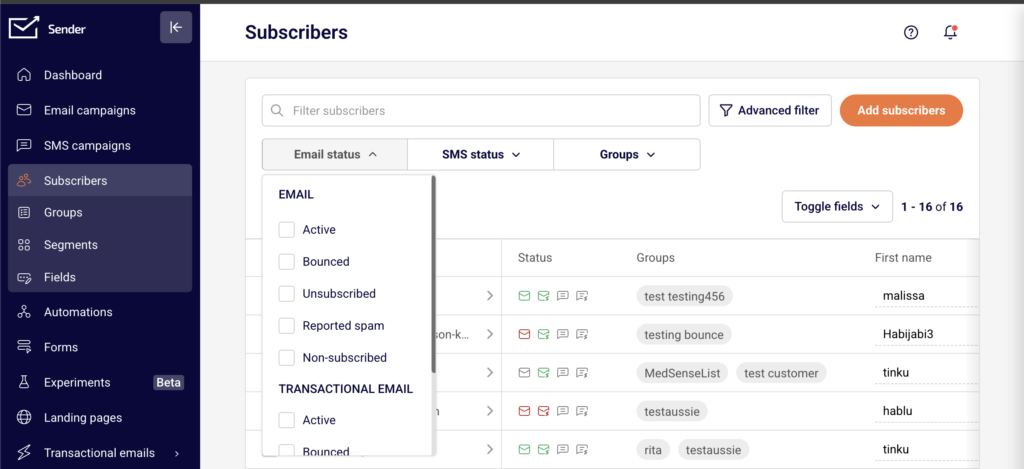
Reducing invalid and disengaged contacts directly lowers your bounce and complaint rates.
Step 3 — Verify your email content and compliance settings
Go to Account settings → General settings. Confirm that your Address, City, State / Province / Region, Postal/ZIP code, and Country fields are filled in with a valid physical mailing address.
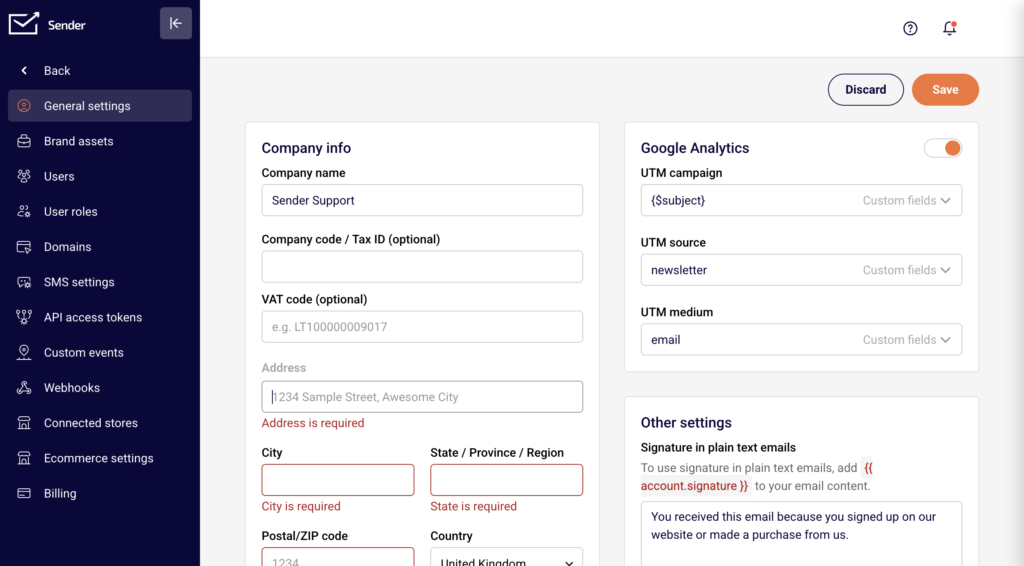
This address is included in your email footer to satisfy CAN-SPAM requirements. Then open your campaign in the editor and confirm it contains a working unsubscribe link and does not include any prohibited content.
Step 4 — Check your account verification status
New accounts must pass Sender’s account verification process before campaigns can be sent. Your account requires a legitimate, verified website and a campaign that reflects that website’s content. If your account is still pending verification, your campaigns remain paused until the review is complete. Contact support@sender.net or use LiveChat if you need clarification on your verification status.
Step 5 — Contact Sender support
If you have addressed the compliance issue but your campaign remains paused, contact Sender’s support team via LiveChat or at support@sender.net. Provide details about the campaign in question and the steps you have taken to resolve the issue. Sender’s compliance team will review your account and advise on next steps or reinstatement.
Sender’s Policies
Zero-tolerance spam policy — Sender prohibits sending unsolicited emails of any form. This includes emails to harvested addresses, purchased or rented lists, and recipients who previously unsubscribed. Violations result in campaign pauses or account termination without refund.
Sending threshold enforcement — Sender actively monitors spam complaint rates, bounce rates, unsubscribe rates, and spamtrap hits across all accounts. Campaigns that exceed the defined thresholds are paused automatically, and repeated violations lead to account suspension.
Prohibited content policy — Sender does not allow campaigns that promote affiliate marketing, gambling, forex or stock trading tips, pornography, drugs, solo email ads, loans, or weight loss products. Campaigns containing this content are rejected or paused on detection.
Unsubscribe link requirement — Every email template must include a working unsubscribe link. Sender prevents campaigns from being sent if the unsubscribe link is missing or broken. For custom HTML templates, the link must use the {{unsubscribe_link}} merge tag.
Account verification requirement — New accounts undergo a verification process that evaluates the legitimacy of the associated website and campaign content. Campaigns cannot be sent from unverified accounts.
One account per sender policy — You are only allowed one Sender account sending the same or similar content. If your account is suspended or disabled, creating another account results in automatic cancellation of the new account.
Compliance Tips
Monitor your dashboard metrics regularly — Check your Bounce rate, Unsubscribe rate, and Total spams on the Dashboard after every campaign send. Catching a rising metric early allows you to clean your list before reaching a threshold that pauses your campaigns.
Use double opt-in for new subscribers — Requiring subscribers to confirm their email address before being added to your list reduces hard bounces, spam complaints, and spamtrap hits. This protects your sending metrics and provides documented proof of consent.
Keep your physical address current — Update your mailing address in Account settings → General settings whenever it changes. Sender uses this address in your email footer, and an outdated or missing address violates CAN-SPAM requirements.
Review content against prohibited categories before sending — Before scheduling a campaign, verify that your email content does not fall into any of Sender’s prohibited content categories. A single campaign with prohibited content can result in an immediate pause or suspension.
Maintain opt-in records — Keep documentation of how and when each subscriber opted in. Sender’s compliance team may request proof of consent at any time, and failure to provide it is treated as a policy violation.
Common Issues
Campaign blocked for missing unsubscribe link → Your email template does not include a working unsubscribe link. Open the campaign editor and add one. For custom HTML, insert <a href="{{unsubscribe_link}}">{{unsubscribe_text}}</a> into your template code.
Campaign paused after high bounce rate → Your subscriber list contains too many invalid email addresses. Go to Subscribers, filter by bounced status, and remove those contacts. Consider validating your list before your next send.
Account suspended after sending to a purchased list → Sender’s anti-spam policy prohibits sending to purchased, rented, or scraped email lists. These lists generate high bounce rates, spam complaints, and spamtrap hits. In most cases, suspensions for this reason are permanent.
Campaign stuck in review for a new account → New accounts must pass Sender’s verification process. Ensure you have added and verified a legitimate website and that your campaign content reflects that website. Contact support if the review is taking longer than expected.
Unsubscribe rate exceeded the threshold → Your unsubscribe rate has risen above 1% or the number of unsubscribes exceeds clicks. Review your sending frequency, audience targeting, and content relevance. Remove disengaged subscribers and segment your list more carefully.
FAQs
Why was my campaign paused by Sender?
Sender pauses campaigns when they exceed compliance thresholds or violate sending policies. Common triggers include a spam complaint rate above 0.1%, a hard bounce rate above 10%, an unsubscribe rate above 1%, missing unsubscribe links, prohibited content, or sending to non-consented contacts. Check your Dashboard metrics and review the notification from Sender for specific details.
Can I resume a paused campaign after fixing the issue?
It depends on the reason for the pause. If the campaign was blocked for a missing unsubscribe link or content issue, correcting the problem and resubmitting the campaign should allow it to proceed. If your account was suspended for a policy violation, contact support@sender.net to discuss reinstatement options.
What content types are prohibited on Sender?
Sender prohibits affiliate marketing, gambling and betting, forex and stock trading tips, “get rich quick” or “work at home” schemes, pornography and dating services, drugs and male enhancement products, solo email ads (campaigns for multiple companies to the same list), loans, and weight loss products.
Do I need an unsubscribe link in every email?
Yes. Every marketing email sent through Sender must include a working unsubscribe link. This is required by CAN-SPAM, GDPR, and Sender’s own sending policies. Sender blocks campaigns that do not contain one. Transactional emails are generally exempt, but including one is still recommended.
What happens if my account is suspended for a policy violation?
In most cases, suspension for a policy violation is permanent. If you believe your account complies with Sender’s terms of service and anti-spam policy, you can contact support@sender.net to request a review. No refunds are provided for accounts suspended due to policy violations.
Am I required to include a physical address in my emails?
Yes. CAN-SPAM requires a valid physical postal address in every commercial email. Add your address in Account settings → General settings under the Address, City, State / Province / Region, Postal/ZIP code, and Country fields. Sender automatically includes this address in your email footer when using default templates.
Can I send to a purchased email list?
No. Sender’s anti-spam policy prohibits sending to purchased, rented, or scraped email lists. Sending to these lists results in high bounce rates, spam complaints, spamtrap hits, and will lead to campaign pauses or account suspension.