

Canceling Your Subscription
This guide explains how to cancel your paid subscription and downgrade to the free plan in Sender.
Where to Find This Setting
In the Sender dashboard, go to: Account settings → Billing
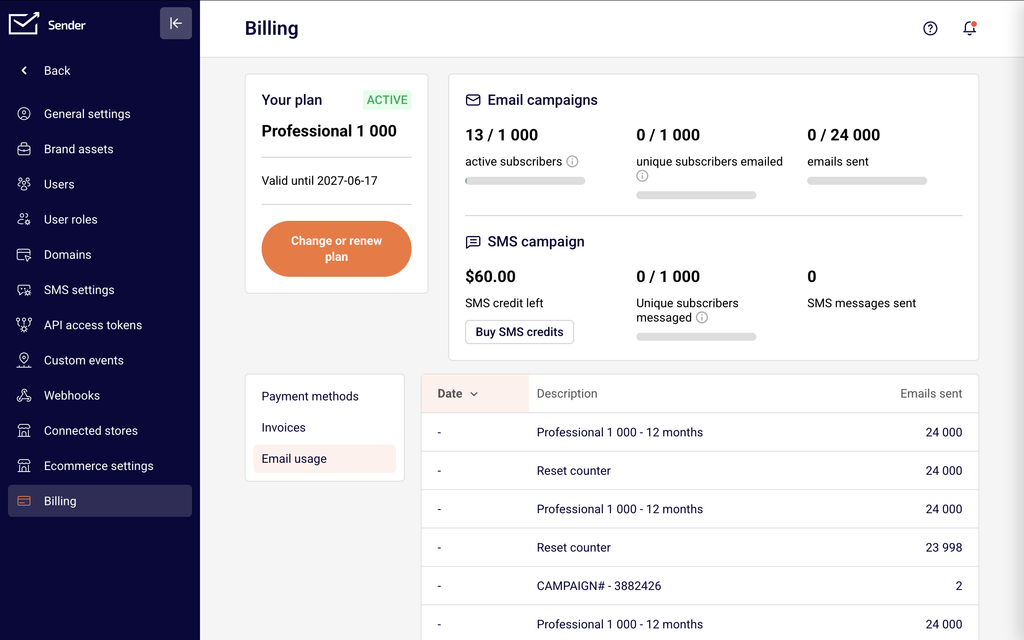
On the Billing page, you will see your current plan name, plan status (e.g., ACTIVE), and the plan validity or renewal date under the Your plan section. Below the plan details is the Change or renew plan button, which opens the plan selection page where the cancellation flow begins. The page also displays your Email campaigns usage, SMS campaign credits, and three tabs — Payment methods, Invoices, and Email usage.
Steps to Cancel Your Subscription
Step 1 — Open the plan selection page
On the Billing page, click the Change or renew plan button inside the Your plan section. This opens the plan selection page, titled Upgrade your plan, which displays all available plan tiers. From this page, the cancellation flow is initiated. Depending on your account and billing setup, you may see options to downgrade or cancel your recurring payment from here.
Step 2 — Select a cancellation reason
In the Cancel recurring payment dialog, you will see a message thanking you for being a customer and asking why you are canceling. Select one of the available reasons — such as Subscription is too expensive, Not using the service enough, Found a better alternative, Financial reasons, Dissatisfied with service/features, Technical issues, or Other reason. Some reasons display a follow-up question. Answer any follow-up question to enable the Cancel subscription button, then click Cancel subscription to proceed. Click Go back if you change your mind.
Step 3 — Confirm the downgrade to the free plan
A final confirmation dialog appears with the title Are you sure you want to downgrade to free plan? It displays the remaining value of your email credits and warns that downgrading will permanently remove any unused email credits. Click Yes to confirm the cancellation and downgrade to the free plan. Click No to return to the Billing page without making changes.
What Happens After the Change
Plan access until end of billing period — Your paid plan features remain accessible until the end of your current billing cycle or plan validity date. After that date, your account automatically reverts to the free plan.
Downgrade to the free plan — Once the paid period ends, your account moves to the free plan. Feature access and sending limits adjust to match the free plan tier. Features such as advanced automation, advanced reports, dedicated IPs, priority support, and unlimited email editor features are no longer available.
Email credits are permanently lost — Any remaining email credits on your paid plan are forfeited upon cancellation. This action cannot be undone, as confirmed in the final downgrade dialog.
Data is retained — Your subscribers, campaigns, automations, forms, and other account data are kept after cancellation. However, access to certain features tied to paid plans may be restricted under the free plan.
No further charges — Recurring billing stops after cancellation. No additional charges are made once the current billing period ends.
Billing Tips
Check your renewal date first — Before canceling, review the Valid until date shown in the Your plan section on the Billing page to understand when your current paid access expires.
Download invoices before canceling — Go to the Invoices tab on the Billing page and click Download Invoice for any records you need. Invoices remain available, but it is good practice to save copies.
Consider downgrading instead — If cost is a concern, you can downgrade to a lower paid tier (such as Standard) instead of canceling entirely. Click Change or renew plan and select Downgrade to Standard to keep some paid features at a lower price.
Review your email credits — The cancellation confirmation shows your remaining email credits value. Once you confirm, these credits are permanently lost and cannot be recovered.
Reactivation is available anytime — If you cancel and later decide to return, you can reactivate a paid plan from the Billing page at any time without losing your stored data.
Common Issues
Cancel subscription button is grayed out → This happens when you have not selected a cancellation reason or have not answered the follow-up question. Select a reason from the list in the Cancel recurring payment dialog and complete any follow-up prompt to enable the button.
No cancel option visible on the Billing page → The cancel flow is accessed through the Change or renew plan button, not from a standalone cancel button on the Billing page. Click Change or renew plan to access the plan selection page where cancellation can be initiated.
Plan still shows as active after canceling → Your paid plan remains active until the end of the current billing cycle or validity period. The status changes to the free plan only after that date passes.
Lost email credits after canceling → Email credits are permanently removed upon confirming the downgrade to the free plan. This is expected behavior and cannot be reversed. The confirmation dialog displays the credit value before you confirm.
FAQs
What happens when I cancel my subscription?
Your paid features remain active until the end of your current billing cycle or plan validity date. After that, your account reverts to the free plan. Your data, subscribers, and campaigns are retained, but feature access and sending limits change to match the free plan.
Can I reactivate my subscription after canceling?
Yes. Go to Account settings → Billing and click Change or renew plan. Select a paid plan to reactivate your subscription. Your account is upgraded immediately and billing resumes from the new activation date.
Will I get a refund when I cancel?
Refund availability depends on Sender’s refund policy and the circumstances of the charge. Contact Sender support with your account details and the relevant invoice to request a review.
Can I downgrade to a lower plan instead of canceling?
Yes. On the plan selection page, click Downgrade to Standard (or another available tier) instead of canceling. A confirmation dialog shows the features you will lose. The downgrade takes effect based on your billing cycle.
What happens to my data after canceling?
Your subscribers, campaigns, automations, forms, landing pages, and reports are retained on the free plan. However, features exclusive to paid plans (such as advanced automation, advanced reports, and dedicated IPs) become unavailable.
Do I lose my SMS credits when I cancel?
SMS credits are separate from email plan credits. Check your SMS campaign balance on the Billing page for details on how SMS credits are handled upon cancellation.
How do I know when my plan expires?
The Your plan section on the Billing page displays the Valid until date, which shows when your current paid plan period ends. After this date, the account moves to the free plan if you have canceled.
Can I cancel at any time during my billing period?
Yes. You can initiate the cancellation at any point. Your paid features remain active until the end of the current billing period or plan validity date. No prorated refunds are issued automatically — contact Sender support if you need to discuss a refund.