

Refund Policy
This guide explains Sender’s refund policy, when refunds are and are not available, and how to submit a refund request to Sender support.
Where to Find This Setting
In the Sender dashboard, go to: Account settings → Billing
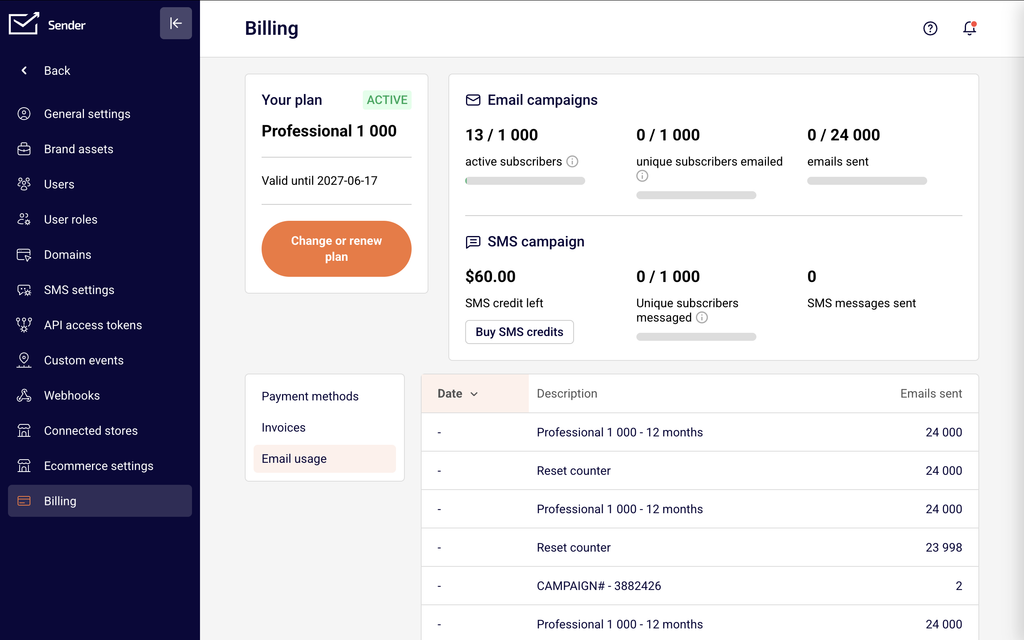
On this page you will see your current plan name and status (e.g., Active), the plan validity date, and the Change or renew plan button. Below that, three tabs are available: Payment methods, Invoices, and Email usage. The Invoices tab lists all past and pending charges with columns for Date, Invoice no., Amount, and Status. Each invoice has a Download Invoice button so you can save a copy for reference when submitting a refund request.
Steps to Request a Refund
Step 1 — Review the invoice in question
Go to Account settings → Billing and click the Invoices tab. Locate the charge you want to dispute or request a refund for. Note the Date, Invoice no., Amount, and Status of the invoice. Click Download Invoice to save a copy. You will need these details when contacting support.
Step 2 — Review refund eligibility
Before contacting support, confirm that your situation meets the refund criteria. Sender provides a refund only if Sender terminates your service without cause before the end of a period you have already paid for. Refunds are not available for unused or partially used plans, forgotten cancellations, wrong plan purchases, charges after a new billing cycle, or accounts suspended due to policy violations. See the What Happens After the Change section below for full details.
Step 3 — Contact Sender support
Reach out to Sender support via LiveChat (available through the chat icon in the bottom-right corner of your dashboard) or by emailing support@sender.net. Include your account email address, the invoice number and date, the charge amount, and the reason for your refund request. Sender support will review your case and respond with a decision.
Step 4 — Submit your dispute within the required timeframe
All billing disputes must be submitted in writing within 30 days of the charge or purchase date. Disputes submitted after 30 days are considered void and the charges become irrefutable. Make sure to contact support promptly after identifying a charge you want to dispute.
What Happens After the Change
Refund eligibility is limited — Sender only issues refunds when Sender itself terminates your service without cause before your paid period ends. There is no entitlement to a refund outside of this specific circumstance.
Policy violations void refund eligibility — If your account is suspended due to a violation of the Anti-Spam Policy or Terms of Service, no refund will be issued. This also applies if you were sending emails without subscriber permission or with prohibited content.
Unused or partially used plans are not refundable — If you did not use or only partially used your plan, forgot to cancel before renewal, or were charged for a new billing period after failing to cancel in time, no refund will be provided.
Wrong plan purchases are not refundable — If you purchased the wrong monthly or yearly plan, even by mistake, or decided to cancel after purchase because of functionality, no refund is available.
Downgrade value is not refunded — If you downgrade to a smaller plan, the remaining value from your previous plan is not refunded or converted to credit. It is forfeited at the time of the downgrade.
Dispute deadline applies — You must submit any billing dispute in writing within 30 days of the charge. After this window, the charge is considered final.
Billing Tips
Save your invoice before contacting support — Go to Invoices and click Download Invoice for the charge in question. Having the invoice on hand speeds up the review process.
Act within 30 days — The dispute window is 30 days from the charge date. If you notice an unexpected charge, contact support immediately rather than waiting.
Check your plan renewal date — Go to Account settings → Billing and note the Valid until date shown under Your plan. Cancel or adjust your plan before this date to avoid being charged for a new billing cycle.
Review your plan before purchasing — Carefully verify the plan tier, billing cycle (monthly vs. annual), and subscriber level before completing a purchase. Plan purchases due to user error are not eligible for a refund.
Use LiveChat for faster responses — The LiveChat widget in the bottom-right corner of your dashboard connects you directly with Sender support for real-time assistance with billing issues.
Common Issues
Charged after forgetting to cancel → This happens when auto-renewal is enabled and the billing cycle renews before you cancel. Sender does not refund charges for new billing periods caused by a missed cancellation. Cancel your plan before the Valid until date shown on the Billing page to prevent future charges.
Purchased the wrong plan by mistake → This occurs when you select an incorrect plan tier or billing cycle during checkout. Sender does not refund wrong plan purchases. Review all plan details on the purchase confirmation screen before clicking Pay Now.
Account suspended and requesting a refund → If your account was suspended for violating the Anti-Spam Policy or Terms of Service, refunds are not available regardless of remaining plan time. Contact support if you believe the suspension was made in error.
Dispute submitted after 30 days → Sender requires all billing disputes to be submitted within 30 days of the charge. Disputes outside this window are void. Monitor your Invoices tab regularly to catch unexpected charges early.
FAQs
Can I get a refund for my subscription?
Sender only provides a refund if Sender terminates your service without cause before the end of your paid period. Outside of that situation, refunds are not available. This applies to both monthly and annual plans.
What if I forgot to cancel and got charged for a new billing cycle?
Charges resulting from a missed cancellation are not refundable. To avoid this, cancel your plan before the renewal date shown under Your plan on the Billing page.
Are unused plan credits refundable?
No. If you did not use or only partially used your plan’s email credits or features, the remaining value is not refundable.
Can I get a refund if I bought the wrong plan?
No. Purchasing the wrong plan — whether by mistake or by choosing a plan that does not meet your needs — is not eligible for a refund. Always review plan details carefully before completing a purchase.
How do I submit a refund request?
Contact Sender support via LiveChat on your dashboard or email support@sender.net. Include your account email, the invoice number, the charge amount, and the reason for your request. Submit your request within 30 days of the charge date.
What happens to my remaining plan value if I downgrade?
The remaining value of your current plan is not refunded when you downgrade. It is forfeited at the time of the plan change. Sender recommends downgrading close to your renewal date to minimize lost value.
Is there a deadline for disputing a charge?
Yes. All billing disputes must be submitted in writing within 30 days of the charge or purchase date. Disputes submitted after this period are void and the charges are considered final.
Will I get a refund if my account is suspended?
No. If your account is suspended for violating Sender’s Anti-Spam Policy or Terms of Service, no refund is issued regardless of how much time remains on your plan.