




Teams often start looking beyond their current email service when delivery control, pricing structure, or feature limits begin affecting application performance. This page reviews the best MailerSend alternatives for transactional email, focusing on tools built for reliable API sending, SMTP relay, and scalable infrastructure.
It compares key capabilities such as deliverability features, analytics, integration options, and cost considerations to help evaluate which provider better fits evolving technical and business requirements in 2026.
Capterra, G2, Trustpilot, and Reddit to create an objective evaluation. Learn more about our review methodology
How We Evaluated MailerSend Alternatives
Choosing transactional email services involves more than comparing price per email. I focused on factors that actually impact day-to-day operations and long-term success.
- Pricing Model Differences. I examined where pricing becomes competitive at different volumes and identified hidden fees for dedicated IPs, additional domains, or premium support that can double your actual spend;
- Sending Infrastructure and Deliverability Controls. I tested each platform’s authentication setup, shared IP pool management, and sender reputation monitoring. Deliverability dashboards vary from granular domain-level metrics to basic delivery confirmation;
- Monitoring and Logging. Capabilities I evaluated log retention periods, search functionality, webhook reliability, and error detail quality. The best options provide searchable activity logs with full SMTP conversation details;
- Template Flexibility. I tested each platform’s templating engine for ease of use, variable handling, and conditional logic support. Visual builders help non-technical teams; developers prefer code-based templates;
- Scalability and Migration Fit. I considered how easily each platform handles growth and supports gradual migrations. Platforms with import tools and migration guides reduce switching friction significantly.
Why People Switch From MailerSend
MailerSend serves many teams well, but specific pain points drive people toward alternatives:
- Limited Advanced Analytics MailerSend provides basic delivery tracking, but teams needing deep engagement analysis or cohort-based reporting find the analytics insufficient. Platforms like Postmark and Bird offer more granular insights into email deliverability patterns and recipient behavior;
- Template Management Constraints The drag-and-drop builder works for simple emails, but complex transactional templates with extensive conditional logic become unwieldy. Developers often want code-based templates with version control—something MailerSend’s interface doesn’t prioritize;
- Pricing Jumps at Scale MailerSend’s pricing is competitive for moderate volumes, but costs escalate quickly past certain thresholds. Teams sending millions of emails monthly often find per-message pricing models like Amazon SES or Bird more economical;
- Feature Bundling Needs Some teams discover they need transactional email plus marketing automation, CRM, or SMS messaging. Rather than managing multiple platforms, switching to an all-in-one solution like Brevo consolidates operations;
- Deliverability Optimization Requirements While MailerSend maintains solid deliverability, teams in heavily-filtered industries (finance, healthcare) sometimes need providers that specialize exclusively in transactional delivery, like Postmark, or offer dedicated deliverability consulting, like Bird.
MailerSend Alternatives — A Quick Comparison Table
| Provider | Best For | Pricing Model | Standout Strength | Key Limitation |
| Sender | Budget-friendly transactional email | Contact-based | Budget-friendly transactional email | Free plan includes Sender branding |
| Mailgun | Developer-first API infrastructure | Email-based | Developer-focused sending tools for high-volume use | Less beginner-friendly; limited built-in visual tools for non-developers |
| Brevo | Transactional + CRM + automation | Email-based | Combines transactional email with CRM and automation | Deliverability consistency can vary depending on sending practices |
| Postmark | High-deliverability transactional specialist | Email-based | Transactional-focused infrastructure and analytics | Limited marketing features such as advanced automation and campaign tools |
| SMTP2GO | SMTP relay with hands-on support | Email-based | SMTP relay focus with reporting and support options | No built-in contact list management for marketing-style sends |
| Mailjet | Transactional email + visual builder | Email-based | Email sending paired with a visual builder | Free plan has sending limits and includes platform branding |
| Amazon SES | Ultra-low-cost, but technical | Pay-as-you-go | Usage-based sending costs at scale | Technical setup and configuration required |
| Bird (formerly SparkPost) | Enterprise-grade deliverability | Pay-as-you-go/plan-based | Enterprise-focused deliverability infrastructure | Platform scope extends beyond email, which can add complexity |
Quick Picks: Find the Perfect MailerSend Alternatives Fast
Use this list to quickly match your business needs with the right transactional email provider.
- Best Free Plan: Sender (15,000 emails/month on the free plan, combined transactional and marketing features.)
- Best for Ecommerce: Brevo (Transactional email integrated with CRM and SMS for seamless ecommerce workflows.)
- Best for Startups/SMBs: Mailgun (Flexible API-first infrastructure and email validation tools for growing businesses.)
- Best Budget Option: Amazon SES (Ultra-low-cost per-email pricing with scalable, AWS-integrated infrastructure.)
- Best for Enterprise/Agencies: Bird (Advanced deliverability and dedicated consulting for enterprise-level email optimization.)
- Best for High-Volume Sending: Postmark (Focused on high-deliverability transactional email with specialized infrastructure.)
8 Best MailerSend Alternatives Reviewed
Sender — Best for Budget-Friendly Transactional Email
Sender is best for small businesses looking for transactional emails; pricing scales by contact count.
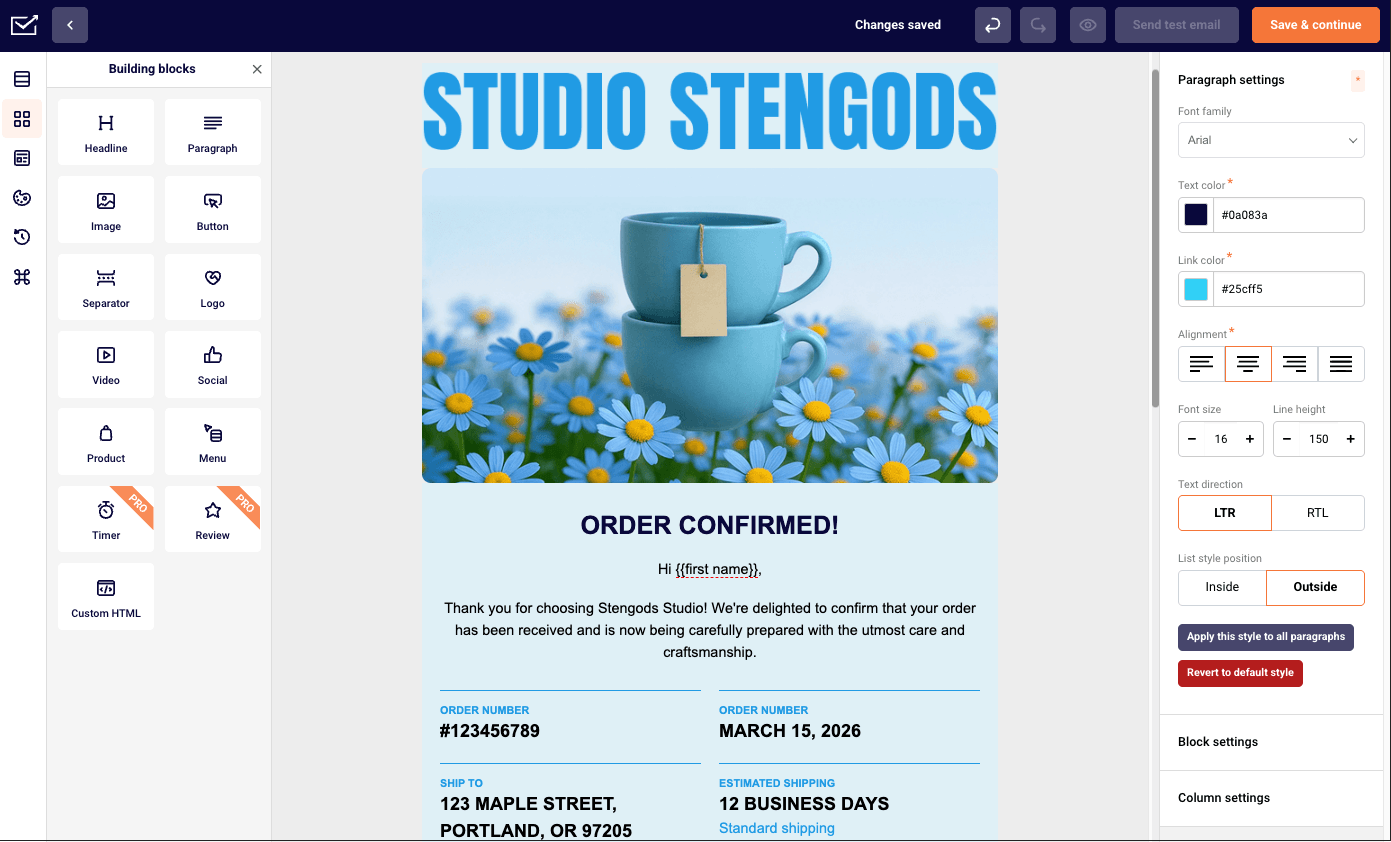
Sender is an email platform that supports both transactional and marketing emails from the same account. It provides SMTP relay service and REST API access for application-generated emails, along with a visual interface for template management and performance monitoring.
This combination makes it suitable for teams that need reliable transactional sending but may also run campaigns or automations.

The platform includes authentication setup for domain-based sending and a dashboard that displays delivery metrics such as bounces, complaints, and engagement data. Non-technical users can manage templates and monitor sending activity, while technical teams can integrate through API SMTP.
Key Features
- Generous free tier. Up to 15,000 emails per month on the free plan, with builder, automation, and analytics included;
- SMTP relay and REST API. Supports both SMTP credentials and API-based integration for application workflows;
- Real-time delivery tracking. Dashboard reporting for opens, clicks, bounces, and complaints;
- Multi-domain sending. Multiple domains can be configured under one account for different brands or projects;
- Template builder with dynamic content. Drag-and-drop editor with personalization variables and conditional logic.
Pros & Cons
- Free monthly email allowance with core features included
- Transactional and marketing email managed in one platform
- Interface designed for both technical and non-technical users
- Paid plans scale by contact and send volume
- Built-in deliverability monitoring tools
- Sender branding appears on emails sent from the free plan
- Smaller native integration ecosystem than some competitors
Setup & Migration
- Add SPF and DKIM records. DNS records provided in the dashboard are added at the domain registrar and verified;
- Generate API keys. Credentials are created under API and SMTP settings for system integration;
- Import existing HTML templates. Templates can be uploaded or rebuilt in the visual editor with variables;
- Upload suppression lists. CSV files of excluded addresses can be imported to maintain compliance and hygiene;
- Configure webhooks. Event notifications for delivery, opens, clicks, bounces, and complaints can be enabled;
- Run test sends. Test messages are sent to internal lists to confirm authentication and inbox placement.
Pricing Model
- Sender pricing is based on email volume with subscriber limits per tier, combining transactional and marketing in single subscription;
- Free plan covers 2,500 subscribers and 15,000 emails monthly with full feature access;
- Paid plans start at $7/month for 12,000 emails and 1,000 contacts, scaling to $100/month for 450,000 emails;
- No hidden fees for standard features; dedicated IPs and premium support available on enterprise plans.
See why businesses choose Sender:
Mailgun — Developer-First API Infrastructure
Mailgun is best for developers building custom email workflows via API; pricing scales by email count.
Mailgun feels purpose-built for developers. The API documentation is comprehensive, SDKs exist for every major language, and the platform assumes you’re comfortable writing code. If drag-and-drop builders make you uncomfortable, Mailgun is your natural home.

The parsing and routing capabilities stand out. Inbound email processing, automatic bounce handling, and sophisticated webhook systems handle complex workflows other platforms struggle with. Log retention is generous, and the search functionality actually works when you’re debugging at 2 AM.
Deliverability is solid, though not quite Postmark-level. Mailgun handles both transactional and marketing emails, which slightly dilutes IP reputation compared to transactional-only providers. For most use cases, this trade-off is worth the flexibility.
Key Features
- Powerful REST API with extensive SDKs. Libraries for Python, Ruby, PHP, Node.js, Java, C#, and Go with comprehensive documentation and code examples;
- Inbound email parsing and routing. Receive and process incoming emails programmatically with pattern matching and custom routing rules;
- Email validation API included. Real-time and bulk email verification to clean lists before sending and reduce bounce rates;
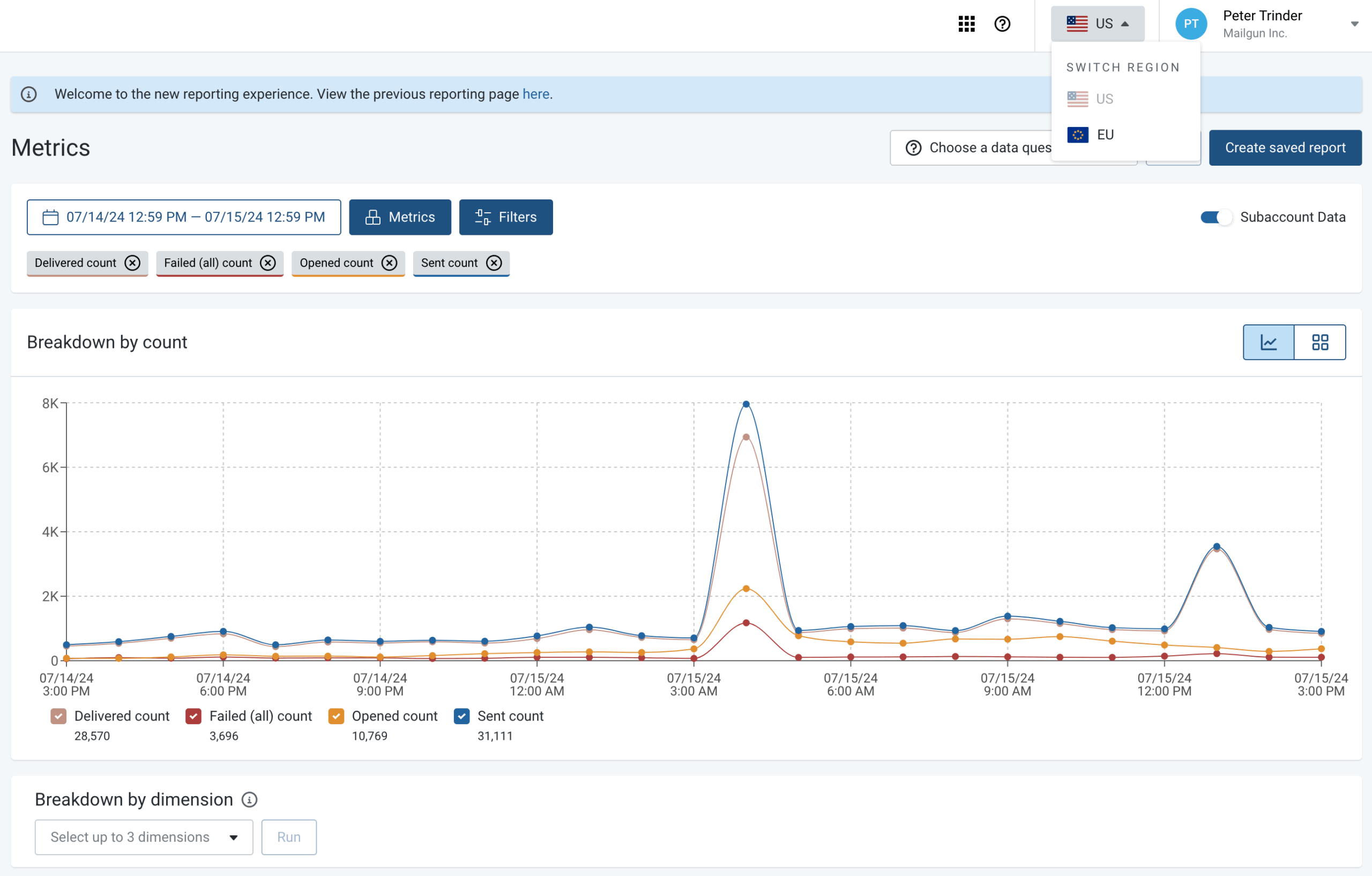
- Advanced analytics and log search. 30-day log retention with full-text search across message content, headers, and delivery events;
- Flexible webhook system. Real-time notifications for opens, clicks, bounces, spam complaints, and custom events with retry logic.
Pros & Cons
- Outstanding API documentation and SDK quality
- Inbound email processing capabilities
- Email validation tools reduce bounce rates
- Detailed searchable logs aid debugging
- Scales efficiently for high-volume sending
- Interface less intuitive for non-developers
- Pricing jumps significantly at higher volumes
- Mixed transactional/marketing affects reputation slightly
- Dedicated IPs require additional monthly fees
Setup & Migration
- Verify SPF, DKIM, DMARC records. Complete domain verification process through Mailgun dashboard and add all authentication records to prevent spoofing and improve deliverability;
- Generate API keys. Choose data residency location based on compliance needs and create API keys with scoped permissions for different applications;
- Integrate SDK into application. Install language-specific SDK (Python, Ruby, PHP, Node.js, etc.) or configure SMTP settings with Mailgun’s relay server details;
- Migrate templates using API or manual HTML upload. Use Mailgun’s template API to programmatically import existing templates or upload HTML files through the dashboard interface;
- Set up email webhooks. Configure webhook endpoints to receive real-time notifications about delivery events, enabling automated bounce processing and analytics;
- Test integration. Verify API error responses, webhook delivery, and edge cases like invalid addresses before routing live traffic through Mailgun.
Pricing Model
- Subscriptions based on email volume with pay-as-you-go pricing model or monthly commitment options available;
- Free tier includes 100 emails daily;
- Paid plans start at $15/month for 10,000 emails; per-email costs decrease significantly above 100,000 sends;
- Dedicated IPs are only available on the priciest $90/month plan; email validation API included at all tiers.
Brevo — Transactional + CRM + Automation
Brevo is best for businesses running multichannel campaigns; pricing scales by email count.
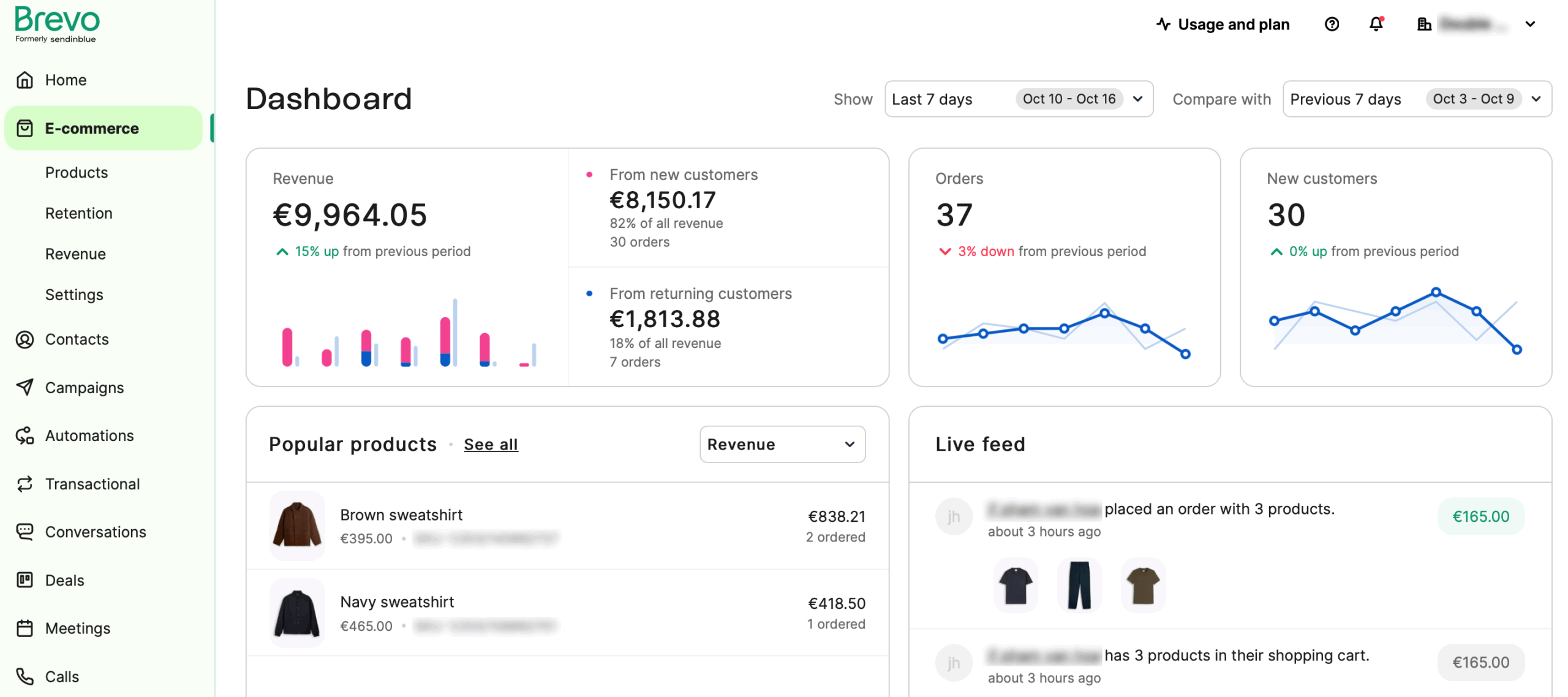
Brevo solves the “too many platforms” problem by bundling transactional email (such as password reset emails and purchase confirmation) with CRM, marketing automation, SMS, web push notifications, and chat.

The transactional features work reliably. SMTP relay handles password resets and notifications without issues. The real value emerges when you start using the integrated tools—building automation sequences that combine transactional triggers with marketing follow-ups, or accessing CRM data directly in email templates.
The platform feels busier than specialized alternatives. More features mean more navigation and steeper learning curves. But for teams wanting comprehensive tools without managing multiple subscriptions, the complexity pays off.
Key Features
- All-in-one marketing platform. Combines transactional email, marketing automation, CRM, SMS, WhatsApp, and live chat in single subscription;
- Built-in CRM with contact management. Track customer interactions across channels with sales pipeline, deal tracking, and contact scoring;
- Marketing automation workflows. Trigger campaigns based on transactional events, website behavior, or CRM data changes;
- Multi-channel messaging. Send coordinated campaigns across email, SMS, and WhatsApp with unified reporting;
- SMTP relay & transactional email API. Reliable infrastructure for password resets, receipts, and notifications with template management.
Pros & Cons
- Consolidates multiple tools into one platform
- Competitive transactional email pricing
- CRM data accessible in email templates
- Multi-channel messaging capabilities
- Marketing and transactional in one system
- Interface complexity from feature density
- 300 daily email limit on free tier restricts bursts
- Learning curve steeper than focused platforms
- Some features require higher-tier plans
Setup & Migration
- Configure SPF, DKIM records. Complete Brevo’s domain authentication wizard and add provided DNS records to verify ownership and enable authenticated sending;
- Import contacts using CSV. Upload contact lists with custom attributes, segment data, and engagement history from previous email provider;
- Migrate email templates via HTML. Transfer existing templates by uploading HTML or recreate using Brevo’s visual builder with drag-and-drop components;
- Configure transactional SMTP credentials. Generate SMTP relay credentials or API keys depending on your application’s integration method and technical requirements;
- Set up automation workflows. Build automated sequences triggered by transactional events and configure sales pipeline stages if leveraging Brevo’s marketing tools;
- Test email delivery. Send test campaigns, verify webhook notifications work correctly, and confirm transactional emails render properly across email clients.
Pricing Model
- Pricing based on monthly email volume with unlimited contact storage on all plans;
- Free plan allows 300 emails daily (approximately 9,000 monthly) with Brevo branding included;
- Paid plans start at $8/month for 5,000 emails, but requires additional $10.80/month if you want to remove Brevo’s branding;
- Marketing automation and advanced CRM features require higher-tier plans; SMS charged separately per message.
Postmark — High-Deliverability Transactional Specialist
Postmark is best for teams prioritizing transactional emails; pricing scales based on email volume.
Postmark does one thing and does it exceptionally well: transactional email. They refuse to send marketing messages, maintaining a pristine IP reputation exclusively for password resets, receipts, and notifications. This specialization translates to industry-leading deliverability rates.

The platform feels premium in every interaction. Setup is straightforward, documentation anticipates questions before you ask them, and support responds with actual solutions rather than script responses. Message streams let you organize different email types while maintaining unified monitoring.
The trade-off is cost. Postmark charges more per email than competitors, betting that deliverability justifies the premium. For businesses where transactional emails directly impact revenue—SaaS onboarding, ecommerce confirmations—the investment makes sense.
Key Features
- Transactional-only sending policy. Refuses marketing emails to maintain pristine IP reputation and maximize inbox placement for critical messages;
- Message streams for organization. Separate different email types (notifications, receipts, system alerts) with independent tracking and suppression lists;
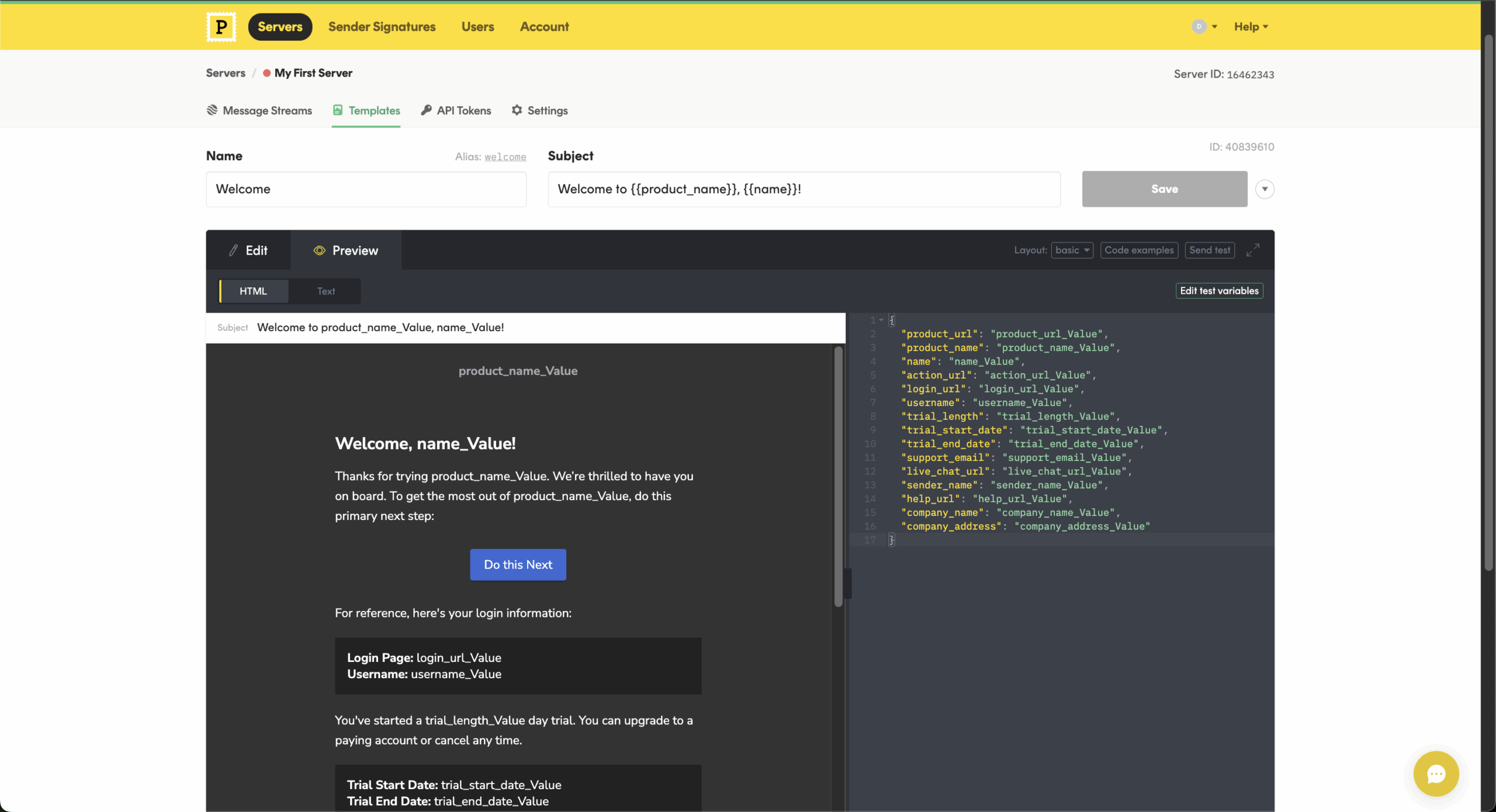
- 45-day searchable message history. Full-text search across all sent emails with detailed SMTP conversation logs and delivery debugging;
- Real-time SMTP status monitoring. Dashboard shows current sending status, queue depth, and immediate alerts for delivery issues;
- Templates with Handlebars support. Version-controlled template management with dynamic content, conditional logic, and layouts for consistency.
Pros & Cons
- Exceptional inbox placement rates
- Transactional-only focus protects reputation
- Outstanding documentation and support
- Clean interface requires minimal training
- Fast, reliable delivery infrastructure
- Higher per-email costs than competitors
- No marketing email capability
- Limited free tier (100 monthly emails)
- Fewer features than all-in-one platforms
Setup & Migration
- Verify SPF, DKIM, return-path records. Complete Postmark’s domain verification wizard and add all required DNS records including custom return-path for optimal deliverability;
- Create message streams. Organize transactional emails into separate streams (notifications, receipts, alerts) with independent suppression lists and tracking;
- Migrate templates using Postmark’s template editor. Import existing templates through the email API or rebuild using Postmark’s Handlebars-based editor with layout support;
- SMTP migration. Generate server-specific SMTP credentials or API tokens with appropriate permissions for your sending application;
- Import suppression lists. Upload lists of hard bounces, spam complaints, and unsubscribes from previous provider to maintain sender reputation;
- Run test sends. Utilize Postmark’s built-in spam check feature and send to seed lists to verify inbox placement across major providers.
Pricing Model
- Pricing based purely on email volume with consistent per-message rates across all tiers;
- Free developer plan includes 100 emails monthly for testing and small-scale projects;
- Paid plans start at $15/month for 10,000 emails, scaling to $425/month for 750,000 emails;
- Premium per-email pricing reflects transactional-only focus and exceptional deliverability; no hidden infrastructure fees.
SMTP2GO — Reliable SMTP Relay with Hands-On Support
SMTP2GO is best for teams looking for a dependable SMTP relay; pricing scales by email volume.
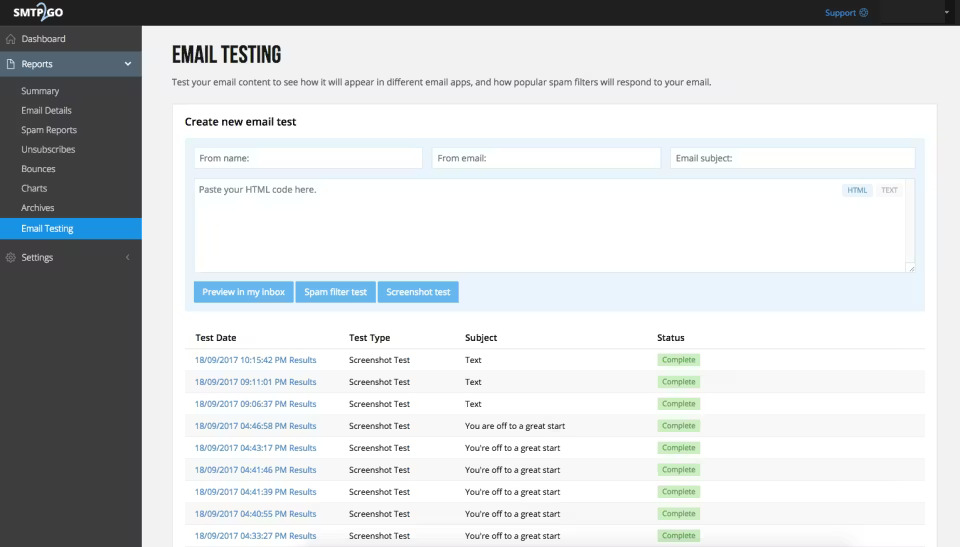
SMTP2GO prioritizes deliverability monitoring and customer support over flashy features. The platform provides detailed delivery reports showing exactly where emails land—inbox, spam, or bounced. This transparency helps troubleshoot issues before they impact large campaigns.

Support stands out. Even free tier users get responsive, knowledgeable help. The team actually investigates delivery issues rather than pointing you to documentation. For teams without dedicated email operations staff, this hands-on approach prevents problems from spiraling.
The interface feels dated compared to modern alternatives, but functionality matters more than aesthetics. Email archiving and searchable email logs work efficiently. Team collaboration features let multiple users manage sending without sharing credentials.
Key Features
- Detailed deliverability reporting. Shows inbox placement rates by domain and ISP with specific data on spam folder delivery and filtering;
- Email archiving and log search. Permanent storage of all sent emails with full-text search and SMTP conversation details for compliance;
- Team collaboration with roles. Multiple user accounts with granular permissions for sending, reporting, and configuration management;
- 24/7 support on all tiers. Responsive technical support even on free plans with actual troubleshooting instead of automated responses;
- SMTP relay and API access. Flexible integration options with detailed documentation and migration assistance from support team.
Pros & Cons
- Excellent support responsiveness across all tiers
- Transparent deliverability tracking
- Team management features for agencies
- Reliable infrastructure with consistent performance
- Email archiving useful for compliance needs
- Interface design feels dated visually
- Modest free tier (1,000 monthly emails)
- Limited marketing automation features
- Fewer pre-built integrations than competitors
Setup & Migration
- Add SPF, DKIM, and DNS records. Complete SMTP2GO’s guided DNS setup adding all authentication records including custom return-path for bounce tracking;
- Generate SMTP credentials. Create authentication credentials with appropriate sending limits and permissions for your application or bulk sending needs;
- Configure domain authentication. Upload verification file or add DNS TXT record to prove domain ownership before enabling sending from that domain;
- Import suppression lists. Upload CSV files of suppressed addresses and migrate HTML email templates through dashboard or API;
- Set up team member accounts. Add team members with role-based access (admin, sender, viewer) to manage sending without sharing primary credentials;
- Contact support for migration assistance. SMTP2GO offers phone support to review setup and get personalized migration guidance even on free tier.
Pricing Model
- Pricing based on monthly email volume with straightforward per-tier rates and no contact limits;
- Free tier includes 1,000 emails monthly with full feature access and support;
- Paid plans start at $15/month for 10,000 emails with volume discounts at higher tiers;
- Dedicated IPs available from $75/month plan; no surprise charges for domains, users, or basic features.
Mailjet — Transactional Email + Visual Builder
Mailjet is perfect for teams looking for transactional emails and an email builder in one; pricing scales by email volume.
Mailjet bridges the gap between developer tools and visual builders. The platform offers both SMTP/API sending and a drag-and-drop email editor that non-technical users can manage independently. This flexibility helps teams where both developers and marketers need access.

Real-time collaboration on email templates is surprisingly useful. Multiple team members can edit, preview, and approve messages without version control chaos. The feature feels gimmicky until you’re actually building templates with design input from multiple stakeholders.
Deliverability is solid but not exceptional. Mailjet handles both transactional and marketing emails, which slightly impacts reputation compared to transactional-only providers. For teams balancing both needs, the compromise is acceptable.

Key Features
- Dual SMTP relay and transactional API. Flexible integration supporting both legacy SMTP systems and modern API-first architectures;
- Drag-and-drop email builder. Visual template editor lets non-technical users create and modify emails without coding knowledge;
- Real-time template collaboration. Multiple team members simultaneously edit templates with version history and approval workflows;
- A/B testing capabilities. Test subject lines, content variations, and send times to optimize transactional email engagement;
- Contact management included. Segment lists, manage subscriptions, and track engagement across transactional and marketing sends.
Pros & Cons
- Generous free tier (6,000 monthly emails)
- Visual builder accessible to non-developers
- Real-time collaboration reduces template bottlenecks
- Handles both transactional and marketing use cases
- European data residency options for GDPR compliance
- Deliverability focus less intense than specialists
- Interface can feel cluttered with features
- European privacy focus adds configuration steps
- Analytics less detailed than competitors
Setup & Migration
- Verify domain ownership. Complete Mailjet’s domain authentication process and add all provided DNS records including open/click tracking domains;
- Choose data residency region. Select where your data will be stored based on GDPR compliance requirements or performance optimization needs;
- Import contacts and suppression lists. Upload subscriber lists with custom properties and import unsubscribe/bounce lists to maintain compliance;
- Migrate templates using HTML. Transfer existing templates by uploading HTML code or recreate using Mailjet’s drag-and-drop collaborative editor;
- Configure SMTP credentials. Generate API keys (public and private) or SMTP username/password for connecting your application or system;
- Set up sub-accounts. Create separate sub-accounts for different brands or clients with independent sending limits and suppression lists.
Pricing Model
- Pricing based on monthly email volume with subscriber limits on lower tiers;
- Free plan includes 6,000 emails monthly with 200 daily limit and Mailjet branding;
- Paid plans start at $15/month for 15,000 emails and unlimited contacts;
- Sub-accounts for agency/multi-client management cost extra; transactional and marketing both included in base pricing.
Amazon SES — Ultra-Low-Cost, But Technical
Amazon SES is ideal for teams with developers on hand; pricing scales by email volume/blocks.
Amazon SES offers the lowest per-email costs in the industry—$0.10 per 1,000 emails after the free tier. After doing an Amazon SES comparison with other similar platforms, it’s clear that SES stands out for its cost-effectiveness at high volumes.

The trade-off is complexity. SES lacks the polished dashboards and guided setups of dedicated email providers. You’ll configure everything through AWS Console or CLI, manage your own bounce handling, and build custom analytics. Documentation is comprehensive but assumes technical proficiency.
Deliverability requires active management. SES provides the infrastructure, but you’re responsible for warming IPs, monitoring reputation, and handling complaints. For teams with DevOps resources, this control is valuable. For those without, it’s a burden.

Key Features
- Extremely low per-email pricing. $0.10 per 1,000 emails after free tier makes it cheapest option for high-volume sending;
- AWS infrastructure integration. Native integration with Lambda, S3, SNS, CloudWatch, and other AWS services for complete automation;
- Dedicated IP options. Purchase and manage dedicated IPs with full control over warming schedules and reputation monitoring;
- Configuration sets for tracking. Custom tracking domains, CloudWatch metrics, and SNS notifications for granular delivery monitoring;
- Email receiving capability. Receive and process incoming emails with Lambda functions or S3 storage for complete email workflows.
Pros & Cons
- Unbeatable pricing at volume ($0.10/1,000 emails)
- Seamless AWS ecosystem integration
- Highly scalable infrastructure
- Full control over configuration and IPs
- Reliable delivery infrastructure
- Steep technical learning curve
- Minimal dashboard and UI
- Free tier requires sending from EC2 instances
- Manual bounce and complaint handling required
- No built-in template management
Setup & Migration
- Request production access. Submit AWS support request to move from sandbox (limits to verified addresses) to production sending capability;
- Verify sending domains via DNS records. Add TXT records to verify domain ownership through AWS SES console or your external DNS provider;
- Configure IAM roles. Create AWS IAM users or roles with SES sending permissions following principle of least privilege for security;
- Set up SNS topics. Create Simple Notification Service topics to receive real-time notifications when emails bounce or generate complaints;
- Build bounce/complaint handling logic. Implement code to process SNS notifications, update your database, and automatically suppress addresses that bounce or complain;
- Create configuration sets. Define configuration sets to organize sending, track events in CloudWatch, and monitor deliverability metrics by email type.
Pricing Model
- Pricing based on pure pay-as-you-go per-email model with no monthly minimums or commitments;
- Free tier includes 3,000 emails monthly when sending from EC2 instances;
- Beyond free tier, pricing is $0.10 per 1,000 emails;
- Dedicated IPs start at $25/month per IP; additional AWS charges apply for data transfer and attachments.
Bird (formerly SparkPost) — Enterprise-Grade Deliverability
Bird is perfect for teams looking for deeper deliverability analytics; pricing scales by email volume.
Bird targets enterprises sending billions of emails. The platform combines industrial-scale infrastructure with white-glove deliverability consulting. If you’re sending millions of messages monthly and deliverability directly impacts revenue, Bird provides the expertise and tools to optimize every aspect.

The deliverability team actively monitors your sending patterns, recommends optimization, and intervenes when issues arise. This hands-on approach contrasts with self-service platforms where you troubleshoot everything single-handedly. For enterprises, the consulting value justifies higher costs.
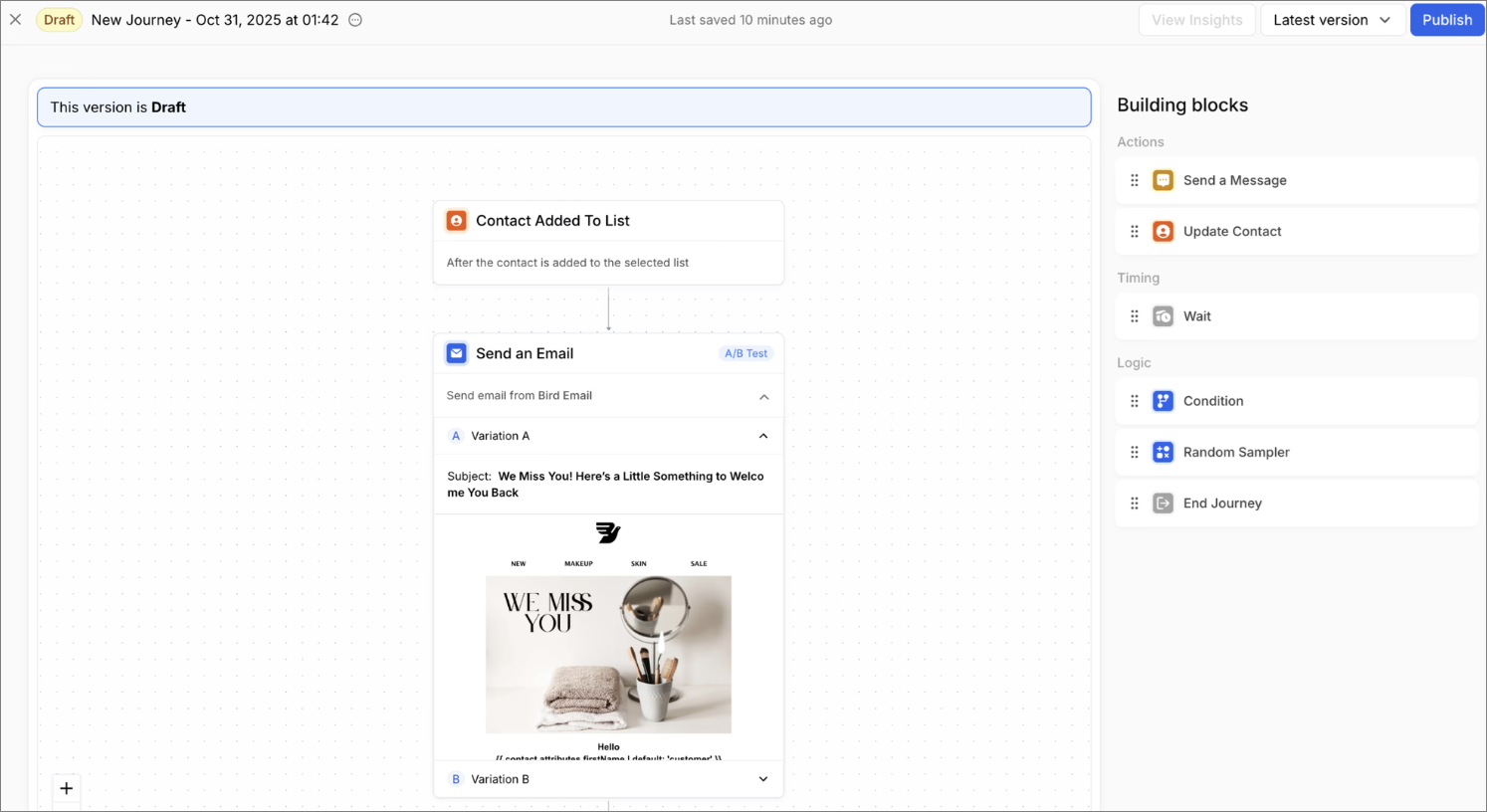
Analytics and reporting are exceptionally detailed. You’ll see domain-level deliverability, ISP-specific performance, and cohort analysis that reveals patterns invisible in simpler dashboards. The platform handles complex use cases—multiple brands, regional sending, sophisticated segmentation—without breaking.
Key Features
- Dedicated deliverability consulting. Proactive monitoring and optimization from experts who review your sending patterns and reputation;
- Advanced analytics and cohort reporting. Domain-level metrics, ISP-specific performance tracking, and predictive insights for optimization;
- Multi-brand sending management. Separate IP pools, domains, and reputation tracking for different brands or business units;
- Predictive analytics for optimization. Machine learning identifies deliverability risks and recommends timing, content, and segmentation improvements;
- Enterprise-grade SLAs. Guaranteed uptime, dedicated support, and contractual deliverability commitments for mission-critical sending.
Pros & Cons
- Best-in-class deliverability expertise and support
- Handles extreme scale (billions of emails)
- Exceptionally detailed analytics and reporting
- Predictive optimization recommendations
- Enterprise SLAs and guaranteed performance
- Enterprise pricing only (thousands monthly minimum)
- Overkill for small to medium teams
- Requires contract commitment
- Complex feature set needs dedicated staff
- No transparent public pricing
Setup & Migration
- Enterprise onboarding. Bird assigns senior migration consultant to manage your entire transition with regular check-ins and progress tracking;
- Coordinated IP warming schedule. Migration specialist creates custom IP warming plan based on your volume, gradually increasing sends to build sender reputation;
- Bulk template migration. Bird’s technical team helps migrate thousands of templates, converting from previous provider’s format to Bird’s syntax;
- Configure sub-accounts, IP pools, and brand separation. Set up organizational structure with separate IP pools per brand, regional sending infrastructure, and multi-tenant access controls;
- Integration testing. Bird provides staging environment matching production for thorough testing of API integration and webhook handling;
- Ongoing optimization reviews. Post-migration, deliverability team conducts regular reviews of sending patterns and recommends improvements for inbox placement.
Pricing Model
- Custom enterprise pricing based on volume, features, and required support level;
- No public pricing or self-service free tier; contracts start from 50,000 contacts/monthly;
- Pricing includes deliverability consulting, dedicated support, and infrastructure access bundled together;
- Volume commitments and enterprise SLAs required; pricing negotiated based on sending needs and scale.
Metrics to Watch When Switching MailerSend Alternatives
- Delivery Rate—Track what percentage of emails successfully reach recipient servers. Rates below 95% indicate serious issues. Compare your new provider’s delivery rate to MailerSend’s baseline for the first few weeks;
- Inbox Placement—Delivery to the server differs from landing in the inbox. Use tools like GlockApps or Mail-Tester to measure actual inbox placement versus spam folder rates. Monitor this closely during IP warming;
- Bounce Rate—Separate hard bounces (permanent failures) from soft bounces (temporary issues). Hard bounce rates above 5% suggest list quality problems. Soft bounce rates above 10% might indicate server throttling;
- Complaint Rate—Track spam complaints per thousand sends. Rates above 0.1% (1 complaint per 1,000 emails) trigger problems with major ISPs. This metric directly impacts sender reputation;
- Response Time—Monitor API response times and SMTP connection speeds. Slowness indicates infrastructure problems that might affect your application’s performance. Compare against MailerSend’s baseline responsiveness;
- Log Accessibility—Verify you can search logs efficiently when troubleshooting. Test how far back logs extend and whether export functionality works. Inadequate logging makes debugging nearly impossible;
- Cost Per Email—Calculate actual cost including hidden fees (dedicated IPs, support, additional domains). Compare against MailerSend’s effective cost at your current volume and projected growth;
- Time to First Send—Measure how long setup and migration actually take versus vendor estimates. Factor this into planning—unexpected delays impact production timelines.
FAQ
Who should consider switching from MailerSend?
Teams that need different integration flexibility, broader feature sets, or alternative infrastructure models should consider MailerSend alternatives. This includes developers seeking deeper API control, businesses that want marketing and transactional email in one platform, and organizations with stricter deliverability monitoring needs.
What features matter most in transactional email providers?
Core features include SMTP relay and API access for system-generated emails, domain authentication support, and delivery event tracking, such as bounces and complaints. Reliability, logging, and webhook support are important for monitoring application workflows. Template handling, suppression management, and analytics depth also influence operational efficiency.
Are marketing and transactional emails better on one platform?
It can be, since using one platform can simplify reputation management, authentication, and reporting by centralizing email operations. This approach is useful for teams that run both system emails and campaigns, as it reduces tool fragmentation and duplicate configuration.
However, some organizations prefer separate tools when they need highly specialized deliverability controls or distinct workflows for marketing and application-generated email streams.
How difficult is it to migrate transactional email providers?
The complexity depends on system architecture and customization level, but most providers offer documentation that supports step-by-step setup and verification before full traffic switching. Migration for transactional email providers typically involves updating DNS records for authentication, generating new API or SMTP credentials, and testing sending from the new provider.
What deliverability metrics should teams monitor after switching?
After migration, teams usually track bounce rates, complaint rates, and delivery success indicators to confirm that domain reputation and authentication are functioning correctly. Open and click data help identify engagement trends, while logs and event notifications support troubleshooting.
Monitoring these metrics early helps detect configuration issues, list hygiene problems, or sending pattern changes that could affect inbox placement.