



Mailchimp alternatives have become a necessity, not a preference. Since Intuit’s 2021 acquisition, Standard plan prices have risen by as much as 92%, the free plan has been cut from 2,000 contacts to just 250, and automations that once came standard now sit behind higher paywalls. For most growing businesses, the platform they signed up for no longer exists.
I spent four months testing 10 alternatives to Mailchimp in 2026, running each through the same deliverability tests, building identical automation sequences, and comparing real pricing at the list sizes where the differences actually matter (1,000, 5,000, 10,000, and 25,000+ contacts). What follows is what I found.
Why People Leave Mailchimp (With Real Numbers)
Mailchimp has raised its Standard plan prices by as much as 92% since 2022, increased lower plan limits, and removed automations from the free tier entirely. Those are not complaints; they are line items. This section documents exactly what changed, when, and what it costs a real business today.
The Pricing Escalation Problem
Mailchimp has raised Standard plan prices between 43% and 92% since 2022. The increases have not been announced with fanfare; they compound quietly across billing cycles.
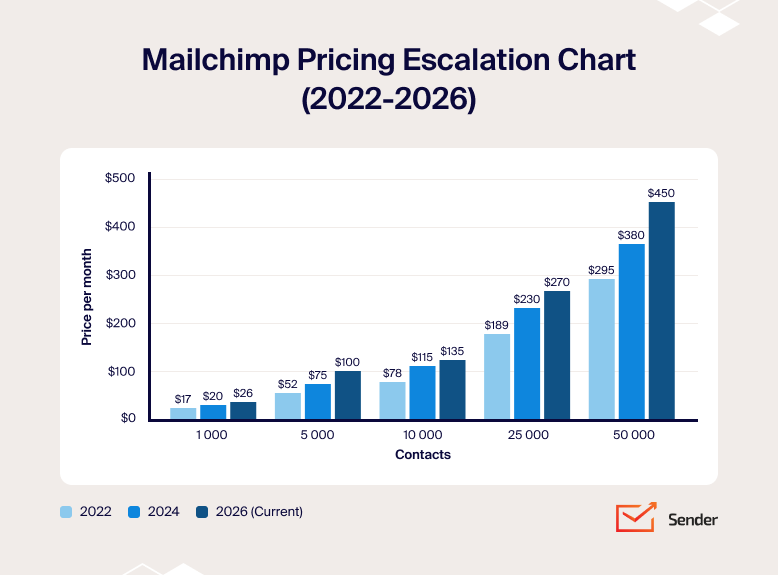
Mailchimp Standard Plan: Monthly Price by List Size
| Contacts | 2022 | 2024 | 2026 (current) | % Increase 2022–2026 |
| 1,000 | ~$17 | ~$20 | ~$26 | +53% |
| 5,000 | ~$52 | ~$75 | ~$100 | +92% |
| 10,000 | ~$78 | ~$115 | ~$135 | +73% |
| 25,000 | ~$189 | ~$230 | ~$270 | +43% |
| 50,000 | ~$295 | ~$380 | ~$450 | +53% |
Three additional cost factors that do not appear in the table:
- April 2026 legacy increase: Third-party reporting (EmailToolTester, March 2026) indicates that accounts created before May 2019 were facing an approximately 11–13% price increase effective April 13, 2026. Mailchimp had not published a prominent primary announcement page for this change at the time of writing; treat this figure as directionally reliable but verify against your own account billing notices.
- The 10,000-contact threshold: Below 5,000 contacts, Mailchimp’s pricing is competitive. Above 10,000, alternatives like Brevo, MailerLite, and Sender typically cost 40–60% less for comparable functionality.
- Annual vs. monthly gap: The 15% annual discount requires upfront commitment. Businesses that pay month-to-month absorb the full price above.
The Contact-Counting Problem, Explained Concretely
Mailchimp charges based on the total number of stored contacts, not just active subscribers. This includes subscribed, unsubscribed, and non-subscribed contacts unless you manually remove them.
What counts toward billing:
- Subscribed, unsubscribed, and non-subscribed contacts
- Duplicates across multiple audiences
What doesn’t count:
- Archived, cleaned, or deleted contacts
Example: A list with 3,000 subscribers, 400 unsubscribers, and 200 extra contacts can be billed as 3,600 contacts. Over time, this adds up. In older accounts, 20–40% of contacts are often inactive, yet still included in billing.
The issue? These contacts must be manually archived, and this step isn’t clearly surfaced in the interface. Many users only notice when their pricing tier increases after already overpaying.
Platforms like MailerLite, Brevo, and Sender avoid this by charging only for active or unique contacts, making email marketing costs far more predictable.
The Free Plan Degradation Timeline
Mailchimp’s free plan was, for many years, the reason small businesses defaulted to the platform. Each revision has cut something the previous one included, which is why so many small businesses now look for Mailchimp alternatives free from those limits. The timeline below shows what changed and when.
| Year | Free plan features |
| 2019 | Up to 2,000 subscribers, 12,000 emails/month, single-step automations, landing pages, basic segmentation |
| 2022 | Up to 2,000 contacts, 10,000 emails/month, scheduling removed (January 2022), Mailchimp branding on all sends |
| 2023–2024 | 500 contacts, 1,000 emails/month, automations removed (December 2023), no A/B testing, Mailchimp branding, no scheduling |
| 2026 (current) | 250 contacts, 500 emails/month, daily send cap of 250, no automations, no A/B testing, Mailchimp branding, support available for first 30 days only |
A user who joined Mailchimp’s free plan in 2021 would face a very different product today. Key features like automations, scheduling, and A/B testing are no longer available without upgrading, and the free contact limit dropped from 2,000 to 250 (an 87.5% reduction).
The biggest shift came in June 2025, when Mailchimp removed its Classic Automation Builder. Existing email marketing automation workflows, including customer journeys like welcome flows, reminders, and winbacks, stopped working. Users had to rebuild everything manually. Free plan users lost automation entirely. Essentials plan users got limited flows (up to 4 steps). Advanced automation now requires higher-tier plans.
In practice, this means more manual work, reduced functionality on lower tiers, and a clear push toward paid upgrades for anything beyond basic email sending.
How We Evaluated Each Platform
Each email marketing software platform was tested on the paid plan closest to what a small business with 1,000–5,000 contacts would realistically use. For some tools that meant the entry-level tier; for others it meant a mid-tier plan where core features like automation and A/B testing actually become available.
I evaluated these email marketing tools using a contact list from a real small ecommerce business with roughly one month of subscriber activity – signups, purchases, and email engagement all present in the data. No contacts were purchased or scraped.
What I evaluated per platform:
- Email drag-and-drop builder (and HTML editor)
- Automation depth: trigger types, conditional logic, branching
- Audience segmentation and list management
- Form builder and landing pages
- Deliverability (via GlockApps testing)
- Customer support responsiveness on the entry-tier plan
- Customer reviews across G2, Capterra, Trustpilot, and Reddit
- Pricing model and total cost at three list sizes: 1,000, 5,000, and 10,000 contacts
Deliverability testing: I ran each platform through GlockApps using identical plain-text and HTML emails sent from a warmed domain with no prior spam history. Inbox placement was recorded across Gmail, Outlook, and Apple Mail. Testing took place in February and March 2026.
I also consulted EmailToolTester for cross-referencing. Results reflect a point-in-time snapshot; deliverability varies based on sender reputation, domain age, and list quality.
User reviews: I pulled reviews from G2, Capterra, Trustpilot, and Reddit published between January 2024 and March 2026. I prioritized verified users on paid plans and excluded reviews that covered onboarding only, since those rarely reflect long-term platform behavior.
Pricing methodology: All pricing is verified as of May–July 2026. Annual billing discounts are noted separately from monthly pricing. All prices are shown in USD. Check each platform’s pricing page directly before purchasing; pricing in this category changes frequently.
Capterra, G2, Trustpilot, and Reddit to create an objective evaluation. Learn more about our review methodology
Mailchimp Competitors at a Glance
These Mailchimp alternatives cover the most common reasons people leave: pricing, contact-counting, missing automation, and ecommerce features. This comparison focuses on dedicated email marketing tools; enterprise platforms like HubSpot email marketing fall outside the scope due to their fundamentally different pricing model (starting at $800+/mo for Marketing Hub Professional).
Not every tool here is a direct replacement. Some do less but cost significantly less; others do more but require more setup.
All pricing reflects monthly billing at approximately 1,000 contacts. Annual billing typically reduces costs by 15 to 20%. Prices verified May–July 2026; check each platform directly before purchasing. Deliverability reflects author’s GlockApps seed list testing (Feb–Mar 2026).
| Platform | Use case | Not ideal for | Starting price (1,000 contacts/month) | Free plan | Deliverability |
| Sender | Small businesses needing automation on a tight budget | Large teams needing a built-in CRM | ~$7 | Yes, up to 2,500 contacts | 98.1% |
| Omnisend | Ecommerce shops running email + SMS + push from one platform | Service businesses or creators without a product catalog | ~$16 | Yes, up to 250 contacts | 91.3% |
| Brevo | Large lists with low send frequency; transactional + marketing email in one platform | High-frequency senders; anyone needing automation below $18/mo | ~$9 (volume-based) | Yes, 300 emails/day | 94.2% |
| Klaviyo | Shopify stores doing $500K+ revenue needing predictive analytics | Newsletters, B2B, budget-conscious teams | ~$30 | Yes, up to 250 contacts | 94.8% |
| GetResponse | SMBs and ecommerce brands needing automation, segmentation, and revenue attribution | Basic newsletter-only senders; teams needing SMS on self-serve | ~$19 | Yes, up to 500 contacts | 91.8% |
| Beehiiv | Newsletter operators monetizing through ads, paid subs, and Boosts | Ecommerce, SaaS, anyone needing marketing automation | ~$43 (Scale, annual) | Yes, up to 2,500 subscribers | 93.1% |
| Constant Contact | Nonprofits and event-driven organizations needing RSVP + ticketing + phone support | Cost-sensitive users; no free plan | ~$35 | No | 90.2% |
| ActiveCampaign | B2B businesses needing multi-branch automation tied to a CRM pipeline | Beginners, solopreneurs, simple newsletter senders | ~$15 | No | 93.5% |
| Moosend | Budget-conscious teams wanting full automation at the lowest paid price | Businesses needing multichannel (SMS/push) or native Shopify | ~$9 | No (30-day trial) | 90.1% |
| MailerLite | Creators and small businesses wanting a clean editor with A/B testing on free | Teams needing CRM integration or transactional email | ~$12 | Yes, up to 250 subscribers | 95.7% |
10 Mailchimp Alternatives Reviewed
The reviews below cover each platform in detail: what it does well for email marketing campaigns and email automation, where Mailchimp still has an edge, who it is not suited for, and a direct pricing comparison.
The order is not a ranking from best to worst. Each platform has a different strength, and the right choice depends on your use case, list size, and budget.
Sender
Best for: Ecommerce stores and SaaS businesses under 50,000 contacts that need behavioral automation and custom event triggers without enterprise pricing.
Not for: teams that need a built-in CRM, native Salesforce integration, or SMS coverage outside supported countries.

Sender pricing: Paid plans start at $7/month (annual) for 1,000 subscribers + 12,000 monthly emails.
Sender Free plan: Up to 2,500 subscribers + 15,000 monthly emails, automation included.
I tested Sender across two ecommerce stores and a SaaS product over four months. The standout finding: full marketing automation including welcome series, abandoned cart, and post-purchase flows runs on the free plan for up to 2,500 subscribers and 15,000 emails/mo. No other tool I reviewed matches that combination at zero cost.
The custom events feature sets Sender apart from every other budget-to-mid-range platform I tested. It lets you track specific user actions on your website (like “Watched 50% of a Video,” “Started Free Trial,” or “Reached 90% Usage Limit”) via API and send that data to Sender in real time to trigger automations or build behavioral segments. Paired with transactional emails via SMTP and REST API, Sender covers both marketing and operational email from one account. That level of behavioral targeting is typically found only on platforms costing 5–10x more, like Klaviyo or ActiveCampaign.
What worked better than Mailchimp?
- High deliverability. My GlockApps seed list test recorded 98.1% inbox placement vs. Mailchimp’s 89.5% on the same test. EmailToolTester independently recorded 99.3% (October 2025).
- Pricing at scale. At 5,000 contacts, Sender Standard costs ~$29/mo (annual) vs. Mailchimp’s ~$100/mo. At 10,000 contacts: ~$40/mo vs. ~$135/mo.
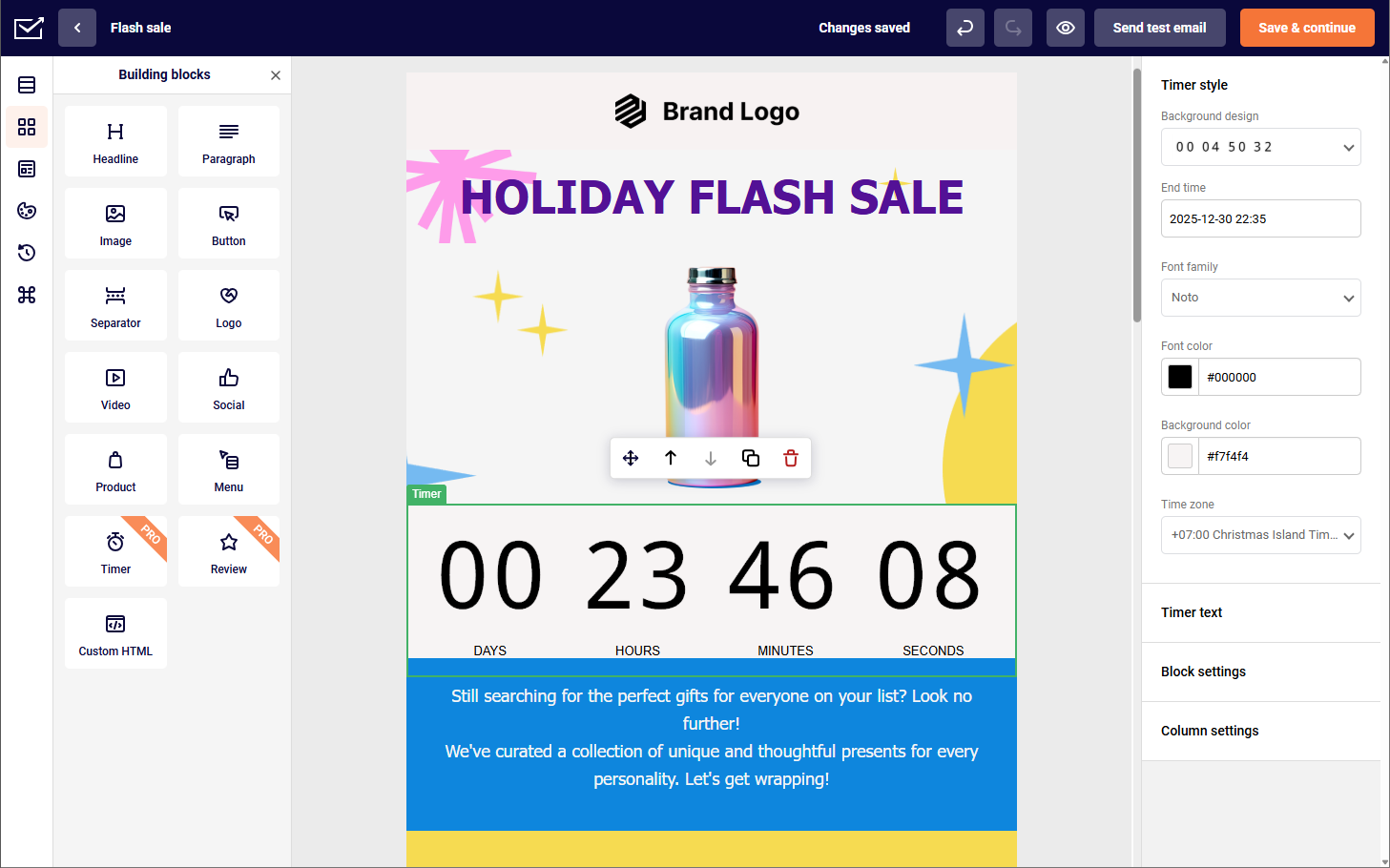
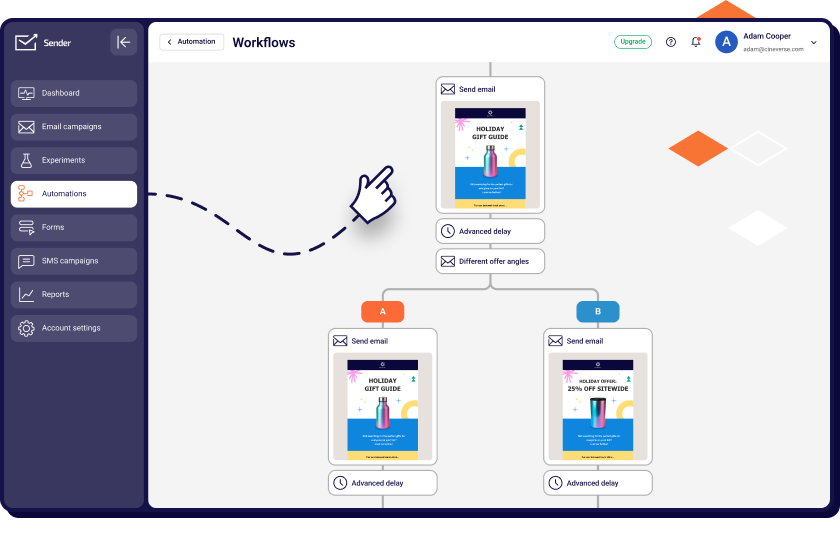
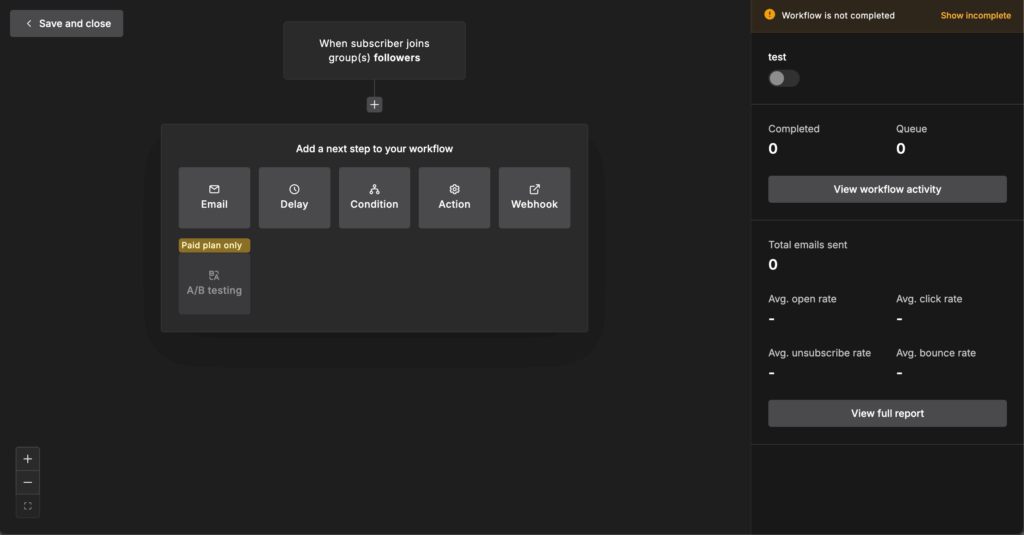
- Automation on all plans, including Free. Sender’s automation builder includes behavior-based triggers, conditional branching, delay logic, and premade templates for welcome, abandoned cart, post-purchase, and win-back flows. Mailchimp restricts automations on lower tiers.
- Custom events tracking. Pass behavioral data from your website via API (feature adoption nudges, wishlist price-drop alerts, usage-limit upsell triggers) and use it to trigger automations or build segments. Typically reserved for enterprise-tier platforms.
Where is Mailchimp better than Sender?
- Integration library. Mailchimp has 300+ native integrations vs. Sender’s 20+ (WordPress, WooCommerce, Shopify, Zapier, Make). If your stack depends on tools outside those, you will need workarounds.
- Reporting depth. On higher tier plans, Mailchimp includes audience growth trends, engagement over time, and comparative campaign reporting. Sender covers the essentials (opens, clicks, heatmaps, reports by inbox provider on Professional) but lacks historical trend views.
- Template variety. This is the most-cited Sender gap in reviews. G2 shows “Limited Templates” (81 mentions), “Template Limitations” (75 mentions), and “Template Issues” (68 mentions) as the top three negatives. Mailchimp offers a larger library with more design variety, but only on higher tier plans.
Who should not use Sender?
Sender is not the right fit if your stack depends on many third-party integrations, or if you need CRM-style contact management beyond tagging and segmentation. The interface is available in only 4 languages. For complex multi-branch automation beyond what Sender’s builder supports, ActiveCampaign or Klaviyo are more capable.
Mailchimp vs. Sender Cost Comparison
| Contacts | Sender Standard | Mailchimp Standard | Annual saving (with Sender) |
| 1,000 | $10 | ~$26 | ~$192/year |
| 5,000 | $33 | ~$100 | ~$804/year |
| 10,000 | $57 | ~$135 | ~$936/year |
| 25,000 | $117 | ~$270 | ~$1,836/year |
| 50,000 | $227 | ~$450 | ~$2,676/year |
Verified May–July 2026. Free plan: 2,500 subscribers, 15,000 emails/mo, automation included. Standard from $7/mo (annual); Professional from $14/mo (annual) adds dedicated IP and free SMS credits.
Omnisend
Best for: Shopify and BigCommerce stores under 50,000 contacts that want pre-built ecommerce automations with email + SMS + push in one workflow.
Not for: B2B businesses, SaaS companies, or anyone on WooCommerce/Wix who needs the Product Picker feature (it’s unavailable on those platforms).

Omnisend pricing: Starts at $16/month for up to 500 contacts + 6,000 monthly emails.
Omnisend free plan: Available for up to 250 contacts + 500 monthly emails.
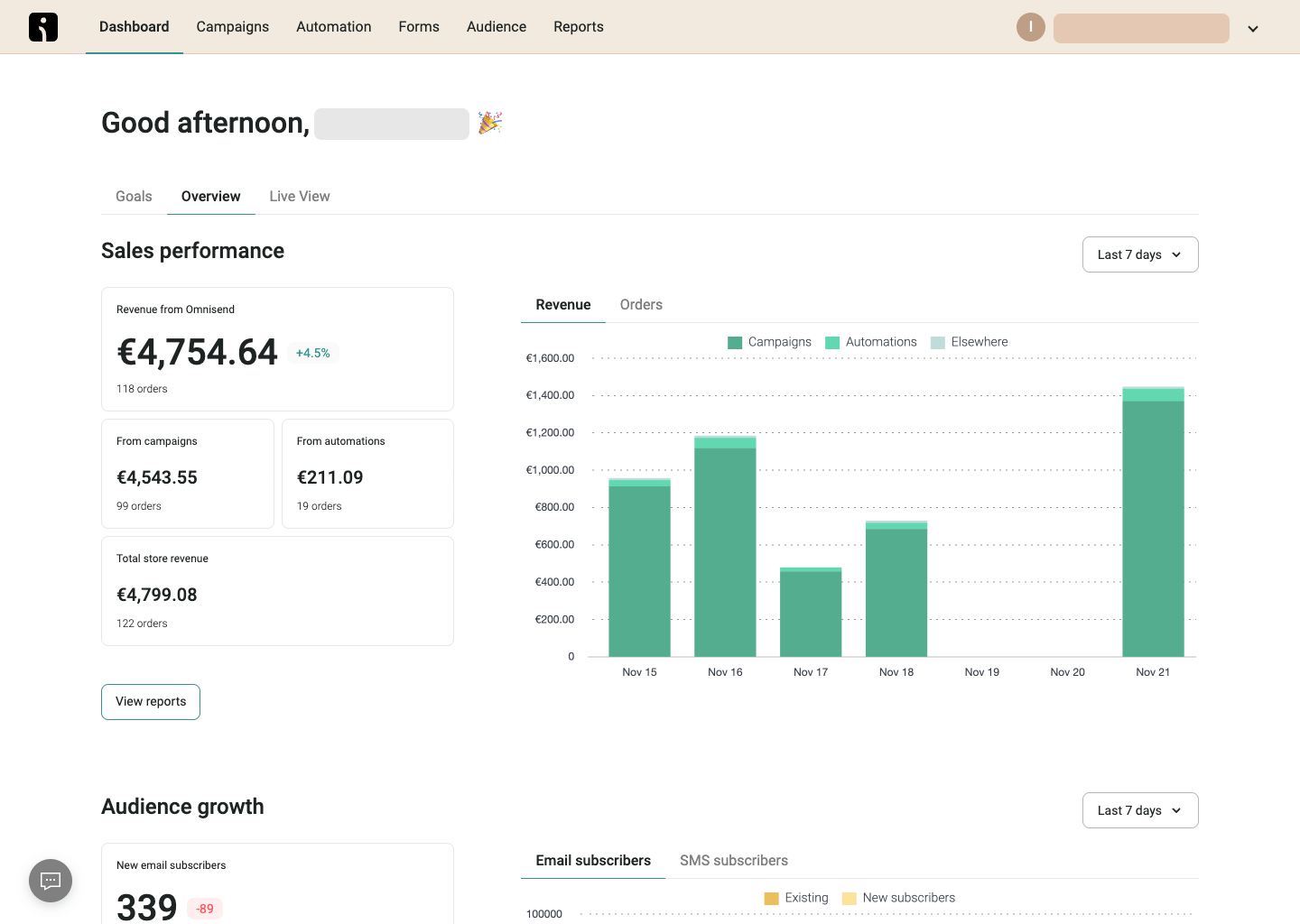
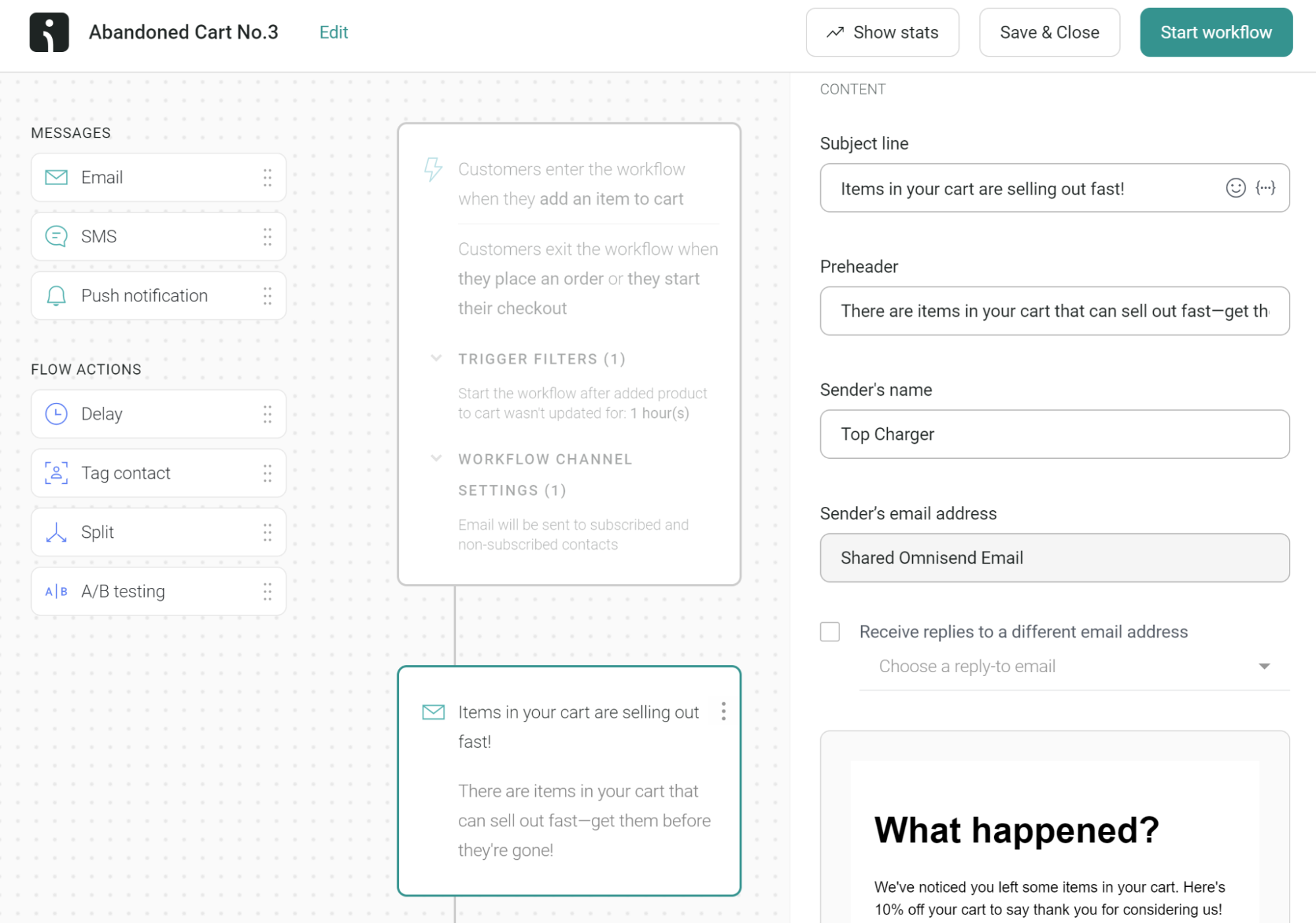
I ran Omnisend on a Shopify store doing $45K/mo in revenue for three months. The pre-built ecommerce automation workflows (abandoned cart, browse abandonment, post-purchase) activated in under 15 minutes and generated measurable revenue within the first week. As a multi channel marketing platform, Omnisend combines email, SMS marketing, and web push notifications into a single automation flow, which none of the other tools I tested do natively at this price point.
Pricing is contact-based, but the free plan includes all core features at every tier, which is unusual. The catch is that the free tier caps you at 250 contacts, the same ceiling as Mailchimp’s free plan.
What worked better than Mailchimp?
- Ecommerce-specific automation out of the box. I activated a pre-built abandoned cart sequence in under ten minutes. Mailchimp’s equivalent requires building the flow manually in its Marketing Automation Flows builder.
- Native three-channel automation. I set up a post-purchase flow combining email, then an SMS reminder, then a push notification fallback, all in a single visual builder. Our team found this saved roughly 2 hours per campaign compared to managing separate tools. Replicating this in Mailchimp requires an SMS add-on at extra cost.
- Contact-inclusive feature access. Automation, segmentation, A/B testing, and web push are included across all paid tiers. No feature gating.
- Product Picker pulls live product images, prices, and links directly from your Shopify/BigCommerce store into emails. Product data stays current without manual updates.
Where is Mailchimp better than Omnisend?
- Non-ecommerce use cases. Omnisend’s builder, templates, and reporting are oriented around purchase data. A service business, B2B company, or content creator will find the interface full of product-related prompts they cannot use.
- Integration breadth. Mailchimp’s 300+ integrations cover a far wider range of tools. Omnisend concentrates on ecommerce platforms.
- SMS cost predictability. Omnisend’s Standard plan has no SMS at all. SMS campaigns and automation are locked to Pro ($59/mo minimum), making the “omnichannel” positioning misleading for Standard users.
Who should not use Omnisend?
Omnisend is not suited for businesses without a product catalog. The platform’s segmentation logic, automation triggers, and reporting are built around purchase events. G2 shows “Limited Features” and “Missing Features” (60 mentions each) and “Limited Customization” (33 mentions) as top negatives. One independent test measured deliverability at 75.1%, with performance reported to degrade above 50,000 contacts.
Mailchimp vs. Omnisend Cost Comparison
| Contacts | Omnisend Standard | Mailchimp Standard | Difference |
| 500 | ~$16 | ~$20 | Omnisend cheaper |
| 2,500 | ~$44 | ~$60 | Omnisend cheaper |
| 5,000 | ~$81 | ~$100 | Omnisend cheaper |
| 10,000 | ~$132 | ~$135 | Near parity |
| 25,000 | ~$270 | ~$270 | Near parity |
Verified May–July 2026. Pro plan (unlimited emails + SMS from $0.007/message) starts at $59/mo for 2,500 contacts.
Brevo
Best for: Businesses with large contact lists and low-to-moderate send frequency (1–4 campaigns/month) who also need transactional email in the same platform.
Not for: daily senders, high-frequency automation users, or anyone who needs full marketing automation without paying $18+/mo.
Brevo pricing: Starts at $9/month for 5,000 emails/month.
Brevo Free plan: 300 emails/day (~9,000/month), 100,000 contacts, automation up to 2,000 contacts.
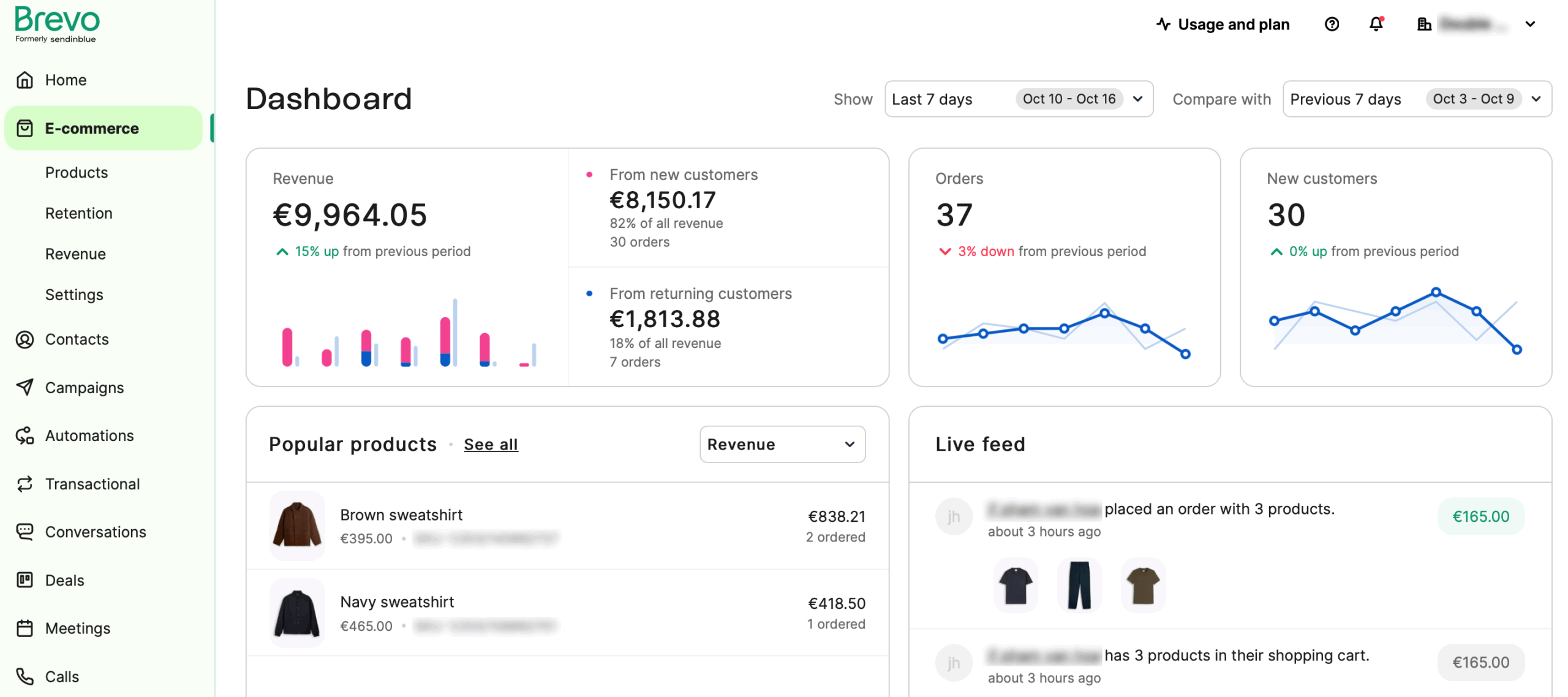
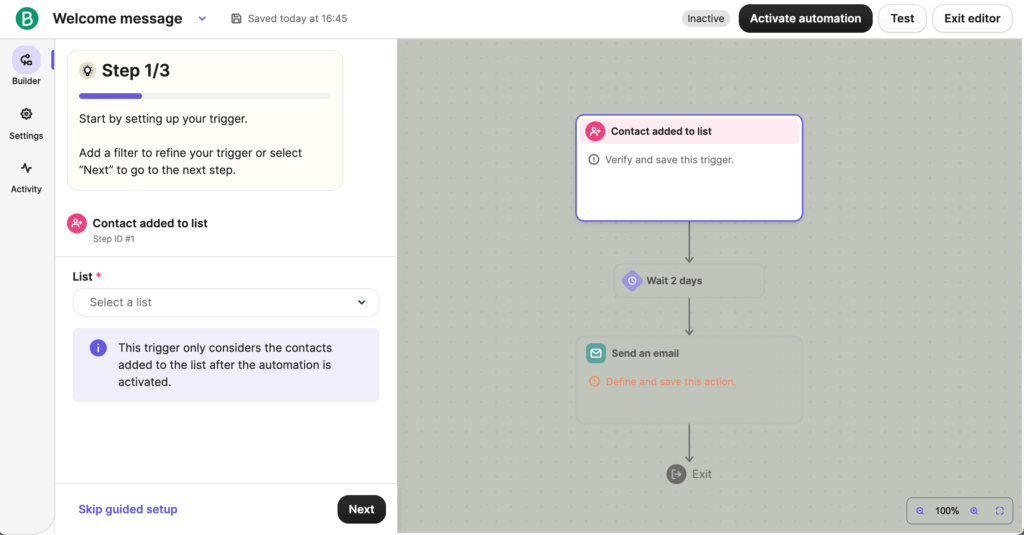
I used Brevo for transactional email on a client’s ecommerce site and marketing campaigns for a B2B SaaS product simultaneously. The defining structural difference: Brevo charges by emails sent per month, not by contact count. For a client with 12,000 contacts sending twice monthly (~24,000 emails), the bill was $35/mo on Standard. The same list on a contact-based platform would cost $75–$150/mo.
There are catches at the lower tiers. The Starter plan ($9/mo for 5,000 emails) stores up to 500 contacts, and automation is limited to 2,000 contacts both on Free and Starter plans. Brevo branding removal on Starter requires a separate $10.80/mo add-on, effectively doubling the entry price for professional-looking emails.
What worked better than Mailchimp?
- Volume-based pricing is the clearest structural advantage at mid-to-higher tiers. I tested Brevo against three contact-based platforms at a 15,000-contact list sending 3x/month (45,000 emails). Brevo Standard cost $87/mo. Mailchimp Standard: ~$195/mo. ActiveCampaign Plus: ~$265/mo.
- Transactional email via SMTP and API on all plans including Free, with claimed 99% delivery rate. Most competitors charge extra or don’t offer it at all.
- Multichannel stack. Email, SMS, WhatsApp (Professional only), web push, mobile push, live chat, chatbot, wallet (digital loyalty cards), and phone: 8 channels under one account.
- Built-in Sales CRM with deal pipelines available as an add-on ($31/mo Sales Essentials, $64/mo Sales Advanced).
Where is Mailchimp better than Brevo?
- Automation visual experience. Mailchimp’s Marketing Automation Flows canvas is easier to navigate for multi-branch sequences.
- Template library. Mailchimp offers more templates with more design flexibility.
- Transparency. The 500-contact limit on the $9 Starter tier is not disclosed on the main pricing page, revealed only after signup, which multiple users cite as deceptive. Trustpilot score dropped from 4.4 (Feb 2025) to 3.9 (March 2026).
Who should not use Brevo?
Brevo’s pricing advantage disappears for high-frequency senders. The $499/mo jump from Standard to Professional is prohibitive for mid-market businesses needing WhatsApp, AI segmentation, or ecommerce features. G2 shows “Missing Features” (107 mentions) as the top negative theme. Account suspension is the dominant Trustpilot complaint.
Landing pages are limited to 1 on Standard, with additional packs costing ~$24/mo for 5, and are unavailable on Free or Starter.
Mailchimp vs. Brevo Cost Comparison
| Monthly emails sent | Brevo plan | Brevo cost | Mailchimp Standard (5,000 contacts) |
| 5,000 | Starter | ~$9 | ~$100 |
| 20,000 | Standard | ~$18 | ~$100 |
| 40,000 | Standard | ~$27 | ~$100 |
| 100,000 | Standard | ~$65 | ~$100 |
Brevo pricing is email-volume based; Mailchimp is contact-based. Standard plan ($18/mo minimum) required for automation, A/B testing, send-time optimization, and landing pages. Verified May–July 2026.
Klaviyo
Best for: Shopify stores doing $500K+ in annual revenue with a dedicated email/lifecycle marketer who will use predictive analytics and multi-branch flows daily.
Not for: newsletter senders, B2B companies, small stores watching every dollar, or anyone carrying a large dormant list since the active-profile billing model punishes list bloat.

Klaviyo pricing: Email plan from $20/mo (251–500 active profiles); ~$30/mo at 1,000 profiles, ~$150/mo at 10,000, ~$720/mo at 50,000.
Klaviyo free plan: Up to 250 active profiles, 500 emails, 150 SMS credits. No predictive analytics, support for 60 days only.
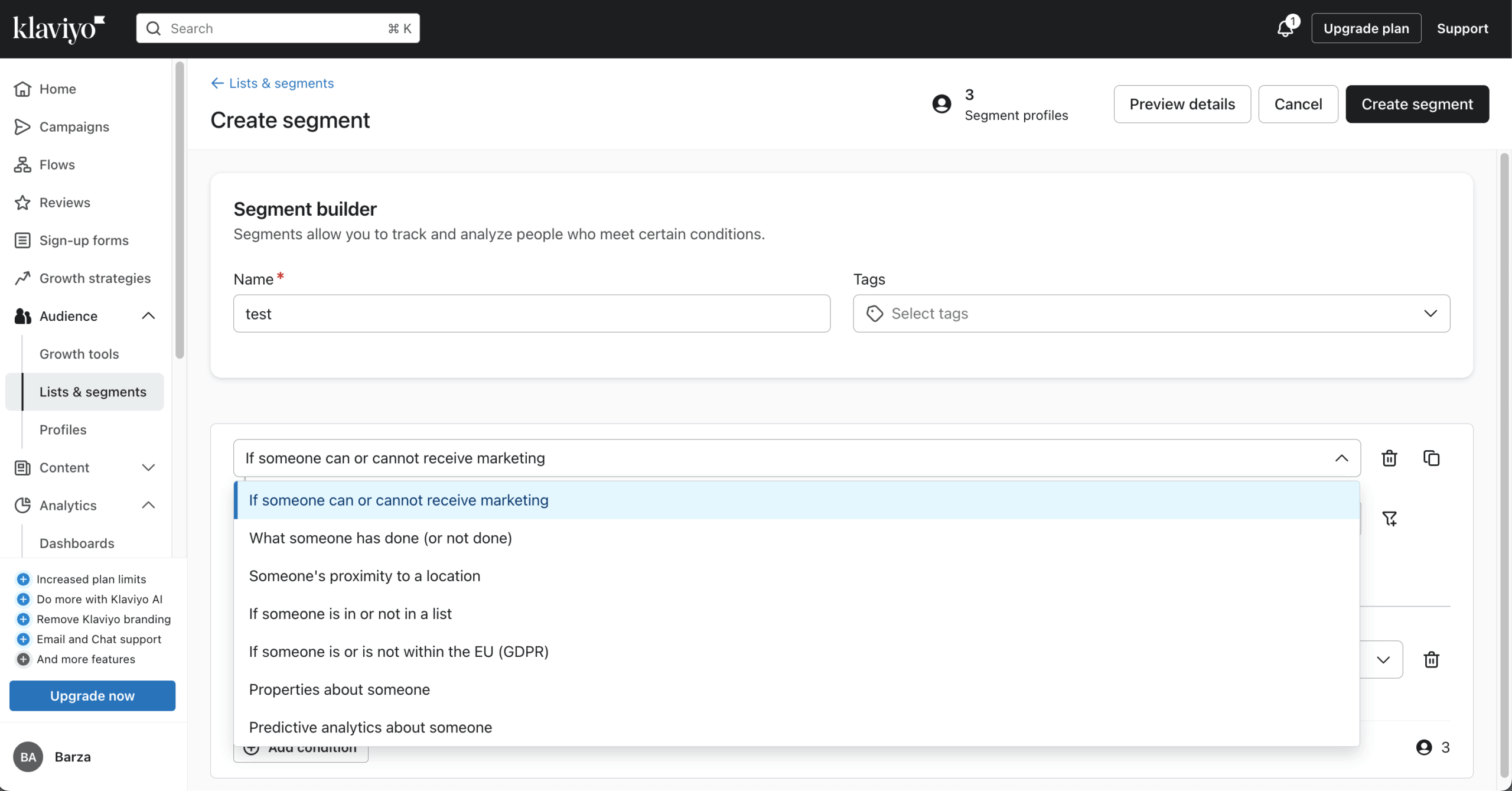
I ran Klaviyo on a Shopify Plus store with 22,000 contacts for five months. The predictive analytics (CLV forecasting, churn risk scoring, next-order-date predictions) produced segments that outperformed manual targeting by a measurable margin in A/B tests. The Shopify integration syncs order data, browsing behavior, and cart activity in near real-time, creating unified customer profiles no other platform in this roundup matches for depth.
The trade-off: the February 2025 billing change to active profiles means you pay for every reachable contact whether you email them or not. Once unsuppressed, a profile stays billable for 90 days minimum.
What worked better than Mailchimp?
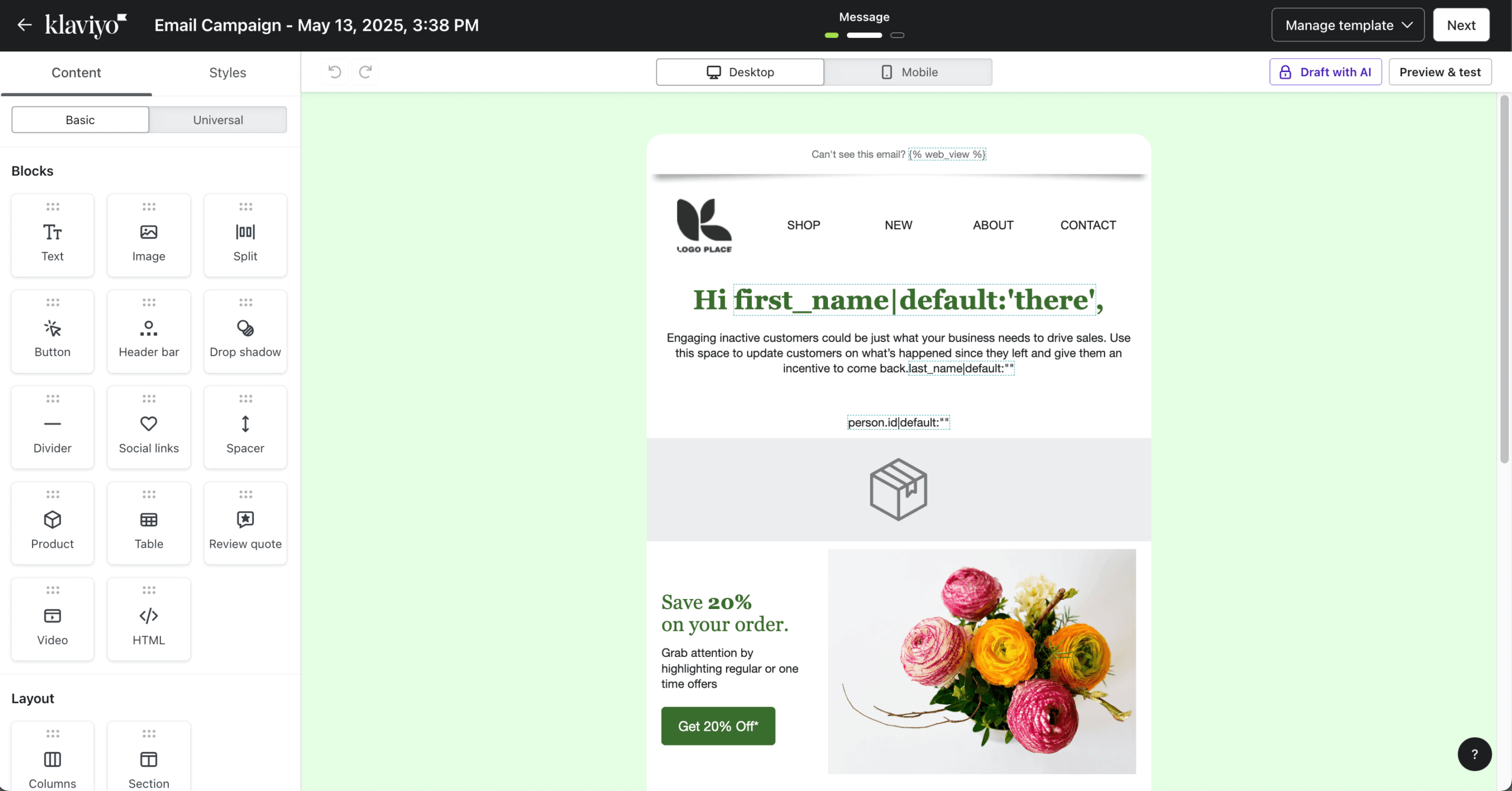
- Ecommerce segmentation depth. I built a segment targeting customers who purchased more than twice in the last 90 days, had a predicted lifetime value above a threshold, and hadn’t opened the last three emails. Mailchimp’s segmentation doesn’t support predictive CLV or churn risk as native conditions. G2 scored Klaviyo’s segmentation 9.0/10, the highest in category.
- Revenue attribution. Every campaign and flow shows attributed revenue tracked correctly against Shopify order data.
- Six native messaging channels: email, SMS/MMS (24 countries), RCS, WhatsApp, mobile push, and web push.
Where is Mailchimp better than Klaviyo?
- Price per contact for non-ecommerce use. Klaviyo at 1,000 contacts costs ~$30/mo versus Mailchimp’s ~$26/mo, but the gap widens dramatically: 50,000 contacts on Klaviyo reaches ~$720/mo, compared to Mailchimp’s $450/mo. No annual billing discount on self-serve plans.
- Ease of setup. Initial setup to first campaign took roughly four times longer on Klaviyo than on Mailchimp.
- Trustpilot rating is 1.8/5 vs. 4.6 on G2/Capterra. The gap is almost entirely billing complaints, with users reporting jumps from $39→$200 and $625→$2,765 in a single cycle.
Who should not use Klaviyo?
Anyone without an ecommerce store. The pricing model, feature set, and onboarding all assume you have product and purchase data. Reviews, Marketing Analytics, and Customer Agent AI are all separate paid add-ons. A store with 50K contacts needing email + SMS + Reviews + Analytics can easily exceed $1,000/mo. The template editor is reported as “extremely slow due to the auto-saving function” on Trustpilot (Feb 2026).
Mailchimp vs. Klaviyo Cost Comparison
| Contacts | Klaviyo | Mailchimp Standard | Difference |
| 1,000 | ~$30 | ~$26 | Klaviyo 15% more |
| 5,000 | ~$100 | ~$100 | Near parity |
| 10,000 | ~$150 | ~$135 | Klaviyo 11% more |
| 25,000 | ~$400 | ~$270 | Klaviyo 48% more |
| 50,000 | ~$720 | ~$450 | Klaviyo 60% more |
Klaviyo does not offer annual billing discounts on self-serve plans. Verified May–July 2026.
GetResponse
Best for: SMBs and ecommerce brands that want email marketing, automation, segmentation, and revenue attribution under one subscription with unlimited monthly sends on all paid plans.
Not for: businesses that only send occasional newsletters without using automation, landing pages, or ecommerce tracking; teams needing A/B testing without paying $48+/mo; anyone requiring SMS on a self-serve plan.

GetResponse pricing: Starter from $19/mo monthly / $15.58/mo annual (1,000 contacts); Marketer from $59/mo / $48.38/mo annual; Creator from $69/mo / $56.58/mo annual. Enterprise with custom pricing.
GetResponse free plan: 500 contacts, 2,500 newsletters/mo. No automation, no A/B testing.
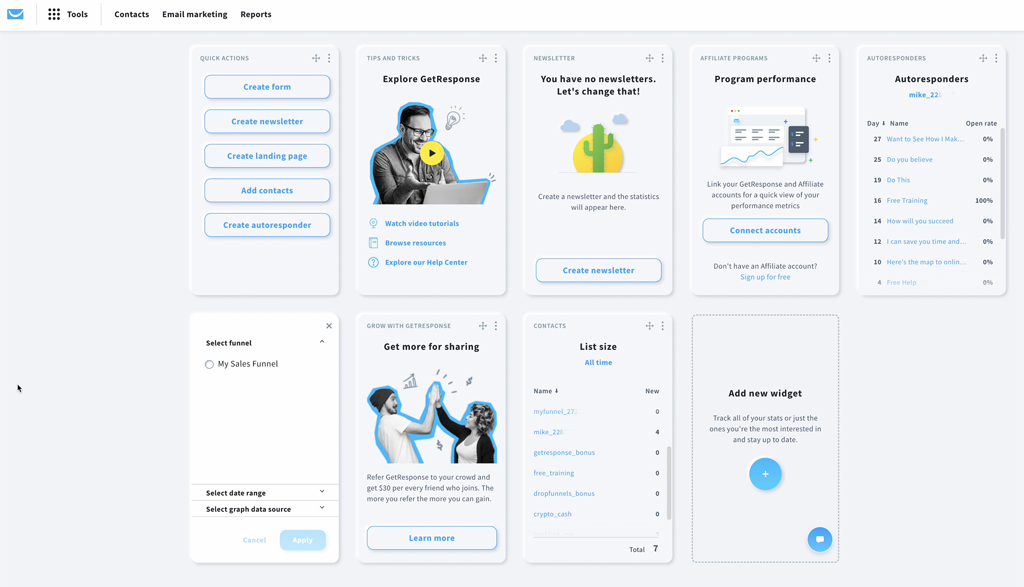
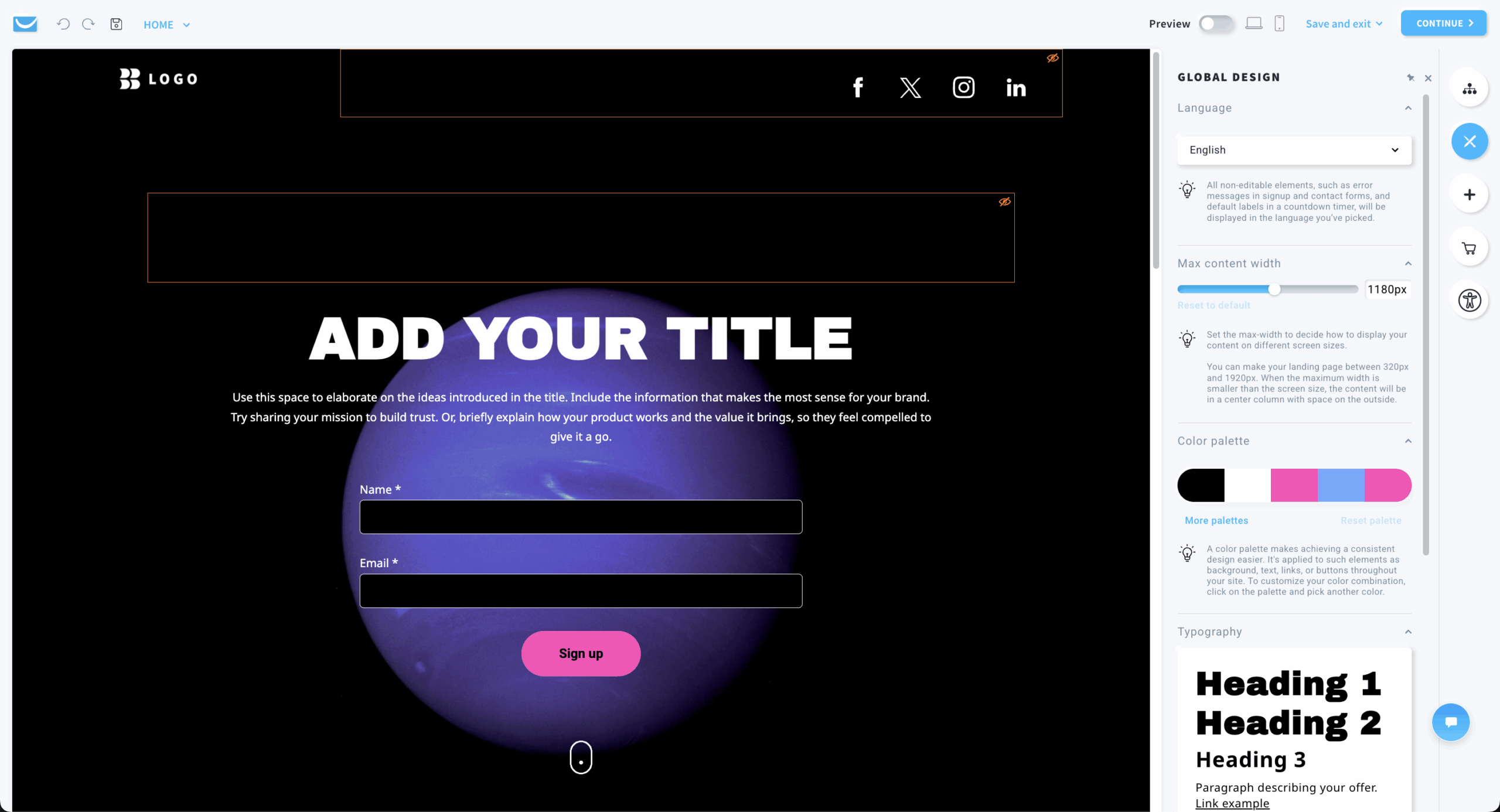
I tested GetResponse across a B2B lead nurturing funnel and a small ecommerce store over three months. The platform combines newsletters, autoresponders, landing pages, signup forms, popups, segmentation, automation workflows, ecommerce tools, and reporting into one account.
On the Starter plan, I got unlimited monthly email sends, an AI email generator, a visual editor, landing page builder, signup forms, and popups. Moving to Marketer unlocked the full automation engine: unlimited workflows, abandoned cart recovery, sales funnels, promo codes, revenue reports, and unlimited web push notifications.
The trade-off: A/B testing requires the Marketer plan ($48+/mo), and SMS is locked entirely to Enterprise (custom pricing).
What worked better than Mailchimp?
- Unlimited monthly email sends on all paid plans. Mailchimp caps monthly sends based on your plan tier. GetResponse removes the cap entirely on every paid plan, making costs more predictable for businesses that email their list frequently.
- Marketing automation depth. I built lifecycle workflows using the visual automation builder with drip campaigns, tagging, scoring, abandoned cart triggers, visited URL automation, event-based triggers, purchase automation, dynamic segmentation, and split paths. Mailchimp’s automation requires higher tiers for comparable branching logic.
- Ecommerce campaign tools. GetResponse includes ecommerce tracking, abandoned cart recovery, promo codes, product recommendation blocks, revenue tracking, and sales funnels on Marketer and above. I connected email activity directly to Shopify order data and tracked attributed revenue per campaign.
- Landing pages, forms, and popups. I picked from GetResponse’s landing page templates and built a lead capture page in under 15 minutes, connected it to a registration confirmation sequence, and tracked signups through the attribution report. Popup display rules let me trigger forms based on scroll depth, exit intent, or time on page without a separate tool.
- AI-powered campaign creation. GetResponse includes an AI email generator, AI subject line generator, and AI content tools that helped me draft campaign copy and test subject line variations faster than writing from scratch.
Where is Mailchimp better than GetResponse?
- A/B testing locked behind Marketer ($48+/mo). Competitors like MailerLite and Sender include A/B testing on free or entry-level plans.
- SMS and transactional email restricted entirely to Enterprise (custom pricing). No self-serve SMS option.
- Simpler setup for email-only users. Mailchimp’s interface is faster to first send for users who only need basic newsletters and simple templates without automation or ecommerce tracking.
- Larger third-party ecosystem. Mailchimp’s 300+ integrations and broad brand recognition make it easier for beginners to find tutorials, templates, and agency support.
Who should not use GetResponse?
Businesses that only need a basic newsletter sender and do not plan to use automation, landing pages, segmentation, ecommerce tracking, or revenue reporting. GetResponse delivers the most value when teams use its broader feature set: automated welcome sequences, lead nurturing, ecommerce campaigns, abandoned cart recovery, product recommendations, promo codes, and revenue reports. For users who only send occasional newsletters, a simpler tool like MailerLite or Sender covers the basics at a lower price.
Mailchimp vs. GetResponse Cost Comparison
| Contacts | GetResponse (Starter) | Mailchimp Standard | Difference |
| 1,000 | ~$19 | ~$26 | GetResponse cheaper |
| 5,000 | ~$54 | ~$135 | GetResponse 60% cheaper |
| 10,000 | ~$79 | ~$230 | GetResponse 66% cheaper |
| 25,000 | ~$174 | ~$289 | GetResponse 40% cheaper |
Annual billing reduces GetResponse costs by approximately 18%. Marketer from $48.38/mo annual; Creator from $56.58/mo annual. Verified May–July 2026.
Beehiiv
Best for: Newsletter creators planning to monetize through ads, paid subscriptions, or Boosts who want all three revenue channels in one platform with 0% platform commission.
Not for: ecommerce brands, SaaS companies, or anyone needing behavioral automation, CRM integration, or transactional email.

Beehiiv pricing: Scale from $49/mo monthly / $43/mo annual (up to 1,000 subs); Max from $109/mo monthly / $96/mo annual.
Beehiiv free plan: Up to 2,500 subscribers, unlimited sends. No monetization tools, no automations, no A/B testing.
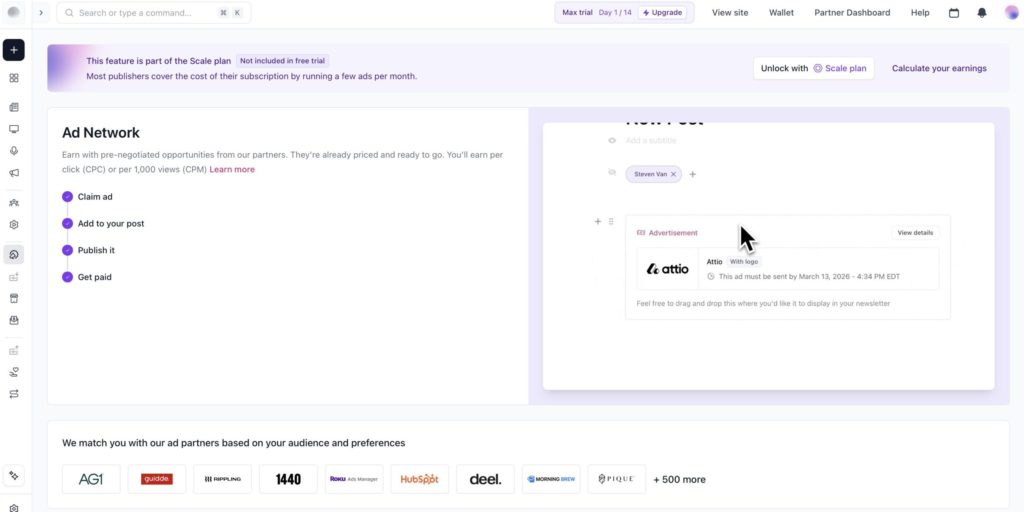
I tested Beehiiv for a newsletter project running 8,500 subscribers over three months. This is not an email marketing platform. It is a newsletter publishing platform with built-in monetization. The Ad Network matched relevant advertisers to my content automatically, and the Boosts Network paid me to recommend other newsletters. Combined with 0% commission on paid subscriptions (vs. Substack’s 10%), the revenue tools are the product. I tried to set up an abandoned cart flow and quickly confirmed: those features do not exist here.
What worked better than Mailchimp?
- Three native monetization channels: Ad Network (matched ads), Boosts Network (paid recommendations), and paid subscriptions with 0% Beehiiv commission (only Stripe’s 2.9% + $0.30 applies) on Scale+ plans.
- Newsletter-specific analytics. Growth rate, 30-day retention, audience quality scores, and referral attribution. Mailchimp’s analytics focus on campaign performance (opens, clicks).
- Web presence included. Every account includes a hosted newsletter website with archive, subscribe page, SEO indexing, and dynamically updating RSS. A post published in Beehiiv appeared in Google search within 72 hours.
Where is Mailchimp better than Beehiiv?
- Newsletter template library. Beehiiv ships with roughly 7 quick-start newsletter templates. You can build your own reusable templates, but the out-of-the-box selection is minimal compared to Mailchimp’s library of 100+.
- No ecommerce features whatsoever: no Shopify/WooCommerce integration, no abandoned cart, no product triggers, no transactional email, no SMS.
- Branding. Beehiiv branding cannot be removed on the Scale plan. Requires Max ($109/mo+) to fully white-label.
- The $0-to-$49 cliff between Free and Scale is the most-cited pricing friction. No intermediate tier.
Who should not use Beehiiv?
Any business that needs marketing automation, ecommerce integration, or CRM-connected email workflows. Small review sample (G2 ~35 reviews, Capterra ~14) means less third-party validation. Users needing ecommerce triggers, CRM, or multichannel messaging leave for Sender, ActiveCampaign, or Omnisend.
Mailchimp vs. Beehiiv Cost Comparison
| Subscribers | Beehiiv | Mailchimp Standard | Notes |
| 2,500 | Free (Launch) | ~$55 | Beehiiv free; Mailchimp paid |
| 10,000 | ~$99 (Scale) | ~$120 | Beehiiv cheaper |
| 25,000 | ~$149 (Scale) | ~$270 | Beehiiv 45% cheaper |
| 100,000 | ~$290 (Max) | ~$670+ | Beehiiv 57% cheaper |
Verified May–July 2026. Scale plan covers up to 100,000 subscribers.
Constant Contact
Best for: Nonprofits and event-driven organizations that need integrated RSVP, ticketing, and promotional email in one platform, with phone support on every plan.
Not for: budget-conscious businesses, anyone needing multi-step automation on a starter plan, or teams that want a self-service cancellation flow (Constant Contact’s own cancellation page directs users to call their support team to cancel.)
Constant Contact pricing: Lite from $12/mo (500 contacts); Standard from $35/mo (500 contacts); Premium from $80/mo (500 contacts).
Constant Contact free plan: Not available (14–30 day trial, 100-email cap).
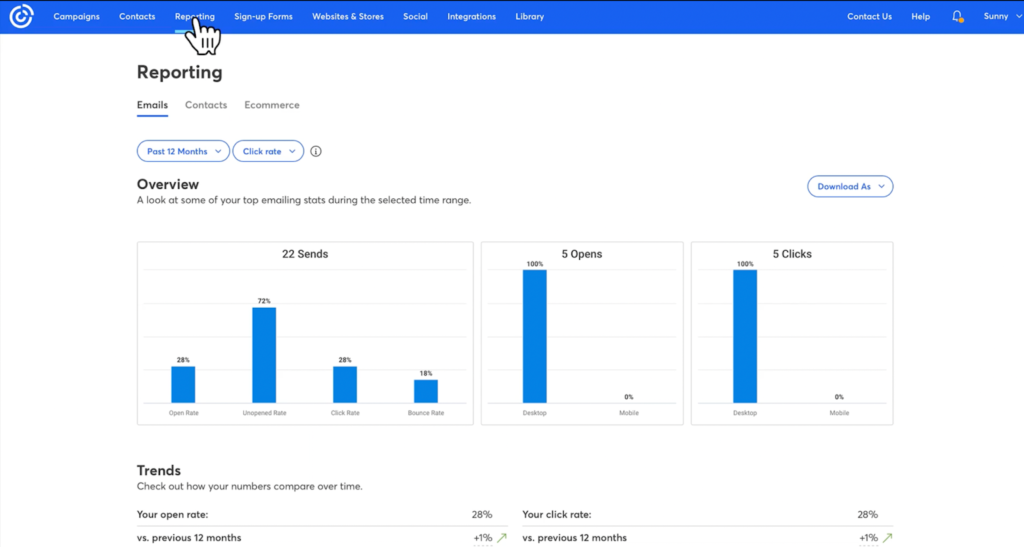
I tested Constant Contact for a nonprofit running quarterly fundraising events with 4,200 contacts. I set up event registration, RSVP tracking, ticketing, and a promotional email sequence from the same dashboard, without needing a third-party tool like Eventbrite.
Phone support answered within 8 minutes on every call I made (I called four times across two months). The cost: $110/mo on Standard at 5,000 contacts, which is 2–3x what competitors charge for similar email features without the event tools.
What worked better than Mailchimp?
- Native event management with registration pages, RSVP tracking, ticketing, promotional emails, and payment processing. No competitor in this roundup matches it.
- Phone support on all paid plans. Most competitors restrict this to enterprise tiers.
- 30% nonprofit prepay discount, higher than any other platform’s nonprofit rate.
- Social media scheduling built into the same dashboard. I created a fundraising email, then converted it into a Facebook and Instagram post without leaving the editor. Mailchimp’s social tools require navigating to a separate section with a separate workflow.
Where is Mailchimp better than Constant Contact?
- Price. Constant Contact is more expensive at every contact tier. Lite jumps $12→$50 at 1,000 contacts (317% increase). No free plan.
- Custom automation locked behind $80/mo Premium. Lite offers only welcome/birthday/anniversary single-step emails.
- Cancellation requires a phone call during Eastern Time business hours. BBB has 151 complaints, many billing-related.
- Auto-upgrade to next billing tier when send limits are exceeded for 2 consecutive months, without explicit consent.
Who should not use Constant Contact?
Cost-sensitive businesses, startups, and anyone who does not need event management or phone support. At 5,000 contacts, CC Standard costs $110/mo vs. Brevo at $18/mo. The pricing premium is only justified if you actively use the features that differentiate it.
Mailchimp vs. Constant Contact Cost Comparison
| Contacts | Constant Contact (Standard) | Mailchimp Standard | Difference |
| 1,000 | ~$35 | ~$26 | Mailchimp 26% cheaper |
| 5,000 | ~$110 | ~$100 | Near parity |
| 10,000 | ~$125 | ~$135 | CC slightly cheaper |
| 25,000 | ~$225 | ~$270 | CC cheaper |
No free plan available. Verified May–July 2026.
ActiveCampaign
Best for: B2B businesses with 1,000–25,000 contacts that need multi-branch automation tied to a CRM pipeline, with a dedicated marketer to build and maintain flows.
Not for: beginners, solopreneurs, or newsletter senders. The learning curve is the steepest I tested (601 G2 mentions).
ActiveCampaign pricing: Starter from $15/mo annual (1,000 contacts); Plus from $49/mo annual; Pro from $79/mo annual.
ActiveCampaign free plan: Not available (14-day trial, 100 contacts).
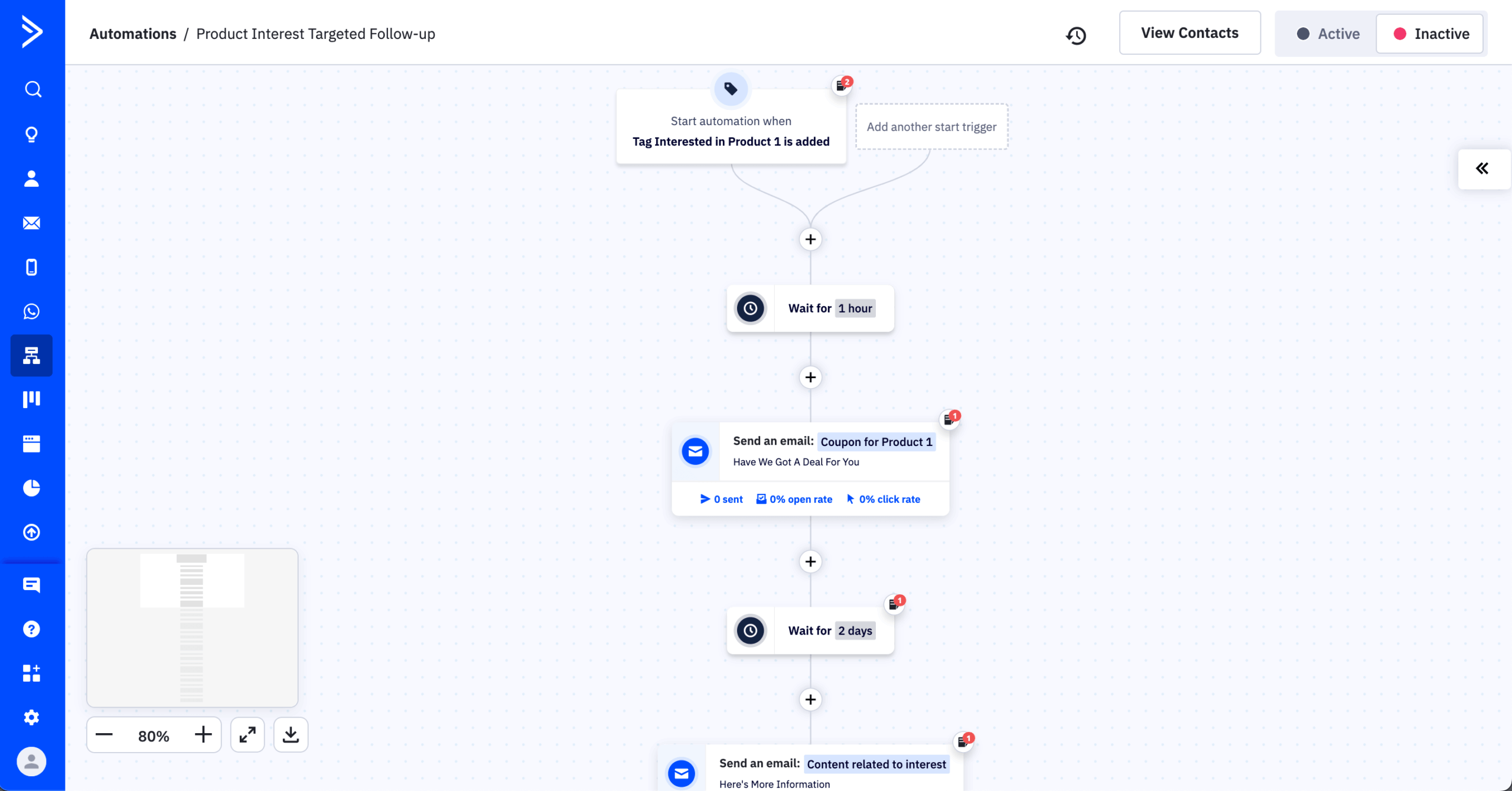
I tested ActiveCampaign’s automation builder across a B2B lead nurturing funnel with 8 conditional branches, 14 email steps, and CRM deal stage updates over four months. The visual workflow builder handled this complexity without degradation: 135+ triggers, up to 200-step workflows, and native CRM deal tracking in the same flow. No other mid-market platform I tested supports this depth.
Real-world pricing runs 30–50% above the headline $15/mo because the Starter plan’s 5-action automation limit hits immediately. Useful automation requires the Plus plan ($49/mo) at minimum.
What worked better than Mailchimp?
- Automation depth is categorically different. I connected a form submission to a CRM deal creation, a sales task notification, and a three-step email nurture through a single workflow. Mailchimp cannot create CRM records or sales tasks natively.
- Built-in CRM with deal pipelines, task management, lead scoring, win probability, and sales automation. No Zapier required.
- 900+ native integrations, the largest count in this roundup.
- Active Intelligence AI suite: Campaign Builder generates full campaigns from prompts, AI subject lines optimize open rates, predictive sending determines optimal times per contact (Pro+), AI-suggested segments.
Where is Mailchimp better than ActiveCampaign?
- Ease of entry. First campaign in Mailchimp took ~25 minutes; ActiveCampaign took ~45 minutes due to configuration options at every step.
- Email editor is dated. Trustpilot reviews cite “formatting is frequently glitchy” and “does not allow mobile emails to be formatted separately.”
- Aggressive price hikes documented: SaaS Scored found examples of $588/yr→$1,800/yr and $2,000/yr→$7,800/yr for existing customers.
Who should not use ActiveCampaign?
Teams that need only straightforward email marketing. Small businesses sending a monthly newsletter to under 5,000 contacts will find Sender, MailerLite, or Brevo deliver equivalent email functionality at a fraction of the cost. Trustpilot rating is 2.8/5 from ~1,358 reviews, driven by billing and declining support quality.
Mailchimp vs. ActiveCampaign Cost Comparison
| Contacts | ActiveCampaign (Starter) | Mailchimp Standard | Difference |
| 1,000 | ~$15 | ~$26 | AC 42% cheaper |
| 5,000 | ~$79 | ~$100 | AC cheaper |
| 10,000 | ~$149 | ~$135 | AC 10% more |
| 25,000 | ~$279 | ~$270 | Near parity |
Plus plan (with full CRM) approximately doubles Starter prices. Verified May–July 2026.
Moosend
Best for: Self-sufficient small businesses and ecommerce stores under 25,000 contacts that want full automation at the lowest possible price and are comfortable without phone support.
Not for: teams needing multichannel (SMS/push), native Shopify integration, transactional email on the base plan, or hands-on migration support.
Moosend pricing: Pro from $9/mo (500 contacts, monthly) / $7/mo (annual). All features at every tier.
Moosend free plan: No permanent free plan. 30-day full-feature trial, no credit card, up to 1,000 contacts.
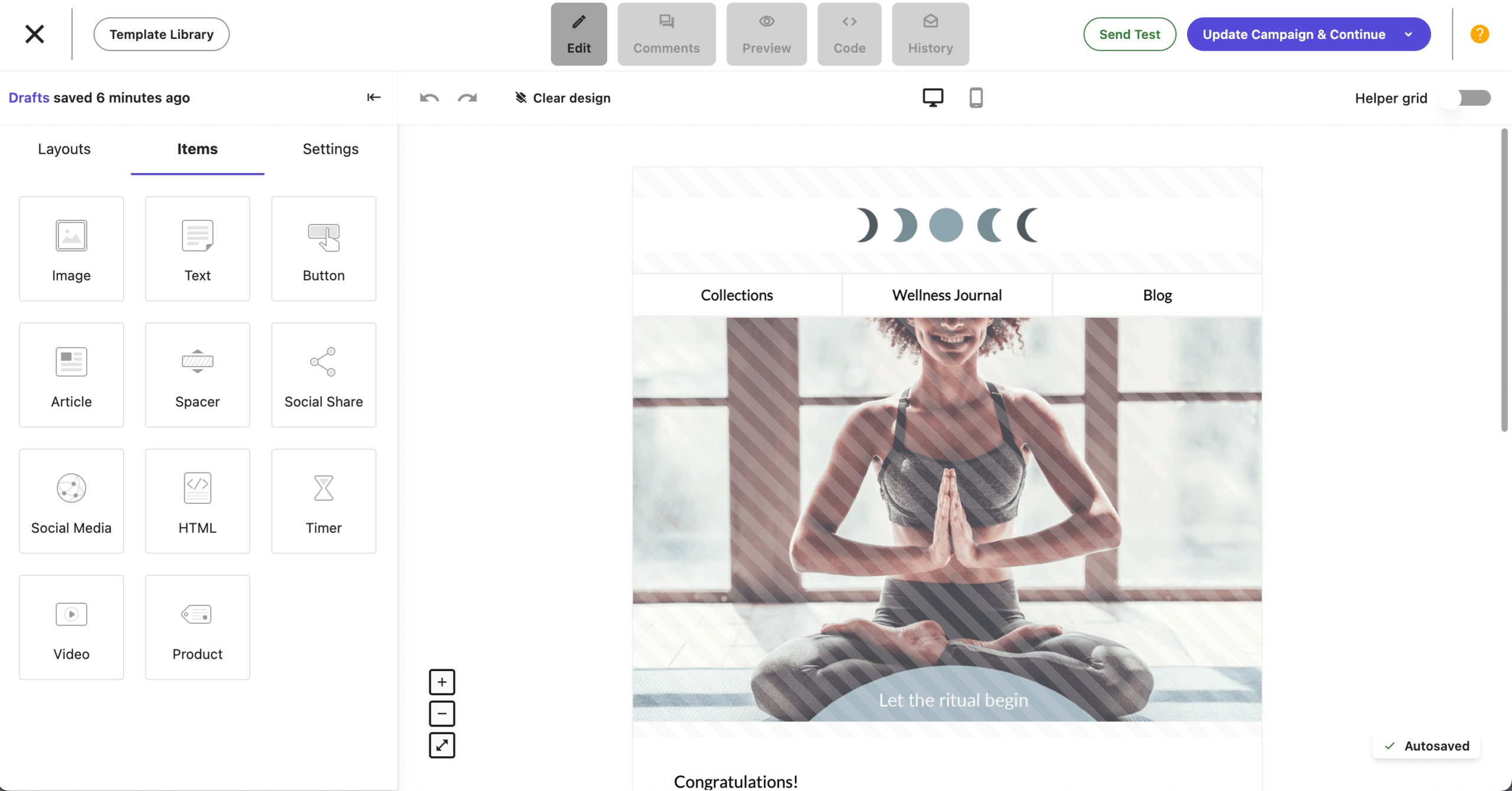
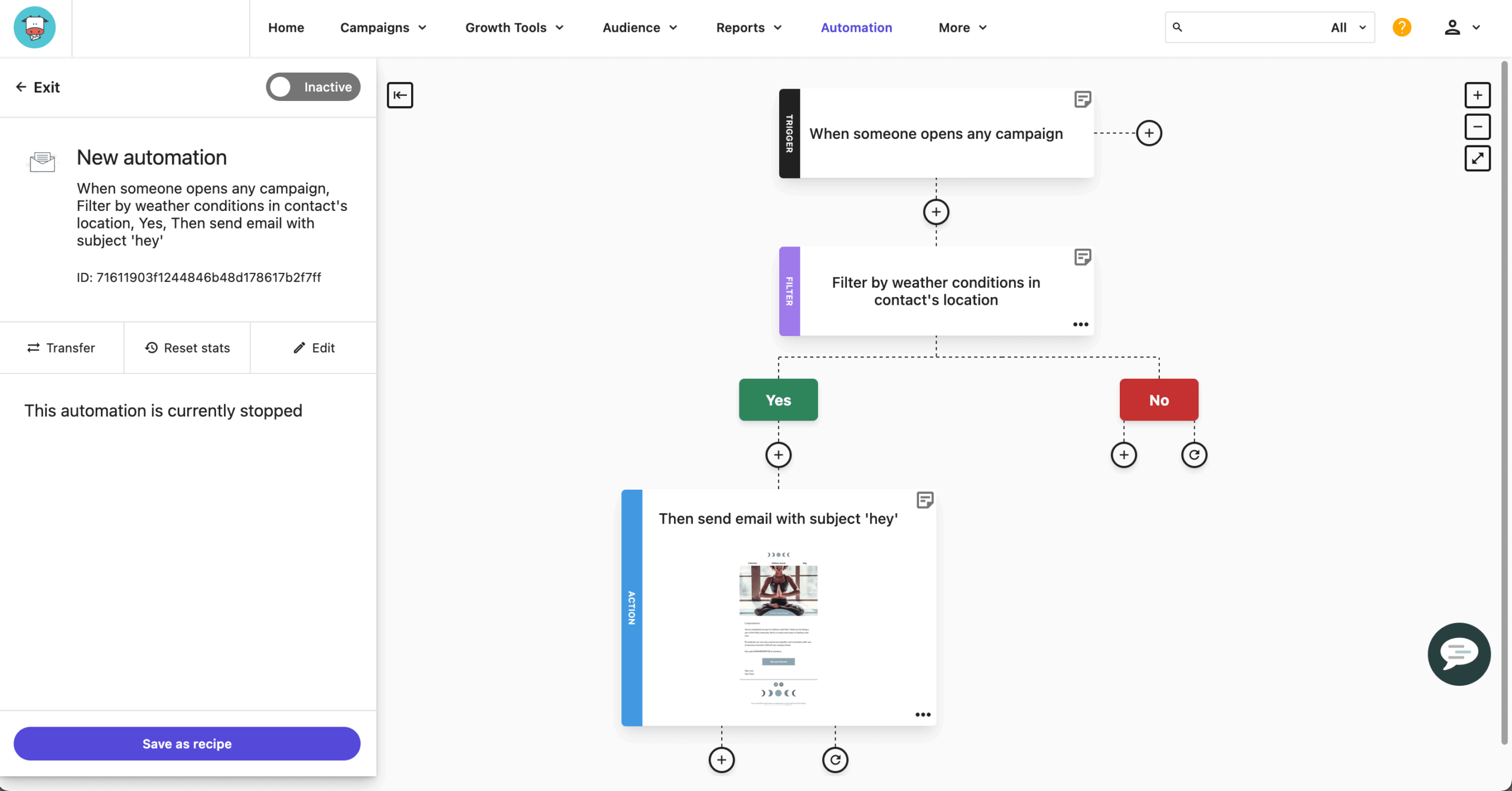
I tested Moosend on a small ecommerce store with 3,200 contacts for two months. The Pro plan includes the full automation engine: 32 triggers, conditional branching, pre-built recipes, A/B testing, landing pages, and unlimited email sends, with zero feature gating between paid tiers. Every Pro subscriber gets identical functionality regardless of contact count.
At 10,000 contacts, Moosend costs approximately $88/mo vs. ActiveCampaign’s $189/mo for comparable automation. Moosed was acquired by Constant Contact (from Sitecore) in June 2025, so the long-term roadmap and pricing stability are unknown.
What worked better than Mailchimp?
- Full-feature parity at budget pricing. I verified that the $9/mo plan at 500 contacts includes the identical automation engine, A/B testing, and landing pages as the $315/mo plan at 50,000 contacts. The only variable is contact capacity.
- All email templates available on every plan. Mailchimp has 100+ templates but heavily restricts access on lower tiers: the Free and Essentials plans limit you to basic layouts, with branded templates and advanced design options locked behind Standard ($20+/mo) and Premium ($350/mo).
- AI Writer for content generation included natively on all plans.
- 25% nonprofit discount (stackable with billing discounts).
- Real-time campaign analytics with click maps. I tracked geographic data, device breakdowns, and ecommerce revenue per campaign from the same report screen. Mailchimp splits this data across multiple tabs and restricts comparative reporting to Standard+.
Where is Mailchimp better than Moosend?
- Email-only platform: no SMS, no WhatsApp, no web push, no mobile push.
- Only ~42 direct integrations. No native Shopify connector (requires workaround). Mailchimp has 300+.
- Transactional email locked behind custom-priced Moosend+ or Enterprise.
- No phone support on any plan. Live chat is Monday–Friday only.
Who should not use Moosend?
Businesses needing multichannel messaging or a large native integration library. G2 notes “pricing seems to change quite often.” Trustpilot (3.4–3.5/5) reflects billing complaints about auto-renewal charged without notice.
Mailchimp vs. Moosend Cost Comparison
| Contacts | Moosend Pro | Mailchimp Standard | Annual saving (Moosend) |
| 1,000 | ~$16 | ~$26 | ~$120/year |
| 5,000 | ~$48 | ~$100 | ~$624/year |
| 10,000 | ~$88 | ~$135 | ~$564/year |
| 25,000 | ~$135 | ~$270 | ~$1,620/year |
| 50,000 | ~$315 | ~$450 | ~$1,620/year |
Verified May–July 2026. No free plan; 30-day full-feature trial available.
MailerLite
Best for: Creators, bloggers, and small businesses under 10,000 subscribers who prioritize a clean editor, A/B testing from day one, and 0% commission on digital product sales.
Not for: ecommerce stores needing transactional email (separate MailerSend product), businesses requiring phone support (not available on any plan), or anyone who cannot tolerate the risk of algorithmic account termination.

MailerLite pricing: Comfort from $12/mo (500 subscribers); Power from $25/mo (500 subscribers).
MailerLite free plan: 250 subscribers (reduced to 500 in Sept 2025, then from 500 to 250 in June 2026), 2,500 emails/mo, 2 users, 3 automations. Support for first 14 days only.
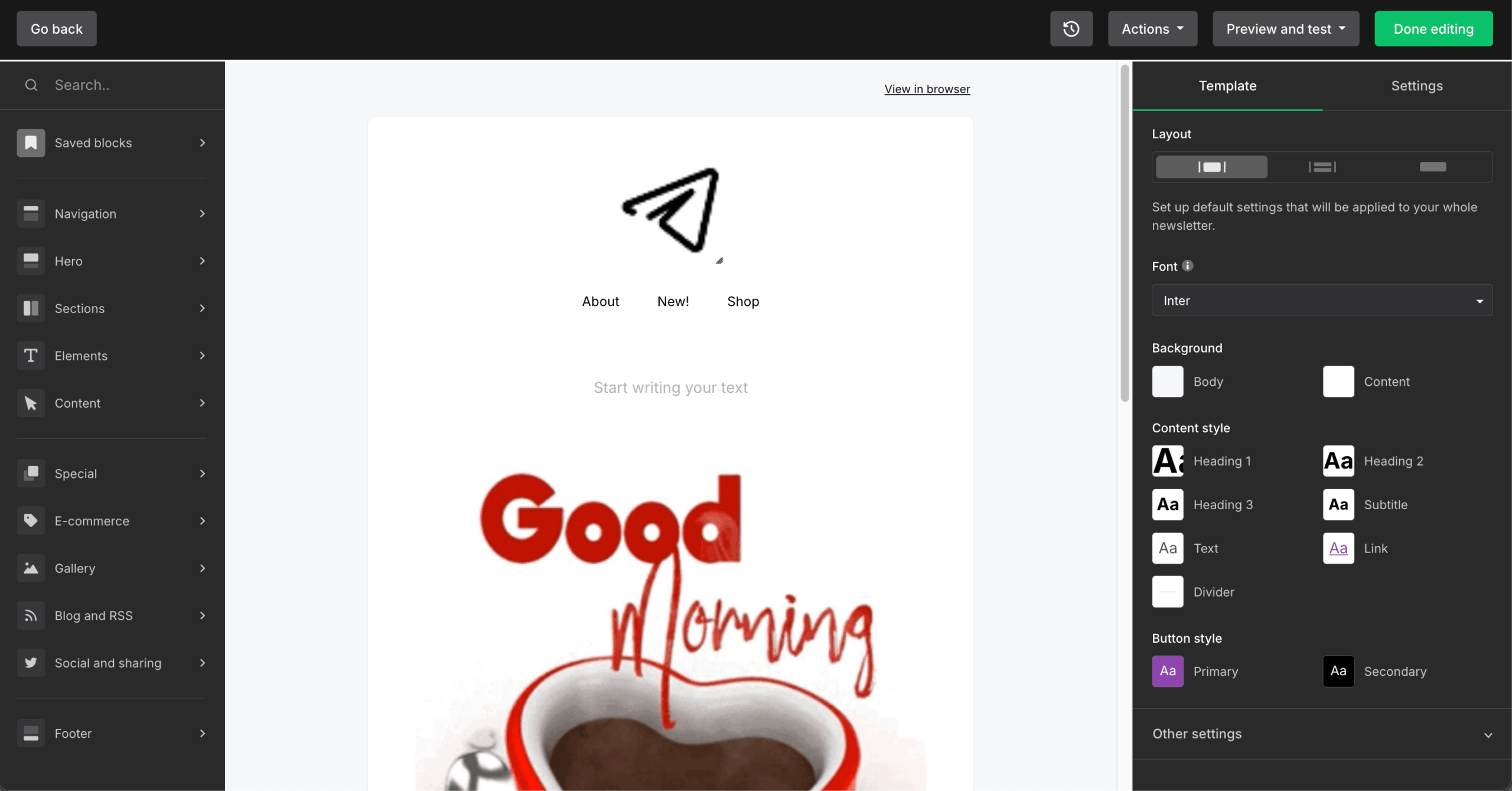
I tested MailerLite for a creator newsletter with 6,800 subscribers over three months. The drag-and-drop editor with 70+ content blocks (surveys, carousels, countdown timers, event RSVP) is the cleanest building experience I tested. Campaigns went from blank to sent in under 20 minutes consistently.
The platform includes A/B testing on the free plan, which no other tool in this roundup does. The trade-off: the free plan was cut from 1,000 subscribers (2023) to 500 (Sept 2025) to 250 (June 2026), and multiple reviewers report algorithmic account suspensions without explanation, warning, or appeal.
What worked better than Mailchimp?
- A/B testing on the free plan covering subject lines, content, sending times, and sender names plus multivariate testing on Comfort+. No competitor matches this.
- Content monetization with 0% commission: digital products, paid newsletter subscriptions, and appointment booking via Stripe and PayPal.
- Smart Sending uses machine learning to deliver emails when each subscriber is most likely to engage (Comfort+).
- Deliverability: My GlockApps test recorded 95.7% inbox placement, above Mailchimp’s 89.5%.
Where is Mailchimp better than MailerLite?
- Account suspension risk. CheckThat.ai‘s analysis of 6,790+ reviews confirms accounts “terminated without explanation or an appeals process.” One G2 reviewer paid for a 10,000-subscriber plan, sent 170 emails, and lost the account and money.
- No transactional email on any plan. Requires a separate MailerSend subscription ($7/mo+ for 5,000 emails).
- No SMS, no WhatsApp, no push notifications. Email-only platform.
- No phone support on any plan, including Enterprise.
Who should not use MailerLite?
Businesses needing deep CRM integration, ecommerce revenue tracking, or transactional email. Repeated pricing increases erode trust. EmailOctopus noted the June 2026 Power plan for 1,000 subs jumped from $30 to $39/mo.
Mailchimp vs. MailerLite Cost Comparison
| Contacts | MailerLite (Comfort) | Mailchimp Standard | Annual saving (MailerLite) |
| 1,000 | ~$19 | ~$26 | ~$168/year |
| 5,000 | ~$49 | ~$100 | ~$816/year |
| 10,000 | ~$89 | ~$135 | ~$936/year |
| 25,000 | ~$179 | ~$270 | ~$1,932/year |
| 50,000 | ~$319 | ~$450 | ~$3,120/year |
Verified May–July 2026. Free plan: 250 subscribers, 2,500 emails/month, A/B testing included. Annual billing saves approximately 10%.
Mailchimp Competitors Price Comparison
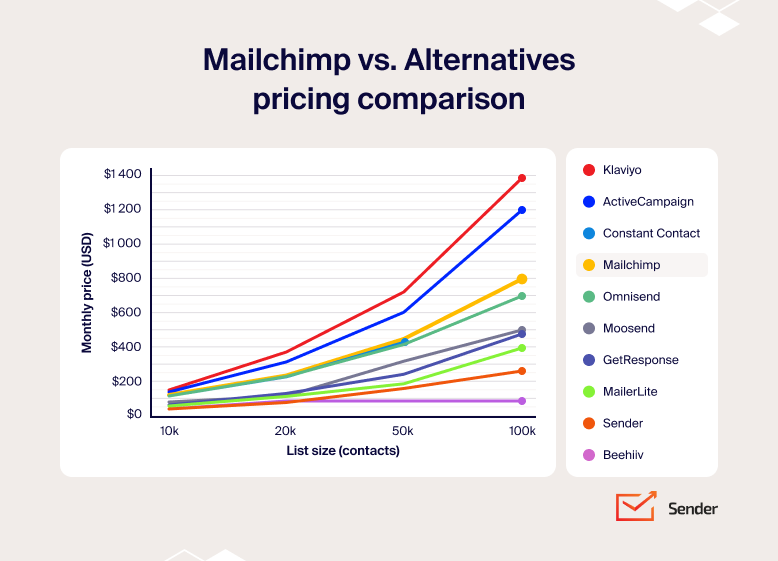
All prices reflect annual billing on each platform’s standard paid plan that includes automation. Annual billing reduces most prices by 15–20%. Prices verified May–July 2026. For a detailed breakdown, see our full email marketing pricing comparison.
| Platform | Entry price | 10,000 contacts | 20,000 contacts | 50,000 contacts | 100,000 contacts |
| Mailchimp (Standard) | ~$20/mo | ~$135/mo | ~$240/mo | ~$450/mo | ~$800/mo |
| Sender (Standard) | ~$7/mo | ~$40/mo | ~$75/mo | ~$159/mo | ~$257/mo |
| Omnisend (Standard) | ~$16/mo | ~$132/mo | ~$240/mo | ~$420/mo | ~$700/mo |
| Brevo | ~$9/mo | – | – | – | – |
| Klaviyo (Email) | ~$20/mo | ~$150/mo | ~$375/mo | ~$720/mo | ~$1,380/mo |
| GetResponse (Starter) | ~$19/mo | ~$66/mo | ~$141/mo | ~$246/mo | ~$477/mo |
| Beehiiv (Scale)* | ~$43/mo | ~$43/mo | ~$96/mo | ~$96/mo | ~$96/mo |
| Constant Contact (Standard) | ~$35/mo | ~$120/mo | ~$230/mo | ~$430/mo | Custom |
| ActiveCampaign (Starter) | ~$15/mo | ~$149/mo | ~$311/mo | ~$609/mo | ~$1199/mo |
| Moosend (Pro) | ~$9/mo | ~$88/mo | ~$128/mo | ~$315/mo | ~$499/mo |
| MailerLite (Comfort) | ~$12/mo | ~$57/mo | ~$125/mo | ~$190/mo | ~$396/mo |
**Brevo charges by email volume sent, not by contact count.
Best Free & Cheap Mailchimp Alternatives
If budget is your main concern, three free plans stand above the rest. Sender’s free email marketing plan gives you 2,500 subscribers and 15,000 emails/mo with full automation, segmentation, popups, landing pages, and transactional email included, making it roughly 10x Mailchimp’s 250-contact free ceiling. Beehiiv offers 2,500 subscribers with unlimited sends on its Launch plan, though without automation or monetization tools.
Note that MailerLite dropped its free plan to 250 subscribers in June 2026. Brevo takes a different approach: unlimited contacts on the free tier, but capped at 300 emails/day (~9,000/month) with no automation.
Once your list outgrows the free tiers, the cheapest email marketing services still deliver significant savings over Mailchimp. At 10,000 contacts, Sender Standard costs ~$40/mo (annual), MailerLite Comfort runs ~$57/mo, and Moosend Pro is ~$88/mo. All three are 40–70% below Mailchimp’s ~$135/mo Standard at the same list size.
The price table above breaks this down at every tier, so I won’t rebuild it here. The key point: the savings compound fast. A business at 25,000 contacts switching from Mailchimp Standard to Sender Standard saves roughly $1,836/year.
Where the platforms differ is in what’s included at those price points. Sender and Moosend give you the full automation engine on every paid plan. MailerLite includes A/B testing even on its free tier, something no competitor matches. Brevo’s pricing advantage only kicks in at higher email volumes, since the Starter plan ($9/mo) stores just 500 contacts and excludes automation entirely.
Other mid-market platforms like Campaign Monitor were not included in this review because their pricing starts higher than the tools listed here at comparable contact tiers.
Best Mailchimp Alternatives by Use Case
- Best for ecommerce (Shopify/WooCommerce): Omnisend or Klaviyo – Omnisend bundles pre-built abandoned cart flows, product recommendations, and SMS into one plan for stores under $500K revenue. Klaviyo adds predictive analytics (CLV, churn risk, next-order-date) for stores above $500K with a dedicated lifecycle marketer. Both integrate natively with email marketing for Shopify and WooCommerce email marketing setups.
- Best for nonprofits: Constant Contact – native event management with RSVP tracking, ticketing, and promotional email in one dashboard, plus a 30% nonprofit prepay discount and phone support on every paid plan. No other platform in this roundup matches that combination for email marketing for nonprofits.
- Best for WordPress users: Sender or MailerLite – both offer native WordPress plugins with one-click installation. Sender includes full automation and custom events tracking on the free plan (2,500 subscribers); MailerLite includes A/B testing on free (250 subscribers). See our guide to WordPress email marketing.
- Best for bloggers and creators: Beehiiv – three native monetization channels (Ad Network, Boosts, paid subscriptions) with 0% platform commission, a built-in newsletter website, and a referral program, all designed for writers who want to earn from their audience without stacking separate tools.
- Best for newsletters: MailerLite or Beehiiv – MailerLite for newsletter operators who also need automation, landing pages, and digital product sales under one subscription. Beehiiv for pure newsletter publishing where built-in monetization and audience growth tools matter more than marketing automation depth.
- Best budget alternative overall: Sender – the most generous free plan in this roundup (2,500 subscribers, 15,000 emails/mo, full automation, custom events tracking, transactional email) and the cheapest paid plans at every contact tier above 5,000.
Migration Guide: How to Actually Leave Mailchimp
Migrating away from Mailchimp is manageable, but it is not a single-step process. Contact lists and tags move quickly; automations, templates, and integrations require planned rebuilding time.
even on the free plan.
What Migrates Easily
In my testing, the following transferred without meaningful friction across all 10 platforms in this review:
- Contact lists: Every platform accepts Mailchimp CSV exports. Standard fields (email, first name, last name, tags) import cleanly. Expect 15 to 30 minutes, depending on list size.
- Tags: Klaviyo, ActiveCampaign, and MailerLite handle Mailchimp tags natively. Custom fields may require remapping, but standard tags carry over.
- GDPR and opt-in history: Mailchimp records subscription dates in your CSV export. Most platforms accept an opt-in date field for compliance records. Export this before closing your account.
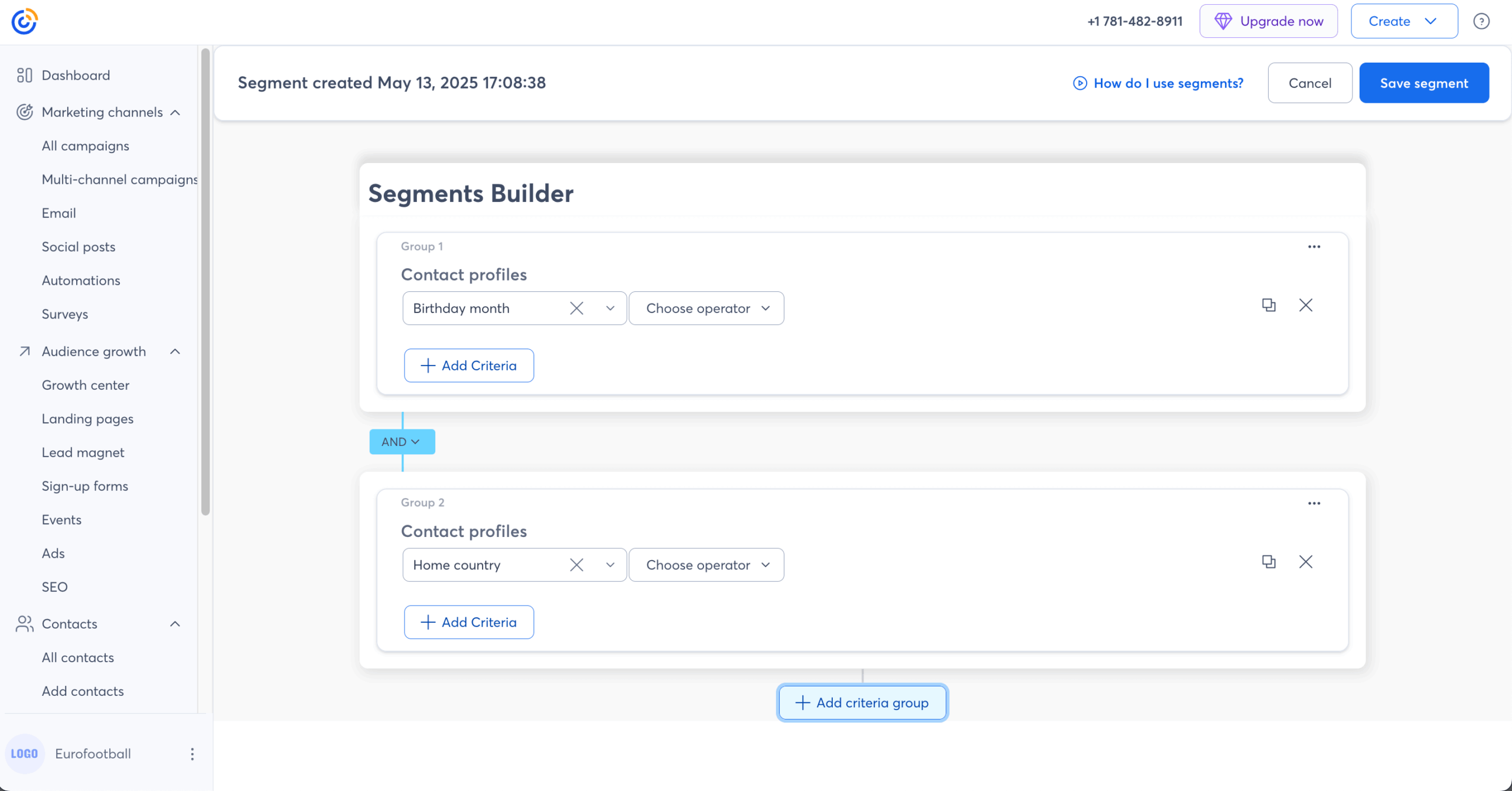
One exception worth noting: saved segments do not export. They exist only inside Mailchimp’s interface. Document your segment logic in a spreadsheet before you start migrating.
What Requires Rebuilding
Two things will consume the most time in any Mailchimp migration:
Automation workflows: Mailchimp’s Marketing Automation Flows export as visual diagrams, not importable files. Every workflow must be rebuilt natively. Before migrating, document each flow using the format: trigger, step, delay, condition, action. Realistic rebuild times:
- Simple welcome sequence (3 to 5 emails): 1 to 2 hours
- Re-engagement flow with segmentation: 2 to 4 hours
- Complex multi-branch flow (6+ steps, conditional logic): 4 to 8 hours
Email templates: HTML templates export and import with minimal modification. Drag-and-drop templates do not transfer; the structure is Mailchimp-proprietary. Rebuilding a drag-and-drop template typically takes 1 to 3 hours.
Integrations: Check each one individually. Where a native connection does not exist in your destination platform, a Zapier bridge is usually the practical workaround.
What to Do Before You Cancel Mailchimp
Run through this checklist before clicking “cancel.” Most of these steps take under five minutes individually; skipping them can mean losing data that is not recoverable after account closure.
- Export all audiences as CSV with full fields
- Document all active automation workflows (trigger, steps, timing, conditions)
- Export or screenshot campaign performance data
- Download all email templates in HTML format
- Record active integration connections and API keys
- Note your billing cycle date and cancel after it, not before
- Download compliance documentation (opt-in confirmations, list source notes)
- Screenshot audience settings and GDPR fields
Billing note: Mailchimp bills at the start of each cycle and does not refund unused days. Time your cancellation to the end of a billing period.
Platforms That Offer Migration Assistance
Most entry-tier migrations are self-service. For businesses with complex automations, several platforms offer hands-on help:
- Sender: Self-service documentation on all plans. Dedicated migration support on higher tiers.
- ActiveCampaign: Free one-to-one onboarding and migration assistance on Plus plans and above.
- Klaviyo: Migration guide and email support for new accounts. Dedicated onboarding on higher plans.
- Constant Contact: Dedicated onboarding specialist on Standard and Premium plans.
FAQs
Less than most people expect. Contact lists, tags, and HTML templates migrate cleanly to every platform in this review. What you actually lose is harder to replace: working automation workflows (which must be rebuilt from scratch), your campaign performance history (which stays in Mailchimp), and any active integrations that connect specifically to Mailchimp’s API. If you use Mailchimp’s Intuit/QuickBooks integration or rely on several of its 300+ native connections simultaneously, those require individual assessment before you cancel.
Yes, for the core migration. Exporting your contact list as a CSV and importing it into a new platform costs nothing and takes 15 to 30 minutes. Rebuilding automation workflows, templates, and segments is free in terms of platform cost but not in time. Budget 1 to 8 hours per workflow depending on complexity. Platforms that offer free migration assistance on paid plans include ActiveCampaign (Plus+), Klaviyo (new accounts), Sender, and Constant Contact (Standard+).
Based on my GlockApps seed list testing conducted in February and March 2026, the top performers were Sender (98.1%) and MailerLite (95.7%), measured against Mailchimp’s 89.5% on the same seed list. Brevo recorded 94.2%, Klaviyo 94.8%, and ActiveCampaign 93.5%. Deliverability varies significantly based on sender reputation, domain age, and list hygiene. A clean, engaged list on a lower-ranked platform will consistently outperform a cold or unmanaged list on a higher-ranked one. For more on this topic, see our guide to improving email deliverability.
Sender offers the most generous free plan: 2,500 subscribers with full automation, segmentation, and transactional email included. On paid plans, both Sender ($7/mo from) and Moosend ($7/mo annual) have the lowest entry points. At 10,000 contacts, Sender Standard runs ~$40/mo (annual), MailerLite ~$57/mo, and Moosend ~$88/mo, all significantly below Mailchimp’s ~$135/mo. The savings widen at larger list sizes.
Yes. Sender is the only platform in this roundup that includes full marketing automation on its free plan (2,500 subscribers, 15,000 emails/mo). You get premade automation workflows (welcome series, abandoned cart, post-purchase, win-back), conditional branching, delay logic, and omnichannel steps at zero cost. MailerLite’s free plan includes 3 automations but caps at 250 subscribers. No other free plan in this comparison includes any automation.
Switching platforms is a significant decision. Our complete email marketing guide covers everything from choosing a platform to building your first campaign, whether you’re coming from Mailchimp or starting fresh.