


Every email you send travels through a chain of servers before reaching its destination. SMTP relay is the mechanism that makes this journey possible—forwarding messages from one mail server to another until they arrive in the recipient’s inbox. Without relay, your emails would have nowhere to go beyond your own server.
Whether you’re sending transactional emails from an application, bulk marketing campaigns, or just trying to understand why email messages sometimes fail to deliver, understanding SMTP relay helps you troubleshoot issues and optimize deliverability.
So if you’re still wondering, ‘How SMTP relay works?’, by the end of this guide, you’ll know how relay works, why it matters, and how to get started with one.
What is SMTP Relay?
SMTP relay is the process of transferring email messages between mail servers. Simply put, when you send an email, it rarely travels directly from your server to the recipient’s inbox. Instead, it passes through intermediary servers—relays—that forward the message along until it reaches its final destination.
Think of relay as the routing system for email. Your outgoing mail server accepts your message, determines where it needs to go, and hands it off to the next server in the chain. That server might deliver it directly or pass it along to another relay. Each hop brings your email closer to the recipient’s mail server.
SMTP relay becomes especially important when sending from applications, websites, or business systems. Rather than configuring your own mail server infrastructure, you connect to a SMTP relay service that handles the complex work of authentication, deliverability, and routing. The relay accepts your messages and takes responsibility for getting them delivered.
SMTP Relay vs. Other Email Concepts
Email terminology gets confusing fast. SMTP, SMTP servers, SMTP relay services, smart hosts—if you’re not confused by all this, we salute you. But for most users who’re new to the inner workings of email sending, these terms overlap and intertwine in ways that trip up even the most experienced developers.
SMTP Relay vs. SMTP
SMTP stands for Simple Mail Transfer Protocol and is, as you might have guessed it, a protocol—the set of rules governing how email servers communicate. SMTP relay is an action performed using that protocol. SMTP defines the language servers speak; relay describes what they’re doing with it.
Every relay uses SMTP protocol, but not every SMTP interaction is a relay. When you send email from your client to your outgoing server, that’s SMTP submission. When that server forwards your message to another server, that’s SMTP mail relay. The protocol stays the same—the function differs.
SMTP Relay vs. SMTP Servers
An SMTP server is the infrastructure—the actual software and hardware that processes email. SMTP relay is one function that servers perform. Your SMTP server might accept incoming messages, authenticate users, filter spam, and relay outgoing mail. Relay is just one job among many.
Some servers specialize in relay, focusing exclusively on forwarding messages efficiently. Others handle the full email stack. When people say “SMTP relay server,” they typically mean a server optimized for forwarding high volumes of outgoing email rather than managing mailboxes or receiving incoming messages. Thus it’s important to be cautious of open relay configurations, where an SMTP server allows anyone to send mail through it, often resulting in spam or abuse.
SMTP Relay vs. SMTP Relay Services
SMTP relay is the technical process, while an SMTP relay service is a provider that relay emails for you. Services like SendGrid, Mailgun, and Amazon SES offer relay infrastructure so you don’t have to build and maintain your own.
These services provide SMTP credentials, manage IP reputation, handle bounce processing, and ensure deliverability. You send messages to their servers, and they relay to recipients. The distinction matters because you can perform SMTP relay yourself with your own servers—or outsource it entirely to a dedicated SMTP service.
SMTP Relay vs. Smart Host
A smart host is a specific type of mail relay server that your mail server forwards all outgoing mail through. Rather than delivering directly to recipients, your server routes everything through the smart host, which handles final email delivery.
Smart hosts are commonly used when your server lacks the reputation or infrastructure for direct delivery. The terms overlap significantly—a smart host performs relay functions. The difference is architectural: smart host implies a designated forwarding destination, while relay describes the broader forwarding process.
Sender includes SMTP with full automation on every plan. Start free with 15,000 emails/month.
How Does an SMTP Relay Work?
SMTP relay follows a predictable sequence every time you send an email. Understanding this process helps troubleshoot delivery issues and explains why certain configuration choices matter. The journey from send button to inbox involves multiple handoffs, each with potential failure points.
Understanding SMTP Relay: The Postal Mail Analogy
Imagine mailing a letter from a small town without a direct postal route to your recipient’s city. You drop the letter at your local post office—that’s your outgoing mail server. The local office doesn’t deliver directly. Instead, it sends your letter to a regional sorting facility.
The regional facility checks the destination and forwards it to another hub closer to the recipient. Maybe it passes through two or three facilities before reaching the local post office serving recipient’s address. Each facility is a relay point, accepting mail and forwarding it toward its destination.
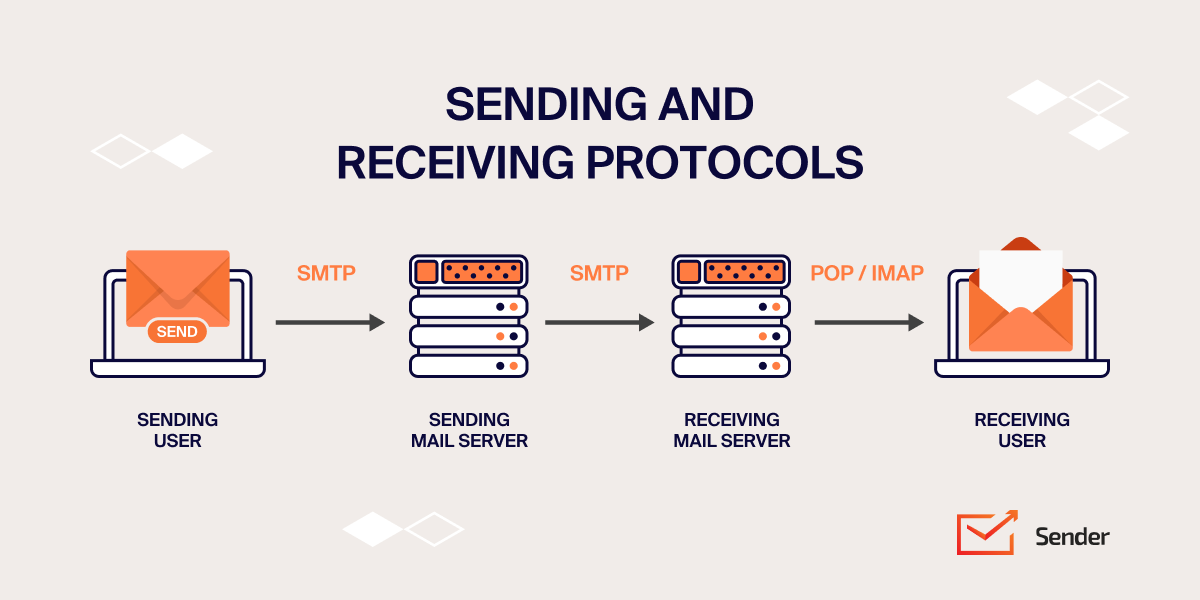
SMTP relay works pretty much the same way. Your email leaves your mail server, hits a relay server that checks the destination, gets forwarded to another server if needed, and eventually reaches the recipient’s mail server. Each server in the chain authenticates the sender, verifies the destination, and decides whether to accept and forward the message.
The SMTP Relay Process Step-by-Step
The technical relay process follows these stages:
1. Sending the Email (MUA → MSA → MTA). Your email client (Mail User Agent) connects to the Mail Submission Agent, which authenticates your credentials and accepts the message. The MSA then hands off the email to the Mail Transfer Agent (MTA), which takes responsibility for routing it toward the recipient.
2. Domain Check and Decision. The MTA examines the recipient’s domain to determine the next step. If the recipient shares your domain, delivery happens locally without relay. Different domain? The MTA prepares to relay the message externally.
3. DNS Lookup. The MTA prepares to relay messages for the recipient domain’s MX (mail exchanger) records. These records identify which servers accept email for that domain and their priority order, telling your MTA exactly where to forward the message.
4. The Relay (MTA to MTA Transfer). Your MTA connects to the recipient’s MTA and initiates an SMTP conversation—authenticating, specifying sender and recipient, and transferring the message content. The receiving MTA accepts the email and queues it for processing.
5. Final Delivery (MDA → Recipient’s Inbox). The recipient’s Mail Delivery Agent receives the message from the MTA and deposits it into the correct mailbox. The email now sits in the recipient’s inbox, ready to be retrieved via IMAP or POP3.
Why is SMTP Relay Important?
SMTP relay solves problems you might not realize you have—until emails stop arriving. Direct delivery from your own server sounds simple, but modern email infrastructure makes it surprisingly difficult without relay services.
- Deliverability and Reputation. Email providers judge incoming messages partly by sender reputation. New or low-volume IP addresses lack reputation, landing messages in spam folders. Relay services maintain high-reputation IP pools, improving your chances of reaching the inbox. Their infrastructure has established trust that your server hasn’t earned.
- Scalability. Sending a few emails directly works fine. Sending bulk emails requires infrastructure—queue management, retry logic, bounce handling, and throttling to avoid overwhelming recipient servers. Relay services handle this complexity, scaling seamlessly whether you send 100 or 100,000 messages.
- SMTP authentication Compliance. Modern email requires SPF, DKIM, and DMARC authentication. Configuring these correctly on your own infrastructure takes expertise. Relay services handle SMTP authentication automatically, signing messages and managing DNS records to maximize deliverability.
- Bypassing Restrictions. Many Internet Service Providers (or ISPs) and hosting providers block outbound port 25 to prevent spam. Email relay services accept connections on alternative ports, letting you send email even from restricted networks. Without relay, your emails might never leave your server.
- Monitoring and Analytics. Relay services provide visibility into delivery status—opens, clicks, bounces, and spam complaints. This data helps optimize email campaigns and troubleshoot issues. Self-managed servers rarely offer comparable analytics without significant development effort.
SMTP Relay Ports Explained
Choosing the correct port ensures your relay connection succeeds. Different SMTP ports serve different purposes, and using the wrong one causes silent failures or security vulnerabilities.
| SMTP Port | Use case |
| PORT 25 | This is the original SMTP port. While still widely recognized, it is often blocked by ISPs due to its association with spam, making it unsuitable for many users. |
| PORT 465 | Used for secure communications with encryption. It ensures data is transmitted safely via the Implicit TLS protocol, typically required for secure applications. |
| PORT 587 | This port is the most common for secure SMTP connections. It supports encryption and is widely adopted for email sending, particularly by businesses and email services. |
| PORT 2525 | A backup option for when Port 587 is blocked or unavailable. Many email service providers support this port as an alternative. |
For most configurations, we recommend starting with port 587 using TLS encryption. Fall back to alternatives only if network restrictions require it.
Getting Started with SMTP Relay
There are two ways to implement SMTP relays—building your own infrastructure or using a dedicated relay service. Let’s break both of these down:
The DIY Approach
Running your own SMTP servers gives you complete control but comes with significant challenges. You’ll need to configure and maintain mail server software, manage IP reputation from scratch, handle bounce processing and retry logic, implement proper authentication (SPF, DKIM, DMARC), and monitor email deliverability constantly.
Another catch is that new IPs start with zero reputation, meaning your emails likely land in spam until you’ve warmed the address over weeks or months. Most ISPs block port 25, adding another hurdle. For most businesses, the technical overhead isn’t worth the trouble.
Using a Relay Service
Dedicated SMTP relay providers like SendGrid, Mailgun, Sender, or Amazon SES solve these challenges out of the box. They maintain high-reputation IP pools, handle authentication automatically, process bounces, and provide analytics dashboards. Setup takes minutes—generate credentials, update your DNS records, configure your application, and start sending. The infrastructure scales with your needs, and deliverability expertise is baked in.
The Bottom Line
Unless you have specific compliance requirements or dedicated email operations staff, ready-to-go relay services like Sender or SMTP2GO make more sense than DIY. They eliminate the complexity of email infrastructure so you can focus on what you’re actually sending rather than how it gets there. Start with a free SMTP server, test deliverability, and scale up as your email volume grows.what-is-smtp-relay