

The top three ActiveCampaign alternatives in 2026 are Sender (best for overall value and budget automation), Klaviyo (best for ecommerce data and predictive targeting), and MailerLite (best for beginner-friendly campaign creation). Each platform beats ActiveCampaign on either cost, ease of use, or free-tier flexibility while delivering dependable marketing automation.
Choosing a marketing automation platform often comes down to how much complexity your team can realistically manage alongside cost and scalability. This page is an email marketing software comparison guide for those looking for ActiveCampaign alternatives, focusing on automation depth, usability, pricing structure, and real-world flexibility.
We tested 10 comparable tools side by side so you can weigh the trade-offs and pick the platform that matches your workflows, budget, and growth stage. For the wider market picture, our roundup of the best email marketing services covers it in depth.
Transparency notice: One of the platforms reviewed here is Sender, the product our company makes and sells. To mitigate that bias, we applied the same evaluation criteria to every platform, including our own, noted where competitors outperform Sender, and sourced deliverability data and customer sentiment from independent third parties. We earn no affiliate commissions, and all pricing was verified at the time of publication.
Best ActiveCampaign Alternatives: A Snapshot
- Top choice for email marketing for small businesses: Sender – full automation builder, segmentation, and transactional email included on a generous free plan, making it the most accessible starting point.
- Great for lifecycle marketing and ecommerce automation: GetResponse – combines email marketing, automation workflows, landing pages, popups, segmentation, abandoned cart recovery, promo codes, and revenue reporting in one platform.
- Go-to option for multichannel messaging: Brevo – manages email, SMS, and transactional emails from one system, reducing the need for separate tools.
- Best for ecommerce omnichannel marketing: Omnisend – unifies email, SMS, and push notifications with prebuilt ecommerce workflows and behavioral targeting.
- Top pick for ecommerce lifecycle marketing: Drip – connects onsite forms, automation, and revenue dashboards for tracking performance across customer journeys.
- Solid choice for data-driven ecommerce targeting: Klaviyo – uses predictive analytics, purchase behavior, and real-time data to power highly personalized campaigns.
- Most beginner-friendly platform: Mailchimp – simple campaign setup, strong deliverability, and built-in tools for website creation and integrations.
- Best for event-driven email marketing: Constant Contact – includes event management, resend-to-non-openers, and built-in surveys for audience engagement.
- Top-tier CRM-based marketing automation: HubSpot – connects email campaigns with CRM, sales, and lifecycle data for full-funnel visibility and coordination.
- Best budget option for beginners: MailerLite – a clean drag-and-drop editor with 70+ content blocks and A/B testing included on every plan, even the free one.
How We Tested These Platforms
Each email marketing software was tested during an extended hands-on evaluation period and benchmarked directly against ActiveCampaign to see where it performed better or worse on functionality, flexibility, ease of use, and cost.
Features evaluated per platform:
- Email builder and template quality
- Automation depth
- List management, segmentation, and tagging
- Forms, popups, and landing pages
- Pricing transparency and value for money
- Deliverability performance
- Integrations and ecosystem depth
- Customer support
- Customer reviews from G2, Capterra, Trustpilot, and Reddit
Deliverability testing: We considered third-party deliverability data from GlockApps and Emailtooltester.com alongside hands-on campaign testing where available, looking at inbox placement, spam risk, and consistency across major inbox providers.
User reviews: We analyzed recurring feedback from G2, Capterra, Trustpilot, and Reddit to identify patterns around ease of use, support quality, feature reliability, pricing complaints, and migration issues. Individual reviews were not treated as proof on their own; we focused on repeated themes across multiple sources.
Pricing methodology: Pricing was reviewed against each platform’s current public plans, with attention to entry-level paid plans, contact limits, send limits, automation access, and feature gating. Annual discounts were treated separately from month-to-month pricing where relevant.
What was not tested: Enterprise-only features such as SSO, custom SLAs, dedicated IPs, and high-volume transactional infrastructure were outside the scope of this review. The comparison is aimed at small businesses, creators, ecommerce teams, and agencies evaluating ActiveCampaign alternatives for everyday email marketing and automation use.
Capterra, G2, Trustpilot, and Reddit to create an objective evaluation. Learn more about our review methodology
Why Search for ActiveCampaign Alternatives?
ActiveCampaign is a decent marketing solution, but like all tools, great or not – it’s simply not for everyone.
That said, here are the most common reasons for exploring the best ActiveCampaign competitors:
- Complexity. ActiveCampaign’s interface is often considered difficult to learn and navigate, even for experienced marketers. (Gartner)
- Price hikes. Users report sudden price increases and broken pricing agreements, leaving them feeling frustrated and misled. (Reddit user)
- Poor support. Once praised for excellent customer service, users now complain of slow response times and unhelpful support staff. (G2)
- Cumbersome automation. Editing email sequences within automations is time-consuming and inefficient, driving users towards platforms with more streamlined workflows. (FluentCRM)
ActiveCampaign Pricing in 2026: What It Really Costs
The $15/month headline is real, but it is not what most teams pay. Three things drive the bill upward: the Starter plan caps every automation at 5 actions, CRM pipelines and SMS are paid add-ons rather than plan features, and since November 2025, new accounts are billed for all contacts, including unsubscribed, bounced, and unconfirmed ones.
Documented increases are steep too: users report annual bills jumping from $588 to $1,800, and in one case from $2,000 to $7,800, and G2 shows “Expensive” as ActiveCampaign’s top negative with 506 mentions. If cost is the main reason you are here, our breakdown of email marketing costs explains what each pricing model means for a growing list.
ActiveCampaign’s tier ladder (the “$15 upward” explainer):
| Plan | Price at 1,000 contacts | What’s included / locked |
| Starter | $15/mo | Basic automation (max 5 actions, no branching), no landing pages, CRM pipelines unavailable |
| Plus | $49/mo | Advanced automation, landing pages, CRM add-ons become available (from $49/mo extra) |
| Pro | $79/mo | Split automations, conditional content, attribution, 3 users |
| Enterprise | $145/mo | Custom objects, custom reporting included, 5 users, phone support |
Monthly prices on annual billing, verified August 2026 from official pricing pages. Billed month-to-month, Starter is $19, and Plus is $59 at 1,000 contacts.
The pricing at scale table (how the bill grows with your list):
| Platform (plan compared) | 1,000 contacts | 5,000 | 10,000 | 25,000 |
| ActiveCampaign (Starter) | $19 | $99 | $189 | Not available* |
| Sender (Standard) | $7 | ~$23 | ~$40 | ~$82 |
| Brevo (Starter)** | from $9 | from $9 | from $9 | from $9 |
| Klaviyo (Email) | $30 | $100 | $150 | $400 |
| Mailchimp (Essentials) | $27 | $75 | $110 | $270 |
**Brevo prices by monthly email volume, not stored contacts. The $9/month Starter tier includes 5,000 emails but caps stored contacts at 500; larger lists require higher volume tiers.
Month-to-month prices, verified August 2026 from official pricing pages; cells marked “–” fall on a pricing slider, so check each platform’s live calculator for your exact list size.
ActiveCampaign Alternatives: Comparison Table
The table below gives a quick overview of pricing, limits, and standout features.
Deliverability is worth weighing too: in GlockApps’ December 2025 testing, ActiveCampaign measured 63.6%, the weakest result in this comparison, so several of the affordable email marketing platforms below beat it on inbox placement as well as price.
| Tool (plan) | Best For | Key Features | Starting Price | Free Plan (contacts / sends) | Verified |
| Sender (Standard) | SMBs looking for a scalable email and transactional email marketing tool | 24/7 human support; landing page builder; custom events tracking | $7/month (1,000 contacts) | 2,500 contacts / 15,000 emails/mo | Aug 2026 |
| GetResponse (Starter) | Ecommerce automation, lifecycle marketing, and lead nurturing | Email marketing, landing pages, popups, automation workflows, advanced segmentation, abandoned cart recovery, promo codes, and revenue reports | $19/month, or $15.58/month billed annually, for 1,000 contacts | 500 contacts / 2,500 emails/mo | Aug 2026 |
| Brevo (Starter) | Large lists with low send frequency, multichannel marketing | Transactional email on every plan; built-in CRM | $9/month (5,000 emails; 500-contact cap) | 100,000 contacts / 300 emails/day | Aug 2026 |
| Omnisend (Standard) | Ecommerce-focused automation and omnichannel marketing | Behavioral signup forms; email + SMS + push in one workflow | $16/month (500 contacts) | 250 contacts / 500 emails/mo | Aug 2026 |
| Drip (base plan) | Ecommerce personalization, customer lifecycle automation | Ecommerce revenue dashboards; pre-built playbook library | $39/month (up to 2,500 contacts) | Free trial only | Aug 2026 |
| Klaviyo (Email) | Advanced segmentation, deep ecommerce integrations | Ecommerce-native personalization; predictive analytics | $20/month (500 profiles); $30/month at 1,000 | 250 profiles / 500 emails/mo | Aug 2026 |
| Mailchimp (Essentials) | Beginners who want templates and a large integration library | 300+ third-party integrations; website builder; AI-based suggestions | $13/month (500 contacts) | 250 contacts / 500 emails/mo | Aug 2026 |
| Constant Contact (Lite) | Mid-sized businesses needing hands-on support and event tools | Event management toolkit; SMS marketing add-on | $12/month (500 contacts) | Free trial only | Aug 2026 |
| HubSpot (Marketing Starter) | Teams that want email tied to a CRM-first platform | Automated prospecting; landing page builder | $15/month per seat on annual billing (1,000 marketing contacts) | 1,000,000 contacts / 2,000 emails/mo | Aug 2026 |
| MailerLite (Comfort) | Creators and beginners on a budget | 70+ content blocks; A/B testing on all plans | $12/month | 250 contacts / 2,500 emails/mo | Aug 2026 |
10 ActiveCampaign Alternatives Compared
Need a new email marketing platform but feeling overwhelmed by all the comparable choices?
From budget-friendly email automation software options to those brimming with advanced features, I’ll break down the best CRM email marketing tools to help you find the perfect alternatives to ActiveCampaign CRM.
Sender — Best Alternative for Automation & Email Campaigns
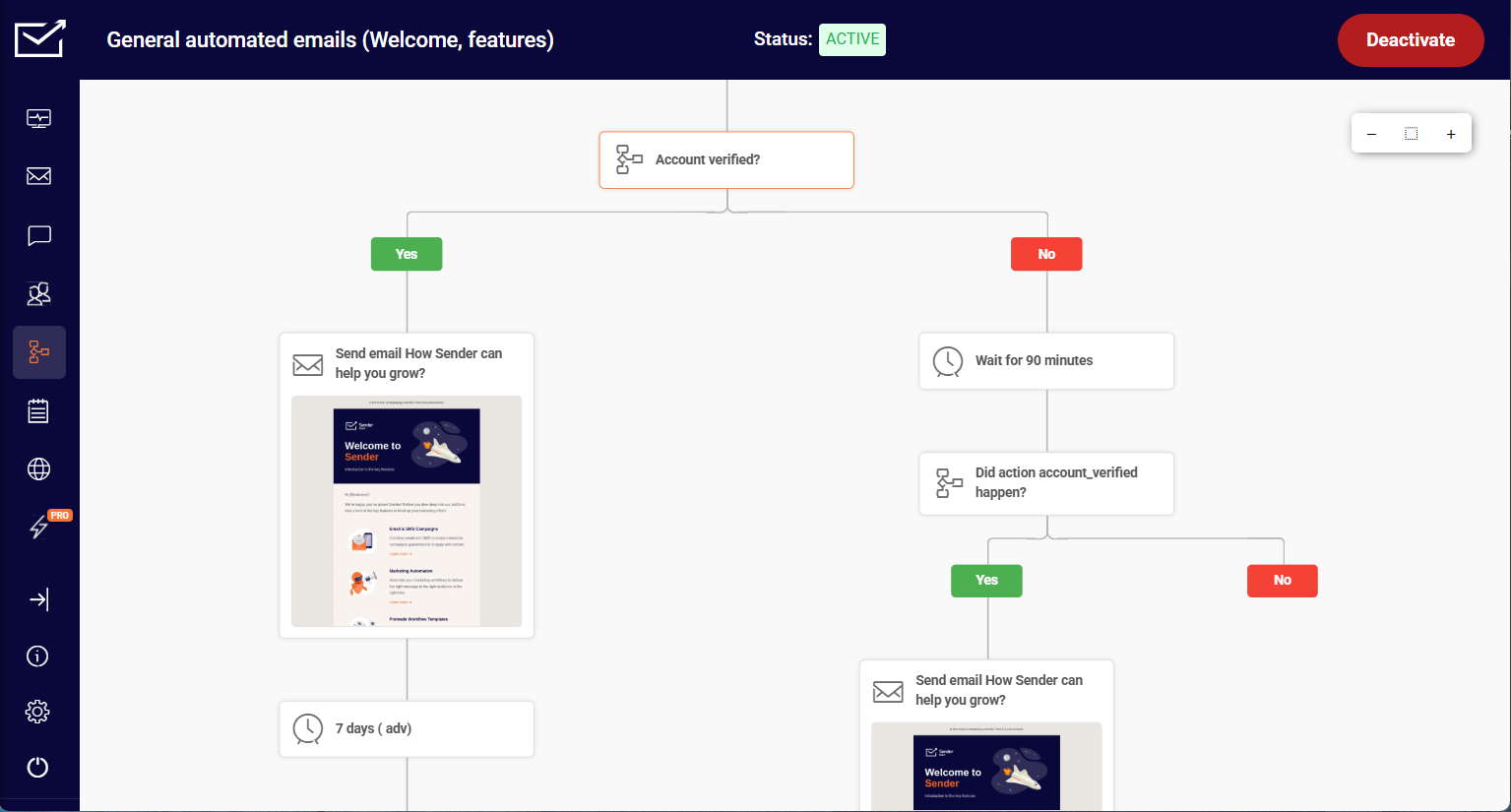
When it comes to Sender, its automation feels more practical than most tools in its xprice range. I was able to build a full onboarding journey – welcome email, two-day delay, link-click condition, two different follow-up paths – from blank canvas to activated flow in around 35 minutes.

The visual builder makes the full customer journey visible in one place, which helped me catch gaps I’d otherwise miss – like a missing fallback path for users who never opened the first email.
The available triggers and conditions covered the typical lifecycle scenarios I needed – welcome flows, lead nurturing, and re-engagement, drip campaigns – without hitting feature restrictions.
Where I noticed the ceiling: Sender isn’t the right choice if you need CRM-style lead scoring or workflows built around deeper multi-channel behavior. The segmentation is solid for most use cases, but complex sales-driven automation will reach the edges of what’s available.
On the free plan – 2,500 subscribers and 15,000 emails per month – the full automation builder was included throughout. I ran the same workflows I tested on paid tools without being prompted to upgrade, which isn’t standard at this price point.
Sender works best for small to mid-sized businesses that need reliable email automation without paying for CRM features they won’t use.
Pros & Cons
- Generous free plan
- Easy-to-use interface
- Advanced automation tools
- Native transactional email support (API/SMTP)
- High email deliverability
- 24/7 human support
- Landing page builder
- Free plan includes Sender branding
- Fewer third-party app integrations
- Lacks built-in CRM features
Key Features
- Free Forever plan. Campaigns, automations, landing pages, forms, and transactional emails are available without a time limit
- Transactional emails (even on the free plan). Order confirmations, password resets, and other triggered emails can be sent without upgrading
- Email A/B testing experiments. 8 different variations of subject lines, sender names, send times, or content can be tested at once
- Custom events tracking. Specific user actions on your site, like “Watched 50% of a Video,” can be sent to Sender via API and used as automation triggers or to build behavioral segments
ActiveCampaign vs. Sender Pricing
| Plan tier | ActiveCampaign | Sender |
| Free Plan | 14-day free trial | $0 (2,500 contacts + 15,000 monthly emails) |
| Entry plan | $15/month (1,000 contacts, basic automation) | $7/month (1,000 subscribers + 12,000 monthly emails) |
| Mid-tier plan | $49/month (1,000 contacts + advanced automation, CRM add-ons available) | $14/month (1,000 subscribers + 24,000 monthly emails) |
| High-tier plan | $79/month (1,000 contacts + advanced features, scales with contacts) | N/A |
| Enterprise | $145/month (1,000 contacts + advanced features, scales with contacts) | Custom price |
Limitations
- Weaker CRM support. Sales pipelines, deal stages, and task automation are less developed than ActiveCampaign’s CRM-first setup
- Simpler lead scoring. Lead scoring exists, but is not as granular or sales-oriented
- CRM ecosystem feels limited. Fewer third-party CRM extensions compared to ActiveCampaign’s mature integrations
GetResponse — Lifecycle Marketing and Ecommerce Automation Platform
GetResponse is an email marketing and automation platform for SMBs, ecommerce brands, and marketing teams that want to build customer journeys across email, landing pages, signup forms, popups, segmentation, and automation workflows.
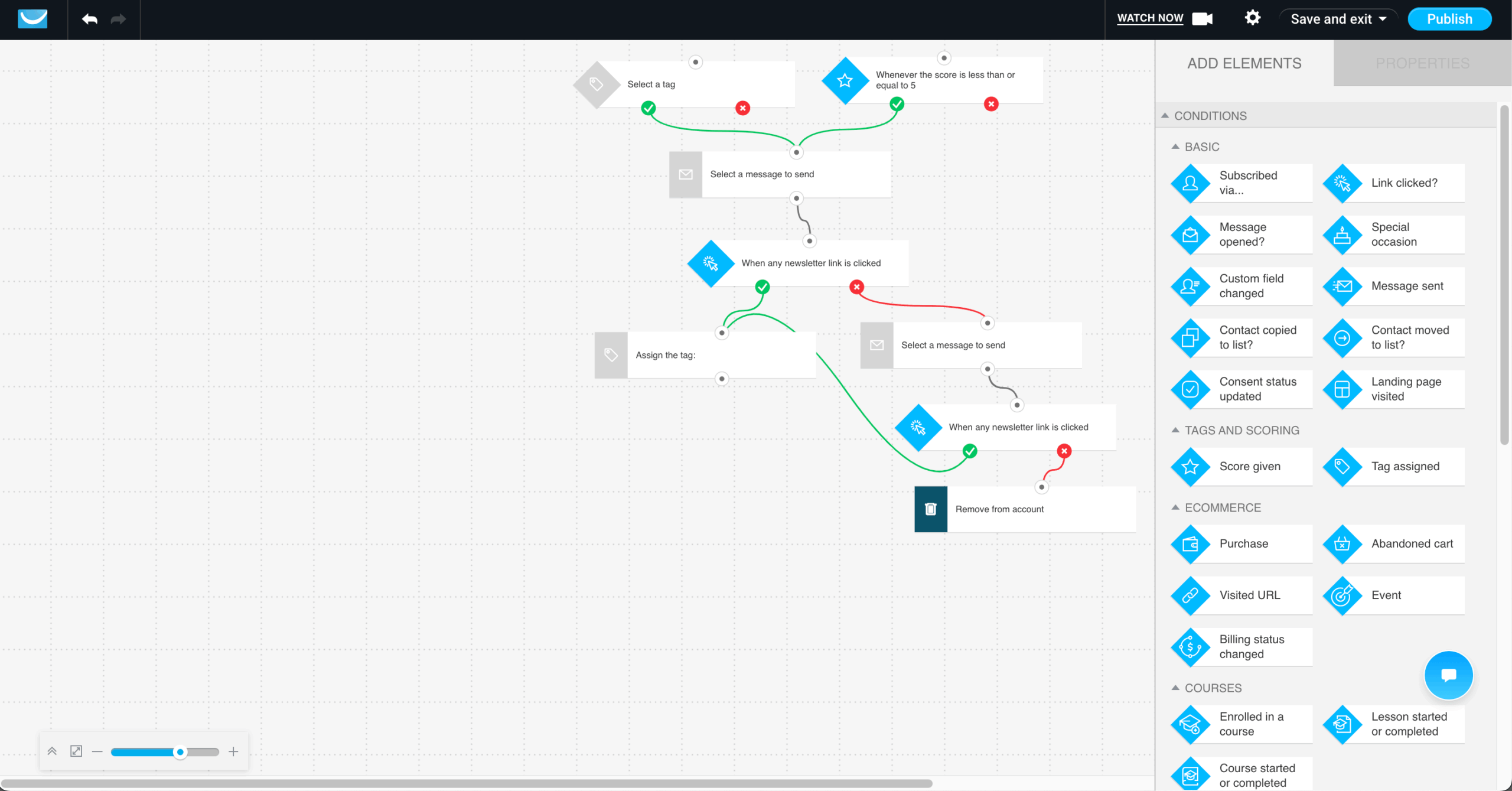
The stronger ActiveCampaign comparison is no longer webinars or funnels. GetResponse is a better fit for teams that want to capture leads, nurture subscribers, automate ecommerce campaigns, and track how email marketing contributes to revenue.
A typical workflow starts with a signup form, popup, or landing page. From there, new subscribers can enter a welcome sequence, receive behavior-based follow-ups, be tagged or scored based on engagement, and move into more targeted lifecycle campaigns over time. Ecommerce teams can also build workflows around abandoned carts, purchases, product recommendations, promo codes, visited URLs, customer activity, and revenue tracking.
Compared with ActiveCampaign, GetResponse is a strong option for teams that want marketing automation workflows without a heavy CRM-first setup. ActiveCampaign remains stronger for sales pipelines, deal automation, and CRM-led workflows. GetResponse is better suited for marketing-led teams that care more about email campaigns, customer journeys, ecommerce retention, list growth, and sales reporting.
Pros & Cons
- Strong email marketing and automation features
- Unlimited monthly email sends on paid plans
- Landing pages, signup forms, and popups included
- Advanced segmentation, tagging, scoring, and behavior-based workflows
- Ecommerce automation with abandoned cart recovery, promo codes, product recommendations, and revenue reports
- AI-powered content generators and AI email tools
- Web push notifications on relevant plans
- 24/7 support on paid plans
- The Starter plan includes only 1 custom automation workflow
- Advanced automation and ecommerce features are mainly available from the Marketer plan and above
- SMS, mobile push notifications, transactional emails, dedicated IP, and AI product recommendations are Enterprise features
- Teams that need deep CRM pipelines and sales task automation may prefer ActiveCampaign
Key Features
- Email marketing: Create newsletters, autoresponders, and automated campaigns with unlimited monthly email sends on paid plans.
- Marketing automation: Build welcome sequences, drip campaigns, click and open follow-ups, birthday emails, event-based workflows, visited URL automation, purchase-based automation, tagging, scoring, and dynamic segmentation.
- Lead capture: Use landing pages, signup forms, and popups to grow your list and move contacts into automated campaigns.
- Ecommerce automation: Recover abandoned carts, add promo codes, recommend products, use ecommerce tracking, and connect campaigns with revenue reports.
- Segmentation: Create targeted groups based on engagement, behavior, ecommerce activity, and customer data.
- AI-powered campaign creation: Use AI-powered content generators, AI email tools, and subject line generation to create campaign assets faster.
- Web push notifications: Add another engagement channel to lifecycle campaigns on relevant plans.
ActiveCampaign vs. GetResponse Pricing
| Plan tier | ActiveCampaign | GetResponse |
| Free Plan | 14-day free trial | Free account for up to 500 contacts and 2,500 newsletter sends |
| Entry plan | $15/month (1,000 contacts, basic automation) | $19/month for 1,000 contacts and unlimited monthly email sends |
| Mid-tier plan | $49/month (1,000 contacts + advanced automation) | $59/month for 1,000 contacts with unlimited automation workflows, advanced segmentation, abandoned cart recovery, promo codes, revenue reports, and web push notifications |
| High-tier plan | $79/month (1,000 contacts + advanced features, scales with contacts) | $69/month for 1,000 contacts with Creator features, webinars, website builder, course creator, and premium newsletter subscriptions |
| Enterprise | $145/month (1,000 contacts + advanced features, scales with contacts) | Custom price |
Limitations
- Less CRM depth: GetResponse is more marketing-led than CRM-led, so deal pipelines, sales task automation, and CRM workflows are not as deep as ActiveCampaign.
- Advanced automation requires a higher plan: The Starter plan includes 1 custom automation workflow, while unlimited automation workflows are available from the Marketer plan.
- Enterprise-only channels: SMS marketing, mobile push notifications, transactional emails, dedicated IP, and AI product recommendations are available on Enterprise.
- Broader platform scope: GetResponse covers email, automation, landing pages, popups, ecommerce, webinars, and monetization, so teams focused only on CRM automation may prefer a more sales-specific tool.
Brevo — Email, SMS, and Transactional Messaging Platform
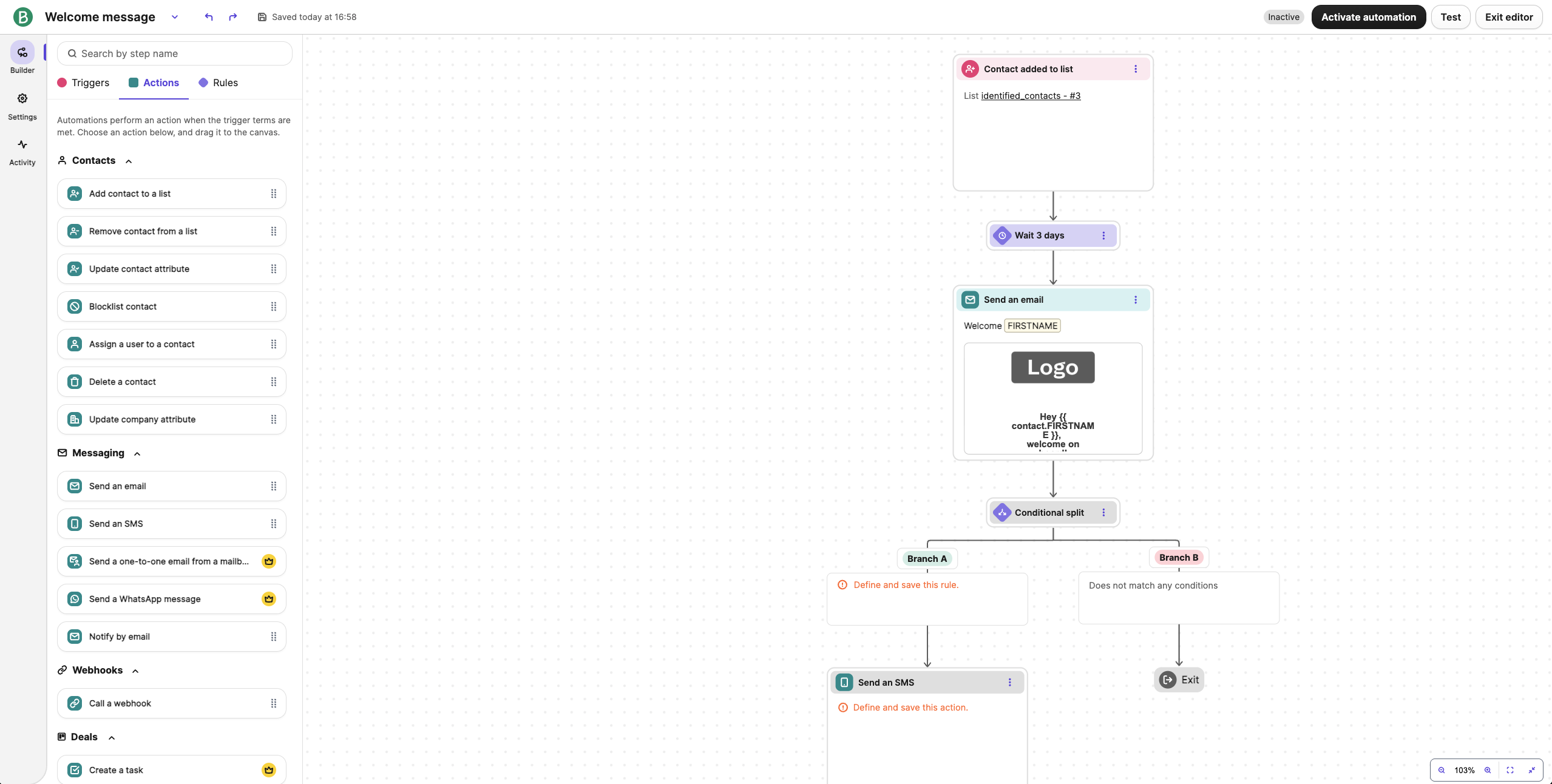
During my hands-on with Brevo, I started with a multichannel flow – signup trigger, welcome email, SMS reminder, and a conditional follow-up based on engagement – set up in around 30 minutes.
All channels live in the same builder, including transactional flows like order confirmations and password resets, so I didn’t need a separate system or API to handle these triggered customer communications.
The limitation was branching logic: I wanted to route contacts by which specific link they clicked in the welcome email. Brevo doesn’t support link-level click conditions natively – you can branch on clicked or not clicked, but not on which link – so a sequence with multiple CTAs meant manual routing.
One pricing detail changed in late 2025: Brevo bills primarily by email volume rather than the contact-based pricing most rivals use, but contact limits now apply on every self-serve plan.
The free plan stores up to 100,000 contacts but caps sending at 300 emails per day, while the $9/month Starter tier at 5,000 emails caps stored contacts at just 500. “Unlimited contacts” is no longer accurate for any self-serve plan; only Enterprise removes the cap.
For teams coordinating email, SMS campaigns, and transactional messages in one place, Brevo removes a real integration problem, though GlockApps’ December 2025 testing measured its deliverability at 70.6%.
Brevo suits businesses with large lists and low-to-moderate send frequency that also need transactional email. It is not for daily senders or anyone who needs automation without paying $18+/month.
Pros & Cons
- Free plan stores up to 100,000 contacts (300 emails/day cap)
- Built-in CRM and 8 channels (email, SMS, WhatsApp, push, chat)
- Easy drag-and-drop editor
- AI tools for content & subject lines
- Transactional email included on every plan, including Free
- Automation excluded from Free and Starter plans
- Contact caps introduced in late 2025 on all self-serve plans
- Brevo branding removal on Starter costs an extra $10.80/month
- $499/month jump to the Professional plan
Key Features
- Multi-channel marketing. Email, SMS, WhatsApp, push, live chat, chatbot, and phone: 8 channels managed from one platform
- Transactional email management. Order confirmations, shipping updates, and password resets send via SMTP and API on every plan, including Free
- AI campaign assistant. Subject lines and email content can be generated with built-in AI tools; AI segmentation sits on Professional
ActiveCampaign vs. Brevo Pricing
| Plan tier | ActiveCampaign | Brevo |
| Free Plan | 14-day free trial | $0/month (up to 100,000 stored contacts + 300 daily emails) |
| Entry plan | $15/month (1,000 contacts, basic automation) | Starter: from $9/month (5,000 monthly emails; 500-contact cap; no automation) |
| Mid-tier plan | $49/month (1,000 contacts + advanced automation) | Standard: from $18/month (adds automation, A/B testing, 1 landing page) |
| High-tier plan | $79/month (1,000 contacts + advanced features, scales with contacts) | Professional: from $499/month (WhatsApp campaigns, AI segmentation, phone support) |
| Enterprise | $145/month (1,000 contacts + advanced features, scales with contacts) | Custom price (the only tier with unlimited contacts) |
Limitations
- Automation costs extra. The visual automation builder requires the Standard plan at $18/month minimum, so the free and Starter tiers are broadcast-only, and more advanced features like AI segmentation sit on Professional
- Contact caps tied to send volume. The $9 Starter at 5,000 emails caps you at 500 stored contacts, a limit reviewers on Capterra describe as a pricing surprise
- Lighter segmentation rules. Behavioral targeting is less granular for advanced lifecycle programs
- Landing pages limited to 1 on Standard; extra packs cost about $24/month
Omnisend — Ecommerce-Focused Email Marketing Platform
Connecting Omnisend to a Shopify store surfaced purchase history, browsing activity, and product-level data within minutes. I used that data to set up an abandoned cart flow with product recommendations and a follow-up SMS, live in around 25–30 minutes, since the triggers and templates were already aligned with ecommerce email marketing use cases.

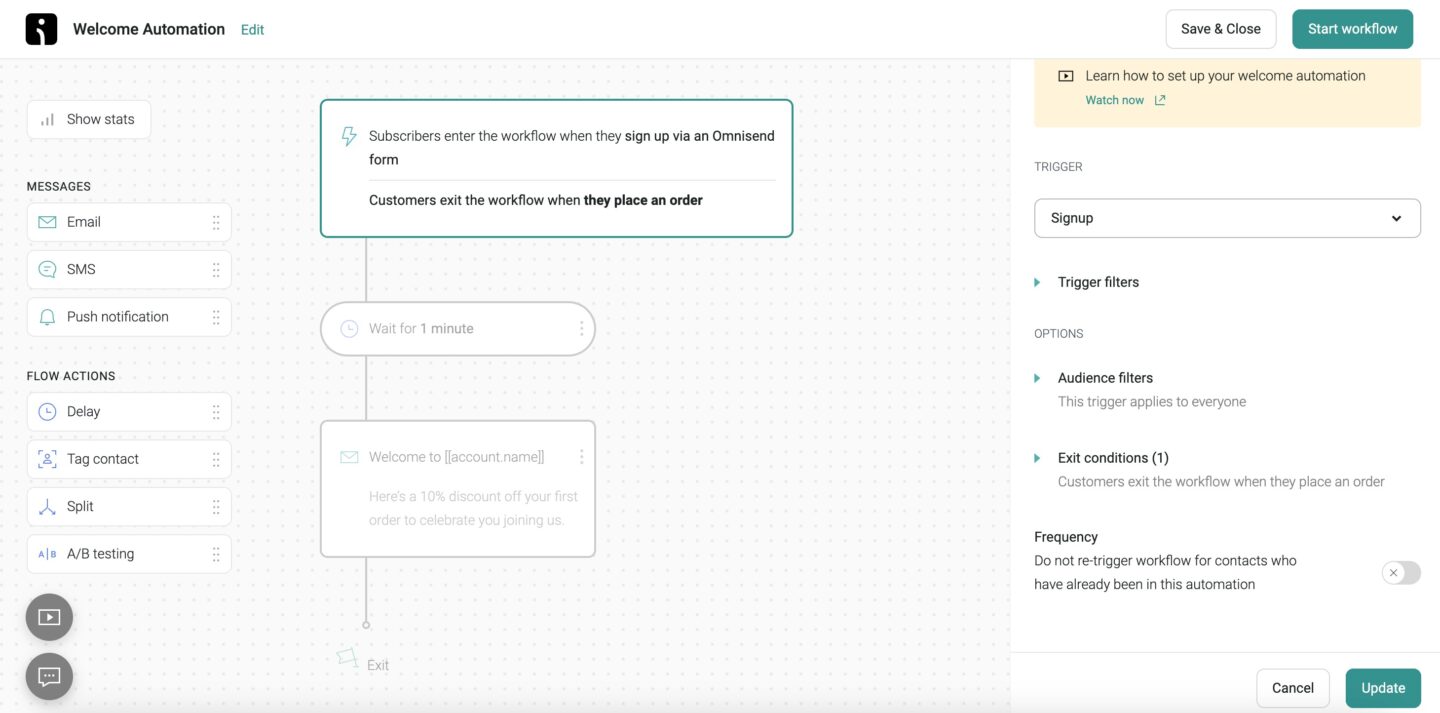
The same setup extended into omnichannel campaigns. I built a flow where users received an email first, then an SMS reminder, and a web push notification if they didn’t return. All of this was managed inside a single workflow, so I didn’t need to coordinate separate tools or duplicate segments across channels.
I also set up an exit-intent popup offering a discount and a scroll-depth form on product pages; both fed directly into automation flows, so new subscribers entered the same sequences without additional setup.
Where the difference shows is how tightly these features are tied to ecommerce actions: product views, cart activity, and purchase behavior are already part of the workflow logic, so campaigns react to what shoppers are doing in real time with far less setup than general platforms need.
You should go with Omnisend if you run an ecommerce store and want ready-made workflows, built-in popups, and email and SMS campaigns (plus push) managed in one system with minimal setup.
Pros & Cons
- Native Shopify/BigCommerce integration with live product data
- Email, SMS & push in one visual workflow
- Prebuilt automation workflows
- Tracks revenue from emails
- AI segment builder creates audiences from plain-language prompts
- 24/7 knowledgeable chat support
- Built mainly for ecommerce
- Standard plan has no SMS (locked to Pro at $59/month minimum)
- Product Picker unavailable for WooCommerce and Wix stores
- No phone support below the Custom tier
Key Features
- Ecommerce-specific automation. Pre-built workflows support cart recovery, product recommendations, and winback campaigns
- Popups and forms. Signup forms and pop-ups with exit-intent, scroll-depth, and visitor-rule targeting can be used to capture leads and grow the email list
- Omnichannel marketing. Email, SMS/MMS, and web push run from one workflow (500 push sends/month free, unlimited on paid plans)
ActiveCampaign vs. Omnisend Pricing
| Plan tier | ActiveCampaign | Omnisend |
| Free Plan | 14-day free trial | $0/month (250 contacts + 500 monthly emails) |
| Entry plan | $15/month (1,000 contacts, basic automation) | Standard: from $16/month (500 contacts; no SMS) |
| Mid-tier plan | $49/month (1,000 contacts + advanced automation) | Pro: from $59/month (2,500 contacts; SMS add-on from $0.007/message) |
| High-tier plan | $79/month (1,000 contacts + advanced features, scales with contacts) | Custom price |
| Enterprise | $145/month (1,000 contacts + advanced features, scales with contacts) | – |
Limitations
- Ecommerce-first focus. Less suitable for B2B or sales pipeline–driven automation
- SMS locked to Pro. The Standard plan includes no SMS marketing capabilities at all, so true omnichannel starts at $59/month
- Platform-dependent value. The Product Picker works with Shopify and BigCommerce but not WooCommerce or Wix
- Deliverability trails leaders. EmailTooltester’s December 2025 round measured Omnisend at 78.5%
Drip — Ecommerce Lifecycle Marketing Automation
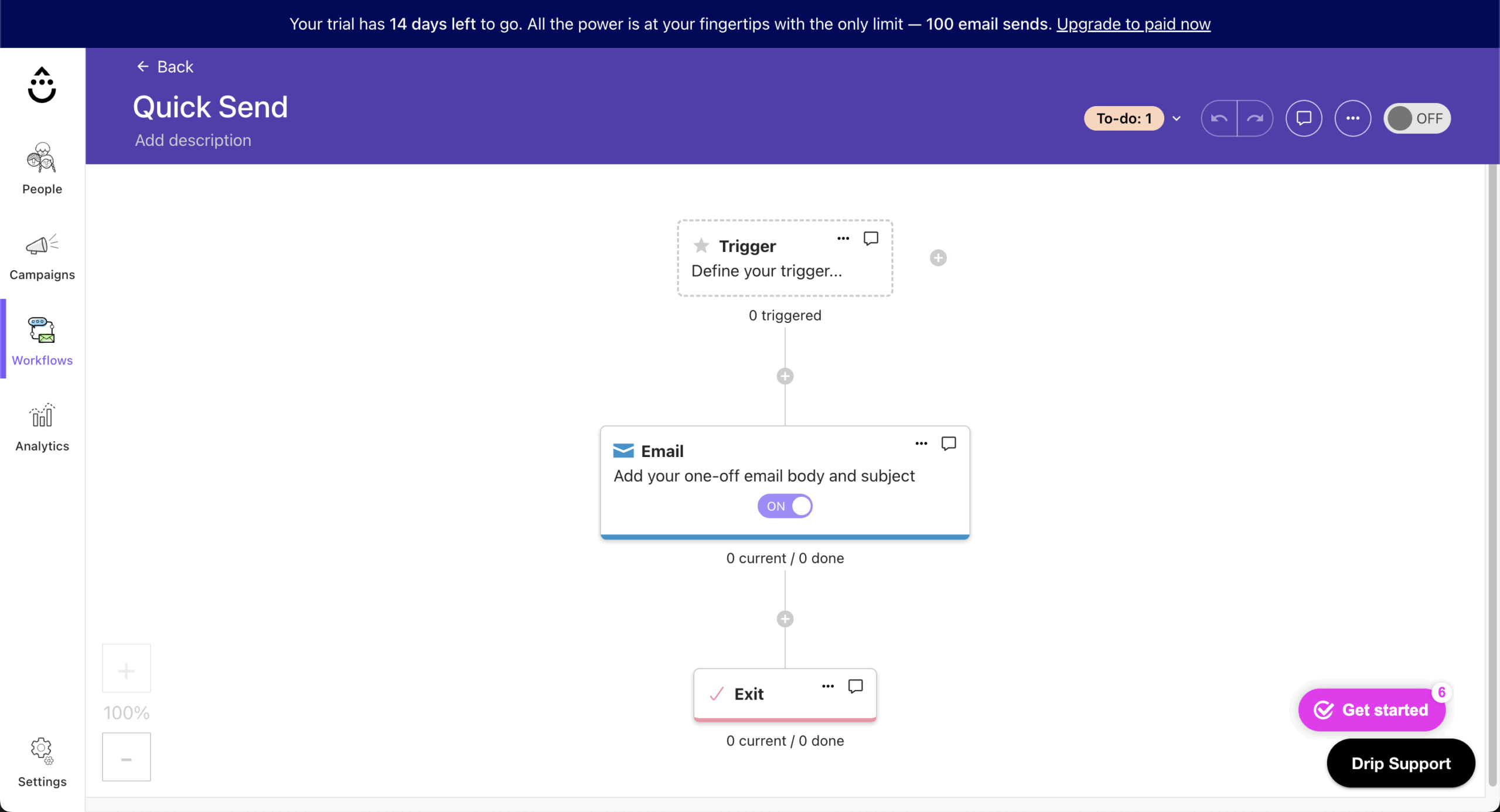
I started with Drip’s on-site marketing toolkit, setting up a pop-up and a slide-in form triggered by user behavior, plus a multi-step form connected to an email sequence. Everything was built inside the platform without needing third-party tools like Privy or Justuno. The setup took around 20–25 minutes, with the forms feeding directly into automation workflows.
The prebuilt ecommerce playbooks were the fastest path to a running campaign: an abandoned cart flow and a welcome sequence launched from ready-made templates, with timing and messaging adjusted afterward.
The behavioral email triggers – cart abandonment, product views, purchase events – were already mapped to ecommerce actions, which removed the manual trigger configuration that tools like Klaviyo still require for custom setups.
The revenue dashboards are where Drip separates itself: I could see which specific workflows generated revenue, not just which emails were opened.
Where I hit a limitation was attribution depth – the dashboard showed revenue per workflow, but didn’t break down performance by individual email within a multi-step sequence. To get that granularity, I had to export data and cross-reference it manually.
Drip fits ecommerce stores on Shopify, WooCommerce, or BigCommerce doing roughly $100K–$5M a year that want revenue-attributed automation. It is not for newsletter senders, B2B teams, or anyone who needs a free plan, since the $39/month entry price is the highest of the marketing platforms in this roundup.
Pros & Cons
- Ecommerce-focused features & integrations
- Advanced email workflow builder (up to 50 workflows on all plans)
- Revenue tracking on every workflow
- Unlimited email sending
- Solid third-party deliverability (87.3%, GlockApps, Dec 2025)
- Free migration service (valued at $3,250)
- Higher pricing than basic tools ($154/month at 10,000 contacts)
- No free plan (14-day trial only)
- Limited template library (50+ vs. Mailchimp’s 260+)
Key Features
- On-site marketing toolkit. Pop-ups, slide-ins, quizzes, and multi-step forms can be created without additional tools
- Ecommerce revenue dashboards. Revenue, top-performing campaigns, and workflow performance can be tracked from a single dashboard, including revenue-per-person
- Behavior-based dynamic segmentation. Segments built from purchase history, browsing, and spending auto-update before each send
ActiveCampaign vs. Drip Pricing
| Plan tier | ActiveCampaign | Drip |
| Free Plan | 14-day free trial | 14-day free trial |
| Entry plan | $15/month (1,000 contacts, basic automation) | $39/month* (up to 2,500 contacts + unlimited monthly emails) |
| Mid-tier plan | $49/month (1,000 contacts + advanced automation) | ~$89/month* (5,000 contacts) |
| High-tier plan | $79/month (1,000 contacts + advanced features, scales with contacts) | ~$154/month* (10,000 contacts) |
| Enterprise | $145/month (1,000 contacts + advanced features, scales with contacts) | ~$699/month* (50,000 contacts) |
Limitations
- Minimal CRM functionality. No native deal pipelines or sales task automation
- Ecommerce-biased workflows. Non-retail automation use cases feel secondary
- Steep price curve. $154/month at 10,000 contacts compares with roughly $20/month on Sender and $59/month on Omnisend at similar list sizes
- Automation reliability complaints. Independent reviews report workflows that occasionally get stuck or fail to fire
Klaviyo — Data-Driven Ecommerce Marketing Automation
In one sentence: choose Klaviyo over ActiveCampaign if your revenue lives in Shopify and you want predictive, purchase-based targeting; choose ActiveCampaign if you need CRM pipelines and B2B multi-branch automation.

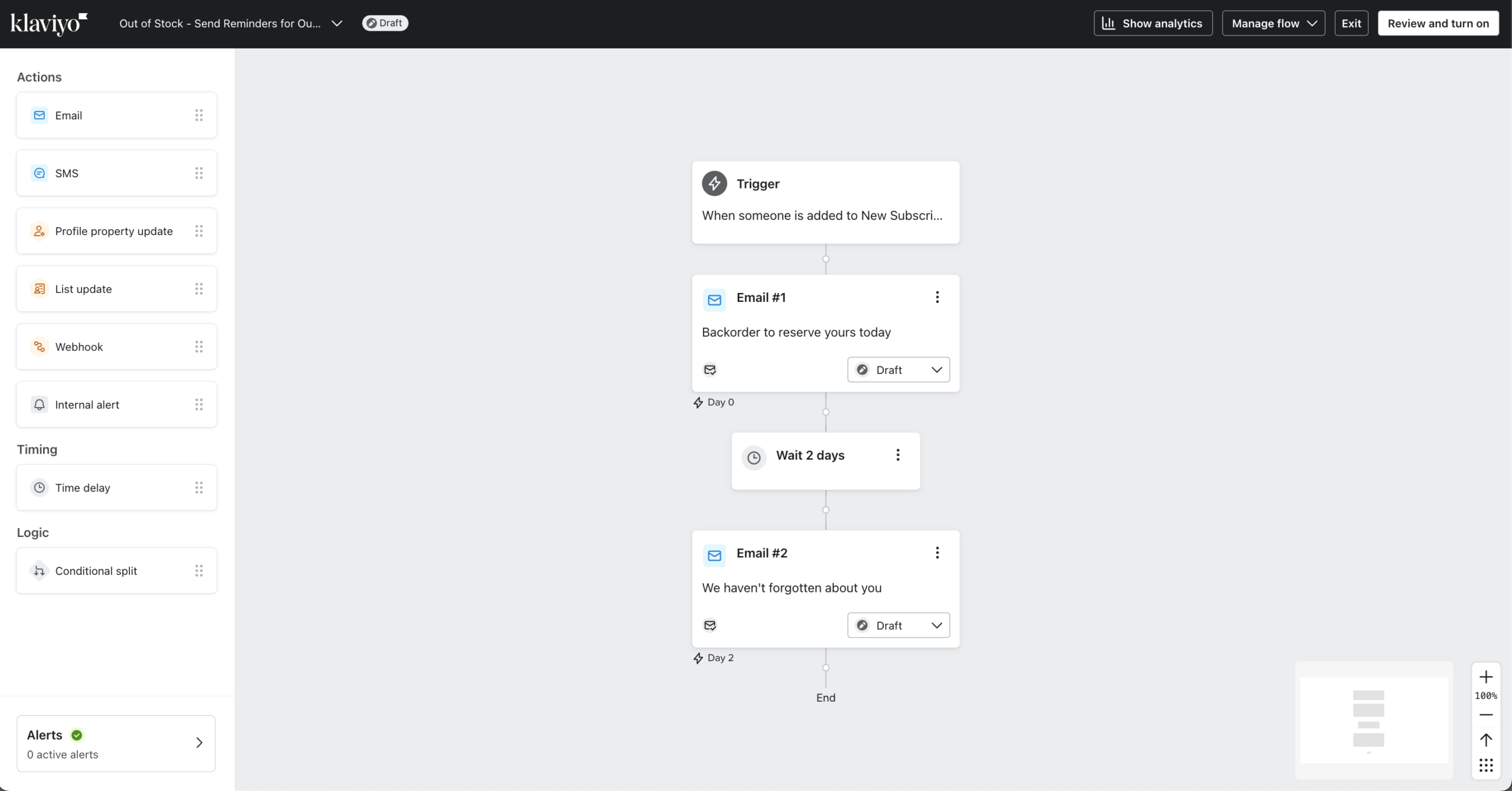
To test Klaviyo against ActiveCampaign, I set up a welcome series and abandoned cart sequence from prebuilt templates – both were live in around 20 minutes since the ecommerce triggers and timing logic were already mapped.
The predictive segmentation is where Klaviyo separates itself. I created segments based on expected behavior – likely repeat buyers, at-risk customers, predicted next purchase date – so campaigns could be built around what customers are likely to do next. If you are new to targeted marketing, our guide to customer segmentation covers the fundamentals these predictive models build on.
The data mapping setup required more effort, though: getting product attributes to surface correctly in emails took two iterations before recommendations displayed as intended.
My first predicted-purchase segment returned a much smaller audience than expected because Klaviyo requires a minimum purchase history to generate predictions – something not flagged clearly during setup.
For ecommerce teams with enough transaction history to fuel predictive segmentation, the targeting depth is unmatched; the ceiling is billing, since active-profile pricing means you pay for every reachable contact.
Klaviyo is the right choice for a Shopify store doing $500K+ in annual revenue with a dedicated email or lifecycle marketer. It is not for newsletter senders, B2B companies, or small stores watching every dollar.
Pros & Cons
- Deep Shopify integration with 350+ data integrations overall
- Flexible automation builder with Flows AI flow drafting
- Advanced segmentation rated 9.0/10 on G2
- Predictive analytics (CLV, churn risk, next order date) with real-time syncing
- Active-profile billing charges for every reachable contact
- Pricing scales steeply along the active-profile slider
- Reviews, Marketing Analytics, and Customer Agent AI are separate paid add-ons
- SMS restricted to 24 countries, with international rates far above US pricing
- Template editor reported as slow by Trustpilot reviewers (2.1/5 rating there)
Key Features
- Predictive analytics. Customer lifetime value, churn risk, next order date, and spending potential are estimated with built-in models;
- Revenue-focused ecommerce analytics. Campaign and segment performance can be tracked with revenue attribution included;
- Six native messaging channels. Email, SMS/MMS, RCS, WhatsApp, mobile push, and web push run from one profile database, with Flows AI (beta) generating flows from plain-language prompts.
ActiveCampaign vs. Klaviyo Pricing
| Plan tier | ActiveCampaign | Klaviyo |
| Free Plan | 14-day free trial | $0/month (250 active profiles + 500 monthly emails) |
| Entry plan | $15/month (1,000 contacts, basic automation) | Email: $20/month (251–500 active profiles); $30/month at 1,000 profiles* |
| Mid-tier plan | $49/month (1,000 contacts + advanced automation) | $100/month (5,000 active profiles)* |
| High-tier plan | $79/month (1,000 contacts + advanced features, scales with contacts) | $150/month (10,000 active profiles)* |
| Enterprise | $145/month (1,000 contacts + advanced features, scales with contacts) | $400/month (25,000 active profiles)* |
Limitations
- Diminished value outside ecommerce. Data advantages depend heavily on store integrations;
- Active-profile billing. Every reachable contact is billable for a minimum of 90 days once unsuppressed, which penalizes dormant lists;
- Add-on stacking. These advanced tools all cost extra: Reviews (from $25/month), Marketing Analytics (from $100/month), and Customer Agent AI (from $140/month);
- Inbox placement is unproven at the top. GlockApps’ April 2025 testing measured Klaviyo’s inbox rate at 43.7%, so authentication and list hygiene still matter.
Mailchimp — Beginner-Friendly Email Marketing Platform
What is better, Mailchimp or ActiveCampaign? Mailchimp is better for beginners who want fast setup, templates, and the largest integration library; ActiveCampaign is better for teams that need multi-branch automation tied to a CRM.
On price, ActiveCampaign Starter at $19/month (billed monthly) undercuts Mailchimp Essentials at $26.50/month for a 1,000-contact list, but both now charge for unsubscribed and inactive contacts, so neither is the budget option here.

To start my Mailchimp testing, I connected a Shopify store and Google Analytics using native integrations, with no custom configuration. Once synced, purchase activity flowed into segments automatically, and building a targeted segment from purchase history took around 5 minutes.
For campaign creation, I used the template editor to build a promotional email – adjusting layouts and brand styling without touching code. Starting from a template, I had a send-ready campaign in under 10 minutes. The Intuit Assist AI content creation tools for subject lines and copy helped here, though only on Standard and Premium.
On deliverability, SPF, DKIM, and suppression settings were pre-configured by default. Across EmailTooltester’s recurring test rounds (most recent round: December 2025), Mailchimp has averaged around 92.6%, which matched my test sends; GlockApps’ separate December 2025 snapshot measured 78.4%, so results vary by study and setup. If your placement lags either figure, our guide on how to improve email deliverability covers the fixes that matter.
The ceiling was segmentation: targeting contacts who opened in the last 30 days but hadn’t clicked required exporting, filtering, and reimporting rather than a builder condition.
Mailchimp works for straightforward marketing campaigns, reliable email marketing performance, and the widest integration choice. Its ceiling appears when segmentation must cross list boundaries, and the free plan (250 contacts, zero automation since January 2026) is the most restrictive reviewed here.
Pros & Cons
- Easy-to-use interface
- Reliable email deliverability
- Extensive integrations (300+)
- Helpful AI email tools via Intuit Assist (Standard and Premium only)
- Charges for unsubscribed and inactive contacts unless you archive them manually
- Free plan cut repeatedly, down to 250 contacts with automation removed (Jan 2026)
- SMS is a paid add-on with credits that expire monthly
- Phone support locked behind the $350/month Premium plan
Key Features
- Website builder. Full multi-page websites can be created within the platform
- Extensive integration library. 300+ native connections, including ecommerce platforms, CRMs, and the Intuit ecosystem (QuickBooks syncing)
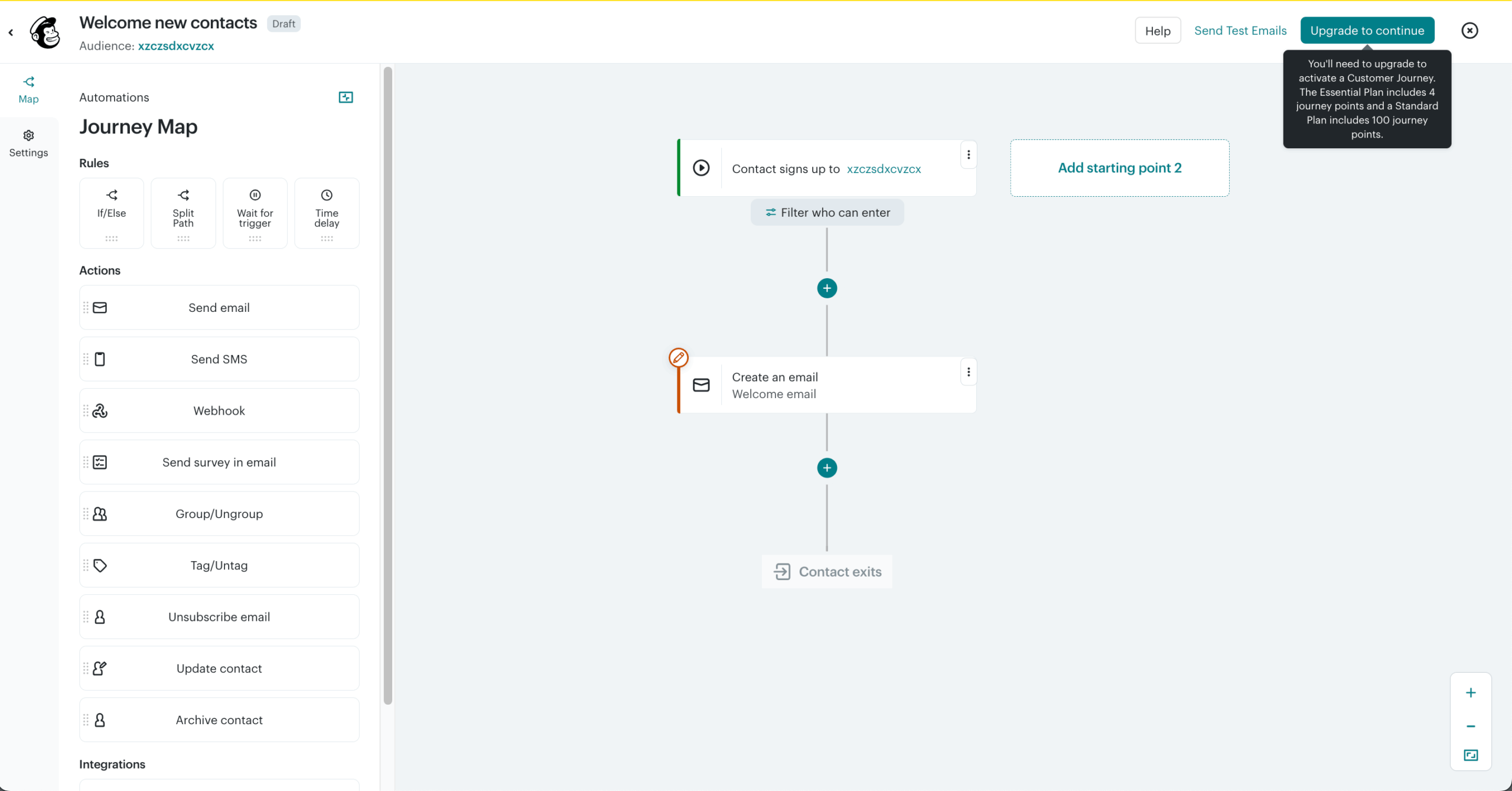
- Customer Journey Builder. Multi-step workflows designed visually, though Essentials caps journeys at 4 points and branching requires Standard
ActiveCampaign vs. Mailchimp Pricing
| Plan tier | ActiveCampaign | Mailchimp |
| Free Plan | 14-day free trial | $0/month (250 contacts + 500 monthly emails; no automation) |
| Entry plan | $15/month (1,000 contacts, basic automation) | Essentials: from $13/month (500 contacts); $26.50/month at 1,000 contacts |
| Mid-tier plan | $49/month (1,000 contacts + advanced automation) | Standard: from $20/month (500 contacts; adds branching automation and AI tools) |
| High-tier plan | $79/month (1,000 contacts + advanced features, scales with contacts) | Premium: from $350/month (10,000 contacts) |
| Enterprise | $145/month (1,000 contacts + advanced features, scales with contacts) | – |
Limitations
- Inactive contacts are billable. Unsubscribed and non-subscribed contacts count toward your tier unless archived;
- Automation gated by tier. Branching logic requires Standard or above;
- Restricted segmentation. Complex behavioral targeting across lists is harder to achieve;
- Support gaps. Phone support requires Premium at $350/month, and Mailchimp’s Trustpilot rating sits at 2.6/5.
Constant Contact — Newsletter-Focused Email Marketing
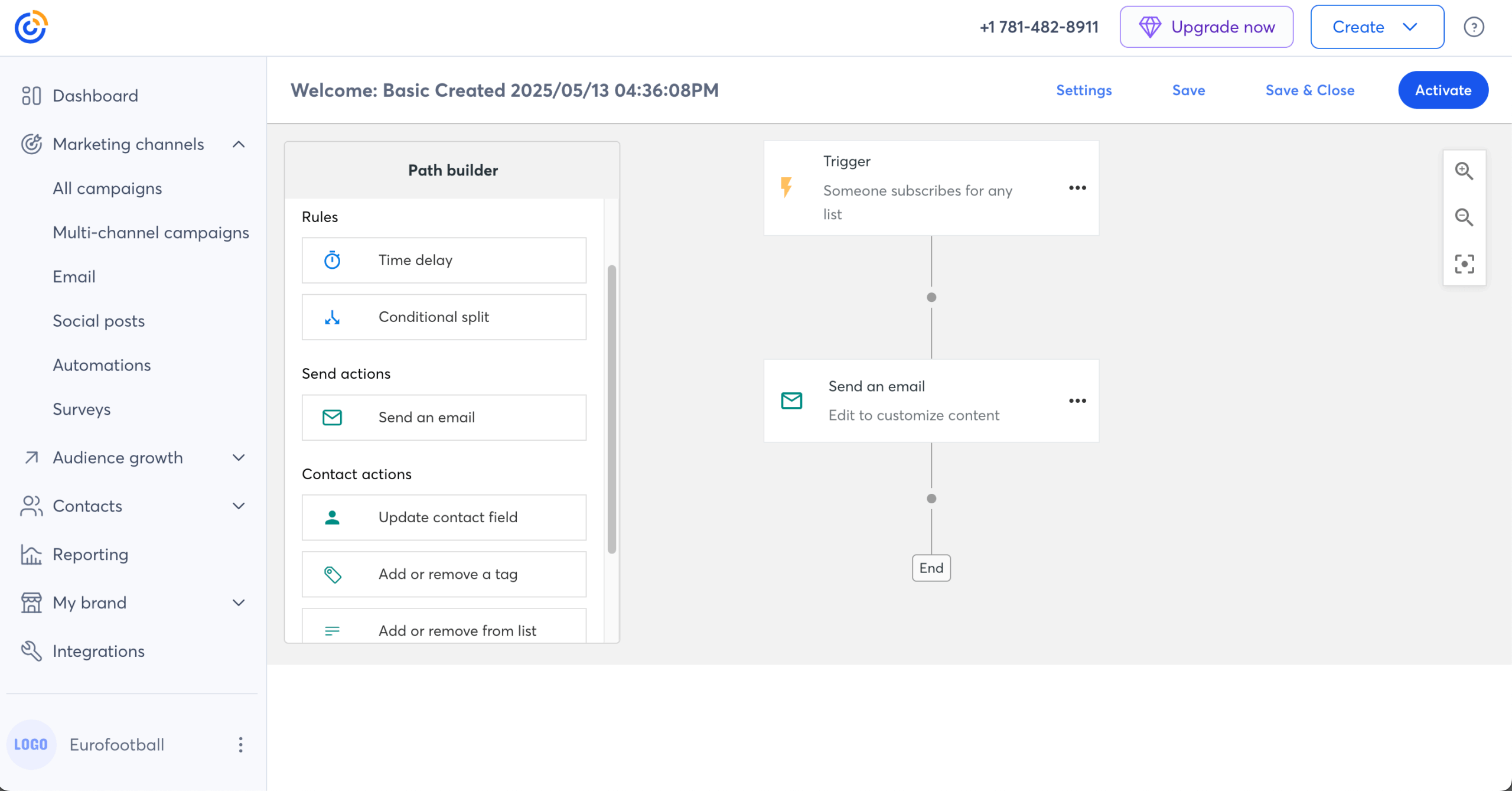
I started with Constant Contact’s event management, setting up a simple event with registration, ticketing, and automated email confirmations in around 30 minutes, with everything from signup to attendee tracking handled inside one system, no Eventbrite needed.
I also tested resend-to-non-openers: a condition automatically resent the campaign to subscribers who hadn’t opened within 48 hours, with an adjusted subject line, configured in three steps inside the campaign editor rather than a separate automation builder. It is a simple way to lift your email open rate without extra tooling.
Where I hit a limitation was contact management. Building a segment that targeted contacts across two separate lists required a manual merge rather than a filter condition.
On price, one point of confusion is worth clearing up: the $12/month figure is the Lite plan at 500 contacts, billed monthly. At 1,000 contacts the same Lite plan costs $30/month, and tiers scale aggressively from there: Lite reaches $50/month at 2,500 contacts, and Standard hits $110/month at 5,000.
Phone-based customer support on every paid plan and a 92% deliverability score in EmailTooltester’s December 2025 round are what you get for the premium.
Constant Contact fits nonprofits and event-driven organizations that need integrated RSVP, ticketing, and promotional email with phone support throughout. It is not for budget-conscious businesses, or teams that expect to cancel easily, since cancellation requires a phone call during US Eastern business hours.
Pros & Cons
- Easy drag-and-drop email editor with Canva integration
- Hundreds of customizable, industry-specific email templates
- Event marketing (registration, RSVP, ticketing, payments)
- Phone support on all paid plans, plus a 30% nonprofit prepay discount
- Strong deliverability (92%, EmailTooltester, Dec 2025)
- No free plan (30-day trial only)
- Custom automation locked behind the $80/month Premium plan
- Cancellation requires a phone call during Eastern Time business hours
- Auto-upgrades your plan when send limits are exceeded
Key Features
- Event management. Events can be promoted, tickets sold, payments processed, and registrations managed in one place;
- Resend to non-openers. Campaigns can be automatically resent to subscribers who didn’t open the first send;
- SMS marketing add-on. US-only texting is available from $10/month for 500 messages;
ActiveCampaign vs. Constant Contact Pricing
| Plan tier | ActiveCampaign | Constant Contact |
| Free Plan | No free plan, only a 14-day free trial | No free plan, only a 30-day free trial |
| Entry plan | $15/month (1,000 contacts, basic automation) | Lite: from $12/month (500 contacts); $30/month at 1,000 contacts |
| Mid-tier plan | $49/month (1,000 contacts + advanced automation) | Standard: from $35/month (500 contacts); $110/month at 5,000 contacts |
| High-tier plan | $79/month (1,000 contacts + advanced features, scales with contacts) | Premium: from $80/month (500 contacts) |
| Enterprise | $145/month (1,000 contacts + advanced features, scales with contacts) | – |
Limitations
- Very limited automation. Few triggers and conditions, with custom automation restricted to the Premium plan
- Aggressive contact-tier scaling. Lite jumps from $12 to $50/month between 500 and 2,500 contacts
- Billing friction. The Better Business Bureau lists 151 complaints, with cancellation-by-phone and auto-upgrades the dominant themes
HubSpot — CRM-Based Email Automation Platform
In one sentence: HubSpot beats ActiveCampaign when you want marketing, sales, and service running on one CRM and can justify Professional-tier pricing; ActiveCampaign wins on automation value for teams spending under $100 a month.
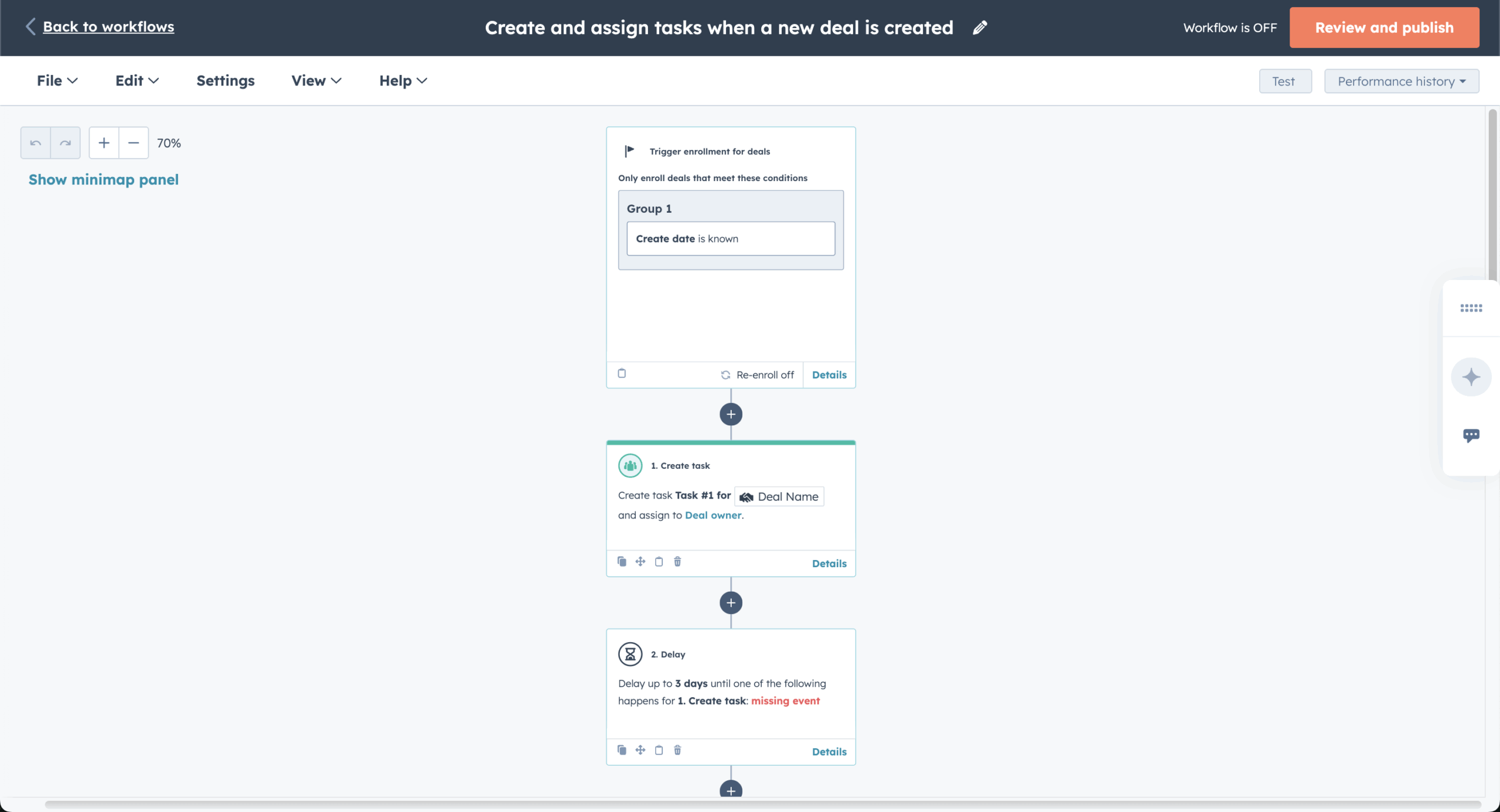
I began HubSpot’s testing by setting up a lead capture flow – landing page, form, email automation – which took around 40–50 minutes. The landing page builder, email editor, and CRM sit in one environment, so leads move into follow-up sequences without switching platforms.
The native customer relationship management (CRM) integration changes how campaigns are built. I tested dynamic content blocks that swap by lifecycle stage – one version for leads, another for customers. The logic worked cleanly once configured, but the setting is buried under an obscure menu path in the email editor.
Where the ceiling becomes expensive: that level of personalization requires Marketing Hub Professional at $890/month on annual billing, which includes 3 seats and 2,000 marketing contacts, plus a one-time $3,000 onboarding fee.
With seat-based pricing, extra seats and marketing contacts are billed on top, so the real figure grows with your team and list. For teams already on that plan for CRM reasons, the email capability adds real value; for email-first teams, the cost is hard to justify against more focused email marketing automation software.
HubSpot suits growing teams that want their digital marketing, sales, and customer data in one CRM-first platform with full-funnel visibility. It is not for teams that only need email, and GlockApps’ December 2025 testing measured its deliverability at 73.5%, midfield for this comparison.
Pros & Cons
- All-in-one suite (marketing, sales, support)
- Strong free plan (CRM, email, forms, live chat)
- Scales well with advanced automation features
- Extensive third-party integrations
- Breeze AI tools built into a polished UI
- Sharp pricing jumps between tiers ($20/seat Starter to $890 Professional)
- Seat-based pricing adds up as the team grows
- $3,000 one-time onboarding fee on Professional
- Key features sold as add-ons
- Steeper learning curve
Key Features
- Landing page builder. Pages are built in-platform and connected directly to campaigns for lead capture
- 24/7 AI customer agents. Breeze-powered agents handle customer inquiries continuously
- Broader all-in-one business platform. Marketing, sales, service, and operations run in one system with shared data
ActiveCampaign vs. HubSpot Pricing
| Plan tier | ActiveCampaign | HubSpot |
| Free Plan | 14-day free trial | $0/month (up to 1,000,000 stored contacts + 2,000 monthly email sends) |
| Entry plan | $15/month (1,000 contacts, basic automation) | Marketing Starter: $15/month per seat on annual billing, $20 billed monthly (1,000 marketing contacts) |
| Mid-tier plan | $49/month (1,000 contacts + advanced automation) | Marketing Professional: $890/month on annual billing (3 seats + 2,000 marketing contacts; $3,000 one-time onboarding) |
| High-tier plan | $79/month (1,000 contacts + advanced features, scales with contacts) | Marketing Enterprise: $3,600/month (5 seats + 10,000 marketing contacts) |
| Enterprise | $145/month (1,000 contacts + advanced features, scales with contacts) | – |
Limitations
- Ecosystem dependency. Email automation works best when bundled with other HubSpot hubs
- Seat and contact meters. Extra seats and marketing-contact packs are billed on top, so published prices are a floor, not the bill
- Advanced automation locked behind pricier tiers. Journey-level workflow automation requires Professional
MailerLite — Budget-Friendly Email Marketing for Beginners
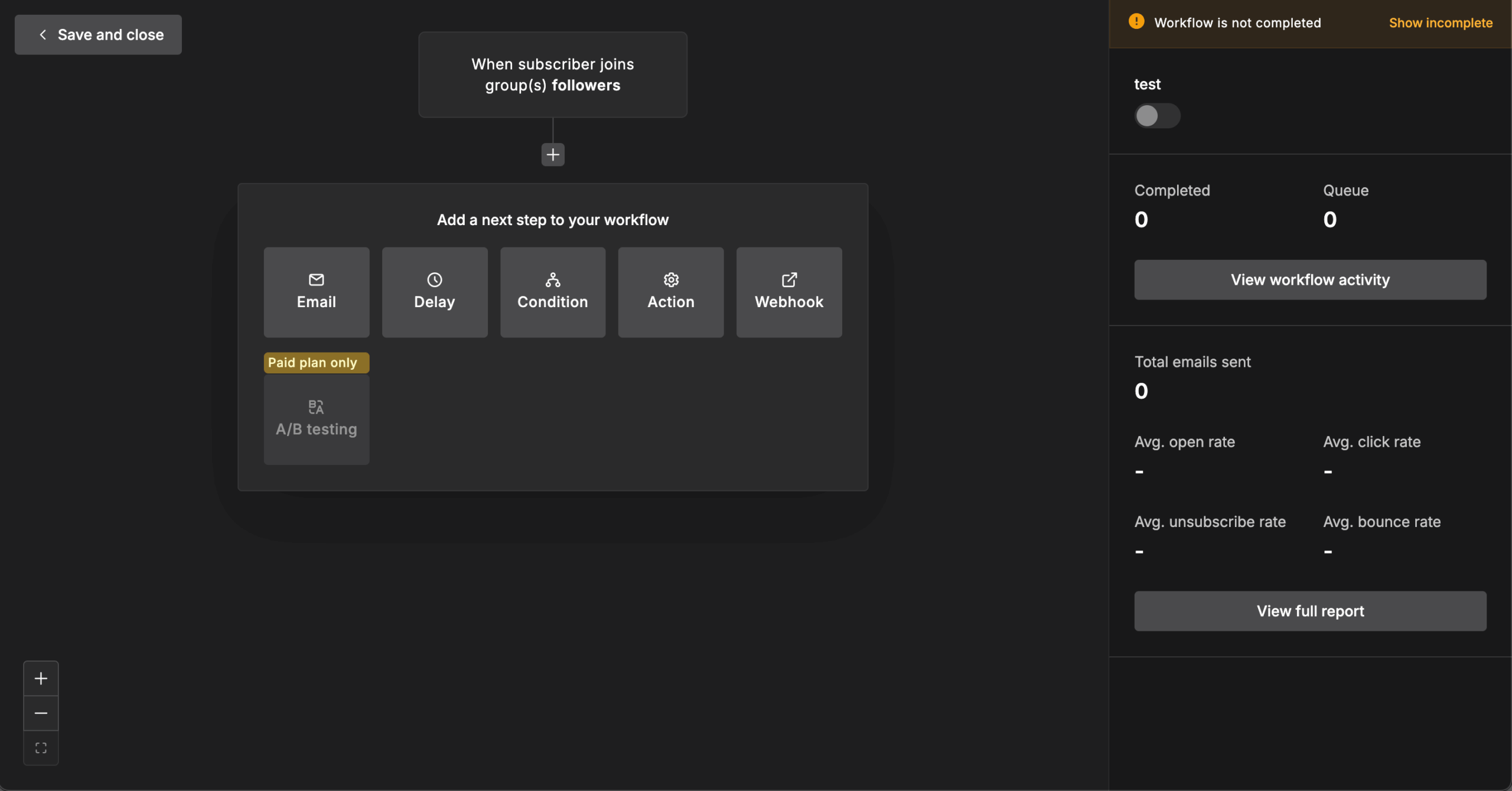
I tested MailerLite for a creator newsletter with 6,800 subscribers, and the drag-and-drop editor with its 70+ content blocks (surveys, countdown timers, coupons, and more) was the cleanest building experience of any tool in this roundup.
Campaigns came together fast even for non-technical users, and A/B testing is included on every plan, which no other platform here offers free.

The automation builder handled a welcome series and a re-engagement flow without friction, though tiers matter: Free allows 3 automations, Comfort 50, and only Power removes the cap and adds multi-trigger workflows.
First, the free plan has been cut three times: from 1,000 subscribers and 12,000 emails in 2023, to 500 subscribers in September 2025, to 250 subscribers and 2,500 emails in June 2026. Second, reviewers report algorithmic account suspensions without explanation, confirmed by CheckThat.ai’s 6,790-review analysis and the most-cited departure reason.
Deliverability is a genuine strength: 92.7% in EmailTooltester’s December 2025 round, with 79.82% inbox placement measured by Email Deliverability Report in June 2026. There is no transactional email (a separate MailerSend subscription covers that), and the platform is email-only.
MailerLite fits creators, bloggers, and small businesses under 10,000 subscribers who want a clean email template builder and A/B testing from day one. It is not for ecommerce stores that need transactional email, teams that require phone support (there is none), or anyone who cannot tolerate the account-termination risk reviewers describe.
Pros & Cons
- Cleanest drag-and-drop editor in this roundup (70+ blocks)
- A/B testing included on all plans, including Free
- Smart Sending ML send-time optimization (Comfort and above)
- Strong deliverability (92.7%, EmailTooltester, Dec 2025)
- Free plan cut three times, now 250 subscribers and 2,500 emails/month
- Reviewers report account suspensions without explanation
- No transactional email (requires a separate MailerSend subscription)
- Email-only: no SMS, WhatsApp, or push notifications
- No phone support on any plan, and no dedicated mobile app
Key Features
- A/B testing on every plan. Subject lines and content variants can be split-tested even on the free tier
- Content monetization. Digital products, paid newsletter subscriptions, and appointment booking (a fit for service businesses) run with 0% platform commission
- Smart Sending. Machine learning delivers each email when the individual subscriber is most likely to engage (Comfort plan and above)
ActiveCampaign vs. MailerLite Pricing
| Plan tier | ActiveCampaign | MailerLite |
| Free Plan | 14-day free trial | $0/month (250 subscribers + 2,500 monthly emails) |
| Entry plan | $15/month (1,000 contacts, basic automation) | Comfort: from $12/month (50 automations) |
| Mid-tier plan | $49/month (1,000 contacts + advanced automation) | Power: from $25/month (unlimited automations, multi-trigger workflows) |
| High-tier plan | $79/month (1,000 contacts + advanced features, scales with contacts) | – |
| Enterprise | $145/month (1,000 contacts + advanced features, scales with contacts) | Enterprise: custom pricing for 200K+ subscribers |
Annual billing saves 10%; June 2026 pricing reflects an increase of roughly 10–30% across tiers.
Limitations
- Shrinking free tier. Three cuts since 2023, now 250 subscribers and 2,500 emails/month
- Account suspension risk. Algorithmic terminations without explanation are the most-cited departure reason across review platforms
- No transactional email or extra channels. Order confirmations require a separate MailerSend subscription, and there is no SMS or push
- Automation depth. Reviewers describe it as basic for complex use cases; multi-trigger workflows require Power
Free ActiveCampaign Alternatives
Does ActiveCampaign have a free version? No, it only offers a 14-day free trial (limited to 100 contacts and 100 email sends), after which the cheapest plan starts at $15/month for 1,000 contacts on annual billing. If you want to run email marketing campaigns at $0, eight of the platforms in this guide have genuinely free plans:
Free plan limits verified August 2026 from official pricing pages.
| Platform | Free contacts | Free sends | What’s included free |
| Sender | 2,500 | 15,000/month | Full automation builder, transactional email, 24/7 support |
| MailerLite | 250 | 2,500/month | 3 automations, A/B testing, landing pages |
| Brevo | 100,000* | 300/day | Transactional email, built-in CRM (no automation) |
| HubSpot | 1,000,000 | 2,000/month | CRM, email, forms, live chat |
| GetResponse | 500 | 2,500/month | Newsletters, signup forms, one landing page |
| Klaviyo | 250 | 500/month | Ecommerce flows, segmentation |
| Mailchimp | 250 | 500/month | Templates only; no automation or scheduling |
| Omnisend | 250 | 500/month | All features, ecommerce workflows |
The right free plan depends on which limit you’ll hit first. If you already have a real list, the 250-contact ceilings rule out Klaviyo, Mailchimp, and Omnisend fast; those tiers are trial plans in practice. Brevo suits large lists with low sending volume, and HubSpot’s free tier is really a CRM with email attached.
Sender’s free plan is the only one that includes the complete automation builder, and it also covers custom events: you can track specific user actions on your site, such as “Watched 50% of a Video,” send that data to Sender in real time, and use it to trigger flows or build behavioral segments through the automation builder.
That combination of contacts, sends, and behavioral triggers is why we rank it as the most usable free email marketing option after ActiveCampaign’s trial ends.
Which ActiveCampaign Alternative Should You Choose?
Match the tool to the job rather than the feature list: most of these platforms handle core email marketing automation competently, and the differences show at the edges.
- Budget-focused SMB: Sender. Affordable pricing runs through both tiers: the $7/month Standard plan and the free tier both include full automation, and custom events give you behavioral triggers that usually sit on plans costing 5–10x more.
- Ecommerce store under $500K/year: Omnisend. Prebuilt store workflows and email + SMS + push in one builder get campaigns live fastest among the ecommerce tools reviewed here.
- Ecommerce store over $500K/year with a dedicated marketer: Klaviyo. The predictive segmentation is unmatched if you can absorb active-profile billing. Our comparison of email marketing platforms for ecommerce goes deeper on this split.
- CRM-led sales team: HubSpot if you want the full customer platform, but be honest about the math: if multi-branch automation tied to deal pipelines is the core need and $100–$200/month is the budget, ActiveCampaign itself remains the strongest option, and switching may not serve you. Sender is not the pick here either.
- Events and nonprofits: Constant Contact. Native registration, ticketing, and phone support justify the premium for this one use case.
- Creators and course sellers: GetResponse for webinars and courses under one roof; MailerLite if you mainly need a clean editor and a low bill.
Switching platforms is a big decision. Our complete email marketing guide covers everything from choosing a platform to building your first campaign, whether you’re coming from ActiveCampaign or starting fresh.
Switching from ActiveCampaign: Migration Checklist
- Export everything, not just actives. Download contacts including unsubscribes and bounces, so your suppression list travels with you and keeps you compliant.
- Map your automations on paper first. List each workflow’s trigger, delays, and branches before rebuilding; Starter-plan workarounds often collapse into fewer, cleaner flows.
- Verify domain authentication. Set up SPF, DKIM, and DMARC on the new platform before the first send.
- Warm up gradually. Start with your most engaged segment and scale volume over 2–4 weeks, especially if you are moving to dedicated IP addresses.
- Run both tools in parallel for one billing cycle, comparing open, click, and bounce rates before canceling.
If you’d rather not handle the migration from ActiveCampaign alone, Sender’s team does it for you, and the step-by-step migration guide walks through moving your lists, templates, and automations with 24/7 support, free on every plan.
even on the free plan.
FAQs
Businesses should consider switching from ActiveCampaign if they find its pricing too high for their needs, especially as advanced features like CRM, lead scoring, and deeper automation are only available on higher-tier plans. It may also not suit teams that prefer a simpler interface, faster setup, or don’t require complex, behavior-driven workflows. Smaller teams or beginners may benefit from more intuitive and cost-effective alternatives.
No. ActiveCampaign offers only a 14-day free trial, limited to 100 contacts and 100 email sends, and its paid plans start at $15/month for 1,000 contacts on annual billing ($19/month billed monthly). If you need a genuinely free tier, Sender (2,500 contacts, 15,000 emails/month with full automation), Brevo (300 emails/day), and MailerLite (250 subscribers) all offer one.
The best alternatives to ActiveCampaign for small businesses are Sender and Mailchimp. Sender is ideal for small teams that want advanced automation and segmentation on a generous free plan, making it a strong all-in-one starting point. Mailchimp, on the other hand, is better suited for beginners thanks to its user-friendly interface, templates, and AI-powered tools, making campaign setup easier for smaller teams.
Sender is the cheapest ActiveCampaign alternative in this comparison. Its Standard plan starts at $7/month for 1,000 subscribers, less than half of ActiveCampaign’s $15/month Starter, and for anyone seeking a cheaper alternative to ActiveCampaign with automation intact, its free plan covers 2,500 subscribers with the full automation builder included. Among the other tools, Brevo’s $9/month Starter is the next cheapest paid entry point, though it caps stored contacts at 500 and excludes automation.
Mailchimp is better for beginners; ActiveCampaign is better for automation-heavy teams.Mailchimp wins on ease of use, templates, and its 300+ integrations, while ActiveCampaign offers far deeper multi-branch automation and a built-in CRM. At 1,000 contacts, ActiveCampaign Starter costs $19/month billed monthly versus $26.50/month for Mailchimp Essentials, but Starter caps automations at 5 actions, so serious automation on either platform requires a mid-tier plan.
Automation features vary a lot across ActiveCampaign alternatives, with some tools focusing on simple autoresponders and basic workflows, others offering advanced branching and multi-step customer journeys. Sender gives small businesses strong automation depth without a steep learning curve, while Mailchimp is better for simpler, beginner-friendly automations.
Yes, many alternatives to ActiveCampaign are well-suited for ecommerce businesses. Platforms like Omnisend and Klaviyo are built specifically for ecommerce, offering product recommendations, behavioral segmentation, and multi-channel automation. Meanwhile, tools like Sender provide a simpler, more affordable email marketing option for growing online stores.
Yes, some ActiveCampaign alternatives do support both marketing and transactional emails. Platforms like Sender, Omnisend, and Brevo combine campaigns, automation, and transactional sending (like order confirmations or password resets) in a single dashboard, making it easier to manage everything together.