


Choosing an automation tool often comes down to how reliably it handles everyday follow-ups without adding extra work. This page ranks the top options for 2026, helping readers compare features, usability, and fit before selecting an email autoresponder.
We made this guide to give a clear, tested shortlist of email marketing platforms for businesses, creators, and teams that need dependable automated email workflows, with concise notes on where each tool performs best and what makes it stand out.
Capterra, G2, Trustpilot, and Reddit to create an objective evaluation. Learn more about our review methodology
How We Tested These Email Autoresponders
- Scalability and long-term value assessment. Finally, we reviewed how pricing scales with subscriber growth, feature gating between tiers, and upgrade thresholds.
- Hands-on platform testing. We created trial accounts and actively used each autoresponder to validate core functionality beyond marketing claims. Rather than relying solely on feature comparison pages, we built real campaigns, configured automations, and explored dashboard workflows;
- Automation workflow evaluation. We tested each platform’s ability to create multi-step email sequences, time-based autoresponders, and trigger-based workflows. This included assessing visual automation builders, branching logic, tagging systems, behavioral triggers, and the flexibility to modify workflows;
- Customization and campaign building. We evaluated email template libraries, drag-and-drop editors, HTML editing capabilities, personalization fields, and dynamic content options;
- Deliverability and sending limits. To gauge reliability, we conducted controlled inbox placement tests across major providers (e.g., Gmail and Outlook) and monitored spam filtering patterns. We also reviewed sending caps, daily/monthly email limits, and throttling policies;
- Customer support and documentation review. We contacted support teams via live chat and email to evaluate response time, technical depth, and overall helpfulness. In addition, we reviewed onboarding flows, knowledge bases, video tutorials, and community forums;
- Real-world user feedback analysis. To complement hands-on testing, we analyzed user reviews and ratings on platforms such as G2 and Trustpilot. We looked for recurring strengths and weaknesses related to usability, automation reliability, billing transparency, and long-term satisfaction trends.
What is an Email Autoresponder?
Simply put, an email autoresponder is a tool for creating automated emails. You write a single email, set it up in an autoresponder dashboard, and voilà—it automatically sends to people when they trigger events, like subscribing to your list or buying a product, or when a specific date comes up.
By setting up a series of automated emails (or email sequences), you can build a more engaging experience for your audience by sending more relevant content while focusing on other areas of your business. But more on that in the following section.
Why Email Autoresponders Matter in 2026
Email autoresponders are a critical ingredient in email marketing because they automate personalized communication, allowing businesses to engage customers with relevant, timely messages. If not for autoresponder functionality, Amazon would have to build an entire department only for sending shipping confirmation emails.
So yes, email marketing software saves time and enhances customer experience, but at the same time, it’s the foundation upon which many businesses flourish and can’t survive without.
For instance, in 2008, only 40% of brands sent welcome messages to new subscribers, but today, 80% of businesses use automation for this key touchpoint. And what about automated emails driving 180% higher conversion rates, not to mention 3.2x more revenue, than regular bulk emails.
Autoresponder vs. Drip Campaign vs. Marketing Automation
If you’re not entirely sure what is the difference between autoresponders, drip campaigns, and marketing automation tools – you’re not alone. In the table below, we break down all three types of tools for you:
| Term | What It Is | Example |
| Autoresponder | Single email or short sequence triggered by one specific action | Welcome email after signup |
| Drip campaign | Time-based sequence that sends on a fixed schedule regardless of behavior | 5-day onboarding series, one email per day |
| Marketing automation | Behavior-driven workflows with branching logic, conditions, and multi-channel steps | If opens email → send offer; if doesn’t → wait 3 days → send reminder via SMS |
In short, these terms often overlap in everyday use, but they describe different levels of sophistication. An autoresponder is simply a sequence that deals with welcome emails (purchase confirmations and the like); an email drip campaign adds fixed timing, and marketing automation introduces conditional logic and more complex customer journeys.
In practice, most marketers say “autoresponder” when they mean all three, which is why the terms are often used interchangeably even though the setups behind them are very different.
Best Email Autoresponders Comparison Table
| Platform | Free Plan Details | Autoresponder Features | Best For | Free Plan Limitations |
| Sender | 2,500 contacts + 15,000 emails/month | Unlimited workflows in free plan | Email automation for small business | No feature limitations |
| Mailchimp | 250 contacts + 500 emails/month | Limited automation (no on free plan) | Beginners, simple email campaigns | No automation on free, 250 emails/day limit |
| Brevo | 300 emails/day, 100,000 stored contacts | Email automation with 2,000 contacts | Growing businesses with solid free features | 300 emails/day, limited automations |
| HubSpot | 1,000 contacts + 2,000 emails/month | Simple automation workflows | Businesses needing CRM + email integration | No advanced workflows |
| SendPulse | 500 contacts + 15,000 emails/month | Multi‑channel flows | Multi-channel needs (email, SMS, push) | No SMS automation; automation workflows included but with volume/feature restrictions |
| Omnisend | 250 contacts + 500 emails/month | Full automation, cart abandonment | Ecommerce stores needing strong automation | Automation and cart-recovery features are limited; 250 contacts only |
| AWeber | 500 contacts + 3,000 emails/month | Basic autoresponders | New users needing a reliable provider | Autoresponder and feature depth are restricted |
| GetResponse | 500 contacts + 2,500 emails/month | Behaviour‑based triggers, lead scoring | Growing businesses with advanced needs | Advanced marketing tools are locked behind paid tiers |
| ActiveCampaign | 14-day free trial only | Advanced autoresponder features for 14 days | Businesses wanting CRM-driven marketing automation | No permanent free plan; 100 contacts and 100 emails sends |
Quick Picks: Find the Perfect Autoresponder Tools Fast
Use this list to quickly match your business needs with the right email marketing platform.
- Best Free Plan: Sender (2,500 contacts and 15,000 emails per month, with unlimited workflows on the free plan.)
- Best for Ecommerce: Omnisend (Full automation and cart abandonment flows for online stores.)
- Best for Startups/SMBs: Brevo (Affordable, beginner-friendly automation with transactional email support.)
- Best Budget Option: Sender (Paid plans start at $7/month, making it the lowest-cost paid option in the visible list.)
- Best for Enterprise/Agencies: HubSpot (Strong CRM-based automation, lead nurturing, and multi-path workflows.)
- Best for Multichannel Needs: SendPulse (Built for email, SMS, and push notifications in one platform.)
9 Best Email Autoresponder Tools Reviewed
Here’s a rundown of the best free autoresponder tools (including free email autoresponder software) available today:
1. Sender – Powerful Automation, Even on the Free Plan
Sender stands out with its intuitive interface and robust automation features, making it an excellent choice for businesses of all sizes, particularly beginners dipping their toes into customer engagement automation.

You can easily create visually appealing autoresponder email templates and set up intricate workflow automation for emails, ensuring a seamless and engaging subscriber experience.
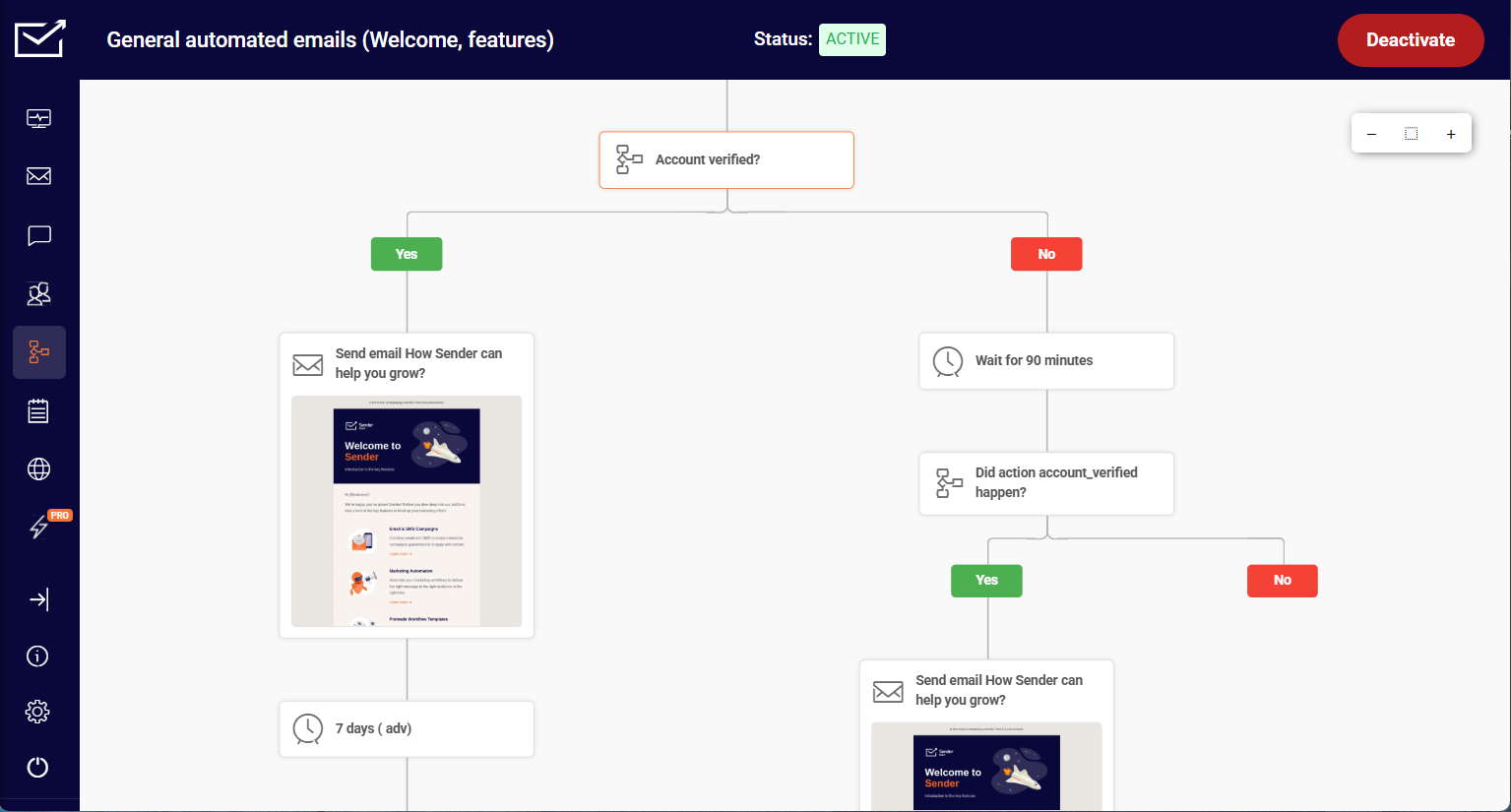
Beyond its automation functionality, Sender prioritizes personalized email marketing automation. You can craft highly targeted welcome email series and lead nurturing emails using subscriber data and advanced segmentation options. This ensures your automated messages resonate with each individual.
All in all, the advanced features and excellent email deliverability help to land emails into subscribers’ inbox, not the dreaded spam folder—and, at the end of the day, that’s what matters the most.
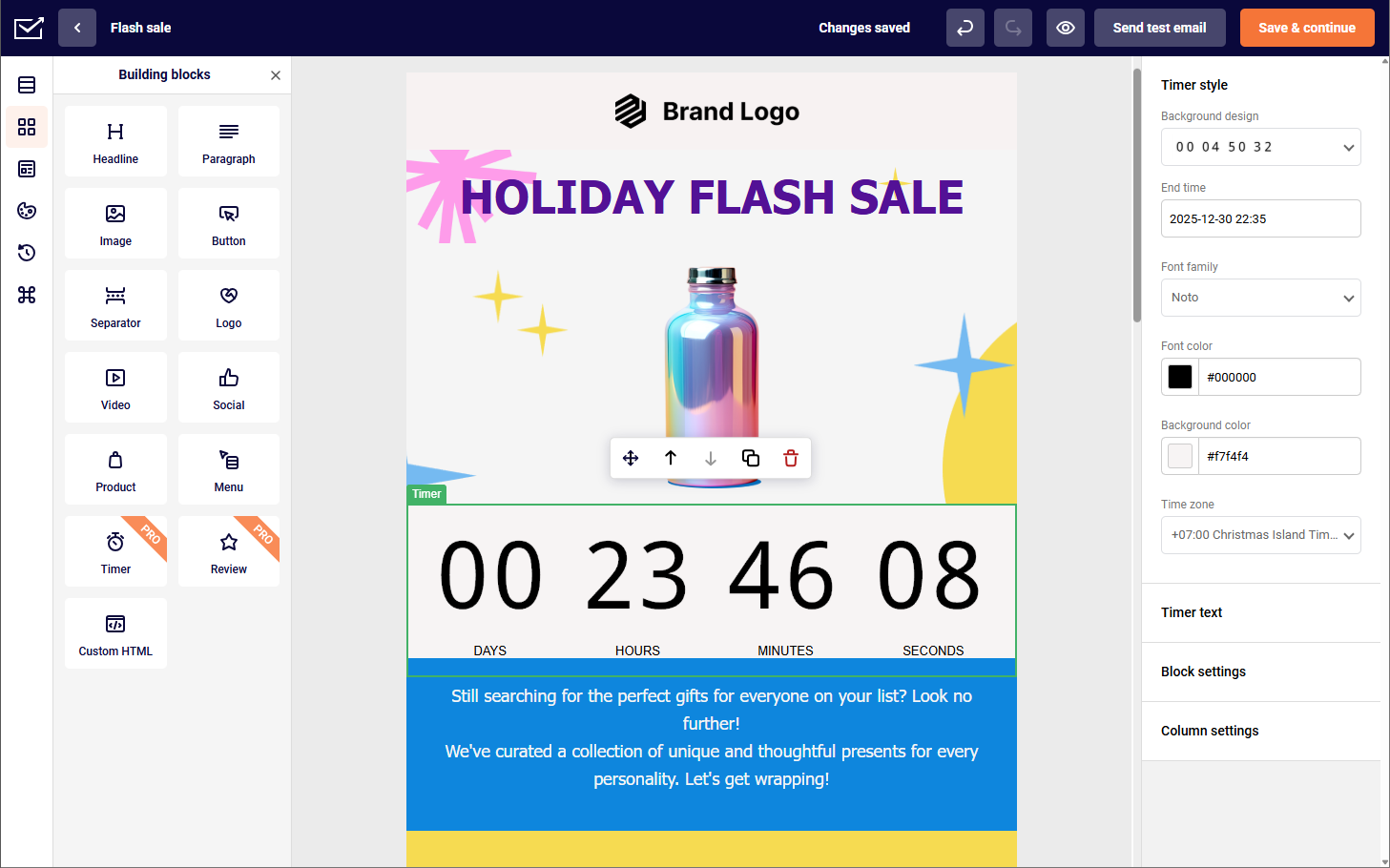
Autoresponder Features
- Pre-built autoresponder email templates to save time and effort;
- Automated welcome emails to engage new subscribers instantly;
- Behavioral triggers to send targeted messages based on subscriber actions;
- Drip campaigns to nurture leads and build customer relationships;
- Real-time analytics and send time optimization suggestions for monitoring autoresponder performance and results.
Pros & Cons
- Easy to use
- Intuitive drag-and-drop builder
- Big pre-built template variety
- High email deliverability rate
- Advanced reporting & analytics
- Affordable pricing for small businesses
- Branding on a free account
- Learning curve for complex workflows
- SMS only on paid plans
Pricing
There’s a free autoresponder plan for up to 2,500 subscribers and 15,000 monthly emails offering advanced features. If you wish to access features like SMS marketing, paid accounts start at $7/month.
See why businesses choose Sender:
Mailchimp – Beginner-Friendly, But Paid for Automation
I’ve been using Mailchimp for email marketing needs, and let me tell you—it checks all the right boxes. The interface is user-friendly, which makes setting up campaigns and automations a breeze. Migrating from Mailchimp? We make it easy. The autoresponder feature is solid, too, offering templates for the most popular scenarios from the get-go. If you’re comparing options, see our Mailchimp alternatives roundup.

What really stands out, however, is the powerful audience insights and predictive analytics. These tools helped me understand my subscribers on a deeper level and tailor my campaigns to fit their needs.
That being said, one thing I’ve noticed is that Mailchimp’s pricing can quickly become a big hurdle as your subscriber list grows. Not only is Mailchimp sensitive to any subscribers that go over your (monthly) limit, but prices do climb fast if you need dynamic content or all the bells and whistles of AI generation.
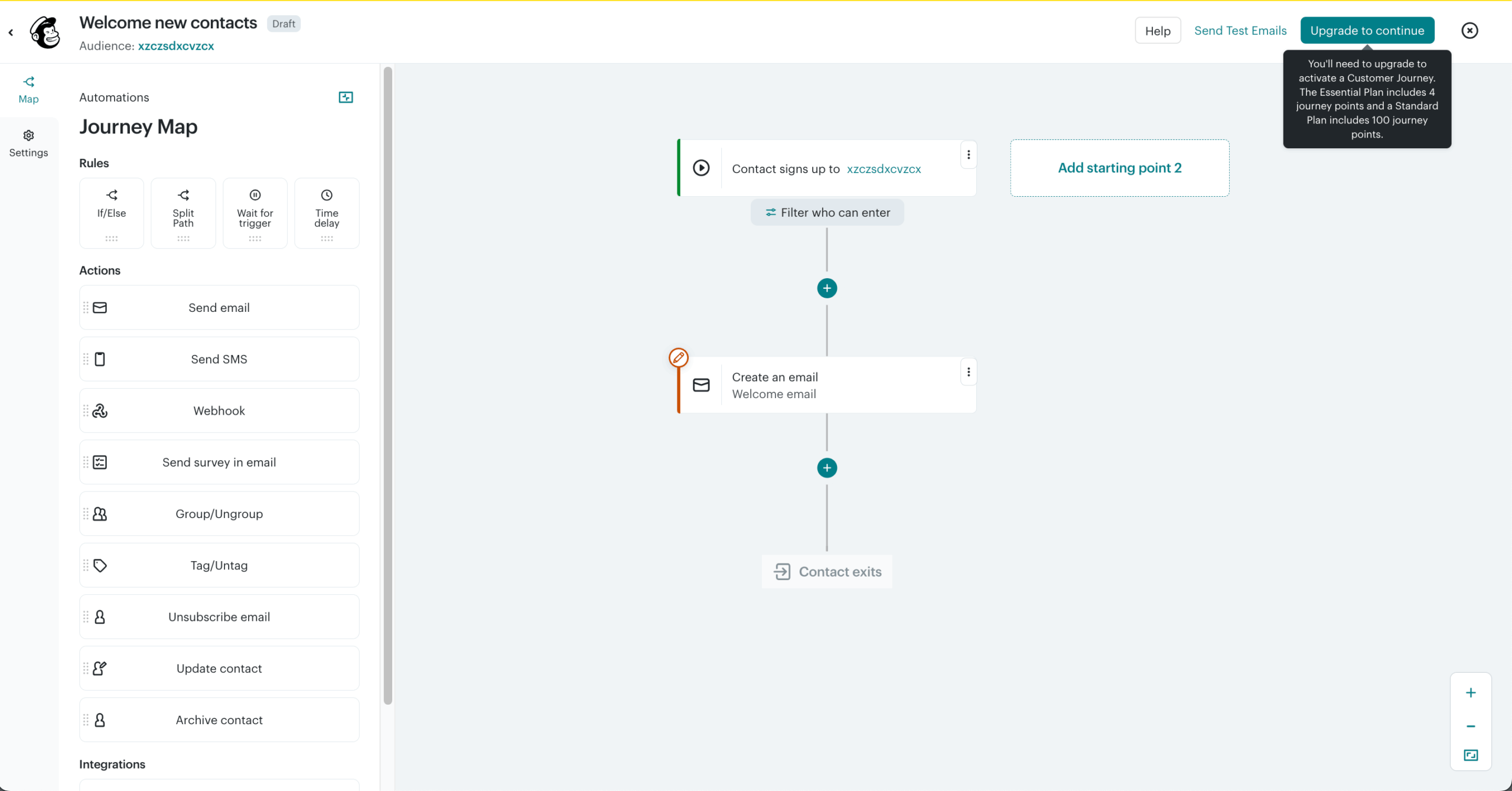
Autoresponder Features
- User-friendly interface to easily create and manage automated email sequences;
- Pre-built automation templates for welcome emails, abandoned cart reminders, etc.
- Segmentation capabilities to target specific audience segments;
- Built-in analytics to track autoresponder performance and measure campaign effectiveness;
- Ecommerce integrations to automate product recommendations and promotional emails.
Pros & Cons
- User-friendly interface
- Top-notch pre-built automation templates
- Strong audience insights and predictive analytics
- Solid segmentation and personalization tools
- Reliable reporting and ecommerce integrations
- Pricing scales quickly as your list grows
- Some advanced automation features locked behind higher tiers
- Can be costly for businesses managing multiple audiences
- Dynamic content and AI tools limited to premium plans
Pricing
Mailchimp offers a free plan with up to 500 emails/month and 250 contacts. If you like the platform and decide to get a paid plan, they start at $13/month.
Brevo – Good Autoresponders with Daily Send Limits
I’ve been using Brevo for a while now, and I have to say it strikes a really nice balance between affordability and functionality. For similar tools, see our Brevo alternatives guide.

When it comes to email automation, it’s a powerhouse—perfect for setting up triggered emails like order confirmations, post-purchase feedback, shipping updates, and password resets. The automation workflows are straightforward, and I enjoyed how easy it is to set up automated email sequences that keep my audience engaged without constant oversight.
The drag-and-drop editor is clean and intuitive, so even without any coding skills, I can design great-looking emails quickly. My only gripe is that Brevo has a very low ceiling for email sends. The free plan gives you 300 emails per day, while on its entry plan, that drops to 250—unless, that is, you want to pay extra.
Still, for all that its autoresponder is able to do, Brevo certainly deserves a place on this list.
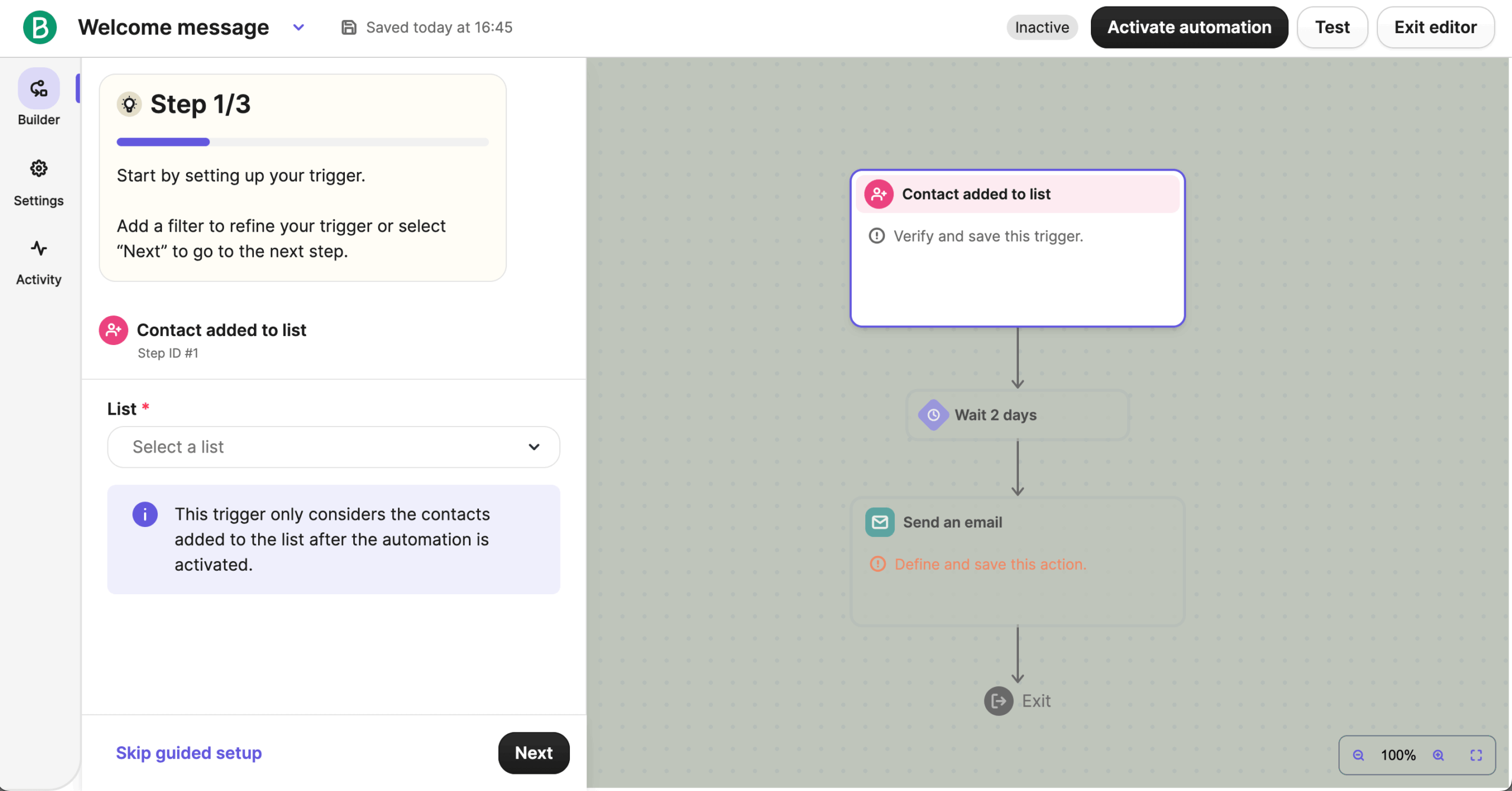
Autoresponder Features
- An intuitive workflow editor that easily creates and manages automated email sequences;.
- Contact segmentation and dynamic personalization to tailor autoresponder messages;.
- Transactional email capabilities to automate order confirmations and shipping updates;.
- A/B testing functionality to optimize campaign performance;
- Detailed reporting and analytics dashboards to track key metrics and gain insights.
Pros & Cons
- Affordable and beginner-friendly email automation
- Clean, intuitive drag-and-drop editor
- Easy setup for autoresponder sequences
- Strong transactional email capabilities (order, shipping, etc.)
- Solid reporting and analytics for campaign tracking
- Daily send limits can be restrictive
- Some advanced automation options are limited
- Lower-tier plans include fewer customization features
Pricing
Brevo’s free plan allows you to send up to 300 emails/day, including automated and transactional messages. If you wish to remove the daily sending email limit, you’ll need a paid plan starting at $8/month.
HubSpot – Advanced CRM Workflows, But Paid-Only
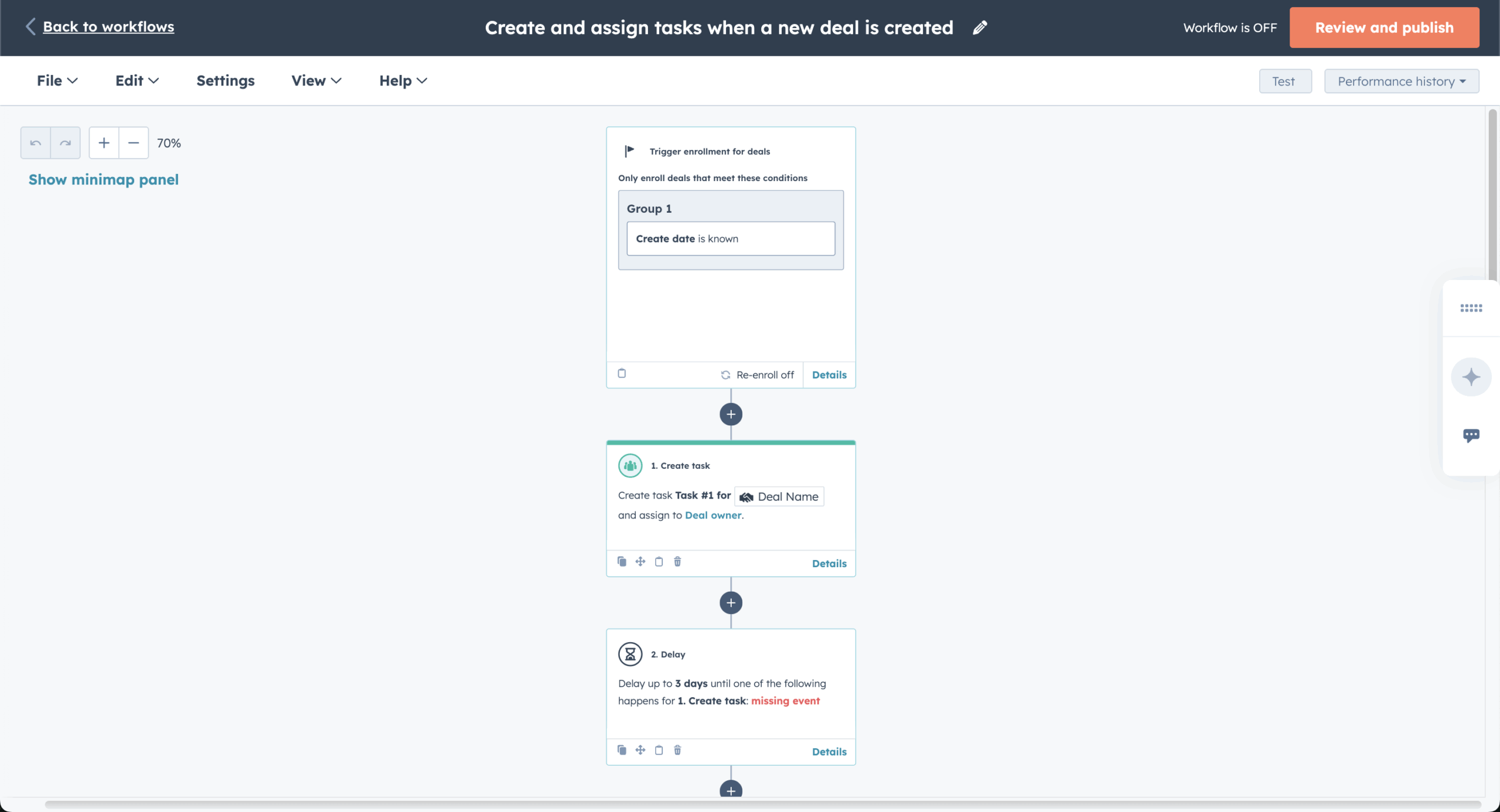
HubSpot, a well-known name in the CRM (Customer Relationships Management) world, offers a capable follow-up email software as part of its marketing hub.

I’ve found that this autoresponder shines when it comes to keeping sales and marketing aligned. You can set up personalized email automations based on how leads behave in your CRM, which makes it easy to guide prospects smoothly through the sales funnel.
While HubSpot does offer a free plan with some basic tools, you’ll need to upgrade to a paid plan to really get the most out of this autoresponder and advanced automation features. From multiple object types to multi-path flows, HubSpot really packs a punch when it comes to email automation.
Autoresponder Features
- CRM-powered autoresponders to personalize messages based on detailed contact information;
- Workflow automation to trigger targeted emails based on specific actions and behaviors;
- Lead nurturing tools to guide prospects through the sales funnel;
- Sales automation features to streamline follow-up communication;
- Comprehensive analytics and reporting to measure the impact of autoresponder campaign.
Pros & Cons
- Deep CRM integration for seamless sales and marketing alignment
- Powerful workflow builder with multi-path branching
- Triggers based on detailed lead behavior and CRM data
- Excellent analytics and reporting capabilities
- Strong lead-nurturing and follow-up automation tools
- Advanced autoresponder only available on paid plans
- Steep price jump when upgrading
- Learning curve for building branching workflows
- HubSpot branding on free plan
Pricing
You can get a free plan of up to 2,000 emails per month. However, it offers limited email templates and includes HubSpot branding. The price of paid plans with a bigger sending volume starts at $11/month.
SendPulse – Free Automation That Rivals Paid Tools
SendPulse is one of those rare tools that give you advanced automation without forcing you onto a paid plan. But more on that later—let’s talk about email automation.

Its automation builder is visual and intuitive, letting you easily design workflows that combine email, SMS, and even web push notifications. You can layer in filters and delays, ensuring every message feels personal and timely.
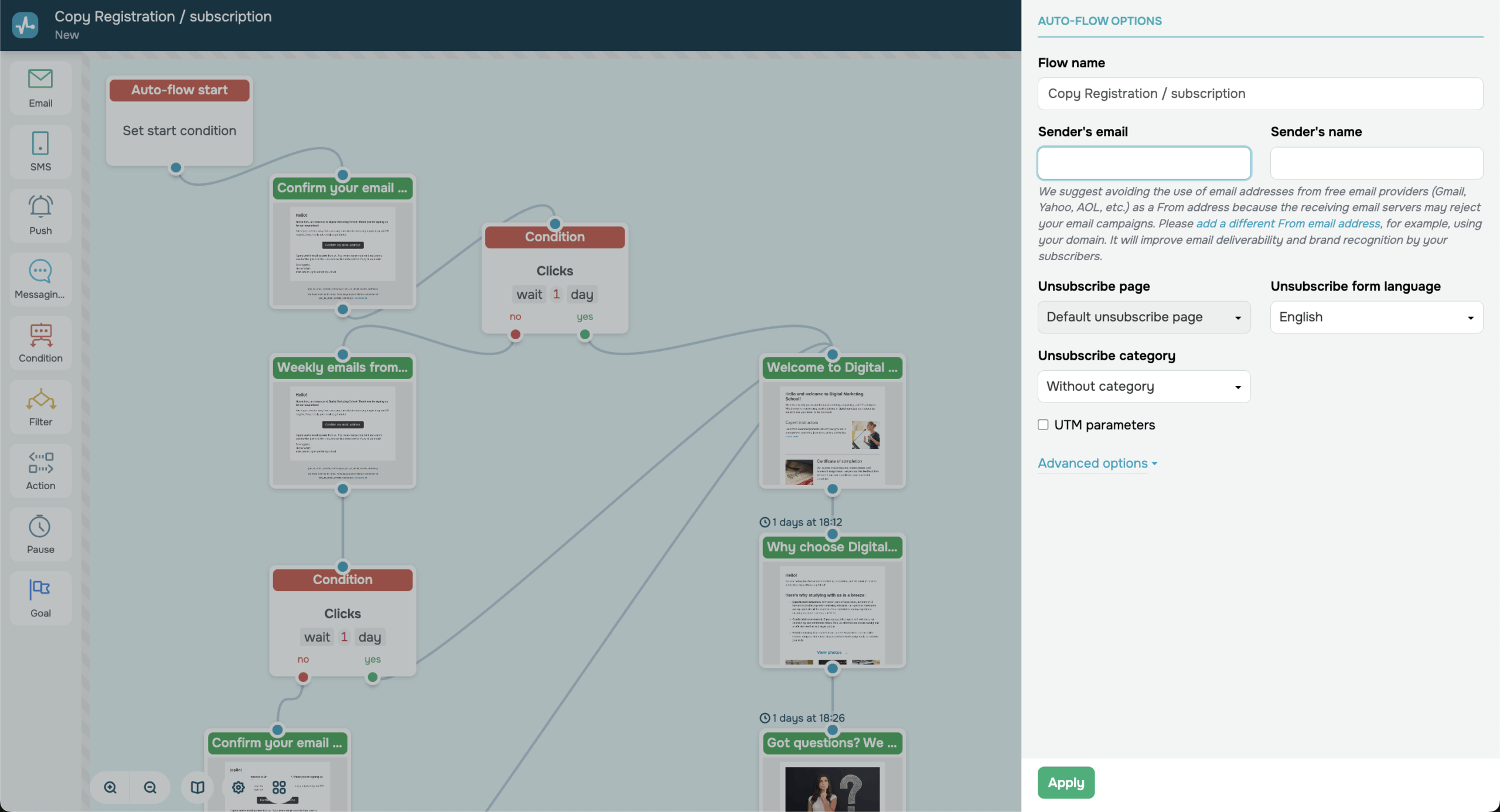
Another standout is SendPulse’s “Automation 360” feature, which lets you build multi-channel customer journeys from a single dashboard. Whether you’re nurturing leads, following up on purchases, or running re-engagement campaigns, the flexibility here is impressive for a free tool.
That said, the interface can take a bit of exploring at first. It’s packed with features that might feel overwhelming if you’re just after a simple email autoresponder. But once you get the hang of it, SendPulse offers a level of control and versatility that rivals some paid platforms.
Autoresponder Features
- Visual drag-and-drop automation builder with multi-channel support;
- Automation 360 for creating advanced, behavior-based customer journeys;
- Conditional filters and delays to personalize autoresponder paths;
- Segmentation and tagging tools for targeted campaigns;
- Real-time reporting and analytics to optimize workflows.
Pros & Cons
- Easy-to-use visual automation builder
- Multi-channel workflows
- Advanced Automation 360 with filters and conditions
- Dynamic content and behavior-based triggers
- Generous free plan
- Interface can feel cluttered for beginners
- Limited design customization on free plan
- Occasional lag when editing large workflows
- Some reports lack deep-level detail
- Customer support priority reserved for paid users
Pricing
SendPulse’s free plan includes up to 500 contacts and 15,000 emails per month—with full access to its automation tools. If you want higher limits or additional channels like Viber messaging, paid plans start at $8/month.
Omnisend – Multi-Channel Autoresponder for Ecommerce
Omnisend is more than just an email autoresponder—it’s a comprehensive multi-channel marketing engine.

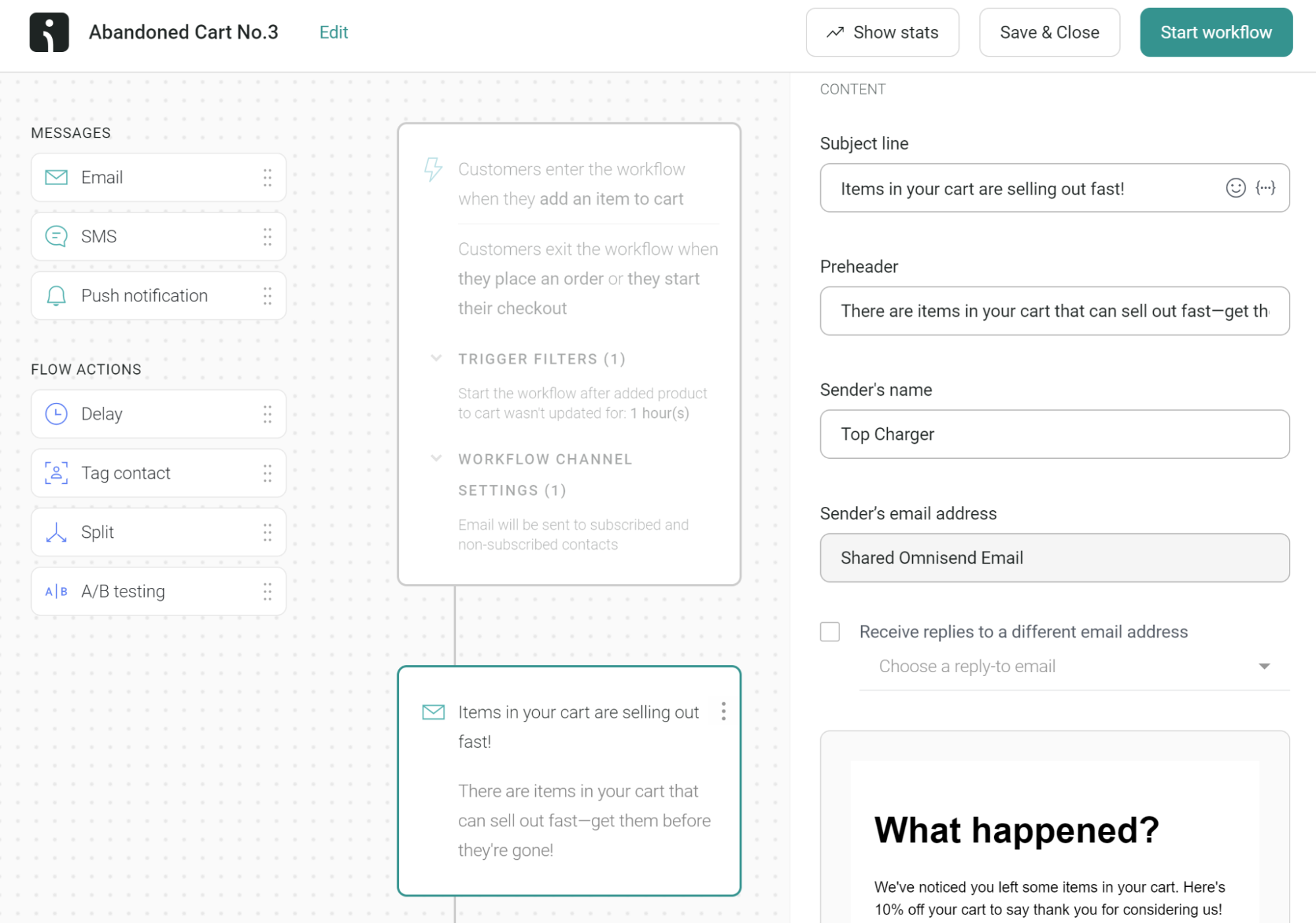
I really enjoyed that this autoresponder goes beyond just email automation—you can also set up SMS marketing and web push notifications, which makes it feel like Omnisend was built with multi-channel marketers in mind.
On the other hand, the multi-channel setup can feel a bit overwhelming if you’re only interested in email marketing. There are tons of features and integrations, and while that’s great for bigger operations, it might be overkill if you’re just looking for a simple, straightforward platform for online courses.
Autoresponder Features
- Ecommerce focused autoresponder workflows get more sales and customer engagement;
- Pre-designed automation templates for welcome series, abandoned cart recovery, and post-purchase follow-ups;
- Multi-channel autoresponders to reach customers through email, SMS, and push notifications;
- Flexible segmentation options to personalize autoresponder messages;
- Robust reporting and analytics to track autoresponder performance and measure ROI.
Pros & Cons
- Powerful multi-channel automation
- Pre-built ecommerce workflows
- Strong segmentation & personalization options
- Easy setup for engaging email campaigns
- Detailed reporting and sales tracking
- Can feel overwhelming if you only want email marketing
- Pricing scales quickly as your list grows
- Interface can feel busy with too many integrations
- Limited customization on lower-tier plans
Pricing
You can choose a free plan if you have up to 250 contacts and plan to send up to 500 monthly emails. However, if you have a bigger contacts list and/or higher sending volume, you’ll need a paid plan that starts from $16/month.
AWeber – Easy Autoresponders, but Limited in Free Tier
AWeber is a veteran in email marketing, known for its user-friendly interface and long-standing reputation.

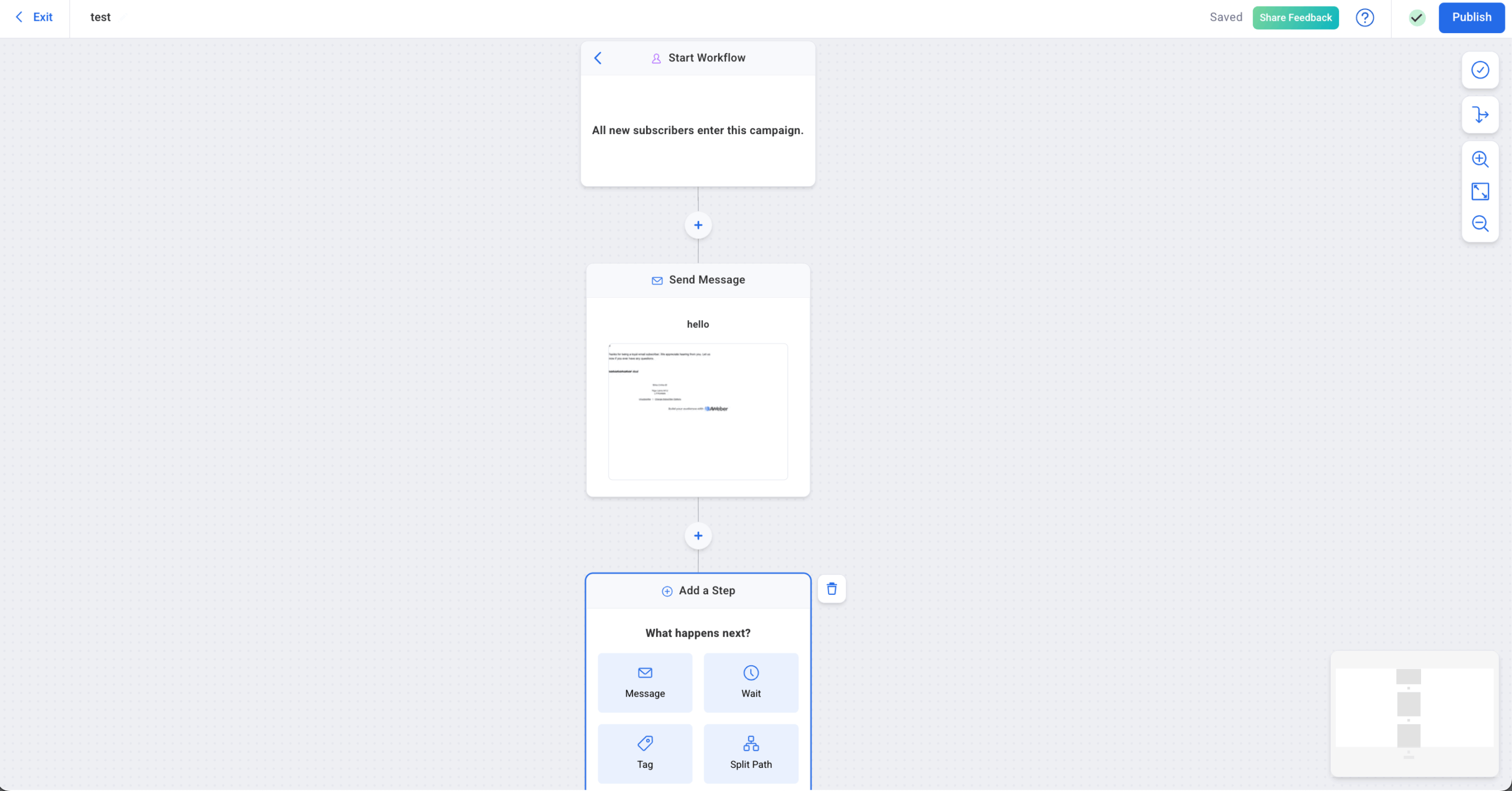
There’s many things to like about AWeber. Setting up basic autoresponders, for instance, is quick and straightforward, and the platform walks you through each step so you’re never lost. The reporting dashboard is another plus—it gives a clear view of how your marketing campaigns are performing so you can adjust as you go.
That said, I did find AWeber’s automation features a bit limited once I wanted to do more complex workflows and not just if/when ones. It’s great for simple sequences, but if you’re an experienced marketer looking to build advanced, multi-branch automations, you might find AWeber a little lacking.
Autoresponder Features
- Drag-and-drop email editor to easily create visually appealing autoresponder messages;
- Pre-designed email templates to save time and effort when creating an autoresponder series;
- List email segmentation and tagging features to target specific subscriber groups;
- Autoresponder campaigns analytics to track open rates, click-through rates, and other key metrics;
- Integrations with popular marketing tools to improve automation capabilities.
Pros & Cons
- Simple and beginner-friendly autoresponder
- Clear reporting dashboard for performance tracking
- Easy subscriber management and segmentation
- Good deliverability
- Helpful onboarding & customer support
- Limited automation depth
- Only basic workflows available on free plan
- Lacks complex behavioral triggers & branching logic
- Email autoresponder tools feel dated compared to newer platforms
Pricing
If you choose a free plan, you can send up to 3,000 emails/month to 500 subscribers and get 1 email automation. If you want to scale or come with bigger requirements, paid plans start at $13/month.
GetResponse – 40+ Pre-Built Automation Templates
Last but not least, GetResponse, which comes swinging with a solid autoresponder alongside a suite of other marketing tools.
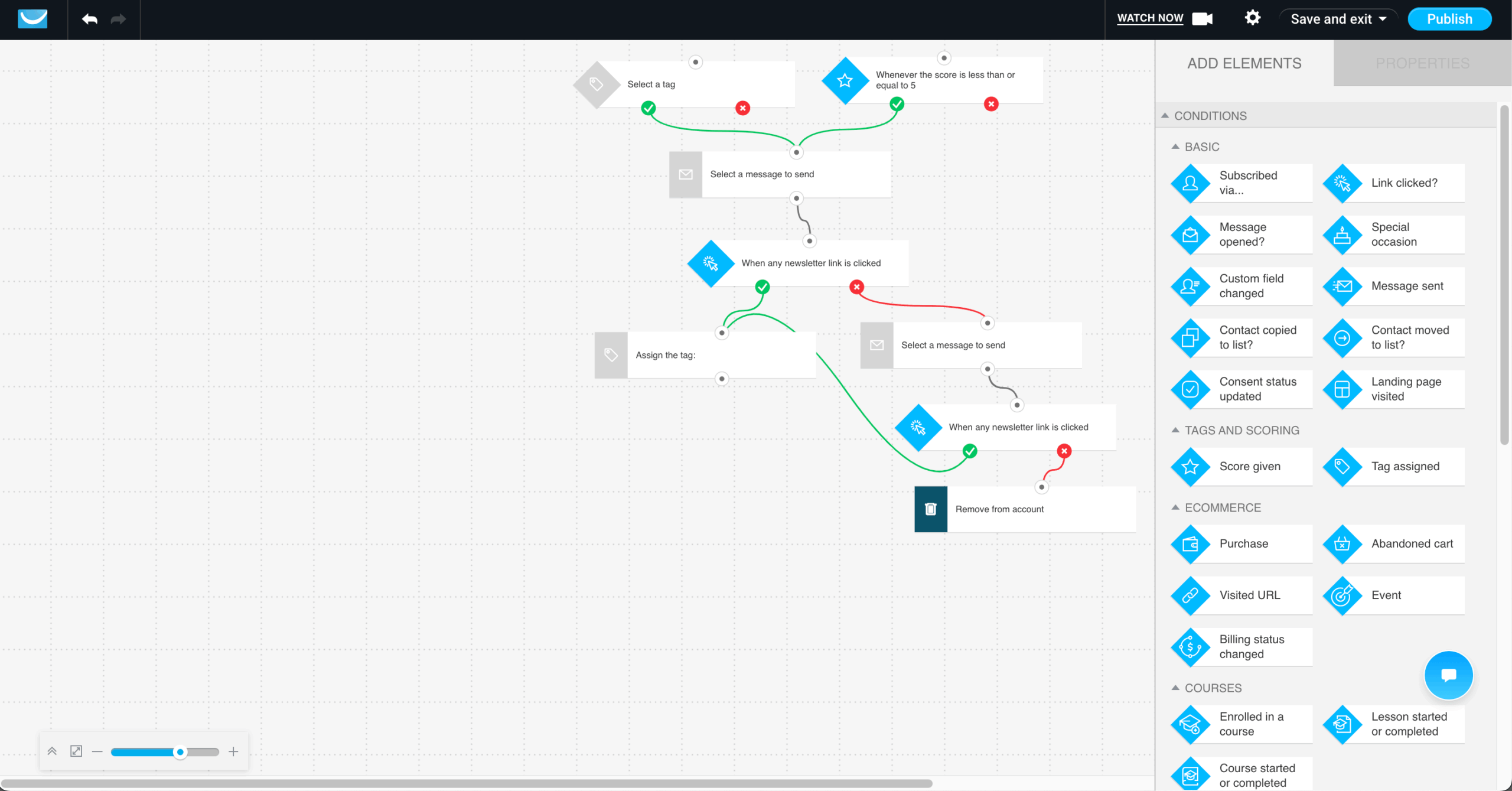
One thing I really like about GetResponse is how powerful its automation features are. You get access to over 40 pre-made marketing automation templates (think abandoned cart emails, win-back campaigns, etc.), which make it easy to launch sophisticated sequences without starting from scratch.
What really stands out to me is GetResponse’s flexibility: you can add filters, delays, and conditional logic so each subscriber follows a personalized path based on their behavior. Including dynamic content in these emails, driven by tags and engagement data, is as easy as it can be.
That said, I wouldn’t necessarily recommend GetResponse for beginners. The interface can feel a bit clunky, and there’s definitely a learning curve when you’re setting up more advanced workflows. But once you get comfortable with it, the automation firepower is hard to beat.
Autoresponder Features
- Visual automation builder to easily create and manage complex email workflows;
- Pre-designed autoresponder templates for various marketing goals;
- Advanced segmentation and tagging to personalize autoresponder messages;
- Webinar automation features to streamline webinar promotion and follow-up communication;
- A/B testing to optimize campaign performance.
Pros & Cons
- Over 40 pre-built automation templates
- Highly flexible workflows with filters, delays, and conditions
- Dynamic content personalization using tags and engagement data
- Great for running webinars directly within autoresponder campaigns
- Powerful segmentation and lead generation tools
- Interface can feel clunky for new users
- Learning curve for building complex automations
- Advanced features locked behind paid tiers
- Can be overwhelming if you only need simple email sequences
Pricing
GetResponse offers a free plan that comes with 2,500 email sends/month and up to 500 contacts. From there, paid plans start at $15/month.
ActiveCampaign – Deep Automation for Scaling Teams
ActiveCampaign is designed for businesses that need more than basic autoresponders. It combines advanced email automation with an integrated CRM, making it suitable for teams that manage both marketing and sales workflows in one system. Looking for other options? See our ActiveCampaign alternatives roundup.
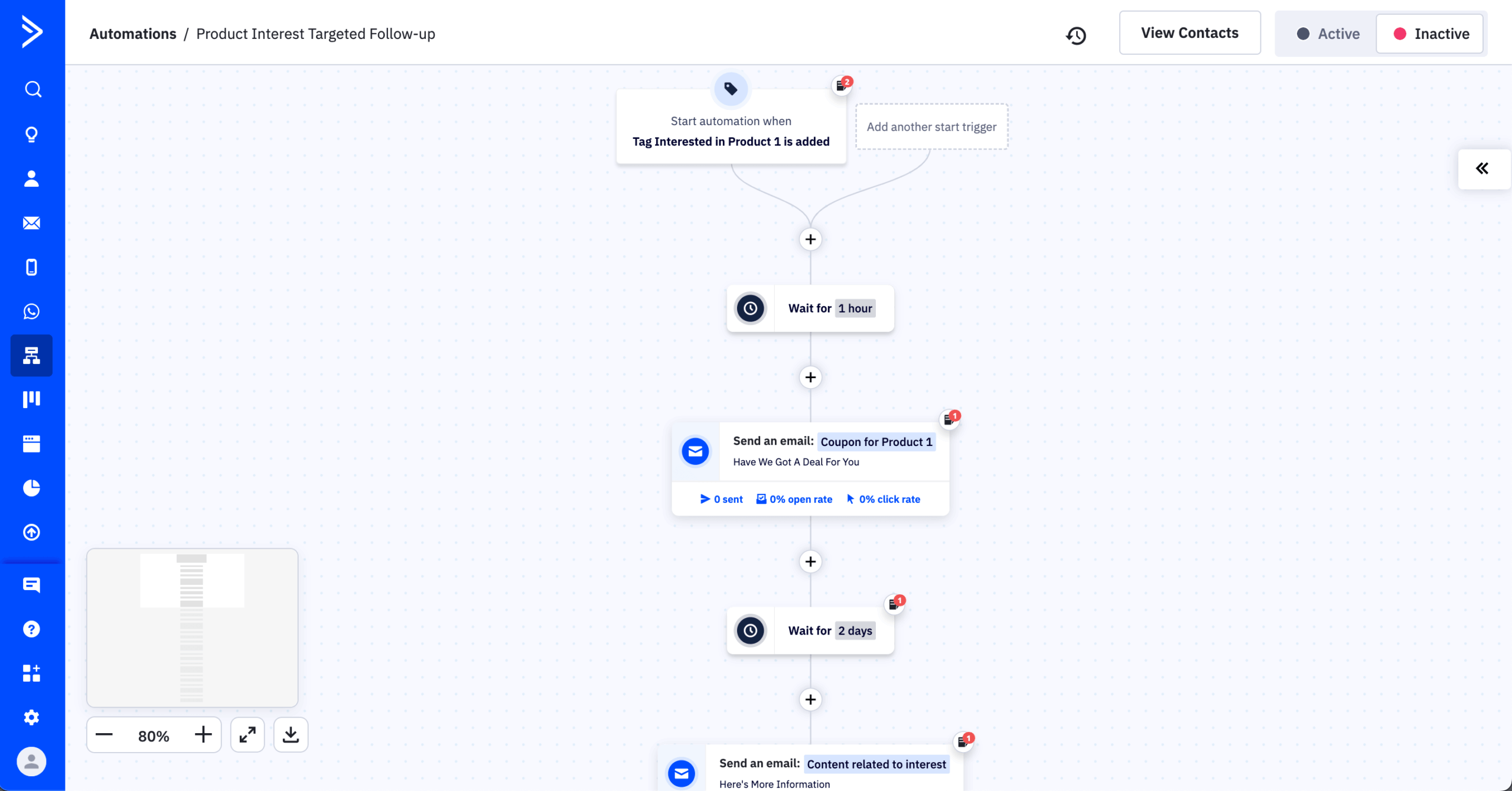
During testing, the automation builder stood out for its flexibility. You can create multi-step sequences with conditional branching, goal tracking, lead scoring, and event-based triggers tied to email behavior, website activity, or deal stages.
However, this depth comes with complexity. The interface requires time to master, especially for users new to workflow automation. For simple welcome series or time-based drip campaigns, it may feel more powerful than necessary—but for scaling teams, the control is substantial.
Autoresponder Features
- Advanced visual automation builder with multi-branch workflows;
- Behavioral triggers based on site visits, email engagement, purchases, and CRM activity;
- Built-in CRM with sales automation and deal pipeline management;
- Lead scoring and tagging for dynamic segmentation;
- Easy-to-use A/B testing autoresponder for fine tuning on the go.
Pros & Cons
Pros
- Extremely deep automation and branching logic;
- Strong CRM and sales pipeline integration;
- Robust behavioral tracking and trigger options;
- Flexible segmentation and lead scoring;
- Scales well for growing teams.
Cons
- No free plan available;
- Steeper learning curve than beginner tools;
- Can feel overwhelming for simple email needs;
- Pricing increases as contact lists grow.
Pricing
ActiveCampaign does not offer a permanent free plan, but it provides a 14-day trial to test its automation features. Paid plans start at $15/month for 1,000 contacts, with more advanced automation, CRM, and predictive features available on higher tiers.
How to Choose the Right Autoresponder
Here are some quick tips to follow when choosing an autoresponder tool for your business:
- Automation depth. Look for multi-step workflows, visual builders, branching logic, tagging, and behavioral conditions that support complex customer journeys—not just basic time-based sequences;
- Trigger variety. Ensure support for opens, clicks, purchases, page visits, tags, form submissions, and custom events to enable timely, behavior-driven messaging;
- Free plan limits. Review subscriber caps, monthly send limits, branding, automation restrictions, and feature gating to confirm the free tier supports your early-stage needs.
- Deliverability. Evaluate sender reputation tools, authentication support (SPF, DKIM, DMARC), inbox placement performance, and spam-testing features to protect engagement rates;
- Integrations. Confirm native or third-party connections with your CRM, ecommerce platform, landing pages, and payment tools for seamless data syncing and trigger accuracy;
- Scalability & pricing trajectory. Analyze how costs increase with list growth, feature unlocks between tiers, and long-term value relative to your projected subscriber expansion.
Email Autoresponder FAQ
What does an email autoresponder actually do?
An email autoresponder automatically sends pre-written emails based on specific triggers or time delays. Common triggers include new subscriber sign-ups, link clicks, purchases, or inactivity. Autoresponders are typically used for welcome sequences, onboarding flows, follow-ups, and basic nurturing email marketing campaigns. More advanced systems allow branching logic and behavioral conditions, enabling tailored communication without manual intervention after initial setup.
How is an autoresponder different from marketing automation?
An autoresponder usually refers to time-based or trigger-based email sequences with limited branching. While all marketing automation tools include autoresponders, not all autoresponders provide full automation capabilities. The distinction mainly lies in workflow complexity, data usage, and system integrations.
Who should use an email autoresponder?
Email autoresponders are suitable for creators, small businesses, ecommerce stores, and marketing teams that need consistent follow-up without manual sending. They are especially useful for onboarding new subscribers, delivering lead magnets, recovering abandoned carts, and nurturing prospects.
What features matter most when choosing one?
Workflow depth, trigger variety, segmentation options, deliverability controls, and integration with ecommerce or CRM systems are features you should review before committing to an autoresponder. Visual builders and tagging systems improve usability and targeting precision.
Can free email autoresponders handle growing lists?
No, free email autoresponders generally cannot handle growing lists long-term. They often impose subscriber caps and send limits, restrict advanced automation and segmentation, and may include branding or feature limitations. These constraints make free plans useful for early testing or small audiences, but scaling reliably typically requires upgrading to a paid plan with higher limits and expanded capabilities.