


Did you know that 74% of companies use web forms for lead generation? For about 50%, online forms are the highest converting lead generation tool. For a simple form on a WordPress website, the impact is massive. Right?
Adding forms to your WordPress site is one of the best ways to start your lead generation engine and capture email leads. But how to create a form for WordPress? More importantly, which form builder for WordPress should you choose?
In this blog, I’ll share my experience with the best form plugin WordPress options for email automation to help you find the best form builder for WordPress. So, let’s get started.
Capterra, G2, Trustpilot, and Reddit to create an objective evaluation. Learn more about our review methodology
What to Look for in WordPress Form Builder?
After building custom forms for dozens of WordPress sites over the years, I’ve learned that choosing the right WordPress form plugin can make or break your user experience.
Whether you need to build simple contact forms or complex applications, here’s what I always consider when evaluating a WordPress form creator to find the best WordPress form builder:
- Ease of use. I’ve wasted countless hours with clunky interfaces, so I now prioritize form builders with clean, intuitive user interface designs. Drag-and-drop features and pre-made templates have saved me so much time that I won’t consider options without them.
- Customization. I’ve found that having various form fields — text, checkboxes, dropdowns — gives me the flexibility I need for different clients. The ability to make highly customizable forms to match brand guidelines has been crucial for maintaining professional consistency.
- Integrations. I learned the hard way that manual data entry is a productivity killer. Now I only choose form builders that sync seamlessly with all your favorite services and the email marketing and CRM platforms I’m already using.
- Conditional logic. This feature transformed how I build forms. Being able to show or hide questions based on user responses has helped me create more engaging, personalized experiences that actually get completed.
- Analytics and reporting. I used to guess which forms performed best, but having built-in analytics changed everything. Now I can see exactly what’s working with display form entries in meaningful ways, and analyze all the data to make data-driven improvements.
- Support & documentation. Trust me, when something breaks at 11 PM with a client deadline looming, quality technical support becomes priceless. I always test the support team response before committing to any platform.
These factors have guided my decisions countless times, and they’ll help you avoid the mistakes I made early on. Now, let me share the form builders that have proven themselves in real projects.
Best Form Builders for WordPress: Quick Comparison Table
Before we dive into in-depth descriptions, let’s check a handy table:
| Plugin | Best For | Starting Price | Key Feature |
| Sender | Marketers & businesses wanting behavioral automation and built-in email marketing | Free forever plan (up to 2,500 subscribers); Paid plans from $7month | Behavioral triggers (exit-intent, abandoned cart, etc.), popup & embedded forms, built-in email & SMS automation |
| WPForms | Beginners & SMBs needing ready-made templates and smart form logic | Paid plans start at $99/year for 1 site | 2,000+ templates, conversational forms, offline submissions, and partial entries tracking |
| Gravity Forms | Developers & agencies building complex, multi-step or calculated forms | Paid plans from $59/year with 30-day money-back guarantee | Advanced calculations, 30+ add-ons, webhook & API integrations, workflow automation |
| Jotform | Both beginners and advanced users who want to deploy forms quickly | Paid plans start at $34 per month | No-code form embedding |
| Formidable Forms | Power users creating apps or directories from form data | Paid plans from $79/year with 14-day money-back guarantee | Views builder for front-end displays, calculators, repeater fields, and data-driven applications |
| Contact Form 7 | Developers or minimalists who want a lightweight, no-frills solution | Free | Text-based form configuration, fast setup, shortcode embedding, highly stable & open-source |
| Jetpack Forms | Users already using Jetpack wanting CRM integration and AI-assisted forms | Free (part of Jetpack suite) | AI form builder, built-in CRM sync, instant email notifications, and form analytics |
| Forminator | Budget-conscious users wanting quizzes, calculators & polls | Free; Paid plans from $1.5/month | Multi-page forms, real-time polls, drag-and-drop builder, Mailchimp & Google Sheets integration |
| Fluent Forms | Beginners who want simplicity, speed, and beautiful conversational forms | Paid plans from $47/year | Lightweight, intuitive drag-and-drop builder, conversational forms, and conditional logic |
9 Best Form Builders for WordPress
After testing nearly every WordPress form maker available for WordPress, including other WordPress form plugins like Ninja Forms, I’ve narrowed down my favorites to these eight options. Each has earned its place through real-world performance on client sites and personal projects creating custom signup forms, proving themselves as the best WordPress form plugin choices:
Let’s explore the key features and pricing of all these WordPress form builders, one by one.
Sender — Best WordPress Form with Behavioral Automation
When I discovered Sender, it completely changed how I approach form-based marketing. This isn’t just another form solution I stumbled upon — it’s become my preferred way for creating intelligent, behavior-driven campaigns that actually convert.
I was initially drawn to Sender’s drag-and-drop builder because I could create basic forms without touching code. But what really sold me was discovering I could trigger popups based on exit intent and abandoned cart scenarios. I knew I’d found something special for growing businesses.
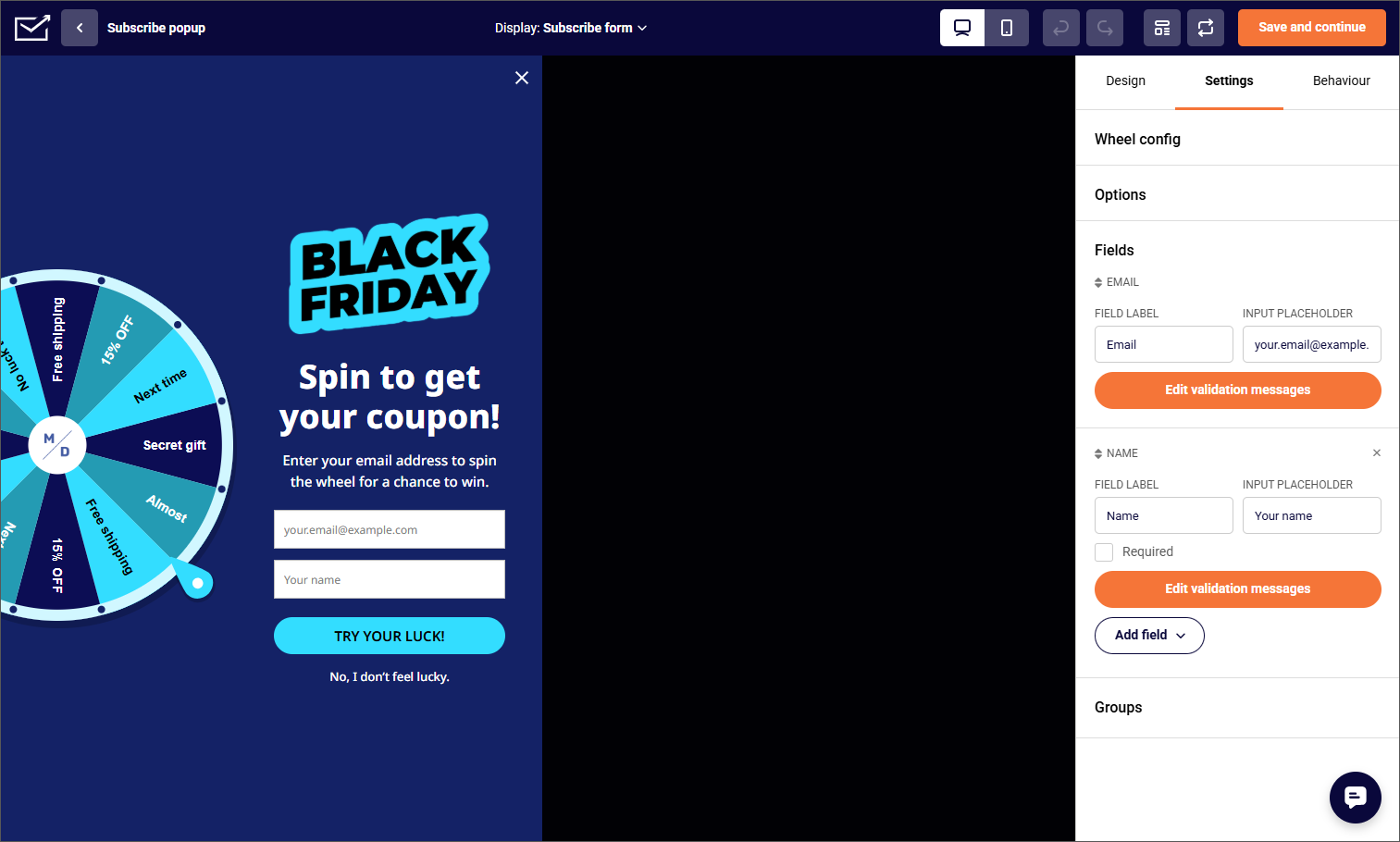
What I appreciate most is having everything in one dashboard. I used to juggle multiple tools for forms, email automation, and list management, but Sender handles it all. The behavioral triggers have been game-changing — I can create automations that respond to what visitors actually do, not just what they submit, creating a seamless experience.
The spin-to-win forms might sound gimmicky, but they’ve consistently outperformed traditional popups on ecommerce sites I’ve worked on. And the best part? I started with the free plan and only upgraded when I saw real results. It’s truly a great plugin for marketing automation — all within the same dashboard. So, you don’t need to spend more money on any other tool to nurture your leads.

Key Features
- Drag-and-drop builder. No coding, no headache. Simply drag all the fields you need, and you’re done.
- Multiple form types. Create embedded forms, popup forms, or interactive spin-to-win forms for different use cases.
- Form customization. Sender’s style suite lets you pick themes, dial in your colors, and finesse those fonts.
- One-click integrations. Sync effortlessly with your existing website, marketing and CRM solutions.
- Analytics & tracking. Track how your forms perform and get notified when action happens.
Pricing
- Forever free plan up to 2,500 subscribers and unlimited sites;
- Paid plans start at $7 monthly for increased sending limits and SMS marketing features.
See why businesses choose Sender:
WPForms — Feature-Rich Form Builder with 2000+ Templates
I’ll be honest — when I first heard about 2,000+ templates, I was skeptical. But after using WPForms on multiple projects, I understand why it’s become so popular. The template library has saved me hours of work, especially when clients need something specific quickly like registration forms or payment forms.
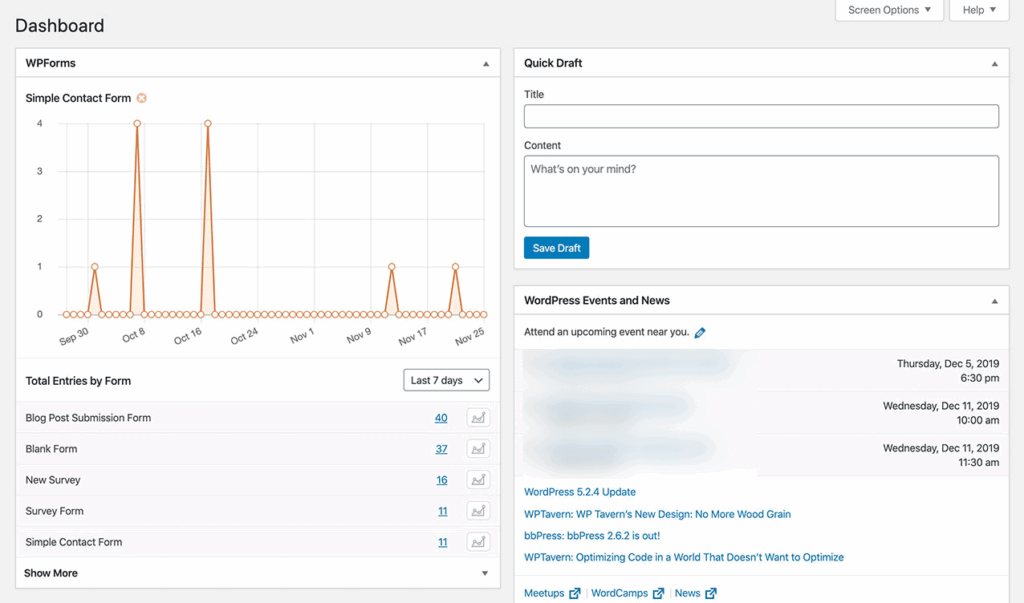
What really impressed me was the form revision system. I once had a client accidentally delete half their form fields, but the revision history let us roll back instantly. The partial submissions feature has been invaluable too — I can see exactly where users abandon forms and follow up with those lost leads.
I particularly love the offline forms feature. Working with clients who run events, being able to collect entries without an internet connection and sync them later has been a lifesaver. The conversational forms also surprised me with how much they improved completion rates — turning boring forms into engaging conversations really works.
The Repeater Field might seem like a small feature, but it’s brilliant for order forms where users need to add multiple items. Combined with user journey reports and progress bar indicators, I finally have real insights into how people interact with my multi-step forms, not just whether they submit them.
Key Features
- Extensive template library. Choose from over 2,000 pre-built templates covering every use case imaginable — from simple contact forms to complex multi-step surveys.
- Smart conditional logic. Create dynamic forms that adapt based on user inputs, showing or hiding fields to streamline the user experience.
- Instant notifications. Get real-time alerts via email or SMS when forms are submitted, ensuring you never miss a lead.
- Payment integration. Accept payments directly through your forms with Stripe, PayPal, Square, and Authorize.Net integrations.
- Spam protection. Built-in CAPTCHA, reCAPTCHA, and custom anti-spam features keep your forms secure from bots and unwanted submissions.
Pricing
- No free plan available, but there’s a 100% money-back guarantee valid for 14 days;
- Paid plans start at $99/year for 1 site;
- Elite Plan starts at $599/year for unlimited sites.
Gravity Forms — Advanced Form Builder with Extensive Add-ons
Gravity Forms is what I reach for when things get complex. I’ve built everything from multi-step application systems to complex forms with calculated fields, and it’s never let me down. Yes, there’s a learning curve, but once you understand its power, there’s almost nothing you can’t build, including advanced workflows that enterprise clients require.
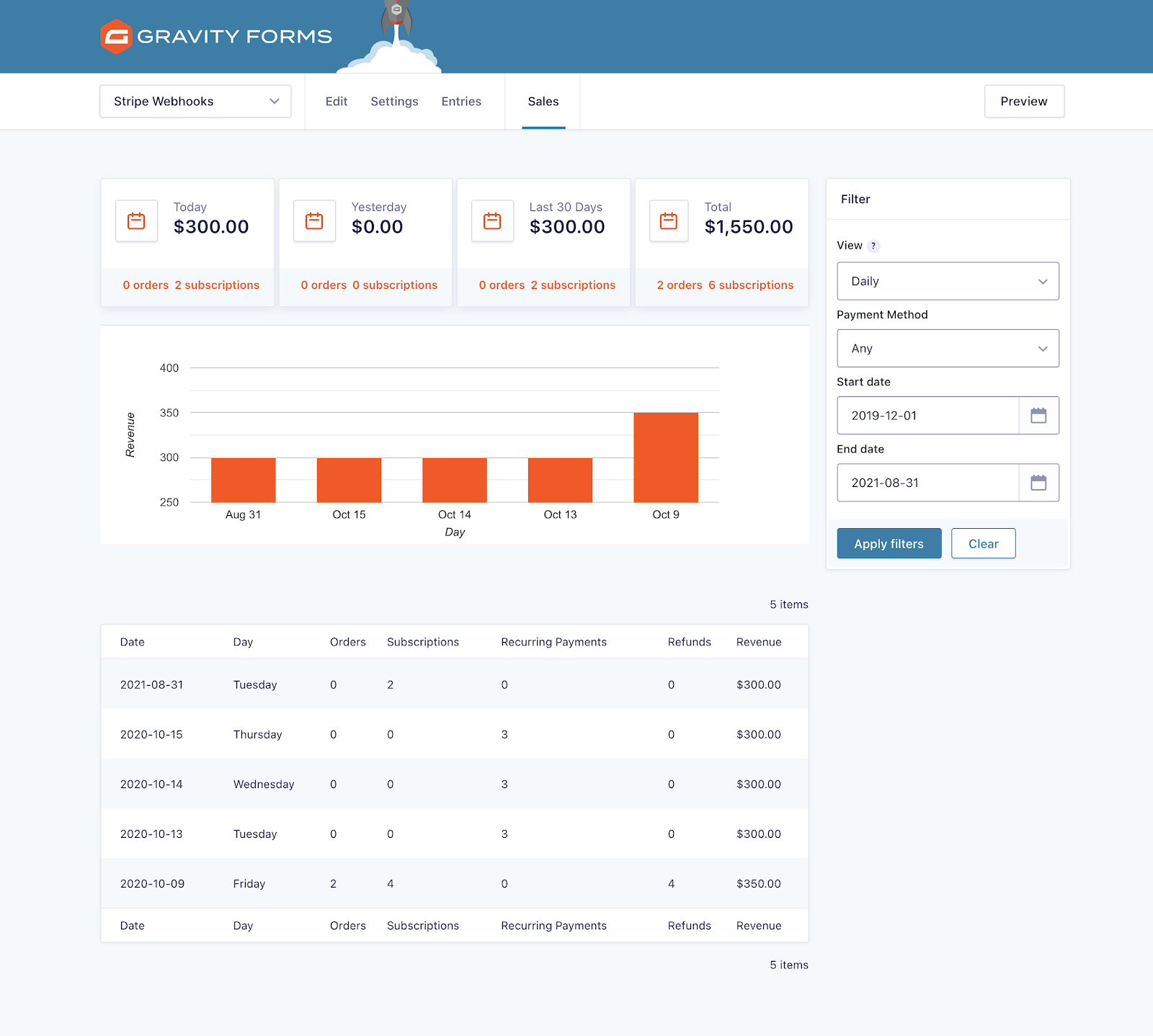
The webhook functionality changed my workflow completely. I can now pipe form submissions to any external API, which has been crucial for enterprise clients with specific system requirements. The async processing is something you don’t appreciate until you need it — when you’re handling hundreds of submissions with multiple integrations, having feeds that don’t block submissions is essential.
What sold me on Gravity Forms was actually a production issue I had with another plugin. With Gravity’s built-in logging and debugging, I could track down exactly what was failing in a complex workflow. The partial entries feature has also been eye-opening — seeing where users give up helps me optimize forms based on real behavior, not assumptions.
The add-ons ecosystem is unmatched. I’ve yet to find an integration that doesn’t exist, either officially or through the community. For agencies or developers building complex, mission-critical forms including quote form capabilities, this is my go-to recommendation.
Key Features
- Advanced calculations. Build complex calculators, quote generators, and pricing forms with conditional pricing logic and mathematical formulas.
- Workflow automation. Create multi-step approval processes, route submissions to different departments, and trigger automated workflows based on form entries.
- Extensive add-on ecosystem. Expand functionality with 30+ official add-ons plus hundreds of third-party extensions for virtually any integration need.
- User registration & login. Create custom registration forms, user profiles, and post-submission content with front-end editing capabilities.
- Survey & quiz features. Build scored quizzes, personality tests, and surveys with weighted scoring, likert scales, and detailed analytics.
Pricing
- No free plan, but there’s a 30-day refund guarantee for any license;
- Basic License — $59 per year for 1 site. Core form builder with conditional logic, calculations, and file uploads;
- Elite License — $259 per year for unlimited sites. Full access to all add-ons, priority support, and developer-friendly features.
Jotform — Versatile Form Builder with Rich Features
Jotform’s WordPress plugin is designed to bridge the gap between cloud-based form building and seamless WordPress integration. Instead of building forms directly inside WordPress, users can create highly customizable forms on Jotform and embed them into their website with just a few clicks. This approach provides flexibility, scalability, and access to advanced features without relying heavily on WordPress resources.
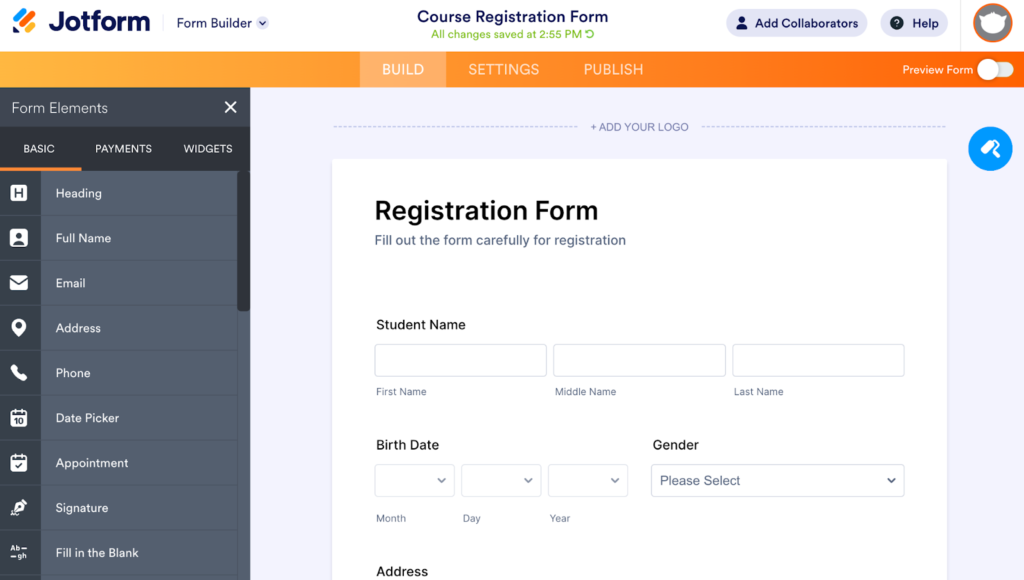
One of the advantages of Jotform’s plugin is its ease of use. Unlike traditional WordPress form builders that require in-dashboard configuration, Jotform allows users to design forms using its intuitive drag-and-drop builder externally, then embed them via shortcode or block. This simplifies the workflow and makes it accessible for both beginners and advanced users who want to deploy forms quickly.
The plugin is especially powerful for businesses that need more than simple contact forms. With support for payment processing, conditional logic, approval workflows, and integrations with hundreds of third-party tools, Jotform transforms WordPress sites into full-featured data collection and automation hubs. This makes it ideal for use cases like lead generation, order forms, registrations, and surveys.
Jotform also offers a myriad of AI tools that you can use to prompt your way to a form. You can also take advantage of their AI Agents to converse with your customers in the form of a chatbot on your website and take orders as well as collect feedback.
Key Features
- No-code form embedding: Easily embed any Jotform into WordPress pages or posts using a shortcode or block, eliminating the need for manual coding or complex setup.
- Drag-and-drop form builder: Build and customize forms visually by adding, removing, and rearranging fields without technical knowledge, making it accessible for beginners and fast for professionals.
- 20,000+ ready-made templates: Jumpstart form creation with thousands of prebuilt templates for use cases like contact forms, registrations, surveys, and payments, reducing setup time significantly.
- Advanced conditional logic: Create dynamic forms that show or hide fields based on user input, enabling personalized user experiences and smarter data collection flows.
- Extensive integration ecosystem: Connect forms with tools like Google Sheets, Slack, HubSpot, and Mailchimp to automate workflows, sync data, and streamline business processes.
- Powerful widgets and advanced fields: Enhance forms with specialized elements like e-signatures, file uploads, geolocation, and rating fields to support complex and interactive use cases.
- Payment processing with 40+ gateways: Accept secure payments, donations, or subscriptions directly through forms using providers like PayPal, Stripe, and Square without extra transaction fees from Jotform.
Pricing
- Free plan available with limitations but includes all features.
- Paid plans start at $34 per month and offer higher limits.
Formidable Forms — All-in-One Form Builder with App Creator
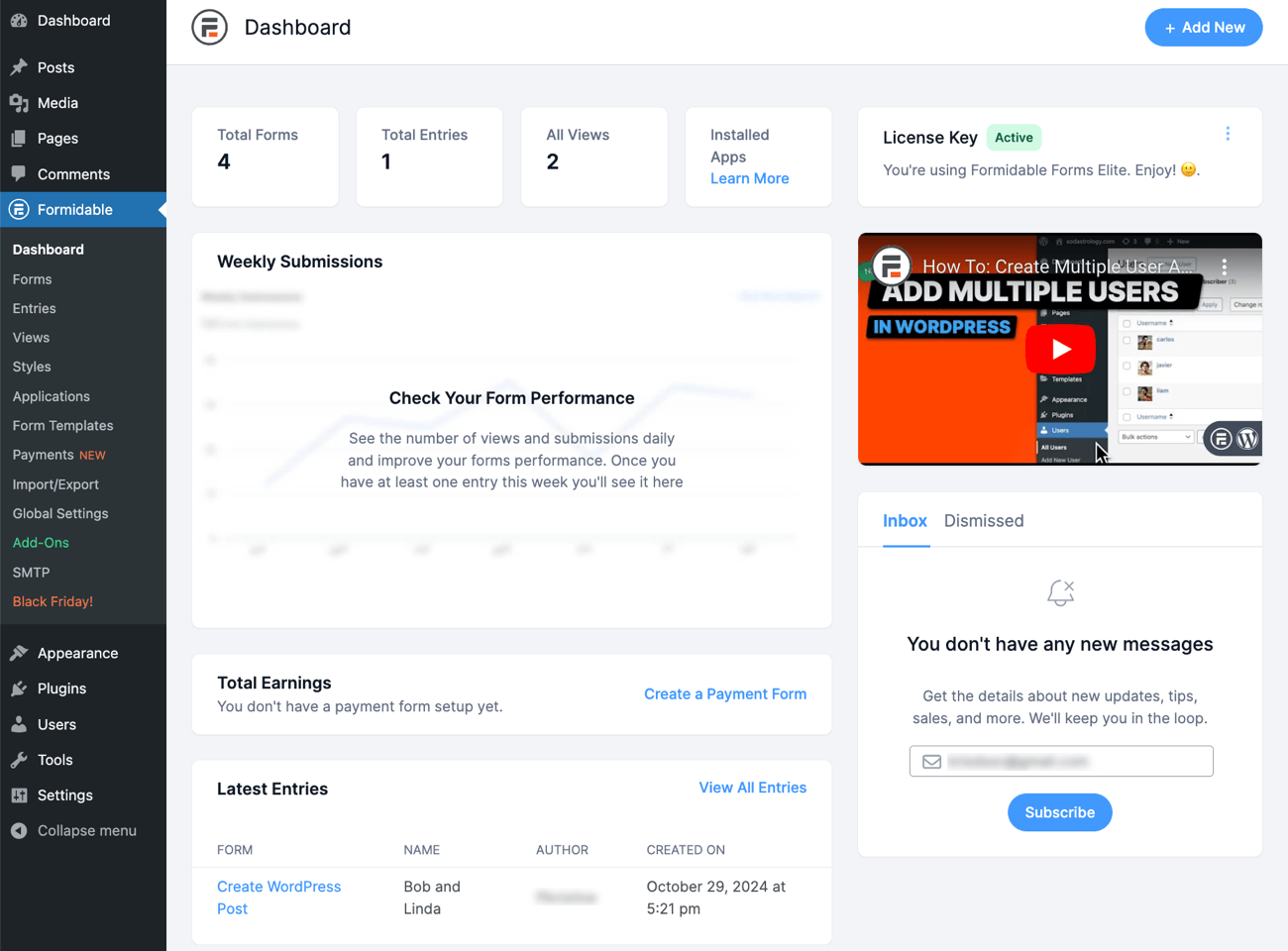
Formidable Forms completely shifted my perspective on what a form plugin can do. I initially chose it for a client who needed a member directory, but I discovered it’s basically an application builder disguised as a form plugin. The premium version really showcases what’s possible beyond basic forms, and even the paid version at the Basic tier offers incredible value.
The Views feature is what sets Formidable apart. I’ve built job boards, real estate listings, and even a simple CRM system using just form submissions displayed through Views. Being able to let users edit their own submissions on the front-end eliminated the need for separate membership plugins on several projects.
The calculations and repeater fields work flawlessly together. I once built a complex quote calculator for a printing company where customers could add unlimited print jobs with different specifications — something that would’ve required custom development with other plugins.
What really impressed me was turning form data into actual website content. Instead of submissions sitting in a database, they become searchable, filterable content that visitors can interact with. For data-driven sites, this approach has saved me thousands in development costs.
Key Features
- Visual Views builder. Transform form data into front-end displays like directories, calendars, tables, and custom layouts without coding.
- Advanced repeater fields. Let users dynamically add unlimited field groups — perfect for order forms, registrations, or data collection.
- Built-in email marketing. Integrate seamlessly with Mailchimp, AWeber, GetResponse, and other favorite services for automatic list building.
- Smart form routing. Use conditional logic to send submissions to different recipients, redirect to specific pages, or trigger different actions.
- Cascading lookup fields. Create dependent dropdowns that update based on previous selections, ideal for location-based forms or product configurations.
Pricing
- No free plan available, but there’s a 100% money-back guarantee valid for 14 days;
- Paid plans start at $79/year for 1 site;
- Elite Plan starts at $599/year for unlimited sites.
Contact Form 7 — Simple Contact Form Builder
Contact Form 7 holds a special place in my toolkit as a reliable WordPress contact form plugin. It was the first form plugin I ever used, and despite trying dozens of alternatives, I still use it regularly. There’s something refreshing about its no-nonsense approach — no upsells, no feature bloat, just reliable forms that work.
I love that it gives me complete control over the HTML. While other plugins try to do everything for you, Contact Form 7 lets me craft exactly what I need. This has been invaluable when working with custom-designed sites where I need pixel-perfect form layouts.
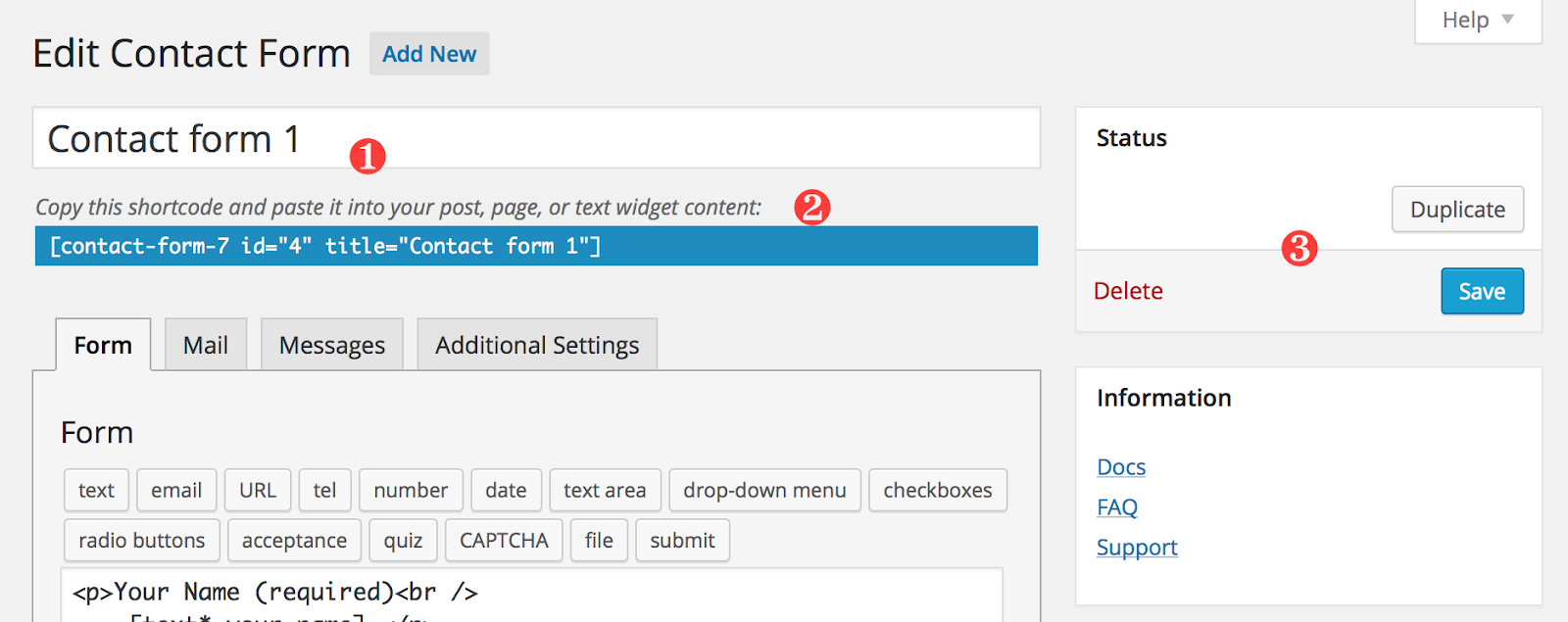
The text-based configuration might look intimidating to beginners, but I’ve grown to prefer it. I can quickly copy form configurations between sites, version control them in Git, and make bulk changes with find-and-replace. For developers, this level of control is actually faster than clicking through visual builders.
What keeps me coming back is its reliability. In over a decade of use, I’ve never had Contact Form 7 break during a WordPress update. For simple contact forms that just need to work, this is still my first choice.
Key Features
- Simple form editor. Add or remove fields effortlessly in the user-friendly WordPress text-based editor.
- Flexible form configuration. Customize email newsletter signup form templates, set notifications, and even add CAPTCHA for spam prevention.
- Multiple contact forms. Create forms for different departments or inquiry types and manage from the central dashboard.
- Shortcode integration. Paste a shortcode to embed your form anywhere on your site.
- Strong support. Useful add-ons and a thriving community make this plugin continuously better.
Pricing
Contact Form 7 is completely free to use. Download it right from the WordPress plugin library. There are no premium plans or hidden fees.
Jetpack Forms — Form Builder with CRM Integration
I was initially skeptical about Jetpack Forms since I associated Jetpack with site performance concerns. But after giving it a fair shot, I’ve been pleasantly surprised, especially by the AI form builder features and CRM integration.
The AI suggestions actually work well. Instead of starting from scratch, the AI analyzes what I’m trying to build and suggests appropriate field layouts. It’s not perfect, but it’s gotten good enough that I now use it as a starting point for most forms.
The native CRM integration is where Jetpack Forms shines. I’ve worked with clients who were already using Jetpack CRM, and having forms that automatically feed into their customer database without any configuration has been a huge time-saver. No webhook setup, no third-party connectors — it just works.
What I appreciate most is how it handles the complete customer journey. Forms aren’t just data collection points; they’re the beginning of the customer relationship. Having that data flow seamlessly into a CRM where I can track interactions and automate follow-ups has simplified my workflow considerably.
Key Features
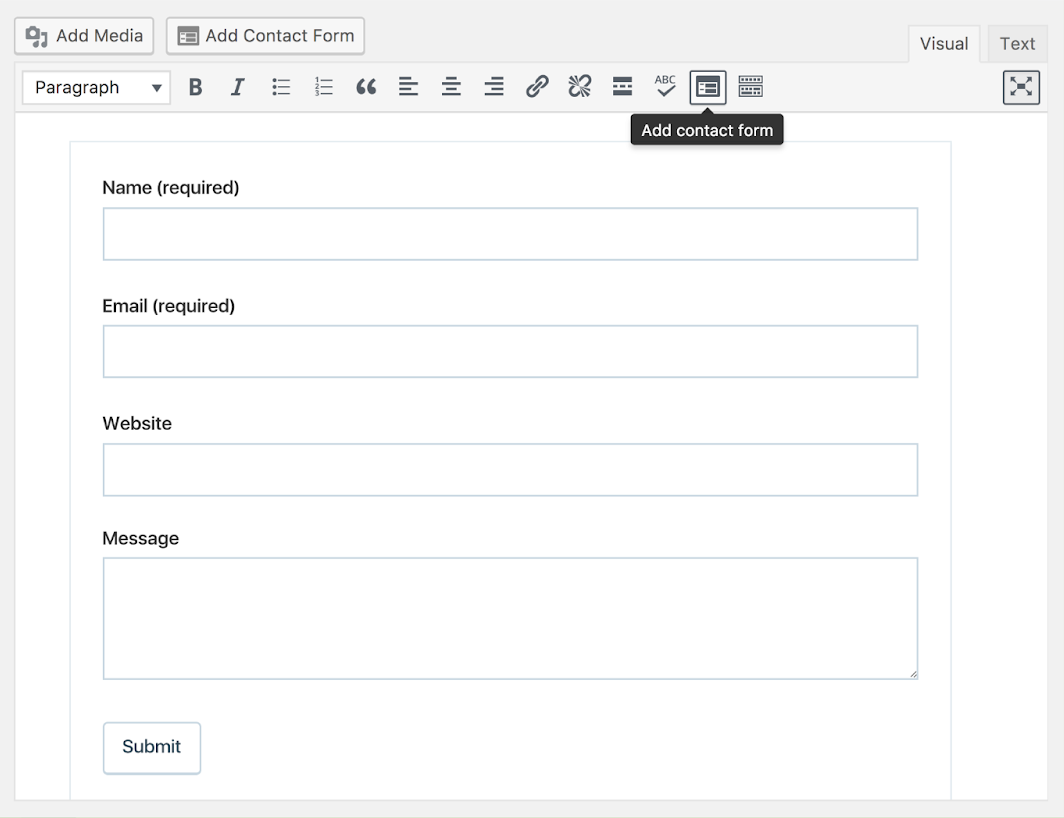
- Drag-and-drop builder. Make a form in a snap using the drag-and-drop interface. Use AI assistance to get layout ideas, add field design elements, and set up a form quickly.
- Form field options. Choose from a variety of form fields like text boxes, checkboxes, radio buttons, and more.
- CRM integration. Link your forms with Jetpack CRM and other CRM systems. Automate data flow, manage leads, and keep your customer data updated.
- Email notifications. Get notified instantly upon form submissions and send auto-replies to keep your users in the loop.
- Form analytics. Stay informed with metrics like views, submissions, and conversion rates.
Pricing
Jetpack forms are free to use and a part of Jetpack Cloud (sold separately as a CRM suite).
Forminator — Dynamic Form Builder with Support for Multiple Forms
Forminator surprised me. As a free plugin from WPMU DEV, I expected limitations, but it’s become my recommendation for anyone who needs advanced features without the price tag. I’ve even used it to create feedback form layouts with star ratings that rival premium alternatives.
The quiz and calculator features rival paid alternatives. I’ve built personality quizzes that went viral and mortgage calculators that generate qualified leads — all without spending a cent. The multi-page form functionality works smoothly, which has helped improve completion rates on longer forms significantly.
What really stands out is the poll feature. I’ve used it for everything from quick surveys to gathering feedback at virtual events. The real-time results display keeps people engaged, and the data export options make analysis straightforward.
The integration selection keeps growing, and unlike some “free” plugins, Forminator doesn’t lock essential integrations behind a paywall. I’ve connected it to Mailchimp, Slack, and Google Sheets without any issues. For anyone starting out or on a tight budget, this is where I point them first.
Key Features
- Multi-page forms and quizzes. Break your long forms into a multi-page form or create interactive quizzes to engage your audience.
- Drag and drop builder. Add, adjust, and arrange fields with simple drag and drop.
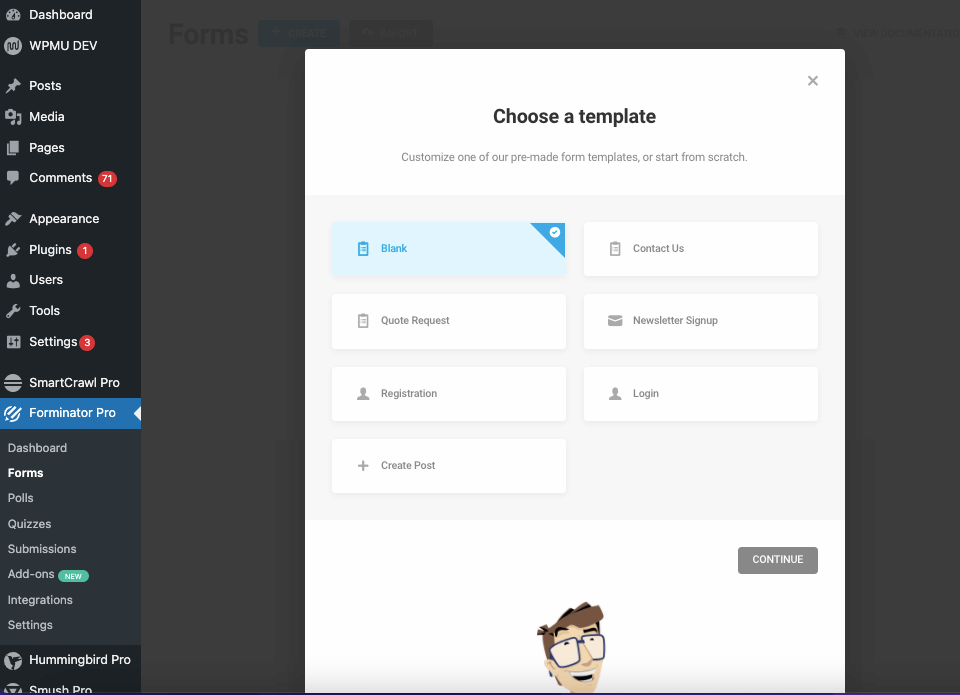
- Form templates. Choose from a rich selection of form templates for different use cases and applications.
- Conditional logic. Show or hide fields based on what the user picks, or add logic to make your form more dynamic.
- Integrations and add-ons. Sync up with your favorite tools or add more functionality with premium add-ons.
Pricing
- Free plan available with limited features;
- Paid plans start at $1.50 per month for more features and functionalities.
Fluent Forms — Beginner-friendly Form Builder
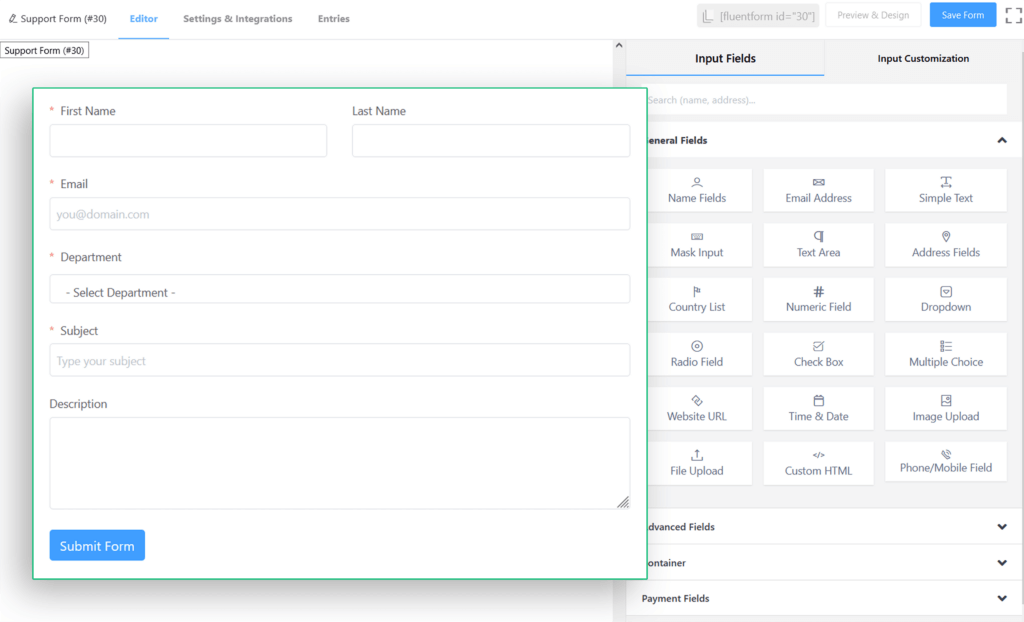
Fluent Forms has become my go-to recommendation for WordPress beginners who still want professional results. After walking several clients through their first form creation, I can confidently say this has the gentlest learning curve without sacrificing capability.
The interface just makes sense. I’ve watched complete novices create complex conditional forms within minutes of installation. The pre-built templates are actually useful — not just basic shells but fully configured forms ready for real-world use.
What impressed me most is the performance. Fluent Forms adds minimal overhead to sites, which matters when you’re working with budget hosting. I’ve tested it on some seriously underpowered shared hosting, and forms still load instantly.
The conversational forms feature deserves special mention. Converting a traditional form to a conversational format takes seconds, but the impact on engagement has been dramatic. For anyone prioritizing user experience and simplicity, Fluent Forms hits the sweet spot.
Key Features
- Easy-to-use form editor. Create a form using drag-and-drop functionality to add and arrange fields;
- Ready-to-use templates. Start with a template and tweak it to make it your own. Whether it’s a contact form or a feedback survey, there’s a template for you;
- Conditional logic. Make smarter, dynamic forms. Show or hide fields based on what the user fills out for a tailored experience;
- Third-party integrations. Sync your forms with tools you already use to streamline your workflow;
- Form styling: Pick a theme, adjust color fonts, and even add some custom CSS if you’re feeling fancy.
Pricing
- No free plan available;
- Annual paid plans start at $79 per year for one domain license;
- Lifetime paid plans start at $349 per year for one domain license.
Best Free WordPress Form Builder Plugins Compared
After years of working with tight budgets and bootstrapped startups, I’ve thoroughly tested every free form builder worth considering.
Some people also look for Everest Forms or Ninja Forms, but after comparing them with other form plugins, here’s my honest take on the best free options:
- WPForms Lite — I recommend this to every WordPress beginner. The interface is so intuitive that clients can manage their own forms after a five-minute tutorial. While it lacks the advanced features I sometimes need, it’s perfect for getting professional-looking forms up quickly. I’ve found it especially useful for those transitioning from other platforms who aren’t ready to invest in premium tools yet.
- Contact Form 7 — This is my old reliable. I’ve been using it for over a decade, and it’s never failed me. Yes, the text-based configuration looks dated, but I actually prefer it for quick deployments. I can set up a contact form faster with Contact Form 7 than with any drag-and-drop builder. For developers who want complete control without any bloat, this remains unbeatable.
- Formidable Forms Lite — The free version surprised me with how much it includes. The visual styler alone makes it worth considering — I’ve matched forms perfectly to brand guidelines without writing CSS. The plugin also includes form analytics to track views and conversions, features typically reserved for premium plugins.
- Fluent Forms Free — This has become my recommendation for small businesses that need more than just contact forms. The 30+ templates are actually useful, not just placeholder content. The conditional confirmation messages let me create personalized thank you pages without any coding. I’m consistently impressed by how much they give away for free — it feels like a premium plugin that happens to have a free version.
How to Choose the Right WordPress Form Builder
After helping dozens of clients choose form builders, I’ve developed a practical framework that cuts through the marketing noise.
Here’s what I tell everyone who asks for my advice:
- Match your primary use case. For basic contact forms, I always start clients with Contact Form 7 or WPForms Lite. When payment processing is involved, WPForms Plus or Gravity Forms have never let me down. If you need lead generation with automation, Sender is an easy pick.
- Assess your technical skills. For beginners, I point them to WPForms, Sender, or Fluent Forms without hesitation. Developers who want full control will appreciate what Gravity Forms or Contact Form 7 give you.
- Consider your budget. If you’re on a tight budget, start with the free options I’ve tested extensively. When you have room to grow, freemium plugins let you upgrade when you see ROI. For those managing multiple sites, I’ve saved thousands with unlimited licenses.
- Check essential integrations. For CRM connections, Jetpack Forms has the smoothest integration. Sender’s built-in features eliminate the need for extra email marketing tools. If you’re running an online store, always verify WooCommerce compatibility first.
- Evaluate support options. Don’t underestimate the importance of good support. With premium plugins, priority support has saved me countless times. Free plugins rely on community forums, which can be hit or miss.