


Bounced addresses piling up, inactive subscribers dragging down engagement, and unsegmented contacts receiving messages that do not apply to them… Most email lists start to lose value the moment you stop maintaining them. And that’s where email segmentation comes in.
Choosing the best contact list management software comes down to how well a platform handles email segmentation, automated cleanup, and email list cleaning as your database grows.
This comparison breaks down nine email marketing platforms by their list management features, automation capabilities, pricing models, and limitations to help you find the right fit.
Bottom line: ActiveCampaign is the strongest choice for advanced automation and CRM-linked segmentation, GetResponse for ecommerce workflows and performance analytics, and Sender for budget-friendly list management.
How We Evaluated Email List Management Software
Each platform was tested on its entry-level paid plan, with a standardized 2,500-contact list – unless stated otherwise. The same list was imported into every platform – same custom fields, same tags, same mix of duplicates, hard bounces, and unengaged addresses – so import behavior could be compared directly. Contacts were not purchased or scraped.
Features evaluated per platform:
- Import and migration (CSV mapping, custom field handling, duplicate detection, error reporting)
- Segmentation depth (condition types, AND/OR logic, behavioral and engagement filters, dynamic vs static lists)
- Contact record quality (custom fields, tags, activity history, and how much of it is visible in one place)
- List hygiene (bounce and complaint handling, inactive-contact identification, cleanup and re-engagement tools)
- Subscription management (signup flow, preference center, unsubscribe handling, suppression lists)
- Form builder and landing pages as list-growth tools
- Deliverability (3rd party testing data)
- Support responsiveness on the entry-level plan
- Customer reviews (G2, Capterra, Trustpilot, Reddit)
- Pricing model – specifically how contacts are counted, and whether unsubscribed or duplicate contacts still bill
Deliverability testing: We used third-party data to evaluate deliverability, relying on tools like GlockApps and EmailTooltester to benchmark inbox placement, spam rates, and domain reputation. Tests were conducted in-house using identical campaign setups across platforms to ensure consistency.
User reviews: We gathered customer feedback from platforms like G2, Trustpilot, and Capterra, analyzing recurring themes – segmentation flexibility, import friction, support quality, and pricing transparency as lists grow. To avoid cherry-picking, we focused on patterns across a large volume of recent reviews and balanced both positive and negative feedback to reflect real user sentiment.
What was not tested: Enterprise features (SSO, dedicated IPs, custom SLAs), SMS sending at volume, CRM and sales pipeline functionality, and transactional email infrastructure beyond basic SMTP. This review is aimed at SMBs, independent creators, and agencies with lists of up to 50,000 contacts.
Pricing methodology: All pricing is verified as of August 2026. Annual billing discounts are noted separately from monthly pricing, with all prices being shown in USD. Because most platforms bill by contact count rather than sends, we priced every plan at the same 1,000-contact list and noted where the next tier begins. We highly recommend analyzing each platform’s pricing page directly before purchasing a subscription.
Capterra, G2, Trustpilot, and Reddit to create an objective evaluation. Learn more about our review methodology
Compare Email List Management Software Side-by-Side
Comparing the best email list management tools makes it easier to find the right fit for your business. Whether you need advanced automation, personalization tools or a simple free tool to get started, this breakdown highlights key features, pricing, and scalability options at a glance.
| Tool | Best For | Segmentation depth | List Hygiene Automation | Free plan cap | Price at 5,000 contacts | Pricing Model |
| Sender | Small to mid-sized businesses and ecommerce stores | Behavior-based segmentation with tags, custom fields, and visual automation builder | Automated bounce handling, duplicate removal, and unsubscribe processing | 2,500 contacts + 15,000 emails/month | $33/month | Contact-based. Paid plans from $10/month |
| Constant Contact | Small businesses and nonprofits needing simple list tools | Lists, tags, and segment builder with basic automation workflows | Identifies inactive and bounced contacts; automatic deduplication on sends | 14-day trial only | N/A | Contact-based · From $12/month |
| ActiveCampaign | Marketing teams needing automation with CRM integration | Advanced segment builder with tags, custom fields, site tracking, and CRM data; AI-suggested segments on Pro | Automation-driven cleanup; segments by bounced, unsubscribed, and unconfirmed status | 14-day trial only | $79/month | Contact-based · From $15/month |
| GetResponse | Ecommerce and content creators needing automation | Dynamic segmentation, contact scoring, automated tagging, and website visitor tracking | Automation rules to suppress or remove non-engaged subscribers | 500 contacts + 2,500 emails/month | $55/month | Contact-based. Paid from $15/month |
| Kit | Independent creators, coaches, and solopreneurs | Unified database with tag-based segmentation and visual automation builder | Automated bounce handling, duplicate removal, and unsubscribe processing | Up to 10,000 contacts | $89/month | Contact-based. Paid from $39/month |
| Mailchimp | Small businesses needing flexible audience management | Layered tags, groups, and segments; predictive segmentation on higher tiers | Identifies inactive and bounced contacts; automatic deduplication on sends | 250 contacts + 500 emails/month | $75/month | Contact-based. Paid from $13/month |
| Brevo | Budget-conscious businesses with large contact databases | Multi-criteria segmentation by engagement, demographics, and behavior from entry plan | Automated removal of invalid addresses and spam-flagged contacts | 300 daily emails | $32/month | Email volume pricing. Paid from $9/month |
| ZeroBounce | Businesses needing dedicated list verification and cleaning | Minimal segmentation (validation-focused tool) | AI-driven multi-step email validation with spam trap, disposable, and abuse detection | N/A | N/A | Credit-based · Free 100 validations/month; pay-as-you-go from $18 for 2,000 credits; subscriptions from $99/month |
| HubSpot | Businesses managing email and CRM in one platform | Active lists with CRM-property segmentation; workflow-based contact management | Automatic deduplication on import; contact activity timeline for engagement tracking | 2,000 emails/month | $212/month | Contact-based. Paid from $20/month per seat |
Quick Picks: Choose Email List Management Software Fast
Use this list to quickly match your business needs with the platform that fits:
- Best free email marketing plan: Sender (segmentation, advanced tagging, and automation included for up to 2,500 subscribers at no cost).
- Best for ecommerce: Mailchimp (layered tags, groups, and segments with a wide integration ecosystem for growing businesses).
- Best for CRM capabilities: ActiveCampaign (strongest built-in CRM, complete with pipelines, lead scoring, and behavior-driven automation).
- Best for startups and SMBs: Brevo (automated list cleaning, flexible segmentation, and generous contact storage).
- Best for enterprise and agencies: HubSpot (active lists update dynamically using CRM properties, engagement data, and multi-property segmentation across departments).
- Best for performance analytics: GetResponse (detailed analytics, multi-layered reporting, funnel analytics, conversion tracking, and campaign performance insights).
Verified in August 2026.
9 Best Email List Management Software: Our Reviews
If there’s one thing I can tell from my experience – managing your email list manually gets harder as your business grows.
That’s when picking a mailing list management software helps. It makes it easier to segment, clean, and engage your list. Here are my top picks based on features:
Sender — Effective List Management for Growing Businesses
Sender is a marketing and transactional email platform built for small to mid-sized businesses that need straightforward list management without a steep learning curve.

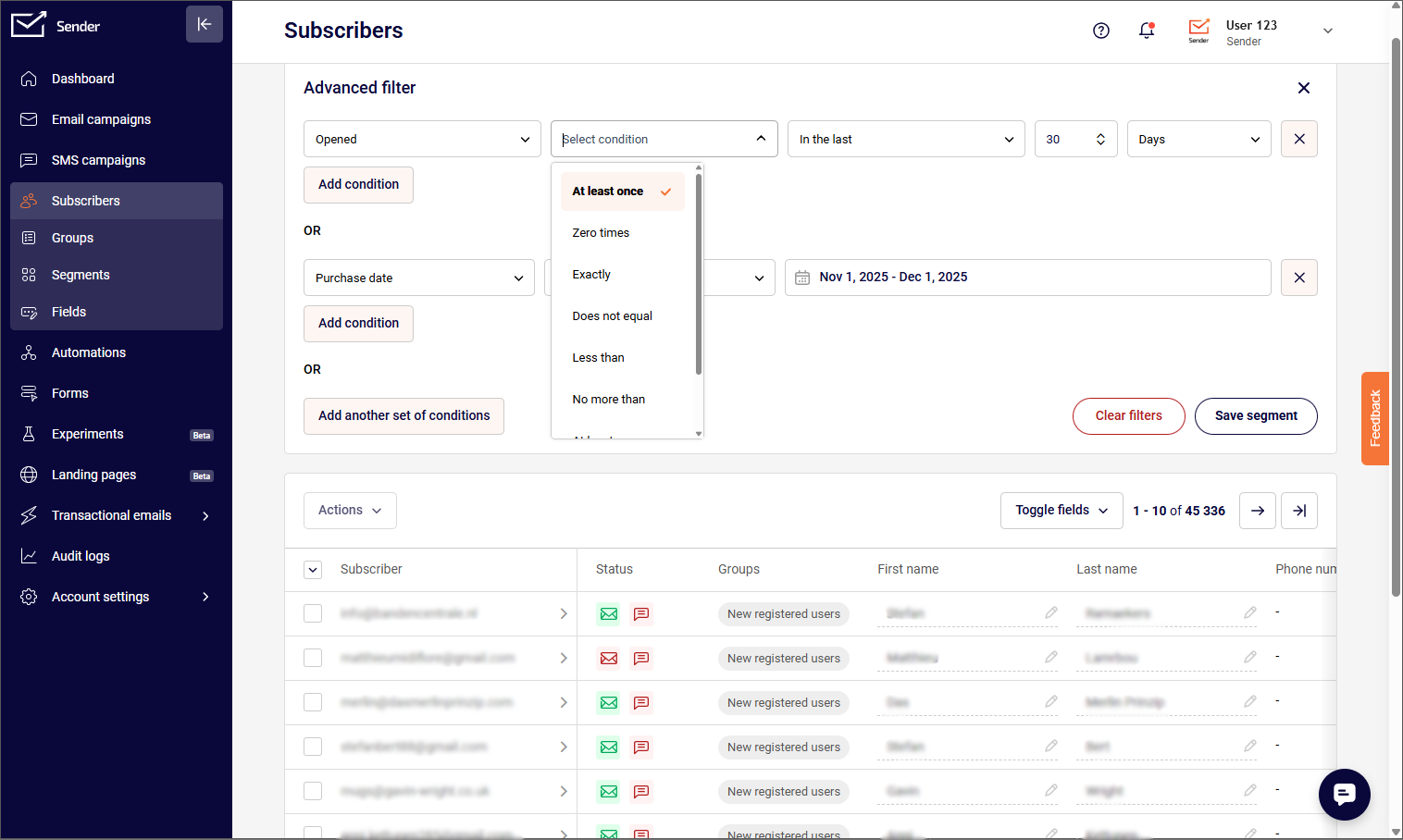
Sender’s segmentation engine uses dynamic filters that recalculate at send time – not when you build the segment. I set up a segment targeting WooCommerce customers who spent over $80 in the last 60 days but hadn’t opened the last three campaigns (the same behavioral data can also support WooCommerce abandoned-cart campaigns).
The segment updated automatically before every send without manual rebuilding. You can filter by campaign activity, purchase history, custom fields, and ecommerce metrics like total spend, average order value, items purchased, and order count.
The automation builder supports decision splits, delay logic, and omnichannel steps combining email and SMS in a single workflow. The custom events feature takes this further with custom event tracking, monitoring specific user actions on your site via API (like “Downloaded PDF” or “Reached Usage Limit”) and using them as automation triggers. Premade templates for welcome, abandoned cart, and post-purchase flows are included on the free plan.
Verdict
Sender is best for small to mid-sized businesses that want affordable segmentation, automation, and built-in list hygiene without much complexity. Its free plan is especially appealing for growing lists.
Choose ActiveCampaign instead for deeper CRM-linked segmentation and lead scoring, or GetResponse if contact scoring and more advanced engagement tracking matter more.
Key List Management Features
- Behavior-based segmentation. Filter contacts by actions such as email opens, link clicks, purchases, or location using drop-down selectors.
- Tags and custom fields. Label and organize subscribers with user-defined tags and custom data fields for targeted campaign sends.
- Contact group management. Move, copy, or remove subscribers between groups through automation actions or manual bulk operations.
- Flexible contact import. Add subscribers via CSV upload, copy-paste, or third-party integrations with automatic field mapping.
Best For
- Small to mid-sized businesses that need segmentation, automation, and list cleaning in a single platform without a large budget.
- Ecommerce stores looking to automate cart abandonment emails, post-purchase follow-ups, and product-based subscriber segmentation.
- Teams starting out with email marketing that want access to core list management features on a free plan before scaling to a paid tier.
Pros & Cons
- Free plan includes segmentation, tagging, and automation for up to 2,500 subscribers
- Automated bounce handling and duplicate removal reduce manual list maintenance
- Simple drop-down filters make segment creation accessible without technical knowledge
- Limited segmentation depth compared to platforms with CRM-level contact data
- No contact scoring (yet)
Pricing
| Subscription Tier | Starting Price | Subscribers | Email Limit | Key Features |
| Free Forever | $0/month | Up to 2,500 | 15,000/month | Segmentation, automation, tagging, templates, transactional emails |
| Standard | $10/month | From 1,000 | Up to 12,000/month | Everything in Free + no Sender branding, SMS, multi-user access |
| Professional | $20/month | From 1,000 | Up to 24,000/month+ | Everything in Standard + dedicated IP, countdown timers and feedback blocks |
| Enterprise | Custom | Unlimited | Unlimited | Everything in Professional + dedicated success manager, SSO, SLA, advanced permissions |
Free plan available. Prices based on monthly billing.
Constant Contact — Email Marketing & Contact Management
Constant Contact is a solid option for small businesses and nonprofits that need simple, structured list management for their email marketing campaigns.
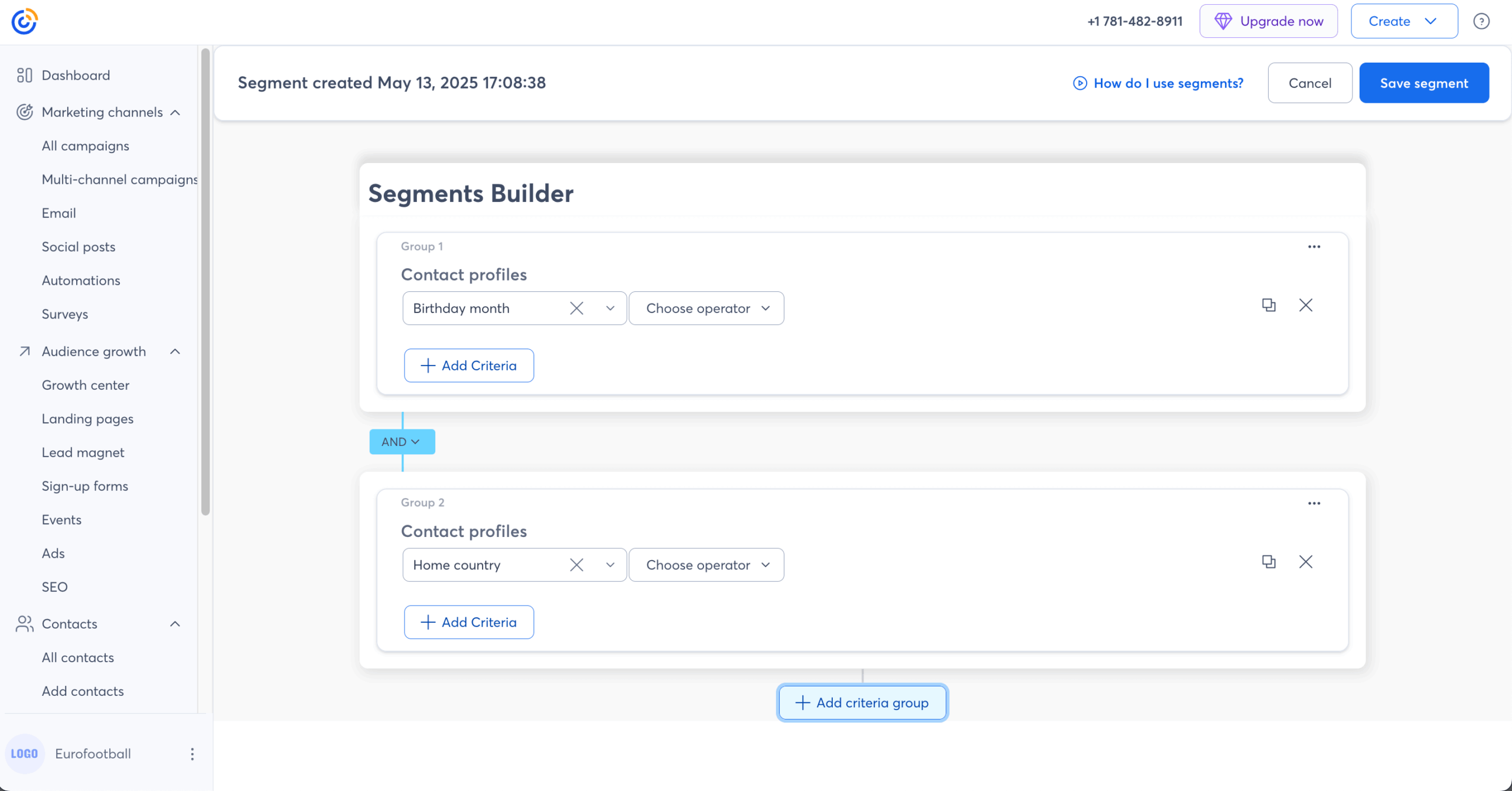
Constant Contact splits audience management into three layers: lists for broad grouping, tags for manual labeling, and segments for criteria-based filtering. When I set up a nonprofit’s quarterly fundraising campaigns with 4,200 contacts, the automatic deduplication worked as promised – subscribers on multiple lists received exactly one email per send, no manual cleanup needed.
Where it breaks down is filter precision. Multi-step automations with conditional branching require the Premium plan at $80/mo – on Lite ($12/mo) you’re limited to single-step triggers like welcome or birthday emails. That’s a significant gap when alternatives like Sender include full automation workflows on their free plan.
Verdict
Constant Contact is best for small businesses and nonprofits that want simple list organization, easy segmentation, and event-focused email campaigns without a complex setup.
Choose ActiveCampaign instead if you need deeper segmentation and multi-step automation, or Brevo if generous contact cap and stronger built-in list cleaning are priorities.
Key List Management Features
- Tag-based filtering. Apply tags individually or in bulk based on interests, customer status, or location to sort contacts without creating separate lists.
- Segment builder. Create segments using conditions such as list membership, tags, contact details, and custom field values.
- Inactive contact identification. Flag contacts with hard bounces or prolonged inactivity for review and removal.
- Automatic deduplication. Sends to multiple lists deliver only one email per contact, preventing duplicate messages.
- In-campaign segmentation. Build or apply segments directly during campaign setup without leaving the editor.
Best For
- Small businesses and nonprofits that need a straightforward platform for organizing contacts with lists, tags, and basic segmentation.
- Organizations with limited technical resources that prefer a guided setup and drag-and-drop tools over complex configuration.
- Businesses running event-based campaigns that need to manage RSVPs, attendee lists, and post-event follow-ups from one platform.
Pros & Cons
- Three-layer organization system (lists, tags, segments) covers a range of contact sorting needs
- Automatic deduplication prevents duplicate sends when contacts appear on multiple lists
- Segments can be built and applied directly during campaign creation
- Advanced segmentation and multi-step automations are locked behind higher-tier plans
- Costs increase as your contact list grows, with premium list features requiring plan upgrades
Pricing
| Subscription Tier | Starting Price | Subscribers | Email Limit | Key Features |
| Lite | $12/month | Up to 500 | 10x contact count | Email templates, basic automation, contact management, 1 user |
| Standard | $35/month | Up to 500 | 12x contact count | Everything in Lite + A/B testing, advanced segmentation, dynamic content, 3 users |
| Premium | $80/month | Up to 500 | 24x contact count | Everything in Standard + advanced automation, SEO, ads, unlimited users |
No free plan. 14-day free trial available. Prices scale with contact count. Overage fee of $0.002/email.
ActiveCampaign — All-in-One Marketing & List Management
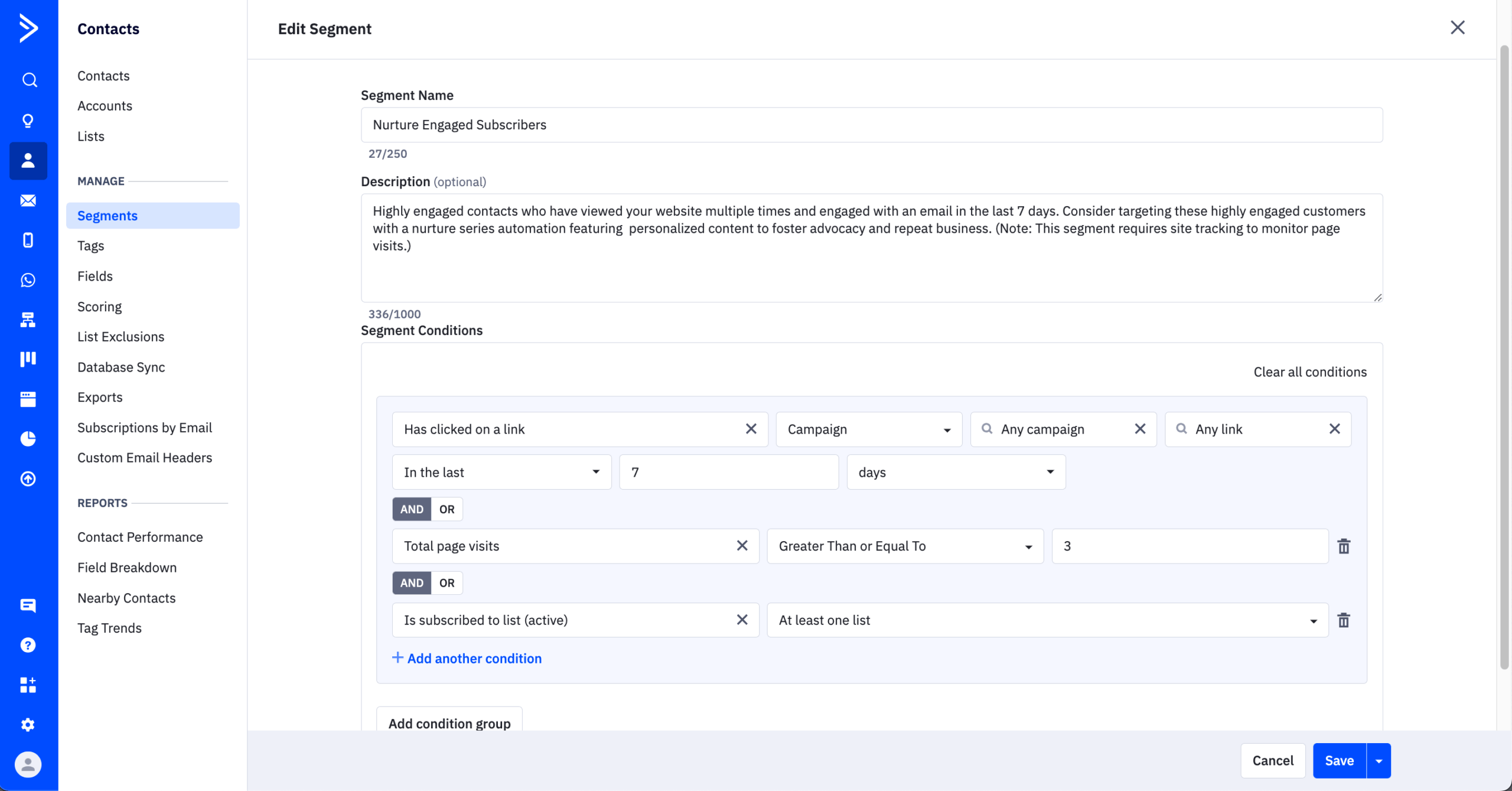
ActiveCampaign is a strong choice for marketing teams that need advanced list management tied to CRM data. Its segment builder supports deep filtering using tags, custom fields, behavioral data, site visits, and purchase history.
I built a B2B lead nurturing workflow in ActiveCampaign that scored contacts based on email engagement and pricing-page visits, then automatically moved qualifying leads into a CRM deal stage and assigned a follow-up task to the sales rep – all within one visual automation.
The segment builder is the deepest in this roundup. I stacked five conditions in one segment – “lead score above 40 AND visited pricing page twice AND opened last 3 emails AND tagged Webinar Attendee AND deal stage is blank” – and it resolved instantly.
Filters pull from tags, custom fields, site tracking, purchase data, deal properties, and lead scores simultaneously. But that segmentation depth requires Plus ($49/mo minimum) plan – Starter’s 5-action automation cap, not to mention the inability to do AND/OR conditions, ran out before I finished a basic welcome sequence.
ActiveCampaign rewards the investment once it’s built, but the ramp-up cost in time and pricing is steeper than any other tool in this roundup.
Verdict
ActiveCampaign is best for marketing teams that need advanced segmentation, automation, and CRM data working together. Its workflows can manage contacts based on behavior, site activity, lead scores, and deal stages.
Choose GetResponse if you want ecommerce-focused segmentation and scoring alongside built-in email marketing tools, or HubSpot if you need a broader CRM platform that keeps sales and marketing data in one system.
Key List Management Features
- Advanced segment builder. Create segments using combinations of tags, custom fields, behavioral data, site visits, and purchase history.
- Contact list status conditions. Segment by subscription state including active, unsubscribed, bounced, and unconfirmed contacts across lists.
- Automation-driven list management. Workflows can add or remove tags, update custom fields, and move contacts between lists based on triggered actions.
- AI-suggested segments. Available on Pro plan and above, the platform recommends segment criteria based on contact data patterns.
- Multi-source contact import. Import contacts via CSV, copy-paste, or direct integrations with tools like Shopify, Zapier, and Google Sheets.
Best For
- Marketing teams that rely on automation to manage subscriber lifecycles across email, CRM, and sales pipelines in one system.
- B2B and SaaS companies that need behavior-based segmentation tied to site tracking, lead scoring, and deal stage data.
- Mid-sized businesses scaling their list that require advanced segmentation logic and CRM-integrated contact management.
Pros & Cons
- Segment builder supports deep filtering by tags, custom fields, site behavior, and CRM deal data
- Automations can tag, move, and update contacts across lists without manual effort
- Built-in CRM keeps list data aligned with lead scores and sales pipeline stages
- AI-suggested segments and advanced segmentation features require the Pro plan at $79/month
- Managing multiple lists can cause unsubscribe complications including unintended global opt-outs
- Steeper learning curve for building complex segments and multi-condition automation workflows
Pricing
| Subscription Tier | Starting Price | Subscribers | Email Limit | Key Features |
| Starter | $15/month | Up to 1,000 | 10x contact count | Email campaigns, basic automation, site tracking, forms, 1 user |
| Plus | $49/month | Up to 1,000 | 10x contact count | Everything in Starter + landing pages, generative AI, basic CRM, SMS, 3 users |
| Pro | $79/month | Up to 1,000 | 12x contact count | Everything in Plus + advanced segmentation, conditional content, attribution, 3 users |
| Enterprise | $145/month | Up to 1,000 | 15x contact count | Everything in Pro + custom reporting, SSO, HIPAA support, 5 users |
No free plan. 14-day free trial available. Prices based on monthly billing. Charges apply to all contacts including unsubscribed.
GetResponse — Email Marketing Tool with List Management
GetResponse offers dynamic list management features well-suited for ecommerce businesses and content creators.

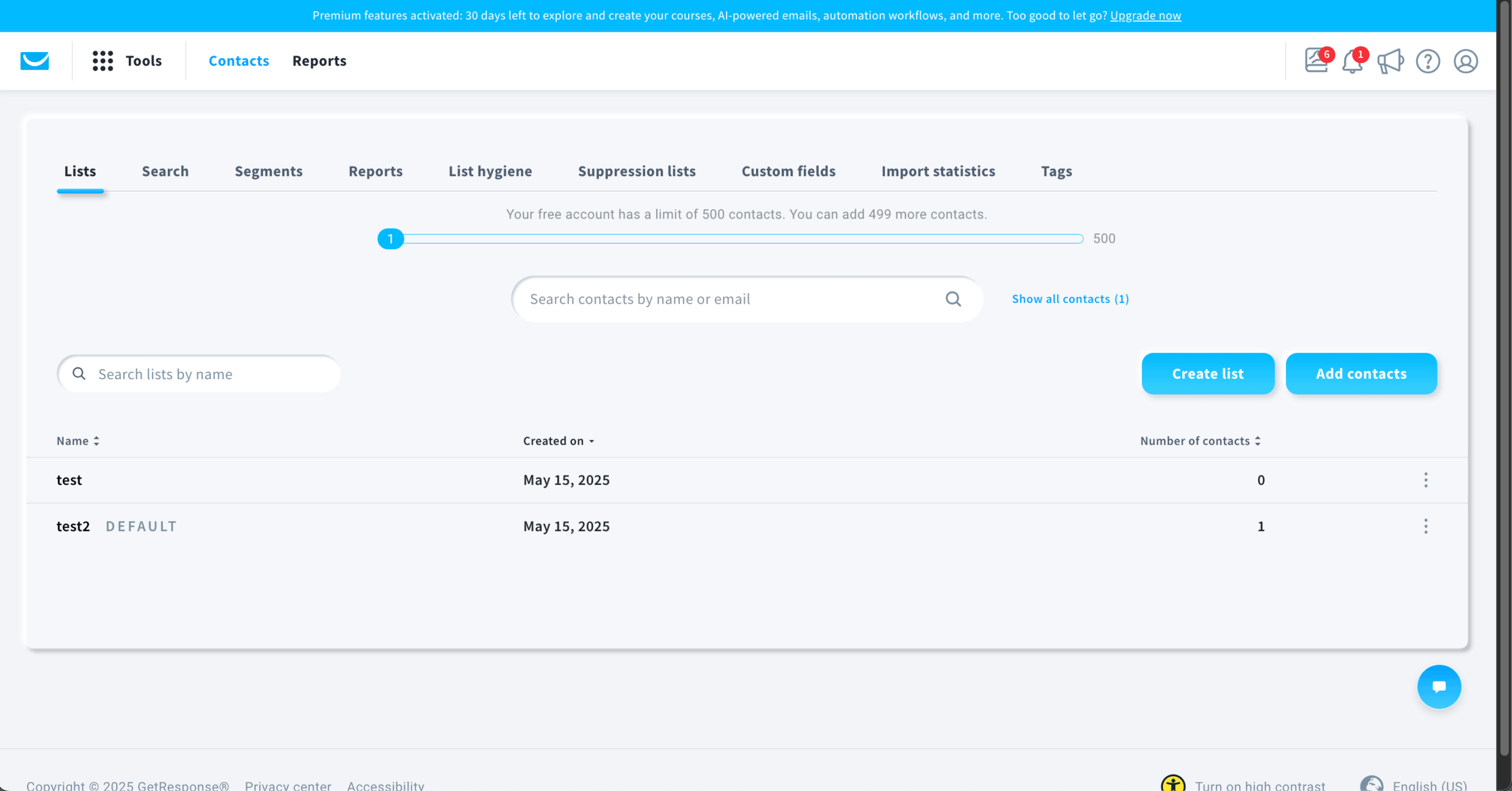
GetResponse ties contact scoring, website visitor tracking, and automated suppression into a single loop. Subscriber scores updated based on email opens, link clicks, and on-site behavior, and I set an automation to suppress contacts whose score dropped below threshold for 45 days – the list self-cleaned without manual intervention.
Segmentation pulls from scoring data, ecommerce activity, funnel stage, and custom events. I built a segment filtering contacts scored above 60 AND purchased in the last 30 days AND NOT tagged as “Received Upsell” – the kind of multi-condition filter that requires Premium on Constant Contact but works on GetResponse’s Marketer plan.
Meanwhile, A/B testing to validate the automated flow you’re building is available on the free plan, which is always great to see (even with some obvious limitations). However, Perfect Timing, which delivers emails when each subscriber is statistically most likely to engage, is available from Marketer only.
GetResponse earns its price if you use the scoring-to-suppression loop and the course builder together – but if you only need one half of that equation, lighter platforms deliver it cheaper.
Verdict
GetResponse is best for ecommerce businesses and creators that want dynamic segmentation, contact scoring, and automation tied to subscriber behavior.
Choose Sender instead for simpler, lower-cost list management, or ActiveCampaign if you need deeper CRM integration and more advanced multi-condition workflows.
Key List Management Features
- Dynamic segmentation. Automatically update segments based on subscriber behavior, engagement levels, demographics, and applied tags.
- Contact scoring. Assign point values to contacts based on actions like email opens, link clicks, and purchases to rank engagement.
- Inactive subscriber suppression. Set automation rules to suppress or remove non-engaged contacts from active campaign sends.
- Automated tagging. Apply or remove tags through automation workflows triggered by subscriber actions such as form fills or link clicks.
- Ecommerce activity segmentation. Segment contacts by purchase history, cart events, back-in-stock alerts, and product page views through platform integrations.
Best For
- Ecommerce businesses that need to segment subscribers by purchase history, cart activity, and product browsing behavior.
- Content creators and course sellers looking to combine email automation with landing pages, webinars, sales funnels, and product launch emails.
- Growing businesses that want dynamic segmentation and contact scoring to prioritize engaged subscribers automatically.
Pros & Cons
- Dynamic segments update automatically as subscriber behavior and engagement change
- Contact scoring helps prioritize active subscribers and identify disengaged contacts
- Website tracking feeds visitor data directly into contact profiles for behavior-based segmentation
- Some advanced features like advanced segmentation and sales funnel features are gated behind higher-priced plans
- Interface can feel outdated, making list and segment navigation less intuitive
- Pricing scales quickly as contact count grows, increasing costs for larger lists
Pricing
| Subscription Tier | Starting Price | Subscribers | Email Limit | Key Features |
| Free plan | $0/month | Up to 500 | 2,500/month | Email campaigns, website builder, landing pages, signup forms |
| Starter | $19/month | Up to 1,000 | Unlimited | Everything in Free + basic automation, A/B testing, segmentation, 24/7 chat |
| Marketer | $59/month | Up to 1,000 | Unlimited | Everything in Starter + advanced automation, contact scoring, ecommerce segmentation, promo codes |
| Creator | $69/month | Up to 1,000 | Unlimited | Everything in Marketer + website builder, webinars |
Free 14-day trial available. Prices based on monthly billing. Charges for duplicates across lists.
Kit — Subscriber Management & Automation for Creators
Kit takes a streamlined approach to list management by housing all contacts in a single unified database instead of separate lists.

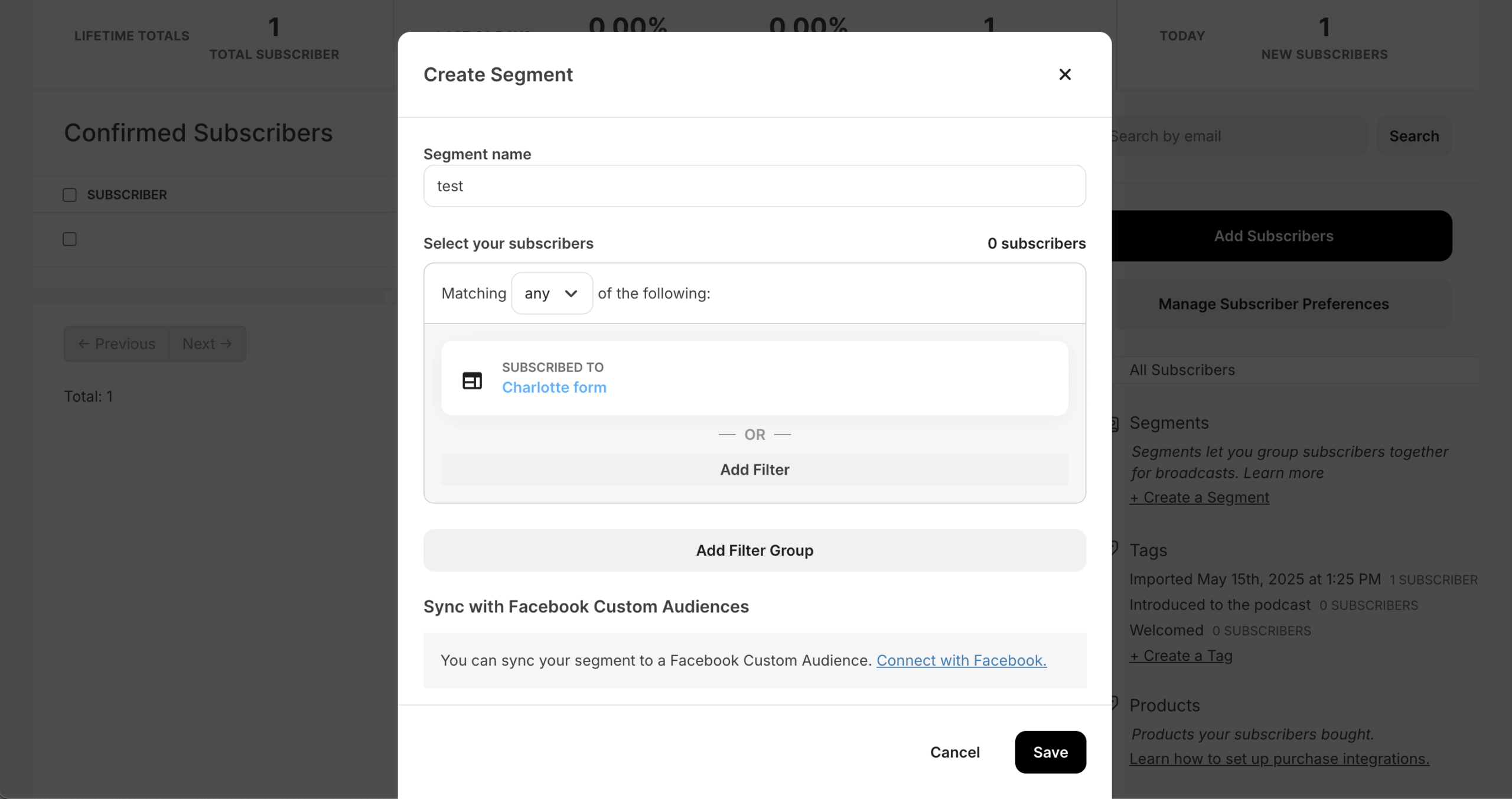
Kit replaces the traditional list model entirely – every subscriber lives in one database with tags as the sole organizational unit. When I migrated a course creator’s 6,500 contacts from Mailchimp, 340 duplicates that had been inflating the bill across three separate audiences collapsed into single profiles automatically. Segments built on tag combinations (“purchased Course A AND clicked upsell link AND NOT tagged VIP”) worked without the cross-list workarounds I’d needed on list-based platforms.
The visual automation builder handles conditional branching and tag-based routing cleanly. But the template library is thin – 40 plain-text-focused designs with no drag-and-drop builder. Engagement scoring and email deliverability reporting require Pro ($79/mo at 1,000 contacts, scaling to $189/mo at 10,000) – analytics that platforms like Sender surface at a fraction of the cost.
Kit’s free plan covers 10,000 subscribers with digital product sales, but paid plans took a 70-200% price hike in September 2025 that remains the dominant complaint from long-time users.
Verdict
Kit is best for creators, coaches, and solopreneurs who want a simple tag-based subscriber system, visual automations, and built-in audience growth through its creator network.
Choose GetResponse instead if you need contact scoring, stronger reporting, or ecommerce-focused automation, or Mailchimp if you want more flexible audience structures with tags, groups, and segments.
Key List Management Features
- Unified subscriber database. All contacts live in a single database organized by tags and custom fields instead of separate lists.
- Tag-based segmentation. Group subscribers using tags and custom fields to build targeted segments without managing multiple lists.
- Behavior-triggered automation. Workflows apply or remove tags automatically based on subscriber actions like email clicks or form completions.
- Conditional logic. Supports conditional logic for routing subscribers through different sequences based on tags or engagement.
- Single-dashboard subscriber management. Filter and manage all contacts by tag, segment, or engagement status from one centralized view.
Best For
- Independent creators such as bloggers, podcasters, and authors who need simple tag-based subscriber organization in one database.
- Coaches and solopreneurs looking for an easy-to-use automation builder that handles email sequences without complex setup.
- Creator-led brands that want to grow their list organically through cross-promotion via Kit’s built-in recommendation network.
Pros & Cons
- Single unified database eliminates the complexity of managing subscribers across multiple lists
- Tag-based organization keeps segmentation simple and scalable for growing audiences
- Built-in creator network supports organic list growth through cross-promotion
- No multi-list structure, which may limit flexibility for businesses with distinct audience groups
- Reporting and list health analytics are less detailed than similarly priced platforms
- Paid plans start at $39/month, which is higher than some competitors for basic list management
Pricing
| Subscription Tier | Starting Price | Subscribers | Email Limit | Key Features |
| Newsletter | $0/month | Up to 10,000 | Unlimited broadcasts | Landing pages, signup forms, audience tagging, creator network |
| Creator | $39/month | Up to 1,000 | Unlimited | Everything in Newsletter + automated sequences, visual automation builder, third-party integrations |
| Creator Pro | $79/month | Up to 1,000 | Unlimited | Everything in Creator + subscriber scoring, advanced reporting, newsletter referral system |
Prices shown are monthly billing rates. Scales with subscriber count.
Mailchimp — Advanced Segmentation and Audience Management
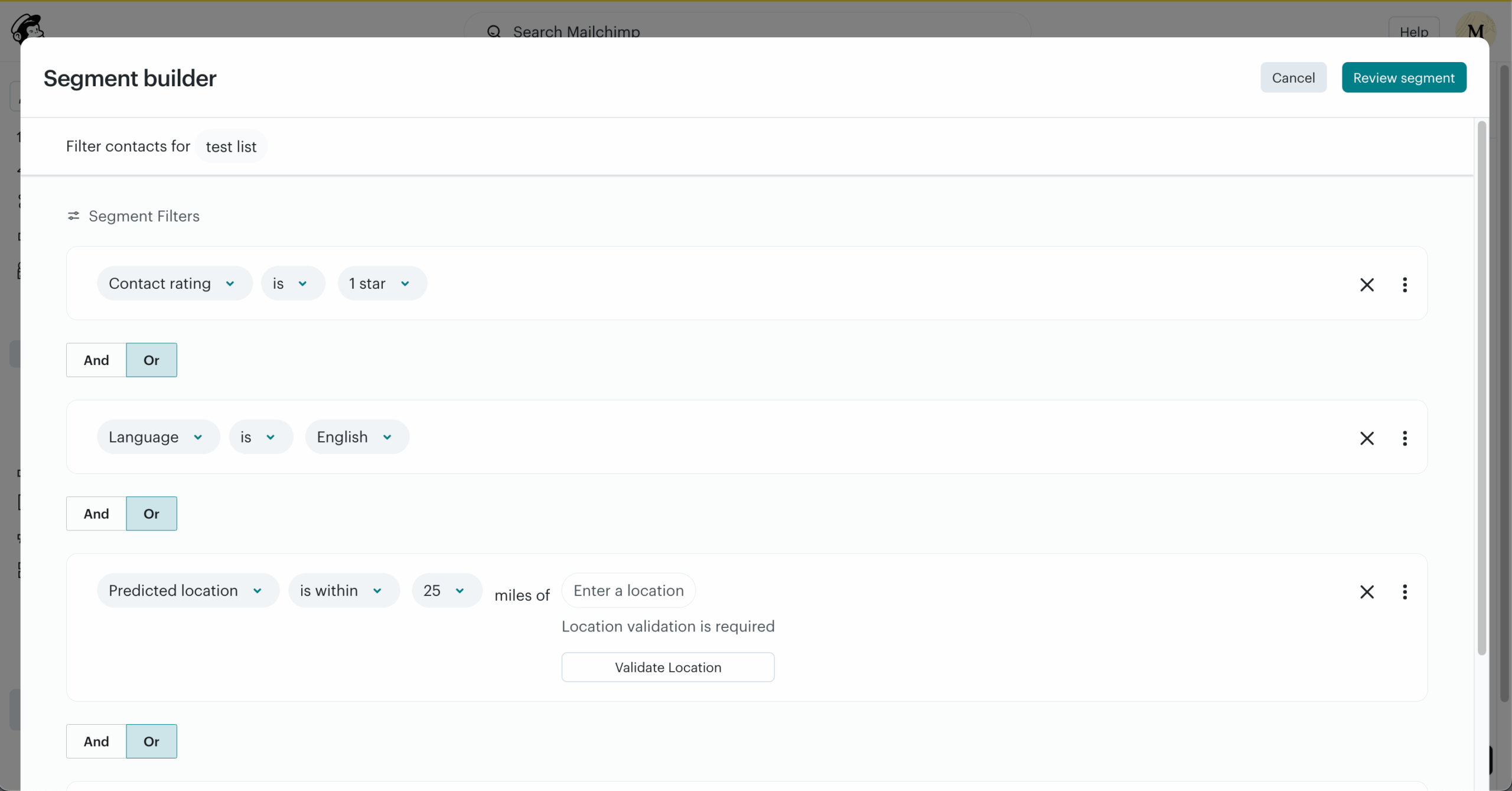
Mailchimp offers layered list management through a combination of tags, groups, and segments that let you organize and target contacts from multiple angles–behavioral, preference-based, or demographic.

Mailchimp’s three-layer system – tags, groups, and segments – offers the most organizational flexibility of any platform I tested, but that flexibility comes with real confusion costs. Tags label contacts, groups capture self-reported preferences (selected by subscribers on forms), and segments filter dynamically by behavior. When I set up a client’s 5,000-contact account, distinguishing when to use a tag versus a group versus a segment for the same targeting goal took longer than building the actual campaigns.
Segments filter across purchase history, email engagement, site activity, and custom fields – and on Standard ($20/mo), predictive demographics identify high-value contacts automatically. But on Essentials ($13/mo), segmentation is basic and automations cap at 4 journey points, which I exhausted before finishing a welcome-to-upsell sequence.
Verdict
Mailchimp is best for small businesses and growing teams that want flexible audience organization through tags, groups, and behavioral segments, plus a broad integration ecosystem.
Choose Sender instead for a more affordable option with stronger free-plan automation, or ActiveCampaign if you need deeper CRM-linked segmentation and more advanced workflows.
Key List Management Features
- Layered contact organization. Use a combination of tags, groups, and segments to categorize contacts from multiple angles within an audience.
- Behavioral segmentation. Build segments based on purchase history, email engagement, website activity, and custom field data.
- Flexible tagging. Apply tags manually, in bulk, or automatically through integrations and automation workflows.
- Custom fields and merge tags. Store additional subscriber data in custom fields and insert it dynamically into email content.
Best For
- Small businesses and startups that need flexible audience management with layered tags, groups, and segments in a single platform.
- Teams managing multi-channel campaigns that want to segment contacts based on email, website, and ad engagement data.
- Businesses with diverse audiences that require granular filtering across behavioral, demographic, and preference-based criteria.
Pros & Cons
- Layered system of tags, groups, and segments allows flexible, multi-angle contact organization
- Predictive segmentation on higher plans identifies high-value contacts based on AI analysis
- Wide integration ecosystem feeds contact data from ecommerce, CRM, and web platforms
- Unsubscribed contacts count toward billing unless manually deleted from the audience
- Free plan limits segmentation capabilities and restricts audience size
- Advanced behavioral segments and automation features require premium plan tiers
Pricing
| Subscription Tier | Starting Price | Subscribers | Email Limit | Key Features |
| Free | $0/month | Up to 250 | 500/month (250/day) | Basic templates, forms, landing pages, 1 audience, no automation |
| Essentials | $13/month | Up to 500 | 10x contact count | Everything in Free + A/B testing, email scheduling, 3 audiences, 24/7 support |
| Standard | $20/month | Up to 500 | 12x contact count | Everything in Essentials + behavioral targeting, custom templates, advanced automation, predictive demographics |
| Premium | $350/month | Up to 10,000 | 15x contact count | Everything in Standard + advanced segmentation, unlimited audiences |
Charges for unsubscribed contacts unless manually removed. Prices based on monthly billing.
Brevo — Email Management Software with Smart Segmentation
Brevo stands out for list management capabilities and SMS campaigns on every plan, including the free tier.

Brevo’s billing meter runs on email volume rather than contact count, but that doesn’t mean contacts are unlimited – a distinction I missed until I hit the wall. On the $9/mo Starter plan sending 5,000 emails, the contact cap is 500. Even at 20,000 emails/mo, Starter caps at 500,000 contacts. Standard and Professional also impose contact limits that scale with the volume tier selected. Brevo introduced these caps in late 2025, but the pricing page still leads with “unlimited contacts” language that only holds true on Enterprise.
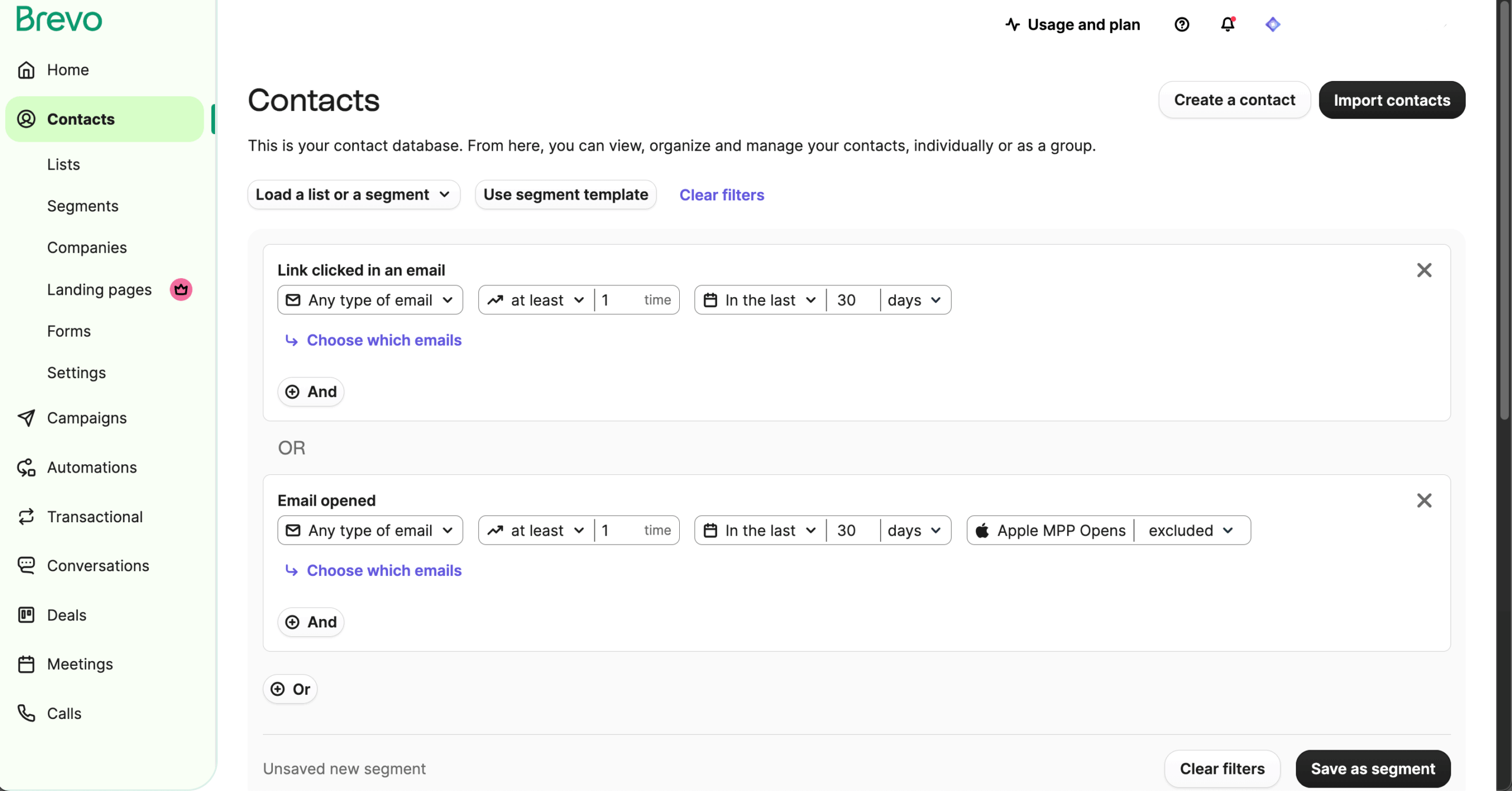
Where Brevo earns its place is cross-channel segmentation. I could build segments filtering by email engagement, SMS responses, live chat interactions, and web behavior from a single contact timeline – a unified view that Mailchimp and Sender don’t offer natively.
Contact scoring on Standard assigns values based on engagement, purchases, and RFM metrics, feeding directly into automation triggers. The volume-based model saves money for large, low-frequency lists, but only once you clear Starter’s misleading entry price.
Verdict
Brevo is best for budget-conscious businesses that want unlimited contact storage, built-in list cleaning, and multi-channel contact management across email, SMS, and chat.
Choose ActiveCampaign instead for deeper automation and CRM-linked segmentation, or Mailchimp if you want a broader integration ecosystem and more layered audience management.
Key List Management Features
- Multi-criteria segmentation. Segment contacts by engagement, demographics, purchase behavior, and custom attributes from the entry-level plan.
- Automated list cleaning. Invalid addresses and contacts who report messages as spam are automatically flagged and added to suppression lists.
- CRM with unified inbox. Centralize contact interactions across email, SMS, and chat in a single CRM view for complete engagement history.
- Automation-based contact management. Workflows can update contact attributes, move contacts between lists, and apply segment filters based on triggers.
- Flexible contact import. Add contacts via CSV upload, API, or direct integrations with ecommerce and CRM platforms.
Best For
- Budget-conscious businesses that need advanced segmentation and generous contact storage without paying per subscriber.
- Teams managing multi-channel outreach across email, SMS, and chat who want contact data centralized in one CRM.
- Businesses with large contact databases that need automated list cleaning and spam-flag handling included from entry-level plans.
Pros & Cons
- Advanced segmentation by engagement, demographics, and behavior available from entry-level tier
- Automated list cleaning handles invalid addresses and spam-flagged contacts without manual review
- Interface feels less polished than competing platforms, slowing down list navigation
- Free plan limits sending volume rather than contacts, which can restrict campaign frequency
- Visual workflow builder is functional but less visual and intuitive than some alternatives
Pricing
| Subscription Tier | Starting Price | Subscribers | Email Limit | Key Features |
| Free | $0/month | Unlimited | 300/day (~9,000/month) | Segmentation, contact management, templates, transactional emails |
| Starter | $9/month | Unlimited | 5,000/month | Everything in Free + no daily limit, basic analytics |
| Standard | $18/month | Unlimited | 5,000/month | Everything in Starter + marketing automation, A/B testing, advanced segmentation, landing pages |
| Professional | $499/month | Unlimited | Custom | Everything in Standard + dedicated IP, priority support, advanced integrations |
Brevo branding on Free and Starter plans. Monthly billing prices. Logo removal add-on is $10.80/month on Starter.
ZeroBounce — Specialized Email List Verification & Hygiene Tool
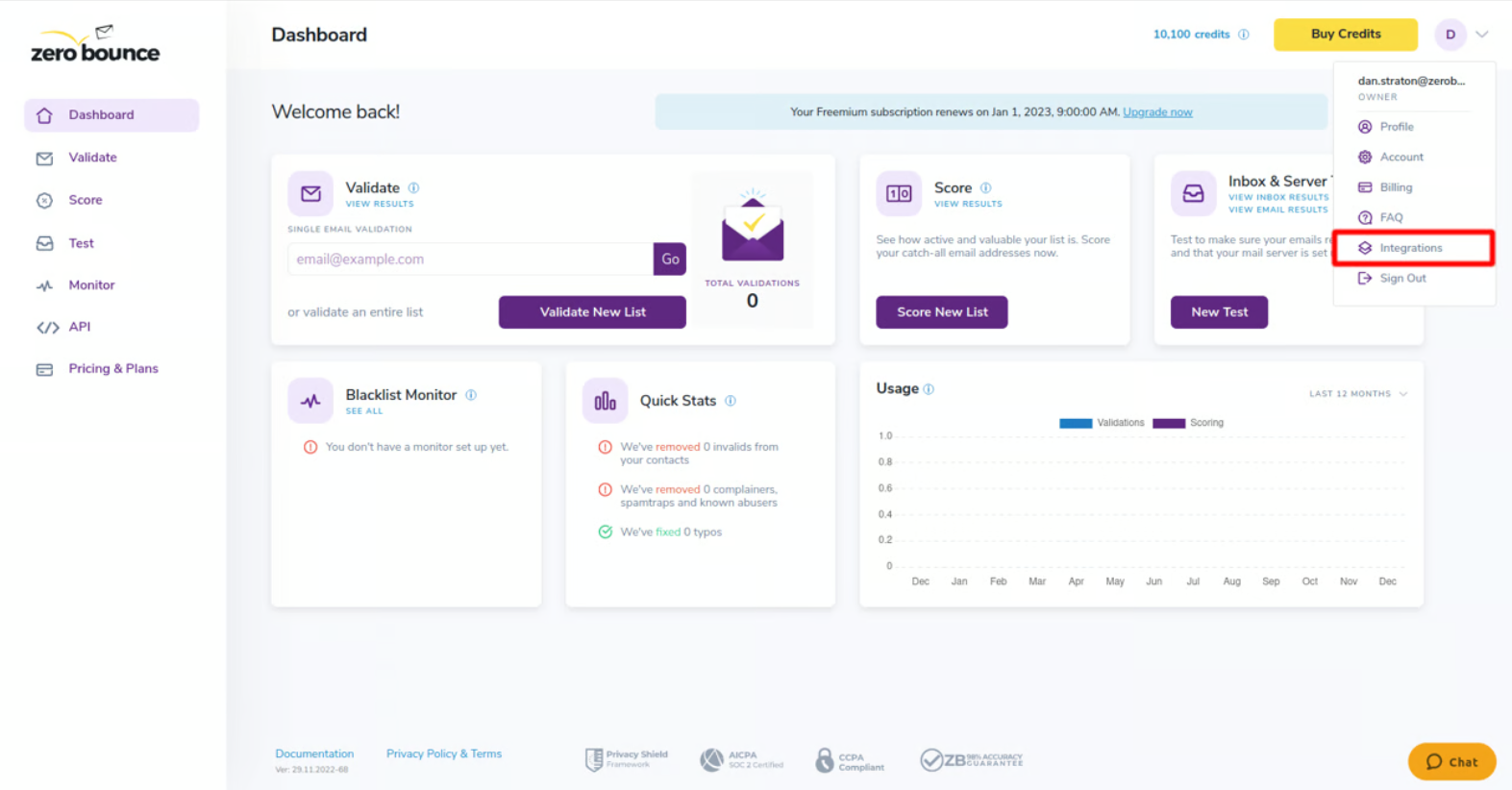
ZeroBounce is a dedicated email list verification tool, not a full marketing platform. It uses AI-driven, multi-step validation to identify invalid, inactive, and risky email addresses before you send a campaign.

During my testing, I uploaded a roughly 1,500-address list that had been collecting signups for 2 months without cleaning. ZeroBounce flagged 14.3% as problematic: 6.1% invalid, 3.4% catch-all (unverifiable), 2.8% disposable or abuse addresses, and 2% spam traps that would have damaged sender reputation on the first campaign.
The AI-powered email quality scoring assigns each address an engagement likelihood estimate, which I cross-referenced against actual open data after sending – the “low quality” contacts ZeroBounce flagged had a 4% open rate versus 31% for addresses scored “high.”
The API integrates directly with Sender, Mailchimp, and Brevo for in-workflow cleaning, but at volume the per-verification cost adds up – maintaining a 50,000-contact list quarterly would run roughly $1,600/year in verification fees alone.
Verdict
ZeroBounce is best for businesses with large, aging, or imported lists that need deeper pre-send verification to catch invalid, disposable, catch-all, and abuse-prone addresses before a campaign goes out.
Choose Brevo instead if you want list cleaning built into a full email marketing platform, or ActiveCampaign if your priority is segmentation, CRM integration, and automation rather than standalone validation.
Key List Management Features
- AI-driven email validation. Verifies email addresses in real time using a multi-step process to identify invalid, inactive, or risky contacts.
- Bulk and individual verification. Validate entire lists or single addresses with detailed categorizations including spam trap, disposable, and do-not-mail.
- Catch-all and temporary address detection. Flags catch-all domains and temporary email addresses that may inflate list size without real engagement.
- Pre-send bounce prevention. Multi-step verification identifies problematic addresses before a campaign is sent, reducing hard bounce rates.
- Platform integrations. Connects with major email marketing list management platforms for direct list cleaning within existing workflows.
Best For
- Businesses with large or aging email lists that need to validate contacts in bulk before running campaigns.
- Marketing teams focused on deliverability that want to identify spam traps, disposable addresses, and abuse-flagged contacts.
- Companies already using an email platform that need a dedicated verification tool to complement their existing list management workflow.
Pros & Cons
- Multi-step AI verification catches spam traps, disposable addresses, and abuse-flagged contacts
- Bulk validation processes large lists quickly with detailed per-address categorization
- Integrates directly with major email platforms for in-workflow list cleaning
- Not a full email marketing platform – handles validation only, not sending or segmentation
- Credit-based pricing means ongoing costs for repeated or regular list cleaning
- No built-in tools for subscriber engagement tracking, tagging, or campaign management
Pricing
| Subscription Tier | Starting Price | Subscribers | Email Limit | Key Features |
| Free | $0/month | N/A | 100 validations/month | Email validation, spam trap detection, abuse email detection |
| Pay-As-You-Go | From $39 (one-time) | N/A | 2,000 validations (minimum) | Everything in Free + bulk validation, catch-all detection, email scoring; credits never expire |
| ZeroBounce ONE | From $99/month | N/A | 10,000 validations/month | Everything in Pay-As-You-Go + recurring monthly credits, inbox placement testing, blacklist monitoring, DMARC monitoring; 15% discount on additional credit purchases |
| Enterprise | Custom | N/A | Over 1,000,000/month | Everything in ZeroBounce ONE + dedicated account manager, custom integrations |
ZeroBounce is a validation tool, not a full email marketing platform. “Subscribers” and “Email Limit” refer to validation credits, not sends. ZeroBounce ONE annual billing starts at $79/month.
HubSpot — CRM Platform with Advanced Contact Management
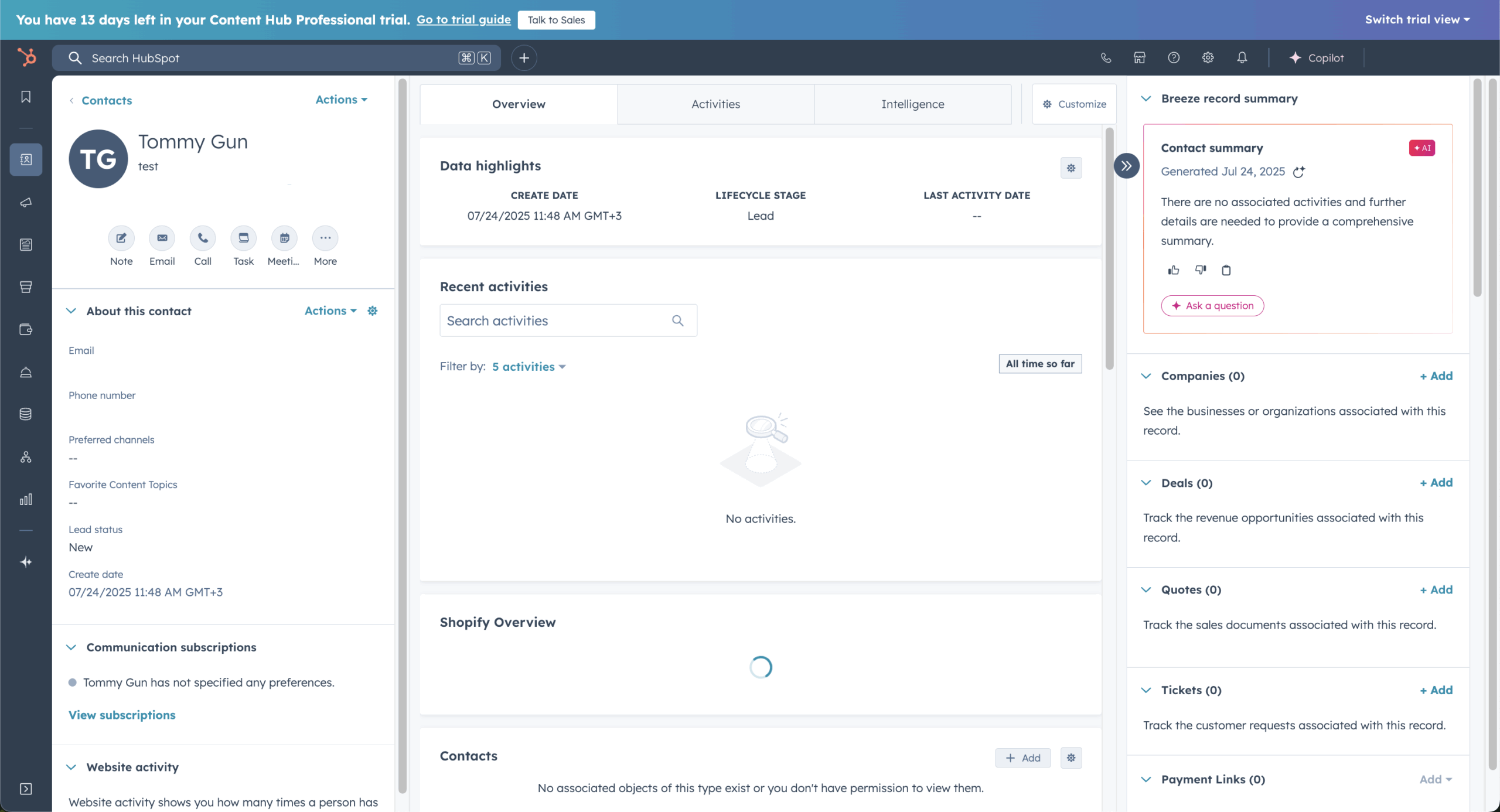
HubSpot integrates email list management directly into its CRM, syncing subscriber data with deal stages, lifecycle stages, and company records in a unified database.

When I set up a B2B SaaS client’s 2,500 contacts, segments pulling from CRM properties (lifecycle stage = “Marketing Qualified” AND last page viewed = pricing AND deal stage = blank) built in seconds – a cross-system filter that would require Zapier workarounds on most email-first platforms.
The free CRM stores up to 1,000 contacts, which makes HubSpot the only platform in this roundup offering genuine list management at that scale for free. But the email marketing capabilities on that free tier are basic – 2,000 sends/month with HubSpot branding.
HubSpot earns the price for B2B teams already running their pipeline through it, but for anyone starting from an email marketing need rather than a CRM need – you’re paying for a system built around a problem you may not have.
Verdict
HubSpot is best for businesses that want email list management tightly integrated with CRM data, sales pipelines, lifecycle stages, and cross-team contact records.
Choose ActiveCampaign instead if you want advanced automation with less platform complexity, or Brevo if you need simpler, lower-cost contact management with unlimited contact storage.
Key List Management Features
- CRM-integrated contact management. Subscriber data syncs with deal stages, lifecycle stages, and company records in a unified CRM database.
- Active lists. Dynamic lists update automatically based on contact properties, behavior, form submissions, and engagement criteria.
- Multi-property segmentation. Segment contacts by engagement data, page views, email interactions, CRM properties, and lifecycle stage.
- Workflow-based list management. Marketing automation workflows can update contact properties, enroll contacts in sequences, and manage list membership.
- Import with automatic deduplication. Add contacts via CSV, integrations, or CRM sync with built-in duplicate detection and merging.
Best For
- Businesses that want email and CRM in one system with contact records tied to deal stages, lifecycle data, and company profiles.
- Sales and marketing teams that need automated list management driven by CRM properties, form submissions, and engagement triggers.
- Organizations scaling across departments that require a shared contact database with role-based access and unified reporting.
Pros & Cons
- Active lists update dynamically based on CRM properties, engagement data, and form submissions
- Contact activity timeline provides a complete interaction history for each subscriber in one view
- Automatic deduplication on import keeps the contact database clean from the start
- Advanced list management features like custom behavioral triggers require paid Marketing Hub tiers
- Contact limits on free and starter plans can restrict list growth for scaling businesses
- Platform complexity may be excessive for teams that only need basic email list management
Pricing
| Subscription Tier | Starting Price | Marketing Contacts | Email Limit | Key Features |
| Free CRM | $0/month | None (up to 1,000 CRM contacts) | 2,000/month | Forms, contact management, basic email, basic CRM, 1 automation |
| Marketing Hub Starter | $20/month per seat | Up to 1,000 | 5x marketing contact count | Everything in Free + no HubSpot branding, landing pages, simple automation, 10 audiences |
| Marketing Hub Professional | $890/month | Up to 2,000 | 10x marketing contact count | Everything in Starter + advanced automation, smart content, A/B testing, custom reporting (3 seats included) |
| Marketing Hub Enterprise | $3,600/month | Up to 10,000 | 20x marketing contact count | Everything in Professional + custom objects, behavioral triggers, advanced permissions (5 seats included) |
Free CRM stores up to 1,000 contacts but does not include marketing contact capabilities. Marketing Hub prices based on monthly billing. Professional requires $3,000 onboarding fee; Enterprise requires $6,000 onboarding fee. Additional marketing contacts charged separately ($50/month per 1,000 on Starter).
Email List Management Best Practices
Strong email list management is not just about keeping your database organized. Each of the following habits helps reduce bounces, prevent spam complaints, and protect the sender reputation that determines whether your campaigns reach the inbox.
- Use double opt-in for new subscribers. Double opt-in asks people to confirm their subscription through a verification email before they join your active list. This prevents mistyped, fake, or unwanted addresses from entering your database and creates clearer proof of consent. Although it adds one extra signup step, it usually produces a more engaged audience and lowers the risk of complaints.
- Follow a regular cleaning cadence. Do not wait for deliverability problems before reviewing your list. Automatically remove duplicates and process invalid addresses as they appear, then review subscriber engagement at least every 30 days. Contacts who stop opening or clicking can be moved to an inactive segment before they begin weakening campaign performance.
- Suppress hard bounces and complainers immediately. Addresses that generate hard bounces should not receive another campaign. The same applies to recipients who mark your messages as spam. Keeping these contacts in active sends increases bounce and complaint rates, which can damage your reputation with mailbox providers. Use your ESP’s suppression list to exclude them automatically rather than repeatedly deleting and reimporting records.
- Give subscribers a preference center. An unsubscribe link should not be the only option available. A preference center lets subscribers choose the topics they receive, change email frequency, or pause communications. Giving people more control can prevent unnecessary unsubscribes and spam complaints while helping you collect better preference data for segmentation.
- Run re-engagement campaigns for inactive contacts. When subscribers have not engaged for 60–90 days, send a short sequence of win-back emails or re-permission sequence asking whether they still want to hear from you. Remind them of the value they receive and provide a clear confirmation link. Contacts who respond can return to active segments; those who remain inactive should be suppressed from future campaigns.
Together, these practices keep your database focused on people who have given valid consent and are still interested in your emails. That leads to healthier engagement signals, fewer delivery failures, and a stronger sender reputation over time.
ESP vs. Dedicated List Cleaning Tool: Which Do You Need?
For routine email list hygiene, your email service provider (ESP) is usually enough. Built-in tools can automatically process hard bounces, unsubscribes, duplicate contacts, and spam complaints, while engagement-based rules help suppress inactive subscribers. This covers the day-to-day maintenance needed to keep an actively used list healthy.
A dedicated list cleaning tool becomes useful when you are working with an imported, purchased, inherited, or aging database that has not been contacted recently. Before sending, these lists need deeper verification to identify invalid mailboxes, disposable email addresses, spam traps, catch-all domains, and abuse-flagged accounts that an ESP may only detect after a campaign generates bounces.
ZeroBounce is a great example. It validates individual addresses or bulk lists, categorizes risky contacts, assigns email quality scores, and integrates with major email marketing platforms. However, it does not replace a fully-rounded ESP: ZeroBounce verifies contacts before a campaign, while platforms such as Sender or Brevo handle segmentation, automation, suppression, and delivery.
In practice, use your ESP for ongoing list upkeep and a dedicated validator before sending to older, unfamiliar, or high-risk contact lists.
Example Email List Management Workflows
Most email list management platforms support automation workflows that handle subscriber organization, engagement tracking, and list cleanup without manual input. Below are three common workflows that apply across platforms.
1. Welcome & Early Engagement Workflow
- Trigger: New subscriber joins via signup form, landing page, or import.
- Flow: Signup confirmation → Welcome email introducing the brand → Value-driven follow-up with relevant content → Introductory offer or CTA → Segment split based on clicks or engagement.
- Purpose: Establishes contact from the first interaction and sorts new subscribers by interest based on which emails they open or click. Subscribers who engage with specific content can be tagged and moved into relevant segments automatically, while those who do not engage enter a separate nurture path.
2. Inactive Subscriber Re-engagement Workflow
- Trigger: No opens or clicks within 60–90 days.
- Flow: Check-in email asking if the subscriber still wants to receive messages → Reminder email with a clear value proposition or incentive → If no click after the reminder → Suppress or move to an inactive segment.
- Purpose: Effective inactive subscriber management identifies disengaged subscribers before they damage deliverability metrics. Contacts who re-engage are returned to active segments. Those who remain unresponsive are suppressed from future campaigns, reducing bounce risk and keeping sender reputation intact.
3. Engagement-Based Segmentation Workflow
- Trigger: Ongoing behavior tracking across opens, clicks, purchases, and site visits.
- Flow: Subscribers who engage consistently → Moved to a VIP or high-engagement segment. Subscribers idle for 30 days → Moved to a watchlist segment. Subscribers idle for 90 days → Routed into the re-engagement workflow above.
- Purpose: Keeps the contact database organized automatically based on real activity rather than static attributes. High-engagement subscribers receive priority content or exclusive offers, while declining engagement triggers intervention before contacts go fully inactive.
What is Email List Management?
Email list management is the process of organizing, maintaining, and segmenting a database of email subscribers to keep contact data accurate and campaigns targeted.
It covers tasks such as adding and removing subscribers, tagging contacts by behavior or demographics, building segments for targeted sends, removing invalid or bounced addresses, handling unsubscribes, and suppressing inactive contacts.
Dedicated email list management software automates most of these tasks through features like dynamic segmentation, automated tagging, bounce detection, duplicate removal, and engagement-based filtering.
Effective list management reduces bounce rates, improves inbox placement, and ensures messages reach subscribers who are likely to engage.
FAQs
Email marketing focuses on creating and sending campaigns, while list management covers what happens to your contact database before and after those sends. It includes tasks like removing bounced addresses, segmenting subscribers by behavior or demographics, suppressing inactive contacts, and handling unsubscribes. A platform can be strong at one and weak at the other, which is why both capabilities matter when choosing list cleaning software.
It depends on how you use your list. Contact-based pricing works well when you send frequently to a stable subscriber base, since costs scale with list size rather than send frequency. Volume-based pricing suits businesses with large databases but lower send frequency, because you only pay for emails delivered. Reviewing both models against your actual sending patterns prevents overpaying.
Free plans vary significantly across platforms. Some include segmentation, tagging, and automation with generous subscriber limits, while others restrict features like automated workflows or cap contacts at levels that small businesses outgrow quickly. The key factors to evaluate are subscriber limits, whether segmentation and tagging are included, and whether unsubscribed or inactive contacts count toward your cap.
Static segments are fixed groups created manually or by a one-time import and do not update unless you edit them. Dynamic segments refresh automatically based on rules you set, such as engagement level, purchase history, or tag changes. Dynamic segmentation reduces manual list maintenance but is often limited to mid-tier or higher plans on most platforms.
A dedicated validation tool is useful when your existing email platform lacks built-in list cleaning, or when you manage a large or aging database with a high bounce rate. Validation services check addresses for issues like spam traps, disposable accounts, and inactive mailboxes before you send. They complement rather than replace a full email marketing platform.
You should clean your email list regularly by automatically removing hard bounces, unsubscribes, and duplicates. Review engagement every 30 days, place inactive subscribers on a watchlist, and run a re-engagement campaign after 60–90 days. Suppress contacts who remain unresponsive to protect deliverability and sender reputation.