


Mailtrap does one thing well – catching outgoing emails in a sandbox during development. But the best replacement depends on the job: Mailpit is great for a local sandbox, Mailosaur for CI assertions, Postmark for deliverability-focused transactional sending, Sender for transactional + marketing email in one account, and UniOne for budget transactional sending.
That said, Mailtrap now sells three products separately – Email Sandbox, Email API/SMTP, and Email Marketing – plus agent / MCP tooling.
This guide focuses on alternatives to the first two: testing email during development and sending production transactional email.
I tested eight alternatives over three months on live accounts using the same test domain and Node.js harness. Sandbox tools – Mailpit, MailHog, and Mailosaur – were measured on capture reliability and API support for automated testing.
Transactional senders – Postmark, Mailgun, SendGrid, UniOne, and Sender – were measured on inbox placement, webhook reliability, and bounce handling.
This guide covers what each tool actually does, where it falls short, and which side of Mailtrap’s split product line – Email Sandbox or Email API – it’s built to replace.
If you’ve only used Mailtrap to inspect outgoing emails during development, you’re on the Sandbox side. If you’ve used Mailtrap to send production transactional email, you’re on the Email API side.
Which Mailtrap Problem Are You Replacing?
Before choosing a Mailtrap alternative, identify which part of Mailtrap you actually need to replace. The tools in this guide cover sandbox testing, automated QA, transactional sending, and marketing email – not every deliverability problem Mailtrap users may encounter.
Email Sandbox – capture and inspect test emails. For local development, jump to Mailpit: it runs on your own machine with no account or sending caps. Keep Mailtrap if you mainly want hosted manual QA with a polished inbox, spam analysis, and HTML inspection; choose Mailosaur when automated CI assertions, OTP extraction, and link extraction matter more.
Email API/SMTP – send production transactional email. Look at Postmark for deliverability-focused transactional sending, Mailgun for API control and reputation management, SendGrid for its integration ecosystem, UniOne for budget-focused sending, or Sender when transactional and marketing email need to coexist.
Email Marketing – campaigns and automation. Sender is the option reviewed here for combining marketing automation with transactional SMTP in one account.
Not covered here – inbox placement, spam testing, and rendering previews. If your actual problem is testing placement with tools such as GlockApps, Inbox Radar, or Warmforge, or cross-client rendering with Litmus or Email on Acid, see our email deliverability tools round-up instead.
Mailtrap Alternatives Worth Your Attention: A Snapshot
- Local development default – Mailpit. Docker container running in under two minutes, no account, no rate limits, and the same default ports as MailHog, so it slots into existing docker-compose setups. The default choice for anything that doesn’t leave your laptop.
- Legacy local testing, with caveats – MailHog. Still functional for basic SMTP capture, but the project has been quiet since 2020 and no longer ships meaningful updates. New projects should pick Mailpit; existing MailHog setups only need to migrate if they hit a bug.
- CI/CD email assertions – Mailosaur. Purpose-built for asserting on email content inside automated pipelines, with per-test inboxes and content-extraction APIs the marketing-focused tools don’t offer. Go straight to the API on day one of the 14-day trial.
- Hosted manual QA inspection – Mailtrap (kept). As an email sandbox tool, Mailtrap delivers clean inbox UI, spam analysis, and HTML rendering. Still the right tool if your team uses Mailtrap for development inspection rather than CI assertions. Not every Mailtrap user has a reason to leave.
- Production transactional, deliverability-first – Postmark. As a transactional email service, Postmark delivered the strongest inbox placement I measured across three months of testing, separate Message Streams for transactional vs broadcast traffic, and the cleanest DNS-to-first-send setup path of any tool I tested.
- Transactional + marketing in one platform – Sender. Native transactional SMTP alongside marketing automation and custom events triggering, on a free tier of 15,000 emails/month. No credential juggling between two tools, no Zapier dependency for events sourced from your app.
- High-volume transactional at scale – Mailgun. Per-domain reputation controls and webhook infrastructure that hold up at any tier, with a permanent free tier of 100 emails/day and Basic plan from $15/month. Plan for ~25 minutes of setup – right tool if you have the ops bandwidth.
- Broadest integration ecosystem – SendGrid. Widest third-party integration coverage of any transactional service tested, with Twilio-backed phone-tree workflows on higher tiers. Reputation concerns at very high volume are real and worth checking before committing.
- Budget transactional with simple onboarding – UniOne. Per-email pricing lower than SendGrid or Mailgun at common volumes, with a setup flow simple enough for first-time SMTP integration. Smaller integration ecosystem and lighter analytics than the leaders.
Mailtrap Alternatives Compared: Quick Comparison Table
Eight Mailtrap competitors ordered by workflow – local testing, cloud QA, hybrid sandbox, then production sending. Pricing is for the entry tier; unit prices vary across platforms, so verify each page directly before committing.
| Tool | Replaces | Best for | Free tier | From |
| Mailpit | Sandbox | Local email capture on your own machine; default choice for new local-development setups | Free, open source, self-hosted | Free |
| MailHog | Sandbox | Existing MailHog deployments that are already stable | Free, open source, self-hosted | Free |
| Mailosaur | Sandbox (CI) | Automated CI/CD assertions, OTP/link extraction, and parallel email testing | No permanent free tier; 14-day trial | $25/mo |
| Postmark | Email API | Password resets, receipts, and other transactional email where inbox placement matters | 100 emails/mo | $15/mo |
| Mailgun | Email API | Engineering teams needing per-domain reputation controls, webhooks, and higher-volume sending | 100 emails/day, permanent | $15/mo |
| SendGrid | Email API | Teams in the Twilio ecosystem or needing a large third-party integration library | 100 emails/day for 60 days | $20/mo |
| UniOne | Email API | Startups wanting low-cost transactional sending and straightforward SMTP setup | 6,000 emails/mo for 4 months | $6/mo |
| Sender | Email API + Marketing | Teams wanting transactional and marketing email in one account | 15,000 emails/mo, including transactional, for up to 2,500 subscribers | From $10/mo |
Why Developers Keep Searching for Mailtrap Alternatives
Mailtrap works well for what it was originally built to do: act as a fake SMTP server that catches outgoing emails in a sandbox. For that one job, it’s fast to set up and does what it promises. The friction starts when needs grow past that starting point – and the alternatives people reach for usually solve only one of the four issues below.
The free tier throttles in ways production never would. Mailtrap’s free Sandbox is limited to 50 test emails per month, one sandbox, 10 stored messages per sandbox, and one send every 10 seconds (checked Aug 2026). That’s enough for occasional template checks, but a developer repeatedly testing notifications, signup flows, or batch sends can hit those limits quickly. It also makes realistic load testing difficult without upgrading.
Mailtrap is now three separate products, three quotas, three bills. It separates Email Sandbox, Email API/SMTP, and Email Marketing into distinct products, each aimed at a different part of the email workflow, while agent and MCP tooling sits across that ecosystem.
If you use Mailtrap for staging tests, production transactional email, and campaigns, you’re managing separate product limits and pricing rather than one shared allowance. The MCP layer can streamline agent-driven sending and testing, but it doesn’t remove that underlying product split.
The CI workflow takes more plumbing than Mailosaur. In our 100-message test batch, Mailtrap messages became API-retrievable in 1.4–2.1 seconds, compared with roughly 780ms for Mailosaur. In the workflow I tested, Mailtrap also lacked Mailosaur-style wait-for helpers and built-in OTP/link extraction, meaning more polling and parsing logic has to live in your test code.
Per-client rendering was limited on the plans I tested. Mailtrap’s current documentation describes browser-style HTML rendering, responsive previews for mobile, tablet, and desktop, plus HTML/CSS checks that flag compatibility problems across email clients.
For client-specific viewing, it recommends forwarding the message and opening it in Outlook, Thunderbird, or another real client rather than documenting native Gmail/Outlook/Apple Mail screenshot previews. Teams that need true cross-client visual screenshots may therefore still want a dedicated rendering service.
How I Evaluated Mailtrap Alternatives
Each tool was tested on a live account over three months, run against the workflow it’s actually built for – automated email testing for the sandbox tools, transactional delivery for the production senders. Same test domain, same Node.js test harness across all eight platforms.
Features evaluated per tool:
- Setup time from account creation to first captured or delivered email
- SMTP and API integration with a real codebase
- For sandbox tools: capture reliability, inbox UI, API for CI assertions, HTML preview, free-tier rate limits
- For transactional tools: inbox placement, webhook reliability, bounce and complaint handling, suppression lists
- Documentation quality
- Support responsiveness on the entry-level paid plan
- Pricing model and free-tier scope
- Customer feedback on G2, GitHub issues, and Reddit
Deliverability testing: For transactional providers, I measured inbox placement using GlockApps and MailTester across identical seed lists over four weeks (unless stated otherwise). Results vary by domain warmup, sending frequency, and reputation history in ways that make cross-platform scores misleading on their own – observations are folded into each transactional tool’s qualitative review rather than published as standalone numbers.
User reviews: I pulled patterns from recent G2, Capterra, GitHub issues, and Reddit r/webdev and r/devops feedback, balancing positive and negative themes. Technical complaints (rate limits, API quirks, deliverability dips) were weighted above onboarding feedback for this audience.
What was not tested: Enterprise features (dedicated IPs, SSO, custom SLAs), high-volume sending above 100,000 emails per month, multi-region setups, and sub-account hierarchies. This review targets development teams and small-to-mid stacks.
Pricing methodology: All pricing is verified as of August 2026. Annual billing discounts are noted separately, prices shown in USD. Verify each platform’s pricing page directly before committing.
Capterra, G2, Trustpilot, and Reddit to create an objective evaluation. Learn more about our review methodology
8 Best Mailtrap Alternatives I’ve Reviewed
Each tool below – covering sandbox and CI testing tools, as well as transactional senders – was tested on a live account against the workflow it’s built for: capture reliability and CI assertion APIs for sandbox tools, inbox placement and webhook handling for transactional senders.
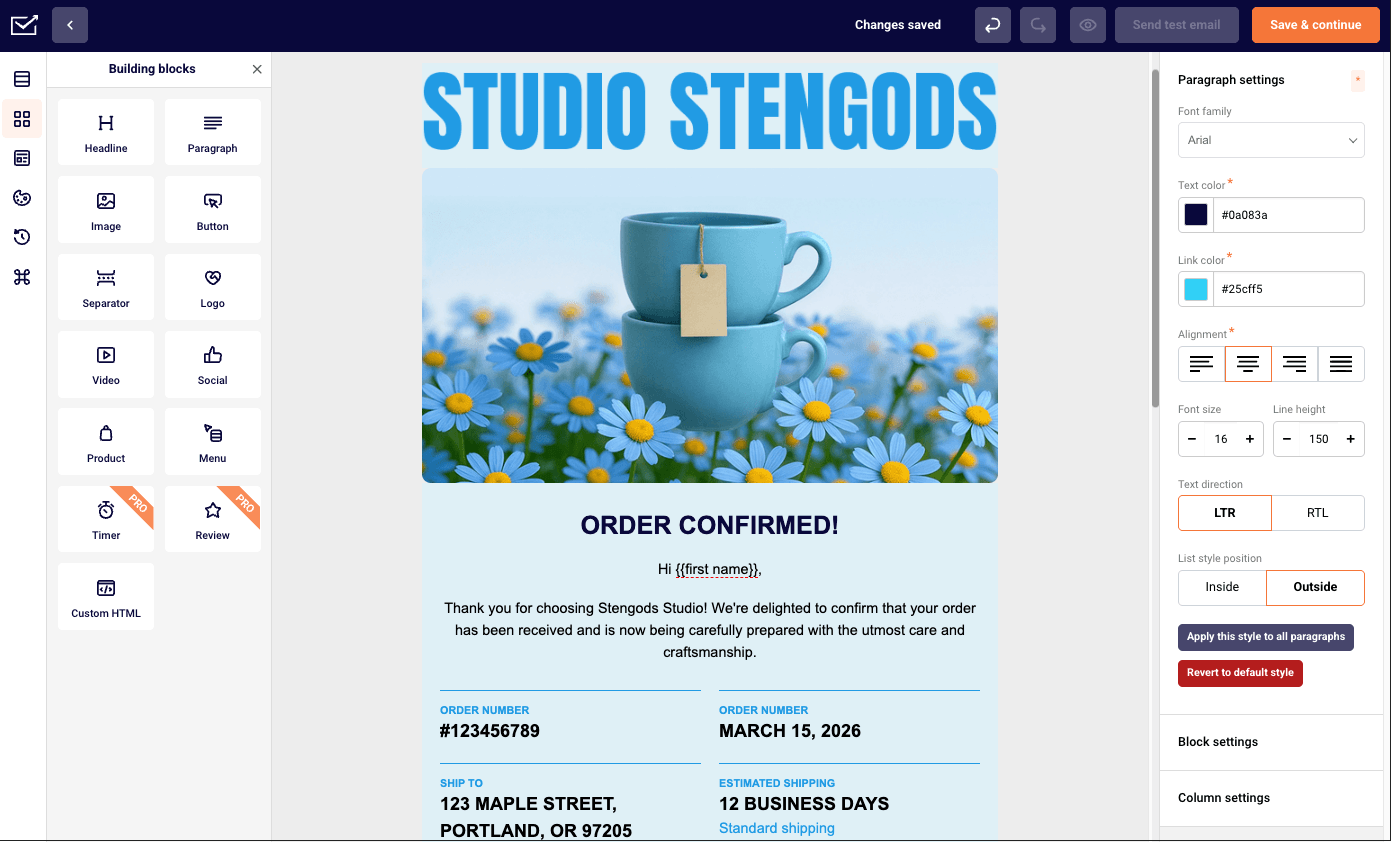
Sender – Transactional and Marketing Email in One Account
Sender combines transactional SMTP with marketing automation in one account, so product emails and newsletters share credentials and contact data. Webhook tooling is shallower than what dedicated transactional providers like Mailgun or Postmark offer.

Key Features
- Unified transactional + marketing dashboard. Both use cases live in one account – no separate credentials, bounce lists, or analytics tabs to manage between two tools.
- Custom events trigger transactional sends. Define events in your app code (signup_complete, purchase_made, password_reset) and fire transactional templates without Zapier or middleware. Tied to the marketing automation engine, so transactional and lifecycle emails share the same trigger language.
- SMTP relay + REST API on the free plan. Both delivery methods available without upgrading. API docs cover basics but lack depth on webhook configuration and event payload structure.
- Guided SPF/DKIM/DMARC setup. Email authentication configuration is a checklist inside the dashboard – one of the clearer implementations tested across the eight tools.
- 15,000-email free tier with transactional included. Most generous free tier in this comparison: 15,000 emails/month to 2,500 subscribers, with both transactional SMTP and marketing automation, segmentation, and templates included at no cost.
Compared to Mailtrap
Sender replaces Mailtrap’s Email API side, combining transactional SMTP and marketing automation in one account instead of splitting them across separate products. On the free tiers, Sender includes 15,000 emails/month versus Mailtrap Email API’s 4,000/month (checked Aug 2026).
Still, though, by going with Sender you give up Mailtrap’s dedicated Email Sandbox for development testing (which has a free plan and runs from $17/month depending on scale), so teams that capture and inspect test emails will still need a separate sandbox tool.
Pros & Cons
- Most generous free tier in this comparison
- Transactional + marketing on one set of credentials
- Custom events fire sends directly from app code, no middleware
- Guided auth setup reduces DNS and deliverability errors
- Dashboard noisy for pure transactional use – marketing UI fights for screen space
- Webhook and advanced API docs thinner than Postmark or Mailgun
- No self-hosting option
- Sender branding on free-plan emails
Pricing
Free email marketing for 15,000 emails/month (2,500 subscribers, transactional included). Paid plans from $10/month, with exact pricing varying by plan and billing cycle.
Best for: Early-stage startups or small teams running both a product and a mailing list who want to avoid managing two separate email platforms – not the right tool for teams whose sole need is high-volume transactional sending.
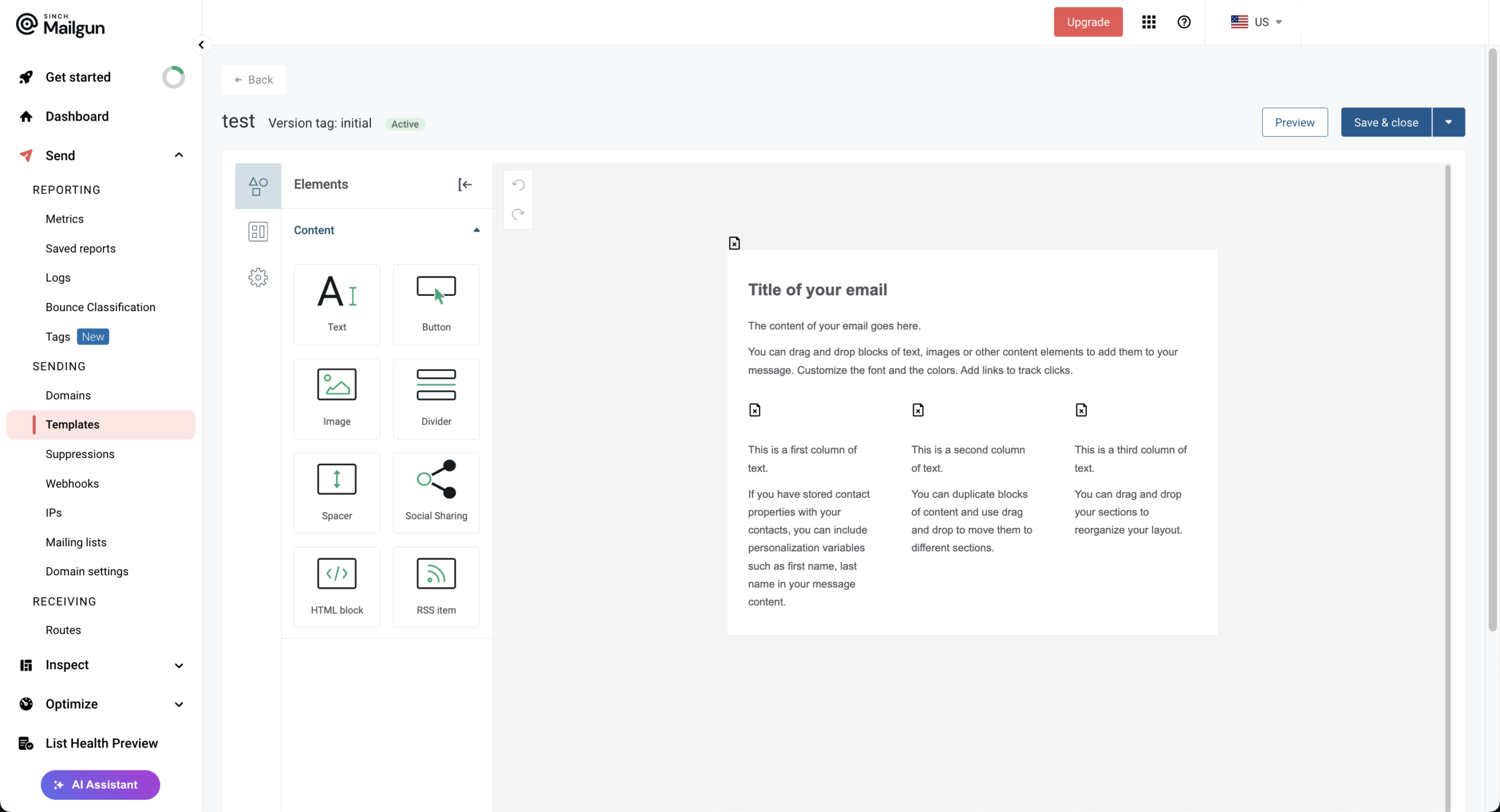
Mailgun – API-First Transactional Email Service
Mailgun is API-first transactional infrastructure for engineering teams sending at scale, with per-domain reputation isolation and granular webhook event tracking. Setup is the steepest among platforms tested – about 25 minutes from signup to a verified send.

Key Features
- Per-domain reputation management. Each sending domain gets its own reputation tracking and warm-up curve, so transactional and marketing traffic don’t cross-contaminate. The dashboard exposes reputation metrics at a granularity that Postmark and SendGrid don’t match.
- Webhook infrastructure with a fixed retry schedule. Per-event webhooks (accepted, delivered, opened, clicked, unsubscribed, complained, permanent/temporary fail) configured either in the Control Panel under Sending → Webhooks or via the API. If your endpoint returns anything other than a 2xx (or a 406, which tells Mailgun to stop), it retries on a fixed schedule – 10 min, 10 min, 15 min, 30 min, 1 h, 2 h, 4 h – for roughly 8 hours, then logs the failure under the Webhooks page. The schedule can’t be customized, so time-sensitive handlers need their own queue.
- Email validation API. Real-time email address validation to filter typos and disposable addresses before they hit your suppression list. Pay-per-validation, billed on top of the sending plan.
Compared to Mailtrap
Mailgun replaces Mailtrap’s Email API side, with an advantage in per-domain reputation management and the option to use US or EU sending regions. The price difference is not that apparent – at first.
Both Mailgun and Mailtrap charge $15/month for 10,000 emails (checked Aug 2026), while the real difference shows at 100,000 monthly emails cap – Mailtrap’s $30/mo versus Mailgun’s $75/mo. You give up Mailtrap’s dedicated Email Sandbox and simpler setup – Mailgun took about 25 minutes from signup to a verified send in our testing.
Pros & Cons
- Per-domain reputation isolation between transactional and marketing traffic
- EU/US region choice for data residency requirements
- Detailed webhook event structure with retry guarantees
- Daily-cap free tier (100/day) burns quickly during batch sends or bursty workflows
- 25-minute setup from signup to verified send, the longest of the transactional tools tested
- Pricing jumps sharply between Foundation (35/mo) and Scale (90/mo)
- Documentation density assumes engineering experience – not friendly for first-time integrators
- No native inbox placement testing – it comes as an add-on you have to pay for separately
Pricing
Free 100 emails/day (permanent). Basic plan from $15/month for 10,000 emails; Foundation from $35/month for 50,000 emails.
Best for: Engineering teams with the ops bandwidth to manage per-domain reputation and webhook retry logic, sending tens of thousands of emails per month – not for solo developers or teams looking for a quick setup.
SendGrid – Scalable SMTP and API Email Delivery
SendGrid is Twilio’s transactional email arm, with the widest third-party integration ecosystem in this comparison and direct connection to Twilio SMS and voice. Shared-IP deliverability is the real friction – the 1.2/5 Trustpilot score reflects that pattern.

Key Features
- Twilio integration for multichannel workflows. Native connection to Twilio SMS, voice, and WhatsApp lets you build escalation patterns (email → SMS → call) inside one platform. Useful for transactional flows like password resets or 2FA when email delivery is delayed.
- Dynamic templates with Handlebars syntax. Server-side templating with substitution tags, conditional blocks, and loops. Templates render at send time, no client-side processing required from your app. Documentation and examples are stronger than Mailgun’s templating system.
- Event Webhook with 11 event types. Granular events (delivered, opened, clicked, bounced, dropped, deferred, processed, unsubscribed, group unsubscribe & resubscribe, and spam report) sent to a single endpoint. Easier to wire up than Mailgun’s per-event configuration, harder to scope precisely.
- 60-day free trial at 100 emails/day. Time-limited rather than a permanent free tier – useful for evaluation and proof-of-concept work, but you’ll need to move to a paid plan ($20/month Essentials minimum) for any sustained production use beyond the trial window.
- Marketing Campaigns add-on. Separate marketing tool bolted onto the transactional account, with contact lists and campaign builders. The UX gap between the transactional API and marketing UI is noticeable.

Compared to Mailtrap
SendGrid replaces Mailtrap’s Email API side, offering a broader integration ecosystem and native connections with Twilio SMS and voice. At 50,000 emails/month, both Mailtrap and SendGrid start at $20/month (checked Aug 2026). The price is slightly higher at 100,000 emails, SendGrid charging $35/mo versus Mailtrap’s $30/mo. You give up Mailtrap’s dedicated Email Sandbox for development testing (that comes at an additional price), so teams that rely on capturing and inspecting test emails may need a separate sandbox alongside SendGrid.
Pros & Cons
- Twilio ecosystem connection for multichannel transactional flows
- Strong templating documentation and examples
- 60-day free trial at 100 emails/day for evaluation
- 900+ third-party integrations, the widest in this comparison
- 1.2/5 Trustpilot score across 2,000+ recent reviews – pattern of deliverability complaints
- Shared IP pools on lower tiers expose you to other senders’ reputation
- Support on free and entry tiers is community-forum-based
- Pricing tiers escalate quickly above 100,000 emails/month
Pricing
Free trial: 100 emails/day for 60 days. Essentials plan from $20/month.
Best for: Teams already invested in the Twilio ecosystem who need email alongside SMS and voice workflows – not for teams optimizing primarily for inbox placement or deliverability reputation.
UniOne – Transactional Email Service for Startups
UniOne is a transactional email service built for startups wanting low per-email cost and simple SMTP setup without enterprise pricing pressure. Integration ecosystem and analytics are lighter than what Mailgun, SendGrid, or Postmark offer.

Key Features
- Pay-per-email pricing model. Pricing scales linearly with volume, no tier jumps or contact-count surcharges. Standard plan starts at $6/month for 10,000 emails. At 50,000 emails a month, UniOne charges $25/mo, undercutting Mailgun’s Foundation tier ($35/month for the same volume).
- REST API and SMTP relay on entry tier. Both methods available from the lowest plan. API supports template variables, attachments, and scheduled sends. Documentation is sparser than Mailgun or Postmark but covers the core endpoints clearly.
- Built-in email validation API with included credits. A separate endpoint checks addresses before you send. Useful at signup forms to keep bad addresses off your list; it doesn’t run on every outgoing message automatically.
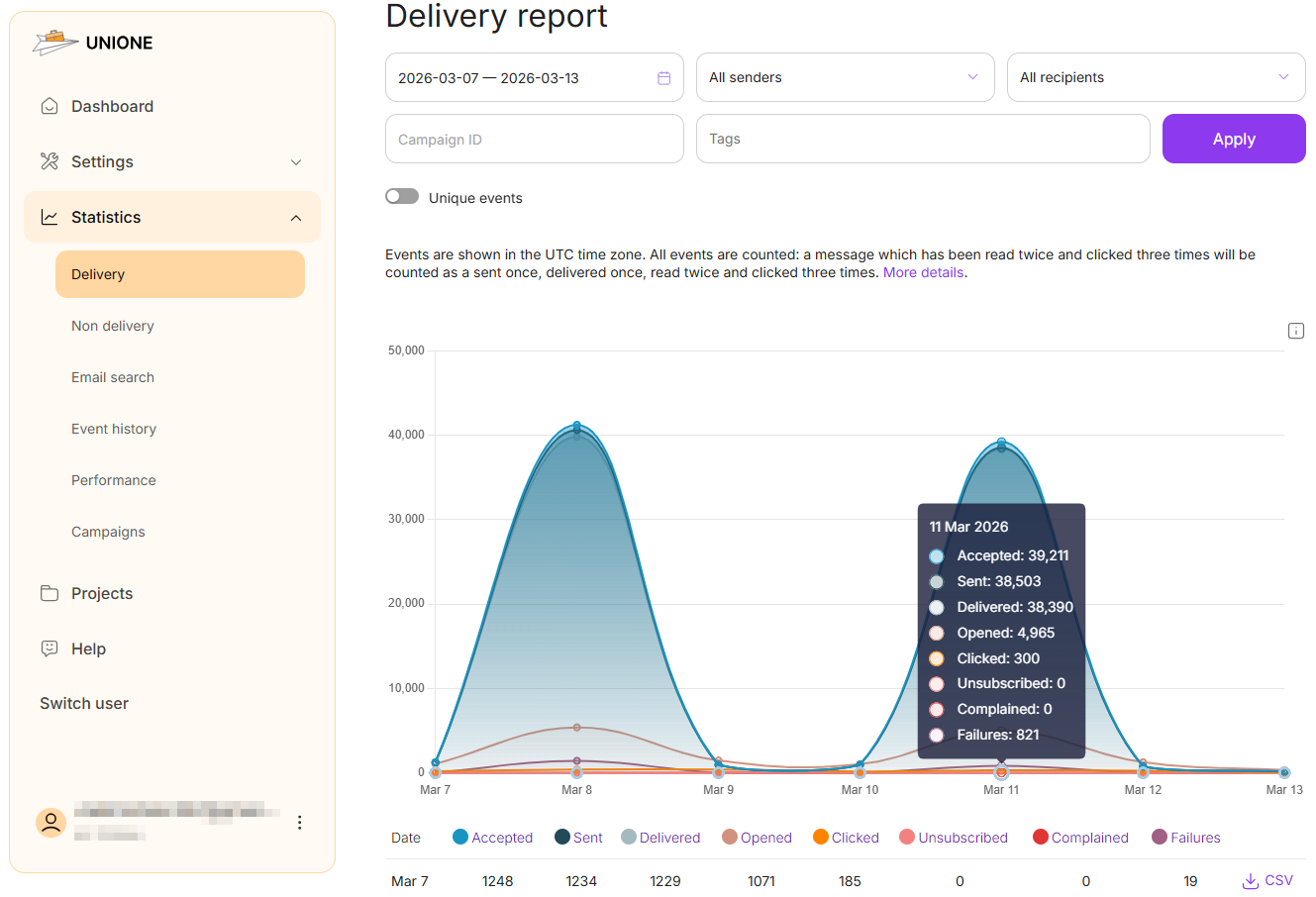
- Webhook events covering the full delivery and engagement lifecycle. Eight status types, enough to track everything from acceptance and delivery through opens, clicks, bounces, and spam complaints.
- Standalone analytics layer. Open rates, click rates, and bounce rates surfaced in the dashboard. No revenue attribution or cohort analysis – UniOne expects your application layer to handle those.
Compared to Mailtrap
UniOne replaces Mailtrap’s Email API side and stands out for simpler, linear pricing aimed at startups sending moderate volumes. At 10,000 emails/month, UniOne starts at $6/month versus Mailtrap’s $15/month (checked Aug 2026). That said, by going with Mailtrap you give up some depth around analytics and advanced workflows: UniOne’s analytics are relatively lightweight, and its documentation has gaps around areas such as rate limiting and suppression APIs.
Pros & Cons
- Among the lowest per-email costs in this comparison at moderate volumes
- Built-in validation prevents wasted credits and bounces
- Linear pricing without tier jumps or surcharges
- Simple SMTP setup, well-suited to first-time transactional integrations
- Smaller integration ecosystem than SendGrid or Mailgun
- Analytics layer is lighter – no advanced segmentation or cohort views
- Documentation gaps on edge cases like rate limiting and suppression API
Pricing
Free trial: 6,000 emails/month for 4 months. Paid plans: Standard from $6/month for 10,000 emails.
Best for: Bootstrap startups and small teams sending 10,000–100,000 emails/month who want low per-email cost and simple SMTP integration – not for teams needing deep analytics or complex webhook routing.
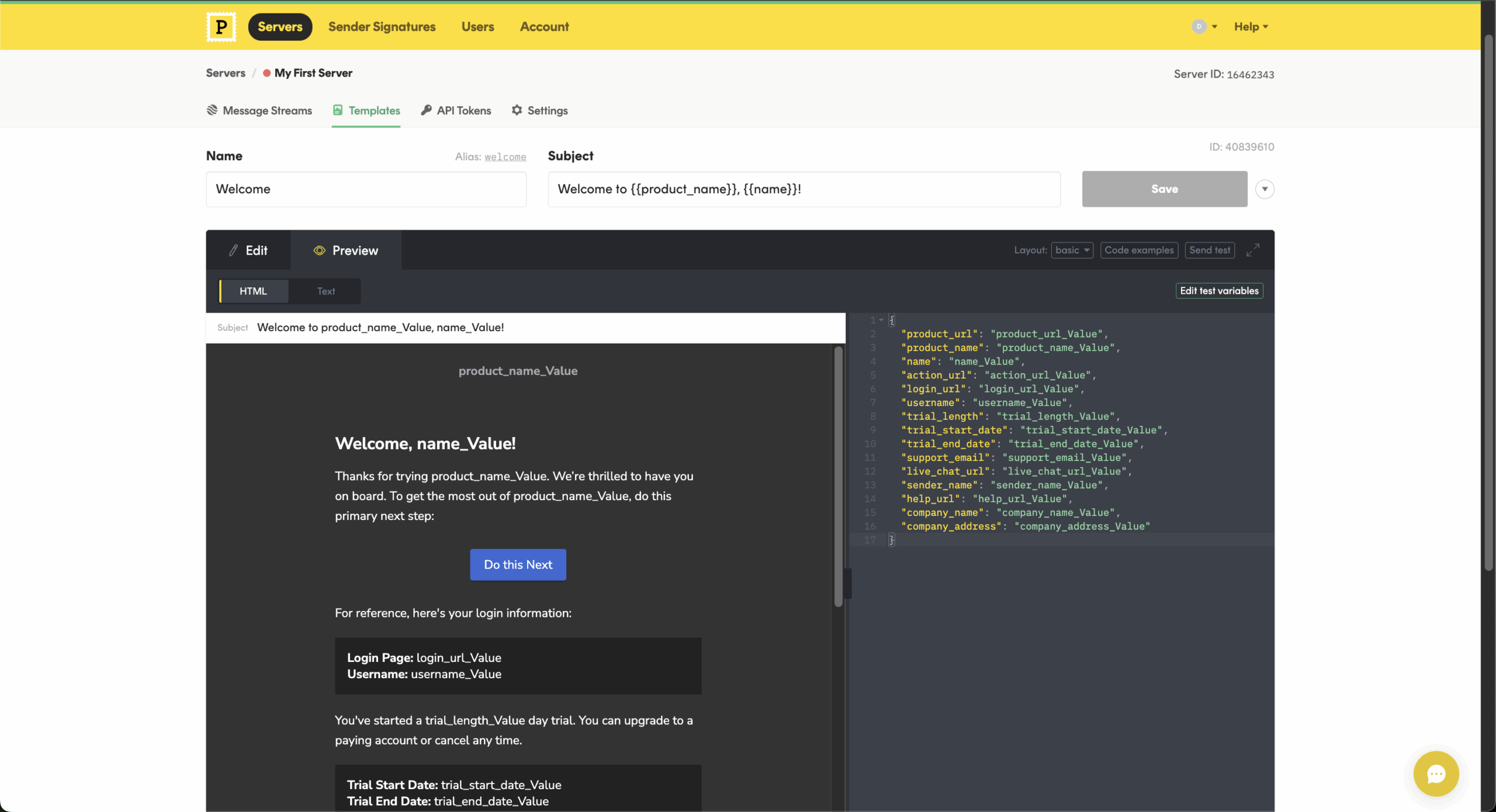
Postmark – Transactional Email Built for Consistency
Postmark is a transactional-only service that has invested heavily in deliverability – Message Streams separate transactional from broadcast traffic, and inbox placement topped this comparison across three months of testing. The trade-off is scope: no marketing automation, no EU sending region.

Key Features
- Message Streams separate transactional from broadcast. Native separation of transactional and broadcast traffic at the account level, each with isolated IP reputation. Prevents marketing sends from damaging transactional deliverability – the most common cause of password-reset emails landing in spam.
- Strongest inbox placement measured. Across three months of GlockApps testing on identical seed lists, Postmark achieved the highest inbox placement rate of any tool in this comparison, particularly to Gmail and Outlook. Margins narrowed at lower send volumes but held at scale.
- DNS-to-first-send under 10 minutes. Onboarding walks through SPF, DKIM, and Return-Path configuration with a verifier that confirms each record before letting you send. The cleanest setup path of any production sender tested.
- 45-day searchable message archive. Every send searchable with full content and event history for 45 days. Longer than Mailgun’s 5-day default and useful for debugging delivery issues retroactively.
- REST API with 6 event types. Granular event tracking (delivered, opened, clicked, bounced, complained, plus subcategories). Webhook payloads include the full Postmark message ID for correlation with internal logs.
Compared to Mailtrap
Postmark replaces Mailtrap’s Email API side and stands out for transactional deliverability, with the strongest inbox placement I measured across three months of testing. At 50,000 emails/month, Mailtrap is listed at $20/month versus Postmark at $55/month (checked Aug 2026). You give up Mailtrap’s lower cost at this volume and its broader developer-focused testing ecosystem when moving to Postmark.
Pros & Cons
- Best inbox placement in this comparison, measured over three months
- Message Streams isolate transactional from broadcast reputation
- Clearest authentication setup flow tested
- 45-day searchable message archive built in
- Pricing rises sharply above 1 million emails/month
- No native A/B testing on transactional templates
- Free tier capped at 100 emails/month, intended for evaluation only
Pricing
Free up to 100 emails/month. Paid plans start at $15/month for 10,000 emails.
Best for: Product teams launching transactional email where deliverability of password resets, receipts, and account notifications matters more than send volume – not the cheapest option for high-volume marketing-style sends.
Mailosaur – Automated Email Testing for QA Teams
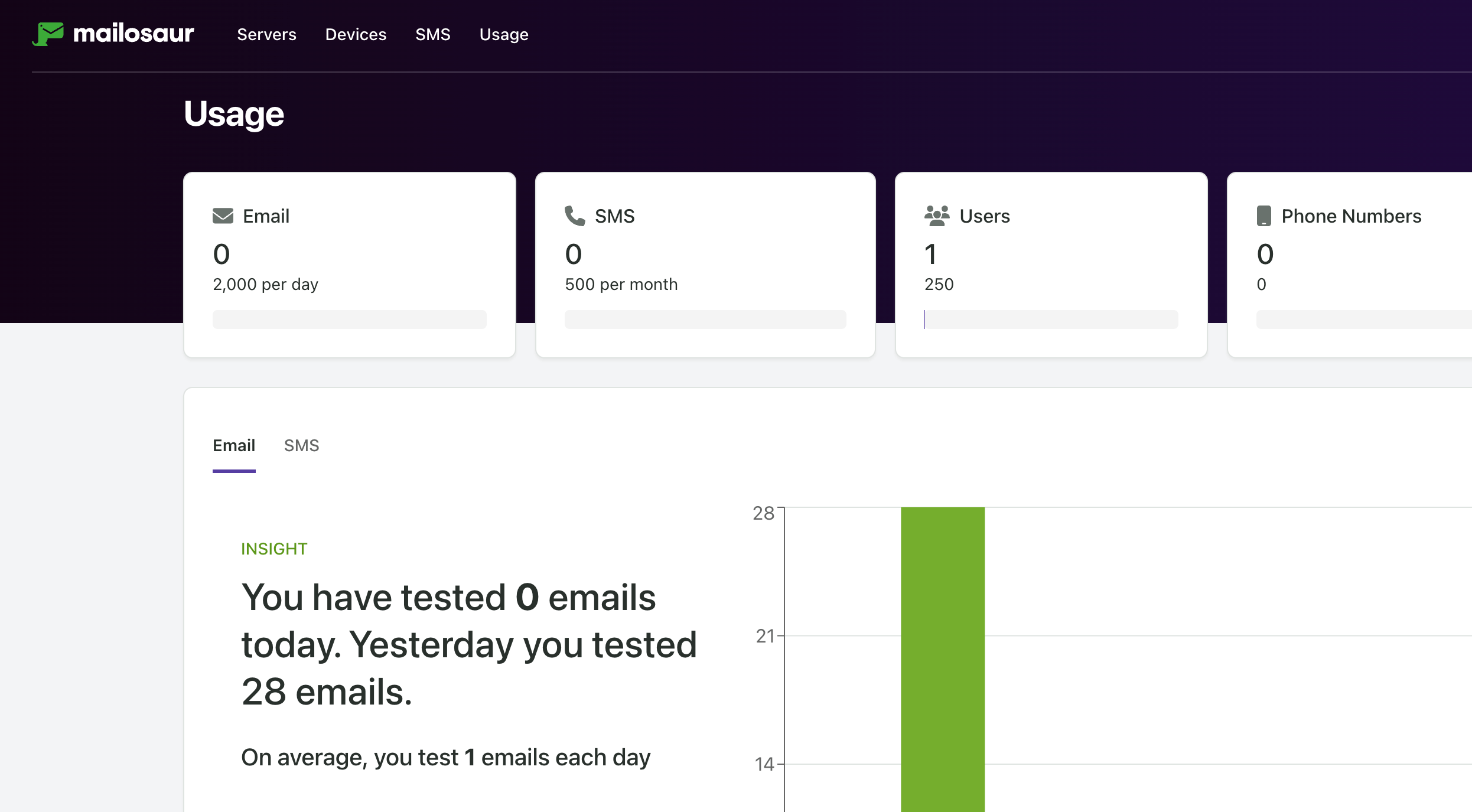
Mailosaur is cloud-hosted email testing built specifically for automated CI/CD pipelines – per-test inboxes, content extraction APIs, and SDKs for eight programming languages. Not designed for manual development inspection.

Key Features
- Per-test inbox provisioning. Each test run can spin up a unique address. No inbox cleanup between tests; no shared-state risk in parallel CI runs.
- Content extraction API. Built-in helpers to extract verification codes, password reset links, OTP values, and tracked URL parameters from email bodies. Avoids regex-parsing email HTML in your test code – the most common source of fragile email tests.
- ~780ms average message retrieval in testing. From SMTP send to API-retrievable, Mailosaur delivered captured messages in roughly 780ms across our 100-message test batch. Mailtrap’s API returned comparable messages in 1.4–2.1 seconds.
- SMS on higher tiers. Same assertion model extended to SMS verification codes. Useful for testing multi-factor authentication flows that mix channels.
- Native SDKs for 8 languages. First-party libraries for Node, Python, Ruby, Java, C#, Go, PHP, and Swift. Documentation includes Cypress, Playwright, and Selenium examples for end-to-end testing frameworks.
Compared to Mailtrap
Mailosaur replaces Mailtrap’s Sandbox side for automated QA, with faster message retrieval in our tests – about 780ms versus Mailtrap’s 1.4–2.1s – plus purpose-built OTP and link extraction for CI assertions.
On monthly billing, Mailosaur (QA) starts at $25/month (for 15,000 inbound emails), while Mailtrap Sandbox starts at $17/month (for 500 inbound emails; checked Aug 2026). You give up Mailtrap’s stronger manual inspection experience and more capable HTML preview UI when moving to Mailosaur.
Pros & Cons
- Built specifically for CI/CD email testing workflows
- Fast message retrieval suits parallel test suites
- Content-extraction helpers reduce test fragility
- SDKs and framework examples available out of the box
- 14-day trial only – no permanent free tier
- Pricing rises with parallel server count and message volume
- HTML previews (Gmail, Outlook, mobile) are a paid add-on, not included – Mailtrap and Mailpit bundle HTML checks for free
- Not designed for manual development inspection – sandbox tools fit that job better
Pricing
14-day free trial. Paid plans from $20/month billed annually.
Best for: QA engineers and platform teams running automated email assertions inside CI pipelines, especially for verification codes and password-reset flows – not for solo developers doing manual email inspection during local development.
Mailpit – Lightweight Self-Hosted Alternative
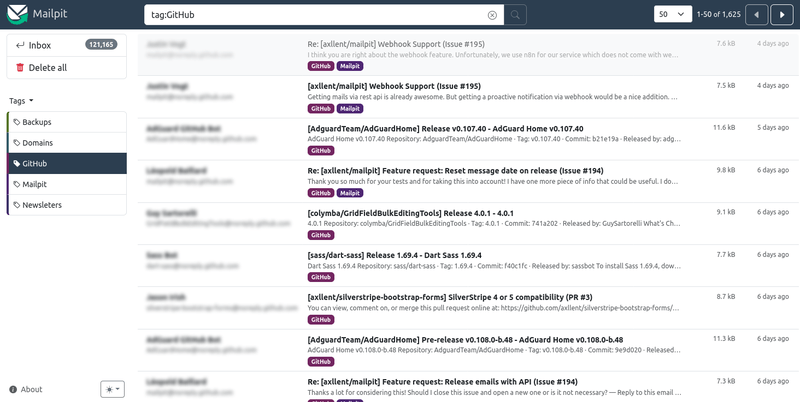
Mailpit is a self-hosted SMTP capture tool that runs as a single Docker container, designed as a modern replacement for the unmaintained MailHog. It captures outgoing email locally with a web UI and REST API for inspection – no cloud component, no account, no signup.

Key Features
- Docker container, no account needed. Run docker run -p 1025:1025 -p 8025:8025 axllent/mailpit and Mailpit is capturing SMTP traffic in under two minutes. No signup, no API key, no cloud component.
- MailHog-compatible API. As an SMTP testing tool, Mailpit listens on 1025 (SMTP) and 8025 (UI) by default, so swapping the image name in docker-compose is usually the only infrastructure change.
- HTML, plain-text, and raw source views. As an email preview tool, Mailpit lets you inspect every captured message in three formats. HTML preview renders inline with link-blocking enabled by default – useful for verifying templates without firing tracking pixels.
- Per-client CSS compatibility checker. Built-in CSS rule checker against an email-client compatibility database. Warns about properties Outlook 2016 strips, dark-mode rendering quirks, and mobile-client incompatibilities – without a Litmus or Email on Acid subscription.
Compared to Mailtrap
Mailpit replaces Mailtrap’s Sandbox side and does local development testing with no account, no cloud dependency, and no email quota.
Mailpit is free and open source, while Mailtrap’s free Sandbox costs $0 but is capped at 50 test emails/month (checked Aug 2026). That said, you give up Mailtrap’s hosted team experience, including its cleaner shared inbox, spam analysis, and richer manual QA workflow.
Pros & Cons
- Zero-config Docker setup, no account required
- Compatible with existing MailHog tooling
- CSS compatibility checker without a third-party subscription
- Active development with regular releases
- Self-hosted only, no cloud option
- No multi-user collaboration features
- API not designed for CI assertion workflows like Mailosaur’s
- No SMS or alternative channel testing
Pricing
Free, open source.
Best for: Solo developers and small teams running local SMTP capture during development on personal machines or shared dev containers – not for distributed QA teams needing shared cloud access or CI assertion APIs.
MailHog – Free Local Email Testing Alternative
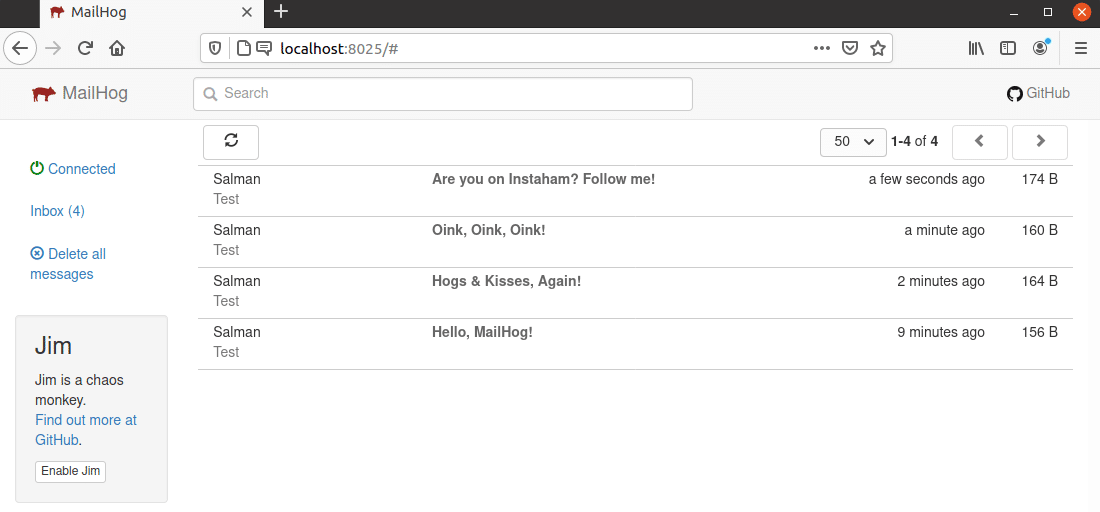
MailHog was the dominant local SMTP capture tool before development effectively stopped in 2020. It still works for basic capture and inbox preview, but the API is frozen and lacks the modern features Mailpit has added since. MailHog is not on major SaaS tool review sites like Trustpilot or G2, so this guide does not include rating scores for MailHog.
Key Features
- SMTP capture with web UI. Captures outgoing SMTP messages and displays them in a browser at port 8025.
- Simple HTTP API. Supports retrieving, deleting, and releasing messages; Mailpit maintains API compatibility for easier migration.
- Multiple storage options. Supports memory, MongoDB, and Maildir.
- Static Go binary. Runs on Linux, macOS, and Windows without runtime dependencies.
Compared to MailHog
MailHog replaces Mailtrap’s Sandbox side and offers fully local, self-hosted SMTP capture with no account or cloud dependency. Just like Mailpit before it, MailHog is free and open source, while Mailtrap’s free Sandbox is capped at 50 test emails/month (checked Aug 2026).
If you go with MailHog, however, you give up Mailtrap’s hosted QA workflow, richer inspection features, and active product development – MailHog has seen no meaningful update since 2020.
Pros & Cons
- Static binary distribution with no runtime dependencies
- Familiar to teams already running it for years
- Lightweight and well-documented for its scope
- Multiple storage backends for varied development setups
- No active development – last meaningful release was 2020
- No CSS compatibility checker or modern email rendering features
- API surface frozen at 2020 capabilities
- New projects gain nothing from picking MailHog over Mailpit
Pricing
Free, open source.
Best for: Existing self-hosted email testing setups on MailHog where switching costs outweigh the benefit of newer features – not for new projects, which should choose Mailpit instead.
Mailtrap vs SendGrid, Mailgun and Postmark: Head-to-Head on Price and Scope
At 10,000 emails a month, Mailtrap, Mailgun, and Postmark all start around $15, while SendGrid’s smallest paid Email API tier starts at $20. Email costs change significantly as volume grows, but price is only half the decision: regional infrastructure, testing, integrations, and deliverability controls differ sharply.
| Provider | Free tier | 10k/mo | 50k/mo | 100k/mo | EU region | Sandbox included | Best for |
| Mailtrap Email API | 4,000/mo | $15 | $20 | $30 | No | Separate Sandbox product | Developer-focused sending + testing ecosystem |
| Postmark | 100/mo | $15 | $55 | $115 | No | Yes, Sandbox Mode | Delivery-critical transactional email |
| Mailgun | 100/day | $15 | $35 | $75 | Yes | Limited sandbox domain | API control, routing, EU/US infrastructure |
| SendGrid | 100/day for 60 days | $20 | $20 | $35 | Yes, from Pro | Yes, validation-only mode | Scale and Twilio integrations |
| UniOne | 6,000/mo for 4 months | $6 | $25 | $40 | Yes | No | Budget transactional sending |
| Sender* | 15,000/mo | $10 | $35 | $60 | Yes | No | Transactional + marketing in one account |
| Amazon SES – not tested | $200 worth of credits | $2 | $8 | $16 | Yes | No | AWS-native, lowest raw send cost |
| Mandrill – not tested | No | $20 | $40 | $80 | No selectable EU region | No | Existing Mailchimp users |
| MailerSend – not tested | 500/mo | $35 | $35 | $68 | Yes | Yes | Smaller development teams |
| Resend – not tested | 3,000/mo | $20 | $20 | $35 | Yes | No | Modern developer-first stacks |
Mailtrap vs SendGrid
Stay with Mailtrap if you want transactional sending and a dedicated email-testing product under the same vendor, or if you prefer lower entry pricing without stepping into SendGrid’s broader Twilio ecosystem.
Move to SendGrid if your stack already depends on Twilio, you need its large integration ecosystem, or you require EU data residency and can use a Pro-or-higher setup with an EU subuser and dedicated EU IP. SendGrid remains broader; Mailtrap stays more email-development-focused.
Mailtrap vs Mailgun
Stay with Mailtrap if you value a simpler developer workflow and do not need to choose where message data is processed. Move to Mailgun if regional control is a requirement: Mailgun lets one account provision domains in either US or EU infrastructure, with region-bound message data, logs, suppressions, and IPs.
In our testing, Mailgun also had the longest initial setup among the transactional tools, so that extra control comes with more configuration work.
Mailtrap vs Postmark
Stay with Mailtrap if cost at higher volumes, a separate full email sandbox, or broader testing tooling matters more than a transactional-only focus. Move to Postmark when delivery consistency for password resets, receipts, and account alerts is the priority.
In our three-month test, Postmark produced the strongest inbox placement and the cleanest DNS-to-first-send setup. The trade-off is geographic flexibility: Postmark stores data in the US and does not offer an EU hosting region.
Free and Open-Source Mailtrap Alternatives
Mailpit and MailHog solve the same basic problem – capturing SMTP email locally. Yet, Mailpit is the stronger choice for new projects. MailHog has been in maintenance mode since 2020, while Mailpit is actively developed and keeps a MailHog-compatible API, making migration straightforward.
Mailpit also adds a built-in CSS compatibility checker and optional SQLite persistence across restarts; MailHog lacks the CSS checker but supports in-memory, MongoDB, or Maildir storage.
Here are some alternative Mailtrap replacements:
- MailDev – A Node.js-based local SMTP server with a web interface, REST API, Docker support, and email relay. Pick it if your development stack is already Node-heavy and you want a simple browser-based inbox. (Not tested in our harness.)
- smtp4dev – A cross-platform fake SMTP server with a web UI, REST/OpenAPI support, IMAP/POP3 access, HTML validation, and SMTP session logging. Pick it when you need deeper protocol inspection or richer testing features than a basic inbox. (Not tested in our harness.)
- MailCatcher – A Ruby-based SMTP catcher that displays messages in a web interface. Pick it for straightforward local testing, especially in Ruby or Rails environments. (Not tested in our harness.)
- Papercut SMTP – A free, open-source SMTP receiver with a desktop viewer plus service and Docker options. Pick it if you prefer a Windows desktop workflow or want a lightweight local server with a visual inbox. (Not tested in our harness.)
Mailtrap cannot be fully self-hosted, however, it now offers Mailtrap Local, a free, open-source email sandbox that runs on your own machine – or a “local version of Mailtrap Email Sandbox”.
For more options, see our roundup of the best free SMTP servers.
Migration Guide: Switching Away From Mailtrap
If you’ve decided to switch, here’s what the migration looks like – covering the three most common paths. The process is straightforward, but easy to do partially, which is where most deliverability problems come from.

even on the free plan.
SMTP Settings at a Glance
The four values that change when you switch are host, port, username, and password. Here’s what they look like across the most common migration paths:
| Setting | Mailtrap | Mailpit | Postmark | Mailgun |
| SMTP host | sandbox.smtp.mailtrap.io | localhost | smtp.postmarkapp.com | smtp.mailgun.org |
| Port | 2525 | 1025 | 587 | 587 |
| Username | Your Mailtrap user | None required | Your server token | postmaster@yourdomain |
| Password | Your Mailtrap pass | None required | Your server token | Your Mailgun SMTP password |
Update these values in every environment – local, staging, and production. Leaving one environment pointing at Mailtrap is the most common migration mistake.
Migration Checklist
Follow these steps in order. Skipping step 3 is the most common cause of post-migration deliverability problems.
- Update SMTP settings in all environments using the table above.
- Rotate your API key on the new provider immediately after setup. Never use the default key created during signup in production.
- Verify SPF and DKIM DNS records for your sending domain before sending a single production email. Both Postmark and Mailgun have a DNS verification dashboard that confirms when records are live. Unverified sends will land in spam.
- Test in staging first. Send at least 10 emails covering your real templates – HTML, plain-text, and any with attachments – and confirm they arrive correctly before cutting over production.
- Update webhook endpoints if you used Mailtrap’s event logging for opens, clicks, or bounces. Postmark and Mailgun support webhooks too, but with different payload formats – check your handler code before go-live.
- Confirm your From address domain matches your verified sending domain. A mismatch between the two is a common post-migration deliverability issue that’s easy to miss in testing.
FAQs
Yes, Mailtrap has a Free Forever plan. Mailtrap offers a free Sandbox plan capped at 50 test emails per month. Its Email API also includes a free allowance of 4,000 emails per month, while paid plans increase those limits.
Mailtrap is mainly used to capture and inspect outgoing emails during development without sending them to real users. It also provides an Email API for production transactional sending. Developers can therefore use it for both sandbox testing and live application emails.
Mailpit is actively maintained, supports MailHog-compatible APIs, and adds features such as CSS compatibility checking and optional SQLite persistence. MailHog is older and has received no significant feature development since 2020.
Only if you already have it deployed and stable – for new projects, Mailpit is the better choice. MailHog stopped meaningful development in 2020 and now ships only occasional security patches, while Mailpit offers the same SMTP capture model on the same ports, active maintenance, and modern additions like a CSS compatibility checker and dark-mode preview.
Migration cost is minimal: change the image name in your docker-compose file and most existing tooling continues to work. Stick with MailHog only if your current setup is stable, your tooling depends on its exact API surface, and you have no specific reason to switch.
Not by default. Mailpit writes captured messages to a temporary database that is deleted when the container stops, and it only keeps the most recent 500 messages unless you raise the limit. For persistence, point it at a file on a mounted volume with the –database flag or the MP_DATABASE environment variable, for example: docker run -v ./mailpit:/data -e MP_DATABASE=/data/mailpit.db axllent/mailpit
The SQLite file holds full message bodies and metadata, so search, filtering and the web UI all keep working after a restart. Add –max 0 (or MP_MAX_MESSAGES=0) if you don’t want the 500-message pruning.
Most local development workflows are cleaner without retained state, so only enable persistence if you have a specific reason to keep messages across sessions – debugging an intermittent template bug, for example.
Yes, Mailosaur’s 14-day trial can cover a CI/CD integration if you stay focused on a single integration target. The trial mirrors the Personal plan: one inbox with unlimited test addresses, capped at 500 messages a day (15,000 per month), plus the full API and SDKs – enough to build and validate a CI/CD pipeline against one workflow, such as signup-with-verification or password-reset assertions.
What it won’t cover is multiple parallel test environments (each consumes a separate server), high-volume regression suites, or webhook-driven inbound flows at production cadence. Plan to wire up one critical test path during the trial, prove it works in your pipeline, and commit to the paid tier ($20/month billed annually minimum) before expanding scope.
Mailpit, for almost every case. It runs entirely on localhost via a single Docker command, captures all SMTP traffic from your app, and exposes both a web UI and a REST API – none of which requires internet access.
MailHog works the same way and is a reasonable choice if it’s already in your stack, but it stopped active development in 2020 and lacks Mailpit’s CSS compatibility checker and dark-mode preview. Cloud-hosted options like Mailtrap and Mailosaur require network access to function, so they’re not viable for fully offline workflows or air-gapped development environments.