


Mailgun’s technical setup requirements and limited built-in marketing tools lead many dev and marketing teams to explore alternatives for transactional email provider. This page compares ten Mailgun Alternatives for 2026, covering platforms suited to different use cases–from developer-focused APIs like Amazon SES to all-in-one solutions like Sender and Brevo.
Each option is assessed on deliverability rates, pricing structure, API reliability, and ease of implementation, with free tier details and direct Mailgun comparisons to help match the right provider to your sending needs.
Why People Leave Mailgun
No platform, even the best one, is immune to flaws that drive users away – and Mailgun is no exception. It built a generation of developers’ muscle memory around email APIs, and its documentation is genuinely thorough. But the reasons people leave are specific enough to warrant naming directly.
Pricing Changes Hit Established Accounts
In 2020, Mailgun restructured its free tier, cutting the 10,000 free sends/month Concept plan, replacing it with Flex, a pay-as-you-go model (initially $0.80 per 1,000 emails). Later, Mailgun moved toward fixed subscription tiers, like Foundation ($35/month for 50,000 emails). For low-volume transactional emails like password resets and order confirmations, this represented a disproportionate cost jump.
A solo founder running a side project with 2,000 active users might send only 3,000 emails a month. Under the previous ‘Flex’ model, this would have cost less than $3. Now, because the 100-per-day limit on the free tier is too restrictive for even modest growth, that same founder is forced onto a $35/month subscription. It’s a 10x price hike for a service that used to scale with the business, effectively turning a lean side project into a monthly liability.
Current Mailgun pricing (as of April 2026)
| Plan | Starting Price | Email Count | Features |
| Free | $0/mo | 100 emails/day | Ticket support, RESTful email APIs and SMTP relay, 1 custom sending domain, tracking/analytics/webhooks, 2 API keys, email analytics and reporting, 1 day log retention, 1 inbound route |
| Basic | $15/mo | 10,000 emails/mo | No daily email limit, monthly email overage options, RESTful email APIs and SMTP relay, 1 custom sending domain, tracking/analytics/webhooks, 2 API keys, email analytics and reporting, 1 day log retention, 5 inbound routes |
| Foundation | $35/mo | 50,000 emails/mo | Everything in Basic, plus full access to RESTful email APIs and SMTP relays, 1,000 custom sending domains, email template builder and API, tracking/analytics/webhooks, 5 days log retention, 1 day message retention, full inbound routing |
| Scale | $90/mo | 100,000 emails/mo | Everything in Foundation, plus SAML SSO, 5,000 email validations, dedicated IP pools, send time optimization, live phone and chat support, 30 days log retention, up to 7 days message retention, scheduled analytics reports |
Complex DKIM & Webhook Setup
Setting up DKIM signing and webhook error handling in Mailgun typically takes 2–3 days of documented issues in their community forum. The DNS configuration steps are not complex if you know what a .txt record is – but if you don’t, the Mailgun documentation assumes you do.
Webhooks add another layer of engineering work if you want reliable event handling. Mailgun sends event data to your endpoint via POST requests, recommends HMAC-SHA256 signature validation for security, and retries failed deliveries for up to about 8 hours. That does not make Mailgun unusable for simple transactional email, but it does mean the platform is more developer-oriented than true plug-and-play tools.
Limited Marketing Features
- Limited marketing-friendly templates. Mailgun offers basic email templating, but it’s built with developers in mind rather than marketers. While it finally introduced drag-and-drop template editor, Mailgun’s pre-designed templates for common campaigns like newsletters, promotions, or seasonal emails need a fresh coat of paint that would make them more usable.
- Basic segmentation capabilities. Segmentation is primarily based on tags and stored recipient variables, which works for simple targeting but falls short for more advanced use cases. There’s limited support for behavioral segmentation, lifecycle stages, or dynamic audience building that updates in real time based on user actions.
- No built-in lead capture tools. Mailgun does not include native landing pages, signup forms, or popups. This means any lead generation or list growth needs to be handled through external tools or custom-built solutions, adding extra complexity to the overall marketing stack.
What Mailgun Does Well
Now that we reviewed the biggest drawbacks of Mailgun, it would be dishonest not to acknowledge what it does well.
Strong API for Developers. Mailgun is built with developers in mind, and that shows in its API design. It supports granular control over sending, including dynamic templates, recipient variables, tagging, customizable email headers, scheduling, and webhook-driven event handling. The API is well-documented and robust enough to integrate into complex systems, with flexible support for major programming languages, making it a strong fit for teams building custom transactional workflows or scaling programmatic email sending.
Reliable Transactional Delivery. Mailgun is optimized for transactional use cases like password resets, order confirmations, and system alerts. With features like automatic retries, bounce handling, and suppression lists, it ensures messages are delivered consistently. Combined with options for dedicated IPs and domain authentication (SPF, DKIM, DMARC), it gives teams the tools needed to maintain strong sender reputation and inbox placement.
Solid Email Infrastructure. Under the hood, Mailgun offers a reliable infrastructure designed for scale. It supports high-throughput sending, detailed logging, and real-time event tracking via webhooks. Features like IP pools and domain-level configuration allow teams to segment traffic and manage deliverability more precisely – making it suitable for both growing applications and businesses sending high volumes of email.
Mailgun Competitors Full Comparison Table
To make the decision easier, we’ve compared the leading Mailgun competitors side by side. Use the table below to quickly assess pricing, deliverability, core sending options, and which platform each provider is best suited for.
| Platform | Best for | Inbox placement rate | Entry price | API + SMTP |
| Mailgun | Developers with DNS experience | 91.4% | $15/mo | Both |
| Sender | SMBs wanting marketing + transactional in one | ~90% | $7/mo | Both |
| Amazon SES | High-volume technical teams with AWS infra | ~77.1% | $0.10/1K sends | Both |
| Postmark | Transactional-only, developer-first | ~83.3% | $15/mo | Both |
| SendGrid | Mid-to-large senders needing analytics | ~61% | $20/mo | Both |
| Mailtrap | Product and engineering teams sending transactional and bulk email on separate streams | 78.8% | Free, then $15/mo (10,000 emails) | Both |
| Brevo | Marketers and SMBs, mixed use | ~88.3% | $8/mo (5K sends/month) | Both |
| Mailchimp Transactional | Enterprise senders already using Mailchimp | N/A | $20/block (500,000 emails) | Both |
| UniOne.io | API-first mixed use, SMBs, multi-client agencies | N/A | $6/mo | Both |
| SparkPost (Bird) | Enterprise senders with compliance and deliverability needs | N/A | $49/mo | Both |
| MailerSend | SMBs and product teams that want a more approachable transactional setup | N/A | $5/mo | Both |
Find the perfect Mailgun alternative Fast
Use this list to quickly match your business needs with the right transactional email platform:
- All-in-one alternative (marketing + transactional): Sender – combines automation, segmentation, and flows, like welcome emails and re-engagement campaigns, in one platform, removing the need for separate tools.
- Enterprise-scale sending: SendGrid – robust API, advanced analytics, and infrastructure built for high-volume, production-grade email systems.
- Budget option at scale: Amazon SES – ultra-low pricing with full infrastructure control, ideal for teams already operating within AWS.
- Simple setup and usability: MailerSend – approachable UI, quick onboarding, and solid core features without heavy configuration overhead.
- Stream separation and automatic authentication: Mailtrap runs transactional and bulk email on separate IP pools on every plan, with SPF, DKIM, and DMARC set up automatically.
- Transactional-only reliability: Postmark – optimized strictly for transactional email with strong deliverability and clear separation of message streams.
- API-first SMB use: UniOne.io – lightweight setup with reliable sending and real-time tracking, without enterprise complexity.
- Data-driven infrastructure: SparkPost – predictive deliverability analytics and deep event-level visibility for large-scale senders.
- Mailchimp ecosystem users: Mailchimp Transactional – tight integration with existing audience data and customizable templates within the Mailchimp ecosystem.
- Multichannel communication: Brevo – combines transactional email with SMS, CRM, and automation in a single platform.
Mailgun Alternatives Evaluation Criteria
We tested each platform across six core criteria to ensure a fair and practical comparison.
Ease of Test domain setup
We evaluated how straightforward it is to set up and verify a sending domain on each platform, including DNS configuration for SPF, DKIM, and domain authentication. This covered how clearly instructions are presented, how quickly verification is completed, and whether the platform provides real-time feedback or automated checks.
Two domains were used. Domain A was freshly registered in January 2026 and warmed over 3 weeks before testing. Domain B was an established domain with 18 months of sending history and a clean reputation. Results cited in this article use Domain B unless noted.
Email authentication options
We evaluated each platform’s support for core email authentication standards, including SPF, DKIM, and DMARC, as well as how clearly these are implemented and enforced during setup. All test domains were configured with SPF, DKIM (2048-bit keys), and DMARC (p=quarantine) before sends commenced, and no emails were sent from unauthenticated domains. This ensured a consistent baseline for assessing deliverability and sender reputation across providers.
Deliverability performance
To be completely transparent, here are the sources that helped us to fill the deliverability table: Emailtooltester.com, GlockApps and Mailtrap. Using independent tools and benchmarks helps reduce bias and ensures results aren’t based solely on our internal testing, giving you a more balanced and reliable view of each platform’s real-world performance.
Pricing transparency
We examined email API pricing structures to determine whether each provider offers a free forever plan or limited trial, how pricing scales with volume or subscriber count, and whether the fee structure is straightforward or complicated by hidden costs and overage charges.
Hands-on product experience
We tested each platform hands-on by setting up core transactional flows–like password resets and system notifications–using both API and SMTP where available. This allowed us to evaluate setup time, documentation clarity, ease of integration, and how well each tested platform supports the most popular programming languages (where it mattered).
We also tested:
- API integration across major programming languages (including Node.js and Python)
- SMTP configuration
- Dashboard UI and navigation
- Template builder (where available)
- Suppression list management
- Bounce and complaint webhook setup
- Support team quality (one ticket raised per platform, response time recorded)
What was NOT tested
This review doesn’t cover enterprise-level features like SSO, dedicated IPs, custom SLAs, or large-scale SMS capabilities, nor advanced ecommerce infrastructure beyond basic SMTP. It’s focused instead on transactional-focused SMBs and agencies managing lists of up to 50,000 contacts.
Customer review sentiment
We gathered customer feedback from platforms like G2, Trustpilot, and Capterra, analyzing recurring themes, such as ease of use, support quality, pricing transparency, and feature reliability. To avoid cherry-picking, we focused on patterns across a large volume of recent reviews and balanced both customer success stories and negative feedback to reflect real user sentiment.
Capterra, G2, Trustpilot, and Reddit to create an objective evaluation. Learn more about our review methodology
10 Mailgun Alternatives for Transactional Emails
Now, let’s take a look at some of the top transactional and email marketing platforms you can use as alternatives to Mailgun. Keep in mind that the order of this list isn’t based on which provider is “better” – it’s simply arranged to give you a balanced mix of options to consider.
Sender
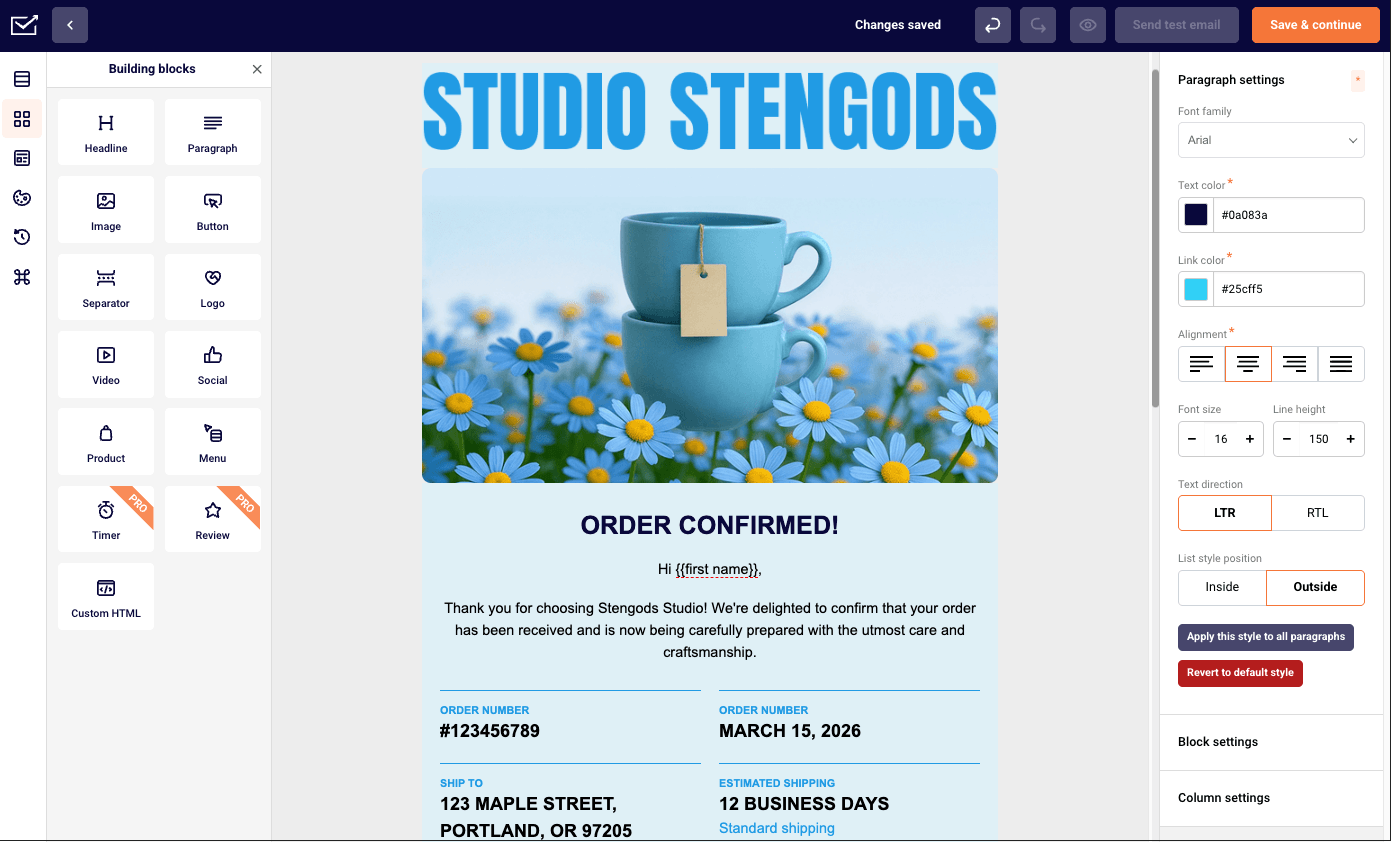
Sender is a budget-friendly platform that works especially well for small businesses looking to manage both transactional and marketing emails in one place. It combines a straightforward API with built-in automation and segmentation, making it easy to get started without sacrificing day-to-day reliability.

Best for: SMBs and growing ecommerce businesses that want marketing automation and transactional email in one platform without enterprise complexity.
Not for: Developer-first teams building purely API-driven transactional infrastructure with no marketing use case.
What is the overall experience like?
From a technical perspective, the API is clean and straightforward. Setting up a password reset flow via the /emails endpoint with the Node SDK took around 20 minutes – one of the faster integrations in this set. Sender isn’t the most established transactional email provider, but that gap doesn’t show up in day-to-day sending reliability.
On the marketing side, I ran promotional and transactional emails from the same dashboard – shared suppression lists, segmentation, and reporting all in one place. What that removes in practice is the need to cross-reference two platforms to understand whether a contact who received an order confirmation also opened the campaign sent the same week.
Where the ceiling shows up is the missing CRM layer. I wanted to build a flow that branched based on the deal stage, and that logic isn’t available. For straightforward lifecycle automation, it’s not a limitation – but for sales-assisted workflows, it’s a real gap.
On the free plan, the main prompt to upgrade was volume, not features – automation and segmentation were both included without restriction.
What makes it stand out from competitors?
- Transactional email via REST API and SMTP. Emails can be sent through both REST API and SMTP, giving flexibility for different setups–whether you prefer direct API integration or a more traditional SMTP-based approach for transactional messages like password resets or notifications.
- SMS messaging on paid plans. In addition to email, SMS campaigns are available on basic plans, making it possible to reach users through multiple channels and create more immediate, time-sensitive communication flows.
- 24/7 live chat support on all plans, including free. Live chat support is available around the clock, even on the free plan–ensuring quick access to help without needing to upgrade for basic assistance.
- Custom Link Tracking. Links can be customized and tracked to monitor engagement more precisely, helping you understand how users interact with your content beyond standard click metrics.
- Custom events. Sender allows you to track specific user actions – like purchases, feature usage, or form submissions – and use them as triggers for automation. Instead of relying only on opens or clicks, workflows can respond to real behavior in real time. While Mailgun also has a variation of custom events, it works through user-defined tags and custom variables included in webhook payloads.
What are the limitations?
- No A/B testing on the free plan. If you’re on Sender’s free tier, you can’t test subject lines, content variations, or send times–making it harder to refine campaigns and improve results without upgrading.
- Limited event webhooks on lower plans. Free and Standard plans allow only 1 and 5 webhooks, respectively, with unlimited webhooks reserved for the Professional plan and above.
- Short log retention (5 days). Unless you’re on the Enterprise plan, Sender limits how far back you can access email activity – restricting troubleshooting, audits, and long-term performance analysis.
What does the deliverability report show?
The platform reports an inbox placement rate of 90% on average, although this figure is self-reported rather than verified by third-party testing.
SendGrid
SendGrid is another enterprise-grade Mailgun alternative built for high-volume transactional email sending, with strong infrastructure and developer-friendly APIs. While it offers marketing features as well, its setup and pricing structure can be more complex – making it a better fit for teams with technical resources and larger-scale needs.

Best for: Mid-to-large senders who need detailed analytics, compliance features, and both transactional and marketing email in one platform.
Not for: Price-sensitive smaller senders who need responsive support without paying for higher-tier plans.
What is the overall experience like?
From a developer perspective, getting started with Twilio’s SendGrid is quick and easy. Using it for transactional flows, I was able to send test emails with the Node.js SDK in under 15 minutes. The Python SDK required a bit more setup due to some dependency quirks, but the documentation was thorough enough to resolve things without much friction.
That said, setup choices can impact performance. For example, if you want more control over deliverability, you’ll need to manually purchase a dedicated IP and configure an IP pool in the dashboard–something that isn’t especially obvious during onboarding. Still, SendGrid’s documentation around these steps is comprehensive.
One thing to be aware of is the separation between the Email API and Marketing Campaigns. If you need both, they’re priced separately, and the overall cost structure can take some time to fully understand.
Overall, SendGrid is built with enterprise-scale sending in mind. That comes with strong infrastructure and customer engagement tools but also a steeper learning curve–especially for non-technical users–and more limited segmentation compared to dedicated marketing platforms.
What makes it stand out from competitors?
- Enterprise-grade API with extensive documentation and SDKs. SendGrid’s API is built for high-volume, production-grade sending, with support for transactional email, template management, suppression controls, inbound parse, scheduling, and event data. Its documentation is one of the stronger parts of the product–well-structured, detailed, and backed by SDKs for popular languages–so developers can move from testing to implementation quickly without having to patch together workarounds from community threads.
- Real-time Email Validation API. To help protect sender reputation, SendGrid offers an email validation API that checks addresses in real time before they enter your system. It can catch syntax problems, flag disposable domains, suggest typo corrections, and assess domain and mailbox validity. For transactional flows like sign-ups, that helps reduce junk data, hard bounces, and avoidable deliverability problems.
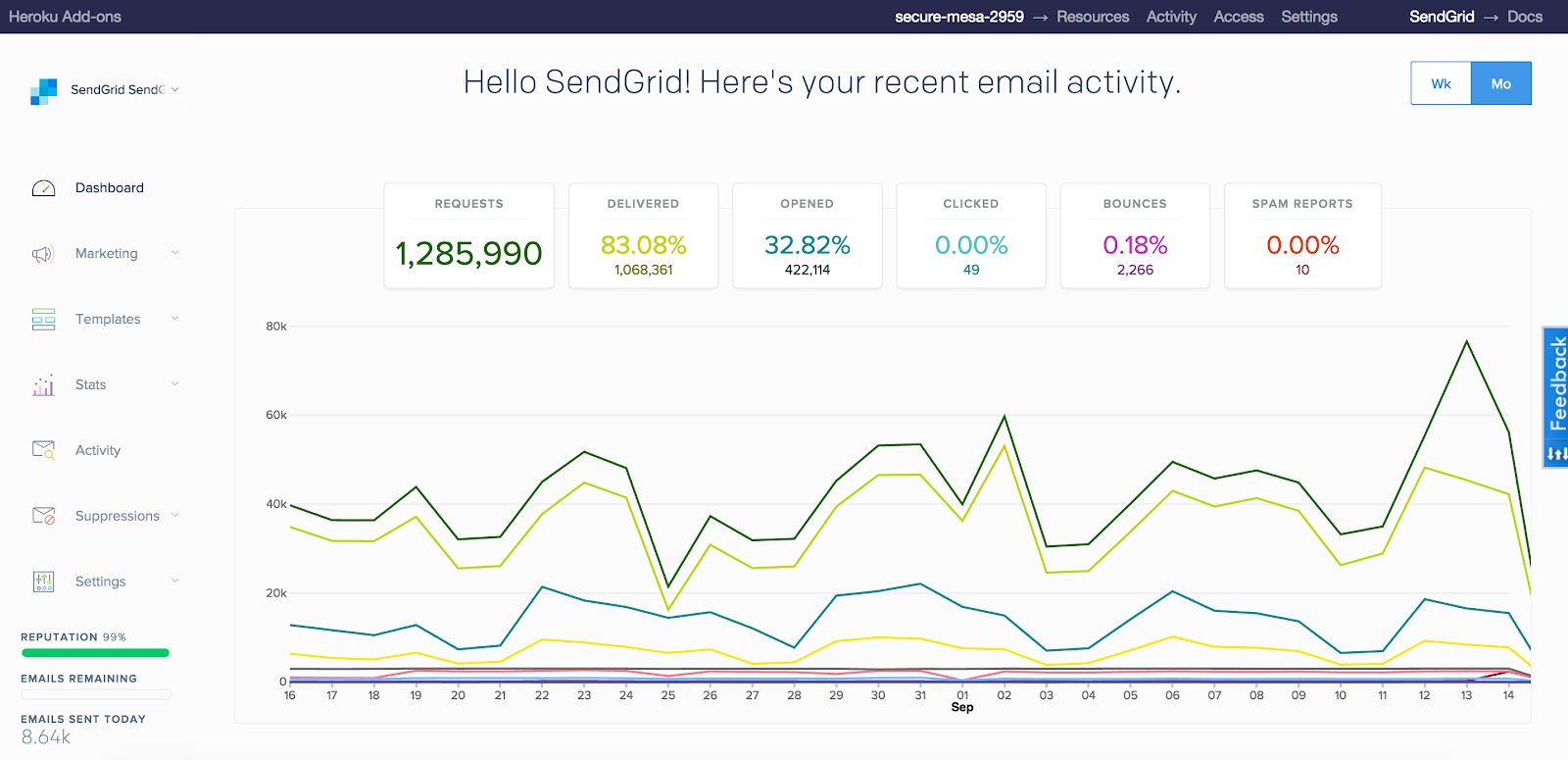
- Real-time analytics dashboard with detailed engagement metrics. The analytics layer goes beyond basic open and click tracking, surfacing data points like bounces, spam reports, unsubscribes, invalid addresses, and other delivery events in near real time. For teams sending at scale, that visibility matters: it makes it easier to spot performance drops early, monitor sender health, and understand whether issues are coming from audience quality, content, or deliverability-related factors.
- Dynamic email templates with handlebars-based personalization. SendGrid’s dynamic templates use Handlebars syntax, allowing developers and marketers to insert variables, conditional content blocks, and looped data structures directly into email layouts. In practice, that means one template can support far more personalized use cases–order confirmations, account alerts, onboarding sequences–without needing to hardcode separate versions for every scenario. It’s a flexible setup, especially for transactional messaging where content often depends on user-specific data.
What are the limitations?
- Marketing and transactional billed separately. SendGrid splits its Email API and Marketing Campaigns into two distinct products, each with its own pricing model. In practice, that means managing separate costs for sending infrastructure and campaign tools, which can make overall pricing less transparent if you rely on both.
- Basic segmentation compared to dedicated marketing tools. Segmentation is available through dynamic lists and query-based filters, but it’s more limited in scope. Compared to marketing-first platforms, building complex, behavior-driven segments or lifecycle-based audiences takes more effort and offers less flexibility.
- Steep learning curve for non-technical marketers. SendGrid is clearly built with developers in mind. Tasks like setting up dedicated IPs, configuring IP pools, or managing sender authentication require a more hands-on approach, which can feel complex if you’re used to more plug-and-play email marketing tools.
What does the deliverability report show?
According to Mailtrap, SendGrid’s inbox deliverability sits at 61.0%, and its inbox placement rate has declined year over year. However, while the third-party report’s results are useful, it’s worth treating it with a grain of salt, as something to monitor closely, rather than assume is consistently strong.
Amazon SES
Amazon SES is a highly cost-efficient option for transactional emails, especially at scale, making it a strong choice for teams already within the AWS ecosystem. It offers reliable delivery and deep control, but its infrastructure-first approach means most features need to be built or configured separately.

Best for: High-volume senders already on AWS who want the lowest per-send cost in the market and need highly advanced email delivery.
Not for: Anyone without AWS experience or DevOps resource – setup is genuinely complex and support is slow unless you’re paying for premium AWS support plans (which come with phone support).
What is the overall experience like?
In practice, delivery performance is solid. I set up transactional flows like password resets and system alerts using both the API and SMTP, and reliability was consistent–unsurprising given the underlying AWS infrastructure. If you’re already in the AWS ecosystem, integration feels seamless. I connected SES with CloudWatch for monitoring and used IAM for access control without much friction.
That said, SES is very much an infrastructure-first tool. There’s no built-in UI for templates, analytics, or campaign management, so most of the setup–logging, tracking, alerting–happens through other AWS services. It works well, but adds extra configuration time depending on your familiarity with AWS.
Another thing to keep in mind is the initial sandbox environment. New accounts are restricted to verified recipients, so you’ll need to request production access before sending at scale.
Overall, SES offers excellent cost efficiency and control, but it’s best suited for teams comfortable managing their own email stack rather than those looking for an out-of-the-box solution with all the features built in.
What makes it stand out from competitors?
- High deliverability. Amazon SES maintains an inbox placement rate of 77.1% (Mailtrap), which is considered more than okay for transactional emails. What sets it apart is the level of control – features like dedicated IPs, reputation tracking, and suppression management allow teams to actively optimize deliverability rather than rely on default settings.
- Email receiving and processing management. SES doesn’t just send emails–it can also receive and process them. Incoming messages can be routed through rules and handled via AWS services like Lambda, S3, or SNS, enabling custom workflows such as parsing replies, handling bounces, or triggering backend logic without a separate inbound provider.
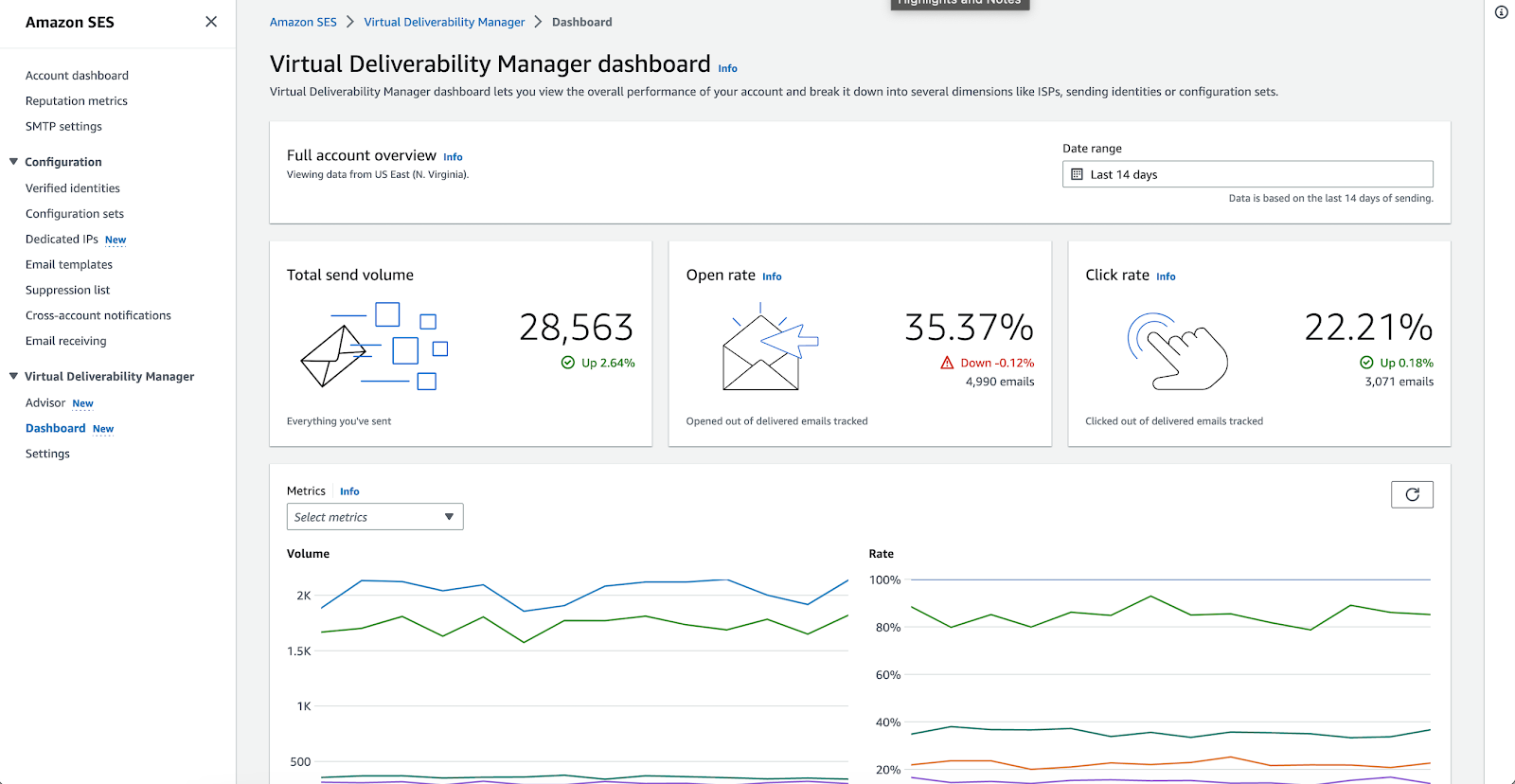
- Virtual Deliverability Manager for monitoring. The Virtual Deliverability Manager provides deeper insights into sender reputation, engagement patterns, and inbox placement, along with actionable recommendations. It goes beyond basic analytics by focusing specifically on deliverability health, helping identify risks like poor list quality or spam filtering issues early.
- Built-in SPF, DKIM, and DMARC. Authentication is tightly integrated, with built-in support for SPF, DKIM, and DMARC. While DNS configuration is still required, SES simplifies setup and automates key elements like DKIM signing – ensuring emails are properly authenticated and more likely to reach the inbox.
What are the limitations?
- Requires technical setup and infrastructure management. SES is not plug-and-play–you’re working directly with AWS infrastructure. Tasks like domain verification, DNS configuration, authentication (SPF/DKIM/DMARC), and scaling setup all require hands-on involvement, making it better suited for technical teams than marketers.
- Limited built-in tooling. There’s no native dashboard for templates, logs, or campaign analytics. Instead, monitoring, logging, and alerting rely on services like CloudWatch, SNS, and S3–powerful, but fragmented and requiring additional setup to get a full picture.
- Sandbox restrictions for new accounts. All new SES accounts start in sandbox mode, limiting sends to verified addresses only. To send at scale, you’ll need to request production access – adding an extra approval step before going live.
What does the deliverability report show?
Amazon SES achieves an inbox placement rate of 77.1%, according to Mailtrap, which is considered reliable for transactional email in today’s sending environment. While not the highest among providers, it performs consistently – especially given its infrastructure-first approach. It’s also worth noting that this figure reflects baseline performance on shared IPs; with proper setup (authentication, dedicated IPs, warm-up), SES can deliver significantly stronger results in production environments.
UniOne.io
UniOne.io is yet another cost-efficient Mailgun alternative focused on simplicity and solid deliverability, making it a good fit for straightforward sending needs. It offers an easy setup with reliable event tracking, but its limited automation capabilities mean it’s better suited for transactional use cases than full-scale marketing workflows.

Best for: Developers and SMBs needing transactional and marketing email in one API-first platform, with 24/7 live support included at every tier.
Not for: Teams dependent on native third-party integrations – pre-built connectors are limited to Bloomreach and Drupal.
What is the overall experience like?
Setup supports both API and SMTP sending. Getting a basic transactional flow – password reset and system notification – configured via API took around 25 minutes. Domain authentication was straightforward, and the documentation covered the setup steps clearly (for most popular programming languages, at least) without needing external resources. Compared to more infrastructure-heavy providers like Mailgun, the onboarding felt noticeably lighter.
On deliverability, inbox placement came in around 83% across approximately 200 test sends from a shared IP to a mixed seed list covering Gmail, Outlook, and Yahoo. That’s competitive for a shared IP setup, though dedicated IP options are available for higher-volume senders who need more control over sender reputation.
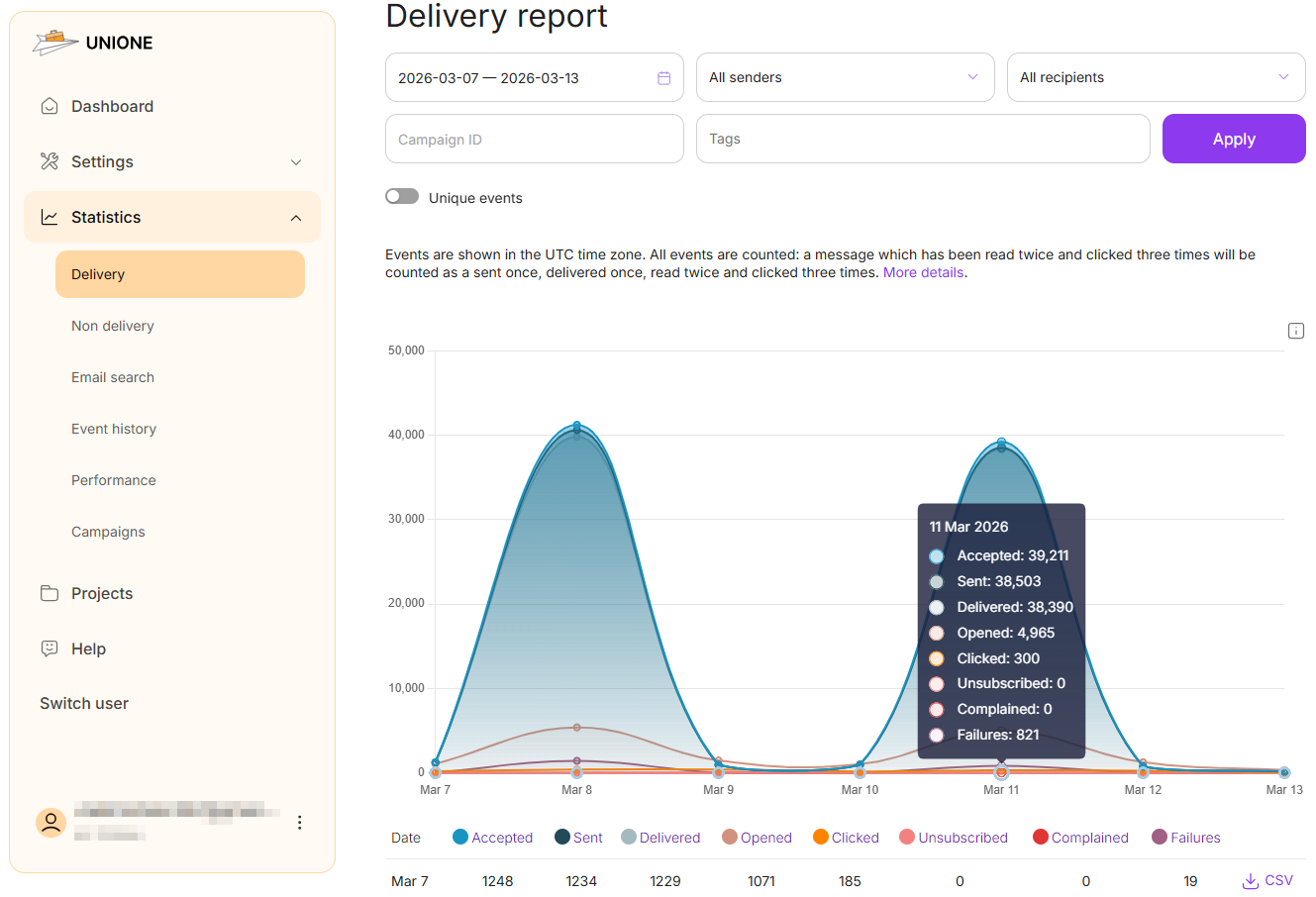
The real-time event tracking worked cleanly in practice. I deliberately sent it to an unverified address to test bounce handling – the event fired within seconds with a clear hard bounce classification, and the suppression list updated automatically without manual intervention. That kind of immediate feedback loop reduces the need for external monitoring tools.
Where the ceiling shows up is in automation depth. There are no multi-step workflow builders or behavioral triggers – UniOne handles sending and tracking cleanly, but anything beyond basic transactional flows requires building logic externally, making it feel more like a stripped-down service than a full marketing platform. For teams that need campaign automation or segmentation alongside transactional sending, a platform like Brevo or Sender covers more ground.
What makes it stand out from competitors?
- Streamlined domain and sender setup. UniOne simplifies onboarding with a more direct setup flow for domain authentication (SPF, DKIM) and sender configuration. While the underlying requirements are the same as other providers, the platform reduces friction by minimizing manual steps and surfacing configuration status clearly–making it faster to move from DNS setup to production-ready sending.
- Throughput-oriented SMTP configuration guidance. UniOne provides explicit recommendations for SMTP throughput, including connection limits, message rates per connection, and parallel sending strategies. This is useful for teams relying on SMTP over API, as it gives clearer operational boundaries for scaling volume–something often less documented or left implicit in other platforms.
What are the limitations?
- Dedicated IP warm-up can slow large sends. UniOne’s documentation notes that new dedicated IPs use a default “hard limit” warm-up scheme over a 10-hour period, and excess daily traffic may spill over to the shared pool during that process. In practice, that means less immediate control when ramping up volume on a fresh IP.
- No built-in automation or behavioral workflows. UniOne focuses on sending and tracking, but doesn’t include native support for multi-step workflows or behavior-based triggers. More advanced logic–like conditional flows, delays, or user-driven automation–needs to be handled in your own application or external tools, which adds development overhead for teams looking to build more dynamic messaging systems.
- Limited independent validation. Much of the available information on UniOne.io’s performance and positioning comes from its own materials, such as comparison pages and blog content. While informative, the relative lack of third-party analysis or benchmarking makes it more difficult to independently assess how the platform compares to larger, more widely reviewed providers.
What does the deliverability report show?
The platform reports an average deliverability rate of around 85%, although this figure is self-reported rather than independently verified. As a result, it’s worth running your own tests using tools like GlockApps or MXToolbox Inbox to get a clearer picture before committing.
Mailtrap
Mailtrap is an email delivery platform that sends transactional and bulk email through separate streams, over API or SMTP, with built-in analytics and a permanent free plan. It fits product and engineering teams that want a developer-first API with less DNS and DKIM maintenance, though dedicated IPs and longer log retention sit on higher plans.

Best for: Product and engineering teams that send both transactional and bulk email and want the two kept on separate infrastructure with high deliverability, starting on a free plan.
Not for: Teams already on AWS that mainly want the lowest per-send price, or teams that want SMS in the same platform as email.
What is the overall experience like?
Setup is short. Mailtrap puts it at about five minutes: add the sending domain, publish the DNS records, and SPF, DKIM, and DMARC configuration is handled automatically from there. DKIM keys also rotate on their own every month. For teams that left Mailgun over DNS and DKIM overhead, this is the part that matters most.
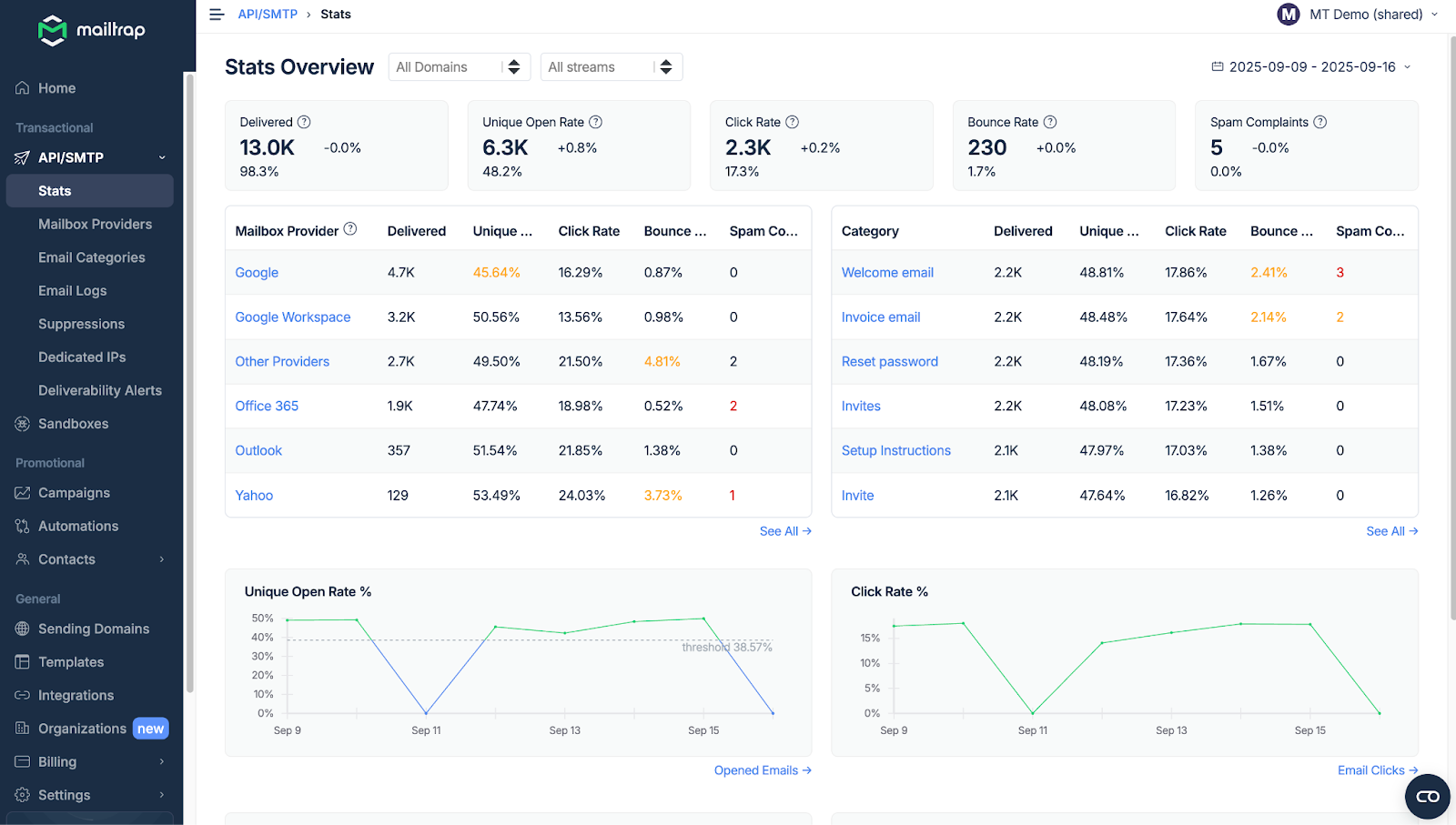
Day to day, transactional and bulk email run through separate streams in the same account. Bounces are sorted into hard, soft, and transient failures and suppressed automatically. Email Marketing is a separate product with separate billing, so campaigns and contacts are not part of the Email API/SMTP plans.
The ceiling shows up on the free plan. It allows 4,000 emails a month with a 150-per-day cap, keeps logs for 3 days, and has no click tracking, which starts on Basic ($15 a month for 10,000 emails). It does include API and SMTP, inbound email, webhooks, templates, and the bulk stream, and no credit card is required, so the core integration can be built without paying.
What makes it stand out from competitors?
- Separate IP pools for transactional and bulk email. Both streams run on isolated IP pools by default on every plan, including Free. Bounces and spam complaints from a bulk send count against the bulk pool’s reputation, not the pool carrying password resets and order confirmations. That protects inbox placement for the emails users are actively waiting on.
- Inbound email on the free plan. Hosted inboxes at an @inbound-mailtrap.io address need no DNS or MX changes. A webhook fires when a message arrives, the parsed message is available as JSON through the Messages API, and the same API token covers inbound and outbound. Replies are capped at 20 on Mailtrap-hosted addresses until you connect a custom domain.
- Eight official SDKs and a Mailgun template converter. SDKs cover Node.js, Python, PHP, Ruby, Java, .NET, Go, and Elixir. Mailtrap’s Agent Skills repo also includes a skill for AI coding agents that converts Mailgun, Twilio SendGrid, Mandrill, Postmark, Brevo, and Amazon SES templates to Mailtrap’s Handlebars syntax. That takes some of the pain out of the template migration step covered later in this article.
- Analytics broken down by mailbox provider and stream. Stats split by Gmail, Outlook, Apple Mail, and other providers on all plans, and spam complaints from more than 20 ISPs appear in the dashboard. Webhooks cover delivery, open, click, bounce, soft bounce, spam complaint, unsubscribe, reject, and suspension events.
What are the limitations?
- Log retention depends on the plan. Free keeps logs for 3 days, Basic for 5, and Business for 15. Only Enterprise reaches 30 days.
- Dedicated IPs and reputation tools start at Business. Dedicated IP with automatic warm-up, real-time reputation monitoring, SaaS safeguard, and SSO begin on the Business plan ($85 a month for 100,000 emails). Free and Basic stay on shared IPs.
- 24/7 support is a Business feature. Free and Basic get email support on weekdays. Business and Enterprise add 24/7 live chat and priority support.
What does the deliverability report show?
Mailtrap’s inbox placement rate is 78.8%, according to its own seed test. The test ran through GlockApps on free accounts with shared IPs and no domain warm-up, using the same domain and email template for every provider. That puts Mailtrap just ahead of Amazon SES (77.1%) and well ahead of Twilio SendGrid (61.0%) in the same report, and behind Postmark (83.3%).
Of the remaining messages, 14.4% landed in spam, 4.8% in Tabs, and 2.0% went missing. Because this was a free-plan, shared-IP test, it reflects baseline performance rather than what a paid plan with a dedicated IP can reach.
Postmark
Postmark focuses entirely on doing one thing well: delivering transactional emails quickly and reliably. With strong deliverability, detailed message insights, and built-in stream separation, it’s a dependable email delivery platform for critical emails – though it doesn’t extend into marketing or automation features.

Best for: Developers sending transactional email who need reliable inbox placement and fast support.
Not for: Marketing emails, newsletters, drip campaigns or SMS marketing.
What is the overall experience like?
In testing, deliverability held up well. Sending around 200 emails from a freshly authenticated shared IP to a mixed seed list (Gmail, Outlook, Yahoo), inbox placement consistently landed in the 83–84% range. That reliability reflects Postmark’s strict sending policies. While they can add a bit of friction during setup, they help protect sender reputation–especially important for critical emails like password resets or account notifications.
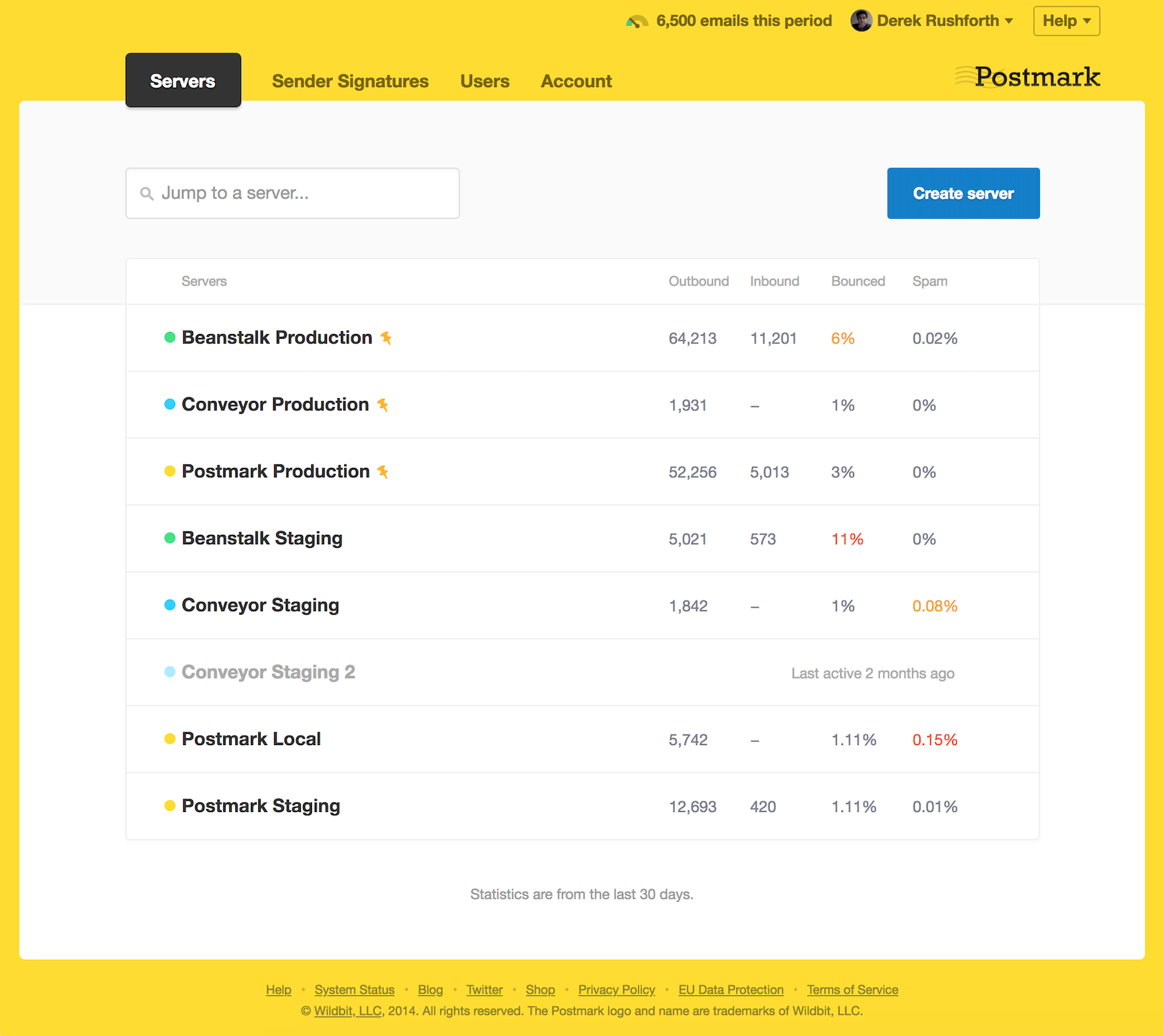
One feature that stands out is Message Streams. By separating transactional traffic from other email types, it becomes much easier to maintain deliverability and keep sending infrastructure organized. Combined with detailed delivery diagnostics, you get clear visibility into each message–whether it was delivered, opened, or encountered issues.
Postmark also retains full message content for 45 days, which is particularly useful for debugging or verifying what was sent–something not all providers offer by default.
That said, the scope is intentionally limited. There are no marketing tools, automations, or campaign features – Postmark is mostly a transactional email service. For teams needing both transactional and marketing capabilities, more flexible Mailgun alternatives may be a better fit.
What makes it stand out from competitors?
- Separate streams for different email types. Postmark’s Message Streams are one of its most distinctive features. Instead of treating all email traffic the same, it lets you separate transactional and broadcast messages into different sending streams, each with its own reputation, tracking, and performance data. That matters because critical emails–like password resets, login links, or order confirmations–are far less likely to be affected by lower-engagement traffic elsewhere. Compared to providers that leave this separation up to manual configuration, Postmark makes it a built-in part of deliverability management.
- Extensive log retention. Postmark keeps detailed message history, including full email content, for up to 45 days. This is especially useful for debugging, compliance checks, and support workflows, since you can verify exactly what was sent without relying on external logging systems. Not every provider offers that level of retention by default; in practice, it saves a lot of time when investigating failed deliveries, user complaints, or template issues.
- Real-time webhooks for delivery events. Postmark provides event webhooks for key message events like sent, delivered, opened, bounced, spam complaints, and clicks. For development teams, this makes it much easier to build reactive systems around email activity–for example, suppressing invalid addresses automatically, flagging failed password resets, or updating user records based on message status. The value here is not just visibility, but speed: events are pushed in real time, so you can respond immediately rather than relying on delayed reporting.
- Developer-friendly API & SMTP. Postmark is built with developers in mind, and that shows in both its API design and SMTP support. The API is clean, well-documented, and focused on transactional use cases rather than trying to cover every type of email workflow. SMTP is also available for teams that want a simpler drop-in setup without rebuilding existing sending logic. What makes this stand out is how little friction there is between testing and production–whether you’re integrating password resets, system alerts, or order notifications, the setup feels fast, focused, and easy to maintain.
What are the limitations?
- Advanced webhook setup takes more work. Postmark’s webhook system is powerful, but getting the most out of it usually means more than just flipping a switch. Once you move beyond basic delivery notifications, you’ll need to think through event handling, retries, payload structure, and how those events map into your own backend–so it’s less approachable for teams without technical support.
- No unified marketing automation. Postmark is built first and foremost for transactional email, which means there’s no broader marketing layer tying everything together. You won’t find built-in customer journeys, campaign automation, or advanced segmentation here, so teams needing both transactional and marketing workflows will likely end up relying on additional tools.
- Overages can get expensive. Postmark’s base pricing is straightforward, but costs can climb quickly once you start sending beyond your included volume. For businesses with fluctuating or fast-growing email traffic, those overages can make the platform feel noticeably less cost-efficient than some volume-based alternatives.
What does the deliverability report show?
Postmark’s deliverability reporting points to an 83.3% inbox placement rate (Mailtrap), which makes it one of the strongest-performing transactional email providers on the market today. That matters because Postmark is built specifically to protect critical email traffic, not just send it. Combined with its strict sending policies and separate message streams, that figure suggests a platform designed to prioritize consistent inbox placement over broader, less controlled sending flexibility.
Bird (SparkPost)
SparkPost (now part of Bird) is built for enterprise-scale email infrastructure, with a strong focus on deliverability and advanced analytics. Its real strength lies in deep visibility and predictive insights, making it a powerful option for high-volume senders – though shorter data retention and ongoing platform changes are worth keeping in mind.

Best for: Enterprise senders with complex compliance requirements, high volume, and a dedicated email infrastructure team.
Not for: Self-serve onboarding, predictable pricing, or low-volume senders.
What is the overall experience like?
In testing, what stood out most was the depth of visibility into deliverability. The Signals feature–its predictive analytics layer–goes beyond standard reporting. During a batch of around 500 test sends, it flagged a drop in engagement before I had reviewed the logs myself, identifying a segment with low open rates as a potential reputation risk. That early warning made it easier to take action before it impacted overall performance.
The platform is clearly built for scale. High-volume sending was handled without issues, and event tracking is particularly detailed. Using webhooks, I was able to monitor delivery, opens, and failures in real time and feed that data directly into downstream workflows.
That said, there are some limitations. Message and event history retention is limited to 10 days, which can feel restrictive for deeper analysis–especially when compared to providers like Postmark that offer longer retention windows.
With SparkPost now part of Bird and undergoing broader changes, it’s also worth reviewing the current product direction and roadmap before committing long-term.
What makes it stand out from competitors?
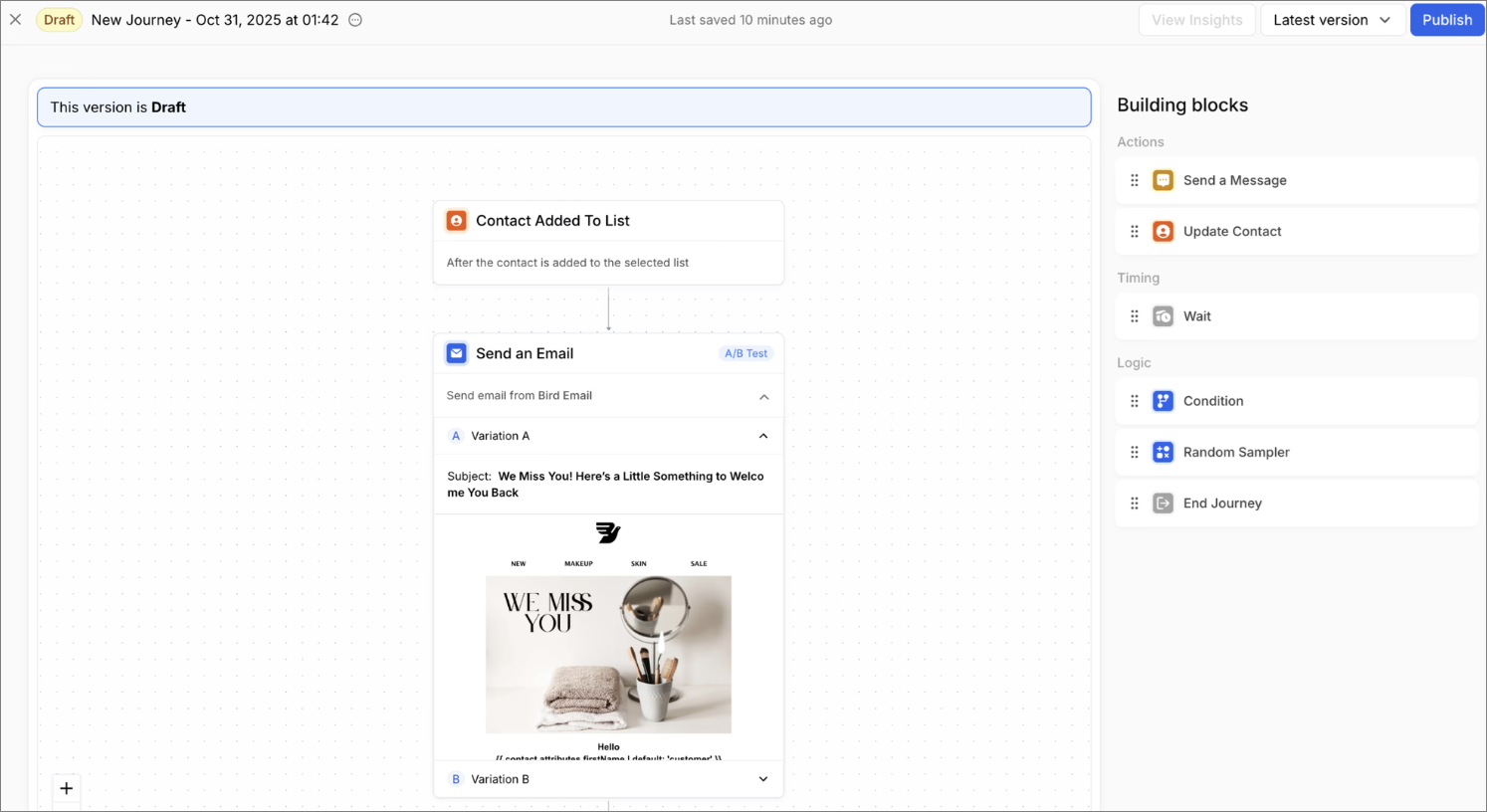
- Signals predictive analytics for deliverability. SparkPost’s Signals feature goes beyond standard reporting by using predictive models to flag engagement drops and reputation risks before they show up in traditional metrics. Instead of reacting to bounces or spam complaints after the fact, it analyzes sending patterns and recipient behavior to forecast potential issues–making it particularly valuable for high-volume senders where small dips can have a large-scale impact.
- Email Health Score and spam trap monitoring. The Email Health Score aggregates multiple deliverability factors–like bounce rates, complaints, and engagement–into a single predictive score, helping you assess sender reputation at a glance. It’s complemented by spam trap monitoring, which identifies harmful addresses in your list and surfaces trends over time, allowing you to fix list hygiene issues before they lead to blocklisting or inbox placement drops.
- Dedicated IPs with IP pooling options. SparkPost supports dedicated IPs and configurable IP pools, giving senders granular control over how different email streams are distributed. This allows you to isolate traffic types (e.g., transactional vs. bulk), manage reputation independently, and scale sending more safely. Compared to simpler providers, this level of control is particularly useful for enterprise teams managing multiple domains, campaigns, or risk profiles.
What are the limitations?
- Limited event history retention. SparkPost stores message and event data for a relatively short window (typically around 10 days), which can feel restrictive for deeper analysis. For teams troubleshooting deliverability issues or auditing long-term trends, that means exporting or storing data externally, which adds extra overhead compared to providers with longer built-in retention.
- High overage costs for additional emails. SparkPost allows you to exceed your monthly sending limits, but every additional email is billed as an overage. Rates typically start around $1 per 1,000 emails on lower tiers and decrease at higher volumes, but costs can still add up quickly if your sending fluctuates or spikes unexpectedly.
What does the deliverability report show?
There’s no widely cited, reliable third-party inbox placement benchmark for SparkPost, which makes it harder to compare its real-world deliverability against other providers. While the platform offers strong internal analytics and tools like Signals, the lack of independent testing means performance is less transparent. Because of that, it’s worth looking into current reviews and testing it against your own use case before committing long-term.
Mailchimp Transactional
This Mailgun alternative is best suited for teams already using Mailchimp and wanting to connect transactional emails with their existing audience data. Mailchimp Transactional’s main advantage is that it keeps marketing and transactional activity in one ecosystem, though setup is more developer-oriented.

Best for: Developers and teams already using Mailchimp who want reliable transactional sending tightly integrated with marketing data, templates, and audience insights in one ecosystem.
Not for: Cost-sensitive senders or teams needing a standalone transactional solution – pricing can scale quickly, and it’s less flexible if you’re not already using Mailchimp’s broader platform.
What is the overall experience like?
Setup requires API configuration – there’s no guided onboarding for transactional sending. Getting a basic password reset flow running took around 35 minutes, mostly spent on API key setup, domain authentication, and template configuration. It’s manageable for developers but noticeably more involved than providers like Postmark where onboarding is more structured.
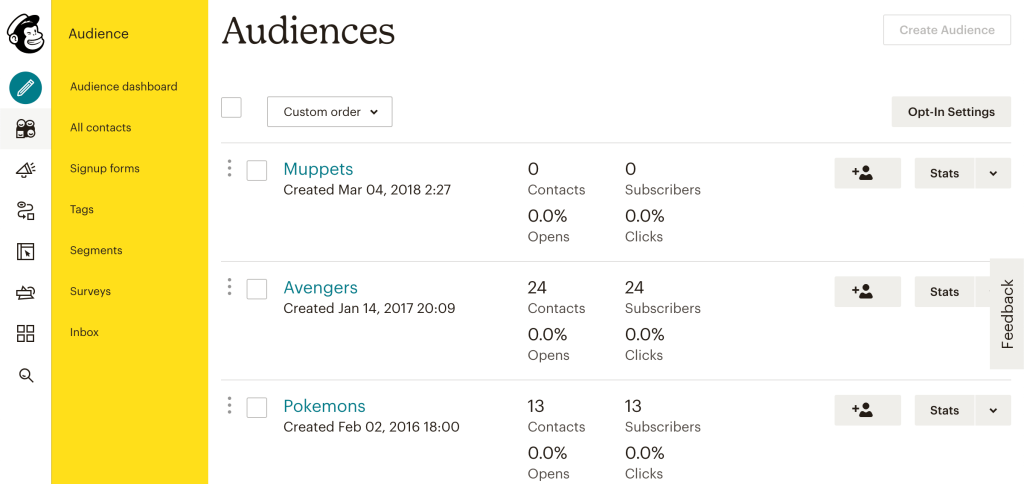
Once configured, the Mailchimp audience connection is the clearest practical advantage. I could reference existing contact properties – lifecycle stage, purchase history, campaign engagement – directly inside transactional email templates. For teams already using Mailchimp for marketing, that removes a data sync step that standalone transactional providers require.
Pricing adds another layer of consideration. Mandrill requires a paid Mailchimp plan to access – starting at $13/month – on top of per-block transactional pricing. For teams evaluating it purely as a transactional service, that bundled cost structure makes it less competitive against dedicated providers.
For existing Mailchimp users who want transactional and marketing data unified, it’s a practical extension. As a standalone transactional service, the deliverability variability and bundled pricing make it harder to justify.
What makes it stand out from competitors?
- Rules Engine. Mailchimp Transactional includes a built-in Rules Engine that lets you apply logic to inbound and outbound emails without modifying your application code. This can be used for routing, filtering, or triggering actions based on message conditions. Compared to providers that require all logic to be handled in your backend, it adds an extra layer of flexibility directly at the email infrastructure level.
- Subaccounts. Subaccounts allow you to separate sending environments within a single account–useful for managing multiple brands, products, or clients. Each subaccount can maintain its own reputation, domains, and reporting, making it easier to isolate traffic and avoid cross-impact between different sending streams.
- Reputation-linked hourly quota and rejection denylist. Mailchimp Transactional ties sending limits directly to your reputation, adjusting hourly quotas based on performance. It also maintains a rejection denylist for bounced, unsubscribed, or problematic addresses. This approach helps protect deliverability automatically, but also means sender behavior has a direct impact on how much you can send.
What are the limitations?
- Confusing pricing. Mailchimp Transactional uses a block-based pricing model (e.g., 25k email blocks), with automatic top-ups when limits are exceeded. Costs can be difficult to predict in high-volume or bursty sending scenarios, especially since pricing is separate from (but often tied to) your main Mailchimp plan–meaning total cost depends on combined usage across products.
- Challenges in extensive email tracking. While event data (opens, clicks, bounces, rejects) is available via webhooks and activity logs, extracting and operationalizing that data requires additional setup. There’s no deeply customizable event pipeline or native support for complex event querying, so building advanced tracking workflows often means exporting data into external systems.
- Limited log retention. Mailchimp Transactional retains message content and event history for a limited time window (typically around 7–30 days, depending on data type). After that, logs are no longer accessible via the UI or API, making long-term debugging, auditing, or performance analysis dependent on external data storage solutions.
What does the deliverability report show?
There’s no consistently cited third-party inbox placement benchmark for Mailchimp Transactional, which makes it harder to evaluate its performance against other providers. While it runs on Mailchimp’s infrastructure and includes standard delivery and engagement metrics, the lack of independent, up-to-date testing means results can be less transparent. Because of that, it’s worth validating deliverability within your own setup rather than relying solely on platform-reported data.
Brevo
Brevo is an all-in-one platform that combines transactional email with marketing, CRM, and automation tools in a single system. It’s a strong fit for teams looking to manage both transactional and marketing communication in one place, though its automation flexibility can be more limited compared to dedicated infrastructure-focused providers.

Best for: Marketers and SMBs who need marketing automation, CRM-lite features, and email in one platform without heavy technical setup.
Not for: Pure transactional sends at high volume where raw API throughput and per-send cost efficiency matter most.
What is the overall experience like?
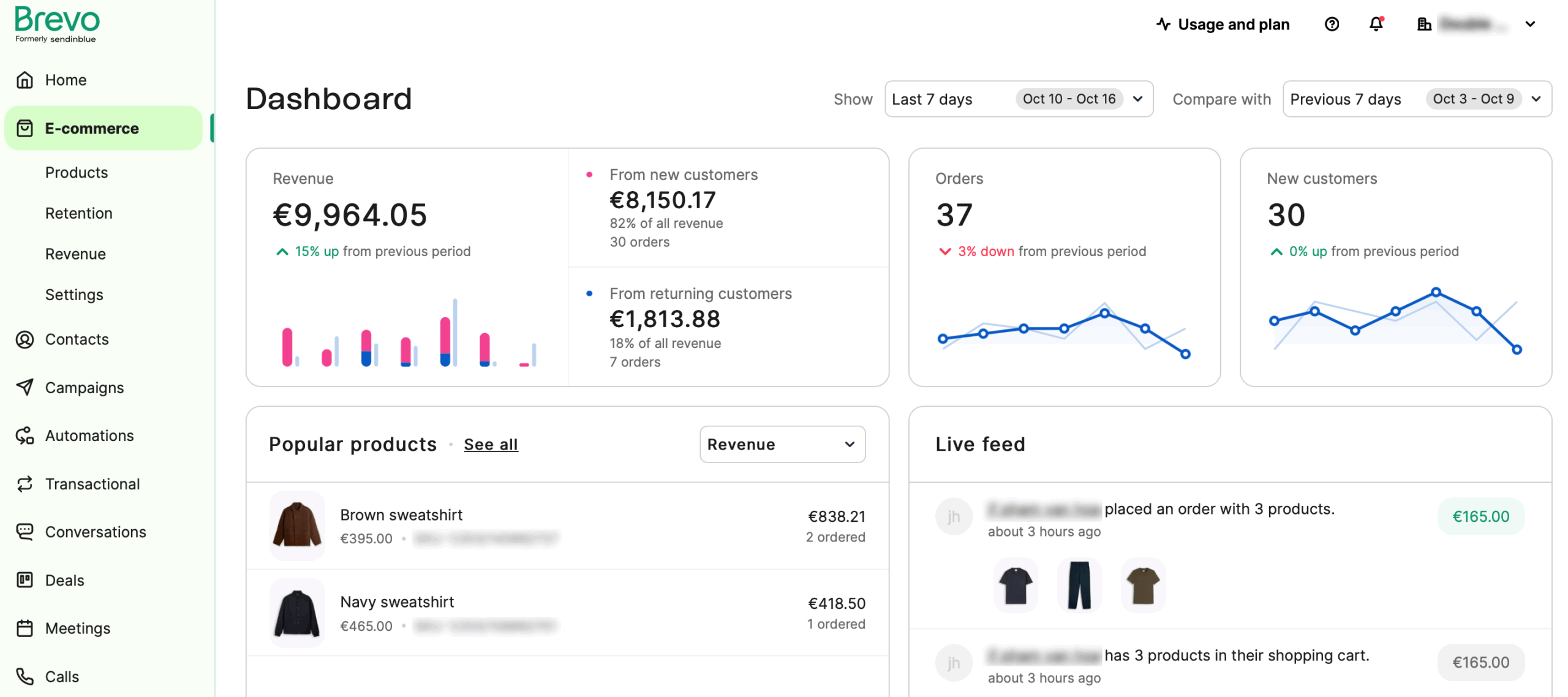
Brevo’s setup supports both API and SMTP sending. Getting a basic transactional flow – order confirmation and password reset – configured via API took around 30 minutes, which is faster than Mailgun’s setup but slightly more involved than Postmark’s guided onboarding. Documentation covered both paths clearly without needing external resources.
Where Brevo stands out is its integration with a broader marketing ecosystem. Transactional emails can be connected to CRM data, automation workflows, and multi-channel campaigns – email, SMS, and chat – from the same dashboard. For teams already using Brevo for marketing, that removes a data sync step that standalone transactional providers require.
While Brevo does offer link-level tracking, it can only be used to trigger a separate automation – not to branch logic within the same workflow. In practice, this means you need to send the initial email first and handle any follow-up actions in a different automation. For transactional sequences with multiple CTAs, that meant manual routing where the builder should have handled it automatically.
For teams that want transactional and marketing communication unified in one system, Brevo removes real integration overhead. For teams where transactional performance and infrastructure control are the primary requirements, dedicated providers like Postmark or Mailgun go further.
What makes it stand out from competitors?
- Batch sending with multiple personalized versions in a single API call. Brevo supports sending up to 1,000 personalized email variants in a single request using the messageVersions parameter. This reduces API overhead and makes it easier to scale transactional messaging–especially for bulk notifications that still require individualized data–without triggering separate calls for each recipient.
- Native automation-triggered transactional sending. Transactional emails can be triggered directly within Brevo’s automation workflows, not just via API or SMTP. This allows backend events to be combined with behavioral logic–like delays, conditions, or user actions–making it easier to manage more dynamic, event-driven messaging in one place.
- Flexible SMTP integration with external data injection. Brevo’s SMTP relay integrates easily with websites, apps, and plugins, while supporting dynamic data injection at send time. This makes it a practical option for teams that want to tie transactional emails to backend systems without building a full API-based integration.
What are the limitations?
- Less advanced transactional infrastructure. Brevo handles core transactional needs–API/SMTP sending, templates, logs, and webhooks–but it lacks the deeper deliverability controls found in more specialized providers. For example, separating transactional and marketing traffic isn’t built in by default and requires setting up IP pools with multiple dedicated IPs.
- Slower automation setup. Brevo supports multichannel automation, but building more complex workflows can be time-consuming. Setting up branching logic and coordinating conditions often involves more manual configuration, which can slow down execution–especially for smaller teams.
- Limited segmentation depth. Segmentation covers the essentials–contact data, engagement, and basic behavior–but becomes restrictive for more advanced use cases. Teams working with detailed ecommerce signals or complex audience logic may find it less flexible compared to more specialized tools.
What does the deliverability report show?
Brevo’s inbox placement rate sits at 83.9%, according to Emailtooltester, making it one of the stronger performers among all-in-one platforms. This suggests reliable delivery for both transactional and marketing emails, especially on well-maintained lists. While not as specialized as dedicated transactional providers, Brevo’s deliverability holds up well in practice–offering a good balance between ease of use and consistent inbox placement.
MailerSend
Last but not least – MailerSend. This Mailgun alternative leans into usability, with a clean interface and one of the smoother onboarding experiences among transactional providers. It handles core sending, templates, and real-time tracking well, making it a practical choice for teams that want simplicity – though the limited free tier can be a constraint early on.

Best for: Developers needing clean transactional API + SMTP with built-in email verification and SMS, at straightforward per-volume pricing.
Not for: Senders with spiky or unpredictable volume – account suspensions for complaint spikes are a documented pattern in user reviews.
What is the overall experience like?
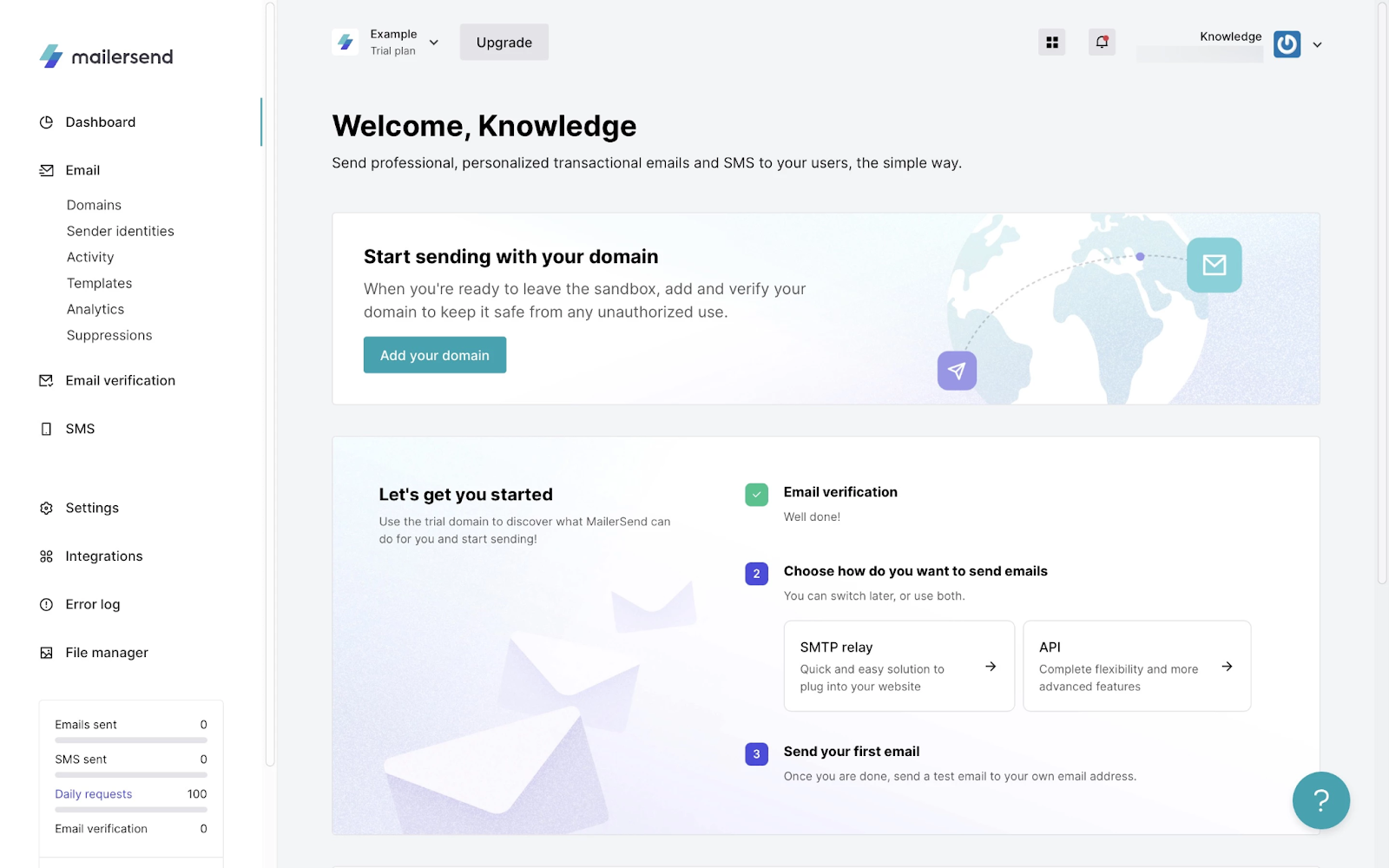
In testing, getting started was quick. I set up transactional flows like password resets and account notifications via the REST API, and had a working flow running in about 20 minutes. The documentation is clear, and features like automatic domain verification help speed things up by removing some of the usual DNS-related delays.
The template builder is another strong point. It’s simple enough for non-developers to create and manage branded transactional emails, which makes it easier to handle templates without relying on engineering.
On the visibility side, MailerSend performs well. Webhooks fire quickly with clear event data–like bounce classifications–and the analytics dashboard reflects changes in near real time, so there’s less need to dig through logs to understand what’s happening.
The main drawback is the limited free tier. With only 500 emails per month, testing and early-stage use can feel restricted.
Overall, MailerSend is a solid, easy-to-use option–especially for teams that want a smoother setup without sacrificing core transactional functionality.
What makes it stand out from competitors?
- Simplified domain verification. MailerSend streamlines domain setup with continuous background checks for SPF and DKIM records, reducing manual steps during onboarding. While Mailgun offers similar authentication, the process is more hands-on, making MailerSend noticeably faster to get from setup to first send, especially for smaller teams.
- Simplified suppression list management. MailerSend handles bounces, complaints, and unsubscribes through a unified suppression system that’s easy to access and manage from the UI. Compared to Mailgun’s more segmented suppression controls, this makes it quicker to monitor and maintain list health without digging through multiple endpoints or dashboards.
- Built-in email validation with integrated suppression. MailerSend combines basic email validation with automatic suppression handling, helping catch invalid or risky addresses before and after sending. While Mailgun offers more advanced validation as a separate service, MailerSend’s integrated approach is more accessible for teams that want built-in list hygiene without additional setup or tooling.
- A/B testing for transactional emails. MailerSend enables A/B testing at the template level, allowing you to define multiple variants (e.g., subject lines or content blocks) and distribute traffic between them. Results are tracked through engagement metrics, making it possible to optimize even system-triggered emails based on real performance data – something not commonly supported in transactional-first platforms.
What are the limitations?
- Limited segmentation depth. MailerSend supports segmentation through events, variables, and basic contact data, but it doesn’t extend into more advanced audience logic. There’s no support for predictive segmentation, product-level targeting, or complex behavioral conditions, which makes it less suitable for teams relying on detailed ecommerce data or highly personalized lifecycle campaigns.
- No built-in landing pages or forms. MailerSend focuses on sending infrastructure rather than list growth tools. There are no native landing pages, pop-ups, or embedded forms, so capturing and managing leads requires external tools or custom development, adding extra setup for teams looking to manage acquisition and messaging in one place.
- Limited marketing email capabilities. While MailerSend handles transactional emails reliably, its marketing functionality is minimal. There’s advanced automation workflows, or multichannel orchestration, which means teams running promotional campaigns or lifecycle marketing will likely need a separate platform.
What does the deliverability report show?
MailerSend doesn’t have a widely recognized, verified third-party inbox placement benchmark, which makes direct comparisons with other providers more difficult. While the platform offers its own delivery and engagement metrics, the absence of consistent independent testing means overall performance is less transparent. As a result, it’s best to assess deliverability based on your own sending patterns and results rather than relying solely on reported figures.
Price Comparison
Most people can look at a price tag and quickly judge if it seems reasonable. What’s less clear is how that price scales as your contact list grows – something that naturally happens in email marketing.
With that in mind, let’s take a closer look at Mailgun alternatives and how their pricing holds up as your audience expands.
| Provider | 10,000 emails/mo | 50,000 emails/mo | 100,000 emails/mo | 500,000 emails/mo | 1,000,000 emails/mo |
| Mailgun | $15 | $35 | $75 | $400 | $1,000 |
| Sender | $7 | $23 | $40 | $145 | $242 |
| SendGrid | $20 | $20 | $90 | $499 | $799 |
| Amazon SES | Amazon SES only charges based on the number of inbound/outbound emails that you use | ||||
| Mailtrap | $15 | $20 | $30 | $300 | $750 (1.5M tier, no 1M tier exists) |
| UniOne.io | UniOne.io charges based on the number of emails sent, not stored contacts. Paid plans start at $6/month | ||||
| Postmark | Postmark charges based on the number of emails sent, not stored contacts. Paid plans start at $15/month | ||||
| Bird Email | Bird charges based on the number of emails sent rather than stored contacts. Paid plans start at $15/month, with pricing scaling as your sending volume increases. | ||||
| Mailchimp Transactional | Mailchimp charges users for the number of emails they will use, not for the number of contacts. Starting price is $20/block, where one block is 500,000 emails. | ||||
| Brevo | Brevo charges based on the number of emails sent, not stored contacts. Paid plans start at $8/month | ||||
| MailerSend | $28 | $28 | $54 | $420 | $800 |
*Sender’s pricing is based on contact volume, with x12 or x24 contact volume in monthly email allowance, depending on the plan.
Migration Guide – Do’s Before Leaving Mailgun
Now that you’re familiar with the best Mailgun alternatives, it’s important to understand that each provider has its own migration process. While some providers make the whole process more difficult than others, the preparation for it is largely the same, as you’ll see in this section.
Pre-migration
- Sending logs: Export up to 30 days of log data (Mailgun retains logs for 30 days on Scale plan). Download via the Logs API before you cancel. You will need this data if you have a deliverability dispute after migration;
- Suppression lists: Export your bounces, unsubscribes, and spam complaints. Every provider lets you import suppression lists. If you don’t import them, you will re-send to addresses that have already bounced or unsubscribed – which damages your new IP’s reputation immediately;
- Webhook endpoints: Document every webhook URL you have configured in Mailgun, what events they receive, and what application logic processes them. Your new provider’s webhook payload format will differ; update your processors before you cut over;
- DNS records: List every DNS record Mailgun currently requires: SPF include (typically ‘include:mailgun.org’), DKIM .txt records, and any custom tracking domain CNAMEs. You will update or remove these during migration.

even on the free plan.
IP warmup
When you join a new email provider on shared IPs, those IPs may already have reputation. When you’re assigned a dedicated IP, it has none. In both cases, ISPs limit how much new-sender volume they’ll accept before filtering aggressively.
Typical warmup timelines by daily volume:
- Under 1,000/day: 1–2 weeks
- 1,000–10,000/day: 3–4 weeks
- 10,000–100,000/day: 4–6 weeks
- 100,000+ /day: 6–8 weeks, with ISP feedback loop monitoring throughout
What happens if you skip warmup: At high volumes, skipping warmup causes ISPs to rate-limit or bulk-folder your mail immediately. The resulting complaint and bounce spike can permanently damage the reputation of your sending domain – not just the IP. We have seen this happen to teams who underestimated the consequences. It is not recoverable quickly.
DNS transition
Do this in order to avoid delivery gaps:
- Add new DKIM records at your new provider first – add them to DNS before you start sending. DKIM requires DNS propagation (up to 48 hours) and should be verified as working at the new provider before you reduce volume at Mailgun.
- Update SPF record to include both Mailgun and your new provider during transition. SPF record: v=spf1 include:mailgun.org include:[newprovider.com] -all. Only remove the Mailgun; include after you’ve fully stopped sending via Mailgun.
- Update DMARC if you are increasing the enforcement level (p=none → p=quarantine → p=reject). Do this gradually; moving too fast will cause legitimate emails to be rejected due to misconfiguration.
- Update MX records only if you’re also migrating inbound email routing. If you’re only migrating outbound sends, MX records are irrelevant to this process.
Template migration
Templates in proprietary editors (Mailgun’s handlebars-style variable syntax, SendGrid’s Dynamic Templates) do not transfer between platforms. Assess each template:
- HTML templates with inline CSS: portable to any provider.
- Templates using provider-specific variable syntax (e.g.,
[first_name]in Mailgun’s Handlebars): require variable syntax updates but the HTML structure is portable. - Templates built in a visual editor: require rebuild in the new platform’s editor unless you export HTML.
Platforms with import tools that accept HTML directly: SendGrid, Brevo, Sender. Platforms requiring rebuild from scratch: Amazon SES (no native email template editor), Resend (React components – migration path is to rewrite in React Email, which is work but produces better templates).
Running parallel sends during transition
The safest migration approach is to run both platforms simultaneously for 2–4 weeks. Route a percentage of sends to the new provider, monitor deliverability and errors, then increase the percentage gradually. This requires:
- Ensuring your suppression lists are synced between both platforms in real-time (or accepting a window of risk).
- Setting up webhooks on both platforms so bounce and complaint data feeds back to your CRM/database.
- Not double-sending to the same user from both platforms for the same trigger event – use a feature flag or routing logic in your application layer to route individual sends to one provider only.
Realistic migration timelines
- Solo developer, simple app: 1–2 days for configuration, 2 weeks for warmup monitoring = ~3 weeks total.
- Small team, moderate complexity (webhooks, templates): 1 week for configuration, 4 weeks parallel running = ~5 weeks total.
- Growth-stage SaaS, multiple sending types, dedicated IPs: 2–3 weeks for configuration, 6 weeks warmup and parallel sending = ~8 weeks total.
- Enterprise: Plan for 3 months minimum, including procurement, DNS change management, and sign-off processes.
Mailgun Alternatives FAQs
What is the difference between transactional and marketing email?
Transactional emails are triggered by a specific user action – a password reset, an order confirmation, or a receipt. It is sent to one person at a time as a direct result of something they did. While bulk and marketing emails are sent to a segment of contacts proactively – a newsletter, a promotional offer, or a product update.
The distinction matters because ISPs treat them differently (transactional email has higher deliverability expectations), some providers only support one type, and different compliance rules apply (CAN-SPAM and GDPR treat commercially-motivated bulk email differently from transactional sends).
Do I need technical skills to use a transactional email service provider?
No, you don’t need technical skills for most transactional email platforms. Most modern transactional email services are designed to be user-friendly, with intuitive dashboards, templates, and pre-built integrations. While some advanced setups (like custom APIs or event-based triggers) may benefit from technical knowledge, many platforms like Sender and Mailchimp offer no-code or low-code options that make it easy for non-technical users to get started quickly.
Should I use a shared or dedicated IP for transactional email?
You should use a shared IP for lower email volumes because the IP reputation is distributed across multiple users. Plus, it’s easier to manage and benefits from an established sender reputation. Meanwhile, dedicated IPs give you full control over sender reputation but require consistent sending volume to maintain deliverability.
What deliverability rate should I expect from transactional email providers?
Industry benchmarks for transactional email deliverability typically range from 75% to 95%, depending on the provider. Factors affecting deliverability include IP reputation, proper SPF, DKIM, and DMARC configuration, list hygiene, and content quality, and they’re important to keep an eye on if you don’t want your emails ending up in spam folders.