


Flodesk changed its pricing model in December 2025, ending the flat-rate plan that made it a default choice for small businesses. For teams where budget was the main draw, comparing affordable email marketing platforms is the faster path to a shortlist.
We tested seven alternatives against the same criteria – automation logic, native integrations, analytics depth, support response time, and total cost at 5,000 contacts – over a three-month period. Each platform was evaluated on a live account, not a demo.
This guide covers what each tool actually does, where it falls short, and which type of business it is and is not built for – whether the need is ecommerce email marketing with purchase-level attribution, creator monetisation, or a more capable automation builder at a lower price. If you’re still scoping the field, our full roundup of top email marketing services frames the broader landscape.
Why Businesses Are Leaving Flodesk
Flodesk built its reputation on one thing: making visually polished emails accessible to businesses without a design team. For years, that was a workable trade-off. In 2026, for a growing segment of its user base, the trade-offs have tipped the other way.
The departures are not happening because Flodesk became worse at what it does. They are happening because the businesses using it have grown, and Flodesk’s product has not developed at the same pace. We spent time testing Flodesk’s current feature set against the alternatives in this guide and cross-referenced our findings with verified user feedback from G2 and Reddit. The friction breaks into five specific categories.
The Automation Ceiling
Flodesk’s automation ceiling is a structural issue, not a pricing one – and that distinction matters.
The workflow builder runs on Yes/No logic: a subscriber either meets a condition or doesn’t, and the path splits accordingly. On the Lite plan, users are capped at one active workflow. The Pro plan removes that limit, but the underlying logic structure does not change. There is no native multi-path branching – the ability to route a subscriber to one of three or more distinct tracks based on conditions evaluated at each step.
Here is what that looks like in practice. We tested a post-purchase sequence on a Shopify store with the following requirements: split first-time buyers from returning ones, then split first-time buyers again based on which product category they purchased, pause the sequence if they make a second purchase mid-flow, and apply different tags depending on which emails they opened.
This is a standard mid-complexity ecommerce automation. In Flodesk, building it requires multiple disconnected workflows with Zapier passing subscribers between them. At under 5,000 contacts with low automation frequency, that workaround functions. Above that threshold, you are maintaining a logic structure that was not designed to exist, and any sync failure cascades across every active sequence.
Platforms reviewed in this guide – ActiveCampaign, Klaviyo, and Sender – handle multi-step marketing automation workflows natively. The branching logic lives inside a single workflow, not spread across multiple entry points bridged by a third-party tool.
Pricing Model Collapse
Flodesk pricing 2026 is the most significant structural change to the platform in recent years, and it directly affects the cost reasoning behind most migration decisions we encountered.
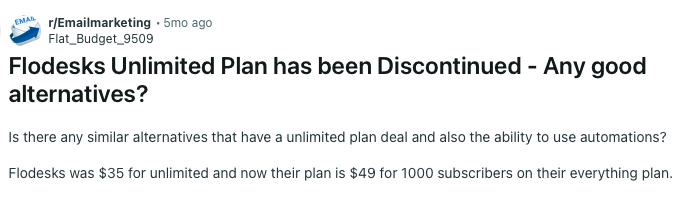
On December 2, 2025, Flodesk retired its flat-rate unlimited pricing for new users. The model that let businesses pay one fixed monthly fee regardless of list size is no longer available to anyone who did not have an active account before that date. Existing accounts are grandfathered indefinitely – but anyone evaluating Flodesk today is on a contact-tiered structure.
Flodesk pricing – annual billing:
| Subscribers | Lite plan | Pro plan |
| Up to 1,000 | $19/mo | $25/mo |
| Up to 2,500 | $29/mo | $35/mo |
| Up to 5,000 | $48/mo | $54/mo |
| Up to 10,000 | $66/mo | $72/mo |
The old flat rate was $35/mo (annual) for unlimited contacts. A business that grew from 2,500 to 10,000 subscribers over 12 months was paying $35/mo throughout that period. On the Pro plan today, that same growth trajectory moves from $35 to $54 to $72/mo as thresholds are crossed – more than double the original cost at the upper end.
The Lite plan is cheaper but carries a hard cap of 25,000 total subscribers and one workflow automation, making it non-functional for any business running more than a single active sequence. In practice, any Flodesk user who needs multiple automations – a welcome series, an abandoned cart flow, and a post-purchase sequence running simultaneously – is on the Pro plan.
One genuine mitigant: Flodesk counts only active subscribers toward tier limits. Unsubscribed, bounced, and cleaned contacts do not count. For businesses actively managing list hygiene, this slows the cost curve – but does not reverse it.
Cost comparison at scale – Flodesk vs. two alternatives (annual billing):
| Platform | 5k contacts/mo | 10k contacts/mo |
| Flodesk (new tiers) | $48 | $66 |
| Sender | $23.10 | $39.90 |
| Brevo | $26 – note: Brevo charges per send, not per contact | $26 |
For a full breakdown of what affects your email marketing pricing, see our guide to the true cost of email marketing.
This pricing change has prompted many users to start looking for alternatives:
The Zapier Tax
Flodesk has no native integration with WooCommerce or most CRMs, which matters most for WooCommerce email marketing: the standard workaround is Zapier, and that dependency adds a recurring cost that most platform comparisons exclude from their headline numbers.
Zapier pricing – annual billing:
| Plan | Monthly cost | Tasks/month |
| Free | $0 | 100 |
| Starter | $19.99 | 750 |
| Professional | $49 | 2,000 |
For a WooCommerce store running abandoned cart, post-purchase, and welcome sequences simultaneously – a realistic minimum for any ecommerce brand using email as a revenue channel – 100 tasks is exhausted within days. At 5,000 contacts with automations firing at normal frequency, the Professional plan at $49/mo is the practical floor.
Actual monthly cost – Flodesk Pro + WooCommerce via Zapier, 5,000 contacts (annual billing):
| Component | Monthly cost |
| Flodesk Pro (5k contacts) | $54 |
| Zapier Professional | $49 |
| Total | $103 |
Equivalent stack – Sender Standard + WooCoomerce, 5,000 contacts:
| Component | Monthly cost |
| Sender Standard (5k contacts) | ~$23 (annual billing) |
| Zapier | $0 – Sender has a native WooCommerce |
| Total | ~$23 |
The structural point holds regardless of the exact Sender figure: any platform with a native WooCommerce integration eliminates the $49/mo Zapier Professional cost entirely. That cost represents a 91% surcharge on top of Flodesk’s own $54/mo base price at the 5,000-contact tier.
Analytics That Cannot Drive Revenue Decisions
Flodesk’s email marketing metrics are not broken. They are scoped to engagement data, which is insufficient for any business running email as a revenue channel rather than a brand touchpoint.
What Flodesk’s analytics show:
- Opens, clicks, and unsubscribes per campaign
- Email performance trends over time, like best day to send, time-of-day opens, and clicks by device
- Workflow entries, completion rates, active subscribers, and workflow performance
What they do not show:
- Revenue attributed to individual emails or sequences
- Which automation generates the highest customer lifetime value
- Which product categories respond to which email type
- Whether abandoned cart emails are recovering lost sales
- Conversion attribution at any level
Here is the concrete problem. You run a seven-email Black Friday sequence that generates $12,000 in tracked revenue over five days. Flodesk can tell you that email #4 had the highest open rate. It cannot tell you that email #4 – the urgency send at 6pm on Black Friday – was directly responsible for $8,400 of those conversions because it was opened by buyers who purchased within two hours.
The exception is Flodesk Checkout, which offers somewhat deeper analytics on its own sales and customer data–but since Flodesk Checkout doesn’t integrate with Shopify or WooCommerce either, this only benefits users who’ve built their storefront inside Flodesk itself.
Klaviyo’s email revenue attribution produces that figure natively, without custom configuration, via its Shopify integration. For a design studio or service provider where email is primarily a relationship channel, this gap is irrelevant. For any business where email drives measurable revenue, it means optimising sequences based on incomplete information.
Support Tier Reality
Flodesk’s support structure is confirmed from their own documentation as of testing:
- Email support only – support@flodesk.com
- Help centre – self-serve articles at help.flodesk.com
- Flodesk Insiders Facebook Group – recommended by Flodesk for non-technical questions
Their own help article states: “We do not offer support via chat or phone at this time.” This applies across all plan tiers – there is no plan upgrade that unlocks live chat. Documented response time for email support is 24–48 hours. Priority support is referenced only on an unlisted enterprise tier not available through the public pricing page.
The business cost of a 24-hour response window is not abstract. Consider this scenario: a product launch sequence is timed to a 72-hour flash sale. A configuration error causes the workflow to stop firing after the first email. Subscribers who opted in during the launch window – your highest-intent segment – receive nothing further. The failure is not visible in Flodesk’s dashboard because the workflow shows as active; it is only caught three days later when conversion data does not match traffic levels.
If that launch sequence converts at 5% and your average order value is $110, three days of a silently broken workflow across 1,000 high-intent subscribers represents approximately $5,500 in unrecoverable missed revenue. A support ticket submitted at the moment of discovery with a 24-hour response window is resolved after the sale window has closed.
Brevo and ActiveCampaign both offer live chat on paid tiers, and Sender offers it free, with documented response times measured in minutes. That difference is not a quality judgment – it is a measurable operational risk reduction for businesses running time-sensitive automations.
How We Evaluated Flodesk Alternatives
Each platform was tested on its entry-level paid plan (or the most comparable tier to Flodesk Lite plan), with a standardized 1,000-contact list that had interacted with a newsletter in the last 90 days. Contacts were not purchased or scraped.
Features evaluated per platform:
- Email builder
- Automation depth (trigger types, conditional logic, branching)
- List/segment management
- Form builder and landing pages
- Deliverability (3rd party testing data)
- Support responsiveness on the entry-level plan
- Customer reviews (G2, Capterra, Trustpilot, Reddit)
- Pricing model
Deliverability testing: We monitored inbox placement, spam classification, and domain reputation across platforms during testing using GlockApps and EmailTooltester.
Results varied materially by domain warmup stage, sending frequency, and list quality in ways that made per-platform scores incomparable as standalone figures – so rather than publish numbers that would mislead more than inform, deliverability observations are incorporated into each platform’s qualitative assessment where they were meaningfully distinct.
User reviews: We gathered customer feedback from platforms like G2, Trustpilot, and Capterra, analyzing recurring themes such as ease of use, support quality, pricing transparency, and feature reliability. To avoid cherry-picking, we focused on patterns across a large volume of recent reviews and balanced both positive and negative feedback to reflect real user sentiment.
What was not tested: Enterprise features (SSO, dedicated IPs, custom SLAs), SMS sending at volume, and transactional email infrastructure beyond basic SMTP. This review is aimed at SMBs, independent creators, and agencies with lists of up to 50,000 contacts.
Platforms evaluated but not included – such as MailerLite – were excluded because their feature sets overlap significantly with tools already in this guide; a Flodesk vs MailerLite comparison would place MailerLite closest to Sender on automation depth and entry-level pricing.
Pricing methodology: All pricing is verified as of April 2026. Annual billing discounts are noted separately from monthly pricing, with all prices shown in USD. We highly recommend analyzing each platform’s pricing page directly before purchasing a subscription.
To learn more about our in-house testing methodology, head to this article, which breaks down the rigorous process we follow to deliver accurate, unbiased reviews.
Capterra, G2, Trustpilot, and Reddit to create an objective evaluation. Learn more about our review methodology
Top Flodesk Competitors At a Glance
| Platform | Best For | Free Plan | Starting Price | What Actually Sets It Apart |
| ActiveCampaign | B2B teams managing leads through a sales pipeline | No | $15/mo | Only platform here with a full native CRM – no third-party integration needed |
| Brevo | Large lists with low send frequency | Yes | $9/mo | Charges per email sent, not per contact stored – significantly cheaper for infrequent senders |
| GetResponse | Businesses that generate leads through webinars | Yes | $15/mo | Only platform here with a native webinar tool – no third-party hosting required |
| Sender | Small businesses needing automation and SMS without enterprise pricing | Yes | $7/mo | Full automation and native Shopify integration on the free plan – no Zapier dependency |
| Kit | Individual creators selling digital products or paid newsletters | Yes | $25/mo | Free plan supports up to 10,000 subscribers – the most generous in this guide |
| Klaviyo | Ecommerce stores that need to connect email sends to purchase revenue | Yes | $20/mo | Only platform here that shows exactly which email drove which purchase, natively |
| Mailchimp | Businesses whose stack requires a specific third-party integration | Yes | $13/mo | 300+ native integrations – the broadest ecosystem in this guide |
Pricing at Scale (Annual billing)
| Platform | 1k contacts | 5k contacts | 10k contacts | 25k contacts |
| Flodesk (Pro) | $25/mo | $54/mo | $72/mo | $155/mo |
| ActiveCampaign (Starter) | $15/mo | ~$71/mo | ~$139/mo | ~$299/mo |
| Brevo (Standard)* | $9/mo | $16/mo | ~$25/mo | ~$65/mo |
| GetResponse (Mktg Auto)**** | $49/mo | ~$79/mo | ~$109/mo | ~$189/mo |
| Kit (Creator)** | $33/mo | $75/mo | ~$100/mo | ~$166/mo |
| Klaviyo (Email)*** | ~$30/mo | $100/mo | ~$150/mo | ~$400/mo |
| Mailchimp (Standard) | $29/mo | ~$80/mo | ~$135/mo | ~$300/mo |
| Sender (Standard) | $7/mo | ~$23/mo | ~$40/mo | ~$80/mo |
All prices verified April 15, 2026. Annual billing assumed unless stated. Monthly billing rates are typically 15–25% higher. Prices reflect the lowest plan tier that includes marketing automation – free or entry plans without automation are excluded from this comparison.
Figures marked ~ are approximations. Most platforms use sliding-scale pricing tables that do not publish a price for every intermediate contact tier. Treat these as directional comparisons, not quoted prices – verify the exact figure for your contact count directly on each platform’s pricing page before committing.
*Brevo prices on email volume sent, not contact count. Figures assume 4 campaigns per month to the full list. A business sending less frequently pays less; one sending weekly pays more. Verify your actual send volume at brevo.com/pricing before comparing.
**Kit’s free Newsletter plan covers up to 10,000 subscribers for broadcast emails – no automations. Creator plan prices shown for users who need automated sequences. If broadcasts only, 1k–10k contacts cost $0.
***Klaviyo does not offer annual billing discounts. Prices are identical whether billed monthly or annually. Figures for 1k and 10k are approximations – verify exact tier at klaviyo.com/pricing.
****GetResponse Marketing Automation plan is the lowest tier that includes automation – the entry Email Marketing plan ($15/mo) excludes it. Figures for 5k, 10k, and 25k are approximations based on the published 1k entry price and confirmed contact-count scaling; verify at getresponse.com/pricing before comparing.
7 Flodesk Alternatives Reviewed Against the Same Criteria
We tested each Flodesk competitor on a live account over three months, evaluating automation logic, native integrations, analytics depth, support response time, and total cost at 5,000 contacts. Every tool in this guide was held to the same criteria – no sponsored placements, no demo-only assessments.
Sender — Email and SMS Automation From $7/Month
Sender is an email and SMS marketing platform built specifically for email marketing for small businesses and mid-sized teams that need automation depth without paying enterprise pricing.
It started as a straightforward email tool and has expanded into multi-channel automation including native SMS – a feature most platforms at this price point require Zapier to replicate. What it does not offer is predictive analytics such as forecasting customer lifetime value, churn risk, or expected next purchase.

Where it Outperforms Flodesk
Automation depth and volume. Sender’s workflow builder supports If/Else conditional branching, time delays, and multi-step sequences within a single workflow. In our testing, we built a post-purchase sequence that split by purchase history, branched again based on email opens, and applied different tags at each path – without leaving the canvas or passing subscribers through Zapier.
Flodesk’s builder supports a single Yes/No branch per condition and caps Lite plan users at one active workflow. On Sender, unlimited automation workflows are available on every plan, including free.
Custom events tracking. Sender supports custom event triggers – you can fire automations based on actions you define outside of standard email engagement, such as a product page visit, a loyalty milestone, or a form submission on a third-party tool. Flodesk’s automation triggers are limited to subscriber joins, tag changes, and date-based conditions.
Native ecommerce integration. Sender’s Shopify app – updated to the current API version in April 2026 – syncs customer data, triggers abandoned cart sequences, and tracks revenue from email campaigns without Zapier. WooCommerce and PrestaShop are also natively supported.
SMS in the same workflow. On paid plans, SMS steps sit inside the email automation builder. A sequence can send an email on day one, evaluate whether it was opened, and fire an SMS on day three if it was not – in one workflow, with no third-party connection. Free SMS credits are included on the Professional plan; Standard users purchase them separately at country-specific rates.
24/7 live chat support. Sender provides live chat on every plan including free, with a documented average response time of approximately 10 seconds. Flodesk’s only support channel is email, with a 24–48 hour response window and no chat or phone access on any plan.
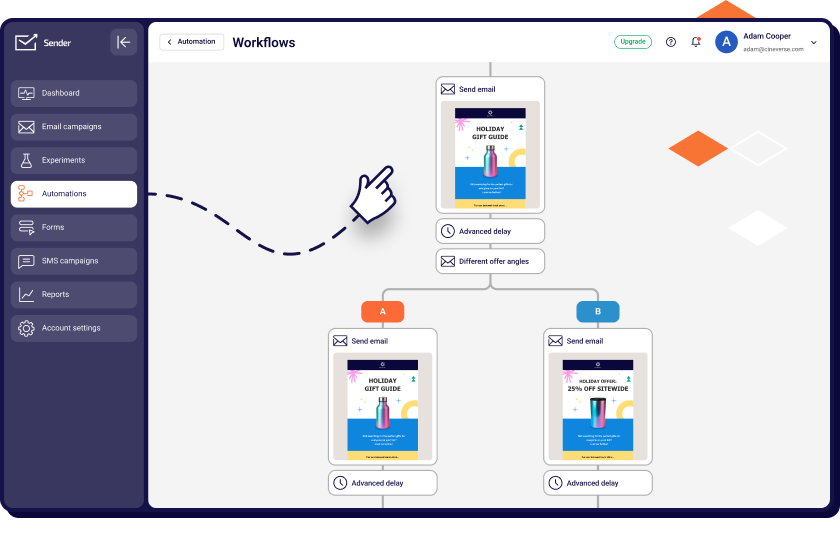
Migration: Sender makes migration easy by letting you import contacts from CSV, TXT, or XLSX files with field mapping and support for custom fields, so your subscriber data transfers over intact..
When to Choose Sender – and When Not To
Sender is the right choice if you are a small business or solopreneur who needs email marketing with SMS and live chat built in, without paying for each as a separate subscription.
The free plan is genuinely usable – not a crippled trial – and the paid tiers scale predictably without the per-contact price jumps. If your primary reason for leaving Flodesk is automation limitations and your list is under 25,000 contacts, Sender covers the gap without overcomplicating the switch.
Do not choose Sender if you are an ecommerce store that needs to see exactly which email drove which purchase – Klaviyo is built for that.
Do not choose it if you are a creator monetising through paid subscriptions or a newsletter ad network – Kit has tools Sender does not. And do not choose it if design quality is your primary concern leaving Flodesk; Sender’s templates are clean and functional, but they do not approach Flodesk’s visual standard.
Sender Pricing
| Plan | Subscribers | Emails/month | Monthly cost (annual billing) |
| Free Forever | Up to 2,500 | 15,000 | $0 |
| Standard | From 1,000 | 12× subscriber count | From $7/mo |
| Professional | From 1,000 | 24× subscriber count | From $14/mo |
| Enterprise | Unlimited | Unlimited | Custom |
The free plan includes Sender branding on emails and forms; all paid plans remove it. SMS credits on Standard are purchased separately. Professional includes free SMS credits.
Klaviyo — Revenue Attribution for Ecommerce Stores
Klaviyo is an email and SMS marketing platform where every feature is built around ecommerce purchase data – segmentation, triggers, analytics, and predictions all assume you have a product catalog and want to connect email activity to store revenue.
It was built for online retailers from the start, not adapted from a general email tool, and that origin explains both why its ecommerce capabilities have no close competitor in this guide and why it handles non-ecommerce use cases poorly.
Pay for it only if you will actually use the purchase data layer – for businesses where email is a relationship channel rather than a revenue driver, most of what makes Klaviyo expensive goes entirely unused.

Where it Outperforms Flodesk
Revenue attribution at the email level. Klaviyo connects email interactions to purchase events natively via its Shopify, BigCommerce, and WooCommerce integrations. In our testing, we could see exactly how much revenue each email in a sequence generated, which automation triggered the highest customer lifetime value, and which product categories responded to which message type.
Flodesk shows opens, clicks, and unsubscribes. It cannot tell you whether any of those opens resulted in a purchase.
Predictive analytics. Klaviyo’s AI layer identifies your highest-value customers, flags contacts at risk of churning, and predicts when a subscriber is likely to make their next purchase – without manual configuration. These predictions update in real time based on purchase history, browsing behaviour, and email engagement combined. Flodesk has no equivalent capability.
Behavioural triggers beyond email activity. Klaviyo fires automations based on specific products viewed, items added to cart, purchase value thresholds, time since last order, and predicted next purchase date. Flodesk’s Shopify integration supports abandoned cart recovery but does not trigger sequences based on browse behaviour, predicted value, or cross-sell conditions.
A/B testing across flows. Klaviyo supports split testing on subject lines, send times, email content, and entire flow paths. Flodesk has no A/B testing on any plan.
Segmentation depth. Klaviyo segments on any combination of purchase history, email engagement, predicted lifetime value, browsing behaviour, and custom properties synced from your store. For a business sending a VIP offer only to customers who have purchased twice in 90 days and opened at least three emails, Klaviyo handles this in one segment definition. In Flodesk, you are approximating it manually.
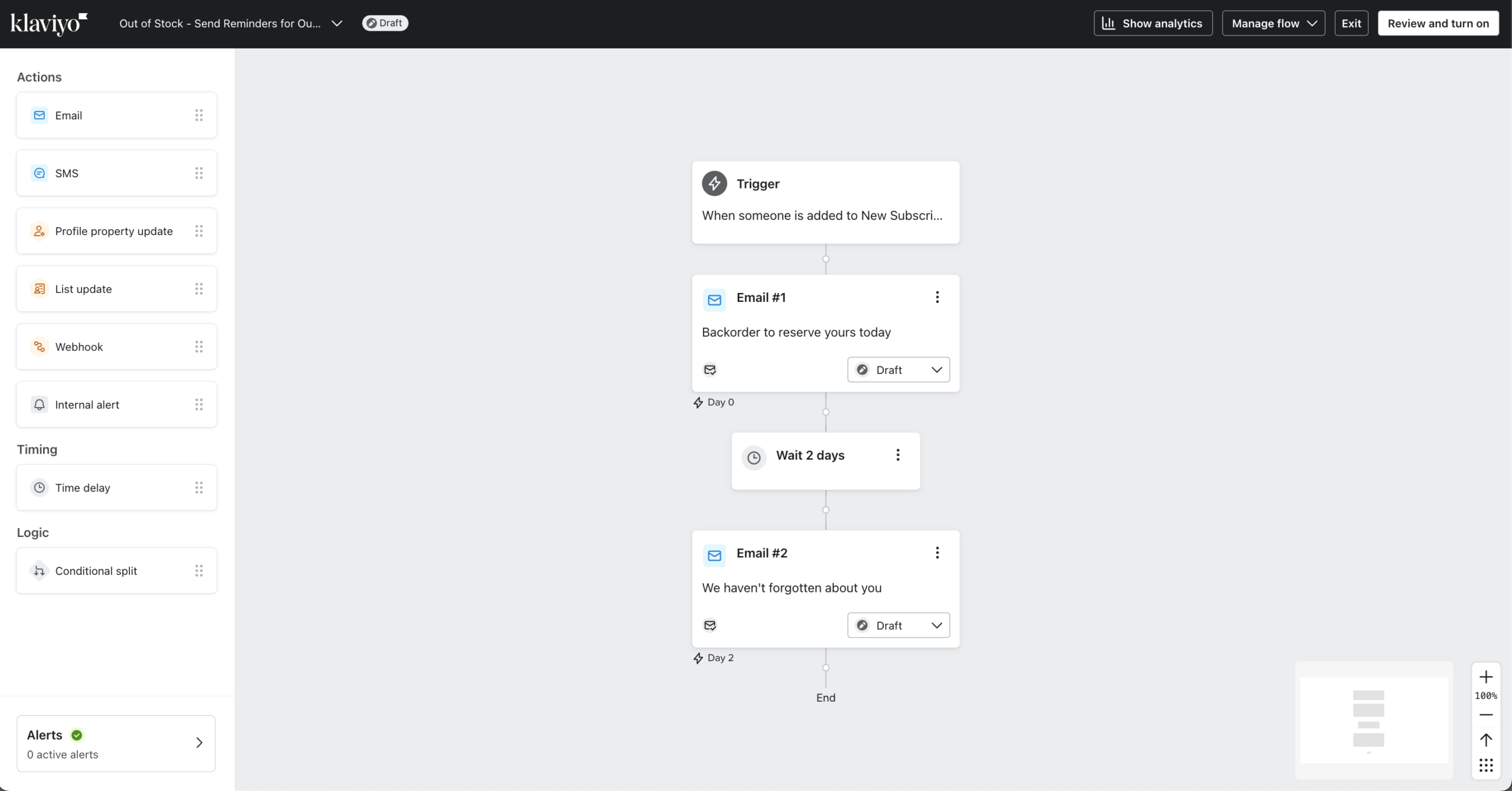
Migration: Moderate – self-serve CSV import with field mapping, migration guides for new accounts, and dedicated onboarding support on higher plans. Contact data transfers cleanly; workflow logic must be rebuilt natively.
When to Choose Klaviyo – and When Not To
Klaviyo is the right choice if you run a Shopify, BigCommerce, or WooCommerce store where email is a direct revenue channel and you need to know which specific campaigns and sequences are generating sales – not just which ones are being opened.
The revenue attribution, predictive analytics, and behaviour-based triggers justify the cost only when you are making decisions that require that data. If you are spending more than $1,000/month on paid acquisition and using email to recover, retain, and upsell those customers, Klaviyo pays for itself in ways that cheaper platforms cannot replicate.
Do not choose Klaviyo if your email programme is primarily newsletters, welcome sequences, or service-based communication where purchases are not trackable to individual email sends. At that use case you are paying for ecommerce infrastructure you will not use – Sender or ActiveCampaign will cover the automation depth at a fraction of the cost.
Do not choose it if your team is small and does not have two to three hours to configure flows correctly; the interface rewards investment and punishes impatience.
Klaviyo Pricing
| Plan | Contacts | Monthly cost |
| Free | Up to 250 | $0 (500 email sends, 150 SMS credits) |
| From 500 | From $20/mo | |
| Email + SMS | From 500 | From $35/mo |
Klaviyo pricing scales by active contact count with no annual billing discount – prices are the same month-to-month or annually. At 5,000 contacts, email-only plans reach approximately $100/mo. At 25,000 contacts, approximately $400/mo.
Kit (ConvertKit) — Free Email Automation Up to 10,000 Contacts
Kit is an email marketing platform built for individual creators – bloggers, course sellers, coaches, and newsletter writers – who need to grow an audience and monetise it directly from their email list.
It was built for creators from the start, and that origin shapes every decision: the tagging system is designed around content interests rather than purchase behaviour, the paid plans assume you are selling digital products or subscriptions rather than physical goods, and the integrations prioritise course platforms and creator tools over ecommerce stacks.
The free plan at 10,000 subscribers is the most generous in this guide by a significant margin – and the design tools are intentionally minimal to match. Anyone expecting Flodesk-level aesthetics or physical-product ecommerce will hit a ceiling quickly.

Where it Outperforms Flodesk
Free plan at scale. Kit’s free Newsletter plan supports up to 10,000 subscribers with unlimited broadcasts, landing pages, and forms – with no time limit. Flodesk’s free plan supports zero email sends. A creator with a 6,000-person list can run their entire newsletter programme on Kit for $0 indefinitely. That same list on Flodesk Lite costs $66/month.
Creator monetisation built in. Kit supports paid newsletter subscriptions, digital product sales, and recurring subscription payments natively on paid plans. You can sell a $15/month newsletter, a $49 course, or a $199 template pack directly through Kit without a separate checkout tool. Flodesk’s Everything plan includes checkout but charges $54–$107/month depending on contact tier for equivalent subscriber counts.
Tagging and subscriber scoring. Kit’s tagging system tracks which content topics subscribers engage with, which products they have purchased, and which lead magnets they used to subscribe – and builds segments from those combinations. Creator Pro adds engagement scoring that identifies your most and least active contacts automatically. Flodesk’s segmentation relies on manual tag assignment rather than behaviour-driven tagging.
Automation templates for creator workflows. Kit includes pre-built automation sequences for course launches, content upgrades, product launches, and webinar follow-ups – designed around how a creator moves a subscriber from free reader to paying customer, which reduces setup time for the specific workflows creators use most.
300+ integrations with creator tools. Teachable, Thinkific, Podia, Gumroad, Kajabi, Circle, Squarespace, and Stripe connect natively. Flodesk requires Zapier for most of these connections.
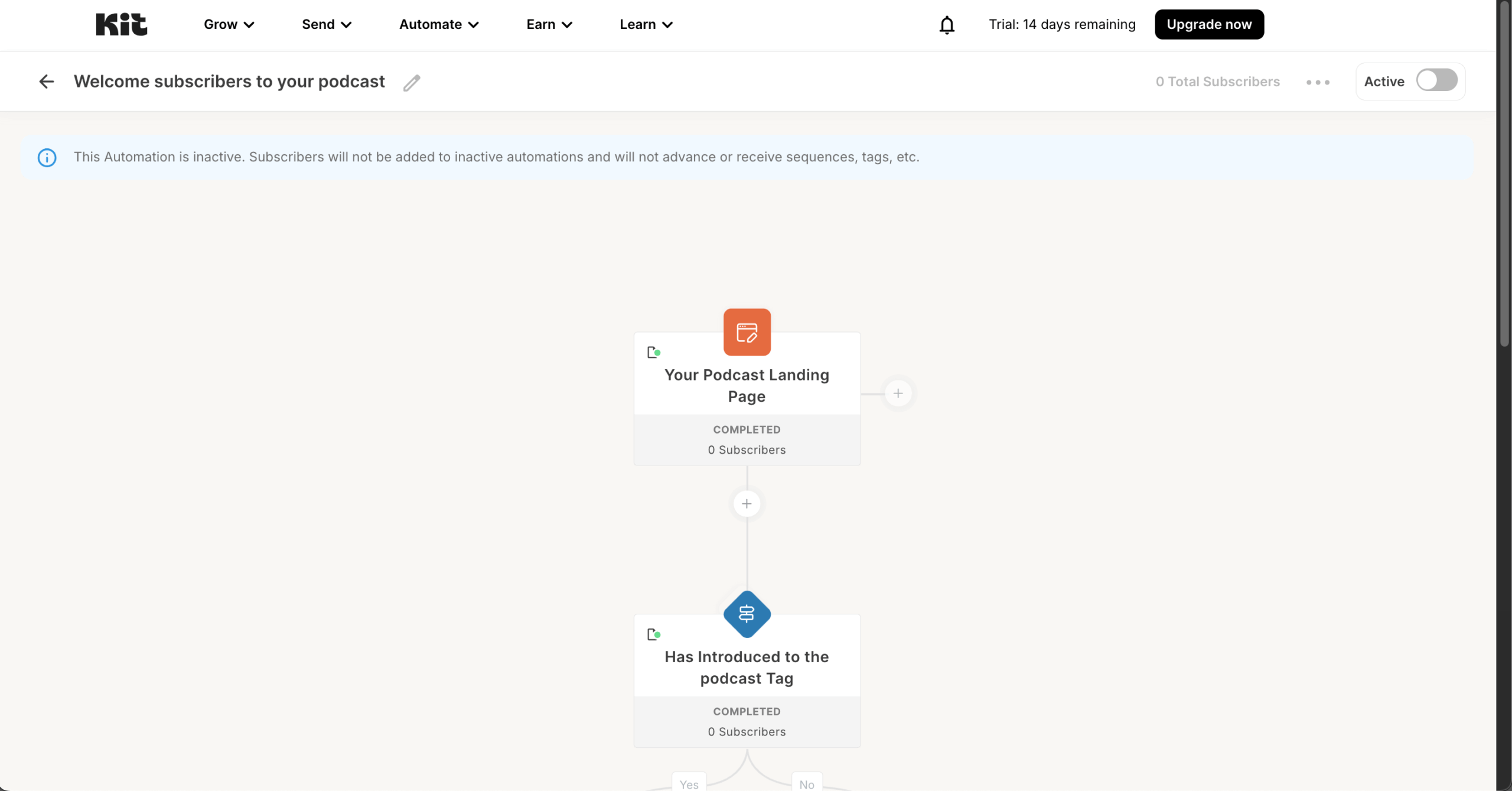
Migration: Easy – CSV import on all plans, with free concierge migration included on Creator plan ($29/mo and above). Contact data and tags transfer cleanly; automation sequences must be rebuilt natively.
When to Choose Kit – and When Not To
Kit is the right choice if you are an individual creator – blogger, coach, course seller, or newsletter writer – whose primary goal is building an owned audience and monetising it through digital products or paid subscriptions.
Among options for email marketing with free plan access, Kit’s 10,000-subscriber offering is genuinely rare in this market, and the paid tiers include creator-specific infrastructure – paid newsletter support, Teachable and Gumroad integrations, subscriber scoring – that no other platform in this guide approaches. If you are leaving Flodesk because you want to sell directly to your list without bolting on a separate checkout tool, Kit handles that natively.
Do not choose Kit if you run an ecommerce store selling physical products and need abandoned cart recovery, purchase-triggered automation, or revenue reporting – Klaviyo is the right tool for that. Do not choose it if visual email design is central to your brand identity; Kit’s templates are intentionally text-forward and minimal, and represent a significant step back from Flodesk’s aesthetic.
And do not choose it if you need multi-channel marketing – Kit does not offer SMS, and connecting it to one requires Zapier.
Kit Pricing
| Plan | Subscribers | Monthly cost (annual billing) |
| Newsletter (Free) | Up to 10,000 | $0 (broadcasts only, no automations) |
| Creator | From 1,000 | From $33/mo |
| Creator Pro | From 1,000 | From $66/mo |
Creator adds automations, sequences, and paid newsletter support. Creator Pro adds unlimited team members, subscriber scoring, and 24/7 priority support. The free Newsletter plan excludes automations entirely – any subscriber journey beyond a single broadcast requires upgrading.
ActiveCampaign — CRM and Email in One Platform
ActiveCampaign is a marketing automation platform with a built-in CRM, where the workflow builder, contact database, and sales pipeline share the same data layer. It was built for B2B and service businesses that treat each lead as part of a managed relationship – not just an email address – and that origin explains why its automation logic is the deepest in this guide while its ecommerce features are secondary to tools built specifically for stores.
Nothing in this guide matches it for conditional automation depth and native CRM – but both the learning curve and the cost are hard to justify unless your programme actually uses the CRM alongside email, not just email on its own.
Where it Outperforms Flodesk
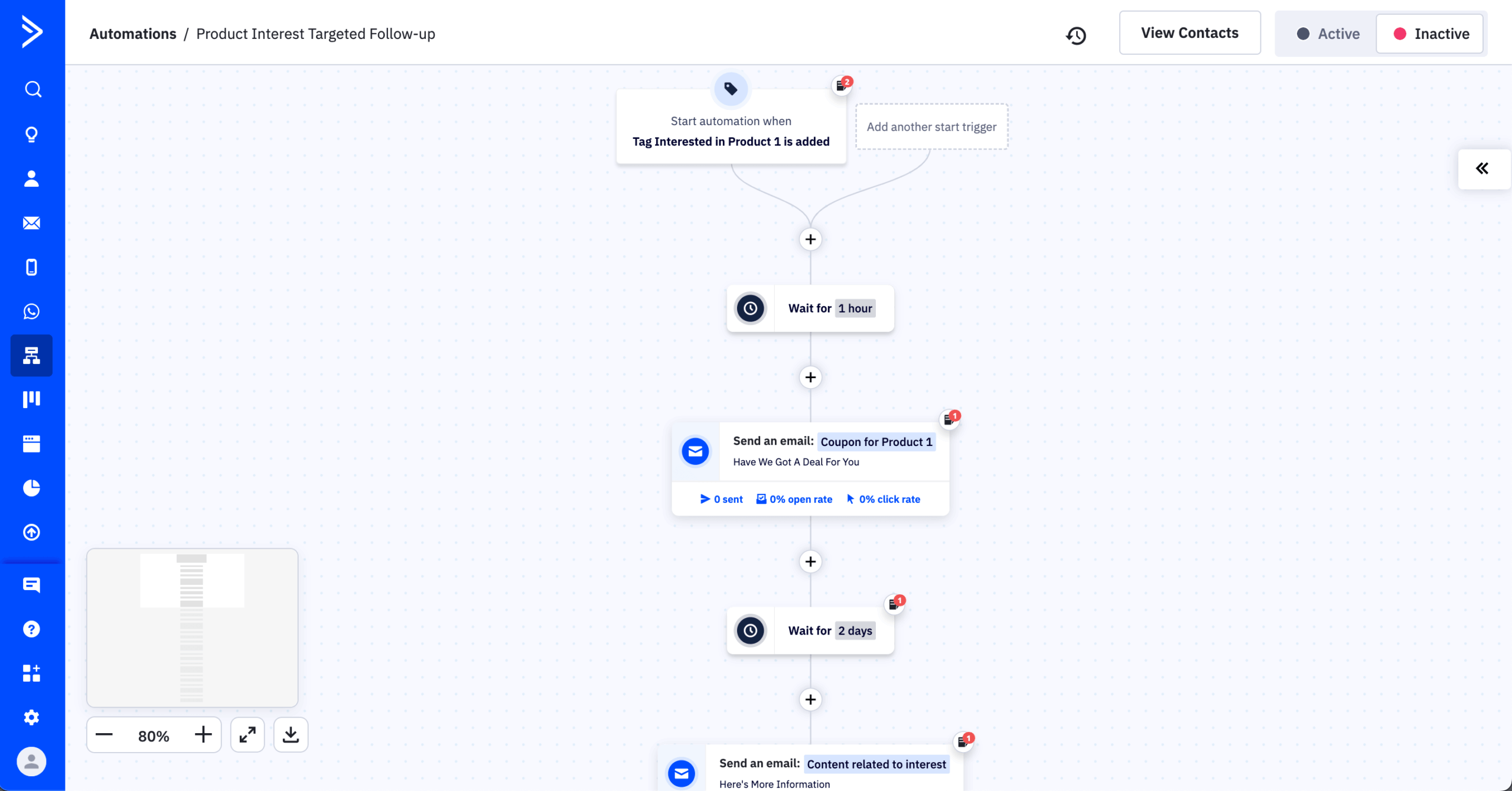
Multi-branch automation with conditional logic. ActiveCampaign’s workflow builder supports conditional branching, goal steps, wait-until conditions, and split testing within a single flow. In our testing we built a 12-step lead nurture sequence that split by industry, re-entered contacts who returned to specific pages, and triggered CRM deal creation when a contact reached a purchase-intent score threshold.
Flodesk’s automation builder cannot replicate this without Zapier and multiple disconnected workflows.
Built-in CRM with lead scoring. ActiveCampaign includes a CRM with deal pipelines, task management, and lead scoring on all paid plans. A contact’s score updates automatically based on email engagement, website visits, and form submissions, and triggers automations when it crosses a defined threshold. Flodesk has no CRM and no lead scoring at any tier.
900+ native integrations. ActiveCampaign connects natively to Shopify, WooCommerce, Salesforce, HubSpot, Calendly, Typeform, and most major business tools. Flodesk’s native integration list is small, with Zapier covering the gap at additional cost.
SMS, site messaging, and conversation tools. ActiveCampaign supports SMS marketing, on-site messaging triggered by contact data, and a conversations inbox for managing real-time chat alongside automation. Flodesk is email-only.
A/B testing and send time optimisation. ActiveCampaign supports split testing on subject lines, content, send times, and entire automation paths. Flodesk has no A/B testing.
Migration: Moderate – free one-to-one migration assistance on Plus plans and above, including automation rebuild support. Contact data and tags transfer via CSV; the onboarding team assists with workflow reconstruction.
When to Choose ActiveCampaign – and When Not To
ActiveCampaign is the right choice if you are a B2B business, agency, or service provider that needs to manage leads through a defined sales pipeline while running parallel marketing automation – and you want both in one system rather than a separate CRM and email platform.
It is also the correct tool if your automation requirements exceed what Flodesk, Sender, or Kit can execute in a single workflow: multi-branch conditional logic, goal-based triggers, lead scoring thresholds, and CRM-connected sequences are where it has no close competitor at its price point.
Do not choose ActiveCampaign if your email programme is primarily broadcast newsletters or simple ecommerce-triggered flows – the CRM and pipeline infrastructure you are paying for goes unused, and Sender or Klaviyo will serve you more efficiently. Do not choose it if your team has no dedicated marketing operations resource; the workflow builder is capable but not forgiving, and misconfigured logic is easy to miss in complex sequences.
And do not choose it if revenue attribution for an online store is your primary need – ActiveCampaign’s ecommerce features exist but are secondary to its automation and CRM strengths.
ActiveCampaign Pricing
| Plan | Contacts | Monthly cost (annual billing) |
| Starter | From 1,000 | From $15/mo |
| Plus | From 1,000 | From $49/mo |
| Pro | From 1,000 | From $79/mo |
| Enterprise | From 1,000 | From $145/mo |
Starter includes email marketing and basic automation. Plus adds CRM, landing pages, and SMS. Pro adds predictive sending, split automations, and site messaging. All tiers scale by contact count – at 10,000 contacts, Starter reaches approximately $149/mo.
Mailchimp — 300+ Integrations, No Free Automations
Mailchimp is a general-purpose email marketing platform built to serve the widest possible range of businesses – from solo operators sending occasional newsletters to mid-market teams running multichannel campaigns. It was built as a mass-market email tool first and accumulated features over time – landing pages, social posting, ads, surveys – without developing the ecommerce depth of Klaviyo or the creator focus of Kit.
Its 300+ native integrations and the ecosystem of third-party experts built around it remain the clearest reasons to choose it – but a 2024 billing change means unsubscribed contacts count toward your tier, so the effective cost is consistently higher than the headline figures suggest.

Where it Outperforms Flodesk
300+ native integrations. Mailchimp connects natively to Shopify, WooCommerce, Salesforce, Stripe, QuickBooks, Canva, and most major marketing and business tools without Zapier. This is its clearest structural advantage over Flodesk, which requires Zapier for most third-party connections.
A/B and multivariate testing. Mailchimp supports subject line, content, and send time split testing on paid plans, and multivariate testing on Standard and Premium. Flodesk has no A/B testing at any tier.
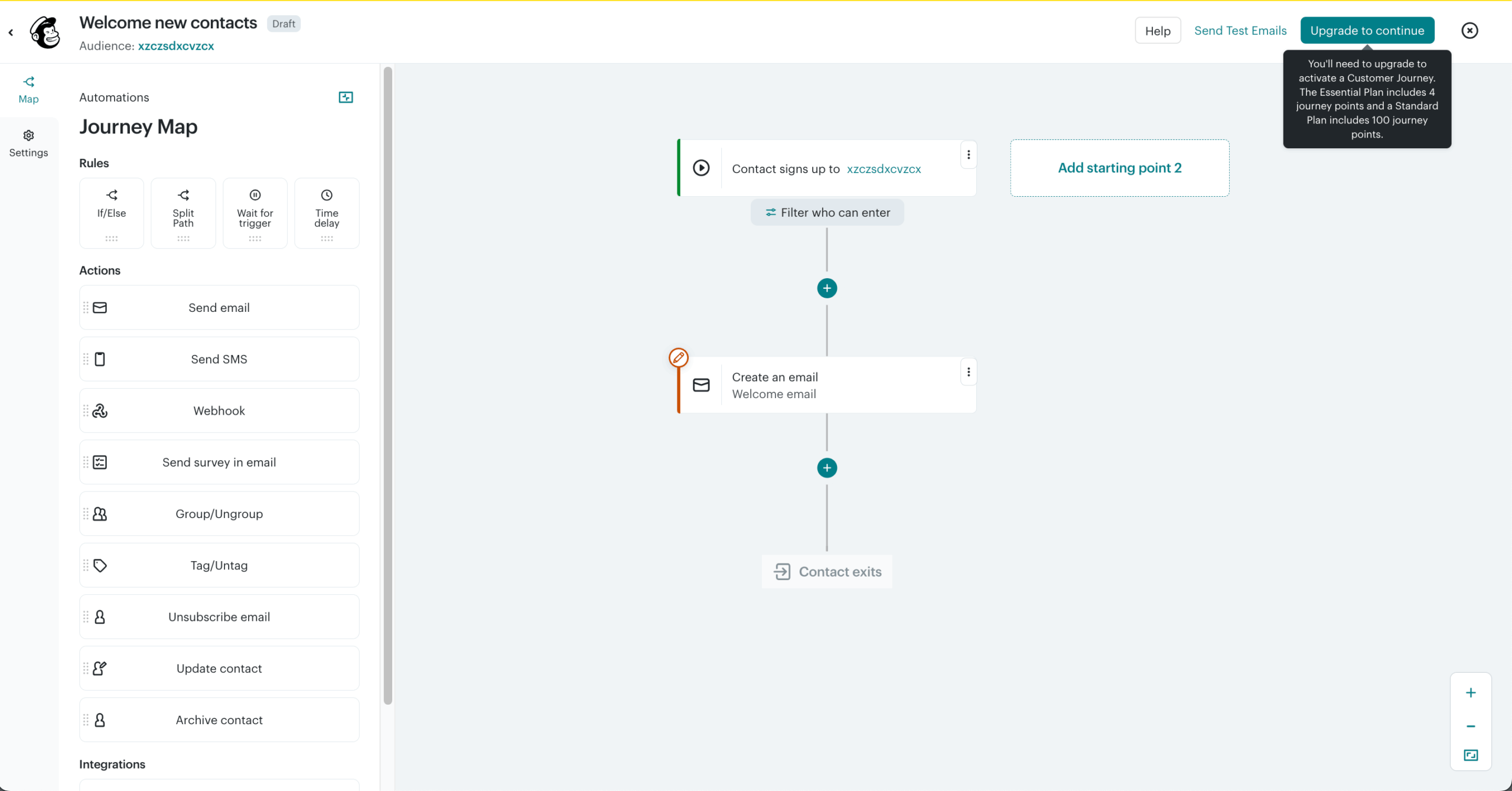
Pre-built customer journey templates. Mailchimp includes automation templates for welcome series, abandoned cart, re-engagement, and post-purchase sequences with pre-configured logic and timing built in. Flodesk’s automation builder requires manual configuration from a blank canvas.
Ecommerce reporting via Shopify integration. Standard and Premium plans include purchase likelihood scoring, customer lifetime value estimation, and campaign revenue reporting. This is less granular than Klaviyo but meaningfully more than Flodesk’s open-and-click reporting.
Social media ad management. Mailchimp lets you create and manage Facebook and Instagram ad campaigns from the same dashboard as your email programme. Flodesk is email-only.
Migration: Moderate – CSV import on all plans. Contact tags and list segments require manual remapping; automation workflows must be rebuilt. Mailchimp’s export includes subscriber history and opt-in dates, which is useful for GDPR documentation during migration.
When to Choose Mailchimp – and When Not To
Mailchimp is the right choice if a specific integration in its 300+ native library is the deciding factor – a legacy CRM, a niche booking system, or a tool that other platforms in this guide do not connect to natively.
It is also a reasonable choice for small businesses that want a recognisable, well-documented platform with a large community of third-party experts, templates, and tutorials, and are not in a position to evaluate alternatives carefully. The breadth of its ecosystem remains its strongest argument.
Do not choose Mailchimp if cost efficiency is a priority – its 2024 change to billing for all contacts including unsubscribed ones means your effective cost is higher than the headline pricing suggests, and Sender or Brevo deliver comparable or better automation at lower per-contact rates across most list sizes. Do not choose it if you need a free plan with working automations; Mailchimp’s free tier excludes them entirely.
And do not choose it if you are leaving Flodesk specifically because of the pricing model change – Mailchimp’s pricing trajectory has moved in the same direction and carries similar scaling penalties.
Mailchimp Pricing
| Plan | Contacts | Monthly cost |
| Free | Up to 250 | $0 (500 sends/mo, no automations) |
| Essentials | From 500 | From $13/mo |
| Standard | From 500 | From $20/mo |
| Premium | From 10,000 | From $350/mo |
Important: Mailchimp bills for all contacts in your account including unsubscribed. Audit and remove inactive contacts before importing or your effective tier will be higher than your active list size suggests.
Brevo — Pricing Based on Sends, Not Contact Count
Brevo is a multichannel marketing platform – email, SMS, WhatsApp, and live chat – where pricing is calculated on monthly email volume sent rather than the number of contacts stored. It was built as a European alternative to US-centric email platforms and expanded into a broader marketing stack with a built-in CRM, transactional messaging, and real-time conversation tools included at lower price points than comparable platforms.
If you have a large list but send to rotating segments rather than the full audience on every campaign, Brevo’s per-send pricing will cost less than any contact-based platform in this guide – sometimes by a significant margin. The trade-off is design quality and automation depth, both of which lag behind the leaders.
Where it Outperforms Flodesk
Native WhatsApp and SMS alongside email. Brevo supports WhatsApp campaigns, SMS, and email from a single workflow. You can trigger a WhatsApp follow-up based on an email non-open, or route a live chat conversation into an automation sequence. Flodesk is email-only.
Built-in CRM with contact scoring. Brevo includes a CRM with deal pipelines, contact scoring, and task management on paid plans – covering the fundamentals without requiring a separate subscription.
Transactional email on the same account. Brevo handles order confirmations, password resets, and system notifications from the same account as marketing campaigns, using separate sending infrastructure to protect marketing deliverability. Flodesk does not offer transactional email.
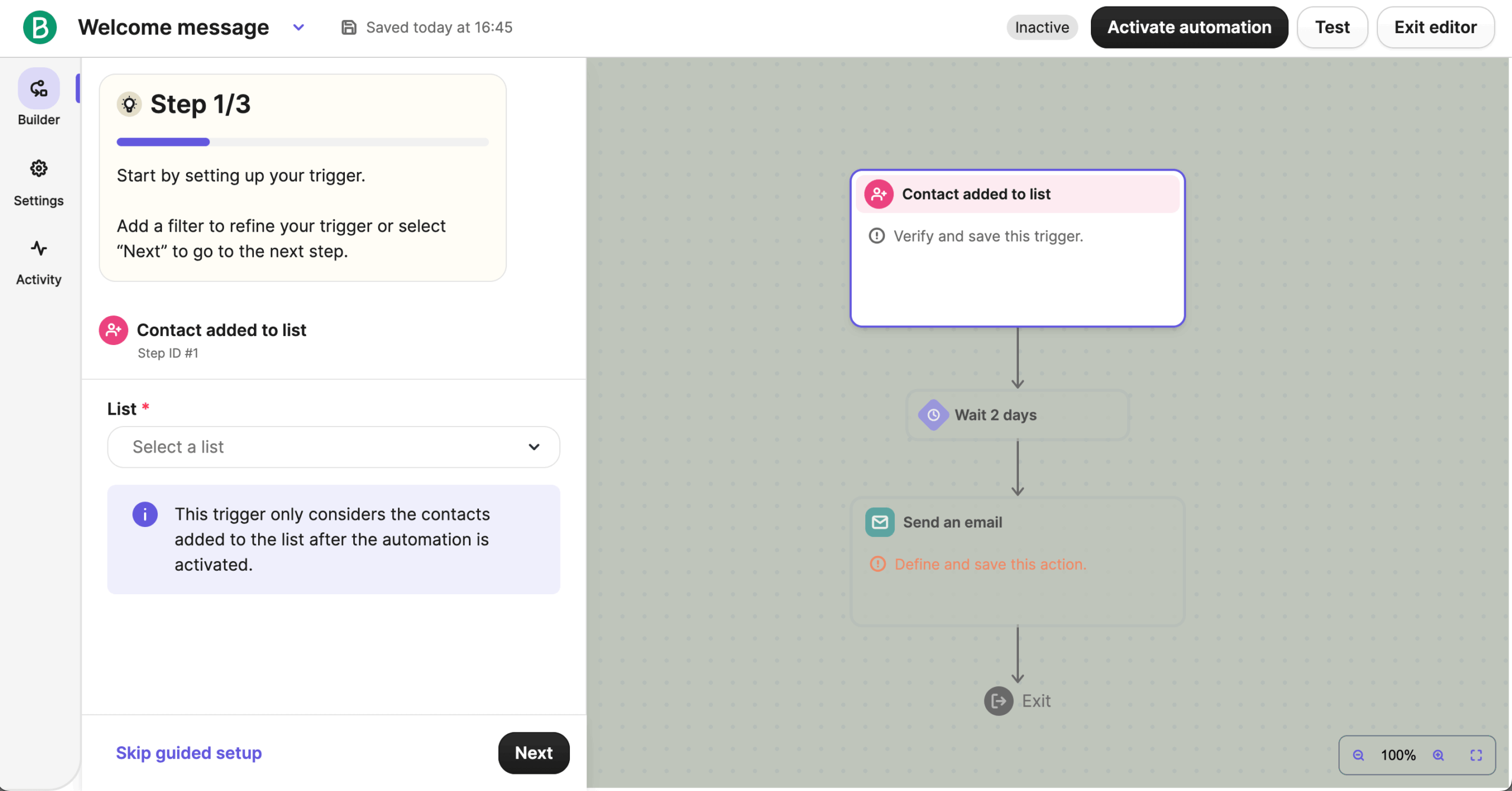
Migration: Easy – CSV import with field mapping, plus native imports from Mailchimp and Klaviyo. Automation workflows must be rebuilt; contact data, tags, and opt-in history transfer cleanly.
When to Choose Brevo – and When Not To
Brevo is the right choice if you have a large contact list but send to segments rather than your full list on every campaign – the per-send pricing model makes it significantly more economical than any contact-count-based platform in that scenario.
It is also the correct tool if you need WhatsApp marketing alongside email, or if you want a built-in CRM and transactional email infrastructure without paying ActiveCampaign’s prices. A business with 30,000 contacts that sends to rotating segments of 5,000 at a time will pay less on Brevo than on any other platform in this guide.
Do not choose Brevo if your programme involves sending to your full list on a weekly or near-weekly basis – at that frequency, per-send pricing compounds quickly and contact-based platforms become more economical above a certain volume threshold. Do not choose it if email design quality is a primary concern; Brevo’s templates are functional but not design-forward, and represent a step down from Flodesk’s output.
And do not choose it if you rely on Zapier to remove the Flodesk dependency – Brevo’s native integration coverage is better than Flodesk’s but narrower than Mailchimp’s or ActiveCampaign’s.
Brevo Pricing
| Plan | Emails/month | Monthly cost |
| Free | Up to 9,000 (300/day cap) | $0 (100,000 contacts) |
| Starter | Up to 5,000 | From $9/mo |
| Standard | Up to 20,000 | From $18/mo |
| Professional | Up to 150,000 | From $499/mo |
| Enterprise | Custom | Custom |
Starter excludes marketing automation and A/B testing – those require Standard minimum. Logo removal is included on Standard and above; Starter emails carry Brevo branding. Monthly prices shown; annual billing reduces costs by 10%.
GetResponse — Email Marketing With Built-In Webinars
GetResponse is a marketing platform that combines email, automation, webinars, landing pages, and conversion funnels in a single subscription. It started as an email marketing tool and expanded into webinar hosting and course creation over time, making it one of the few platforms where you can run a lead-generation webinar and automate the follow-up sequence from the same dashboard without a third-party integration.
The webinar and funnel bundling is genuine value – but only if you use both. Pay for the tier that includes marketing automation ($49/mo minimum) without running webinars, and you are funding infrastructure that Sender, Brevo, or Kit deliver more efficiently at lower cost.
Where it Outperforms Flodesk
Webinars built into the platform. GetResponse’s Marketing Automation and Ecommerce plans include webinar hosting for up to 100–500 attendees with registration pages, automated reminders, and post-webinar follow-up sequences. Running the equivalent with Flodesk requires a separate webinar platform plus Zapier to connect registration data to your email list – typically adding $49–$99/mo and another integration dependency.
Conversion funnels with stage-level tracking. GetResponse includes a funnel builder that connects a landing page, lead capture form, upsell page, and email sequence into a single trackable flow with conversion reporting at each stage. Flodesk has individual landing pages and workflows but no funnel-level conversion tracking across them.
Ecommerce triggers for abandoned cart and post-purchase. GetResponse connects natively to Shopify, WooCommerce, and Magento and triggers abandoned cart, post-purchase, and product recommendation sequences from purchase data, with revenue attribution per campaign.
Course creation on higher plans. GetResponse’s paid tiers include a course builder for creating and delivering online courses without a separate platform. Flodesk does not offer course creation.
A/B testing on all paid plans. GetResponse supports subject line and content split testing across all paid tiers. Flodesk has no A/B testing.
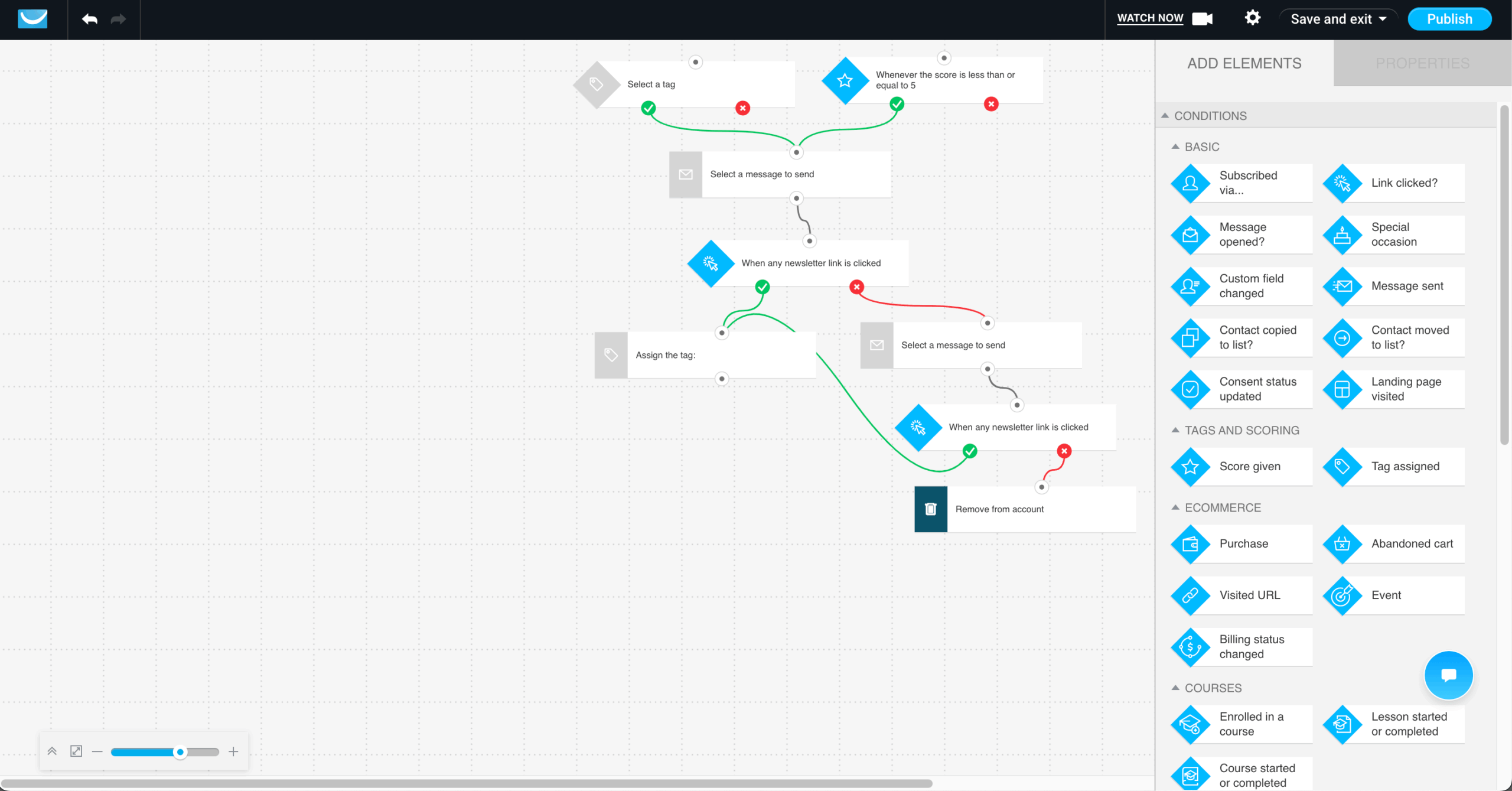
Migration: Easy – CSV import with custom field mapping. Contact data and tags transfer cleanly; automation sequences must be rebuilt. Webinar registration history and funnel performance data do not export in a reusable format.
When to Choose GetResponse – and When Not To
GetResponse is the right choice if webinars are an active part of your lead generation or sales process and you want to manage registration, delivery, and follow-up automation in a single subscription. The bundled value – webinar hosting, conversion funnels, email automation, and landing pages – is real if you use all of it; a business running monthly webinars and automating the post-webinar sequence would otherwise spend $49/mo on a webinar platform plus their email tool separately.
It is also worth considering for coaches and course creators who want email, landing pages, and course delivery without stitching three tools together.
Do not choose GetResponse if you do not use webinars or funnels – the entry plan excludes marketing automation, and once you upgrade to the $49/mo tier to get it, Sender or ActiveCampaign deliver equivalent or deeper automation without the feature bundling you are not using. Do not choose it if ecommerce revenue attribution is your primary need; GetResponse’s ecommerce features require the $97/mo plan, at which point Klaviyo delivers more purpose-built store intelligence for comparable spend.
And do not choose it if you are evaluating on pricing stability – GetResponse has changed its tier structure multiple times in the past 18 months, so verify current pricing directly before committing.
GetResponse Pricing
| Plan | Contacts | Monthly cost (annual billing) |
| Free | Up to 500 | $0 (basic features, no automation) |
| Email Marketing | From 1,000 | From $15/mo |
| Marketing Automation | From 1,000 | From $49/mo |
| Ecommerce Marketing | From 1,000 | From $97/mo |
Marketing automation, webinars, and advanced segmentation require the $49/mo tier minimum. Ecommerce features including abandoned cart and revenue attribution require the $97/mo plan. All plans scale by contact count. Verify current figures at getresponse.com/pricing before committing.
Migration Guide from Flodesk
Most articles about Flodesk alternatives stop at recommendations. The part most users actually need – particularly those actively switching from Flodesk right now – is this one: what happens when you make the decision. We have documented what transfers, what requires rebuilding, and what is gone permanently – in that order, because the third category is the one most people discover too late.
What Transfers from Flodesk – and What Doesn’t
Transfers cleanly:
- Your subscriber list exports as a CSV with all custom fields intact via Audience → All Subscribers → Export.
- Email address, first name, last name, join date, and any custom fields you have configured all come across.
- Tags and segments export as columns in the same file – they require remapping on import to the new platform, but the data is present.
Requires rebuilding from scratch:
No universal export format exists between email platforms. All email automation workflows – welcome series, abandoned cart, post-purchase sequence, re-engagement – must be reconstructed manually in your new platform regardless of which one you choose. There is no shortcut.
Flodesk’s design system is proprietary. No other platform can import Flodesk templates, even as HTML. If you attempt an export and import, the visual output degrades significantly. Plan to rebuild from the new platform’s template library.
Embed codes are platform-specific. Every form on your website, landing pages, or link-in-bio tools must be replaced with new embed codes after migration. If you have forms across multiple pages, audit every placement before you start.
SPF, DKIM, and DMARC are configured per sending platform. When you switch, these must be reconfigured in your DNS for the new provider before your first send. Sending without authentication damages deliverability immediately.
Lost permanently after cancellation:
Flodesk’s font and layout engine is what most departing users miss most acutely – and underestimate before they leave. No platform reviewed in this guide replicates Flodesk’s design philosophy. If email aesthetics were the reason you chose Flodesk originally, reconcile with that trade-off before migrating rather than after.
Historical campaign performance data – open rates, click rates, campaign-level analytics – remains inside Flodesk and cannot be imported into another platform in a usable format. Export every performance report as CSV before cancelling. Once your account closes, this data is not recoverable.
Per-subscriber engagement history at the individual contact level is not exportable in a format other platforms accept. If you use engagement data for suppression lists or re-engagement targeting, export it before migration and document manually which contacts meet your criteria.
Step-by-Step Migration Checklist
If Sender is your destination, our step-by-step migrate to Sender guide covers the exact import, authentication, and warm-up sequence referenced below.
30 Days Before Switching
- Export your full subscriber list with all custom fields and tags: Flodesk → Audience → Export. Open the CSV immediately and verify every column is present.
- Screenshot or document every active automation workflow – name, trigger, all conditions, email sequence order, and timing between steps. A spreadsheet with one row per step per workflow is the most migration-friendly format.
- List every active form and its exact placement: website pages, landing pages, link-in-bio tools, third-party embeds. This list becomes your post-migration update checklist.
- Note your current SPF, DKIM, and DMARC configuration from your DNS provider. You will need these reference points when configuring the new platform.
- Download all past campaign performance reports as CSV from Flodesk’s analytics section. Do this now, not on the day you cancel.
- List every Zapier Zap connected to Flodesk with its trigger, action, and any filters. Decide which ones the new platform replaces natively and which need to be rebuilt.
- Sign up for your new platform and begin building during the overlap period. Do not cancel Flodesk until the new setup is fully live and tested.
even on the free plan.
During Migration
- Import subscribers to the new platform. Do not use auto-mapping – verify every field manually before completing the import. A mismatched custom field at import propagates incorrectly through every subsequent automation.
- Rebuild your highest-priority automations first: welcome series, abandoned cart if applicable, post-purchase sequence. These directly affect revenue and subscriber experience if they go dark during the transition.
- Recreate and test at least one email template before migrating your full campaign schedule. Send a test to yourself and check rendering across Gmail, Outlook, and Apple Mail – the same email can look materially different across clients.
- Configure SPF, DKIM, and DMARC on the new platform and verify authentication before sending anything. Use MXToolbox to confirm all three records resolve correctly.
- Run your first send to your most engaged segment only – not your full list. New sending infrastructure needs to be warmed gradually; starting with your best-engaged subscribers builds sender reputation before you reach the rest of the list.
- Update all embedded forms on your website and landing pages with the new platform’s embed codes, working through the placement list built in the 30-day prep phase.
- Reconnect or rebuild any Zapier automations your programme depends on. If the new platform has a native integration that replaces a Zap, set up the native connection first and confirm it is working before deactivating the Zap.
30 Days After Switching
- Monitor deliverability metrics weekly for the first month: inbox placement rate, bounce rate, and spam complaint rate. A bounce rate above 2% or a spam complaint rate above 0.08% on any send requires immediate attention.
- Compare open rates against your Flodesk baseline. Expect 5–15% variance during the IP warm-up period – this is normal and temporary, not a signal that you chose the wrong platform.
- Confirm all embedded forms are capturing new subscribers correctly and that new sign-ups are entering the correct entry automations.
- Audit a sample of new subscribers who have moved through your rebuilt automations and verify they received the correct emails at the correct intervals.
- Cancel your Flodesk subscription only after confirming all automations are live, all forms are updated, all data has been exported, and at least two weeks of deliverability data looks stable. Cancelling early to save one month’s cost while your new setup is still settling is not worth the risk.
FAQs
For the right user, yes. If you are a solo creative, service provider, or small brand where email design quality matters more than automation depth, and you signed up before December 2025 on the grandfathered flat-rate plan, Flodesk still delivers its core value. For anyone evaluating it fresh today, the new tiered pricing removes its primary cost advantage. At 5,000 contacts on the Pro plan, you are paying $54/month for a single-branch automation builder with no A/B testing and email-only support – at which point the alternatives in this guide offer more for the same spend.
None match it directly – that is not a hedge, it is the honest answer. Flodesk’s design system is its most defensible differentiator and no platform reviewed here replicates it. Of the seven alternatives, Klaviyo comes closest for ecommerce-oriented design, and Kit’s templates are clean if minimal. If design quality is your primary reason for staying on Flodesk, the migration cost is real: you will spend time rebuilding visual identity in a system with fewer layout controls, regardless of which platform you choose.
The Flodesk vs Klaviyo migration is moderately difficult, and the difficulty is front-loaded. Contact data transfers cleanly via CSV with field mapping. The time cost is in rebuilding automation workflows – Klaviyo’s flow builder uses different logic architecture than Flodesk’s, and each workflow must be reconstructed natively. Expect two to four hours per complex workflow for someone unfamiliar with Klaviyo. Klaviyo provides migration guides and dedicated onboarding on higher plans. The full migration including authentication setup, template rebuilding, and list warming typically takes two to three weeks done properly.
Sender. The free plan includes unlimited automation workflows for up to 2,500 subscribers – not a trial, not a feature-capped version, the full automation builder. Paid plans start at $7/month for 1,000 contacts with 12,000 emails per month. For context, Flodesk Lite starts at $19/month and limits you to one workflow. If budget is the primary driver of your Flodesk departure and your list is under 25,000 contacts, Sender is the most direct replacement without meaningful feature trade-offs at that price point.
Kit. It handles paid newsletter subscriptions, one-time digital product sales, and recurring memberships natively on paid plans, with direct integrations to Teachable, Gumroad, Thinkific, and Podia. The free Newsletter plan supports up to 10,000 subscribers with unlimited broadcasts – a genuine free tier for creators still building their audience. The trade-off is design: Kit’s templates are text-forward and minimal. If you need both strong design and digital product sales, the combination does not exist cleanly in one platform – Kit handles the commerce; Flodesk handles the aesthetics.