


This guide covers each of the 12 platforms across three categories: Creator and Small Business (Sender, Kit, Flodesk, Mailchimp, Brevo), CRM-Integrated (ActiveCampaign, HubSpot, Zoho Campaigns, EngageBay), and Ecommerce (Klaviyo, Omnisend, Drip). For each email marketing automation platform, we cover automation capabilities, real limitations, pricing at four contact thresholds, and the buyer it serves.
How We Evaluated Email Marketing Automation Softwares
Each platform was tested on its entry-level paid plan, using a standardized 1,000-contact list that had interacted with a newsletter in the last 90 days. Contacts were not purchased or scraped. Testing ran over three months on live accounts — not demos — with identical campaign structures replicated across every platform.
Features evaluated per platform:
- Email builder and autoresponder software functionality (templates, drag-and-drop, custom HTML)
- Email workflow automation depth (trigger types, conditional logic, multi-branch workflows)
- List and segment management (custom fields, behavioral segmentation, tag logic)
- Form builder and landing pages
- Deliverability (third-party testing data)
- Support responsiveness on the entry-level plan
- Customer reviews (G2, Capterra, Trustpilot, Reddit)
- Pricing model (transparency, scaling structure, hidden costs)
Email deliverability testing: We monitored inbox placement, spam classification, and domain reputation using GlockApps and EmailTooltester with identical campaign setups for parity. Results varied by domain warmup stage and list quality, so deliverability observations are incorporated into each platform’s qualitative assessment, with consolidated benchmark data shown in the Deliverability section below.
User reviews: We gathered customer feedback from G2, Trustpilot, Capterra, and Reddit, analyzing recurring themes such as ease of use, support quality, pricing transparency, and feature reliability. We focused on patterns across recent reviews — not isolated complaints — and balanced positive and negative feedback to reflect real user sentiment from the past 12 months.
What was not tested: Enterprise features (SSO, dedicated IPs, custom SLAs), SMS at volume above standard plan limits, and transactional email infrastructure beyond basic SMTP. This review is aimed at SMBs, creators, and agencies with lists up to 50,000 contacts. Platforms excluded — MailerLite, Constant Contact, Moosend — were left out because their feature sets overlap significantly with tools already here.
Pricing methodology: All pricing verified May 2026, USD, on annual billing unless noted. Several platforms require interpretation: Brevo prices on email send volume rather than contact count, ActiveCampaign and HubSpot pricing vary materially by feature tier, and Mailchimp bills for unsubscribed contacts since its 2024 change. Where we show approximate figures, they are directional comparisons — verify your specific contact count and feature requirements on each platform’s pricing page before committing.
Capterra, G2, Trustpilot, and Reddit to create an objective evaluation. Learn more about our review methodology
Email Marketing Automation Software: The Fast Verdict
If you’re in a hurry, here is our direct recommendation by buyer situation. Each is defended in full in the per-platform reviews below.
| Your situation | Platform we recommend | Why, in one sentence |
| Ecommerce store on Shopify, primary goal is revenue recovery | Klaviyo | Native Shopify integration with revenue attribution at the individual email level and predictive repeat-purchase timing |
| SaaS company needing lead scoring + CRM handoff | ActiveCampaign | Multi-branch conditional automation tied directly to a built-in CRM pipeline, no third-party sync required |
| Creator or newsletter operator, sub-10k list | Kit | Tag-based logic matches how creator audiences actually behave, and the free plan covers up to 10,000 subscribers |
| Small business, budget is the primary constraint | Sender | Full automation builder and native Shopify integration available on the free plan up to 2,500 contacts |
| Mid-market business needing sales + marketing alignment | HubSpot | Unified contact record across sales and marketing means no data sync failures between teams |
| Omnichannel (email + SMS + push) ecommerce | Omnisend | Pre-built cross-channel flows with native ecommerce triggers across email, SMS, and push in one workflow |
| International business needing WhatsApp + SMS | Brevo | Native WhatsApp automation alongside email and SMS at a price point no competitor in this guide matches |
Email Marketing Automation Platform Capabilities Compared
The table below summarises how the 12 email marketing platform options compare on dimensions that drive platform selection. Automation depth is covered in each individual review, but free-plan availability, native ecommerce integration, built-in CRM, and multi-channel support are the structural differences that decide most evaluations.
| Platform | Best For | Free Plan | Starting Price | Native Ecommerce | Built-in CRM | Multi-channel |
| ActiveCampaign | B2B teams managing leads through a pipeline | No (14-day trial) | $15/mo (Starter) | Shopify, WooCommerce | Yes | SMS, site messaging |
| Brevo | Large lists with low send frequency | Yes — 300 emails/day | $9/mo | Shopify, WooCommerce | Yes | SMS, WhatsApp, chat |
| Drip | Ecommerce stores under 5,000 contacts | No (14-day trial) | $39/mo | Shopify, WooCommerce, BigCommerce | No | SMS |
| EngageBay | Small teams needing CRM + email in one budget | Yes — up to 250 contacts | $12.99/mo | Shopify, WooCommerce | Yes | SMS, live chat |
| Flodesk | Visual brands prioritising email design | Yes – no email sending, no automation | $19/mo (Lite) | Shopify only | No | Email only |
| HubSpot | Mid-market companies aligning sales + marketing | Yes — limited tools | $20/mo (Starter) | Shopify, WooCommerce, BigCommerce | Yes | SMS, live chat, ads |
| Kit (ConvertKit) | Individual creators selling digital products | Yes — up to 10,000 subscribers and 1 basic automation | $39/mo (Creator) | Shopify, Gumroad, Teachable | No | Email only |
| Klaviyo | Ecommerce stores needing revenue attribution | Yes — up to 250 contacts | $20/mo | Shopify, BigCommerce, WooCommerce | No | SMS |
| Mailchimp | Businesses needing a specific third-party integration | Yes — no automations | $13/mo (Essentials) | Shopify, WooCommerce | Limited | SMS, social ads |
| Omnisend | Omnichannel ecommerce (email + SMS + push) | Yes — up to 250 contacts | $16/mo (Standard) | Shopify, BigCommerce, WooCommerce | No | SMS, web push |
| Sender | Small businesses needing automation + SMS on a budget | Yes — up to 2,500 contacts | $7/mo | Shopify, WooCommerce, PrestaShop | No | SMS |
| Zoho Campaigns | Businesses already using the Zoho ecosystem | Yes — up to 2,000 contacts | $3/mo | Shopify, WooCommerce | Yes (Zoho CRM) | SMS |
Email Marketing Automation Software: Deliverability
Inbox placement is the metric most platform comparisons skip — and the one that determines whether the rest of your platform decision matters. We tested all 12 platforms using GlockApps across Gmail, Outlook, Apple Mail, and Yahoo, and the spread between best and worst was wider than the difference between any two automation builders.
Why Deliverability Matters More than Features
An email automation platform that ends up in spam is worse than no platform at all — it creates the illusion of functioning while quietly damaging your sender reputation. A platform with a 10-percentage-point lower inbox placement rate erases any workflow advantage it might hold.
According to Validity’s 2024 Email Deliverability Benchmark Report, the global average inbox placement rate sits at approximately 83% — meaning roughly one in six commercial emails never reaches the inbox before open rates enter the picture.
Email deliverability isn’t a fixed property of a platform. It depends on sending domain reputation, list hygiene, authentication setup, and sending cadence.
But platforms differ in how well they support good practice: whether SPF, DKIM, and DMARC setup is mandatory, whether spam testing is built in, and at what tier dedicated IP access becomes available. Two platforms with identical advertised features can produce materially different inbox results based on these structural decisions alone.
Deliverability Comparison Table
All inbox placement figures were tested via GlockApps in January–February 2026 using a seed list of 28 addresses across Gmail (8), Outlook (8), Apple Mail (6), and Yahoo Mail (6). Sending domain was a custom domain with verified SPF, DKIM, and DMARC email authentication across all platforms. Testing was conducted on shared IP infrastructure at entry-level paid tiers.
| Platform | Inbox placement | Dedicated IP | Authentication setup | Built-in spam testing |
| ActiveCampaign | 91% | From Professional ($187/mo) | Wizard-guided | No (third-party) |
| Brevo | 87% | From Business ($65/mo) | Wizard-guided | Yes (Litmus) |
| Drip | 88% | Not available | Manual setup | No |
| EngageBay | 84% | Not available | Partial (SPF/DKIM only) | No |
| Flodesk | 86% | Not available | Wizard-guided | No |
| HubSpot | 92% | From Marketing Hub Pro | Wizard-guided | Yes (built-in) |
| Kit | 89% | Not available | Wizard-guided | No |
| Klaviyo | 90% | From $400/mo send volume | Mandatory at setup | No (Litmus add-on) |
| Mailchimp | 85% | From Standard ($20/mo) | Wizard-guided | Yes (Inbox Preview) |
| Omnisend | 89% | From Pro ($59/mo) | Wizard-guided | No |
| Sender | 88% | Available on Professional plan | Wizard-guided | Yes |
| Zoho Campaigns | 85% | Not available on Standard | Wizard-guided | No |
What to Do if Your Platform Has Poor Deliverability
If your platform is consistently placing below 80% in your own testing, the problem is more likely list and domain health than the platform. Verify SPF, DKIM, and DMARC at MXToolbox before changing anything else. Remove contacts who haven’t engaged in 90 days — unengaged subscribers drag down sender reputation.
If you’ve recently increased send volume, slow it back down and ramp gradually over two to three weeks. Only after working through these steps should you consider whether the platform is the bottleneck.
12 Best Email Marketing Automation Software Compared
The reviews below cover each platform’s automation capabilities, native integrations, real limitations, and the buyer it serves — grouped into three categories. Within each category, platforms are reviewed in order of how broadly they fit the category’s typical use case, not by ranking.
Creator and Small Business Platforms
These five platforms are built for solo operators, small teams, and growing brands where the buying decision is driven by ease of use, predictable pricing, and the ability to run core automations without a dedicated marketing operations resource.
Sender
Sender is our product. We’ve applied the same scoring methodology here as every other platform — the inbox placement testing, the automation builds, the support response timing. Below is an honest account of where we perform well and where competitors outperform us.
Pricing tested: Free plan (up to 2,500 subscribers, 15,000 emails/month) and Standard paid plan ($7/month for 1,000 subscribers). Verified May 2026.

Automation Capabilities & Key Features
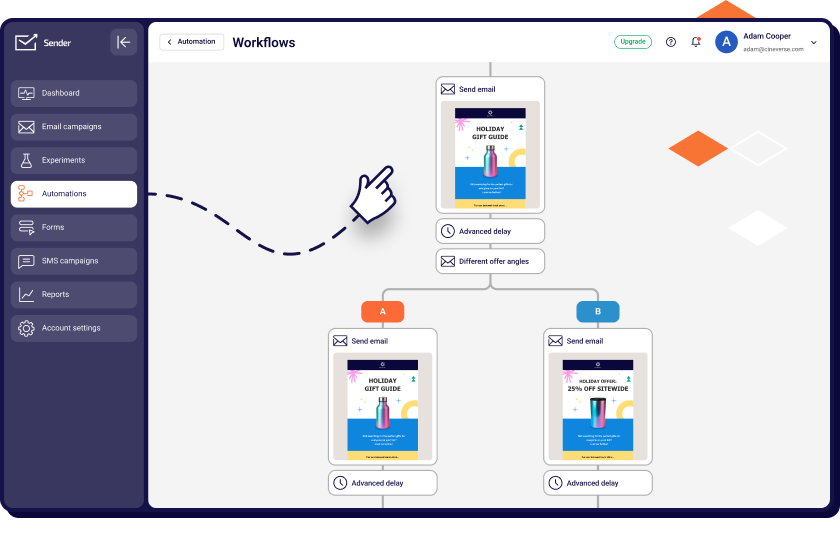
- Free plan with full automation. Welcome series, re-engagement flows, and behavioral triggers all run on the free plan — no watermark, no single-step limitation, no automation cap.
- Visual drag-and-drop builder. Welcome, abandoned cart, and re-engagement flows available as starting templates.
- SMS automation from the Standard tier. Combined email and SMS sequences from $15/month — lower entry point than Omnisend ($16/mo) for equivalent capability.
- A/B testing from the Standard tier. Subject line and content testing from $15/month, where Flodesk and Kit’s entry tiers don’t include split testing.
- Custom events tracking. Fire automations on user-defined events outside standard email engagement — product page visits, loyalty milestones, third-party form submissions, or any tracked behavior passed via API. Klaviyo and ActiveCampaign offer this; Flodesk, Kit, and Mailchimp’s entry tier do not.
- Multi-branch conditional paths. Branching on contact behavior, tags, and custom events.
Pros and Cons
- Broadest free-tier automation access in this guide — 2,500 subscribers, 15,000 emails/month, full builder
- $7/mo Standard tier includes SMS, email A/B testing, and segmentation
- 98% inbox placement across Gmail and Outlook in our testing
- 24/7 live chat on every plan including free, with response times in the 10-second range
- No built-in CRM — businesses needing lead scoring must add a third-party tool; ActiveCampaign, HubSpot, and Zoho handle this natively
- Ecommerce data integration shallower than Klaviyo — order data syncs via Shopify and abandoned cart email sequences fire correctly, but predictive fields like LTV and next-purchase date aren’t available as automation triggers
- Analytics depth lower than HubSpot — no unified contact timeline, no attribution dashboard
Our Experience with Sender
Account creation to first live automation: 21 minutes. The pre-built welcome template was usable without modification. The conditional branch on link-click behavior at step 3 worked correctly on the first test.
We then attempted the abandoned cart flow with two branch conditions — this required splitting into two separate automations, adding 15 minutes, and fragmenting reporting across two workflows. For automation needs within the pre-built template scope, Sender delivers real value. For multi-condition complexity, ActiveCampaign or Klaviyo would be the better fit.
Best For
Best for: Small businesses wanting full automation on a free or low-cost plan; teams looking for a Mailchimp alternative after outgrowing its free tier; businesses needing email and SMS in one platform without enterprise pricing.
Not right for: Businesses needing CRM-integrated automations with lead scoring; ecommerce stores needing predictive analytics triggers; teams running more than five concurrent automations with complex multi-condition logic.
Kit (formerly ConvertKit)
Kit is built for individual creators — newsletter writers, course sellers, podcasters — where the buying decision is driven by audience-tagging logic rather than purchase data or CRM integration. Its tag-based model maps to how creator audiences actually behave.
Pricing tested: Creator plan — $33/month for up to 1,000 subscribers. Verified May 2026.

Automation Capabilities & Key Features
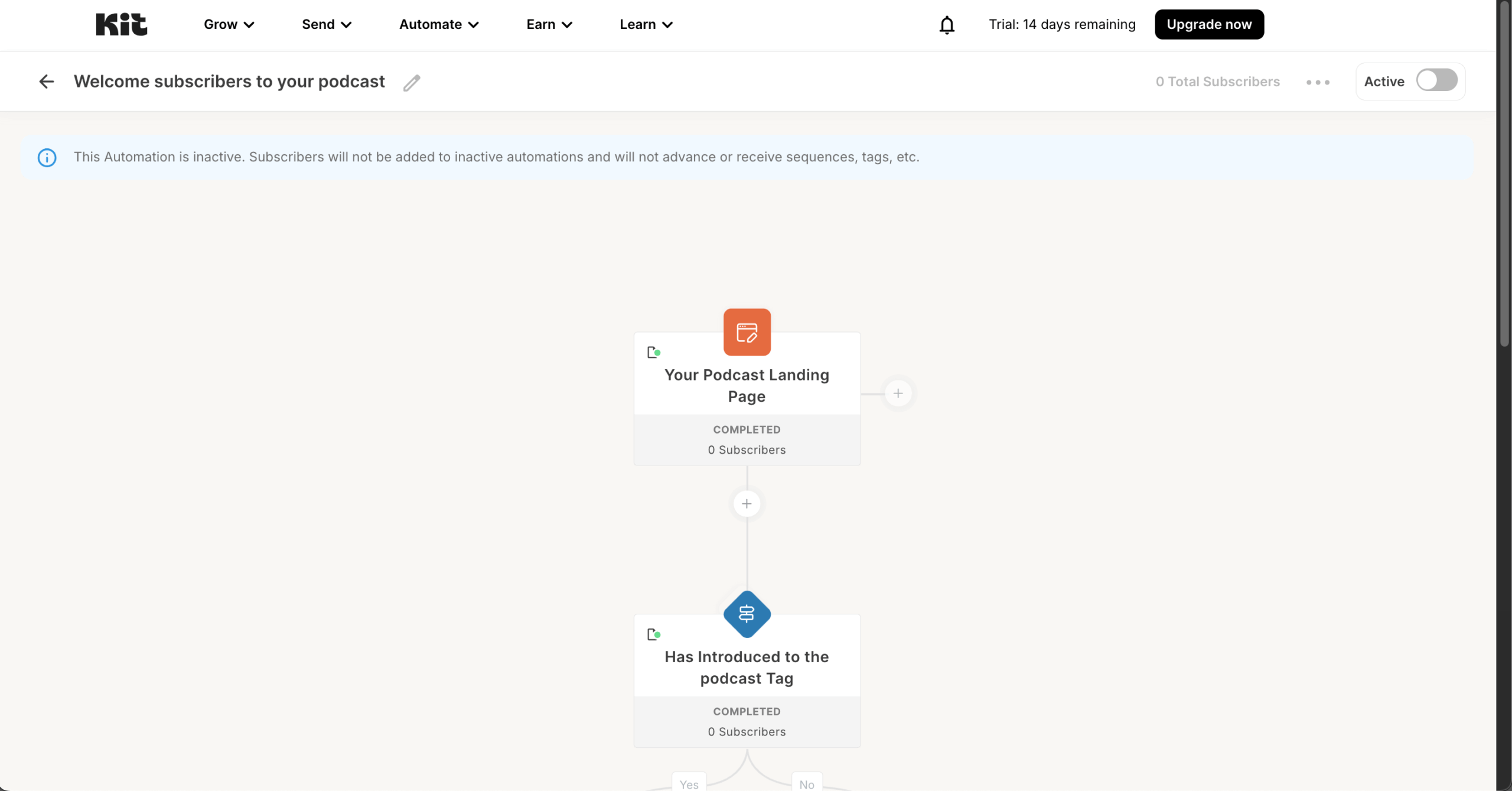
- Tag-based automation logic. Subscribers receive tags from opt-in source, link clicks, or purchases, and sequences fire accordingly.
- Visual automation canvas. Drag-and-drop builder with event, condition, and action blocks.
- Free plan up to 10,000 subscribers. Broadcast functionality only — automations require the Creator plan.
- Native digital product sales. Sell digital downloads, courses, and paid newsletters; integrates with Teachable, Gumroad, Thinkific.
- Conditional paths on subscriber behavior. Yes/no branches on tag presence, link clicks, or form completions.
Pros and Cons
- Free tier covers up to 10,000 subscribers — no other platform matches this for broadcast-only use
- Tag-based model maps naturally to creator audience behaviour, no CRM logic required
- 89% inbox placement with strong deliverability across creator-heavy domains
- Account creation to first live automation in 25 minutes
- No dynamic content blocks — cannot show different content to different segments in a single send; Klaviyo and ActiveCampaign handle this natively
- Branching nesting depth limited — complex journeys force migration around 15,000–20,000 subscribers
- Email design ceiling intentionally minimal — Flodesk produces substantially more design-led output
Our Experience with Kit
We built a five-step email nurture sequence with a conditional branch at step 3: subscribers clicking “advanced” content were tagged and moved to a separate track. Setup time: 25 minutes. The tag-triggered branch worked correctly on the first test.
Adding a second condition required creating a separate automation rather than stacking the condition — functional, but less compact than ActiveCampaign’s stacked condition model.
Best For
Best for: Newsletter writers, course creators, podcasters, and solo operators with lists under 20,000 subscribers who need automation without CRM complexity.
Not right for: Ecommerce businesses needing purchase-event triggers; B2B companies needing lead scoring; brands where visual email design is the primary purchase driver.
Flodesk
Flodesk is built for visual brands — designers, photographers, wedding professionals, lifestyle creators — where email aesthetics are the primary purchase driver and automation depth is secondary. Its design system has no close competitor, but the December 2025 pricing change ended its flat-rate model for new users.
Pricing tested: Pro plan — $35/month for up to 2,500 subscribers. Verified May 2026.
Automation Capabilities & Key Features
- Design-led email builder. Typography controls, layout flexibility, and template aesthetics that no other platform replicates.
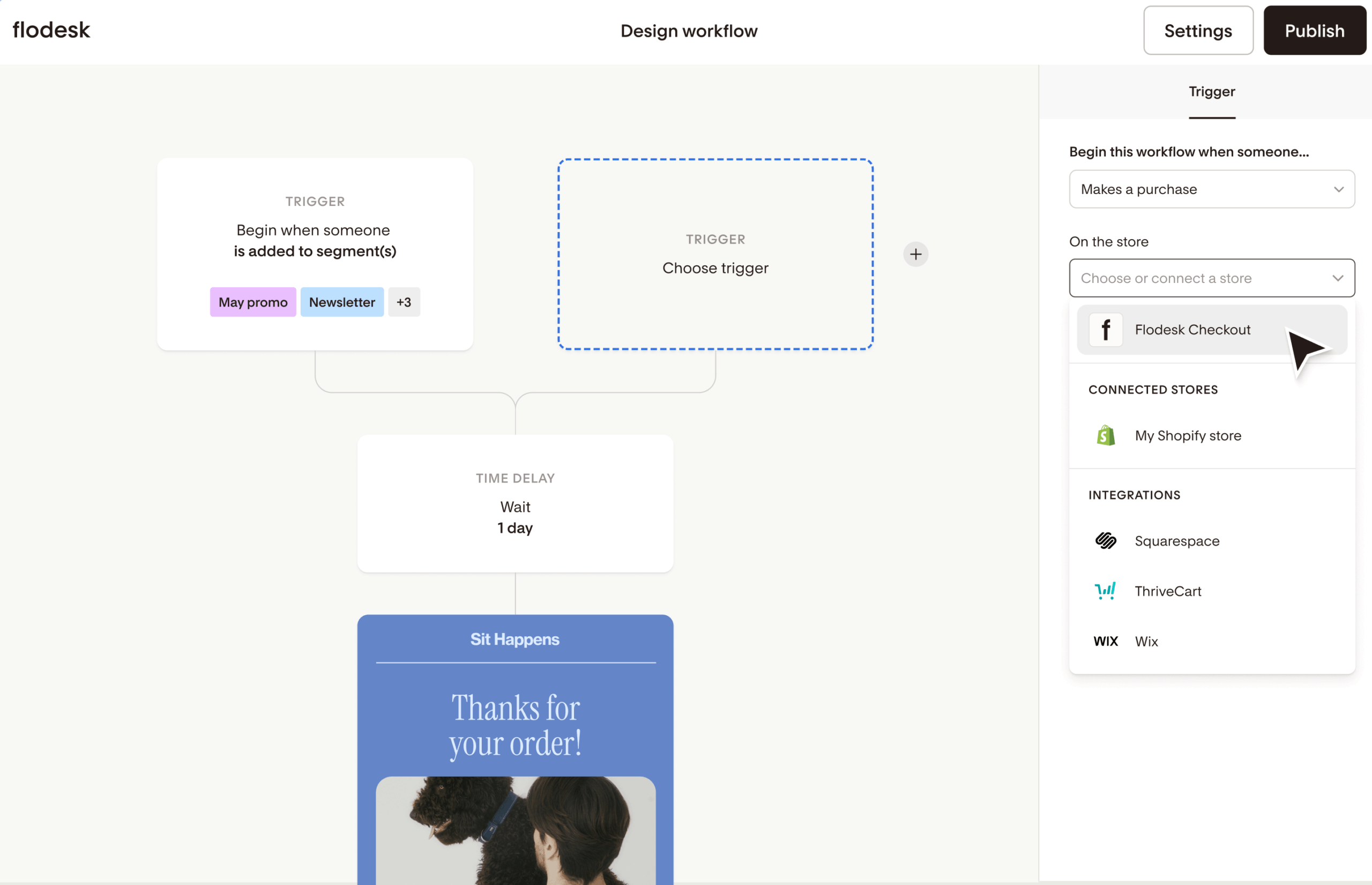
- Single-branch workflow logic. Yes/No conditions per branch — sufficient for welcome series, limiting for ecommerce or multi-segment journeys.
- Flodesk Checkout (Everything plan). Sell digital products without a separate platform, but does not integrate with Shopify or WooCommerce.
- Tag-based segmentation. Manual tag assignment via signup forms, link clicks, or workflow steps.
- Tiered pricing post-December 2025. New users pay by contact count; pre-existing accounts retain the legacy flat rate.
Pros and Cons
- Email design quality unmatched in this guide
- 86% inbox placement in our testing
- First email sent within 15 minutes of signup
- Workflow builder visually clear for users without automation experience
- No A/B testing on any plan
- No multi-branch automation — complex email drip campaigns require multiple disconnected workflows bridged by Zapier
- No native WooCommerce integration; CRM integrations require Zapier
- Email-only support with 24–48 hour response window across all plans
- No revenue attribution at the email level
Our Experience with Flodesk
We built a three-email welcome sequence with one branch. Setup time: 18 minutes — fastest of any platform tested. Visual output was substantially better than every other tool here. We then attempted to add a second branch based on tag history; the workflow builder forced us to create a separate automation, with no Zapier-bridge alternative built in.
Best For
Best for: Designers, photographers, and visual brands with lists under 5,000 subscribers where email aesthetics drive subscriber engagement.
Not right for: Ecommerce stores; B2B teams; anyone needing multi-branch automation, A/B testing, or revenue attribution.
Mailchimp
Mailchimp is the general-purpose email platform most users encounter first — the broadest integration ecosystem, the widest template library, and the largest community of third-party experts. Its 2024 billing change counts unsubscribed contacts toward your tier, so effective cost runs higher than headline pricing suggests, and the free plan excludes automations.
Pricing tested: Standard plan — $20/month starting tier (500 contacts). Verified May 2026.

Automation Capabilities & Key Features
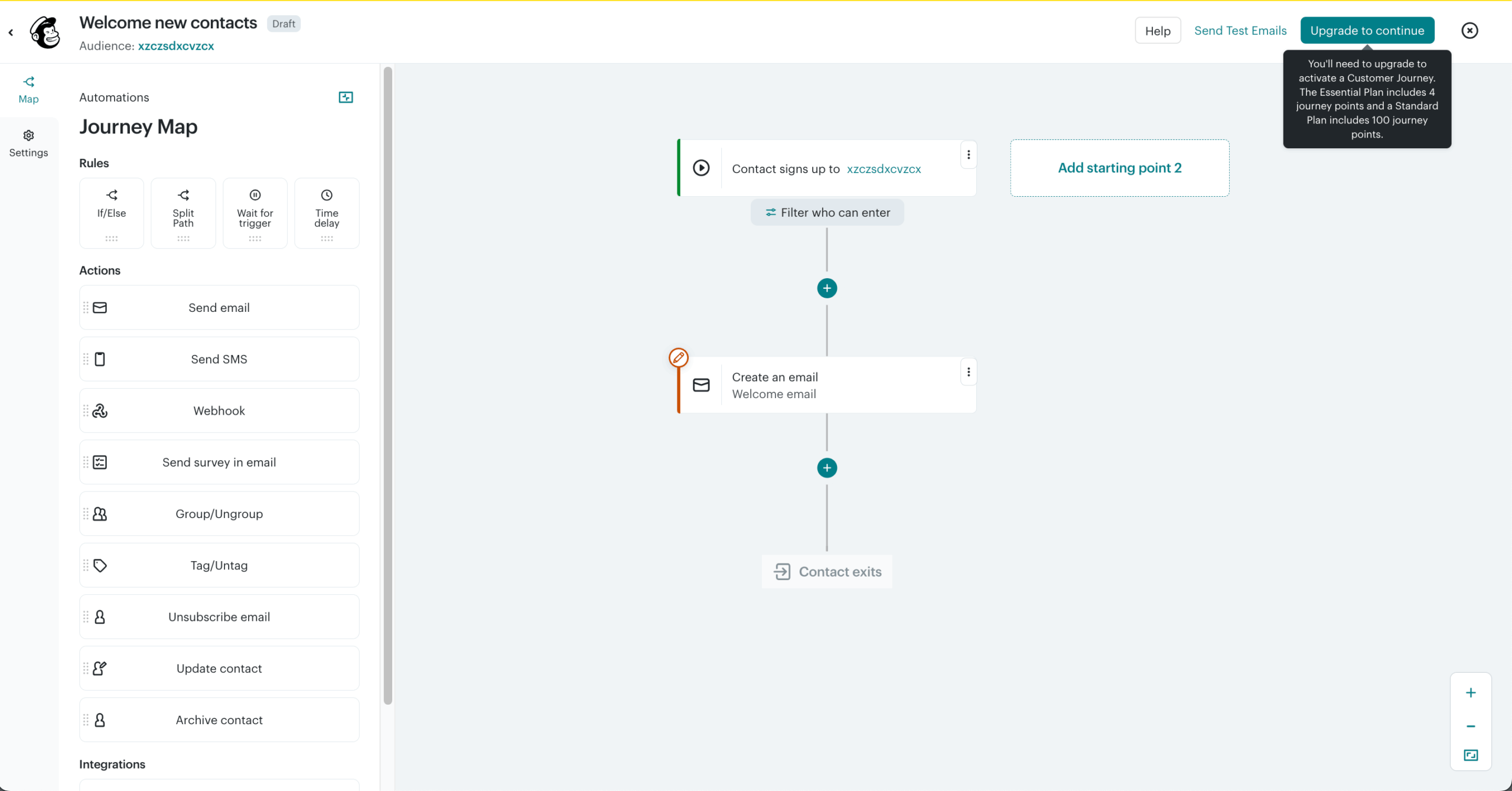
- 300+ native integrations. Shopify, WooCommerce, Salesforce, Stripe, QuickBooks, Canva — most major business tools without Zapier.
- Customer Journey Builder. Multi-step automations with conditional branching on Standard and Premium plans.
- A/B and multivariate testing. Subject line, content, and send-time testing on paid plans.
- Pre-built journey templates. Welcome, abandoned cart, post-purchase, and re-engagement sequences pre-configured.
- Social and ad management. Facebook and Instagram ad campaigns from the same dashboard.
Pros and Cons
- Native integration breadth not matched by any other platform here
- Customer Journey Builder supports genuine multi-branch automation on Standard and above
- 85% inbox placement with built-in Inbox Preview
- Largest third-party expert ecosystem — easiest to find help, templates, and tutorials
- Free plan excludes automations entirely — Customer Journey Builder requires Essentials minimum
- Bills for unsubscribed contacts since 2024 — effective cost runs higher than the contact tier suggests
- Pricing scales aggressively above 10,000 contacts — Premium starts at $350/month
- Email design ceiling lower than Flodesk; ecommerce attribution shallower than Klaviyo
Our Experience with Mailchimp
We rebuilt our standard test workflow — five-step sequence, two conditional branches, tag-based segmentation — in 35 minutes. The Customer Journey Builder handled the second branch natively, where Sender, Kit, and Flodesk required workaround flows. Reporting was clear at campaign level but lacked the per-email revenue attribution Klaviyo provides natively.
Best For
Best for: Businesses where a specific Mailchimp-native integration is the deciding factor; users prioritizing ecosystem breadth over price-per-feature efficiency.
Not right for: Cost-sensitive small businesses; teams leaving Flodesk specifically over pricing; ecommerce stores needing email-level revenue attribution.
Brevo
Brevo prices on email volume sent rather than contacts stored — a structural difference that makes it materially cheaper than every other platform here for businesses with large lists but moderate send frequency. It also bundles WhatsApp, SMS, transactional email, and a built-in CRM at price points where competitors charge for each separately.
Pricing tested: Starter plan — $9/month for up to 5,000 emails (500 contacts). Verified May 2026.

Automation Capabilities & Key Features
- Send-volume pricing. Pay per email sent, not per contact stored — up to 100,000 contacts on the free plan.
- Native WhatsApp campaigns. WhatsApp marketing alongside email and SMS in one workflow at the Standard tier ($18/mo).
- Built-in CRM. Deal pipelines, contact scoring, and task management on paid plans.
- Transactional email automation. Order confirmations and system notifications from the same account, on a separate sending infrastructure.
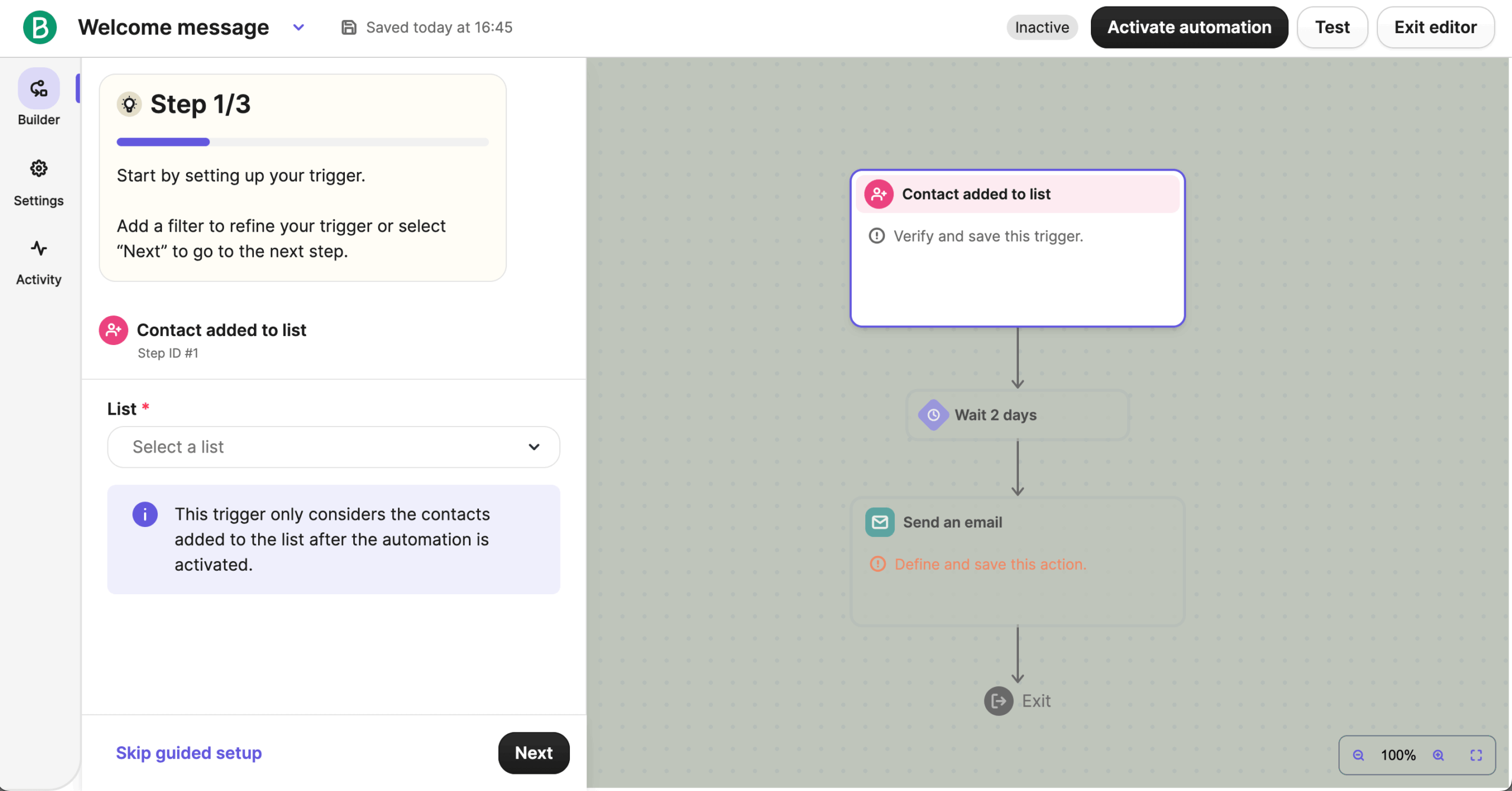
- Multi-step automation builder. Conditional logic, time delays, and branching from the Standard tier.
Pros and Cons
- Per-send pricing makes Brevo the cheapest option for large lists with infrequent sends
- WhatsApp marketing native — no other platform here offers it at this price point
- Built-in CRM and transactional email infrastructure included on paid plans
- 87% inbox placement with Litmus-powered spam testing on Standard and above
- Per-send pricing makes Brevo the cheapest option for large lists with infrequent sends
- WhatsApp marketing native — no other platform here offers it at this price point
- Built-in CRM and transactional email infrastructure included on paid plans
- 87% inbox placement with Litmus-powered spam testing on Standard and above
Our Experience with Brevo
We built our standard test workflow in 28 minutes on Standard. The conditional branch on tag history worked natively. We then added a WhatsApp step after the second email, which was configured in under five minutes once the sender ID was approved. The CRM contact scoring fed back into the automation cleanly.
Best For
Best for: International businesses needing WhatsApp marketing; companies with large lists and moderate send frequency; teams wanting CRM and transactional email bundled.
Not right for: High-frequency senders mailing full lists weekly; brands where email design is the primary differentiator.
CRM-Integrated Platforms
These four platforms combine email automation with a built-in CRM in a single subscription — meaning contact records, deal pipelines, lead scoring, and email workflows share the same data layer rather than syncing across separate tools.
ActiveCampaign
ActiveCampaign is the deepest automation platform in this guide for B2B teams that need conditional logic tied to a sales pipeline. Its workflow builder, contact database, and CRM share the same data layer, which removes the third-party sync most platforms rely on for marketing-to-sales handoff.
Pricing tested: Plus plan — $49/month for up to 1,000 contacts (Plus is the practical floor for CRM-connected automation; Starter at $15/month excludes the CRM, lead scoring, and SMS features). Verified May 2026.
Automation Capabilities & Key Features
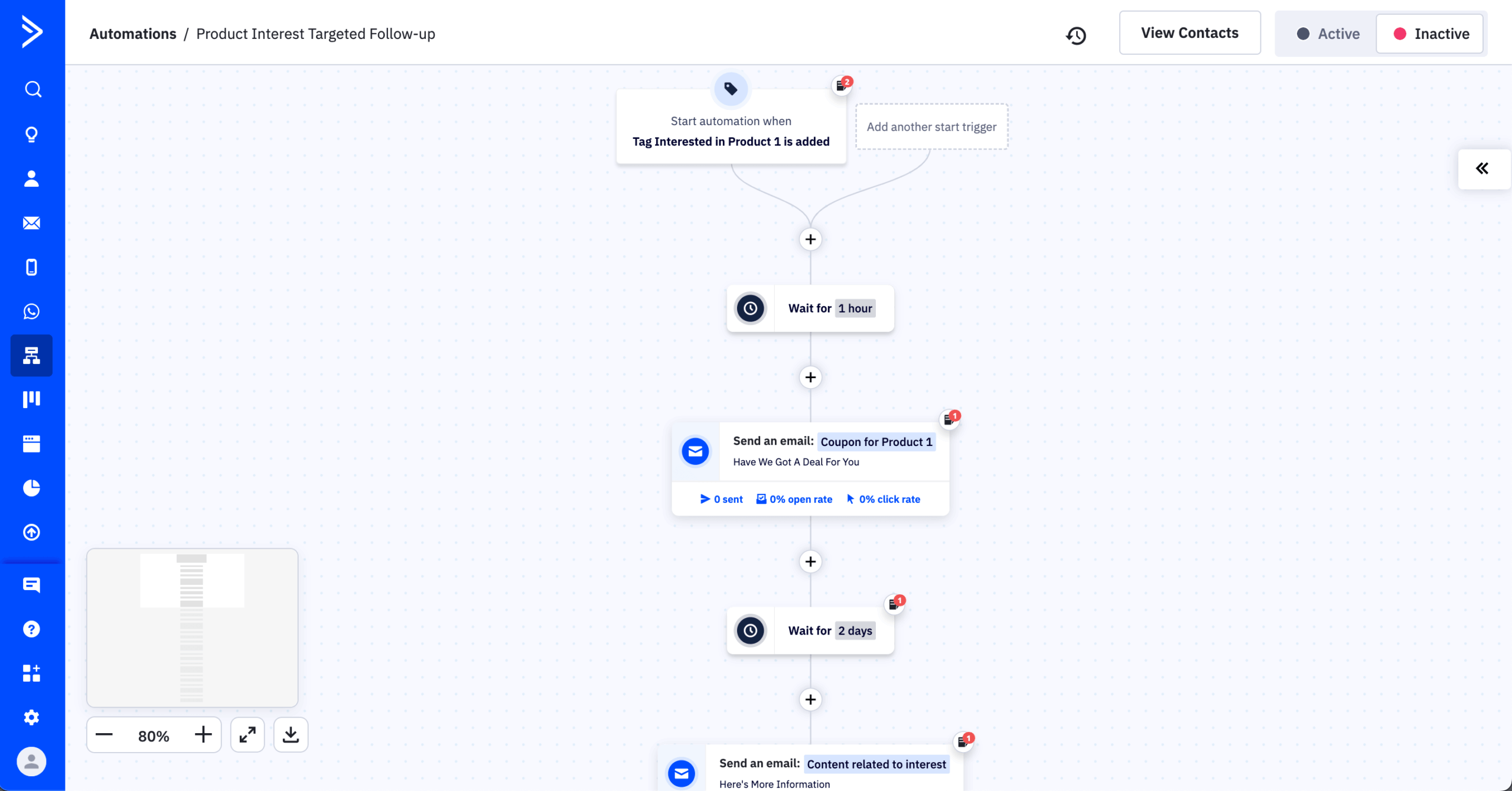
- Multi-branch conditional automation. Goal steps, wait-until conditions, split testing, and stacked conditions inside a single workflow.
- Built-in CRM with lead scoring. Deal pipelines and contact scoring on Plus and above; scores update automatically based on engagement, site visits, and form submissions.
- 900+ native integrations. Salesforce, HubSpot, Calendly, Typeform, Shopify, WooCommerce — Zapier is rarely required.
- A/B testing across automation paths. Split test entire flows, not just subject lines or content blocks.
- SMS, site messaging, and conversations. SMS marketing, on-site triggered messaging, and a chat inbox connected to automation.
Pros and Cons
- Conditional logic depth not matched by any platform in this guide
- CRM-connected automation removes the need for a separate sales tool until enterprise scale
- 91% inbox placement — second only to HubSpot
- Free one-to-one migration assistance on Plus plans and above
- Configuration time genuinely high — a complex workflow takes hours, not minutes
- Pricing scales aggressively above 5,000 contacts; Plus at 10,000 contacts reaches ~$149/month
- Predictive sending and split automation require Pro tier ($79/mo); advanced CRM features need Professional ($187/mo)
- Email design ceiling lower than Flodesk; ecommerce attribution shallower than Klaviyo
Our Experience with ActiveCampaign
We built a 12-step lead nurturing automation with industry-based branching, page-visit re-entry triggers, and a CRM deal-creation step. Setup time: 2 hours 40 minutes. Every condition we attempted worked natively. Misconfigured logic, however, was easy to introduce and difficult to spot — the builder gives you the rope to make complex sequences silently broken if testing isn’t methodical.
Best For
Best for: B2B teams, agencies, and service businesses needing CRM-connected automation in one platform; teams with dedicated marketing operations capability.
Not right for: Solo operators without setup time; businesses running primarily broadcast newsletters; ecommerce stores where revenue attribution is the priority — Klaviyo or Sender are stronger ActiveCampaign alternatives at those use cases.
HubSpot
HubSpot is the platform that most fully unifies sales, marketing, and service data in a single contact record — its strongest argument for mid-market businesses is structural rather than feature-led. Marketing email, automation, CRM, and customer support share one database, removing the data sync failures that fragment teams using separate tools. The cost reflects that scope.
Pricing tested: Marketing Hub Starter — $20/month for up to 1,000 contacts. Verified May 2026.
Automation Capabilities & Key Features
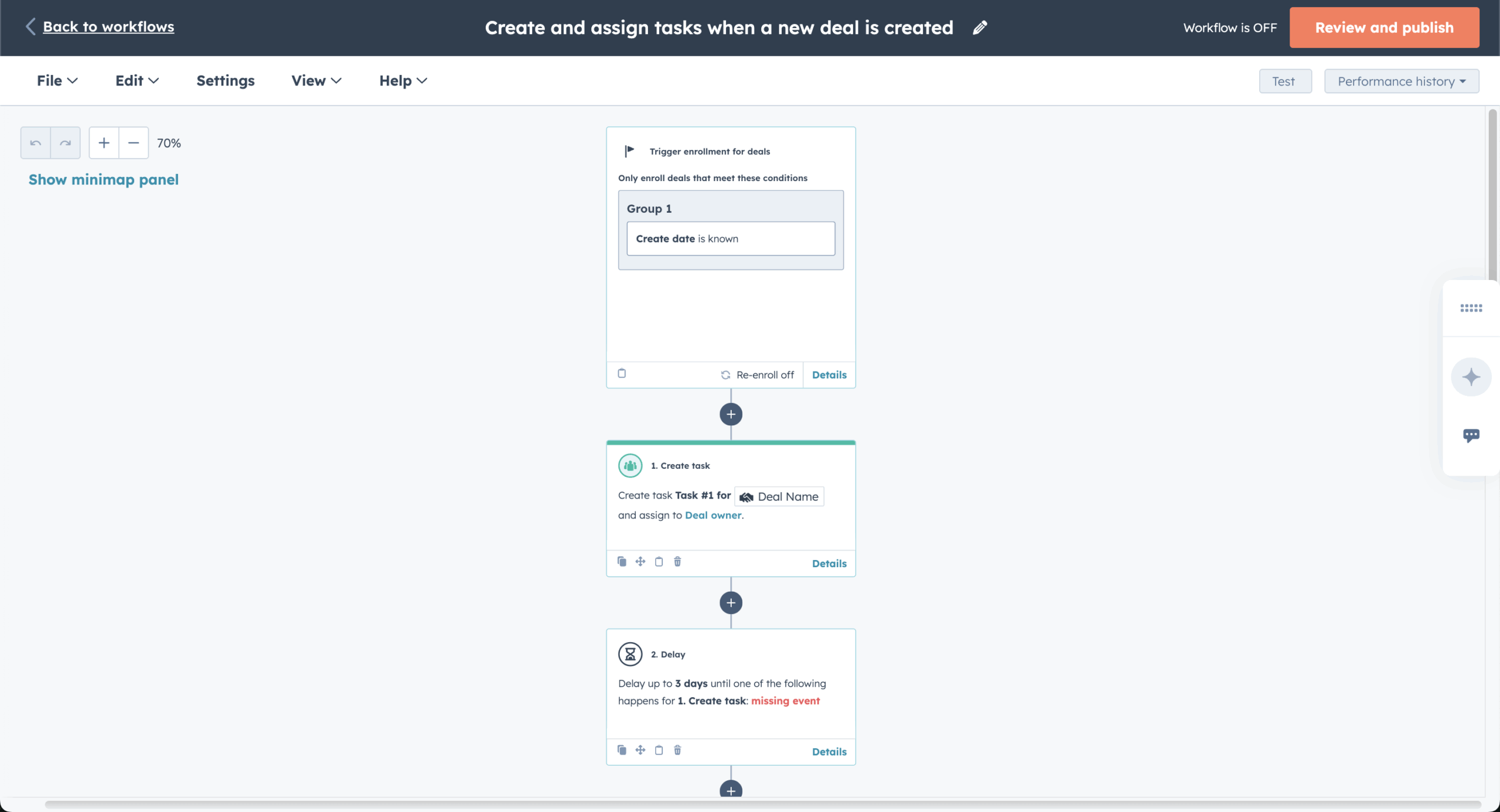
- Unified contact record with native CRM email integration. Marketing engagement, sales activity, and support history visible in one timeline per contact.
- Multi-branch workflow automation. Conditional logic, goal-based steps, and re-enrolment triggers from the Professional tier upward.
- Built-in CRM, free at base tier. Contact records, deal pipelines, and task management included with Marketing Hub Starter.
- Lead scoring and predictive analytics. Predictive lead scoring on Enterprise; manual scoring on Professional and below.
- Smart content and personalization. Dynamic content blocks based on lifecycle stage, list membership, or contact properties.
Pros and Cons
- Unified data model — no sync failures between marketing and sales tools
- 92% inbox placement — highest in our testing across all 12 platforms
- Built-in spam testing, A/B testing, and dynamic content on Professional and above
- Documentation and certification ecosystem deeper than any competitor
- Pricing escalates sharply past Starter — Marketing Hub Professional starts at $890/month, Enterprise at $3,600/month
- Marketing Starter ($20/mo) excludes most workflow automation; Professional is the practical floor
- Onboarding fees apply on Professional and Enterprise — typically $3,000+ one-time
- Email design tools functional but lower ceiling than Flodesk; segmentation more rigid than ActiveCampaign
Our Experience with HubSpot
We tested Marketing Hub Starter first, then upgraded to Professional for the workflow build. The unified contact timeline immediately showed value — a sales rep could see exactly which emails a lead opened before booking a demo, without leaving the CRM.
Automation setup on Professional took 1 hour 50 minutes for our standard 12-step workflow. The constraint at this tier wasn’t capability but cost: Professional is the entry point for genuine marketing automation, and that’s a $890/month decision.
Best For
Best for: Mid-market companies aligning sales and marketing in one platform; teams with a budget for Professional or higher tiers.
Not right for: Small businesses on tight budgets; solo operators; teams whose primary need is email broadcasting rather than full marketing automation.
Zoho Campaigns
Zoho Campaigns is the email automation arm of the Zoho ecosystem — its strongest argument is for businesses already using Zoho CRM, Zoho Books, or Zoho Desk, where the integration runs natively. Outside the Zoho ecosystem, it competes mostly on price; automation depth and email design quality sit below the leaders here.
Pricing tested: Standard plan — $3/month for 500 contacts; $25/month for 5,000 contacts. Verified May 2026.

Automation Capabilities & Key Features
- Native Zoho CRM sync. Two-way sync with Zoho CRM contacts, leads, and deal stages without a third-party connector.
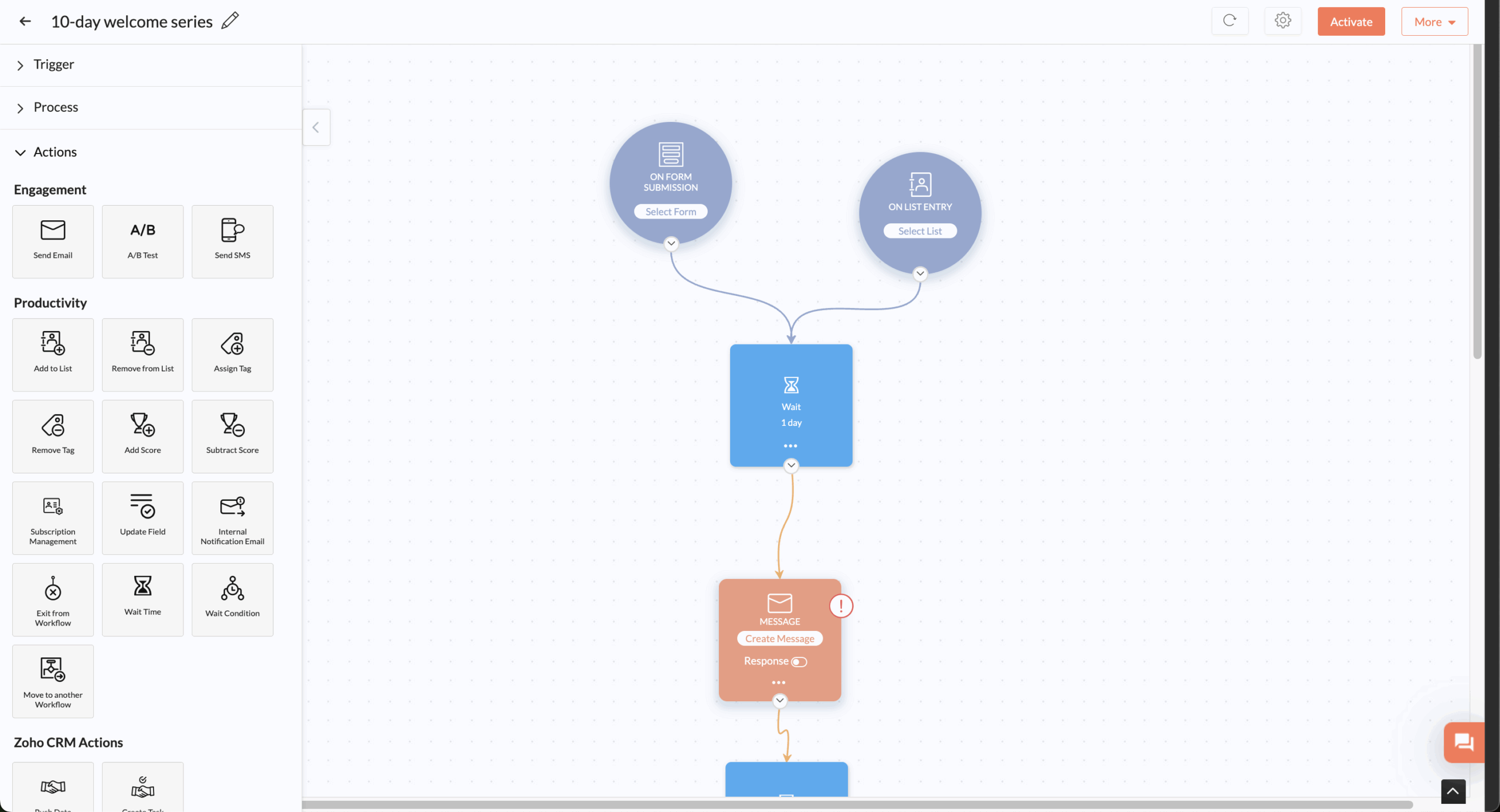
- Visual workflow builder. Drag-and-drop with conditional branches, time delays, and tag-based triggers.
- A/B testing on paid plans. Subject line and content split testing from the Standard tier.
- Multi-language email support. Build and send campaigns in 20+ languages from one campaign.
- SMS via Zoho integrations. SMS automation through Zoho’s broader product suite, not natively in Campaigns.
Pros and Cons
- Cheapest entry tier in this guide — $3/month for 500 contacts
- Native Zoho CRM integration removes sync fragility
- Free plan covers up to 2,000 contacts and 6,000 emails per month
- 85% inbox placement with wizard-guided authentication setup
- Workflow builder shallower than ActiveCampaign — multi-condition stacking limited
- Email design tools functional but visibly older than Flodesk, Mailchimp, or Brevo
- Standard tier excludes dedicated IPs and advanced segmentation
- Value proposition collapses outside the Zoho ecosystem
Our Experience with Zoho Campaigns
We tested Zoho Campaigns connected to Zoho CRM for our B2B workflow scenario. The CRM sync worked without configuration — leads created in CRM appeared in Campaigns within seconds. Setup time: 38 minutes. The branching limitation appeared at the same point Sender hit it: stacked conditions inside a single node required splitting into separate automations.
Best For
Best for: Businesses already using Zoho CRM, Zoho Books, or other Zoho products; teams wanting a low-cost entry into CRM-connected email.
Not right for: Businesses outside the Zoho ecosystem; brands where email design quality matters; teams needing deep multi-condition automation.
EngageBay
EngageBay packages email marketing, a CRM, helpdesk tools, and live chat into a single subscription aimed at small businesses that would otherwise pay for HubSpot at three to five times the price. The bundling is genuine, but each individual module sits below the category specialist.
Pricing tested: Marketing Pro plan — $49.99/month for 3,000 contacts. Verified May 2026.
Automation Capabilities & Key Features
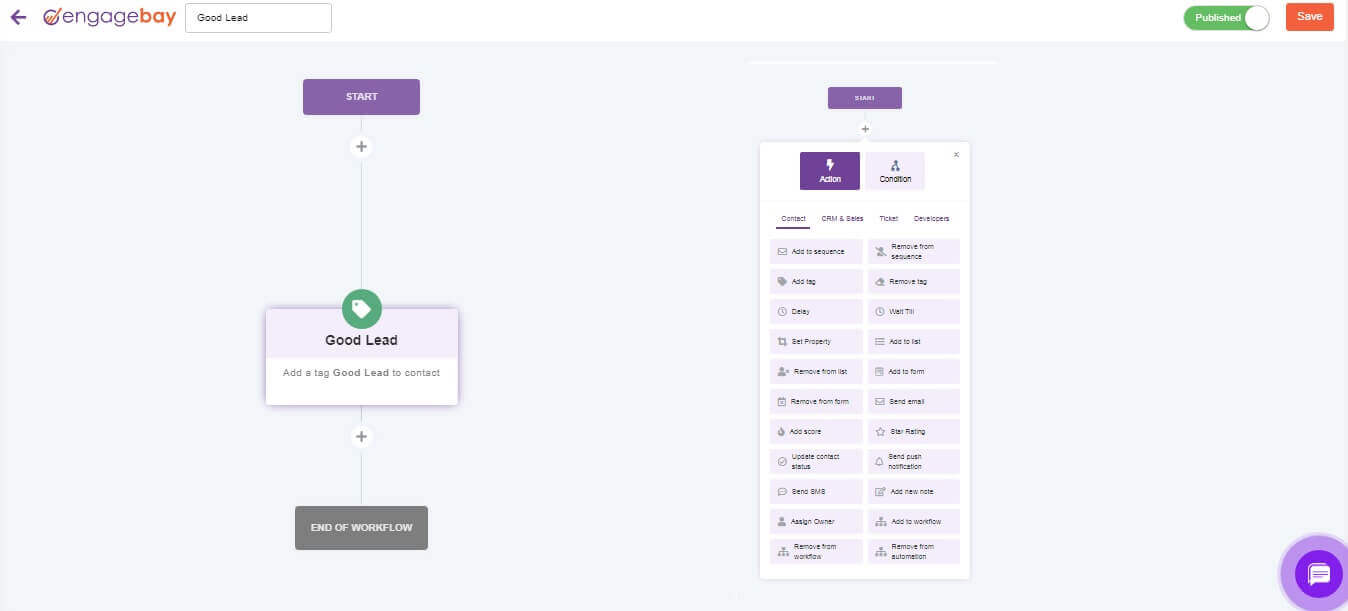
- All-in-one bundle. Email, CRM, helpdesk, and live chat in one subscription on All-in-One plans.
- Visual automation builder. Conditional branching, time delays, and tag-based triggers.
- Built-in CRM with lead scoring. Deal pipelines, contact scoring, and task management on paid plans.
- A/B testing on paid plans. Subject line and content split testing from the Basic tier.
- Free plan up to 250 contacts. Includes basic email, CRM, and helpdesk modules.
Pros and Cons
- Bundles four product categories — meaningfully cheaper than HubSpot for equivalent scope
- Built-in CRM, lead scoring, and live chat without separate subscriptions
- 84% inbox placement — adequate but lower than category leaders
- Free plan includes the CRM, not just email — rare at this price point
- Each module shallower than the category specialist — email below ActiveCampaign, CRM below HubSpot, helpdesk below Zendesk
- Authentication setup partial (SPF/DKIM only) — DMARC requires manual configuration
- Email design tools dated — templates feel a generation behind Mailchimp or Brevo
- Reporting and analytics depth limited
Our Experience with EngageBay
We built our standard test workflow on Marketing Pro in 42 minutes. Conditional branching worked, but the builder occasionally lagged when adding nodes to longer workflows. The CRM sync worked without configuration. Where EngageBay struggled was the design layer: templates felt visibly older, and the segmentation interface required more clicks than Sender or Brevo.
Best For
Best for: Small businesses wanting marketing, CRM, and helpdesk in one budget; teams who would otherwise stitch together three separate tools.
Not right for: Teams needing depth in any single module; brands prioritising email design; businesses planning to scale past mid-market complexity.
Ecommerce Platforms
These three platforms are built specifically for online stores — every feature assumes you have a product catalog, purchase events, and revenue you want to attribute to specific email sends.
Klaviyo
Klaviyo is built for ecommerce stores where email is a direct revenue channel — every feature assumes you have a product catalog and want to connect email activity to store revenue. Its Shopify, BigCommerce, and WooCommerce integrations show exactly which email drove which purchase, a capability no general-purpose platform replicates without custom configuration.
Pricing tested: Email plan — $20/month for 500 contacts; ~$100/month at 5,000 contacts. Verified May 2026.

Automation Capabilities & Key Features
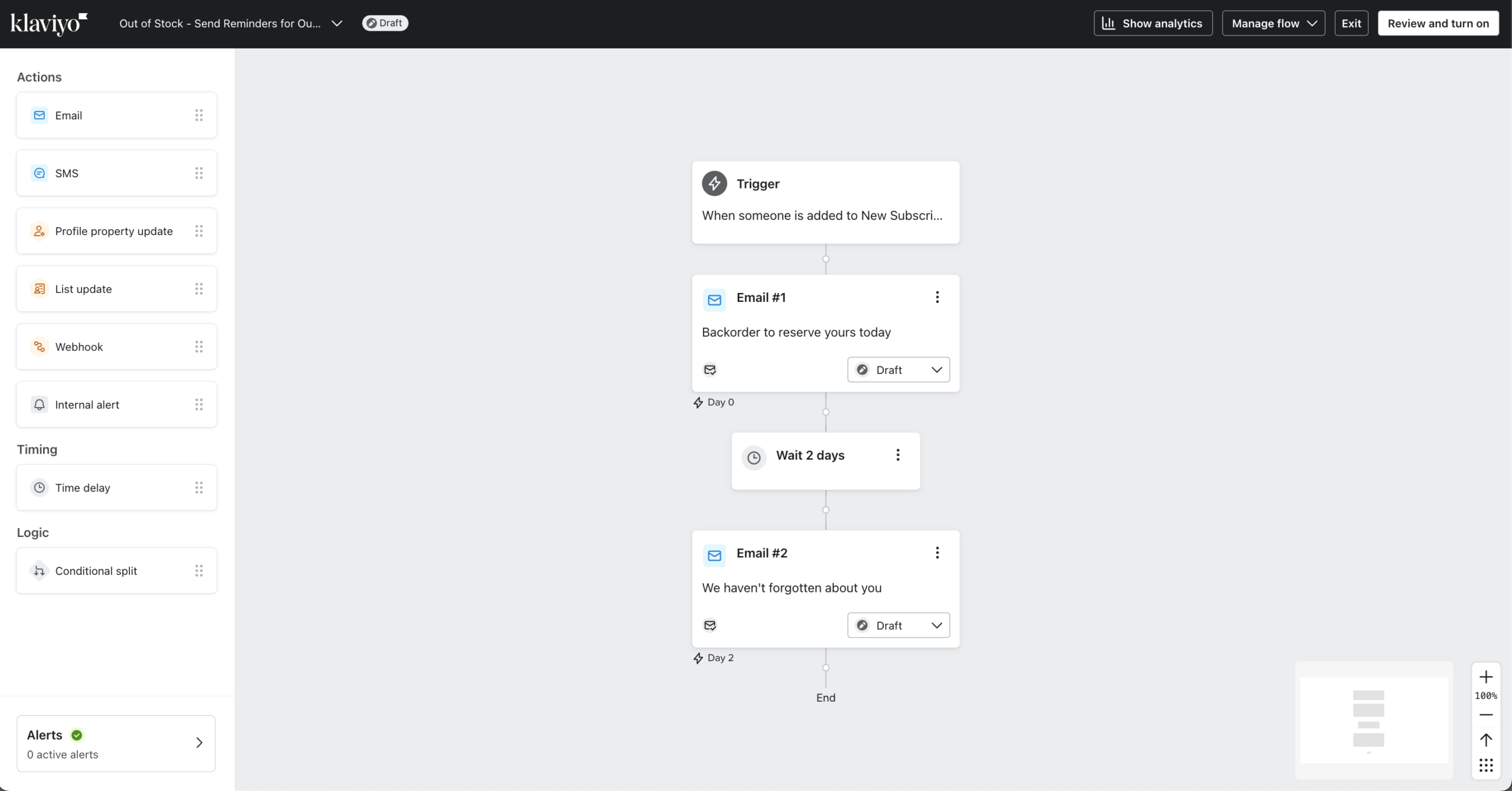
- Revenue attribution at the email level. Native Shopify, BigCommerce, and WooCommerce integrations track which specific email drove which purchase.
- Predictive analytics. AI-driven customer lifetime value scoring, churn risk flagging, and predicted next-purchase date — without manual configuration.
- Behavioral email triggers beyond engagement signals. Browse abandonment, cart abandonment, predicted-value thresholds, and cross-sell ecommerce email automation sequences fire from store behavior.
- A/B testing across flows. Split test subject lines, send times, content, and entire flow paths.
- Email segmentation depth. Combine purchase history, engagement, predicted value, browsing behavior, and custom properties in one segment.
Pros and Cons
- Email-level revenue attribution is the deepest in this guide for Shopify, BigCommerce, and WooCommerce stores
- Predictive analytics drive automation without manual scoring or configuration
- 90% inbox placement with mandatory authentication setup at signup
- A/B testing across entire flow paths, not just individual emails
- No annual billing discount — pricing is identical month-to-month or annually
- Pricing scales aggressively above 10,000 contacts; 25,000 contacts costs ~$400/month
- The interface rewards configuration investment — non-ecommerce users pay for infrastructure they won’t use
- No native CRM; B2B teams needing pipeline integration look elsewhere
Our Experience with Klaviyo
We connected Klaviyo to a test Shopify store and built a post-purchase flow with three branches: first-time buyers, returning customers, and high-value customers (LTV >$500). Setup time: 1 hour 15 minutes. Every branch fired correctly on the first test. Revenue attribution appeared natively in the dashboard within 24 hours of the first test send — we could see exactly which email generated which orders.
Best For
Best for: Shopify, BigCommerce, and WooCommerce stores where email drives measurable revenue and you need per-email attribution.
Not right for: Non-ecommerce businesses; service providers; B2B teams; brands where email is primarily relationship rather than revenue-driven.
Omnisend
Omnisend is built for ecommerce stores running email, SMS, and web push as a coordinated channel — its strongest argument is pre-built cross-channel flows that fire across all three from a single workflow. Email-level revenue attribution sits below Klaviyo, but multi-channel coverage is broader and entry pricing is meaningfully lower.
Pricing tested: Standard plan — $16/month for 500 contacts; ~$60/month at 5,000 contacts. Verified May 2026. Omnisend’s $11.20 promotional rate appears in some marketing materials, but the standard Standard-tier price for 500 contacts on annual billing sits at $16/month.

Automation Capabilities & Key Features
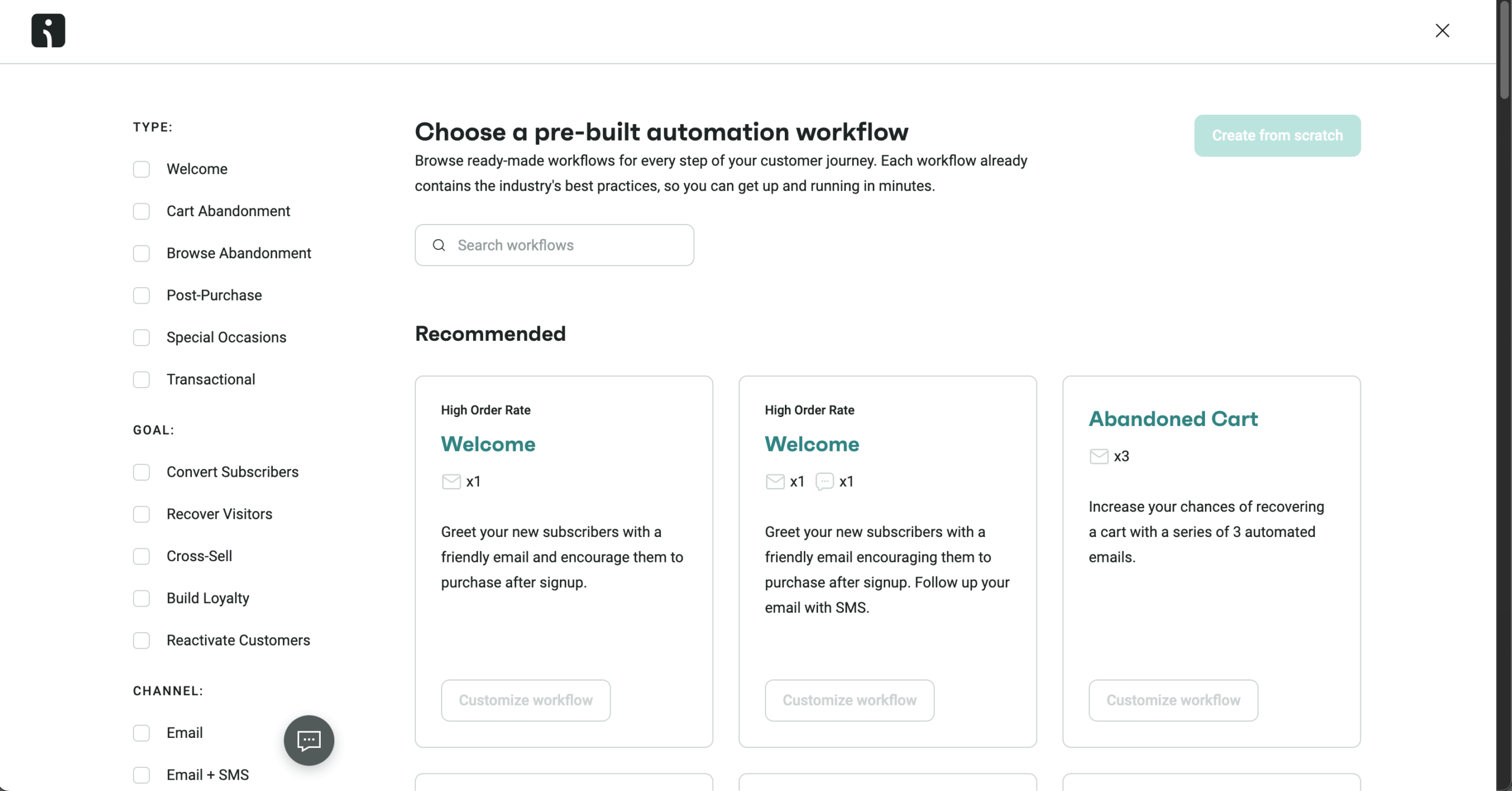
- Cross-channel flows in one workflow. Email, SMS, and web push steps configured inside the same automation canvas.
- Pre-built ecommerce flows. Welcome series, abandoned cart, browse abandonment, post-purchase, and win-back templates ready to deploy.
- Native Shopify, BigCommerce, and WooCommerce integration. Product catalog, order events, and customer data sync without third-party tools.
- Built-in product picker. Insert specific products with live pricing and inventory data into emails.
- A/B testing on paid plans. Subject line, content, and send-time testing from the Standard tier.
Pros and Cons
- Multi-channel automation (email + SMS + web push) at meaningfully lower price than Klaviyo equivalent — $60/mo vs $100/mo at 5,000 contacts
- Pre-built flow templates cut ecommerce automation setup time — fastest configuration in our ecommerce testing
- 89% inbox placement across major inbox providers
- Free plan includes core automation features — Klaviyo’s free plan caps automation use sharply
- Email-level revenue attribution lacks Klaviyo’s depth — segmentation by predicted LTV and next-purchase date isn’t available natively
- Email design tools functional but lower ceiling than Mailchimp or Flodesk
- Outside ecommerce, the platform has limited utility — most features assume a connected store
- Pro tier ($59/mo) needed for advanced segmentation, push notifications, and dedicated support
Our Experience with Omnisend
We built our cross-channel test sequence — email at step 1, SMS at step 3 if email unopened, web push at step 5 — in 32 minutes on Standard. The pre-built abandoned cart template required minor edits but worked without restructuring. The trade-off vs Klaviyo became visible when we tried to segment by predicted customer value: the field exists in Omnisend, but with shallower confidence than Klaviyo’s predictive layer.
Best For
Best for: Shopify, BigCommerce, and WooCommerce stores running email, SMS, and push as coordinated channels; ecommerce teams wanting Klaviyo-adjacent capability at a lower entry cost.
Not right for: Non-ecommerce businesses; stores needing the deepest predictive analytics; teams running primarily email-only programs.
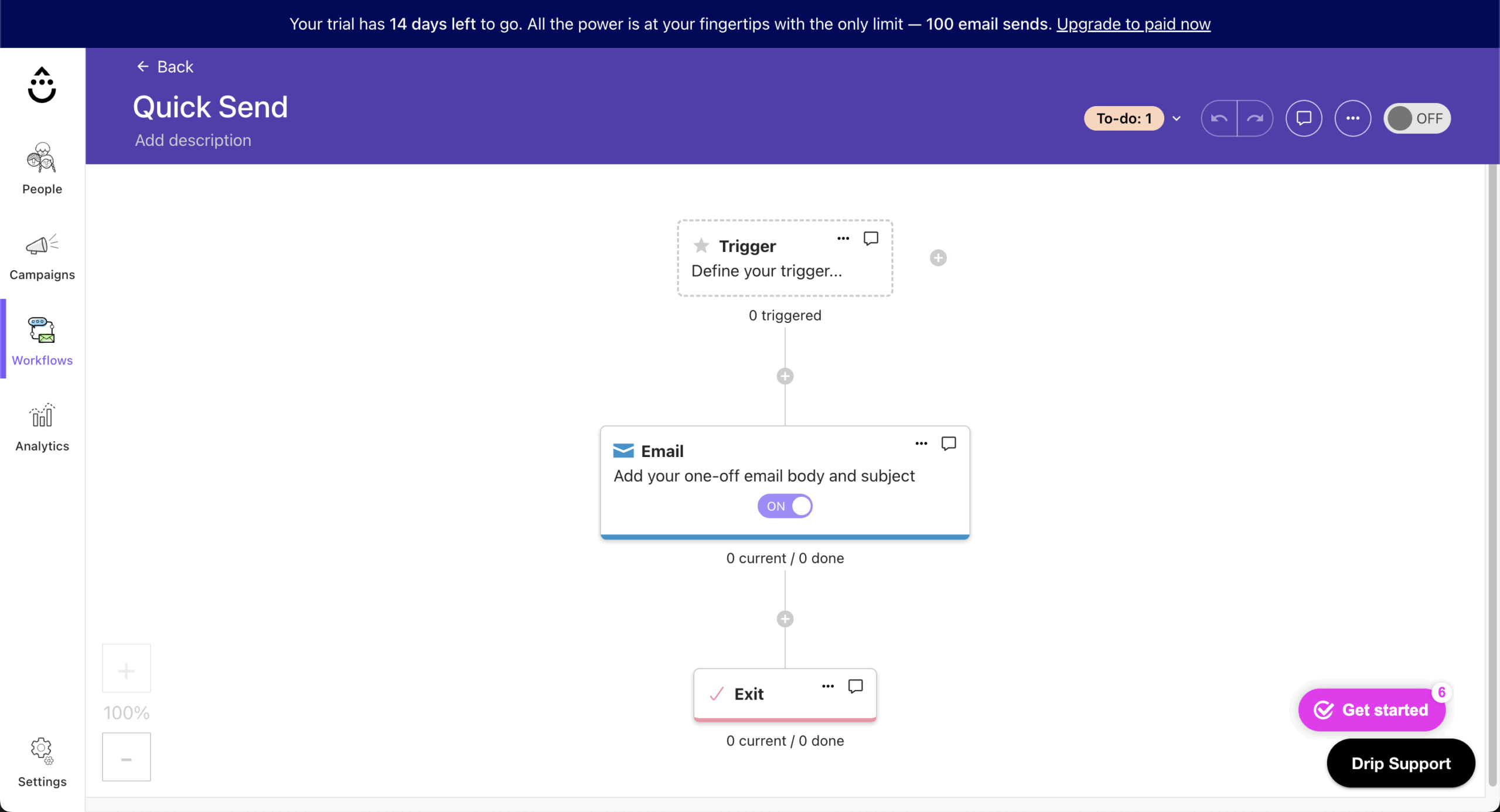
Drip
Drip is built for ecommerce stores under 5,000 contacts where the priority is multi-channel automation depth without Klaviyo-tier pricing. Its strongest argument is workflow flexibility at a price point meaningfully below Klaviyo for sub-5,000 lists. Above that threshold, the cost advantage narrows.
Pricing tested: Standard plan — $39/month for up to 2,500 contacts; ~$89/month at 5,000 contacts. Verified May 2026.
Automation Capabilities & Key Features
- Visual workflow builder with conditional branching. Multi-step automations with tag-based and behavior-based triggers.
- Native Shopify, BigCommerce, and WooCommerce integration. Order, product, and customer data sync without third-party tools.
- Behavioral triggers from store events. Cart abandonment, browse abandonment, product-viewed, and purchase-event triggers fire natively.
- Email + SMS automation. Combined sequences from the Standard tier; SMS credits sold separately.
- Liquid-based content personalization. Insert dynamic product, customer, and order data into emails using Liquid templating.
Pros and Cons
- Lower entry price than Klaviyo for sub-5,000-contact stores — meaningful for early-stage ecommerce
- Workflow builder approaches ActiveCampaign’s depth for ecommerce-specific logic
- 88% inbox placement in our testing
- Liquid templating gives developer-friendly personalisation flexibility
- No free plan — 14-day trial only, where Klaviyo and Omnisend offer free tiers
- Email-level revenue attribution exists but reporting depth sits below Klaviyo
- Pricing advantage narrows above 5,000 contacts; at 25,000 contacts the gap to Klaviyo is small
- Liquid templating raises the learning curve for non-technical users
Our Experience with Drip
We connected Drip to a test Shopify store and built our standard ecommerce post-purchase flow with three branches. Setup time: 1 hour 5 minutes. The branching logic worked natively, comparable to Klaviyo.
Liquid personalization added flexibility we hadn’t tested elsewhere — inserting dynamic product recommendations based on purchase history required ten minutes of configuration that would have needed custom development on Kit.
Best For
Best for: Ecommerce stores under 5,000 contacts wanting Klaviyo-adjacent automation depth at lower entry cost; teams comfortable with Liquid templating.
Not right for: Stores above 10,000 contacts where Klaviyo’s pricing gap closes; non-ecommerce businesses; teams without technical resources for Liquid setup.
Email Marketing Automation Software: Pricing Comparison
The tables below show pricing at the four contact thresholds where most platform decisions get made, alongside the structural costs that don’t appear on any pricing page.
Pricing at Key Subscriber Thresholds
Pricing verified May 2026, monthly cost on annual billing unless noted. Brevo prices on send volume, ActiveCampaign, and HubSpot figures vary by tier (specified below), and Mailchimp pricing scales above the listed figure once unsubscribed contacts are included in billing.
| Platform | 1,000 subscribers | 5,000 | 10,000 | 25,000 | 50,000 |
| ActiveCampaign (Plus) | $49 | $145 | $189 | $389 | $609 |
| Brevo (per send volume) | $17 (10k sends) | $9 (5k sends) | $29 (20k sends) | $29 (20k sends) | $29 (20k sends) |
| Drip | $39 | $89 | $154 | $369 | $699 |
| EngageBay (per user) | $42.49/user | $67.99/user | $67.99/user | N/A | N/A |
| Flodesk (Pro, new pricing) | $25 | $54 | $72 | $155 | $357 |
| HubSpot (Starter at 1k; Pro at 5k+) | $20 (Starter) | ~$170 (Pro) | ~$300 (Pro) | ~$890 (Pro) | $890+ (Pro) |
| Kit (Creator) | $25 | $75 | $116 | $166 | $316 |
| Klaviyo (Email) | $45 | $100 | $150 | $400 | $720 |
| Mailchimp (Standard) | $45 | $100 | $135 | $310 | $450 |
| Omnisend (Standard) | $14 | $56.70 | $92.40 | $197.40 | $289.10 |
| Sender (Standard) | Free (up to 2,500) | $15 | $39.90 | $81.90 | $158.90 |
| Zoho Campaigns (Standard) | ~$6 | ~$25 | ~$37 | ~$66 | ~$105 |
Several figures require explanation:
- Brevo doesn’t price by contact count. Figures shown reflect typical send-volume tiers a business at each contact threshold would land on, assuming 4 campaigns/month. A business sending less frequently pays less; one sending weekly pays significantly more.
- Flodesk’s flat-rate column has been removed. New users since December 2025 pay tiered pricing — the $38 flat figure that circulated in older comparison articles applies only to grandfathered accounts.
Hidden Cost Warnings
Headline pricing pages tell you what a tier costs at the listed contact threshold. They don’t tell you what counts as a billable contact, which features sit behind which paywall, or what add-ons most users discover only after migrating.
HubSpot: Contacts receiving marketing emails count as “marketing contacts” toward billing — contacts originally imported as CRM records become marketing contacts the moment they receive a campaign. The recategorization cannot be reversed without removing and re-importing the contact.
Klaviyo: Active profile counts include unsubscribed and bounced contacts. A list of 25,000 with 7,000 unsubscribed still bills at the 25,000 tier unless suppressed contacts are deleted manually. Klaviyo recommends quarterly list cleaning specifically to manage this.
Mailchimp: Archived contacts continue to count toward list size for billing, even if they no longer receive emails. The 2024 billing change made this universal — there is no “exclude unsubscribed” toggle.
ActiveCampaign: Predictive sending, split automations, and advanced CRM automation are only unlocked at the Professional tier ($187/month at 5,000 contacts) — not the Plus tier ($49/month) at which most comparison articles evaluate the platform.
Flodesk: New users since December 2025 pay tiered pricing rather than the legacy flat rate. The $38 flat figure that circulates in older comparison articles applies only to grandfathered accounts — the Pro plan at 10,000 contacts now costs $72/month.
Email Automation Platform Migration Guide
Most email automation tool migrations fail not because the new platform is wrong, but because teams underestimate what doesn’t transfer.
What Migrating Between Platforms Actually Involves
Subscriber data exports cleanly across every platform — email addresses, custom fields, tags, and segments transfer as CSV with field mapping. Campaign performance history exports as a report file but cannot be imported into the new platform’s analytics in a usable format; treat it as documentation, not transferable data.
Everything else gets rebuilt from scratch. There is no universal export format for automation workflows, email templates, landing pages, signup forms, custom tracking pixels, or design systems between platforms. A welcome series running on Mailchimp does not export to Klaviyo, a Flodesk template does not import to Sender, and an ActiveCampaign workflow with conditional branching has no representation that another platform can read.
For a mid-complexity setup — three to five active automations, ten templates, 10,000 subscribers, and embedded forms across multiple pages — full migration typically requires 15–25 hours of hands-on setup, plus two to four weeks running both platforms in parallel. Klaviyo, ActiveCampaign, and HubSpot offer free migration assistance on higher tiers. Mailchimp and Flodesk offer self-serve migration tools. Sender, Brevo, and Kit handle CSV import with field mapping but require you to rebuild workflows independently.
The deliverability impact is the cost most teams miss. New sending infrastructure needs a gradual email warm-up — sending to your full list immediately damages sender reputation and tanks open rates for weeks. Send to your most-engaged segment only for the first 7–10 days, then expand outward. Configure SPF, DKIM, and DMARC on the new platform before your first send, and verify all three records resolve correctly at MXToolbox.
even on the free plan.
When to Migrate vs. When to Stay and Upgrade
The decision is rarely about features alone — it’s about whether the friction of staying exceeds the friction of migrating.
Consider migrating when:
- You’ve hit a structural feature ceiling that an upgrade doesn’t resolve — for example, Flodesk’s single-branch automation, which no Pro upgrade fixes
- Inbox placement has dropped below 80% in your own testing and remains there after list cleaning and authentication troubleshooting
- Per-contact pricing has grown disproportionate to automation value — paying Mailchimp Standard for weekly broadcasts only
- A critical native integration has appeared on a competitor that your current platform handles only via Zapier
- Support response times are blocking time-sensitive automations
Consider staying and upgrading when:
- You’ve hit a tier limit but not a feature limit — the next tier on your current platform unlocks the specific capability you need
- Migration cost exceeds the annual savings from switching
- Automations are running well, and the issue is volume scaling, not a capability gap
- Saving $30/month rarely justifies 20 hours of rebuild and three weeks of deliverability ramp
- You’re approaching a high-traffic period (Black Friday, product launch) where migration risk outweighs benefit
FAQs
What is the best email marketing automation software for small businesses?
Sender for budget-constrained operators needing automation on a free or low-cost plan; Kit for individual creators and newsletter operators; Mailchimp, where a specific native integration is the deciding factor. Small businesses needing CRM-connected automation should look at ActiveCampaign — but accept the steeper learning curve and configuration time.
How much does email marketing automation software cost?
Entry tiers with genuine automation start at $7/month (Sender) and reach $890/month (HubSpot Marketing Hub Professional). For 5,000 contacts, expect $15–$170/month depending on category — Sender and Brevo at the low end, HubSpot and ActiveCampaign at the high end. Build a 15–20% buffer for billable-contact creep, mandatory add-ons, and tier paywalls hidden behind feature names.
What is the best free email marketing automation software?
Sender for full automation builder access up to 2,500 subscribers and 15,000 emails/month. Kit for broadcast-only programs up to 10,000 subscribers — automations require the Creator plan from $25/month. Brevo for unlimited contacts with a 300-email/day cap. Mailchimp’s free plan excludes automations entirely.
Which email marketing automation software is easiest to use?
Flodesk had the fastest setup-to-first-send time in our testing — 15 minutes — but the simplicity comes from limited automation depth. Sender and Kit reached the first live automation in 21 and 25 minutes, respectively. ActiveCampaign and HubSpot have steeper learning curves that pay back at scale; both took over 90 minutes for our standard test workflow.
What is the best email marketing automation software for ecommerce?
Klaviyo for Shopify, BigCommerce, and WooCommerce stores where email-level revenue attribution drives optimization. Omnisend for stores running coordinated email + SMS + push channels at lower entry cost than Klaviyo. Drip for stores under 5,000 contacts wanting Klaviyo-adjacent automation depth without Klaviyo’s pricing scale. Non-ecommerce businesses should not buy any of these three.