


Resend Review: Is It Worth It for Developers? (2026)
Capterra, G2, Trustpilot, and Reddit to create an objective evaluation. Learn more about our review methodology
Choosing an email delivery platform often comes down to balancing reliability, pricing transparency, and developer-friendly features. This Resend review provides a detailed breakdown of Resend in 2026, including its core features, pricing structure, advantages, and limitations.
It is designed to help businesses and developers evaluate whether the platform meets their transactional and marketing email needs based on current capabilities and cost considerations.
What is Resend?
Resend is a developer-first email delivery platform designed to simplify how engineering teams build, test, and send transactional emails at scale. Founded in 2023 by Zeno Rocha, Resend positions itself as a modern alternative to legacy email providers such as SendGrid and Mailgun.
The platform’s core philosophy centers on offering a clean API, an intuitive dashboard, and smooth integration with React-based email templates. This email marketing newcomer provides infrastructure for sending transactional emails via API and SMTP—perfect for a developer-first approach to marketing.
However, it does not include marketing campaign tools, subscriber management, or visual automation workflows.
Resend Quick Summary
Detail
Overview
Product Type
Transactional & marketing email API provider
Best For
Developers, SaaS startups, product teams using React/Next.js
Free Plan
3,000 emails/month (100/day limit)
Starting Price
$20/month (Pro, Transactional Emails) for 50,000 emails
SDKs Supported
Node.js, Python, Ruby, PHP, Go, Elixir, Java, .NET
Key Differentiator
React Email integration & modern developer experience (DX)
Headquarters
San Francisco, CA
Website
resend.com
Resend Key Features
Resend bundles its capabilities around a streamlined API, a React-based email templating framework, and essential deliverability infrastructure. Below is a breakdown of each major feature area.
Developers can send emails using the Resend API by triggering requests programmatically through backend events. It offers official SDKs for several programming languages, including Node.js, Python, Ruby, PHP, Go, Elixir, Java, and .NET, making it easy for developers to integrate email functionality into their systems.
Meanwhile, the authentication process typically involves API keys, ensuring secure communication while performing security verification between your backend and Resend’s infrastructure. The SDKs are well-documented, offering clear examples and reducing the learning curve when switching between languages. Sending emails is done via backend events such as user actions, rather than list-based campaigns.
REST API & SDK Support
Resend offers a RESTful API alongside official SDKs for Node.js, Rust, Python, Ruby, PHP, Go, Elixir, Java, and .NET. Each SDK mirrors the API surface closely, reducing the learning curve for developers switching between languages.
Meanwhile, the documentation is clean, concise, and packed with practical examples (for example, step-by-step guides showing how to send a transactional email using a single API call with authentication headers and a JSON payload). One thing to note, however, is that email sending is programmatic, triggered via backend events, rather than built around list-based campaign scheduling or visual broadcast tools.
Attachments & Scheduled Sends
The platform supports file attachments (including inline image attachments via CID/Content-ID) and scheduled sends, allowing developers to dispatch emails at a future timestamp. Batch sending is also available, enabling teams to send multiple emails in a single API call with support for idempotency keys—a feature that prevents duplicate sends caused by retries or redundant triggers.
One of Resend’s most distinctive offerings is its deep integration with React Email, an open-source component library for building responsive email templates using familiar React syntax and Tailwind CSS.
Component-Based Email Development
Resend lets developers build emails using React components instead of wrestling with tables and inline CSS. Templates feel like real frontend code, making it easy to create reusable UI elements like headers, buttons, and layouts that can be shared across campaigns.
Rather than relying on traditional drag-and-drop builders or outdated templating systems, Resend takes a code-first approach that feels far more scalable and maintainable for technical teams.
Server-Side Rendering
React email templates are rendered into standard HTML before being sent through the Resend API. In simple terms, your React components are converted into email-friendly HTML at build time, so what gets delivered is fully formatted and ready for inboxes.
This helps ensure consistent display across major email clients like Gmail, Outlook, and Apple Mail, which can be notoriously picky about code. TypeScript support is also built in, giving developers added confidence and structure without complicating the overall workflow.
Preview & Testing Tools
Resend includes a Test Mode that allows developers to simulate events like deliveries, email bounce handling, opens, and clicks without sending real emails to actual recipients. This makes it easier to validate logic and workflows safely during development.
Paired with the React Email CLI, developers can preview templates locally in their own environment before deployment. Instead of switching to a separate email platform or editor, everything can be built, tested, and refined directly within the existing codebase and development workflow.
For teams with existing SMTP-based workflows, Resend offers a drop-in SMTP relay service. This allows integration with legacy systems, content management platforms, or any tool that supports standard SMTP credentials — without rewriting code to use the REST API. Resend SMTP relay is available on all plans, including the free tier.
Beyond simple transactional triggers, Resend supports programmatic domain and API key management through its API. Teams can create, verify, update, and delete sending domains, manage audiences and contacts, and control tracking settings (open tracking, click tracking, encryption) — all programmatically.
In 2025, Resend also added inbound email processing, its most-requested feature, enabling applications to receive and parse incoming emails via webhooks.
Resend emphasizes deliverability with infrastructure designed to protect sender reputation at scale. All plans use carefully maintained shared IP pools, while dedicated IPs are available as a $30/month add-on for Scale users sending 500+ emails per day— giving teams flexibility when deciding between shared vs dedicated IP setups.
The platform supports multi-region sending, routing emails through servers closest to recipients to improve performance. Bounce and complaint events are automatically processed, and suppression lists prevent repeated sends to addresses that have bounced or unsubscribed.
Finally, a built-in Resend Deliverability Insights dashboard also helps users monitor reputation metrics and overall sending health.
Sending Domains & Authentication
In my experience, setting up a custom sending domain with Resend is pretty straightforward. After adding your domain in the dashboard, you’re given the required DNS records to configure— including SPF and DKIM— and Resend verifies them before you’re able to start sending. DMARC is also supported, giving you more control over authentication and domain protection.
This process matters because properly authenticated domains are far less likely to end up in spam, forming a foundational email security service layer that protects users from malicious bots and other harmful players.
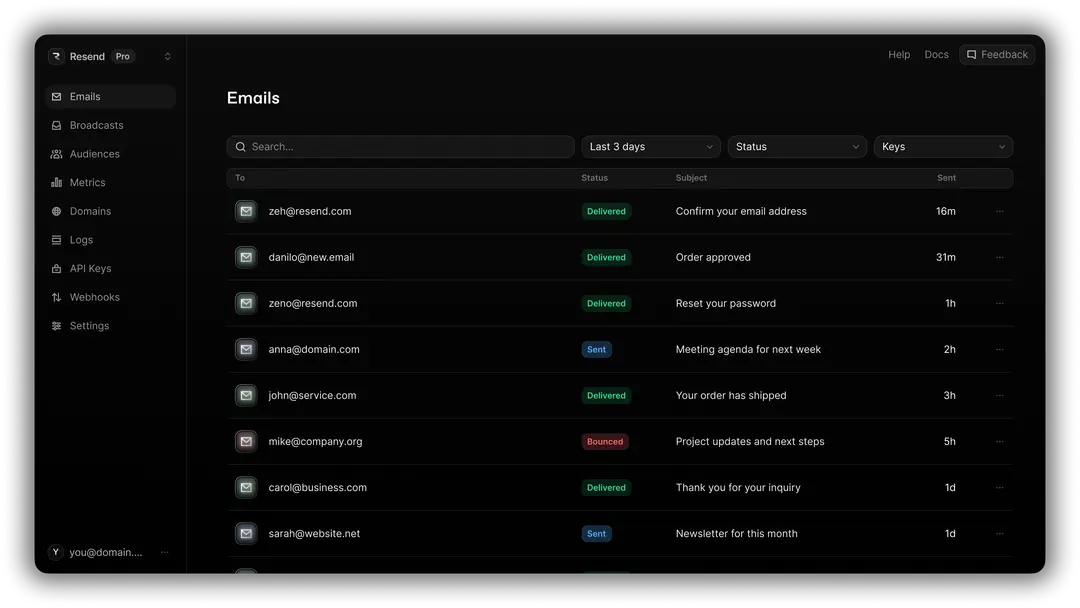
Analytics and logging features is another area where Resend proves to be solid and developer-friendly. It tracks all the essential events—deliveries, opens, clicks, bounces, and complaints—and makes them easy to act on.
Webhooks are well implemented too: the Free plan includes one endpoint, Pro and Scale support up to 10, and Enterprise offers more flexibility, all with access to every event type and signed webhook payloads for added security verification. The dashboard rounds things out with clear visualizations of delivery rates, bounce rates, and engagement trends.
That said, the biggest drawback I noticed is data retention on lower-tier plans. With just 1 day on Free and 3 days on Pro, historical data disappears quickly, which can make diagnosing deliverability issues or spotting longer-term trends more challenging (unless you upgrade or pipe events into your own logging system).
Resend is API-first and designed to run in backend environments like Node.js, server-side frameworks, and serverless functions. It fits naturally into stacks built with Next.js, Remix, Astro, SvelteKit, Nuxt, or Laravel, and deploys cleanly on platforms like Vercel, Netlify, Railway, and Supabase.
For systems that rely on traditional mail protocols, Resend also supports SMTP, making it compatible with applications that expect a standard mail server. Overall, it’s clearly built for modern runtime environments rather than no-code workflows.
Developer experience is arguably Resend’s strongest competitive advantage—as it should be, or that “built for developers” approach would feel like a sham.
That said, it offers an exceptionally fast time-to-first-send, with most developers able to go live in minutes. The documentation is clean and intuitive, with code examples across multiple languages, and setup requires far less configuration overhead than many legacy providers. The dashboard also feels modern and thoughtfully designed, avoiding the visual clutter common in platforms like Mailchimp or SendGrid.
Support quality can significantly shape the overall experience with an email platform, and Resend takes a fairly modern, developer-first approach. Rather than offering sprawling phone trees or tiered call centers, support is primarily handled through chat and email. The team is generally responsive and comfortable diving into API-level questions, webhook debugging, and deliverability troubleshooting without excessive back-and-forth.
Where it feels more limited, however, is in breadth rather than depth. There’s no traditional phone support, and more hands-on guidance or dedicated assistance is typically reserved for higher-tier or Enterprise customers.
For most developers, the support is efficient and technically sharp — but teams looking for white-glove onboarding or round-the-clock account management may find the structure relatively lean.
Resend Pricing Plans and Value
Resend separates pricing into transactional email and marketing email tracks, each with its own plan tiers. Below you’ll find a breakdown of both transactional pricing and marketing one.
Transactional Email Pricing
Plan
Monthly Cost
Emails/Month
Daily Limit
Custom Domains
Data Retention
Team Members
Free
$0
3,000
100
1
1 day
1
Pro
$20
50,000
No limit
10
3 days
5
Scale
$90
100,000
No limit
1,000
7 days
100
Enterprise
Custom
Custom
No limit
Flexible
Flexible
Flexible
Marketing Email Pricing
Plan
Monthly Cost
Contacts Limit
Email Sending
Audiences
Domains
Support / Features
Free
$0
Up to 1,000 contacts
Unlimited sends
1 audience
1 domain
Ticket support
Pro Marketing
$40
Up to 5,000 contacts
Unlimited sends
Unlimited audiences
Unlimited domains
Slack & ticket support, marketing analytics
Enterprise
Custom
Custom contacts
Unlimited sends
Unlimited audiences
Unlimited domains
Priority support, customizable data & features
Resend Pros and Cons
- Clean API, fast setup, and outstanding documentation across 8+ SDKs;
- Build email templates as React components with Tailwind CSS;
- Straightforward volume-based tiers with no hidden fees for core Resend features;
- Strong deliverability infrastructure thanks to healthy shared IPs, multi-region sending, and full SPF/DKIM/DMARC support;
- Generous free tier which offers 3,000 emails/month;
- A minimal, distraction-free UI that surfaces only relevant metrics;
- Frequent feature launches.
- Only 1 day on Free and 3 days on Pro makes debugging difficult;
- Steep price increase over plans;
- No built-in inbox placement testing, blocklist monitoring, or IP warm-up controls;
- Teams not using React may find the templating ecosystem less useful;
- No affiliate program for content creators or marketers.
Should You Choose Resend?
Who Resend is Best For
After my weeks worth of hands-on with Resend, I feel that this developer-first transactional email service is best suited for teams that care more about a clean, modern developer experience. It’s particularly well aligned with SaaS startups and indie developers building transactional flows like password reset emails, order confirmations, and onboarding sequences, where speed and simplicity matter.
It also makes a lot of sense for React or Next.js teams that prefer authoring email templates with familiar component-based patterns rather than wrestling with legacy editors. Early-stage products and MVPs benefit most from the fast setup and generous free tier, especially if the alternative is navigating the complexity of platforms like Mailchimp or SendGrid.
Who Should Consider an Alternative
Like most developer email platforms, Resend isn’t ideal for every use case. Teams that need advanced deliverability analytics, inbox placement testing, or granular IP warm-up controls may find more depth in Resend alternatives like Mailgun or Postmark.
Similarly, businesses looking to combine marketing and Resend transactional email in one place—complete with visual automation builders—may be better served by tools such as Sender or Brevo.
It’s also not the strongest fit for organizations with strict enterprise compliance requirements like HIPAA or EU data residency, despite its SOC 2 certification. If long data retention is essential without upgrading to higher tiers, Postmark’s 45-day message history is appealing. And for sheer cost efficiency at massive scale, Amazon SES remains significantly cheaper per email.
Resend User Experience and Reputation

G2 Reviews Summary
Many G2 reviewers describe Resend as a straightforward and accessible email solution, particularly for smaller apps and independent developers. One Resend review appreciates how simple the setup process is, noting that domain verification is often the only major step required to get started. Another review then highlights its affordability and dependable infrastructure, explaining that it handles email delivery efficiently without requiring complex configuration.
That said, feedback isn’t entirely without reservations. Some users mention that pricing may feel less competitive depending on email volume and usage frequency, especially when compared to alternative providers. Others point out occasional delays in delivery, with emails sometimes taking a few minutes to arrive.
Reddit Reviews Summary
On Reddit, feedback about Resend is notably divided. One Resend review praises its simplicity, especially for lightweight use cases like forwarding basic form submissions. For straightforward transactional needs, reviewers say it performs exactly as expected without unnecessary complexity, making it a convenient, no-frills option for small projects.
However, criticism tends to focus heavily on performance concerns. Multiple users echo G2 reviews, experiencing significant delays when sending emails, with some Resend reviews claiming confirmation messages can take over a minute to arrive. Others go further, arguing that despite having an appealing interface, the platform feels slow and occasionally buggy in practice.
Resend Compared to Top Alternatives
Resend vs Sender
Resend is a clean, API-centric platform focused solely on transactional email delivery, while Sender combines both transactional and marketing capabilities with automation, segmentation, and SMS support.
Resend appeals to developers who want simple, reliable API-driven emails, whereas Sender serves ecommerce and marketing teams that need campaign builders and multichannel messaging in one place. Choose Resend for core delivery simplicity and Sender for broader communication tools.
Resend vs Postmark
Resend offers a modern, developer-friendly API with minimal setup, while Postmark focuses on highly reliable transactional delivery and transparent inbox performance. Postmark’s mature infrastructure and detailed email activity logs make it strong for mission-critical emails, whereas Resend prioritizes simplicity and developer ergonomics.
If you want proven deliverability insights, Postmark leads; if you want a lean, easy-to-adopt API— Resend is the way to go.
Resend vs Mailgun
Resend is a modern, API-first platform built for developers who want fast, straightforward transactional email setup, while Mailgun offers a more established and feature-rich email infrastructure.
Mailgun provides advanced routing, inbound parsing, and email validation tools suited for complex operations, but it can feel more technical to manage. Resend keeps things streamlined with clean SDKs and minimal configuration, making it ideal for teams that prioritize simplicity over deep infrastructure control.
FAQ
Resend offers features like transactional email API, REST API, SDK support, among other features. It also supports attachments and scheduled sends. Resend includes React email templates for component-based development, server-side rendering, and various preview/testing tools. It provides SMTP relay, event-based sending, analytics, and email webhooks to enhance email functionality and tracking.
Resend is ideal for developers and teams needing flexible transactional email solutions with advanced customization. It’s well-suited for businesses looking to integrate programmatic email sending into applications or websites, especially those needing high deliverability and reliable infrastructure for emails. It’s a good choice for large-scale operations and development teams.
Resend focuses on high email deliverability through features like custom sending domains, email domain authentication (DKIM, SPF), and built-in infrastructure that helps ensure emails reach recipients’ inboxes. It supports sending from authenticated domains and provides tools to monitor deliverability for better email performance.
Yes, you can send transactional emails with Resend, since this developer-focused platform specializes in transactional email sending. It allows developers to send programmatic, event-based emails like password resets, order confirmations, and notifications. With Resend email API and SMTP relay, it offers reliable solutions for sending transactional emails securely and efficiently to users.
Resend provides customer support via various channels, including live chat and documentation. It offers resources like a knowledge base, integration guides, and developer tools to help users troubleshoot issues. For complex technical support, users may need to rely on community forums or API-specific resources.
- Hands-on testing across multiple email marketing tools
- Fair comparisons using a unified evaluation process
- Insights verified with real user reviews from trusted sources
- No sponsorships or affiliate ties
- Clear, unbiased scoring and methodology
