




For most small businesses, Sender is the closest MailerLite alternative: it keeps a comparable drag-and-drop editor and visual automation, adds SMS, and its free plan holds 2,500 subscribers versus MailerLite’s 250 as of June 2026.
If you need advanced multi-branch automation, ActiveCampaign is the strongest upgrade; for ecommerce, Omnisend is the closest fit; for creators monetizing a newsletter, Kit is purpose-built. The full comparison of all 13 tools sits below.
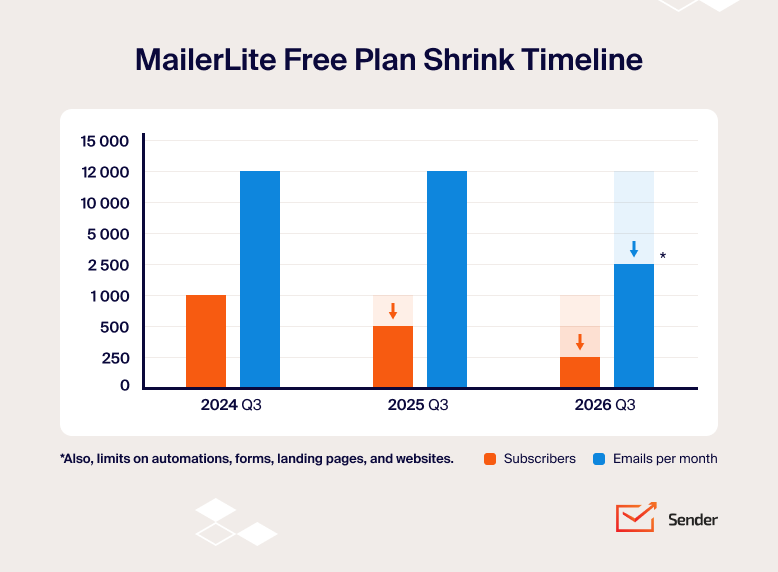
On 16 June 2026, MailerLite cut its free plan to 250 subscribers and 2,500 monthly emails, down from 1,000 subscribers and 12,000 emails two years earlier, and raised prices on paid tiers 10–30% in the same change.
If your list has grown past what the free plan now holds, or your automation needs have outrun single-condition workflows, this is the point where switching pays off.
We tested 13 MailerLite alternatives across free-plan limits, price at scale, automation depth, and ecommerce features.
MailerLite Alternatives Compared: Free Plans & Pricing (2026)
The table below compares all 13 MailerLite competitors by free-plan limit, entry price, best-fit reader, and where automation actually starts. Monthly billing, USD. Verified September 2026 and may have changed since.
| Provider | Free Plan | Starting Price | Best For | Automation entry point |
| MailerLite | 250 subscribers / 2,500 emails/mo | $12/mo | Newsletters and simple campaigns | 3 automations on Free |
| Sender | 2,500 subscribers / 15,000 emails/mo | $9/mo | SMB lifecycle automation on a budget | Free plan, unlimited |
| Omnisend | 250 contacts / 500 emails/mo | $16/mo | Shopify/BigCommerce stores | Free plan (workflow limits apply) |
| Brevo | 300 emails/day, up to 100k contacts | $9/mo | Large lists, low send frequency | Standard $18+/mo (capped at 2,000 contacts on Free/Starter) |
| Moosend | No free plan (30-day trial) | $9/mo | Budget automation, no feature gating | Pro $9/mo, full engine |
| GetResponse | 500 contacts / 2,500 emails/mo | $19/mo | Ecommerce lifecycle marketing | Marketer $48+/mo for unlimited workflows |
| Kit | 10,000 subscribers, unlimited sends | $39/mo | Creators monetizing a newsletter | 1 automation on Free; unlimited on Creator $33+/mo |
| Mailchimp | 250 contacts / 500 emails/mo | $13/mo | Intuit-ecosystem businesses | Standard $20+/mo for branching |
| Constant Contact | No free plan (trial only) | $12/mo | Event-driven orgs and nonprofits | Premium $80+/mo for custom automation |
| ActiveCampaign | No free plan (14-day trial) | $19/mo | B2B multi-branch automation + CRM | Starter $15/mo (5-action limit) |
| Mailjet | 6,000 emails/mo, 1,000 contacts | $9/mo | Teams collaborating on email design | Premium $27/mo |
| Drip | No free plan (14-day trial) | $39/mo | Ecommerce revenue attribution | Included from $39/mo entry |
| AWeber | 500 subscribers / 3,000 emails/mo | $15/mo | Coaches and creators wanting phone support | Lite $15/mo (3 automations); unlimited on Plus $30+/mo |
| Benchmark Email | 500 contacts / 2,500 emails/mo | $19/mo | Simplest possible newsletter tool | Not available (removed on NXG) |
Starting price is the lowest published monthly paid rate.
Why Users Are Leaving MailerLite in 2026
The pressure to switch comes from two directions: a free plan that keeps shrinking, and automation that branches on one condition at a time instead of the multi-trigger, multi-branch logic complex customer journeys need, forcing users to rebuild their workflow for the slightest change. MailerLite still handles newsletters and simple campaigns well; the friction shows up once you outgrow those basics.
The free-plan cuts are the clearest signal. MailerLite went from 1,000 subscribers and 12,000 monthly emails (2023) to 500 subscribers (September 2025) to 250 subscribers and 2,500 emails (June 2026). Each cut pushed more users onto paid tiers, which themselves rose 10-30% in the June 2026 price increase. For a growing list, the tool gets more expensive at exactly the moment you can least justify it.
Beyond pricing, these are the constraints growing teams run into:
Automation depth for lifecycle marketing. MailerLite handles single-condition splits and up to three triggers per automation, but multi-branch logic, layered conditions, and event-driven paths across many steps are harder to model than on automation-first platforms.
The automation cap itself scales by tier – 3 workflows on the MailerLite free plan, 50 on the Comfort plan, unlimited on the Power plan – so MailerLite pricing pushes you up a tier well before you hit real complexity. Teams building real automated workflows tend to feel this first.
Cost as the subscriber list grows. Entry pricing is accessible, but every subscriber counts toward billing, including unengaged ones. For fast-growing lists with multiple segments, the bill climbs faster than expected, which is why some teams start comparing email marketing costs across platforms before they commit.
Ecommerce-focused automation. MailerLite covers basic ecommerce triggers but lacks depth in post-purchase journeys, product-recommendation logic, and revenue-attributed workflows, and its lighter integration set often means complex tech stacks need third-party connectors.
No transactional email. MailerLite has no native transactional engine; it requires a separate MailerSend subscription. Platforms that bundle transactional email remove that second bill and second integration.
Account-suspension risk. The most consistent complaint across MailerLite’s Shopify App Store and G2 reviews is algorithmic account suspension without explanation or appeal. For a business that depends on its list, that’s a hard risk to price in.
How We Evaluated MailerLite Alternatives
Each platform was tested on its entry-level paid plan. Feature and pricing comparisons – automation limits, plan tiers, deliverability testing – ran against a standardized 1,000-contact list that had interacted with a newsletter in the last 90 days and was not purchased or scraped, kept identical across every platform so the comparison is apples-to-apples.
The hands-on verdict for each tool comes from separate trials on live client or store accounts, which varied in size (roughly 1,200 to 4,800 contacts depending on the tool). We created accounts, built email marketing campaigns, and set up automations across real subscriber lists between March and September 2026.
We assessed every platform on the same criteria:
- Automation capabilities. Trigger variety, conditional logic, behavioral segmentation, and support for multi-step lifecycle journeys beyond linear sequences.
- Pricing transparency and scaling. How clearly plan limits, subscriber-based pricing, and overage risks are communicated, and how costs evolve as lists grow.
- Ecommerce integrations. Native store connections, ecommerce triggers, and how well purchase data powers segmentation and revenue-driven automation.
- Ease of migration. How simple it is to import contacts, fields, and segments and rebuild automations, including migration from MailerLite specifically.
- Deliverability tools. Authentication support, sender-reputation features, and monitoring that helps maintain inbox placement.
- Support responsiveness on the entry-level plan, and customer reviews across G2, Capterra, and Trustpilot.
Deliverability testing: third-party data, not vendor claims – GlockApps and EmailTooltester benchmarking inbox placement, spam rates, and domain reputation, run in-house with identical campaign setups across platforms so the comparison isolates platform behavior rather than campaign quality.
User reviews: patterns across a large volume of recent G2, Trustpilot, and Capterra reviews, balancing positive and negative feedback rather than cherry-picking isolated quotes.
What wasn’t tested: enterprise-only features (SSO, dedicated IPs, custom SLAs), SMS at high volume, and transactional infrastructure beyond basic SMTP. This comparison targets SMBs, independent creators, and agencies with lists up to roughly 50,000 contacts, not enterprise buyers.
Pricing methodology: verified directly from each vendor’s pricing page in September 2026 and cross-referenced against at least two independent sources, with annual discounts noted separately from monthly pricing. All prices are USD – check each vendor’s page directly before purchasing, since plans change without much notice.
Capterra, G2, Trustpilot, and Reddit to create an objective evaluation. Learn more about our review methodology
Quick Picks: Best MailerLite Alternative by Use Case
- Best free plan with full automation: Sender: 2,500 subscribers, 15,000 emails/month, with automation and segmentation included on the free tier.
- Largest free plan: Kit: 10,000 subscribers free with unlimited sends, though the free tier is limited to one automation and one sequence.
- Best for ecommerce: Omnisend: pre-built email, SMS, and push workflows for Shopify and BigCommerce. For stores doing $500K+ a year with a dedicated marketer, Klaviyo is the heavier-analytics option worth weighing.
- Best for advanced automation: ActiveCampaign: multi-branch workflows, lead scoring, and a built-in CRM.
- Best budget automation: Moosend: the full automation engine on the $9/mo entry plan, with no feature gating between tiers.
Pricing at Scale: Cost at 1,000 to 25,000 Contacts
Entry prices only tell part of the story – several of these tools get dramatically more or less expensive as a list grows, and cost at 10,000 contacts is often where the real gap between tools shows up. The table below shows monthly, non-promotional pricing at four common list sizes, based on the figures each vendor currently publishes.
| Provider | 1,000 contacts | 5,000 contacts | 10,000 contacts | 25,000 contacts | Pricing model |
| MailerLite (Comfort) | $19/mo | $49/mo | $89/mo | $179/mo | Per subscriber |
| Sender | Free (under 2,500) | $39/mo | $69/mo | $149/mo | Per subscriber |
| Omnisend | $20/mo | $81/mo | $132 | $282 | Per contact |
| GetResponse | $19/mo | ~$56/mo | ~$80/mo | ~$173/mo | Per contact |
| Brevo | from $9/mo* | Per email volume | |||
| Moosend | $16/mo | $48/mo | $88/mo | $160/mo | Per subscriber |
| Kit | $39/mo | $89/mo | $139/mo | $199/mo | Per subscriber |
| Mailchimp | $26.50/mo | $75/mo | $110/mo | $27/mo | Per contact |
| Constant Contact | Starting from $12/mo** | Per contact | |||
| ActiveCampaign | $19/mo | $99/mo | $189/mo | $489/mo | Per contact |
| Mailjet | Starting from $0 (6,000 emails/mo)* | Per email volume | |||
| Drip | $39/mo (2,500 subs included) | $89/mo | $154/mo | $369/mo | Per subscriber |
| AWeber | $25/mo | $60/mo | $100/mo | $210/mo | Per subscriber |
| Benchmark Email | $19/mo | $63/mo | $93/mo | $179/mo | Per contact |
Figures reflect each vendor’s published monthly rate for the tier that includes core automation at that contact count, verified September 2026.
*Brevo and Mailjet prices by email volume rather than contact count, so it doesn’t map to a fixed column; see cheap email marketing for how the two models compare.
**Constant Contact doesn’t publish self-serve pricing past the entry tier – scaling up requires contacting their sales team for a quote – though we tested the Lite plan directly at 1,000 subscribers and paid $35/mo.
13 Best MailerLite Alternatives (Free & Paid Options)
Below, each of the 13 tools gets the same treatment: the core finding from hands-on testing, a clear best-for and not-for, key features, honest limitations, and migration fit from MailerLite – including how easily each platform lets you import contacts and tags without rebuilding your list from scratch. Every price and plan limit was pulled from the vendor and verified September 2026.
Sender — SMB Email Marketing and Automation
The core finding: full marketing automation runs on Sender’s free plan for up to 2,500 subscribers and 15,000 emails a month.

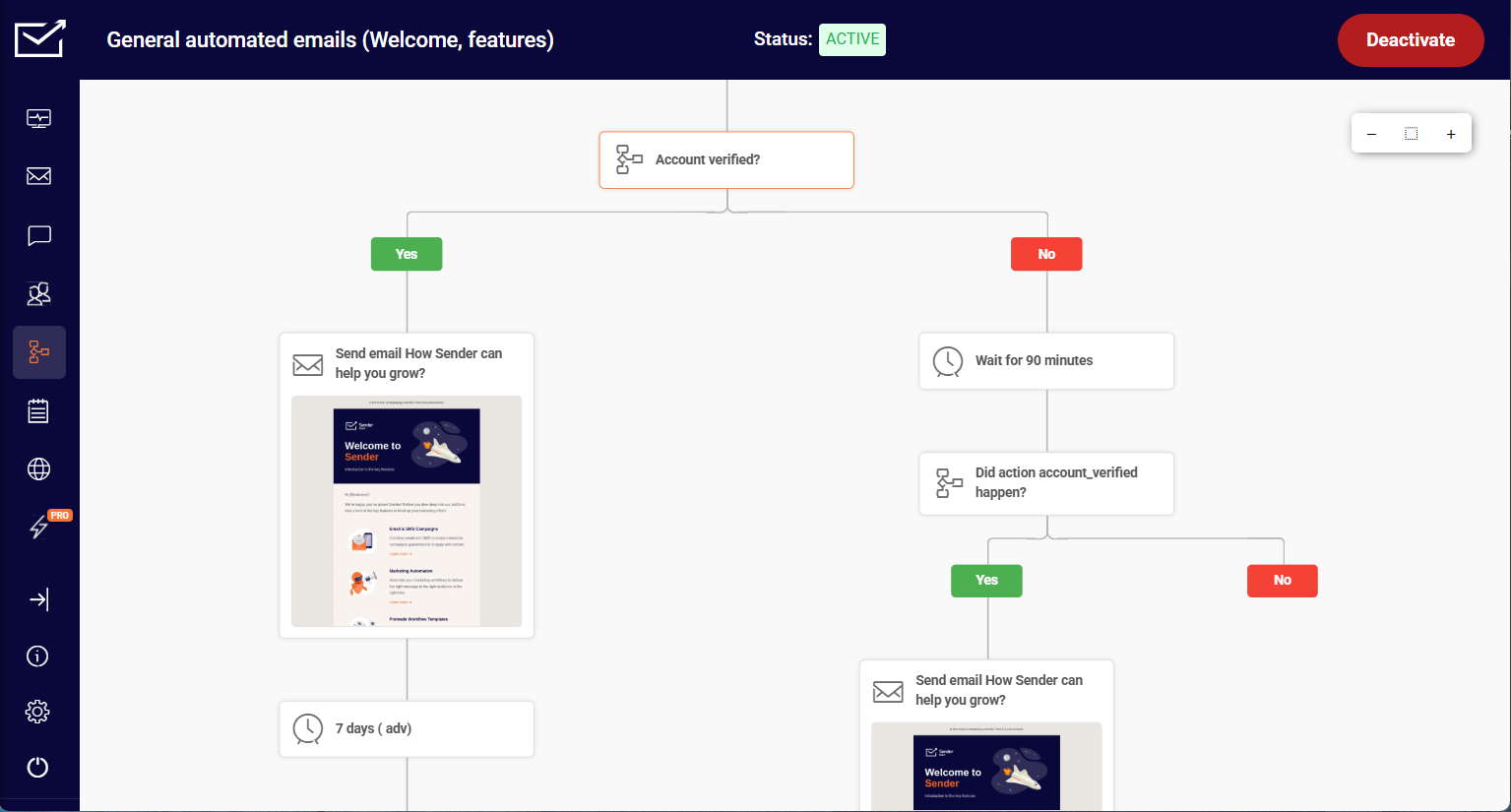
Welcome series, abandoned cart, and post-purchase flows are all available at $0, which is rare in this category. Across two ecommerce stores and a SaaS product tested over four months, the standout was the custom events feature.
Custom events give you site tracking through the API: you capture specific user actions on your site (for example, “Watched 50% of a Video” or “Renewed Subscription”) and send that data to Sender in real time to trigger automations or build behavioral segments. That capability usually appears only on platforms costing five to ten times more.
Those pieces work as one system: signup forms and popups feed segmented lists, and the email builder and automation act on that data directly. That’s also where Sender beats MailerLite most clearly – multi-branch flows and unlimited triggers run from the free plan up, instead of capping at three active automations.
Best for: ecommerce stores and SaaS businesses under 50,000 contacts that need behavior-based automation and custom-event triggers without enterprise pricing.
Not for: teams that need a built-in CRM, native Salesforce integration, or SMS coverage outside supported countries.
Key Features
- Marketing automation on every plan, including Free. Decision splits, delay logic, omnichannel steps (email and SMS in one flow), goal-completion triggers, and premade templates.
- Custom events via API. Fires when users take specific actions on your site, then triggers automations or builds behavioral segments in real time.
- Dynamic segmentation. Recalculates at send time using campaign activity, subscriber attributes, custom fields, and ecommerce metrics.
- Transactional email included. SMTP and REST API with SPF, DKIM, and DMARC, plus a dedicated IP on the Professional plan with 20K+ contacts at no extra cost.
Migration Fit from MailerLite
Sender’s import tool carries over contacts, tags, and segments with little manual cleanup, and standard flows (welcome, promos, behavior triggers) rebuild visually, though more complex logic needs hands-on refinement. Sender offers free, hands-on migration support for lists with 20,000+ subscribers, backed by 24/7 support throughout the switch, and the deeper automation adds a mild learning curve.

even on the free plan.
MailerLite vs. Sender – Feature Breakdown
| Feature | MailerLite | Sender | Winner |
| Free plan contacts | Up to 250 subscribers | Up to 2,500 subscribers | Sender |
| Free plan emails | 2,500 emails/month | 15,000 emails/month | Sender |
| Starting price | $12/month | $9/month | Sender |
| Automation on free plan | 3 active automations, step limits | Unlimited steps, multi-branch | Sender |
| Custom events | Not available | API-triggered custom events | Sender |
| SMS marketing | Via add-ons/integrations | Included on paid plans | Sender |
| Transactional email | Requires MailerSend | Native SMTP + REST API | Sender |
| Website builder / digital-product sales | Native website builder, 0% commission on digital products | Not available | MailerLite |
Where MailerLite wins: its built-in website builder and 0% commission on digital products cover ground Sender doesn’t touch at all.
If cost is the main driver, Sender’s free-forever plan bundles multi-branch automation, segmentation, and the landing page builder at $0.
Omnisend — Ecommerce Email and SMS Platform
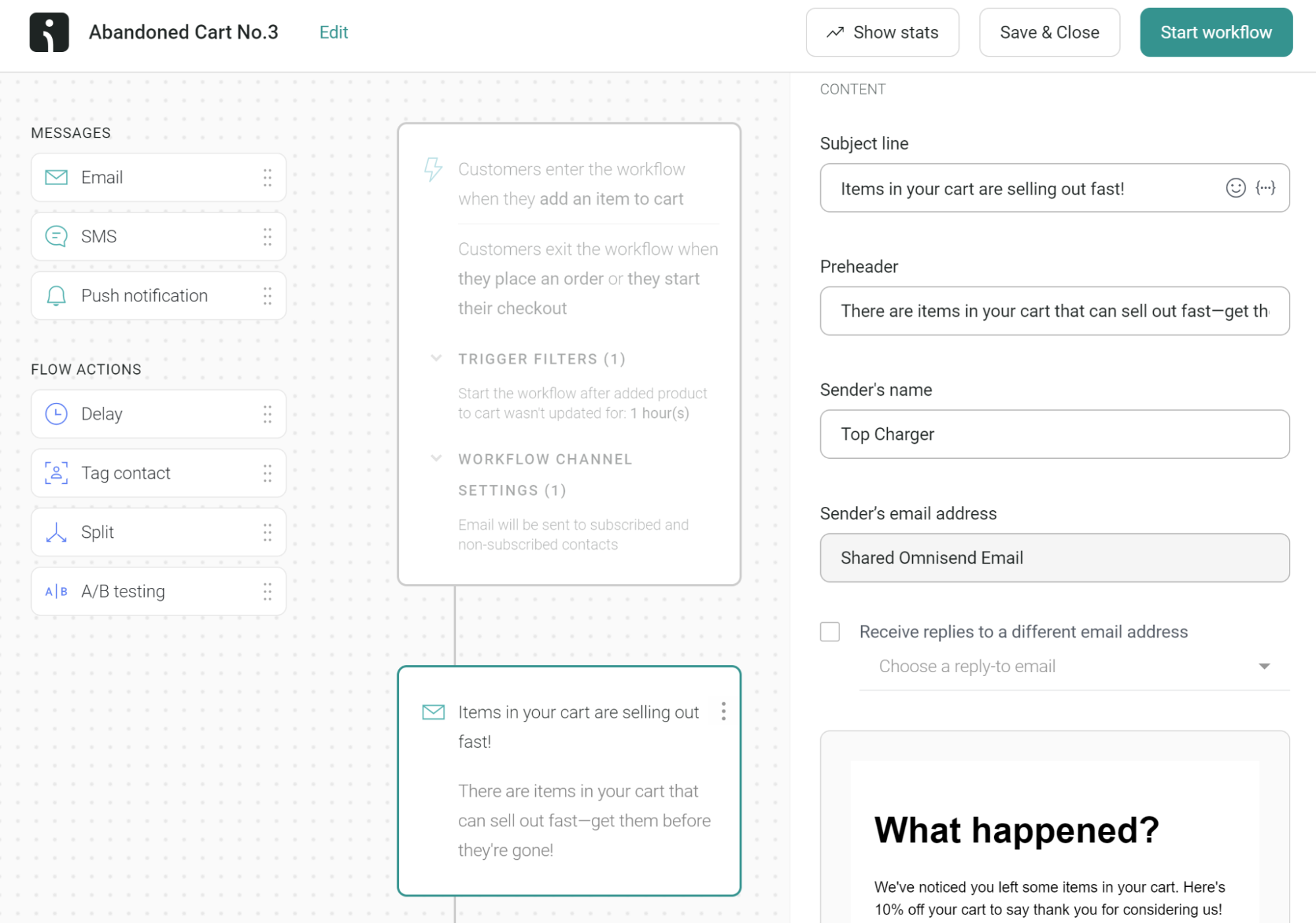
The core finding: Omnisend combines email, SMS, and web push in a single automation flow, and its pre-built ecommerce workflows activate in under 15 minutes.

Running it on a Shopify store doing $45K a month over three months, the cart-abandonment and welcome workflows produced measurable revenue within the first week. This is an ecommerce email marketing platform built omnichannel-first, and it shows in the depth of its store triggers, which read live customer data from your store to target each message. Free-plan gives you 250 contacts, with 500 emails/month.
Building an email, an SMS reminder, and a push fallback into one flow saved roughly two hours per campaign compared with stitching separate tools together.
Best for: Shopify and BigCommerce stores under 50,000 contacts that want pre-built ecommerce automations across email, SMS, and push in one workflow.
Not for: B2B businesses, SaaS companies, or anyone on WooCommerce or Wix who needs the Product Picker feature.
Key Features
- Omnichannel automation. Email, SMS/MMS, and web push in a single workflow.
- Product Picker. Pulls live product images, prices, and links directly from your Shopify or BigCommerce store.
- AI segment builder. Creates audience segments from plain-language prompts.
- Web push as a native channel. 500/month on Free, unlimited on paid plans.
Migration Fit from MailerLite
Subscriber lists, segments, and basic tags transfer smoothly, adding ecommerce data like purchase history along the way, though Omnisend’s ecommerce automations (cart abandonment, product follow-ups, post-purchase) need extra setup and store integration. Existing layouts adapt into Omnisend templates with light restructuring, and the deeper segmentation adds a moderate ramp-up. Stores weighing the switch can compare options in our roundup of email marketing platforms for ecommerce.
MailerLite vs. Omnisend – Feature Breakdown
| Feature | MailerLite | Omnisend | Winner |
| Free plan contacts | Up to 250 subscribers | Up to 250 contacts | Tie |
| Free plan emails | 2,500 emails/month | 500 emails/month | MailerLite |
| Starting price | $12/month | $16/month | MailerLite |
| Ecommerce focus | Basic ecommerce triggers | Built for ecommerce | Omnisend |
| SMS marketing | Via integrations | First-class channel (Pro) | Omnisend |
| Web push | Not native | Native channel + automation | Omnisend |
| Automation builder | 3 active workflows on free | Email/SMS/push in one flow | Omnisend |
Brevo — Multichannel Email Marketing Platform
The core finding: Brevo charges by emails sent per month, not by contact count, which changes the math entirely for large lists.

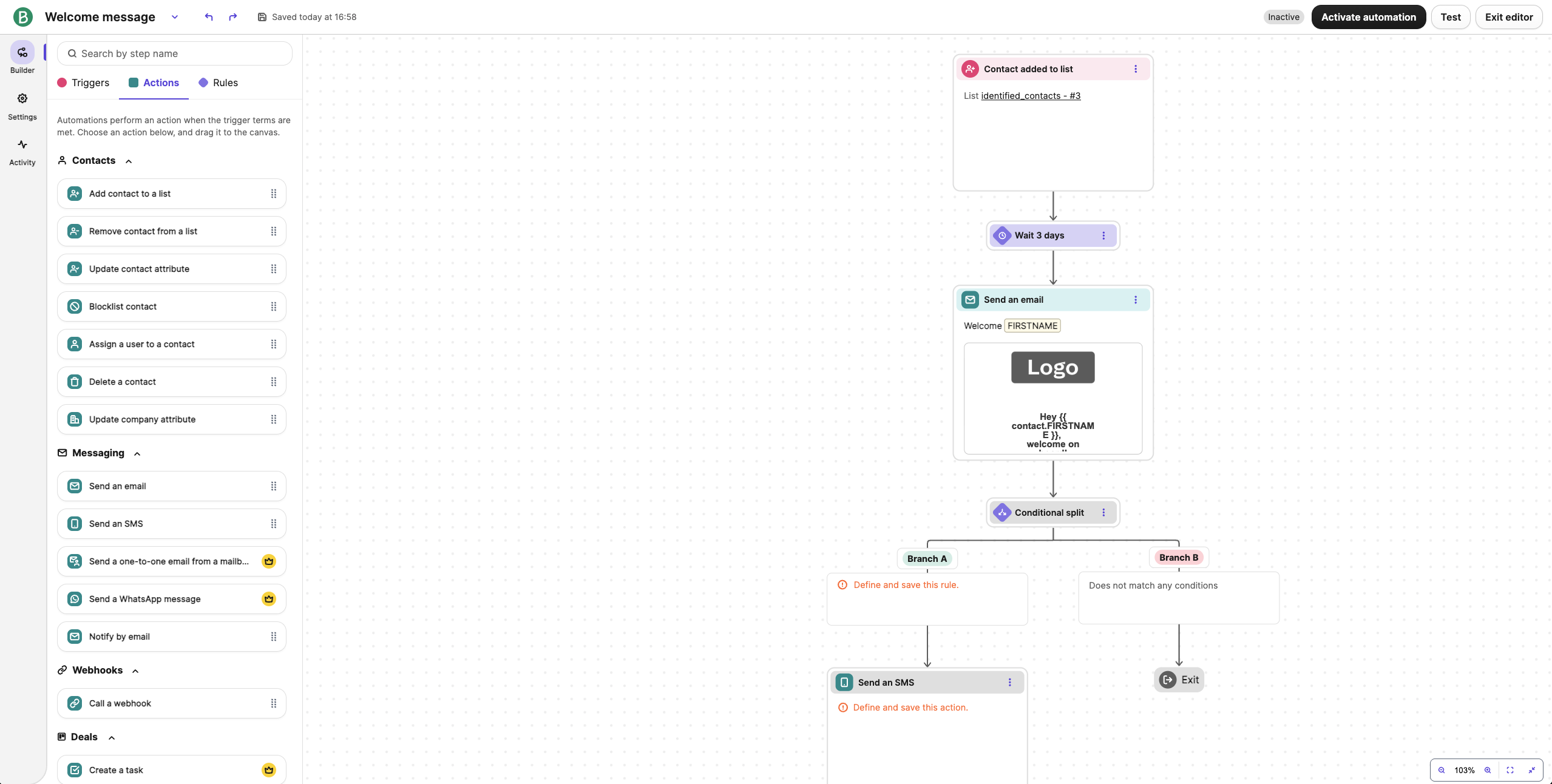
Running it for transactional email on a client’s ecommerce site and marketing campaigns for a B2B SaaS product at the same time, the volume-based model made it cheap to store a large audience and email it infrequently. The catch is that full automation is excluded from Free and Starter – both cap workflows at 2,000 contacts, even if your plan stores far more; removing that cap requires Standard at $18/mo.
Transactional email ships on every plan, including Free, over SMTP and API – for a store that needs both marketing and order-confirmation email, that removes a second vendor.
Best for: businesses with large contact lists and low-to-moderate send frequency that also need transactional email in the same platform.
Not for: daily senders, high-frequency automation users, or anyone who needs automation without paying $18+/mo.
Key Features
- Per-email pricing. You pay for emails sent, though contact limits also apply and scale with the volume tier chosen; unlimited contacts are available only on the Enterprise plan.
- Transactional emails on all plans. Order confirmations and receipts send over SMTP and API with a claimed 99% delivery rate.
- Eight channels. Email, SMS, WhatsApp, web push, mobile push, live chat, chatbot, and phone.
- Visual automation builder. Available from Free, but capped at 2,000 contacts in workflows until Standard ($18/mo).
Migration Fit from MailerLite
Contacts and core fields move over cleanly, and Brevo’s attributes and list filters let you rebuild basic segments without much rework, though heavy MailerLite tag-and-group setups need some cleanup to map into Brevo’s lists-plus-attributes structure. Standard flows (welcome, lead nurturing, re-engagement) rebuild well, but custom-event logic needs hands-on refinement, and Brevo’s broader suite adds a moderate learning curve for teams used to MailerLite’s simpler workflow.
MailerLite vs. Brevo – Feature Breakdown
| Feature | MailerLite | Brevo | Winner |
| Free plan contacts | Up to 250 subscribers | Up to 100,000 contacts | Brevo |
| Free plan sends | 2,500 emails/month | 300 emails/day | Brevo |
| Starting price | $12/month | $9/month | Brevo |
| Automation entry point | Free plan (capped) | Free plan, capped at 2,000 workflow contacts | Tie |
| SMS + WhatsApp | Via integrations | Native | Brevo |
| Transactional email | Requires MailerSend | Built-in on all plans | Brevo |
| Pricing model | Per subscriber | Per email volume | Brevo |
For high-send, low-frequency use cases, Brevo often lands cheapest; our guide to cheap email marketing puts the volume model side by side with per-subscriber pricing.
Moosend — Cheap MailerLite Alternative with Unlimited Emails
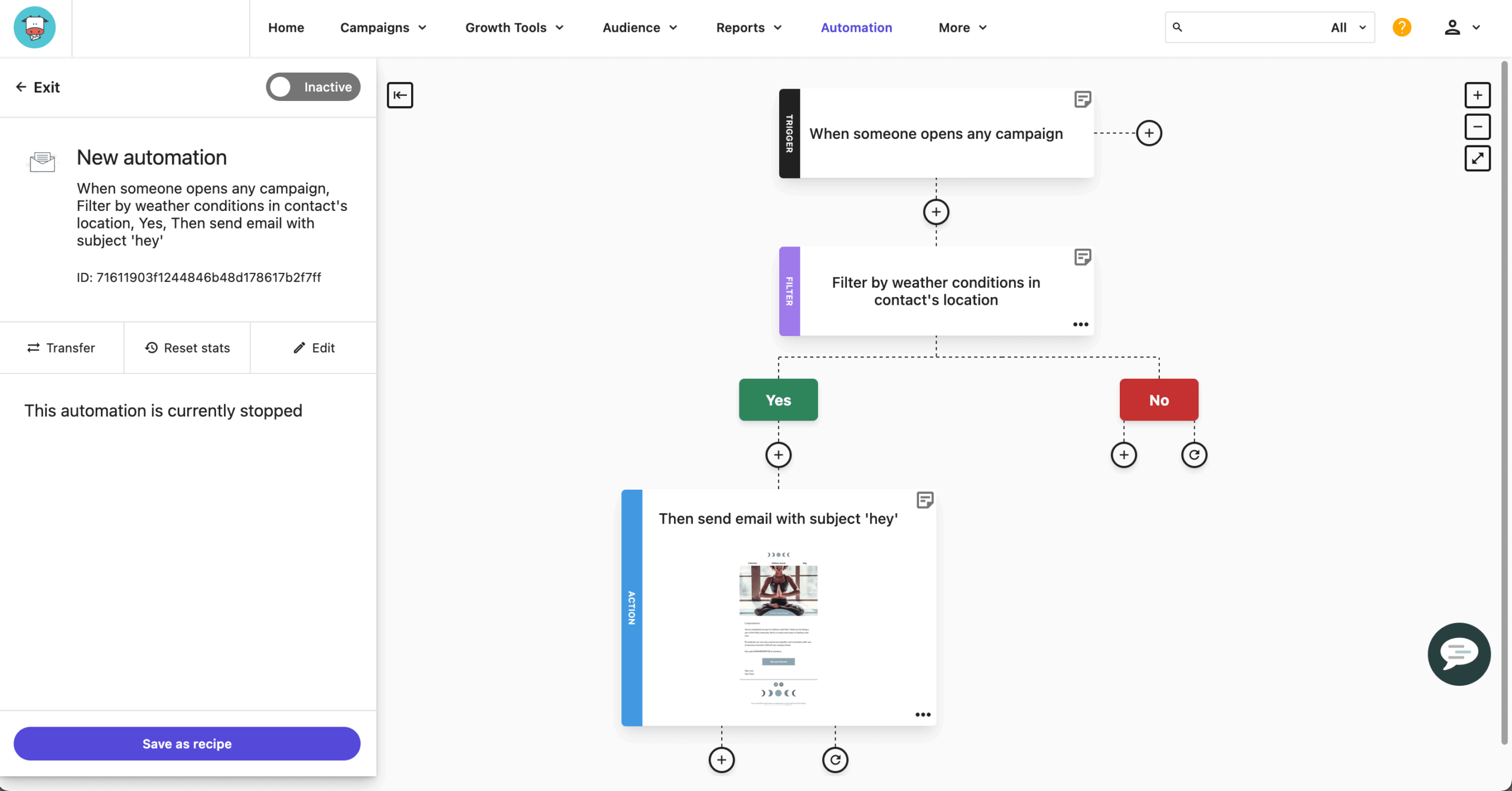
The core finding: Moosend’s $9/mo Pro plan includes the full automation engine with zero feature gating between paid tiers.
Testing it on a small ecommerce store with 3,200 contacts, the same automation available on the entry plan is what you get on the $315/mo plan at 50,000 contacts; only the contact ceiling changes. At 10,000 contacts, Moosend runs about $88/mo versus ActiveCampaign’s $189/mo for comparable list size.
Best for: self-sufficient small businesses under 25,000 contacts that want full automation at the lowest price.
Not for: teams needing multichannel (SMS or push), a native Shopify integration, or transactional email on the base plan.
Key Features
- Marketing automation. 32 triggers, 30+ filter criteria, and up to 10 conditional branches, all included on Pro.
- Drag-and-drop editor. Countdown timers, product blocks, and AI features including an AI Writer for copy.
- Real-time analytics. Click maps, geographic data, and revenue tracking.
- Landing page builder. Templates and SEO settings, unlimited on paid plans.
Migration Fit from MailerLite
Moosend’s automation engine is strong enough to rebuild MailerLite flows without simplifying them, and contacts, fields, and segments carry over with a manageable amount of setup – the main effort is recreating event tracking and re-checking timing rules. Because every feature sits on every paid tier, there’s no upgrade puzzle to solve mid-migration; the learning curve is moderate and centered on the automation builder.
MailerLite vs. Moosend – Feature Breakdown
| Feature | MailerLite | Moosend | Winner |
| Free plan | 250 subscribers / 2,500 emails | No free plan (30-day trial) | MailerLite |
| Starting price | $12/month | $9/month | Moosend |
| Feature gating | Tiered by plan | None between paid tiers | Moosend |
| Automation | Capped on free plan | Full engine on entry plan | Moosend |
| Unlimited emails | No | Yes | Moosend |
| Shopify integration | Native | No native connector | MailerLite |
| SMS / push | Via integrations | Email-only | MailerLite |
GetResponse — Ecommerce Automation and Lifecycle Marketing Platform
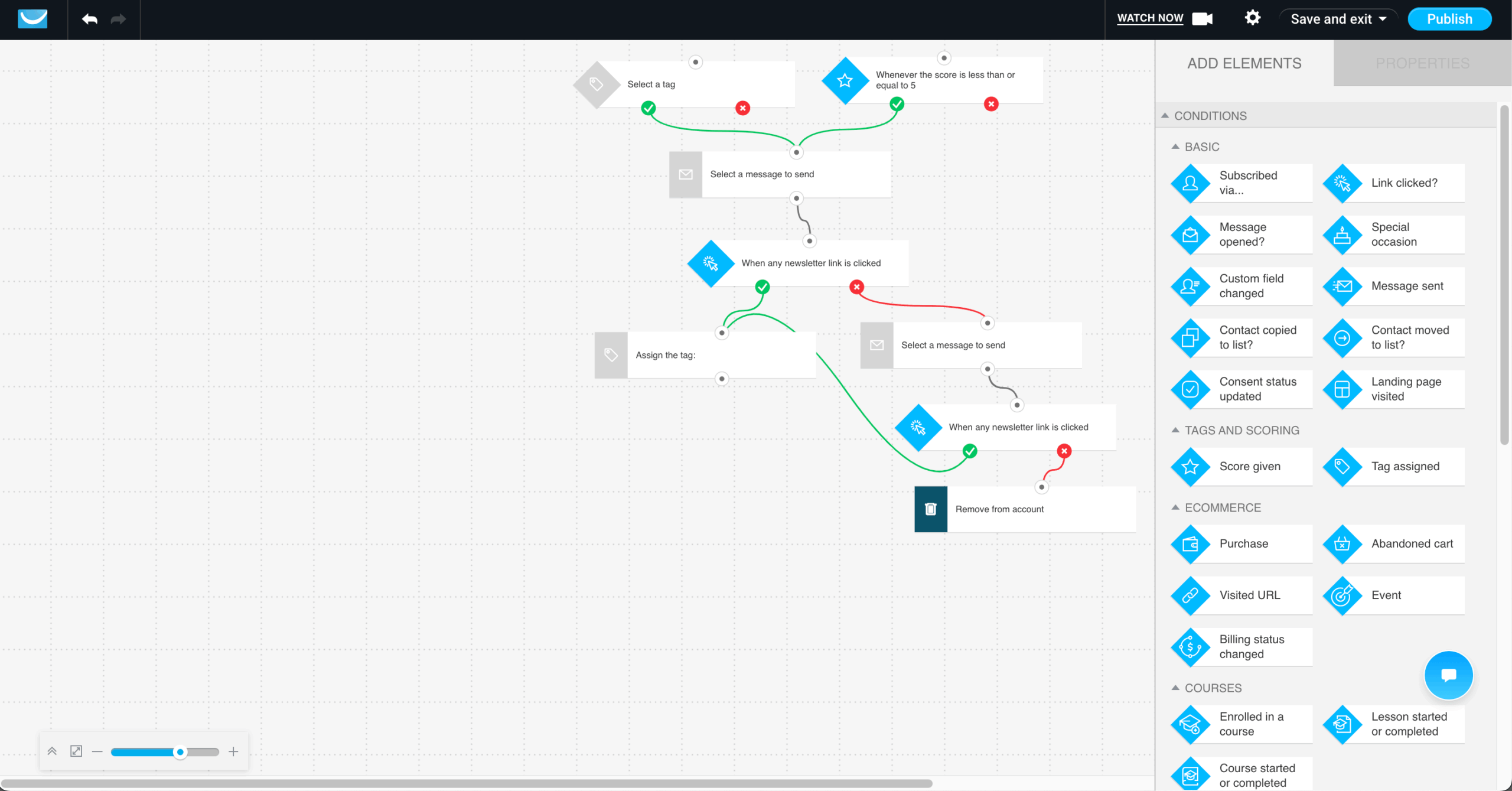
The core finding: GetResponse combines email marketing, landing pages, popups, and ecommerce automation – abandoned-cart recovery, promo codes, revenue reporting – into one platform built for lifecycle marketing rather than one-off newsletters.

Compared to MailerLite, the depth shows up in lifecycle automation: welcome sequences, lead-nurturing workflows, click-and-open follow-ups, birthday emails, visited-URL triggers, and purchase-based automation all sit inside the same workflow builder, instead of the linear sequences MailerLite is built around.
For ecommerce specifically, GetResponse adds product recommendations, promo codes, abandoned-cart recovery, and revenue reporting on top of that automation layer, tying campaigns directly to purchase behavior rather than send dates alone. Unlimited email sends apply once you’re on a paid plan; the free tier stays capped at 2,500 a month, and several advanced features, including revenue reporting, sit on higher tiers.
Best for: ecommerce brands, SMBs, and marketing teams that want lifecycle automation, lead capture, and revenue reporting in one platform.
Not for: teams that only need a basic newsletter sender, or anyone who wants ecommerce automation without leaving the entry-level plan.
Key Features
- Marketing automation. Welcome sequences, lead-nurturing workflows, click-and-open follow-ups, purchase-based triggers, tagging, and scoring in one visual builder.
- Ecommerce automation. Abandoned-cart recovery, promo codes, product recommendations, and revenue reporting tied to store activity.
- Conversion funnels. Landing pages, email sequences, and payment processing combined into one sales funnel from lead to purchase.
- Lead capture. Landing pages, signup forms, and popups that feed new subscribers directly into automated workflows.
Migration Fit from MailerLite
Importing contacts and custom fields into GetResponse is straightforward, though teams with complex MailerLite groups, tags, and segments should map their audience structure before migrating. Standard flows (welcome, nurture, re-engagement, promos) rebuild in the visual automation builder, while ecommerce tracking, purchase-based workflows, and revenue reporting need extra setup time beyond MailerLite’s simpler automation.
MailerLite vs. GetResponse – Feature Breakdown
| Feature | MailerLite | GetResponse | Winner |
| Free plan contacts | Up to 250 subscribers | Up to 500 contacts | GetResponse |
| Free plan emails | 2,500 emails/month | 2,500 emails/month | Tie |
| Starting price | $12/month | $19/month | MailerLite |
| Unlimited sends on paid plans | No | Yes | GetResponse |
| Automation depth | Visual workflows for linear journeys | Unlimited workflows (Marketer+), purchase-based triggers | GetResponse |
| Ecommerce automation | Basic triggers | Abandoned carts, promo codes, product recommendations, revenue reports | GetResponse |
| Revenue reporting | Limited | Reports tied to campaigns and purchases | GetResponse |
If linear automation is the reason you’re leaving MailerLite, GetResponse’s workflow builder is built for exactly that gap.
Kit (ConvertKit) — Best for Creators & Paid Newsletters
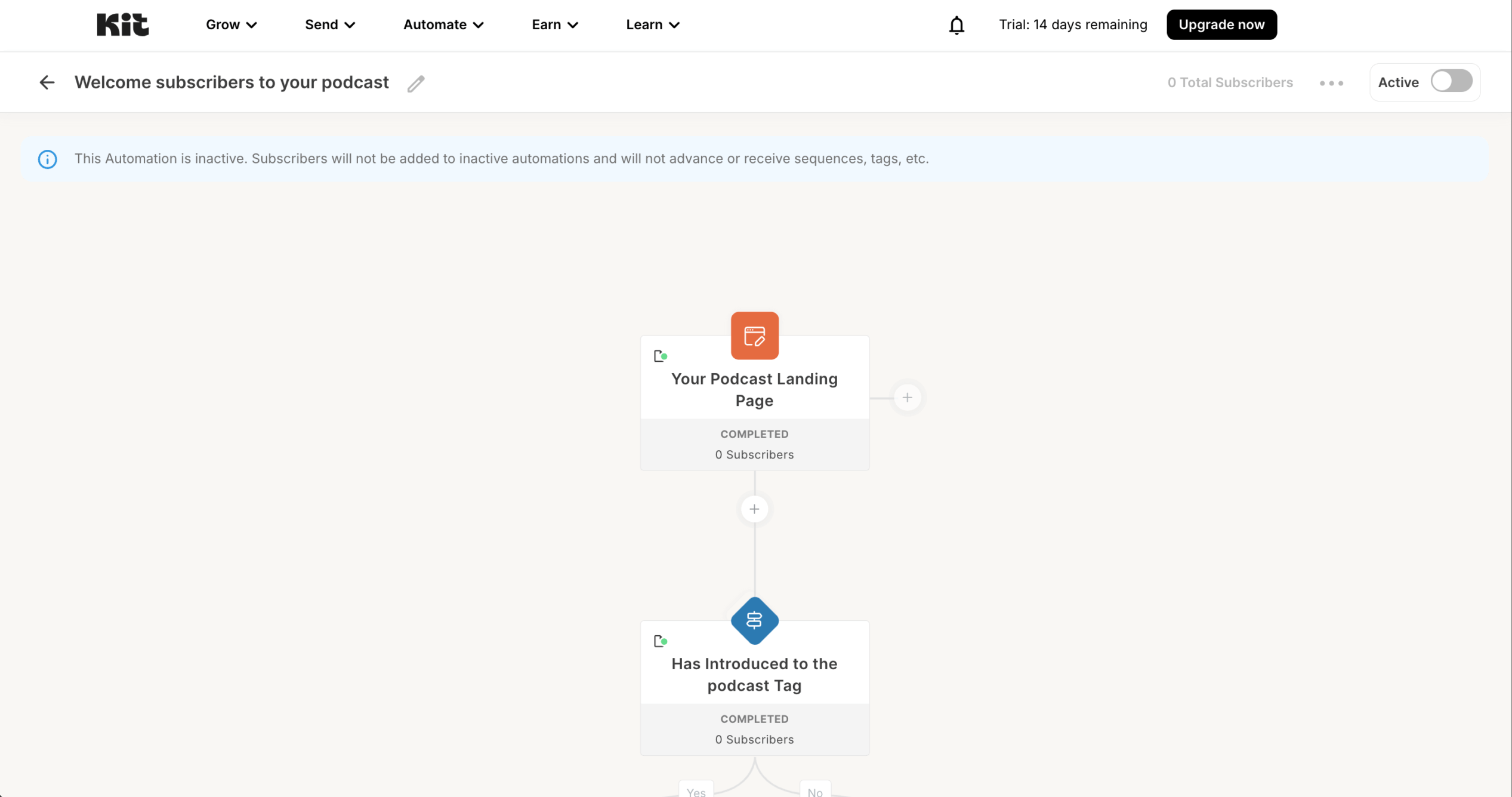
The core finding: Kit’s free Newsletter plan holds up to 10,000 subscribers with unlimited sends, the most generous free plan in this roundup.

Formerly ConvertKit, Kit is a creator newsletter platform for bloggers, course sellers, podcasters, and newsletter operators who want to grow and monetize a list in one place. The trade-off is paid pricing that rose sharply in September 2025, so the value depends on whether you use the monetization tools.
Pricing scales by subscriber count, not sends, so you never pay for email volume. The catch is that the free plan includes only one automation and one sequence, and unbranded emails plus real automation require the paid Creator tier. At 10,000 subscribers, Creator runs $100/mo and Pro runs $140/mo (September 2026).
Best for: creators who monetize through digital products, paid newsletters, or the sponsor network and want a large free list ceiling.
Not for: ecommerce brands needing store automation, teams that need A/B testing without the top tier, or budget-conscious businesses that only need basic email (MailerLite or Sender cost far less at scale).
Key Features
- Free plan up to 10,000 subscribers. Unlimited email broadcasts, unlimited landing pages, and unlimited forms at no cost.
- Visual automation and sequences. Unlimited on Creator; the free plan is limited to one of each.
- Built-in monetization. Sell digital products and paid newsletter subscriptions; a 3.5% + $0.30 fee applies per transaction on every plan, including Free.
- 70+ integrations with ecommerce, webinar, and CRM tools on paid plans.
Migration Fit from MailerLite
Kit imports subscribers, tags, and forms cleanly, and runs free migrations for new paid customers with lists over 5,000 subscribers; MailerLite’s tag-based structure maps naturally onto Kit’s tag-and-segment model, so audience structure carries over with little cleanup. Rebuilding automations is straightforward for creator-style sequences (lead magnet delivery, evergreen funnels, onboarding), though you’ll recreate them on Creator since the free plan allows only one, and landing pages and forms rebuild quickly from Kit’s template library.
MailerLite vs. Kit – Feature Breakdown
| Feature | MailerLite | Kit | Winner |
| Free plan subscribers | Up to 250 | Up to 10,000 | Kit |
| Free plan sends | 2,500 emails/month | Unlimited | Kit |
| Starting price | $12/month | $39/month | MailerLite |
| Free plan automations | 3 active | 1 automation, 1 sequence | MailerLite |
| A/B testing | Free plan | Pro tier only | MailerLite |
| Creator monetization | 0% on digital products | Digital products + sponsor network | Kit |
Creators weighing the newsletter-first options can compare Kit against dedicated publishing tools in our roundup of the best newsletter platforms.
Mailchimp — All-in-One Email Marketing Platform
The core finding: Mailchimp’s differentiator is its integration ecosystem, with 300+ native connections, but the gap between what it promises and what it costs has widened since Intuit’s 2021 acquisition.

The free plan now caps at 250 contacts and 500 emails/month with zero automation, and the platform charges for unsubscribed and inactive contacts until you manually archive them.
The 300+ native connections plus the Intuit financial-data pipeline are the real reason to choose Mailchimp – it plugs into more tools than any platform in this comparison, which is often what keeps teams from moving to cheaper alternatives.
Best for: businesses already embedded in the Intuit ecosystem (QuickBooks, TurboTax) that need one-click financial-data syncing.
Not for: budget-conscious teams with growing lists, since costs escalate faster than any other tool tested here.
Key Features
- Drag-and-drop builder with 260+ templates and a product content block that pulls live store data.
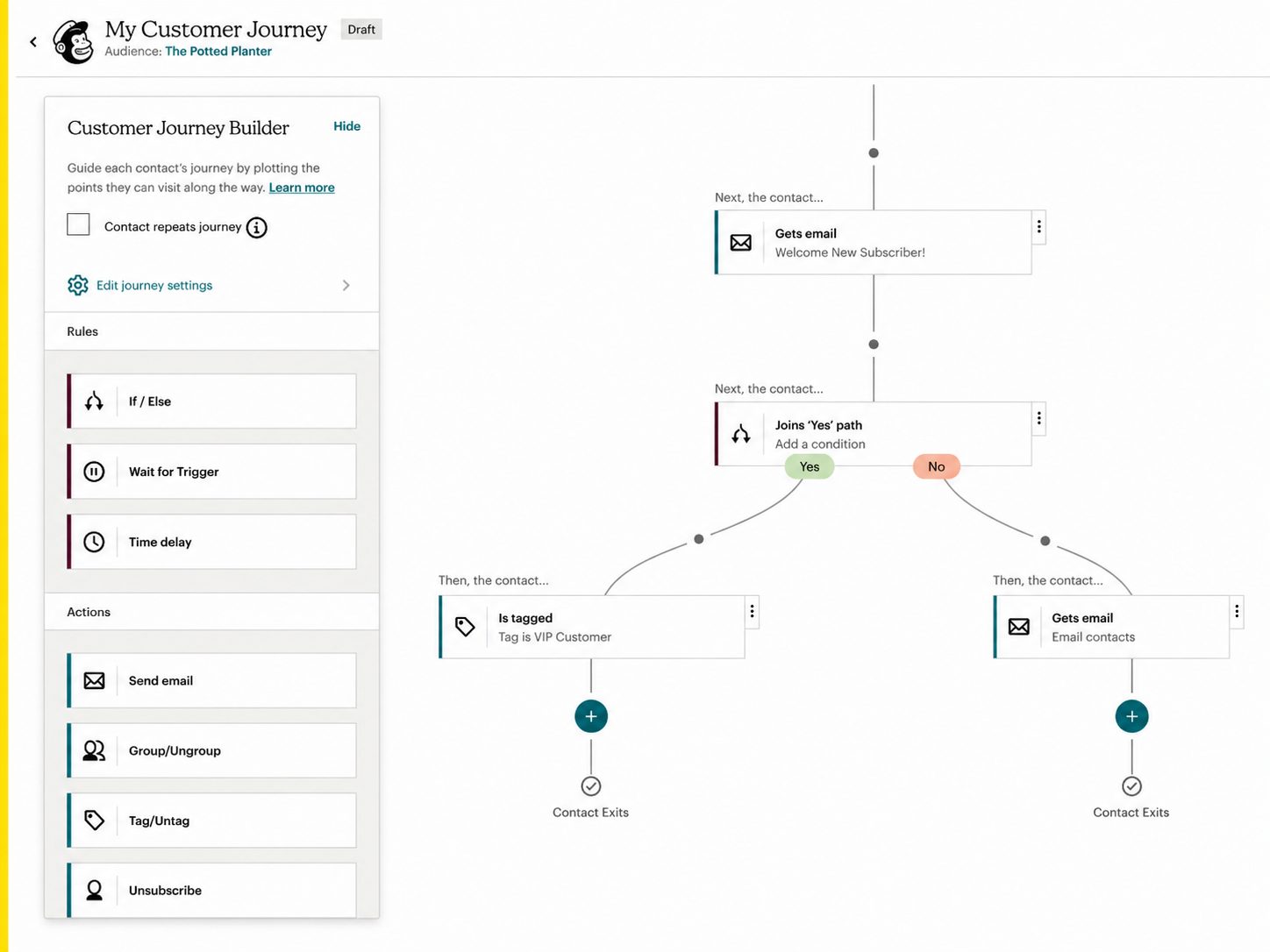
- Customer Journey Builder. Multi-step workflows, but limited to 4 journey points on Essentials ($13/mo) and requiring Standard ($20/mo) for branching logic.
- Audience segmentation with behavioral targeting and predictive demographics (Standard and above).
- 300+ native integrations including Shopify, WooCommerce, Salesforce, and Canva.
Migration Fit from MailerLite
Mailchimp preserves key fields and basic tags on import; the most time goes into mapping MailerLite groups and segments into its audience structure so you don’t duplicate contacts. Common flows rebuild easily, though nuanced behavioral data needs extra configuration for branching paths or custom events, and teams coming from MailerLite’s simpler setup need a short ramp-up on the audience model. Our Mailchimp alternatives guide covers lower-cost options if pricing is the sticking point.
MailerLite vs. Mailchimp – Feature Breakdown
| Feature | MailerLite | Mailchimp | Winner |
| Free plan | 250 subs / 2,500 emails | 250 contacts / 500 emails | MailerLite |
| Starting price | $12/month | $13/month | MailerLite |
| Automation builder | Full visual workflows | Branching requires Standard ($20/mo) | MailerLite |
| Integrations | Essentials covered | 300+ native apps | Mailchimp |
| Templates | Modern, smaller library | 260+ templates | Mailchimp |
| Billing on inactive contacts | Standard | Charged until archived | MailerLite |
| Ease of use | Clean, beginner-friendly | Feature-heavy at scale | MailerLite |
Constant Contact — Email Marketing for Events & SMBs
The core finding: Constant Contact’s native event management handles registration, RSVP tracking, ticketing, and payments without a separate tool, and phone support answers on every plan.

Testing it for a nonprofit running quarterly fundraising events with 4,200 contacts, phone support answered within 8 minutes, and the event workflow replaced a standalone tool. The cost is $110/mo on Standard at 5,000 contacts, well above volume-priced competitors.
No competitor here matches native event management, and the 30% nonprofit prepay discount makes the platform defensible for that specific audience.
Best for: nonprofits and event-driven organizations that need integrated RSVP, ticketing, and promotional email with phone support on every plan.
Not for: budget-conscious businesses or teams that expect to cancel easily.
Key Features
- Native event management. Registration pages, RSVP tracking, ticketing, and payment processing.
- Drag-and-drop editor with hundreds of industry-specific templates and Canva integration.
- Phone support on all paid plans.
- SMS marketing add-on ($10/mo for 500 messages), US only.
Migration Fit from MailerLite
Constant Contact’s primary lists rebuild quickly, with contacts and basic fields carrying over smoothly, though heavy tag-and-segment setups need manual mapping. Standard automations (welcome, simple drip, follow-ups) are easy to rebuild, but advanced behavior-based logic may need simplifying to match Constant Contact’s shallower automation depth – the core workflow is user-friendly, and the main adjustment is the list-and-segment approach. If you’d rather have someone else handle the move, Sender’s migration guide walks through what a hands-on switch looks like on the receiving end.
MailerLite vs. Constant Contact – Feature Breakdown
| Feature | MailerLite | Constant Contact | Winner |
| Free access | 250 subs / 2,500 emails | No free plan (trial only) | MailerLite |
| Starting price | $12/month | $12/month | Tie |
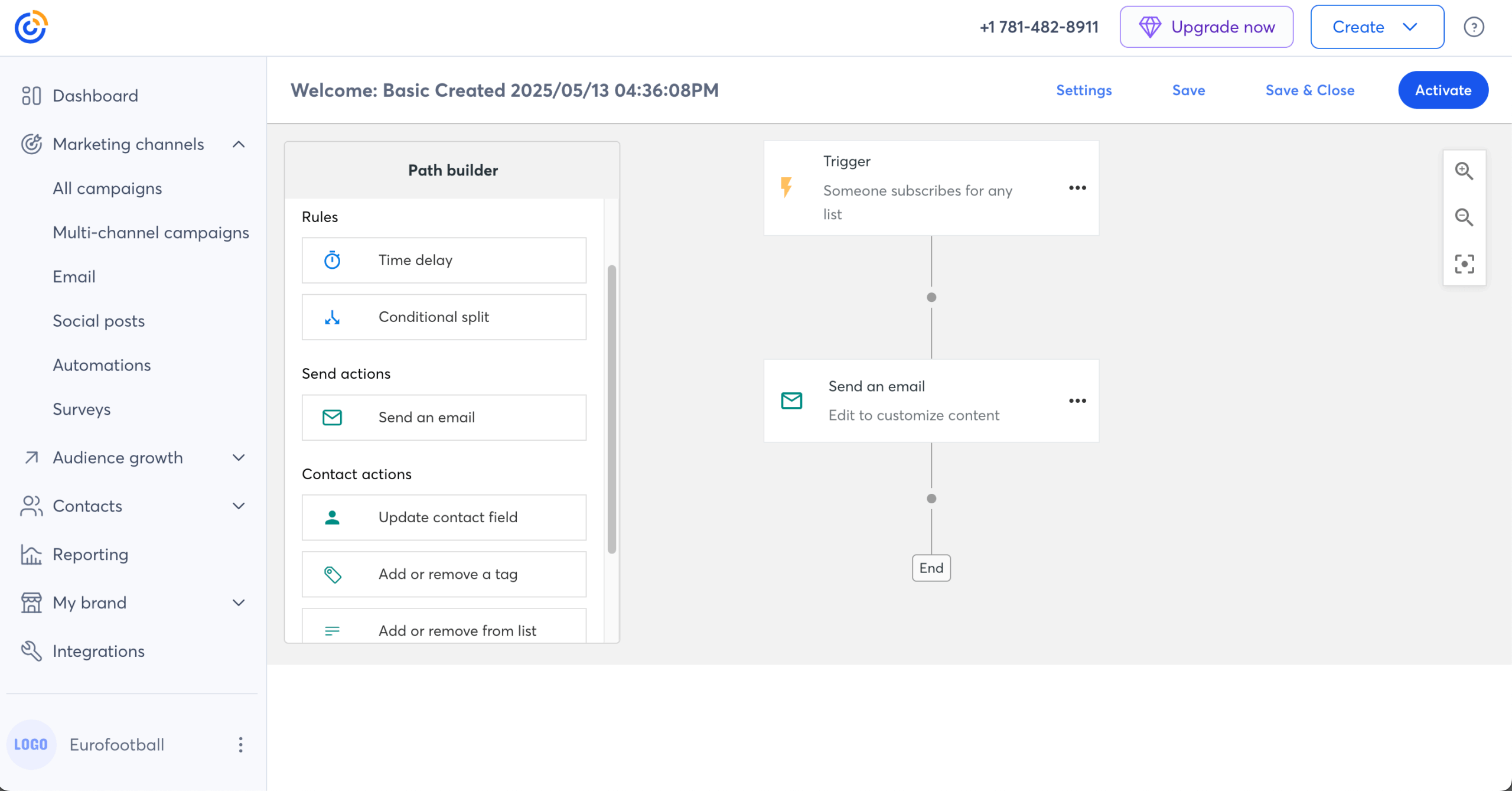
| Automation builder | Visual workflows | Custom automation on Premium ($80/mo) | MailerLite |
| Event tools | None native | Built-in event management | Constant Contact |
| Phone support | Not available | On all paid plans | Constant Contact |
| Template library | Smaller, modern | Hundreds, industry-specific | Constant Contact |
| Price at 5,000 contacts | Lower | $110/mo (Standard) | MailerLite |
ActiveCampaign — Advanced Marketing Automation Platform
The core finding: ActiveCampaign pairs the deepest automation in this roundup with a built-in CRM, handling multi-branch workflows no budget tool can match.
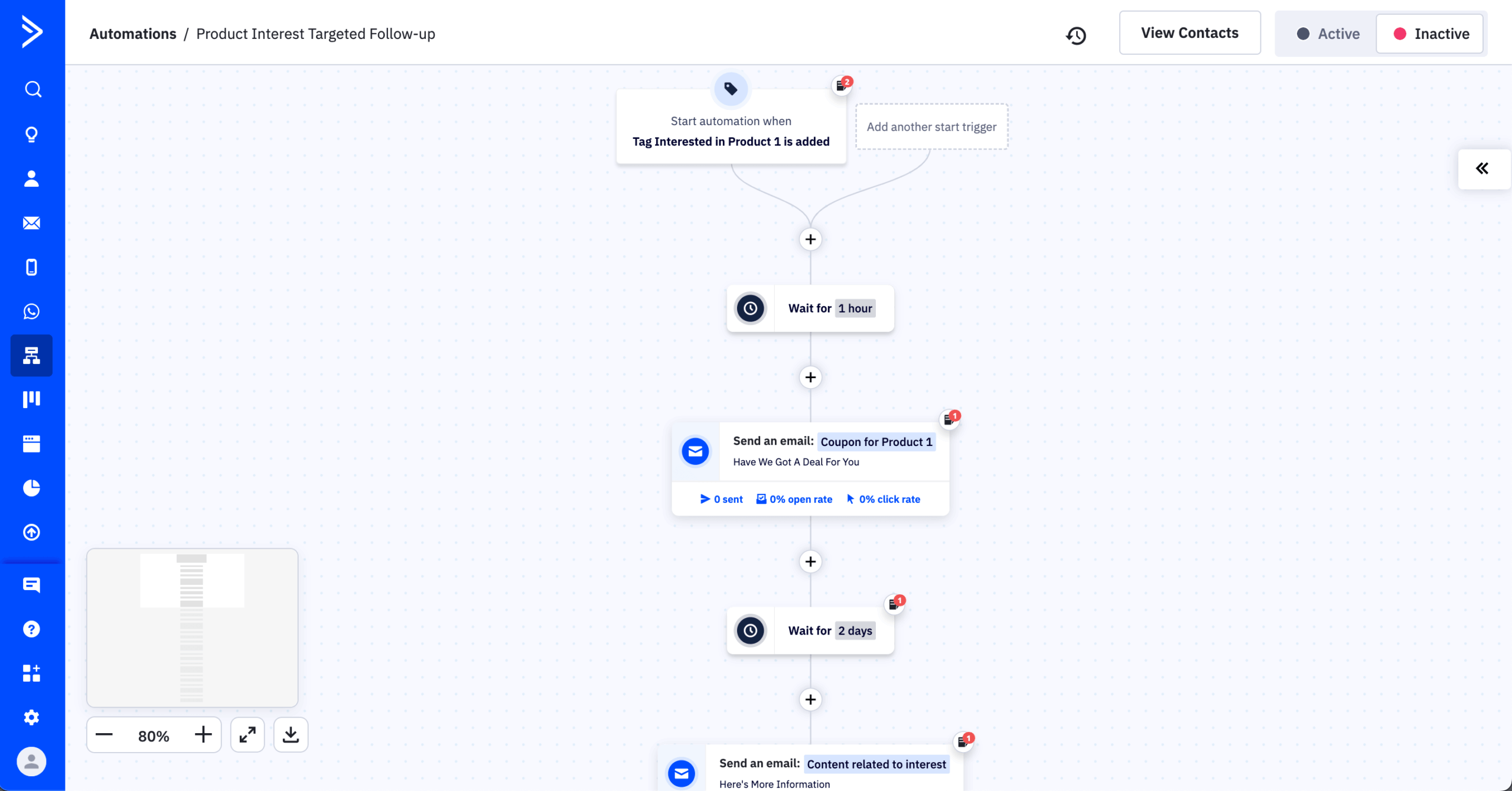
Testing its builder across a B2B lead-nurturing funnel with 8 conditional branches and 14 email steps, it handled the complexity with 135+ triggers, up to 200-step workflows, and native deal tracking. Real-world pricing runs 30-50% above the $15/mo headline because the Starter plan’s 5-action limit hits immediately.
No other platform under $200/mo offers this level of marketing-to-sales handoff, letting a B2B team move a lead from first touch to closed deal inside one tool, backed by the largest integration count in this comparison (900+).
Best for: B2B businesses with 1,000-25,000 contacts that need multi-branch automation tied to a CRM pipeline.
Not for: beginners, solopreneurs, or newsletter senders; the learning curve is the steepest tested here.
Key Features
- Visual automation builder. 135+ triggers, conditional branching, up to 200 steps, and 750+ recipes; Starter limits you to 5 actions.
- Built-in CRM. Deal pipelines, task management, lead scoring, win probability, and sales tracking across the pipeline.
- Omnichannel. Email, SMS as a paid add-on, and WhatsApp as a separate product (from $99/mo).
- 900+ native integrations, the largest count in this roundup.
Migration Fit from MailerLite
With some planning, ActiveCampaign preserves tags and core segmentation on import, and contacts with custom fields move over smoothly – standardize tag and field naming during the move to keep the database clean. Standard flows rebuild easily, and ActiveCampaign can replicate more complex branching and scoring-style logic, at the cost of more setup time to mirror your exact rules; expect a moderate-to-steep learning curve as you get comfortable with pipelines and detailed automation settings.
MailerLite vs. ActiveCampaign – Feature Breakdown
| Feature | MailerLite | ActiveCampaign | Winner |
| Free plan | 250 subs / 2,500 emails | No free plan (14-day trial) | MailerLite |
| Starting price | $12/month | $19/month (5-action limit) | MailerLite |
| Automation depth | Visual workflows | 135+ triggers, up to 200 steps | ActiveCampaign |
| Built-in CRM | None | Deal pipelines, lead scoring | ActiveCampaign |
| Integrations | Essentials covered | 900+ native | ActiveCampaign |
| Billing on inactive contacts | Standard | Charged since Nov 2025 | MailerLite |
| Ease of use | Beginner-friendly | Steepest learning curve | MailerLite |
Teams that need automation this deep can compare the field in our roundup of email marketing automation software.
Mailjet — Email API and Transactional Email Service
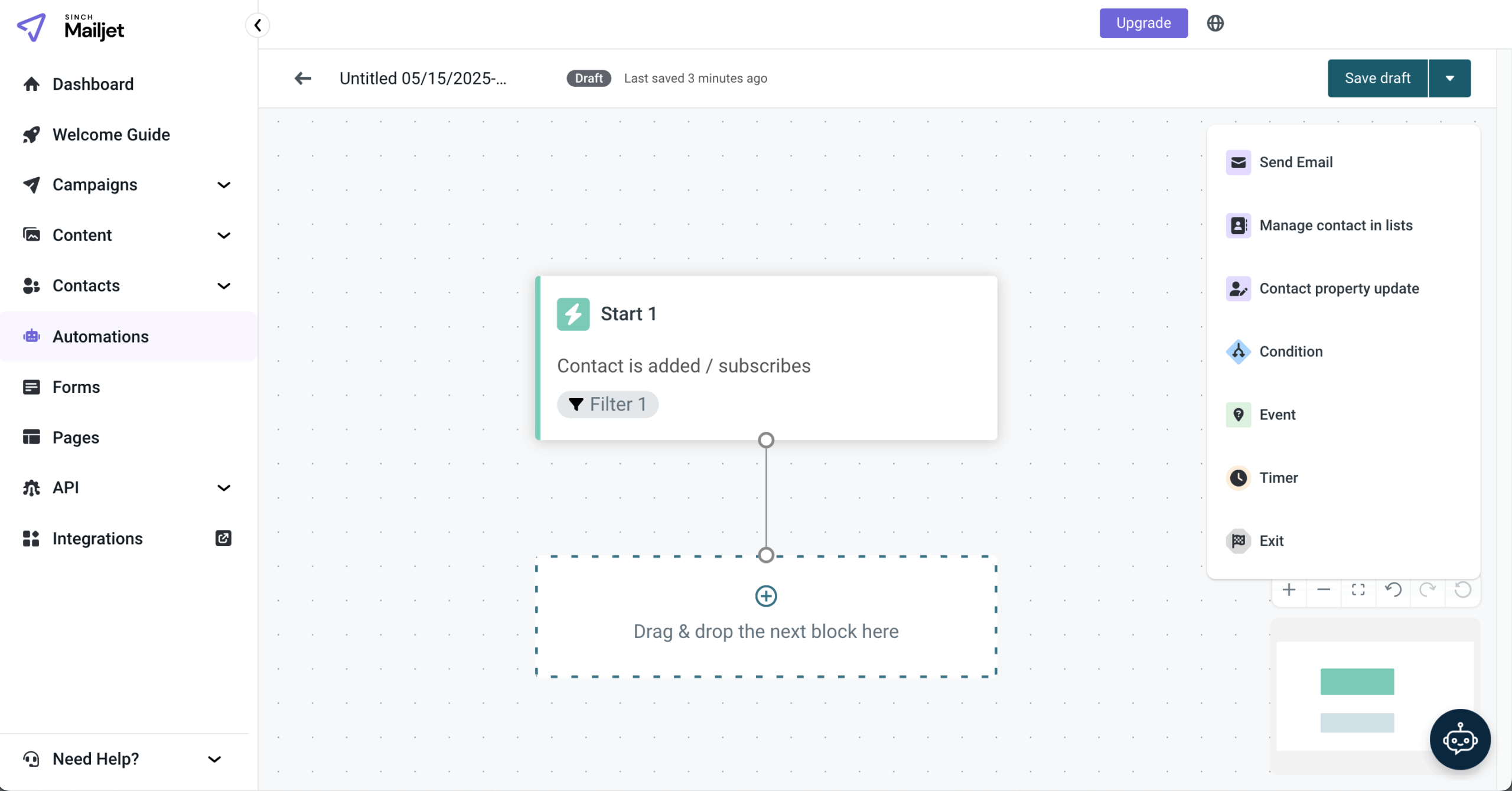
The core finding: Mailjet is the only tool here with real-time, Google Docs-style collaboration, letting several people edit the same email at once.

Testing a workflow where three people edited one email simultaneously, the co-editing eliminated version conflicts. Mailjet runs marketing and transactional email from one dashboard, but automation requires the Premium plan ($27/mo) – Essential ($17/mo) covers transactional sending and segmentation but not workflow automation.
Best for: marketing teams that need real-time multi-user collaboration on email design with combined marketing and transactional email under one EU-based platform.
Not for: solo marketers, businesses needing automation under $27/mo, or anyone requiring landing pages on entry plans.
Key Features
- Real-time collaboration. Simultaneous multi-user editing with commenting and approvals.
- Combined marketing + transactional from one account with API and SMTP relay.
- MJML framework. The open-source responsive email framework Mailjet built.
- Full email API. Send API, Parse API for inbound, and Event API for webhooks.
Migration Fit from MailerLite
Contacts move over without much friction, but Mailjet’s structure is less list-and-segment-first than MailerLite’s, so heavy tag-and-segment setups need planning to recreate using contact properties and filtered lists. Basic sequences set up fine, but richer behavior triggers and branching need more hands-on rebuilding depending on your plan, and teams coming from MailerLite’s automation-first experience will notice a shift toward a more technical, infrastructure-friendly workflow.
MailerLite vs. Mailjet – Feature Breakdown
| Feature | MailerLite | Mailjet | Winner |
| Free plan | 250 contacts / 2,500 emails | 1,000 contacts / 6,000 emails | Mailjet |
| Starting price | $12/month | $9/month | Mailjet |
| Automation | Visual workflows on free | Premium only ($27/mo) | MailerLite |
| Real-time collaboration | Not available | Simultaneous co-editing | Mailjet |
| Transactional email | Requires MailerSend | Strong API + SMTP | Mailjet |
| Segmentation | Advanced on free | Excluded below Essential | MailerLite |
| Landing pages | Included | Premium only | MailerLite |
Drip — Ecommerce Lifecycle Email Platform
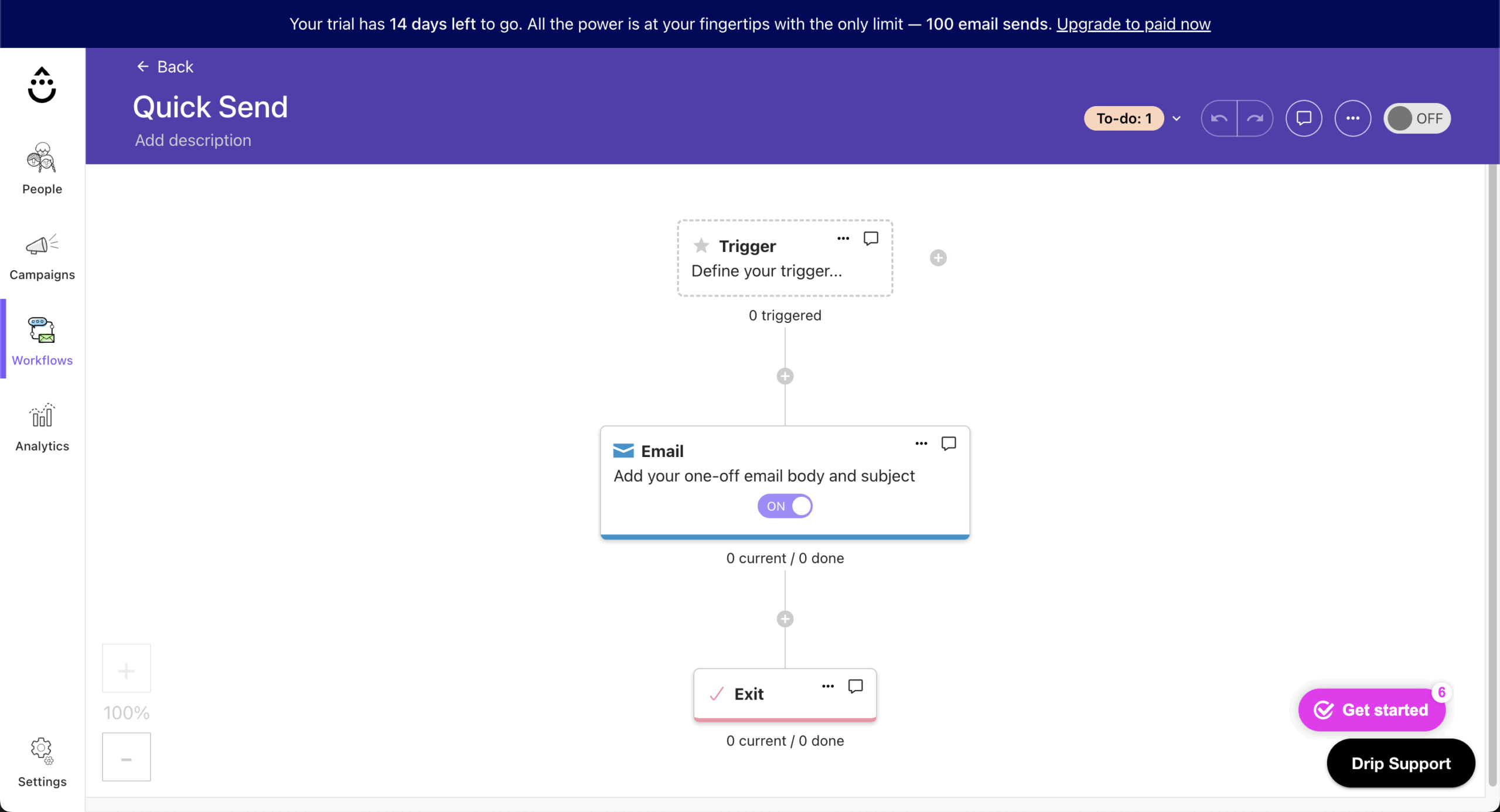
The core finding: every Drip email and automation is tied to actual revenue, so you see exactly how much revenue each workflow earned.
Running it on a Shopify online store with 4,800 contacts for three months, the reporting showed lines like “this cart sequence generated $4,200 last month,” and the pre-built ecommerce playbooks for welcome, cart recovery, and post-purchase follow-ups activated quickly. The trade-off is no free plan and a $39/mo entry price, the highest here among marketing-focused tools.
Drip’s marketing and automation stay inside email and onsite pop-ups; SMS is available only as a separate line item, not a channel built into the core automation flow. The $39/mo entry tier covers up to 2,500 contacts, fitting an early-stage store that’s already generating revenue but hasn’t outgrown a single-plan setup – past that, cost scales quickly (roughly $89/mo at 5,000 contacts, $154/mo at 10,000).
Best for: ecommerce stores on Shopify, WooCommerce, or BigCommerce doing $100K-$5M a year that want revenue-attributed automation without Klaviyo’s pricing.
Not for: newsletter senders, B2B companies, or anyone needing a free plan or entry pricing under $39/mo.
Key Features
- Revenue-attributed automation, with every workflow tied to actual revenue and up to 50 workflows on all plans.
- Behavior-based dynamic segmentation that auto-updates from purchase history and browsing.
- Ecommerce email builder with 50+ templates, product-recommendation blocks, and A/B testing up to 4 variations.
- Native one-click integrations for Shopify, WooCommerce, and BigCommerce with automatic data sync.
Migration Fit from MailerLite
Drip’s import brings over subscribers and core fields with a manageable amount of setup, though plan how MailerLite tags and groups translate into Drip’s tags and custom fields; complex MailerLite automations can translate well here given Drip’s behavior-trigger depth, though you’ll spend time recreating event tracking. Designs adapt with some rework to restructure emails around personalization tokens, and coming from newsletter workflows, budget a moderate learning curve for tagging strategy and events.
MailerLite vs. Drip – Feature Breakdown
| Feature | MailerLite | Drip | Winner |
| Free plan | 250 subs / 2,500 emails | No free plan | MailerLite |
| Starting price | $12/month | $39/month | MailerLite |
| Ecommerce focus | Email-first | Built for ecommerce | Drip |
| Revenue attribution | Not available | Per-email revenue tracking | Drip |
| Segmentation | Tag + behavior | Granular ecommerce states | Drip |
| Automation | Visual workflows | Revenue-attributed workflows, up to 50 on all plans | Drip |
| Landing pages | Included | Not native | MailerLite |
Stores comparing revenue-first tools can also weigh Klaviyo alternatives for heavier predictive analytics.
AWeber — Beginner-Friendly Email Marketing Tool
The core finding: AWeber offers 24/7 phone support on every paid plan and a “Done For You” setup service, which removes the setup burden that stalls many small businesses.

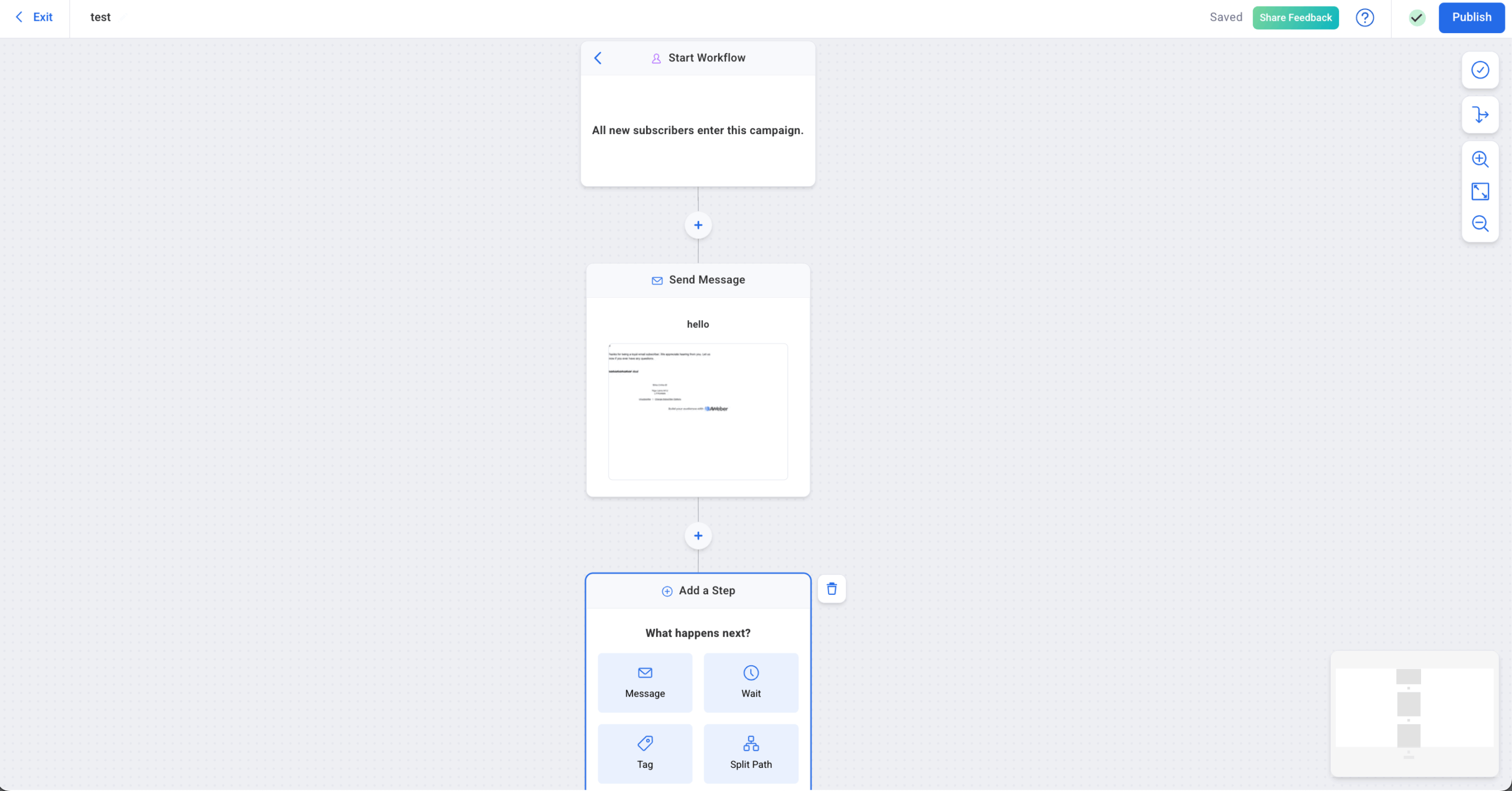
Testing it for a coaching business with 3,100 subscribers, phone support answered on every call, and the Split Paths workflow builder routed subscribers by clicks, opens, and tags. The main trade-off is a new Workflow UI that drew criticism.
Best for: coaches, course creators, and small businesses under 10,000 subscribers who want reliable email with 24/7 phone support and an expert setup option.
Not for: ecommerce stores needing deep product-data sync, teams wanting modern templates, or anyone needing SMS or multichannel messaging.
Key Features
- Visual Workflow builder with Split Paths routing by clicks, opens, purchases, and tags; unlimited automations on Plus.
- 700+ email templates with a Smart Designer that auto-generates branded templates from your website.
- Ecommerce integrations for Shopify, WooCommerce, PayPal, and Etsy with purchase tagging.
- 24/7 phone, chat, and email support on all paid plans, plus a “Done For You” setup ($79 one-time).
Migration Fit from MailerLite
AWeber’s primary lists come up quickly, and subscribers with basic fields transfer without much friction, though heavy tag-and-segment reliance needs manual mapping to recreate the same targeting. Standard sequences rebuild easily; advanced multi-branch flows may need simplification. The fundamentals feel familiar, though teams used to MailerLite’s segmentation need a short adjustment to AWeber’s list-and-tag conventions.
MailerLite vs. AWeber – Feature Breakdown
| Feature | MailerLite | AWeber | Winner |
| Free plan | 250 subs / 2,500 emails | 500 subs / 3,000 emails | AWeber |
| Starting price | $12/month | $15/month | MailerLite |
| Phone support | Not available | 24/7 on all paid plans | AWeber |
| Templates | Smaller, modern | 700+ | AWeber |
| Automation | Visual workflows | Unlimited on Plus | Tie |
| SMS / multichannel | Via integrations | Email + web push only | MailerLite |
| Price at 10,000 contacts | ~$89/mo | $135/mo | MailerLite |
Benchmark Email — Simple Email Marketing for SMBs
The core finding: Benchmark rebuilt its platform from scratch in October 2025 (NXG) and deliberately removed automation, A/B testing, and sign-up forms to focus on radical simplicity.

Testing it for a nonprofit sending monthly newsletters to 1,200 contacts, the first of our email campaigns went out in under 20 minutes with AI content tools and no feature gating. Whether that stripped-down approach fits is the whole decision, because the NXG platform genuinely cannot do automation or A/B testing.
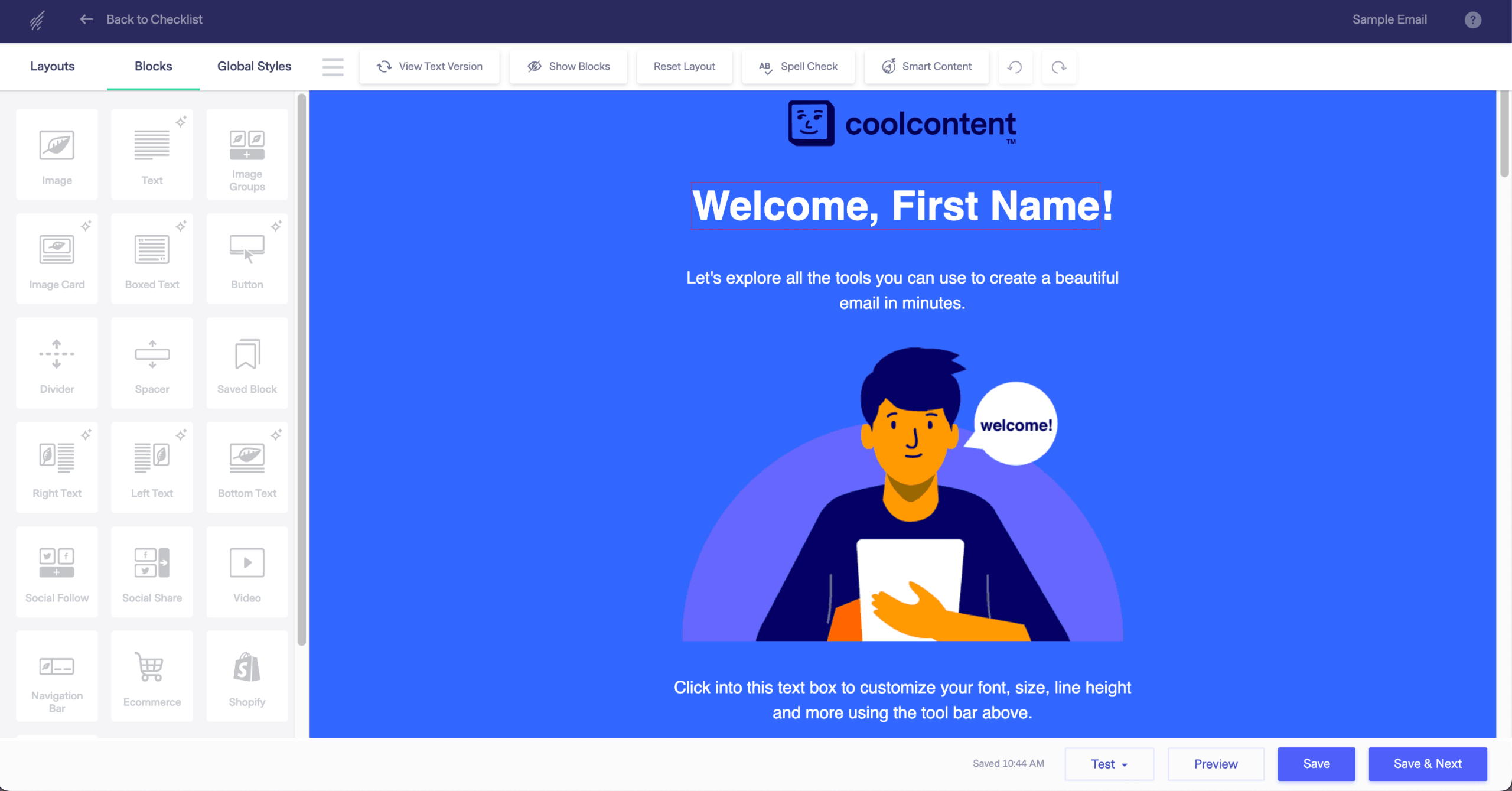
Best for: small businesses and nonprofits that want the simplest possible tool (write, design, send, track) with AI assistance and 24/7 human support and never need automation or A/B testing.
Not for: anyone who needs marketing automation, A/B testing, landing pages, sign-up forms, or third-party integrations, none of which the NXG platform includes.
Key Features
- Drag-and-drop builder with AI Smart Headings, Smart Text, AI image generation, and tone tools, all on the Free plan.
- One plan, all features: every feature on Free is also on Pro; only contacts, volume, and branding differ.
- Contact management with dynamic lists, tagging, and segmentation; only active contacts are billed.
- 24/7 human support (live chat and email) on all plans, including Free.
Migration Fit from MailerLite
Contacts, groups, tags, and custom fields import cleanly, so audience structure carries over with minimal cleanup. Because NXG has no automation, there are no flows to rebuild; the migration is mostly moving contacts and re-checking branding and mobile rendering on templates. The learning curve is practically none for straightforward newsletter sending, which is the point of the platform.
MailerLite vs. Benchmark Email – Feature Breakdown
| Feature | MailerLite | Benchmark Email | Winner |
| Free plan | 250 subs / 2,500 emails | 500 contacts / 2,500 emails | Benchmark Email |
| Starting price | $12/month | $19/month | MailerLite |
| Automation | Visual workflows | Removed on NXG | MailerLite |
| A/B testing | Included | Removed on NXG | MailerLite |
| Sign-up forms | Included | Not on NXG | MailerLite |
| 24/7 human support | Paid plans | All plans including Free | Benchmark Email |
| Deliverability | 92.7% (EmailTooltester) | 50% (EmailTooltester) | MailerLite |
How to Choose a MailerLite Alternative
Choosing the right email marketing service comes down to matching the tool to your business model, not the headline price:
- Ecommerce businesses: Omnisend for pre-built email-SMS-push workflows, or Drip if per-email revenue attribution justifies the $39/mo entry.
- Creator or newsletter: Kit for monetization and a large free list, or AWeber if 24/7 phone support matters more than modern templates. Both rank among the more usable free email marketing platforms for creators.
- Events or nonprofits: Constant Contact for native event management and phone support.
- Transactional plus marketing in one tool: Brevo for volume-based pricing, or Mailjet for team co-editing.
- Lowest total cost with real automation: Sender, where automation and customer segmentation sit on the free plan.
Pricing models differ as much as feature sets, and that affects your bill more than the headline price does. Sender, MailerLite, Kit, Moosend, Drip, and AWeber charge per subscriber, so cost scales directly with list size. Omnisend, GetResponse, Mailchimp, Constant Contact, ActiveCampaign, and Benchmark Email charge per contact, which on some platforms includes unsubscribed or bounced records until you clean the list. Brevo and Mailjet charge by email volume instead, which favors large lists that don’t send often but can cost more than a per-subscriber plan once you’re sending regularly to a full list.
Whichever platform fits, it helps to understand the fundamentals of a switch from MailerLite before you commit; our email marketing guide covers choosing a platform, building your first list, and running your first campaign from scratch.
When MailerLite Is Still the Right Choice
For some readers, staying on MailerLite is the better call. Its native website and blog tools, plus the ability to sell digital products with 0% commission directly from the platform, do things Sender doesn’t offer at all – if you want to run a site, a blog, and a newsletter from one login, MailerLite covers that in a way most alternatives here don’t.
MailerLite’s deliverability also has an independent track record: EmailTooltester’s December 2025 test measured 92.7% deliverability, a strong result among the tools in this comparison.
If your list is comfortably under 250 subscribers, you mainly send newsletters rather than lifecycle automation, and you’re a content-first creator or small brand rather than an ecommerce operation, the free plan may still cover everything you need. Switching only pays off once you outgrow one of those constraints.
MailerLite Alternatives FAQs
The best MailerLite alternative depends on your use case. For most small businesses, Sender is the closest fit, with automation and a 2,500-subscriber free plan. ActiveCampaign is the strongest choice for advanced multi-branch automation, Omnisend for ecommerce, and Kit for creators monetizing a newsletter.
For most users, MailerLite is easier to use and cheaper, with a larger free-plan send limit (2,500 emails versus Mailchimp’s 500) and a cleaner automation builder. Mailchimp wins on integrations (300+ native connections) and template variety, so it fits businesses already in the Intuit ecosystem better than budget-conscious teams.
No. Most email marketing platforms support standard import methods for contacts, tags, and basic campaign data. Automation workflows and templates may need rebuilding due to system differences, but core subscriber information usually transfers without major issues. Several tools, including Sender and Kit, offer free hands-on migration.
No single platform beats MailerLite on every dimension – it depends on which limitation you’ve hit. Sender and Brevo beat it on free-plan size and automation depth; Kit beats it on free-plan subscriber ceiling; ActiveCampaign beats it on automation complexity and CRM depth. If account-suspension reports or the shrinking free plan are the trigger, Sender is the closest like-for-like upgrade.
It depends on how you send. Brevo’s free plan holds far more contacts (up to 100,000 versus MailerLite’s 250) because it bills by email volume, not list size, and includes transactional email on every plan. MailerLite’s advantage is that automation works on its free plan from day one, while Brevo caps automation at 2,000 workflow contacts until Standard ($18/mo). High-volume, low-frequency senders tend to prefer Brevo; teams wanting automation running immediately tend to prefer MailerLite or Sender.
Yes – several free MailerLite alternatives exist. Sender offers a free plan with automation included, covering 2,500 subscribers and 15,000 emails a month; Kit’s free plan covers up to 10,000 subscribers (with limited automation); and Brevo’s free plan covers up to 100,000 contacts at 300 emails a day. Which one fits depends on whether your priority is automation depth, list size, or send volume.