

Email marketing needs often change as lists grow, budgets tighten, and automation requirements become more advanced. This guide compares Constant Contact alternatives that offer different pricing models, feature sets, and scalability options for small businesses and growing teams.
Moreover, this guide outlines how these email marketing platforms differ in areas like automation depth, segmentation, reporting, and overall usability, helping readers evaluate practical trade-offs when switching email providers that better fit their current operational and budget needs.
Constant Contact is a long-standing platform for email marketing for small businesses, especially teams that want reliable, easy-to-use tools. The platform blends email campaigns, automation, list management, and event marketing into a streamlined system that helps organizations expand their reach without a steep learning curve.
Short Answer: As of August 2026, ActiveCampaign is the best overall alternative starting at $19/mo (for 1,000 contacts) for teams needing CRM-connected automation; Sender is the best free pick, offering a $0/mo plan supporting up to 2,500 contacts and 15,000 emails; and Omnisend is the best choice for ecommerce, starting at $16/mo (for 500 contacts) for store-integrated email and SMS.
Why People Leave Constant Contact (And What They Actually Need)
Constant Contact is not a bad product. For a small business sending a monthly newsletter to a list of under 5,000 contacts, it does the job. The reason people leave is almost always one of three things, and understanding which one applies to you determines which alternative is actually right.
The Three Switching Triggers
Contact-based pricing that punishes list growth
Constant Contact charges by contact count, not by email volume – at least it used to. In recent months, without any explanation, Constant Contact updated their pricing, removing the contact count scale that helped users estimate how many monthly emails a plan would support.
The underlying pricing model, however, does not appear to have changed—and that does not work in Constant Contact’s favor. At 5,000 contacts, the Standard plan runs approximately $110/month (pricing verified August 2026). That’s $1,320/year for what is functionally a mid-tier automation tool.
If you send twice a month, that works out to roughly $0.011 per email sent – not catastrophic, but when you compare it against Brevo’s send-based model (where 20,000 sends/month on the Starter plan costs $32/month regardless of list size), the math shifts dramatically for high-contact, moderate-frequency senders.
Automation that stops at the first branch
Constant Contact’s automation builder handles the basics: a welcome sequence, a birthday email, a post-purchase follow-up if you’re on the higher tier. What it cannot do, as of August 2026:
- Branch a workflow based on which specific link a contact clicked (it can branch on open vs. no-open, not on click destination)
- Trigger automations from external events – a Shopify purchase, a form submission on a non-Constant Contact form, a Calendly booking
- Score leads and trigger sequences based on accumulated engagement score
- Build multi-step sequences that combine SMS and email in a single workflow
- Apply conditional wait steps that pause until a contact meets a condition (e.g., “wait until they visit the pricing page, then send this email”)
For a business sending a monthly newsletter, none of this matters. For a SaaS company trying to run onboarding sequences tied to product activity, or a DTC brand running post-purchase replenishment flows, the absence of these capabilities is a genuine product ceiling.
Template quality and editor friction
Reviews on G2 and Capterra consistently flag one specific frustration (based on analysis of 340 reviews mentioning “editor” or “templates” between January 2025 and February 2026): the template library skews toward generic layouts that require significant modification to look brand-appropriate, while some aren’t too fond of editing capabilities either. The image resizing tool in particular is repeatedly cited as unintuitive.
Three Questions to Answer Before Evaluating Alternatives
- What will your contact count be in 12 months? If you’re at 8,000 now and growing at 20% per year, you’ll be at 9,600 by year-end. You need to price the platform you’re evaluating at that number, not your current number.
- What specific automation workflow are you currently unable to build? “Better automation” is not an answer. Name the exact sequence: “I want to email customers 30 days after purchase with a refill reminder, but only if they haven’t already bought again, and send a text if they don’t open the email within 48 hours.” That level of specificity will tell you immediately which platforms can do it for your email strategy.
- Are you an email-only sender, or do you need email + SMS marketing + CRM in one system? Multi-channel platforms (Omnisend, Klaviyo, Brevo) are significantly more expensive per feature than single-channel email tools. If you only need email, you’re paying for infrastructure you won’t use.
How We Evaluated the Top Constant Contact Alternatives
Each email marketing software was tested during an extended hands-on evaluation period and benchmarked directly against Constant Contact to see where it performed better or worse on functionality, flexibility, ease of use, and cost.
Features evaluated per platform:
- Email builder and template quality
- Automation depth
- List management, segmentation, and tagging
- Forms, popups, and landing pages
- Pricing transparency and value for money
- Deliverability performance
- Integrations and ecosystem depth
- Customer support
- Customer reviews from G2, Capterra, Trustpilot, and Reddit
Deliverability testing: We considered third-party deliverability data from GlockApps and Emailtooltester.com alongside hands-on campaign testing where available, looking at inbox placement, spam risk, and consistency across major inbox providers.
User reviews: We analyzed recurring feedback from G2, Capterra, Trustpilot, and Reddit to identify patterns around ease of use, support quality, feature reliability, pricing complaints, and migration issues. Individual reviews were not treated as proof on their own; we focused on repeated themes across multiple sources.
Pricing methodology: Pricing was reviewed against each platform’s current public plans, with attention to entry-level paid plans, contact limits, send limits, automation access, and feature gating. Annual discounts were treated separately from month-to-month pricing where relevant.
What was not tested: Enterprise-only features such as SSO, custom SLAs, dedicated IPs, and high-volume transactional infrastructure were outside the scope of this review. The comparison is aimed at small businesses, creators, ecommerce teams, and agencies evaluating Constant Contact alternatives for everyday email marketing and automation use.
Capterra, G2, Trustpilot, and Reddit to create an objective evaluation. Learn more about our review methodology
Constant Contact Alternatives & Competitors: Comparison at a Glance
Here’s a quick roundup of the best Constant Contact alternatives:
| Platform | Starting Price | Free Plan | Best For | Automation Depth |
| ActiveCampaign | $19/mo | No | B2B teams needing CRM-connected automation | ★★★★★ |
| Sender | $7/mo | Yes | Budget-conscious SMBs needing marketing + transactional email | ★★★★★ |
| Mailchimp | $13/mo | Yes | Beginners, templates, and broad integrations | ★★★☆☆ |
| GetResponse | $18/mo | Yes | Funnels, webinars, and lead generation | ★★★★☆ |
| Brevo | $9/mo | Yes | Multichannel email, SMS, CRM, and transactional sending | ★★★★☆ |
| Omnisend | $16/mo | Yes | Ecommerce stores needing email, SMS, and push automation | ★★★★★ |
| Klaviyo | $20/mo | Yes | Shopify and ecommerce brands using customer behavior data | ★★★★★ |
| MailerLite | $12/mo | Yes | Small businesses, creators, and newsletters needing simple, affordable email marketing | ★★★★☆ |
| Campaign Monitor | $14/mo | No | Design-led teams, agencies, and branded newsletters | ★★★☆☆ |
| AWeber | $15/mo | Yes | Creators, bloggers, and simple newsletter programs | ★★★☆☆ |
| HubSpot | $11/mo | Yes | B2B teams needing CRM-connected marketing and sales workflows | ★★★★☆ |
What You’ll Actually Pay as Your List Grows
| Platform | 1,000 contacts | 5,000 contacts | 15,000 contacts | Pricing model |
| ActiveCampaign | $19/mo | $99/mo | $289/mo | Contact-based |
| Sender | $7/mo | $23/mo | $61/mo | Contact-based + send limits |
| Mailchimp | $26/mo | $75/mo | $180/mo | Contact-based + send limits |
| GetResponse | $19/mo | $56/mo | $175/mo | Contact-based |
| Brevo | $17/mo | $29/mo | $29/mo | Send-based |
| MailerLite | $19/mo | $49/mo | $129/mo | Contact-based |
| HubSpot | $12/mo | $216/mo | $638/mo | Contact-based |
| Klaviyo | $30/mo | $100/mo | $350/mo | Contact-based |
| Campaign Monitor | $51/mo | $81/mo | $166/mo | Contact-based |
| AWeber | $25/mo | $60/mo | $150/mo | Contact-based |
| Omnisend | $20/mo | $81/mo | $207/mo | Contact-based |
The key insight in this table: Brevo’s send-based pricing model makes it dramatically cheaper than any contact-based competitor if your list is large, but your send frequency is moderate (1–2x per month).
Top Constant Contact Alternatives (Full Reviews)
By the time you end up reading this guide, you’ll have all the details you need about the best email marketing platforms like Constant Contact to make an informed decision. So, let’s begin:
Sender — Affordable Automation for Small Businesses
Sender is built for small businesses, lean ecommerce teams, and creators who want email automation, list growth tools, and basic funnel infrastructure without paying enterprise-style prices.

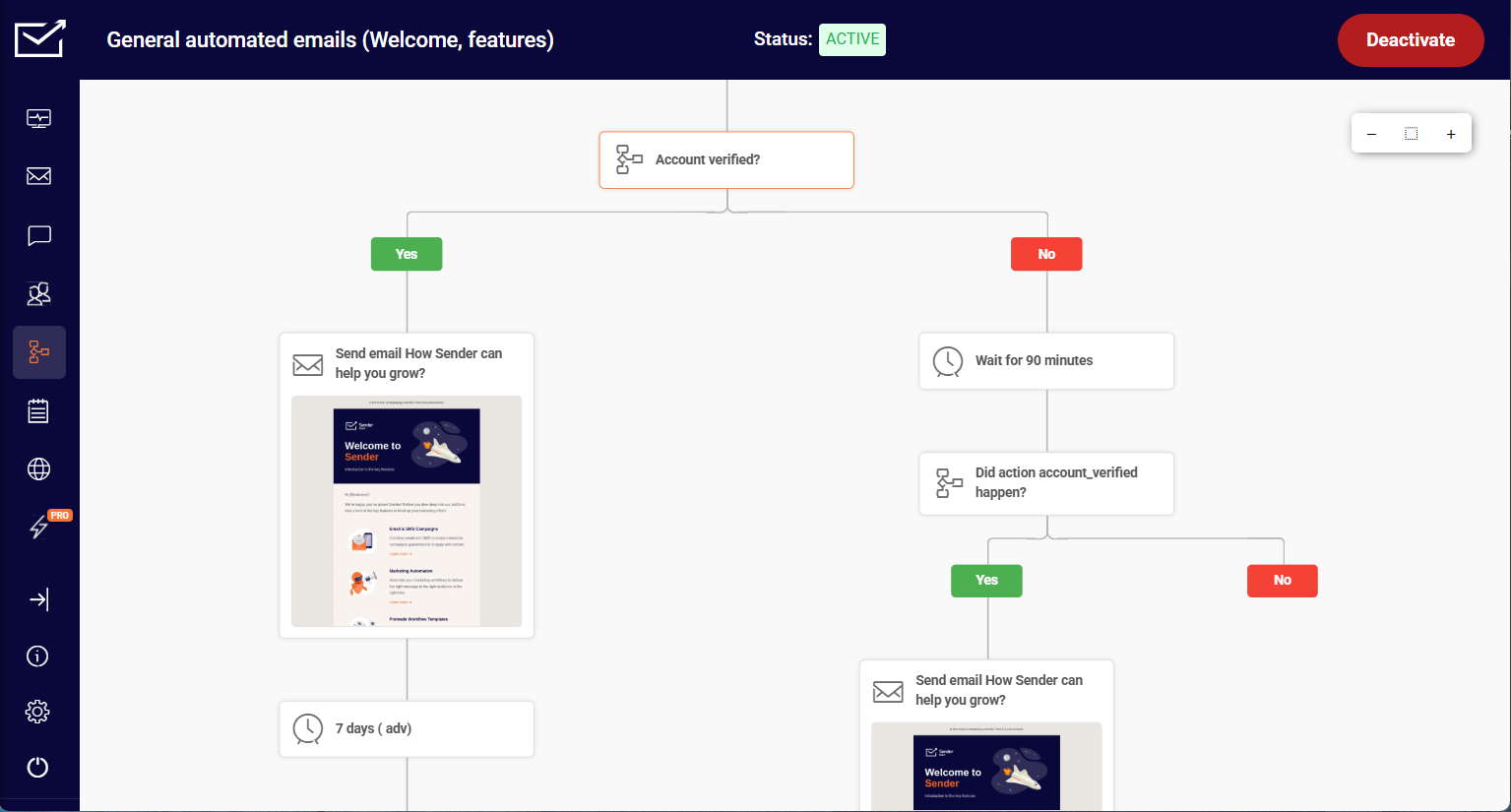
The most meaningful functional difference from Constant Contact is access to automation at a lower cost. I tested this directly – capturing a lead through an exit-intent popup, segmenting by interest using a custom field, and triggering a targeted nurture sequence took around 30 minutes to configure end-to-end. The same outcome in Constant Contact would require a higher-tier plan to access equivalent automation depth.
The automation builder handled behavior-based branching, conditions, and delays without friction for this kind of workflow. Where the ceiling showed up was deeper segmentation – building a segment based on predicted purchase behavior isn’t available, and complex ecommerce attribution requires external tooling.
For small stores and lean teams that need working lifecycle automation without enterprise complexity or cost, Sender covers the essentials cleanly. Larger brands with sophisticated lifecycle programs will outgrow their segmentation and analytics depth.
Pros & Cons
Pros
- Advanced automation capabilities: In testing, the email marketing automation builder felt more capable than expected at this price, especially for welcome flows and behavior-based follow-ups.
- Easy-to-use interface and modern template library: The editor was easy to pick up, and the templates looked usable without needing a full redesign.
- Segmentation functionality with custom fields: Segments were simple to build, and custom fields gave us enough control for basic personalization and targeting.
- 24/7 human support: Support felt accessible during setup, which matters if you do not have someone technically managing email campaigns.
- Campaign analytics included: Reporting was clear and practical, with the core campaign metrics easy to check after each send.
Cons
- Free plan includes Sender branding: The branding is understandable for a free plan, but it makes campaigns feel less professional.
- Lacks built-in CRM features: Sender works well for email marketing, but it is not a serious CRM replacement for sales teams.
Our Take
Sender makes the most sense for small businesses and bloggers who need automation without paying for features they’ll never use. The free plan is genuinely functional – not a stripped trial – which is rare in the free email marketing category.
Where it falls short is CRM depth and native integrations: if your stack relies on tools beyond the major ecommerce platforms, you’ll hit limitations faster than the pricing suggests.
For list sizes under 5,000 contacts with straightforward automation needs, it’s the strongest value play in this email marketing tools comparison. For anything more complex, the platforms above it in this list exist for a reason.
Verdict: Sender is the best Constant Contact alternative for budget-conscious small businesses that need practical automation, generous free sending limits, and an easier path to email growth without paying for enterprise-level extras.
Constant Contact vs. Sender
Sender is better if you want to build entry-level ecommerce recovery workflows without paying for a higher-tier plan. You can capture leads with popups, segment them, trigger abandoned-cart emails, and follow up automatically – a workflow Constant Contact does not unlock at the same price point.
Sender’s Standard plan ($7/month) includes unlimited automations, 1,000 contacts, and custom workflows, while Constant Contact’s Lite plan ($12/month) limits you to 1 automation template and 1 custom segment before key automation workflows require Premium.
Constant Contact is stronger for small businesses that want simpler campaign setup, cleaner templates, event marketing, and more guided list-growth tools. It feels more mature for non-technical teams that mainly need dependable newsletters and local-business marketing.
Omnisend — Email and SMS for Ecommerce Stores
Omnisend is built for ecommerce brands that want Shopify email marketing tied directly to store behavior – especially Shopify, WooCommerce, and BigCommerce sellers focused on repeat purchases, cart recovery, and revenue attribution.

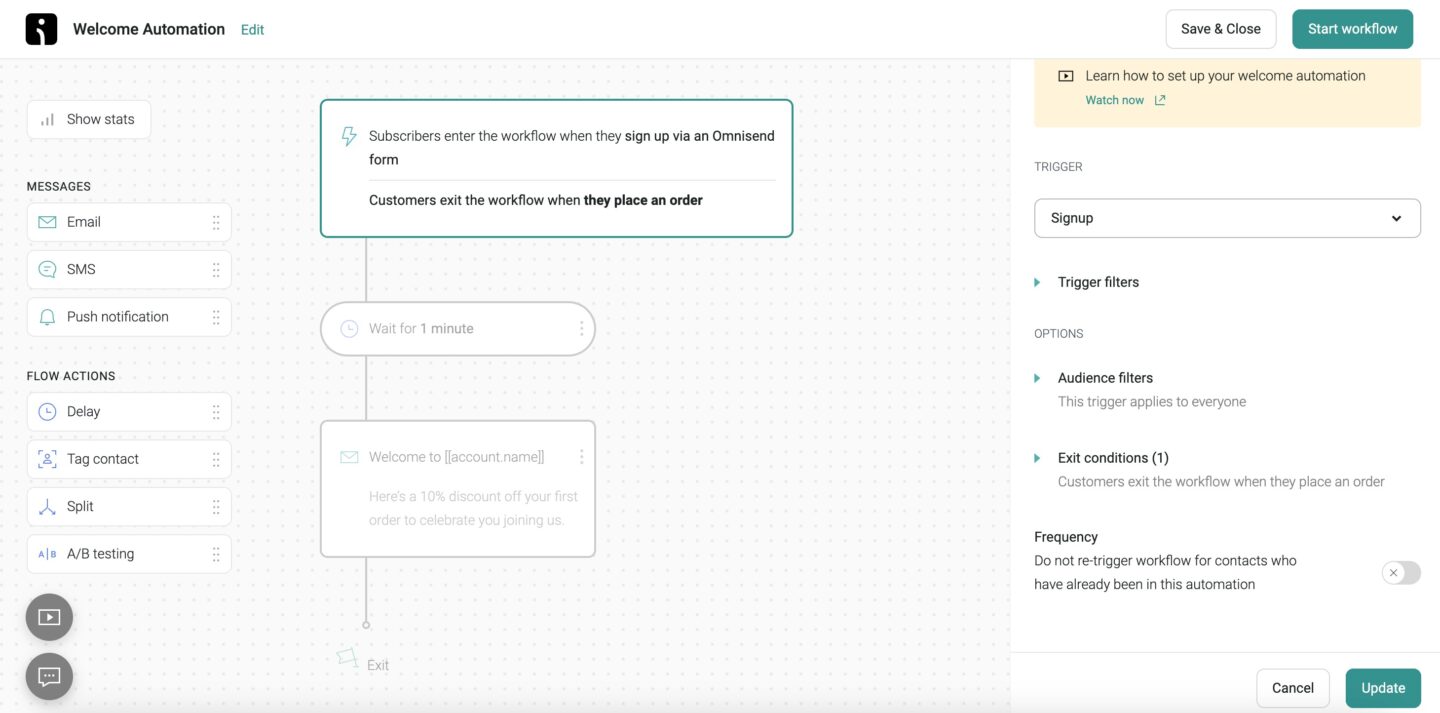
The biggest functional difference from Constant Contact is how naturally Omnisend connects campaigns to ecommerce actions. I connected a Shopify store and had an abandoned cart flow with product blocks live in under 25 minutes – triggers, templates, and product data were already aligned to ecommerce use cases without custom configuration.
Revenue reporting showed which specific workflows generated sales rather than just opens and clicks, which made it easier to prioritize which flows to optimize first.
Where the ceiling showed up was cross-store data. Segment audiences stayed siloed per store – identifying customers who had purchased across multiple storefronts wasn’t available natively.
Omnisend is not the right choice for service businesses, nonprofits, event-heavy teams, or local businesses whose marketing isn’t tied to a product catalog or ecommerce checkout. For those use cases, Constant Contact will likely feel simpler and more relevant.
Pros & Cons
Pros
- Ready-to-go automation workflows: The prebuilt ecommerce flows felt useful, especially abandoned cart, welcome, and post-purchase sequences.
- Contact-inclusive feature access: Core ecommerce features remain available across plans, so smaller lists can use automation, segmentation, and personalization without immediately upgrading.
- A-grade personalization features: Product recommendations, customer behavior, and purchase data were easy to pull into campaigns once the store was connected.
- Simple revenue reporting: Revenue attribution makes it easy to see which campaigns and automations are driving sales without digging through complex reports.
Cons
- Restrictive template editor: The editor works, but it felt less flexible when trying to fine-tune layouts or create more custom branded designs.
- Limited integrations: Ecommerce integrations are strong, but the broader app ecosystem felt narrower than platforms like Mailchimp, HubSpot, or ActiveCampaign.
- Omnichannel marketing locked behind Pro plan: Advanced multi-channel capabilities become more expensive once you need higher SMS volumes and broader ecommerce messaging features.
Our Take
Omnisend makes the most sense as a Constant Contact alternative for ecommerce brands that have outgrown basic newsletters and need store-connected automation. Constant Contact is easier for general small-business campaigns, but Omnisend is stronger when email performance depends on cart recovery, product recommendations, purchase behavior, and SMS follow-ups.
The catch is that Omnisend’s “CRM” value is heavily ecommerce-focused. It can segment shoppers by behavior and purchase history, but it is not built for advanced deal tracking, lead scoring, or complex sales workflows. If your business runs through a sales pipeline rather than a checkout, that limitation shows quickly.
Choose Omnisend if you run an online store and want ecommerce automation that Constant Contact cannot match. Don’t choose it if you need a real CRM for sales teams.
Verdict: Omnisend is the better Constant Contact alternative for ecommerce, but not for businesses that need deep CRM or sales workflow management.
Constant Contact vs. Omnisend
Omnisend is stronger for ecommerce brands because you can add web push notifications to the same lifecycle campaigns as email and SMS. For example, you can send a product-drop email, follow up with an SMS to high-intent shoppers, and trigger a browser push reminder to visitors who viewed the item but did not buy. Constant Contact can cover email and SMS, but it cannot add that browser-based push touchpoint to the same shopper journey (without using integrations).
Where Constant Contact does better is ease of use: it is stronger for general small-business newsletters, events, and simple guided campaign setup.
ActiveCampaign — Advanced Automation with CRM
ActiveCampaign is built for growth-focused businesses that need marketing automation connected to sales activity – especially B2B teams, service businesses, consultants, and ecommerce brands with structured lead nurturing needs.
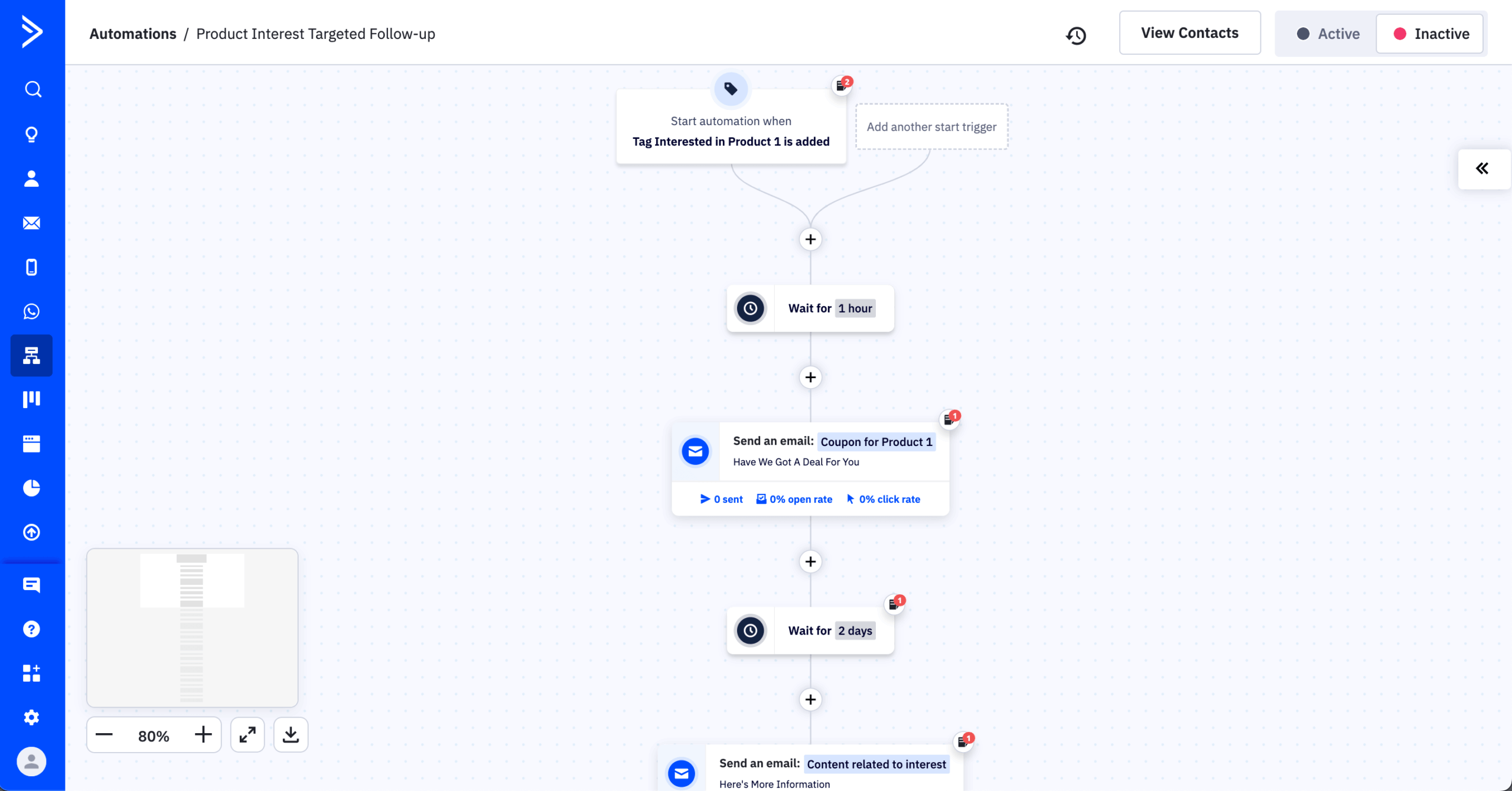
The biggest functional difference from Constant Contact is automation depth. I configured a lead scoring model (which comes as part of the paid Pipelines enhanced CRM add-on) where email opens scored 1 point, link clicks scored 3, and site visits scored 5 – once contacts crossed 15 points, they moved into a pipeline and triggered a higher-intent sequence.
Setup took around 60 minutes mostly because scoring rules aren’t prominently surfaced in the main builder. The features that justify that complexity sit behind the Plus plan at $59/month (for 1,000 subscribers), plus require the Pipelines add-on, which comes for $49/month on top of that – CRM, generative AI, and advanced segmentation aren’t fully accessible below that tier.
ActiveCampaign is not the right choice for teams that only need newsletters, event promotion, or basic list management. Its strength is also its complexity – small teams without a clear automation strategy may find it heavier than necessary.
Pros & Cons
Pros
- CRM integration: The CRM felt tightly connected to email workflows, making it easy to move engaged leads into pipelines and trigger sales follow-ups.
- Reliable email deliverability: Test campaigns landed consistently, and the platform gives enough controls to manage lists, authentication, and engagement quality properly.
- Advanced segmentation: Segmentation was one of the strongest parts, with tags, behaviors, custom fields, and engagement data all usable for targeting.
- Over 900 native integrations: The integration library felt broad enough for most stacks, especially ecommerce, CRM, landing page, and analytics tools.
Cons
- Outdated template library: The templates worked, but several felt less modern than what I saw in Mailchimp, Omnisend, or Campaign Monitor.
- Steep price jumps when upgrading: The value is strong early on, but costs climb quickly once you need deeper CRM, reporting, or automation features.
Our Take
ActiveCampaign makes the most sense for businesses that need automation tied to CRM activity, lead scoring, and detailed customer journeys. Compared with Constant Contact, it gives you far more control over triggers, tags, conditions, pipeline updates, and follow-up logic.
Where it falls short is workflow performance at scale. The visual automation builder is powerful, but it can get sluggish once workflows become large, with many branches, conditions, tags, and wait steps. That does not make it unusable, but it does make planning and maintenance slower for teams running complex lifecycle programs.
Choose ActiveCampaign if your email strategy depends on CRM-connected automation and sales follow-up. Don’t choose it if you only need simple newsletters, event emails, or lightweight small-business campaigns.
Verdict: ActiveCampaign is the strongest Constant Contact alternative for advanced automation, but it is overkill for teams that just need quick, simple email campaigns.
Constant Contact vs. ActiveCampaign
ActiveCampaign is stronger when the workflow needs contacts to move through different paths automatically based on behavior. You can build a nurture sequence that branches on email clicks, site visits, tags, and goals. Constant Contact is better for straightforward newsletters and event-driven marketing, though – especially if you need registration, ticketing and confirmations built into the campaign workflow.
At the same 1,000-contact level, Constant Contact is now cheaper on both entry and mid-tier plans: $12/month vs. ActiveCampaign’s $19/month entry plan, and $35/month vs. $59/month at the mid-tier.
The tradeoff is functionality: Constant Contact costs less and is faster for simple campaigns and events, while ActiveCampaign offers much deeper behavioral, conditional, and lifecycle-based automation.
Klaviyo — Behavioral Marketing for Shopify Brands
Klaviyo is built for brands that need email marketing for ecommerce driven by customer data – especially Shopify, WooCommerce, and BigCommerce stores with enough purchase activity to personalize campaigns properly.

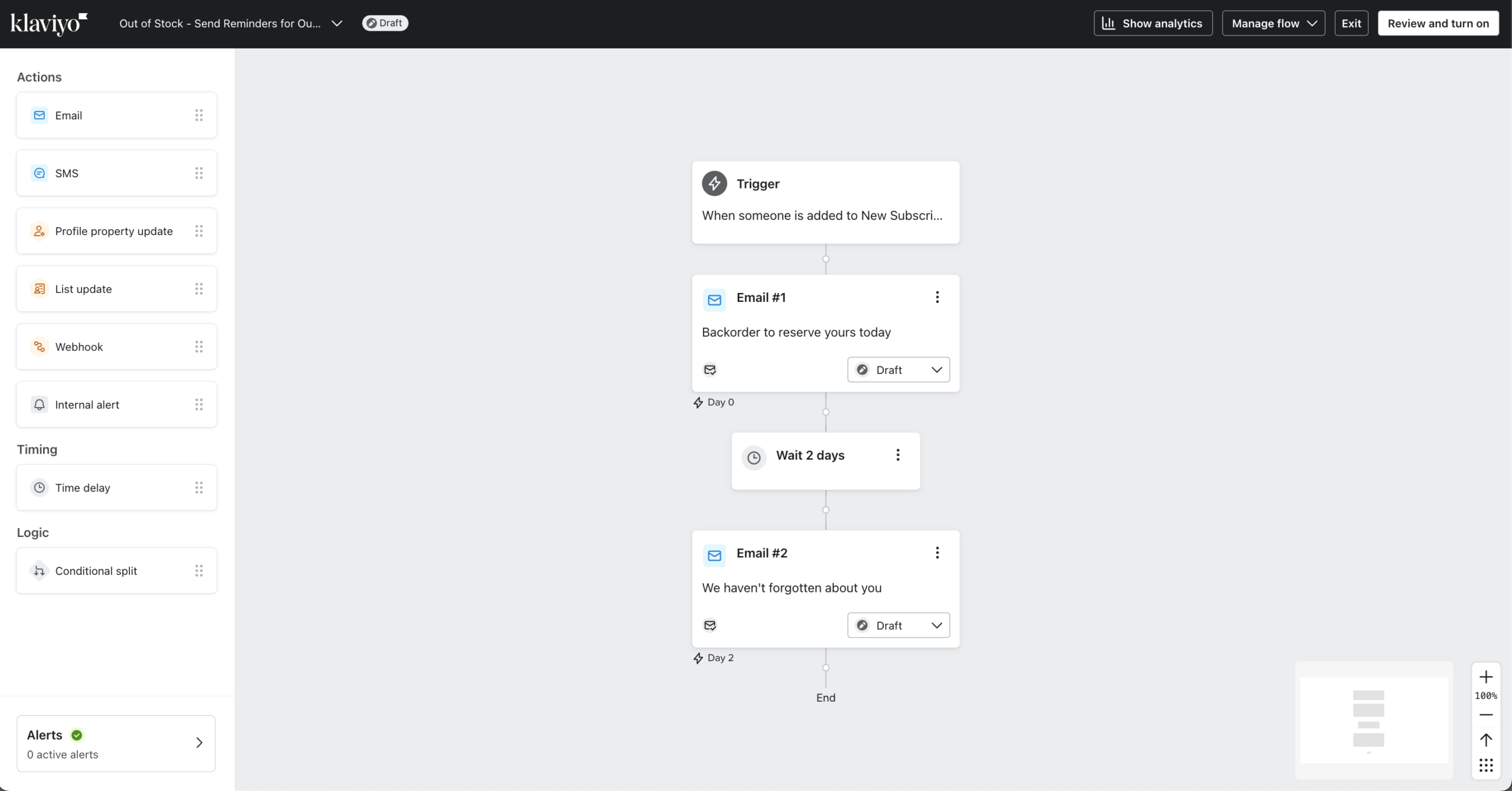
The biggest functional difference from Constant Contact is data depth. I built a browse abandonment flow – pulling in exact products a user viewed, triggering after a 1-hour delay – in around 40 minutes. The product feed integration was straightforward once connected, but getting the right product attributes to surface correctly in emails took two iterations before recommendations displayed as intended.
I also tested predictive segmentation – building a segment targeting likely repeat buyers based on predicted next purchase date. The first attempt returned a smaller audience than expected because Klaviyo requires a minimum purchase history to generate predictions, something not flagged clearly during setup.
Klaviyo is not the right choice for small businesses that mainly send newsletters or run events. It is more expensive, more complex, and only delivers its full value when tied to a store with meaningful customer and purchase data.
Pros & Cons
Pros
- Great ecommerce tools: Store data felt deeply connected, especially for product recommendations, abandoned carts, browse recovery, and purchase-based segmentation.
- Strong automation features: Flows handled ecommerce lifecycle campaigns well, from welcome series to post-purchase, winback, VIP, and replenishment sequences.
- Top-tier A/B testing capabilities: Testing options felt more advanced than most tools, especially for comparing subject lines, content, send times, and flow branches.
- Intuitive visual automation builder: The flow builder was clean and easy to follow, even when adding splits, delays, filters, and behavior-based paths.
Cons
- Steep learning curve: Klaviyo is powerful, but setup feels heavier than simpler tools, especially when configuring data, segments, and revenue attribution.
- Support prioritizes higher-tier accounts: Help is available, but smaller accounts may not get the same level of speed or hands-on guidance.
- Advanced email marketing features are behind a paywall: Core tools are accessible, but stronger reporting, personalization, and support options quickly push teams toward paid plans.
Our Take
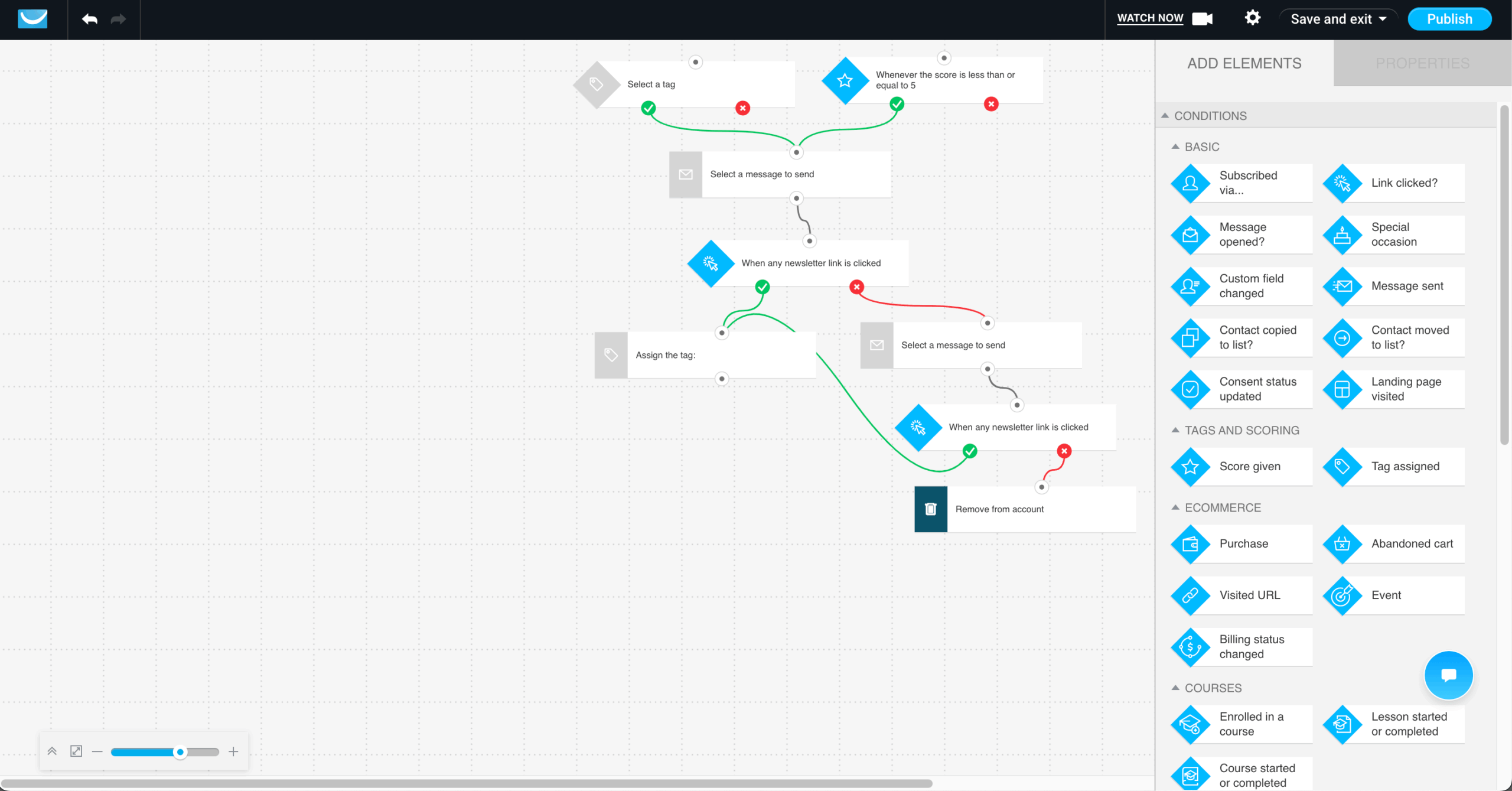
Klaviyo makes the most sense for ecommerce brands that need deep Shopify-style customer data, revenue attribution, and automation tied to purchase behavior. Compared with Constant Contact, it is much stronger for abandoned checkout, product-view, post-purchase, winback, and VIP customer flows.
Where it falls short is automation setup nuance. Klaviyo supports core ecommerce triggers, but some actions, like triggering from behavior in a previous email, require building a segment first instead of selecting the action directly. Purchase-date logic can also get messy because the most recent purchase may overwrite earlier purchase dates, making past-purchase follow-ups harder to control.
Choose Klaviyo if ecommerce revenue attribution and customer behavior data matter more than simplicity. Don’t choose it if you want a lightweight newsletter tool with easy automation setup.
Verdict: Klaviyo is the strongest Constant Contact alternative for ecommerce growth, but it is heavier and more technical than most small businesses need.
Constant Contact vs. Klaviyo
Klaviyo is stronger for advanced ecommerce automation because its flow builder supports unlimited flow steps, so you can build longer, more nuanced journeys with trigger splits, conditional splits, time delays, actions, and A/B test branches. That matters when workflows need to handle multiple customer paths, like first-time buyer, repeat buyer, VIP, inactive subscriber, and post-purchase follow-up, without hitting a step ceiling.
Where Constant Contact does better is manual organization: tags can be applied directly to individual contacts, while Klaviyo tags organize account items like campaigns, flows, lists, and segments rather than profiles (which can get messy without proper oversight real fast).
GetResponse — Email with Funnels and Landing Pages
GetResponse is built for small businesses, course creators, coaches, and webinar-led sales teams that want email marketing plus lead capture and conversion tools in one platform.

The biggest functional difference from Constant Contact is native webinar and conversion funnel support. I built a full webinar campaign on the Creator plan – landing page, automated reminders, and attendance-based follow-up sequences – in around 55 minutes without leaving the platform or connecting external tools. That same structure in Constant Contact would require a separate webinar platform.
Where friction showed up was the landing page editor. Getting a signup form to display correctly on mobile required manual adjustments that dedicated landing-page builders like Unbounce handle more gracefully – worth factoring in for teams where landing page precision matters.
The template library and conversion-focused tools make campaign setup feel more sales-oriented than Constant Contact’s event-first approach, though the interface takes a second session to navigate comfortably given how much is packed into one workspace.
GetResponse is not the right choice for event-heavy local businesses, nonprofits, or teams that mainly need simple newsletters and in-person event promotion.
Pros & Cons
Pros
- Great conversion funnel functionality: The funnel builder made it easy to connect landing pages, signup forms, emails, and offers in one campaign path.
- Design & spam testing tools: Built-in testing felt useful before sending, especially for checking deliverability basics and catching design issues across inboxes.
- Top-notch webinar hosting capabilities: Webinar tools were unusually strong for an email platform, with registration, reminders, and follow-ups handled in the same workspace.
- Intuitive visual workflow builder: The workflow builder was easy to follow once inside it, with clear steps for triggers, delays, conditions, and actions.
Cons
- Limited A/B testing: Testing worked for basics, but it felt less flexible than platforms built for deeper campaign and automation experimentation.
- Clunky interface: The platform packs in a lot, but navigation felt crowded, especially when moving between funnels, emails, automations, and webinars.
- Steep price jumps when upgrading: Entry pricing looks appealing, but costs rise quickly once you need advanced automation, webinars, or stronger ecommerce features.
Our Take
GetResponse is best for small teams that want email marketing, landing pages, and basic funnels in one tool without stitching together multiple platforms. Do not choose it if you expect advanced automation to be included in the entry-level paid plan.
The catch is scale: core automation features like contact scoring, abandoned cart emails, and advanced segmentation sit behind higher-tier plans. Teams starting on the low-cost plan can outgrow it quickly once they move beyond newsletters.
Verdict: GetResponse is a solid all-in-one marketing platform, but its best automation value only appears once you pay up.
Constant Contact vs. GetResponse
GetResponse is better than Constant Contact when the workflow needs to move beyond newsletters into lead capture and sales funnels. You can build a landing page, signup form, drip email campaigns, product offer, and abandoned-order follow-up inside GetResponse’s Conversion Funnel workflow, instead of piecing together separate tools. GetResponse also offers integrated webinars, which Constant Contact does not match as a native funnel feature.
Where Constant Contact does better is event marketing and simple campaign execution. It is stronger for small businesses that need registration, ticketing, automated confirmations, attendee tracking, and resend-to-non-openers built directly into the campaign workflow.
Brevo — Multichannel Email and SMS on a Budget
Brevo is built for small businesses and growing teams that need email marketing connected to broader customer communication – not just newsletters.
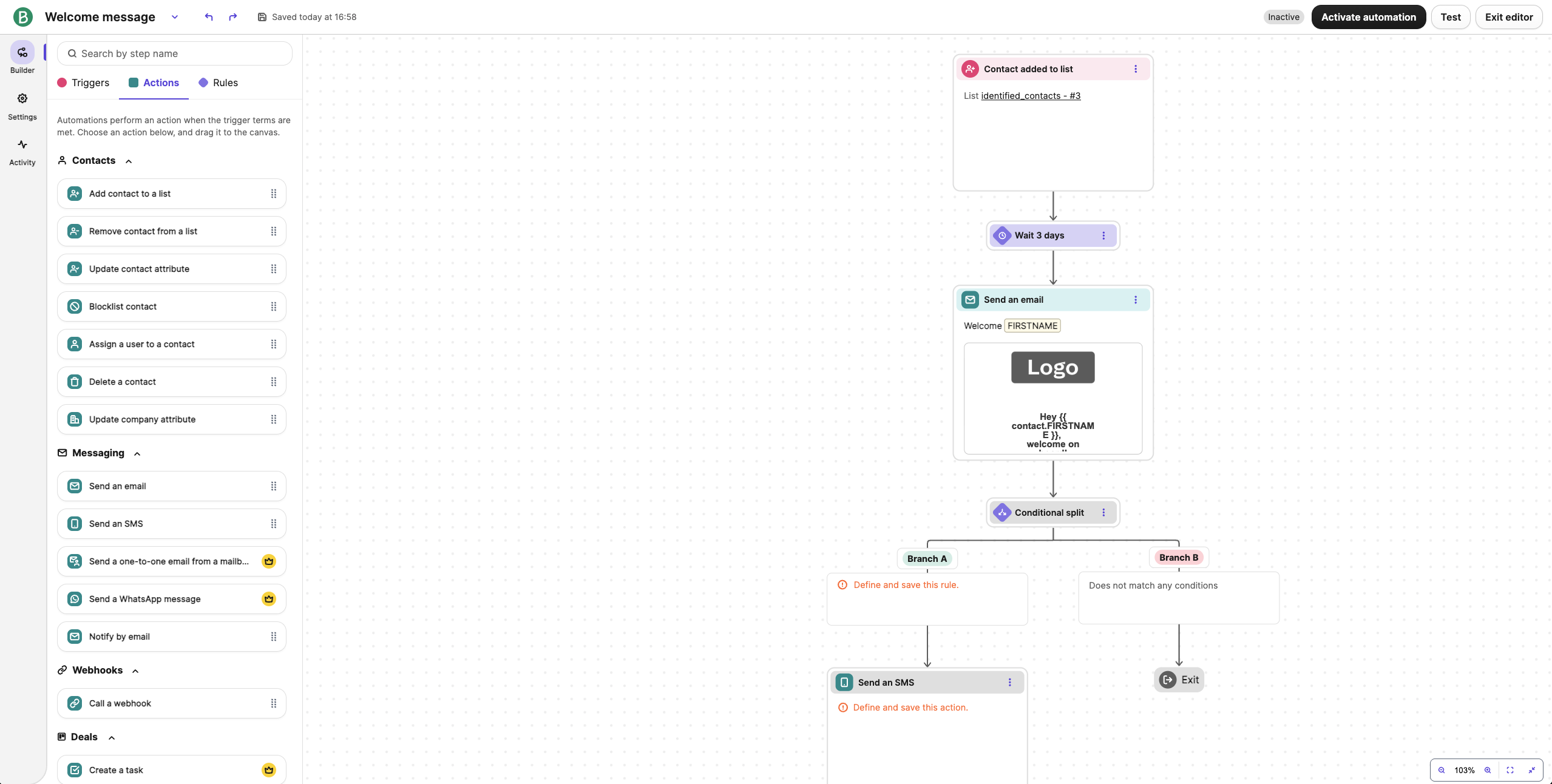
The biggest functional difference from Constant Contact is Brevo’s ability to support both marketing and transactional communication in one system. I built a multichannel flow – welcome email, SMS follow-up, and conditional transactional trigger – in around 20 minutes without connecting separate tools.
Capturing a lead, tracking them in the CRM, and delivering transactional confirmation all stayed inside the same workspace – something that’s not the case with Constant Contact, which has users trying to find workarounds to sending transactional emails.
Where the limitation showed up was branching logic. Link-specific routing works at automation entry, but not in mid-flow wait conditions – you can branch on clicked or not clicked, but not on which link. For multi-CTA sequences, that meant manual routing, where the builder should have handled it automatically.
Brevo is not the right choice for teams that prioritize event marketing, phone support, or a large polished template library. For those use cases, Constant Contact feels more guided.
Pros & Cons
Pros
- Multi-channel support: Email, SMS, WhatsApp, chat, and transactional messages made Brevo feel broader than a standard newsletter tool.
- CRM included: The built-in CRM was basic, but useful for tracking contacts, simple pipelines, and follow-ups without adding another platform.
- Affordable pricing structure: Send-based pricing felt practical for larger lists, especially when contacts do not need frequent emails every week.
- Strong transactional email support: Transactional setup was a clear advantage, making confirmations, password resets, and order updates easier to manage alongside campaigns.
Cons
- Inconsistent email deliverability rate: Deliverability felt more variable than specialist email platforms, so list quality and authentication need extra attention.
- A/B testing locked behind pricier tiers: Basic campaigns are affordable, but proper testing requires upgrading, which weakens the low-cost appeal.
- Reporting lacks advanced funnel tracking: Reports covered standard campaign metrics, but deeper revenue attribution and funnel analysis felt limited.
Our Take
Brevo makes sense for small businesses that want a cheap email marketing platform with automation and basic CRM tools in one workspace. Compared with Constant Contact, it gives you more multichannel flexibility without feeling too enterprise-heavy.
Where it falls short is segmentation depth. Brevo handles contact data, engagement, and basic behavior well, but granular ecommerce logic or advanced lifecycle targeting can feel limited.
Choose Brevo for affordable multichannel marketing. Don’t choose it for deep behavioral segmentation.
Verdict: Brevo is a strong Constant Contact alternative for multichannel value, but not for advanced segmentation.
Constant Contact vs. Brevo
Brevo is stronger when you need to run customer communication across the full journey, not just send newsletters. You can capture a lead, track them in a CRM pipeline, send automated email or SMS follow-ups, trigger transactional messages like confirmations or password resets, and keep sales conversations connected to marketing activity.
Constant Contact misses out here because it is built more around campaigns and small-business marketing than CRM-led, transactional, multichannel customer journeys.
Where Constant Contact does better is small-business execution: it offers 600+ templates, built-in event registration, ticketing, payments, reminders, attendee reporting, social scheduling, and stronger hands-on support. Brevo is broader; Constant Contact is simpler and more complete for events, newsletters, and local-business marketing.
Mailchimp — Beginner-Friendly Email with CRM Basics
Mailchimp is built for startups, ecommerce-adjacent small businesses, and marketing teams that want stronger reporting, integrations, and audience segmentation than Constant Contact offers – without jumping into a complex automation platform.

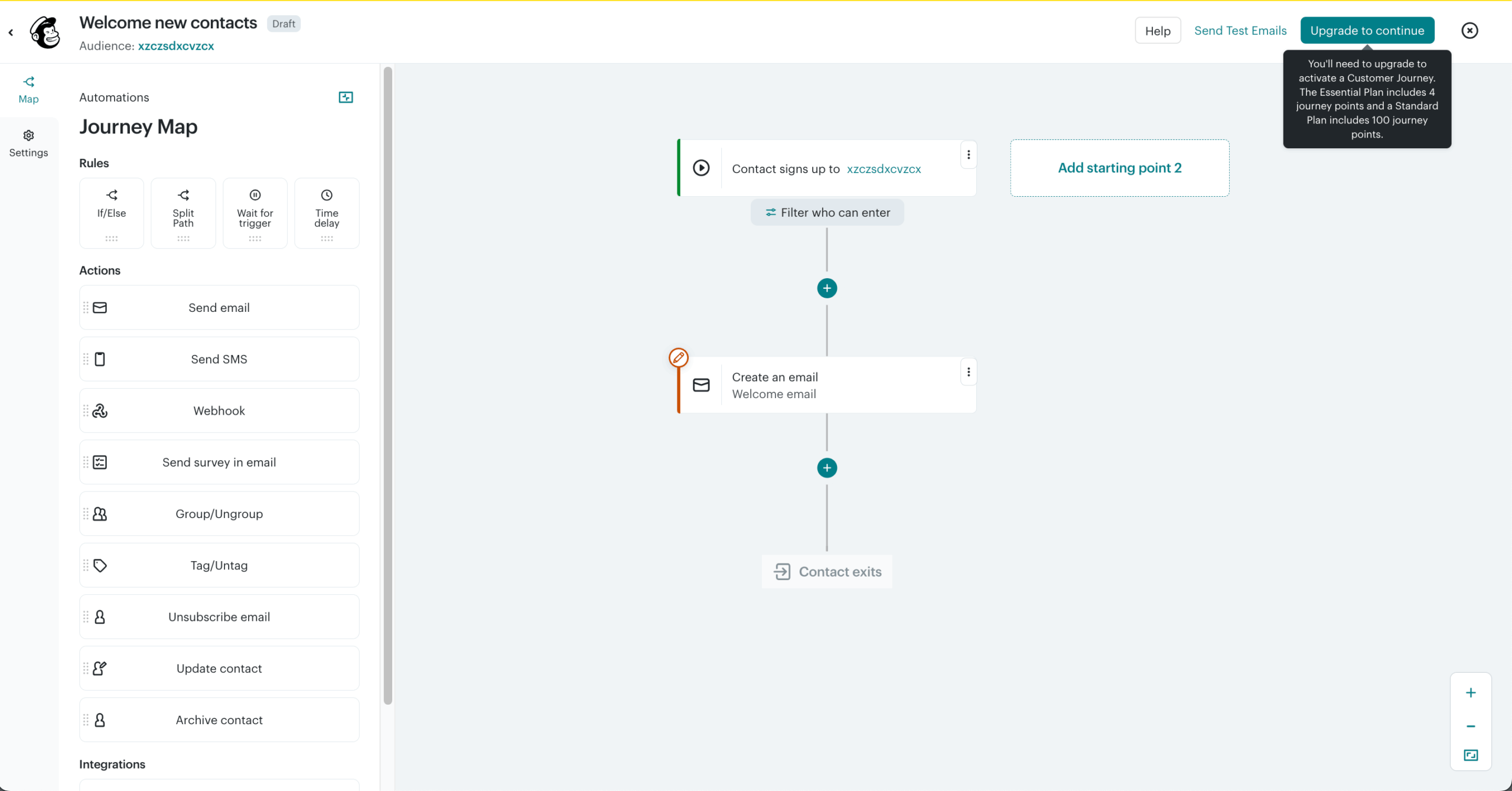
The biggest functional difference is Mailchimp’s broader data ecosystem. I connected a Shopify store and a Google Analytics account through native integrations – both synced automatically without custom configuration. A promotional campaign was send-ready in around 10 minutes from a modern template, faster than building an equivalent layout in Constant Contact’s editor.
Where the limitation showed up was multi-condition purchase segmentation. I wanted to target contacts who had bought from two different product categories. Mailchimp’s segment builder includes a category-purchased condition, but the logic needed to combine purchase conditions cleanly sits in the Advanced Segment Builder, which is only available on Standard plans and above.
On the Essentials plan I tested, that meant a manual export and reimport to build an audience the platform can technically produce – just not at this tier.
Mailchimp is not the right choice for teams that prioritize hands-on support, event marketing, or simple manual contact management.
Pros & Cons
Pros
- Powerful automation: Mailchimp handled basic journeys well, with enough branching and triggers for welcome flows, re-engagement campaigns, and ecommerce follow-ups.
- User-friendly interface: The campaign builder felt polished and approachable, especially for teams creating newsletters without much email marketing experience.
- State-of-the-art AI tools: The AI features were useful for speeding up subject lines, campaign copy, and content ideas, though still needed human editing.
- Wide range of integrations: The integration library felt broader than most beginner-friendly tools, especially for ecommerce, analytics, CRM, and booking platforms.
Cons
- Advanced features hidden behind paid plans: The free and entry plans felt limited quickly once I needed stronger automation, testing, or segmentation.
- Punishing pricing structure: Pricing can feel punishing as lists grow, especially because duplicate contacts across audiences may count more than once.
- Customer support can feel slow at times: Support was available, but responses did not feel as immediate or hands-on as some smaller platforms.
Our Take
Mailchimp makes sense for teams that want polished templates, a familiar editor, and a broad integration ecosystem. Compared with Constant Contact, it offers more campaign flexibility and stronger brand/design options.
Where it falls short is list structure. Mailchimp still relies on separate audiences instead of a fully unified contact database, which can make cross-audience targeting harder and create duplicate-contact issues as your setup grows.
Choose Mailchimp for design-friendly email campaigns. Don’t choose it for complex segmentation across multiple lists.
Verdict: Mailchimp is a strong Constant Contact alternative for campaign design, but weaker for scalable audience management.
Constant Contact vs. Mailchimp
Mailchimp is stronger when you need more flexible automation, better-looking templates, and a wider integration ecosystem. You can build multi-branch marketing flows, connect more deeply with ecommerce, CRM, and ad tools, and create more polished campaigns without relying on Constant Contact’s simpler, more linear workflow.
At 1,000 subscribers, Mailchimp Standard is $45/month, while Constant Contact Standard is $35/month, making Mailchimp roughly 30% more expensive.
Where Constant Contact does better is subscriber management: importing contacts, merging duplicates, applying tags, building segments, and spotting list-health issues are easier to handle without navigating as many menus.
MailerLite — Simple, Cheap Email for Small Lists
MailerLite is built for small businesses, creators, and newsletter-first teams that want straightforward email marketing without a crowded interface or a steep learning curve.

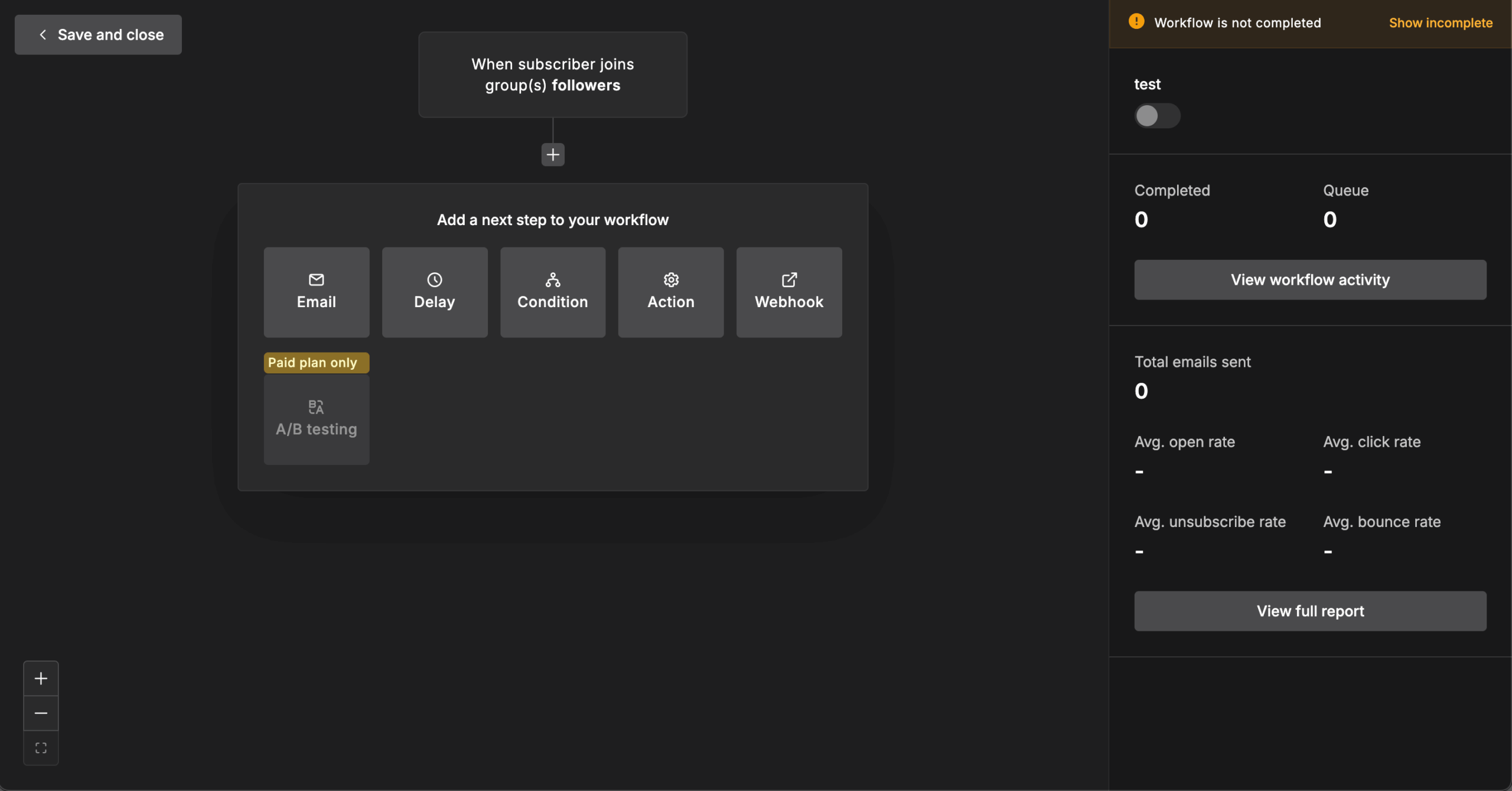
The biggest advantage over Constant Contact is simplicity at a lower cost as your list grows. In hands-on testing, the first campaign took under 30 minutes to build without needing a tutorial, with the drag-and-drop email builder, signup forms, landing pages, and visual automation all in one workspace.
The cost gap widens with list size: at 5,000 contacts, Constant Contact’s Standard plan runs at $110/month, while MailerLite′s Comfort plan costs $49/month for the same list.
The tradeoff is depth. I built a welcome sequence with a purchase-based split — buyers routed to a product-tips branch, non-buyers to a discount reminder — and the builder handled it cleanly. Where it stopped was the entry point: each automation accepts a single trigger below the Power plan, so combining “joined the list” and “completed a purchase” as alternate ways into the same workflow meant duplicating the entire automation three times.
Pricing also changed meaningfully in June 2026. On June 16, MailerLite cut its free plan from 500 subscribers and 12,000 monthly emails to 250 subscribers and 2,500 emails — while adding a second user seat and some previously paid features — with caps of 3 automations, 3 forms, and 1 landing page. Paid plans, renamed Comfort and Power in the same update, start at $12/month for 500 subscribers.
MailerLite is not the right choice for teams that want phone support, event marketing, or deep behavioral targeting. Constant Contact includes phone support on paid plans and purpose-built event tools, and stores that need granular purchase-based automation are better served by the platforms covered in the Klaviyo and Omnisend sections.
Pros & Cons
Pros
- Clean, beginner-friendly editor: Reusable blocks, inline editing, and an uncluttered interface make regular newsletters quick to build.
- Smart sending: Send-time optimization helps deliver campaigns when subscribers are most likely to engage, reducing the need to manually choose the perfect time.
- Lower-cost scaling: Per-subscriber pricing can remain more affordable than Constant Contact as a list grows.
- A/B test on free plan: Test different subject lines, sender details, or email content without upgrading to a paid plan.
Cons
- Small free plan: The 250-subscriber limit leaves little room for meaningful list growth before upgrading.
- Basic reporting: Analytics focus more on standard campaign metrics than detailed revenue or customer-journey reporting.
- No native SMS: Teams wanting email and SMS in one platform will need another solution.
Our Take
MailerLite makes the most sense for small teams that prioritize ease of use, clean email design, and predictable newsletter workflows over advanced automation.
Its biggest strength is how little friction there is between creating an account and sending a polished campaign. You still get automation, landing pages, forms, and segmentation, but without the heavier interface of tools such as ActiveCampaign or HubSpot.
The limitation is growth beyond straightforward email marketing. Once your strategy depends on detailed behavioral segmentation, sophisticated branching, CRM-driven workflows, or deeper ecommerce analytics, MailerLite starts to feel lightweight.
Verdict: MailerLite is a strong Constant Contact alternative for small lists and newsletter-focused teams that value simplicity and lower-cost email marketing over advanced automation.
Constant Contact vs. MailerLite
MailerLite is the better choice if your priority is simple campaign creation, a clean interface, and lower-cost email marketing. Its visual automation and landing-page tools cover most everyday newsletter and lead-generation needs without adding much complexity.
Constant Contact is stronger for events and hands-on small-business marketing. It offers native registration, RSVP tracking, ticketing, payments, a much larger template library, and phone support on paid plans — areas where MailerLite is less complete.
Choose MailerLite for straightforward email marketing and affordability; choose Constant Contact if events, phone support, and guided campaign execution matter more.
Campaign Monitor — Design-Led Email for Teams
Campaign Monitor is built for design-led teams, agencies, publishers, and brand-conscious small businesses that care about how every campaign looks as much as how it performs.

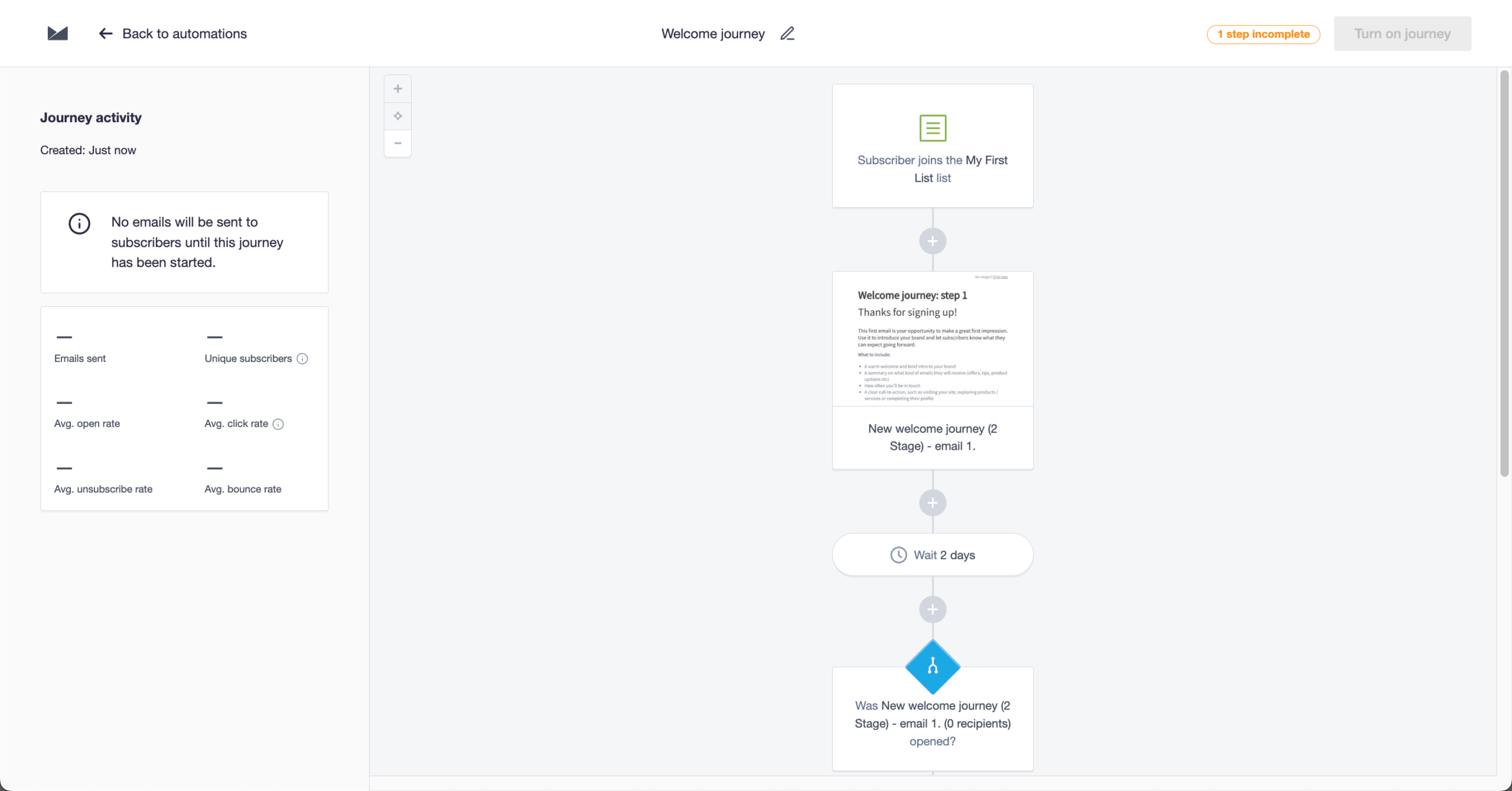
The biggest functional difference from Constant Contact is design control and testing workflow. I recreated a branded template from scratch – matching specific hex colours, adjusting column padding to 24px, and setting custom line spacing for the body font – without touching code once. The whole process took around 40 minutes, and the output matched brand guidelines closely enough that it wouldn’t have needed a designer sign-off.
Where the limitation showed up was mid-journey branching. Campaign Monitor can start a journey from a click on an individual link, but once contacts are inside a flow, the engagement split only reads whether they clicked at all. Routing product-CTA clickers differently from general-offer clickers meant splitting it into two journeys with separate entry triggers, where one flow with a split should have done it.
Campaign Monitor is not the right choice for businesses that need event management, phone support on lower tiers, or broader small-business marketing guidance.
Pros & Cons
Pros
- Intuitive email template builder: The builder felt polished and design-friendly, especially when adjusting layouts, spacing, images, and branded campaign elements.
- Professional email templates: Templates looked cleaner than many basic email tools, with layouts that felt ready for newsletters, announcements, and agency work.
- Reliable email deliverability: Campaign Monitor felt dependable for standard newsletter sending, especially when lists were clean and authentication was set up properly.
- Responsive customer support: Support felt helpful for campaign setup and account questions, though the level of access depends on the plan.
Cons
- Automation lacks some advanced branching: Journeys worked for simple sequences, but more complex behavior-based paths felt limited compared with automation-first platforms.
- Limited CRM capabilities: Contact management was fine for email campaigns, but it did not replace a real CRM for sales tracking or pipelines.
- API access locked behind higher tiers: API access being gated makes the platform less flexible for teams that need custom integrations early.
Our Take
Campaign Monitor is best for teams that care most about polished email design, simple list management, and reliable newsletter campaigns. Do not choose it if your growth strategy depends on complex lifecycle automation.
The limitation is automation depth: Campaign Monitor handles straightforward journeys well, but it lacks some advanced branching logic found in stronger automation-first platforms. That makes it less flexible for behavior-heavy nurture flows, multi-path customer journeys, or campaigns that need lots of conditional logic.
Verdict: Campaign Monitor is a strong email design and newsletter tool, but it is not the right choice for advanced automation.
Constant Contact vs. Campaign Monitor
Campaign Monitor is better for design-led teams because you can lock parts of an email template before handing it to other users. That means a franchise, agency, or multi-location team can let people edit campaign content while protecting brand elements like layout, footer, colors, and legal copy. Constant Contact is easier for general small-business sending, but it lacks that same controlled template-editing workflow.
Where Constant Contact does better is support: phone support is available from the entry-level plan, making it more reliable for small teams that want help quickly. Campaign Monitor reserves phone support for its most expensive Premier plan.
HubSpot — Full-Funnel Marketing Suite with CRM
HubSpot is built for growing B2B teams, agencies, SaaS companies, and service businesses that need marketing tied directly to sales activity.

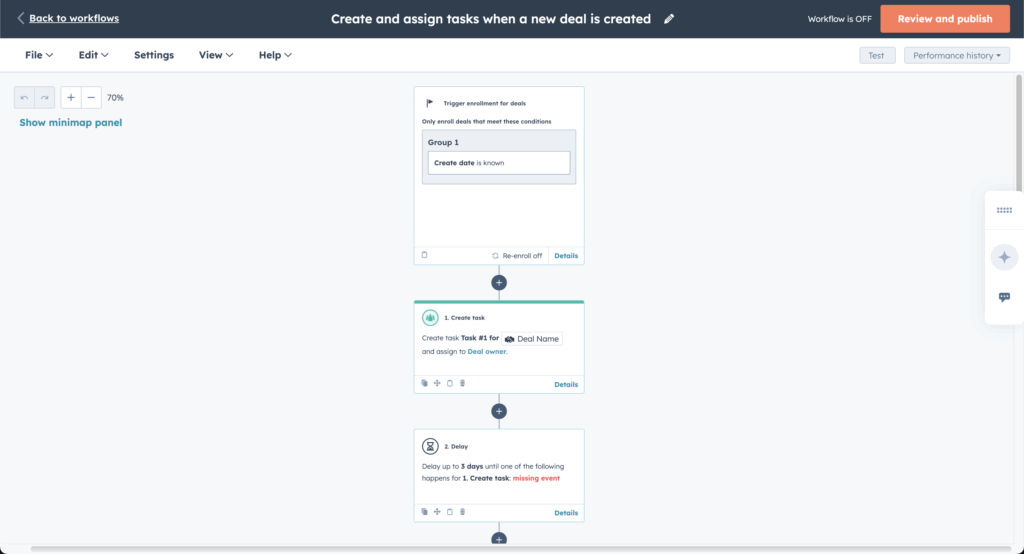
The biggest functional difference from Constant Contact is HubSpot’s native CRM-led workflow, which I tested on a high-tier Marketing Hub Professional plan ($1,015/mo). I set up a lead capture flow – landing page, form, and automated follow-up sequence tied to a sales pipeline – in around 45 minutes, mostly spent mapping CRM properties rather than building the automation itself.
Where friction showed up was dynamic content configuration. Building emails that changed based on lifecycle stage required navigating a non-intuitive menu path in the email editor – it took two documentation searches to surface the right configuration screen.
HubSpot is not the right choice for small businesses that only need newsletters, events, or affordable email sending without CRM depth.
Pros & Cons
Pros
- User-friendly interface: The interface felt polished once configured, especially for managing contacts, forms, emails, landing pages, and CRM activity together.
- Generous free plan: The free tools were useful for small teams testing CRM, forms, basic email, and contact management before committing.
- Great CRM integration: CRM data connected naturally to marketing activity, making it easy to track leads, deals, forms, emails, and sales follow-ups.
- Insightful reporting: Reporting felt stronger than most email-only tools, especially for connecting campaign performance to contacts, pipelines, and revenue activity.
Cons
- High cost at scale: HubSpot became expensive quickly once I needed more contacts, automation, reporting, and sales or marketing seats.
- Steep learning curve: The platform is approachable at first, but workflows, properties, lists, and reporting take time to understand properly.
- Basic templates: Email templates were usable, but they felt less polished and design-led than tools like Mailchimp or Campaign Monitor.
Our Take
HubSpot is best for teams that want CRM, marketing automation, sales, and reporting in one connected system. Do not choose it if email deliverability is your highest revenue lever.
The hidden issue is inbox placement: HubSpot can lag behind more email-focused platforms, especially on shared infrastructure. In testing, Gmail placement on shared infrastructure came in at around 78%, which is a concern for promotional campaigns where missed inboxes directly reduce revenue.
Verdict: HubSpot is a powerful all-in-one growth platform, but it is not the safest pick for teams optimizing primarily around email inbox placement.
Constant Contact vs. HubSpot
HubSpot’s clearest advantage is the free CRM underneath everything. A lead can fill out a form, land in the CRM, get assigned to a sales pipeline, and carry every email, form, and deal interaction on one contact record — all before you’ve paid anything, which Constant Contact’s email plans don’t match at any tier.
Constant Contact beats HubSpot on simple campaign execution for small businesses. You can build a newsletter, manage contacts, create an event, collect registrations, send reminders, track attendees, and follow up afterward without setting up a CRM, pipeline, or broader sales system.
AWeber — Simple Email with Strong Deliverability
AWeber is built for creators, bloggers, coaches, and very small businesses that want dependable email marketing without much setup complexity.

The biggest functional difference from Constant Contact is deliverability consistency and AMP email support. In testing, AWeber achieved 89.40% inbox placement across approximately 200 sends from a shared IP to a mixed seed list covering Gmail, Outlook, and Yahoo – competitive for a platform at this price point and noticeably more consistent than some alternatives I tested at similar volume.
AMP email support allows interactive elements inside the inbox rather than static newsletter layouts – a capability Constant Contact doesn’t offer natively. Building a basic AMP email took longer than a standard campaign and assumed more technical familiarity than the rest of the platform suggests, so it’s more useful for technically comfortable creators than complete beginners.
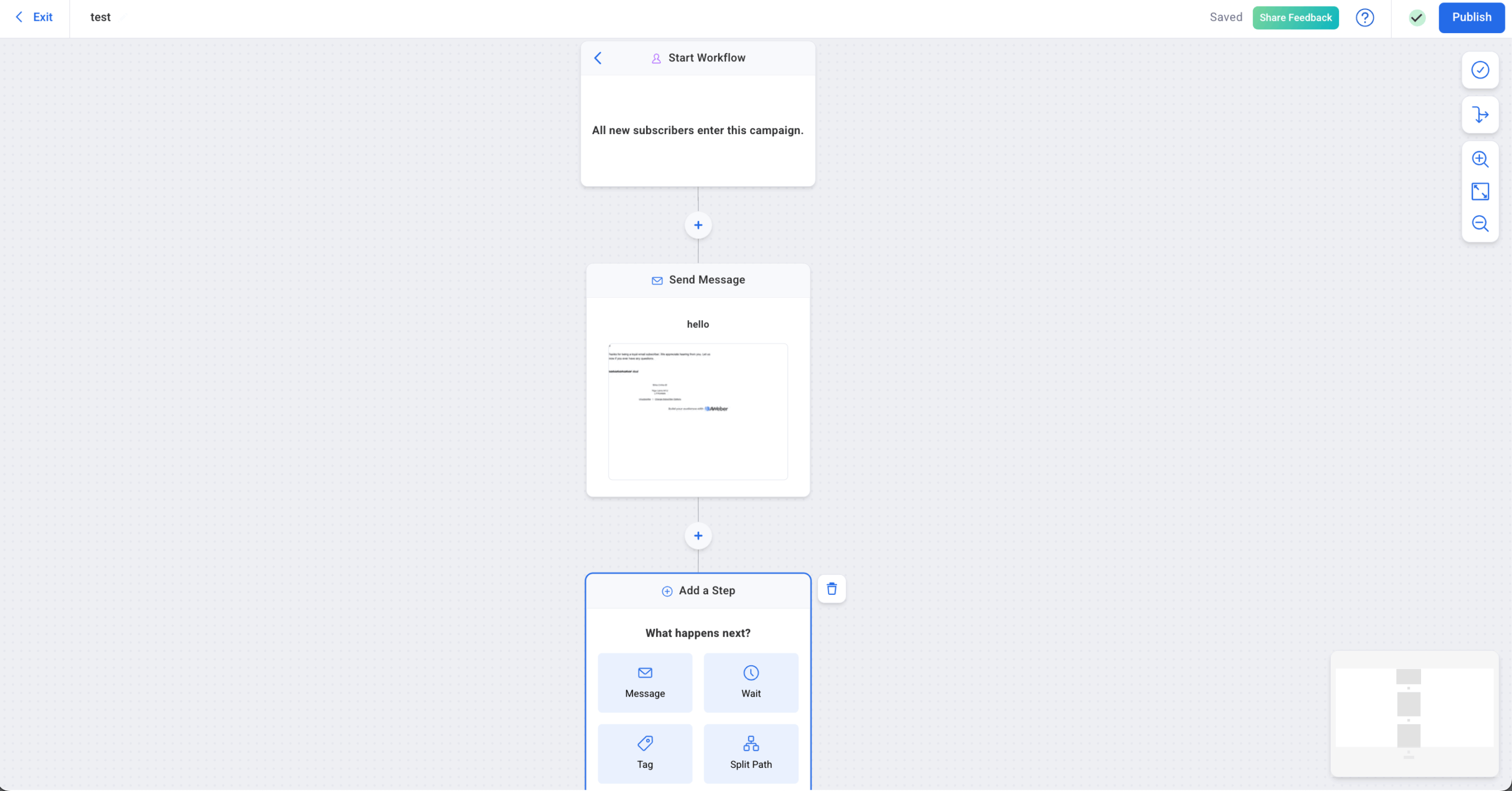
I also set up a landing page with a Stripe checkout connected to a post-purchase email sequence in around 25 minutes – practical for creators selling digital products without a full ecommerce stack.
AWeber is not the right choice for teams that need advanced segmentation, event management, or sophisticated lifecycle automation.
Pros & Cons
Pros
- Reliable deliverability: Emails consistently reached inboxes, which made it easier to trust campaigns for launches, promotions, and customer updates.
- Real-time analytics: The live reporting was useful for monitoring opens, clicks, sales activity, and campaign performance as results came in.
- Seamless ecommerce integrations: Ecommerce connections worked smoothly, especially for syncing customers, products, orders, and revenue data into email campaigns.
- Excellent support: Support felt responsive and helpful, particularly when setting up integrations, troubleshooting campaigns, or improving deliverability.
Cons
- Fewer native integrations than competitors: The integration library covered the essentials, but it felt more limited than larger platforms with broader app ecosystems.
- Limited advanced segmentation and conditional logic: Segmentation worked well for basic targeting, but more complex customer journeys and conditional workflows felt restricted.
- Basic interface: The interface was functional and easy enough to use, but it felt less polished and modern than some competing email marketing tools.
Our Take
AWeber is best for creators and small businesses that need dependable newsletters, simple automations, and easy subscriber management. Do not choose it if your strategy depends on behavior-based personalization.
The limitation is segmentation: it is functional, but not truly dynamic. You can organize audiences and send targeted campaigns, but AWeber does not support the kind of highly personalized flows based on real-time behavior that platforms like ActiveCampaign, Klaviyo, or even Constant Contact handle better.
Verdict: AWeber is a solid, simple email tool, but it falls short for advanced segmentation and personalized automation.
Constant Contact vs. AWeber
AWeber is stronger if you want to reach subscribers outside the inbox with web push notifications. You can send a browser notification for a new product, limited-time offer, new blog post, or livestream reminder, even when the subscriber is not checking email. Constant Contact can handle email and SMS, but it does not give you that same browser-based push channel.
Where Constant Contact does better is event-driven small-business marketing: registrations, reminders, attendee tracking, and follow-up are easier to manage in one place.
Best Free Constant Contact Alternatives
The best free Constant Contact alternatives are Sender, HubSpot, and GetResponse, depending on what you need. Sender offers the most generous free tier with 2,500 contacts and 15,000 emails/month; HubSpot supports 1,000 contacts and 2,000 emails/month, while GetResponse includes 500 contacts and 2,500 emails/month.
| Platform | Free contacts | Free sends/month | Automation (on free plan) | Platform branding (on free plan) | Free plan duration |
| Sender | 2,500 | 15,000 | Yes | Yes | Unlimited |
| Omnisend | 250 | 500 | Yes | Yes | Unlimited |
| HubSpot | 1,000 | 2,000 | No | Yes | Unlimited |
| GetResponse | 500 | 2,500 | Basic triggers (after the trial) | Yes | Free account + 14-day premium feature trial |
| AWeber | 500 | 3,000 | Limited/basic triggers | Yes | Unlimited |
| Brevo | 100,000 | 9,000/month or 300/day | Yes | Yes | Unlimited |
| MailerLite | 250 | 2,500/mon | Yes | Yes | Unlimited |
| Mailchimp | 250 | 500 | Limited/basic triggers | Yes | Unlimited |
| Klaviyo | 250 | 500 | Yes | Yes | Unlimited |
Migrating From Constant Contact: What to Expect
Switching from Constant Contact is usually less technical than it sounds, but the work is uneven. Contacts, lists, and tags move cleanly; automations, templates, and reporting usually do not. The safest approach is to treat the move as a phased rebuild, not a one-click transfer.
What moves cleanly
Subscriber data is usually the easiest part. Most email platforms support standard CSV imports, so contacts, list structures, tags, and basic segments can typically be moved without major issues. Export your unsubscribed and suppressed contacts too, then import them into the new platform before sending anything. That prevents accidentally emailing people who already opted out.
What you have to rebuild
Automations and templates rarely transfer between platforms. Workflow triggers, branching logic, email sequences, and branded templates usually need to be recreated manually because each platform uses its own automation builder and design system. Before switching, document every active automation, screenshot the logic, and rebuild it in the new tool before deactivating the old version.
What usually stays behind
Historical campaign data often does not come with you. Past open rates, click rates, engagement history, and long-term reporting benchmarks may stay locked inside Constant Contact, so export campaign reports before closing the account.
How to make the switch safer
Some providers offer assisted platform/email list migration, especially on higher-tier plans, which can reduce manual setup and import errors. Even with help, avoid switching everything at once. Run both platforms in parallel while you rebuild workflows, test templates, verify contact imports, and confirm your sending setup. This keeps campaigns moving and reduces the risk of downtime, broken automations, or missed follow-ups.
even on the free plan.
Which Constant Contact Alternative Should You Choose?
If you go back to the “Three questions to answer before evaluating alternatives” section at the start of this guide, the answers to these questions should point you toward the right replacement — and the runner-up if your needs overlap.
| Your switching trigger | Best pick | Runner-up | Why |
| Pricing punishes your list growth | Sender | Brevo | Sender keeps automation and segmentation affordable as you grow, while Brevo’s send-based pricing can be even more economical for large lists that only email a few times per month. |
| You’ve hit the automation ceiling | ActiveCampaign | Sender | ActiveCampaign gives you deeper branching, lead scoring, CRM-connected workflows, and behavioral triggers. Sender covers much of the practical automation smaller teams need at a considerably lower price. |
| The editor and templates slow you down | MailerLite | Campaign Monitor | MailerLite keeps campaign creation clean and straightforward; Campaign Monitor is the stronger runner-up when polished design and tighter brand control matter more than advanced automation. |
If cost is the trigger: Sender is the strongest value play for growing small businesses; choose Brevo instead if you have a large list but send relatively infrequently.
If automation depth is the trigger: ActiveCampaign is the ceiling-remover; Sender is the more economical choice when you need better automation without turning your marketing stack into a project of its own.
If campaign creation is the trigger: MailerLite is the better fit when you simply want to build and send faster; choose Campaign Monitor when design control is the bigger priority.
Best Constant Contact Alternatives for Nonprofits
For nonprofits, the best Constant Contact alternative depends heavily on list size and available nonprofit discounts. I have already positioned free-plan capacity as an important switching factor, especially for budget-conscious organizations.
Sender is the strongest free option for nonprofits with supporter lists in the low thousands. Its Free Forever plan supports up to 2,500 subscribers and 15,000 emails per month, including automation, while qualifying charities can get 25% off paid plans.
Brevo works differently: its free plan can store up to 100,000 contacts, but sending is capped at 300 emails per day. That makes it practical for large databases with staggered communications, but less suitable for sending a fundraising appeal to everyone at once. Recognized nonprofits get a verified 20% discount.
For very small lists, MailerLite and Mailchimp both allow up to 250 subscribers/contacts free. MailerLite provides 2,500 monthly emails and a 30% nonprofit discount, while Mailchimp allows 500 monthly sends and offers 15% off for verified nonprofits.
Among paid alternatives, verified nonprofit discounts are also available from GetResponse (50%), HubSpot (40%), ActiveCampaign (20%), and Campaign Monitor (15%).
Event-heavy nonprofits may still prefer Constant Contact, since registration, ticketing, payments, check-in, attendee tracking, and event follow-ups are built into the platform.
FAQs
Businesses should consider Constant Contact alternatives when they need more advanced automation, deeper segmentation, ecommerce integrations, or more flexible pricing as their list grows. Growing online stores, SaaS companies, content-driven brands, and teams managing longer customer journeys may need behavior-based triggers, abandoned cart flows, stronger CRM/API options, or support for both marketing and transactional emails.
Constant Contact alternatives differ by how much logic they let you build into campaigns. AWeber and Brevo, for instance, suit basic autoresponders and welcome emails, while Sender and Mailchimp support more flexible drip campaigns, forms, and funnel-style workflows. Omnisend and Klaviyo go deeper for ecommerce, with abandoned cart, product-view, and post-purchase automations. ActiveCampaign and HubSpot are strongest for CRM-driven automation, lead scoring, branching paths, and sales follow-up.
Yes, several platforms on this list are better suited for ecommerce data and purchase-driven messaging than Constant Contact. Tools like Omnisend or Klaviyo integrate directly with shopping carts, track product views and orders, and support abandoned cart, post-purchase, and product recommendation flows. They often combine email and SMS while using customer behavior and order history to power segmentation and automated campaigns.
Yes, many Constant Contact competitors support multichannel messaging. Platforms like Sender and Klaviyo, for instance, centralize contact data so campaigns across different channels – SMS, WhatsApp, email – use the same audience and behavior signals. This setup helps maintain consistent communication, coordinate timing between channels, and track engagement in one place rather than managing separate tools for each messaging type.
The best Constant Contact alternative for small teams depends on the main use case. Sender is a strong fit for budget-conscious teams that want a simple setup, generous free sending, and practical automation. Omnisend is better for small ecommerce teams that need cart recovery, SMS, and store-connected workflows. HubSpot makes more sense for B2B teams that want CRM included from day one.
Sender is one of the cheapest Constant Contact alternatives, especially for small lists. Its free plan supports up to 2,500 contacts and 15,000 monthly emails, while the Standard plan starts at $7/month. By comparison, Constant Contact’s Lite plan starts at $12/month. Sender also includes automation on its free plan, making it a strong value option for budget-conscious businesses.
Brevo is a strong Constant Contact alternative for nonprofits, particularly organizations that want affordable email, SMS, and CRM tools in one platform. Its send-based pricing can also work well for nonprofits with larger contact lists that email less frequently. For nonprofits heavily focused on event registration, ticketing, reminders, and attendee management, though, Constant Contact may still be the better fit.