


Sendfox Review 2025: The Budget Email Tool That Actually Works?
Capterra, G2, Trustpilot, and Reddit to create an objective evaluation. Learn more about our review methodology
Remember when email marketing tools didn’t cost an arm and a leg? Noah Kagan from AppSumo apparently did too, which is why he built Sendfox. It’s an email platform that promises all the basics for a one-time payment of $49. Sounds too good to be true? Well, it’s complicated.
What is Sendfox?
Picture this: you’re a blogger who just wants to send newsletters without learning seventeen different automation sequences or paying $100 a month. That’s basically Sendfox’s sweet spot. Built by the AppSumo team (yes, the deal site people), it’s email marketing stripped down to what most creators actually use.
The big selling point? Pay once, use forever. For $49, you get up to 5,000 contacts and can send as many emails as you want. No monthly bills eating into your coffee budget. The platform keeps things intentionally simple—maybe too simple for some—but that’s kind of the point.
They’re not trying to compete with Mailchimp’s feature list. They’re going after people who open those complex dashboards and immediately feel overwhelmed. Here’s the thing though: simple doesn’t always mean basic. You still get automation, landing pages, and decent analytics. Just don’t expect the bells and whistles you’d find in pricier tools.
Sendfox Key Features
The campaign builder is drag-and-drop, which sounds fancy until you realize it’s more like “drag, drop, and hope for the best.” You can send unlimited emails—no counting sends or watching quotas like with other platforms. That alone is pretty refreshing.
The editor handles both plain text and HTML builder, though calling it “basic” might be generous. You get your standard formatting options, but if you’re looking for fancy fonts or advanced design elements, you’re out of luck. The Smart Campaigns feature is actually clever though—it pulls content from your blog’s RSS feed automatically. Set it up once, and every new blog post becomes an email. Perfect for lazy marketers (aren’t we all?).
One thing users love: the emails look more like personal messages than marketing blasts. Sometimes that’s exactly what you want.
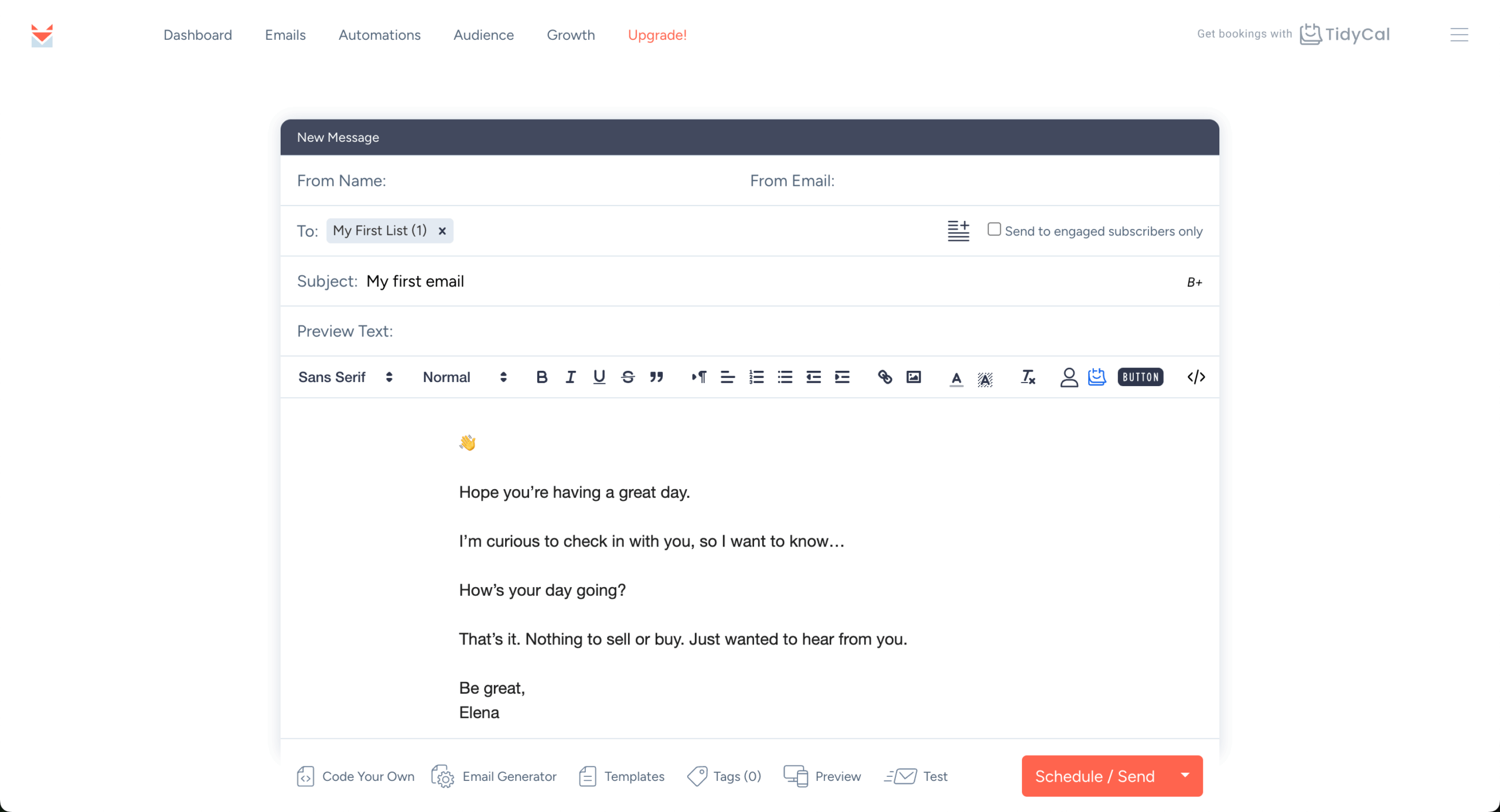
Let’s not sugarcoat this—the template selection is pretty bare bones. We’re talking a handful of simple, mobile-friendly designs that prioritize function over flash. You won’t find hundreds of holiday-themed designs or industry-specific email templates here.
But here’s a thought: maybe that’s not terrible? Those plain templates actually get decent open rates because they don’t scream “marketing email” the moment they hit someone’s inbox. Still, if you’re running an online boutique or need visually stunning newsletters, you’ll probably end up frustrated. The templates work fine for text-heavy updates, announcements, or blog roundups. Just don’t expect to win any design awards.
Sendfox handles the automation basics without making your head spin. You can set up welcome sequences, drip campaigns, and schedule emails based on triggers. New subscriber joins? Boom, welcome email. Someone clicks a link? Tag them for follow-up.
Where it falls short is the fancy stuff. No complex branching logic or multi-channel sequences here. You won’t find advanced behavioral triggers like “visited pricing page three times but didn’t buy.”
For bloggers sending a weekly newsletter and maybe a welcome series, it’s plenty. For ecommerce stores trying to recover abandoned carts based on seventeen different customer behaviors? Not so much. The automation works, it’s just not winning any innovation awards.
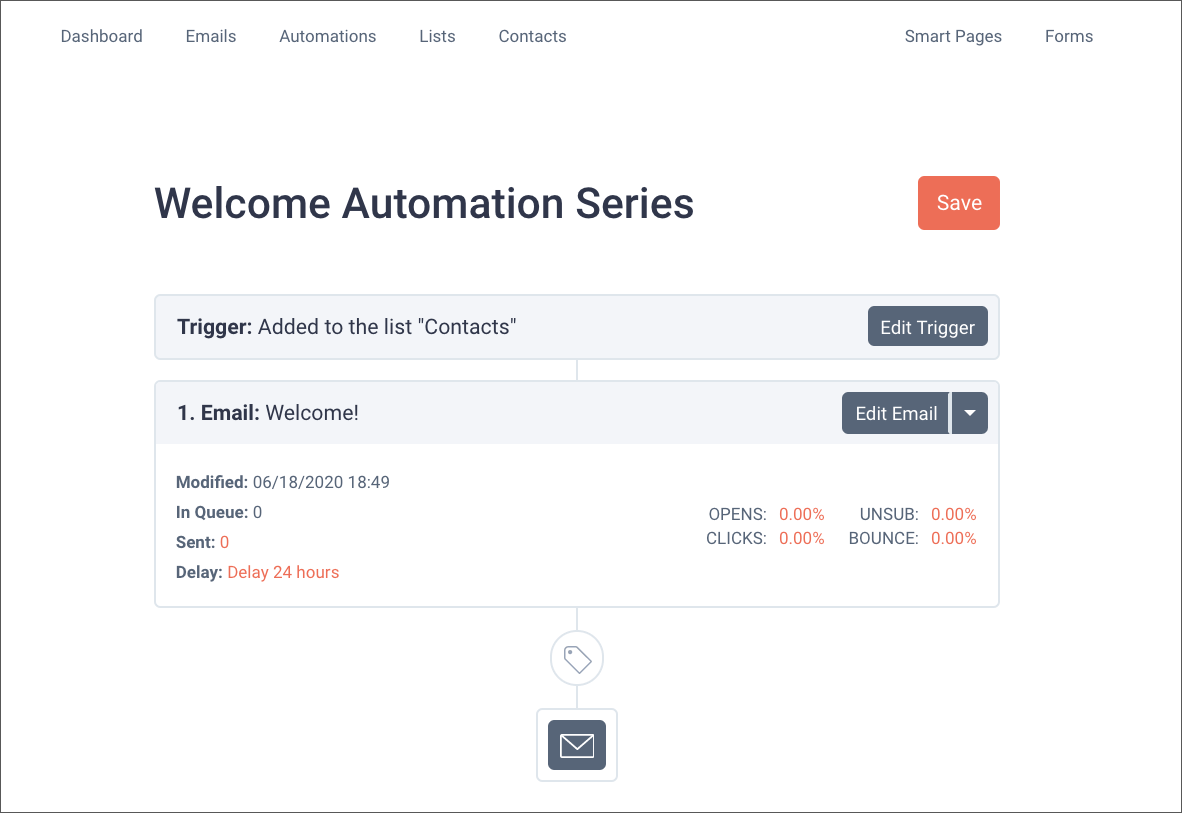
Managing your list segmentation in Sendfox feels refreshingly straightforward. Import a CSV, organize contacts with tags, maybe create a segment or two. Done. The platform handles the boring stuff like cleaning out bad emails and managing unsubscribes automatically.
Here’s a weird quirk, though: once someone unsubscribes, they can’t resubscribe to the same list. Ever. A few users have lost their minds over this in reviews, and honestly, it’s a strange limitation.
The platform tracks basic engagement—who’s opening, who’s clicking, who’s ghosting you completely. Nothing groundbreaking, but enough to know if people actually care about your emails. Migration from Mailchimp is surprisingly smooth with their import tool. Small wins, right?
Need a quick signup page? Sendfox’s Smart Pages get you up and running in literally minutes. We’re not talking about fancy landing pages with countdown timers and exit-intent popups. These are simple, clean pages that do one thing: collect email addresses.
The customization options are… limited. You can change some text, swap an image, pick your button color. That’s about it. But here’s the reality: sometimes simple converts better anyway. The forms embed easily on most websites, though styling them to match your brand might require some CSS wizardry.
For creators who just need something that works without hiring a designer, these tools do the job. Just manage your expectations on the “custom” part of customization.
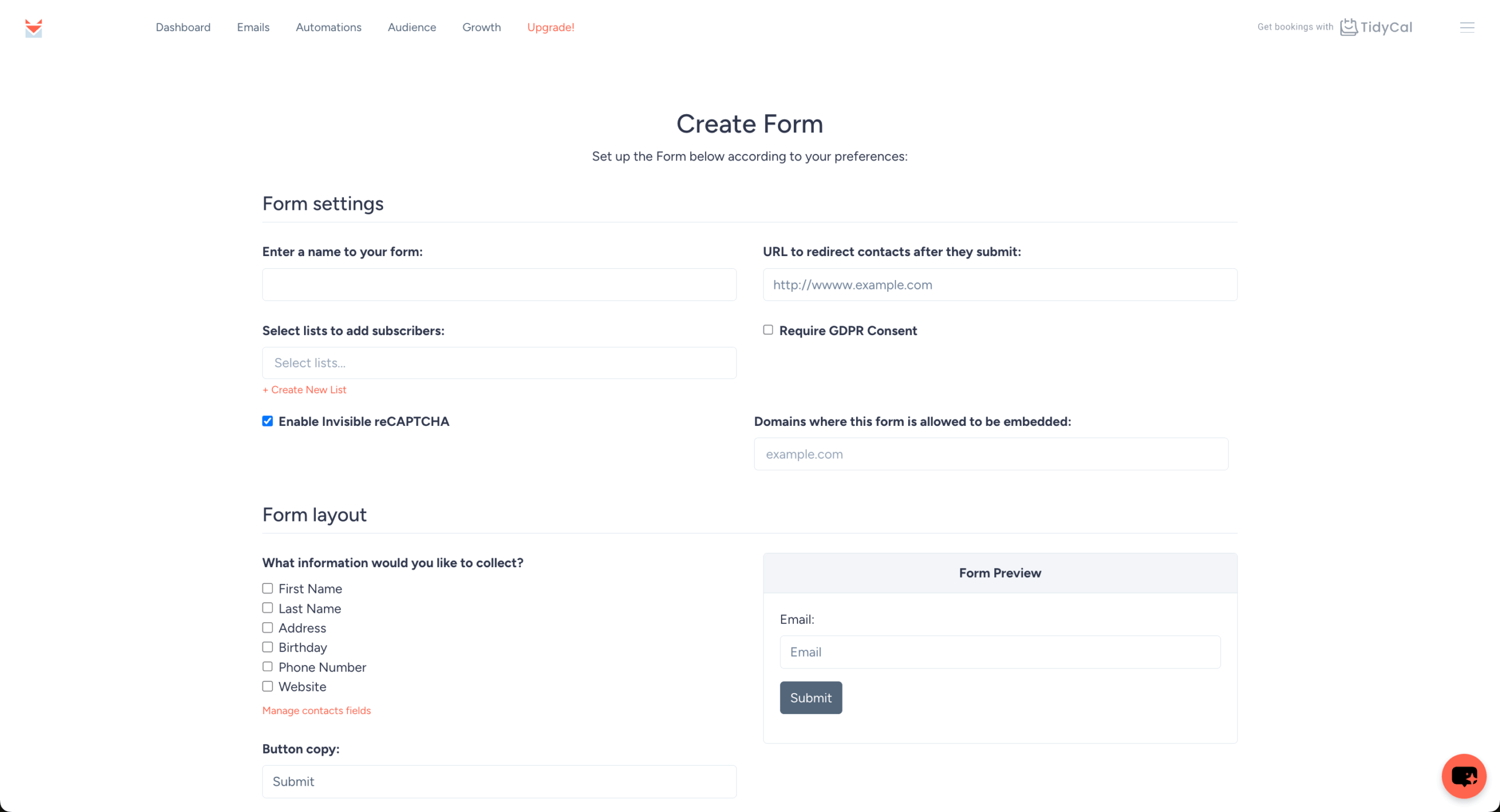
Sendfox gives you the numbers that matter without drowning you in data. Open rates, click rates, subscriber growth—the basics are all there in real-time. You can see who’s engaging with your content and who’s basically dead weight on your list.
What you won’t get: heat maps, predictive analytics, or those fancy attribution models that tell you exactly which email convinced someone to buy. Geographic breakdowns and device reports are pretty basic too. For most creators, the provided metrics are enough to answer the important question: “Are people actually reading this stuff?”
You can export reports if you need to impress someone with a spreadsheet. But if you’re the type who loves diving deep into data, you might find yourself wanting more.
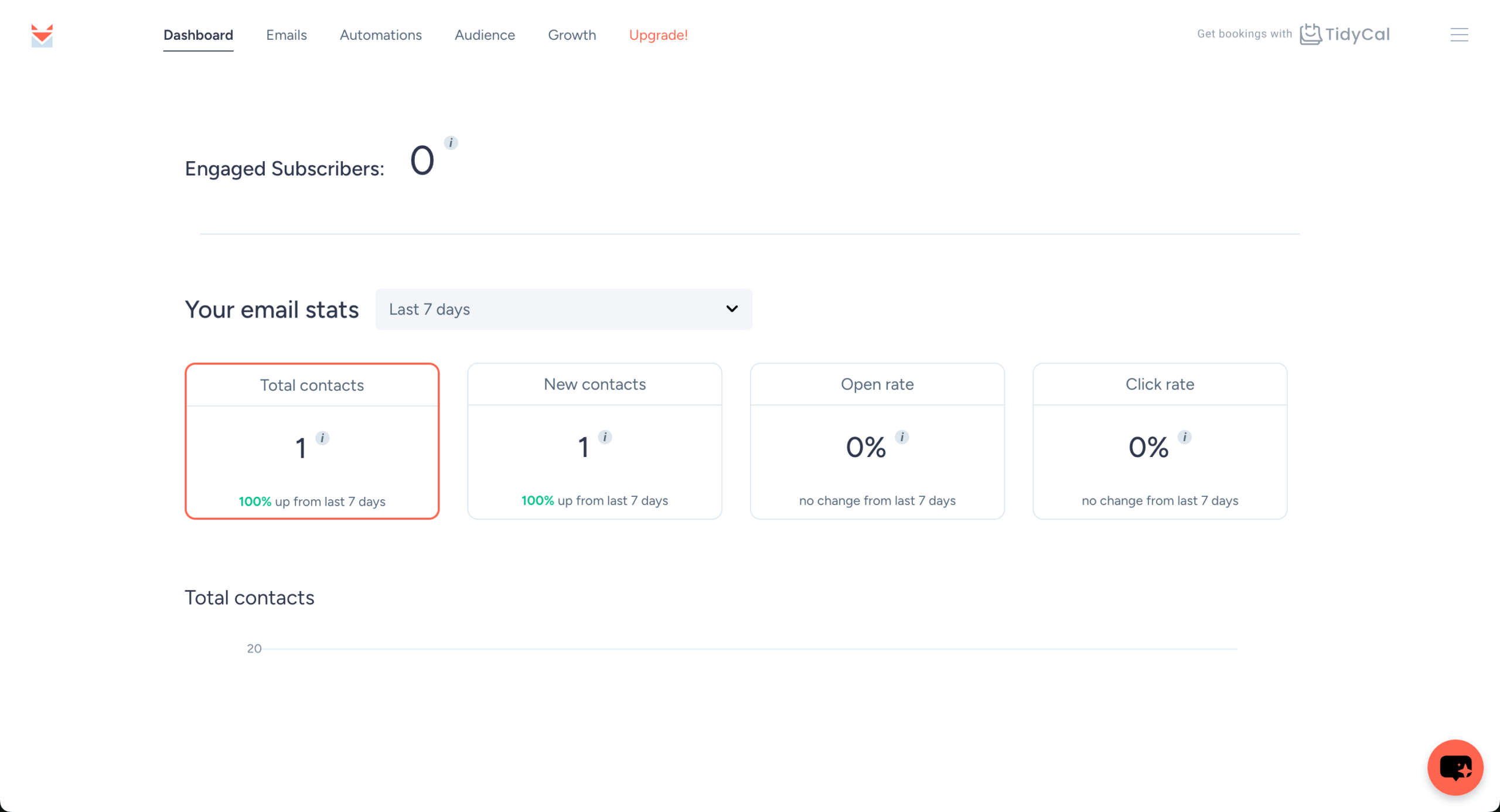
Sendfox plays nice with the AppSumo family of tools (surprise, surprise) and offers basic integrations through their API. WordPress connects easily for blog updates. Zapier helps you connect to other tools, though the integration options are limited compared to the big players.
Here’s what’s missing: serious ecommerce integrations. No Shopify abandoned cart sequences. No WooCommerce product recommendations. The API documentation exists but won’t excite any developers.
Social media connections are basic at best—think share buttons, not sophisticated cross-channel campaigns. If your tech stack is simple, you’ll probably be fine. But if you need deep integrations with multiple platforms, Sendfox might leave you hanging.
Support is where things get… interesting. Some users rave about helpful responses. Others claim they’ve been waiting weeks for basic answers. It’s email-only support, no phone or live chat, which already puts them behind most competitors.
According to various reviews, simple questions get answered fairly quickly. But hit them with something complex? You might be waiting a while. The canned responses some users complain about suggest a small support team doing their best with limited resources.
The knowledge base covers basics but lacks depth. Sometimes the AppSumo community fills in the gaps, which is nice but not exactly professional-grade support. If you’re self-sufficient and good at troubleshooting, you’ll survive. If you need hand-holding, maybe look elsewhere.
Sendfox Pricing Plans and Value
The pricing structure is Sendfox’s biggest weapon. While everyone else charges monthly, they’re out here selling lifetime access like it’s 2010. Besides the free plan, they have five different lifetime tiers that level up based on subscriber count. I’ve added only the lowest and the highest tiers to the table for comparison:
Plan
Price
Contacts
Features
Free Plan
$0/month
Up to 1,000 contacts
Limited campaigns, Sendfox branding, basic features
Lifetime License Tier 1
$49 one-time
Up to 5,000 contacts
Unlimited emails, all core features, remove branding for +$18/month
Lifetime License Tier 5
$245 one-time
Up to 25,000 contacts
Everything above plus priority support (the branding stays, unless you pay that extra $18)
Do the math: other platforms charge $50-75 monthly for 5,000 contacts. Sendfox asks for $49 once. If you stick with it for even six months, you’re already ahead (besides that extra $18 per month to remove the branding).
Sendfox Pros and Cons
- Affordable pricing for email marketing
- Clean, minimalist interface that’s user-friendly
- Lifetime deals available for businesses
- Good automation features for campaigns
- Solid deliverability rates for emails
- Limited advanced segmentation options available
- Basic analytics compared to competitors
- No built-in CRM system included
- Fewer integrations than major platforms
- Customer support can be slow
Pros
That lifetime pricing is honestly ridiculous (in a good way). Forty-nine bucks for 5,000 contacts forever? Other platforms charge that monthly. The unlimited sending means no more sweating about hitting your quota mid-campaign. Plus, the interface doesn’t require a PhD to understand—you can literally start sending emails within minutes of signing up.
The RSS integration is sneaky good for bloggers. Write a post, it becomes an email automatically. Less work, more consistency. And because it’s not loaded with features you’ll never use, everything loads fast and works smoothly. The AppSumo backing means it’s probably not disappearing tomorrow, despite the crazy pricing. For basic email marketing, it genuinely delivers what most people need.
Cons
Design flexibility? What design flexibility? If you want beautiful, branded emails with custom layouts, keep looking. The automation features are kindergarten-level compared to tools like ActiveCampaign. Some users report emails taking forever to send, which defeats the purpose of email marketing.
Customer support is hit or miss—mostly miss, according to angry reviews. No ecommerce features means online stores should run away. And that bizarre “unsubscribes are permanent” rule has caused actual meltdowns in review sections. The template selection makes WordPress themes from 2005 look cutting-edge. Basically, if you need anything beyond basic newsletters, you’ll hit walls quickly.
Should You Choose Sendfox?
Best for
Consider an alternative if
Bloggers wanting simple email newsletters
You need advanced segmentation capabilities
Bootstrapped startups with tight budgets
Complex automation workflows are required
Content creators building subscriber lists
Detailed analytics reports are essential
Small businesses needing basic automation
You require extensive third-party integrations
Solopreneurs avoiding monthly subscription fees
Enterprise-level support is a priority
Who Sendfox is Perfect For
Solo bloggers who just want to notify readers about new posts will love the simplicity and price. Podcasters and YouTubers using email as a simple notification system get exactly what they need. Small businesses sending monthly updates don’t need anything fancier.
Bootstrapped startups watching every penny can’t beat the lifetime deal. Writers and coaches who rely on words, not visuals, won’t miss the design limitations. Non-profits stretching tiny budgets can finally afford decent email marketing. If you’re starting from zero and want to test email marketing without commitment, this is your gateway drug.
Who Should Consider an Alternative
Running an ecommerce store? You need abandoned cart emails, product recommendations, and purchase tracking that Sendfox doesn’t offer. Agencies juggling multiple clients will tear their hair out with the limited features and permissions.
Visual brands requiring gorgeous templates and design control should look at Mailchimp or Constant Contact. B2B companies needing CRM integration and lead scoring are playing in a different league entirely. If you can’t survive without 24/7 support or guaranteed delivery times, invest in something premium. Basically, if your email marketing needs are complex, Sendfox isn’t your solution.
Sendfox User Experience and Reputation

G2 reviewers seem split between loving the price and hating the limitations. The lifetime deal gets tons of praise—people can’t believe they’re paying once for what usually costs hundreds yearly. Setup is apparently dead simple, which newcomers appreciate.
But then come the horror stories. Emails landing in spam despite proper setup. Features that just… don’t exist. Some reviewer called it “total garbage” after their emails disappeared into the void. The pattern seems clear: works great for basic needs, falls apart for anything complex.
Most reviews basically say the same thing: you get what you pay for, which in this case is actually a decent amount considering you’re barely paying anything.
With 355 reviews averaging 3.4 stars, not all Trustpilot users seem happier. Authors and solopreneurs love the lifetime deal—one reviewer switched from an expensive provider and couldn’t stop gushing about saving money. The smooth migration process gets mentioned a lot, too.
But dig into the negative reviews and you’ll find familiar complaints. Support taking weeks to respond. Emails delayed or not sending at all. Some poor soul has been waiting three months for help with their account. The positive reviews mostly come from people with simple needs who appreciate the price. The angry ones? Usually people who expected more features or hit technical problems. Pick your camp accordingly.
Sendfox Compared to Top Alternatives



Sender feels like what Sendfox could be with actual features. While Sendfox gives you lifetime access for $49, Sender offers 2,500 subscribers and 15,000 emails monthly completely free—with better features included. We’re talking A/B testing, abandoned cart automation, and templates that don’t look like they’re from 1999.
Sender can even pull product info from URLs directly into emails, which is huge for small ecommerce operations. The template library alone makes Sendfox look amateur hour. Don’t forget that text messaging is on the same dashboard! But here’s the catch: Sender charges monthly once you grow. After a couple of years, you’ll have spent way more than Sendfox’s one-time fee.
Comparing Sendfox to Mailchimp is like comparing a bicycle to a Tesla. Sure, they both get you places, but the experience is wildly different. Mailchimp has everything—multichannel campaigns, advanced analytics, hundreds of templates, serious automation. For 5,000 contacts, you’re looking at $50-75 monthly.
Mailchimp’s template library makes Sendfox’s selection look like a joke. The automation possibilities are endless (maybe too endless—people get lost in there). But many users find Mailchimp overwhelming and increasingly expensive. Sendfox wins on simplicity and price. Mailchimp wins on… everything else. Choose based on whether you need a newsletter tool or a complete marketing platform.
Kit sits somewhere between Sendfox’s simplicity and Mailchimp’s complexity, targeting creators specifically. Both platforms claim to serve bloggers and content creators, but Kit actually delivers advanced features like visual automation builders and sophisticated tagging.
Kit’s subscriber-centric approach beats Sendfox’s basic list management. Link triggers, purchase tagging, creator economy integrations—it’s all there. But at $59/month for 3,000 contacts, it costs more in one month than Sendfox’s lifetime deal. Kit makes sense if you’re serious about email marketing and can justify the monthly expense. Sendfox works if you just need something that sends emails without the monthly bill anxiety.
Bottom Line — Is Sendfox Worth a Try?
Here’s the deal with Sendfox: it does exactly what it promises, which isn’t actually that much, but costs almost nothing to find out. For bloggers, podcasters, and small businesses who just need basic email functionality, that $49 lifetime deal is genuinely hard to beat. You could spend that on lunch.
The platform won’t win any innovation awards. It lacks the automation sophistication, design flexibility, and integration ecosystem that serious marketers need. Customer support seems to be run by three people and a very tired chatbot. Technical issues pop up enough to be concerning.
But if you’re choosing between Sendfox and not doing email marketing at all because other platforms are too expensive or complicated? Sendfox wins every time. It’s the email marketing equivalent of a reliable Honda Civic—not fancy, not powerful, but it gets you where you’re going without breaking the bank. For the right person, that’s exactly what they need.
- Hands-on testing across multiple email marketing tools
- Fair comparisons using a unified evaluation process
- Insights verified with real user reviews from trusted sources
- No sponsorships or affiliate ties
- Clear, unbiased scoring and methodology
