

Email advertising is the practice of promoting a product, service, or offer through email, either by sending campaigns to your own subscriber list or by paying to place an ad inside someone else’s newsletter. It is direct-response marketing: you put a specific offer in front of a defined audience and measure exactly what they do next.
That measurability is why it still outperforms most channels, returning $36 to $42 for every dollar spent in 2026, according to Litmus data, against roughly $2 for paid search and $2.80 for social advertising.
This guide covers what email advertising is, the types of ads you can send, what it costs to run to your own list versus buying newsletter sponsorships, six real campaign examples, and a seven-step process for launching your first campaign.
This article is part of our email marketing guide.
What is Email Advertising?
Email advertising is a form of direct marketing where you promote products, services, or offers through email. It lets you stay present in a subscriber’s inbox, explain what your business does for them, and prompt a specific action, whether that is a click, a purchase, or a re-subscribe.
The distinction that matters is targeting. With a permission-based list, you send to people who asked to hear from you, and you can split that list by behavior, purchase history, or location so each message fits its reader. Relevant offers sent to a segment that opted in are far less likely to trigger spam complaints than the same message blasted to everyone, which is the fastest way to damage your conversion rate and your sender reputation at the same time.
Types of Advertising Emails
Different goals call for different formats. These are the advertising email types you will send most often:
- Promotional emails. Push a product, service, or discount with a clear call to action to buy.
- Informational emails. Build brand awareness of a product, feature, or benefit and move the reader closer to a purchase without hard-selling.
- Welcome emails. The first send after someone subscribes, introducing your brand and often carrying a first-order incentive. Welcome emails post high open rates and set the tone for the customer relationship, which is why they double as an advertising moment.
- Re-engagement emails. Sent to inactive subscribers to revive interest, often with an incentive to come back. These are your main lever for customer retention: winning back a lapsed buyer usually costs far less than acquiring a new one.
- Abandoned cart emails. Triggered when a shopper adds items but does not check out, usually with a reminder, an incentive, or a countdown to create urgency.
- Advertising newsletters. Sent on a regular schedule to share curated content and offers, keeping subscribers engaged and fostering customer loyalty over time so one-time buyers turn into repeat purchases.
- Survey emails. Sent to collect customer feedback on products, service, or content. The responses sharpen your targeting, and the act of asking signals that you value the subscriber’s opinion.
- Transactional emails. Triggered by an action such as a purchase or password reset. These carry functional information like receipts and shipping updates, and while their job is not advertising, they get high open rates and can carry a relevant secondary offer.
- Seasonal emails. Timed around holidays or events to match increased buying intent, usually with themed promotions or gift ideas.
3 Ways to Advertise with Email (Comparison)
There are three distinct ways to advertise using email, and they differ in what you pay, who owns the audience, and what you can expect to spend. Sending to your own list means you own the relationship and the data. Buying newsletter sponsorships means paying a publisher to reach an audience you do not own. Programmatic ad networks sit in between, placing your ad automatically across many newsletters.
| Method | What it is | Typical cost | Who it reaches | Best for | Tools |
| Sending to your own list | Campaigns and automations to subscribers who opted in | Platform fee, often free to start, scaling with list size | People who already know you | Retention, repeat sales, nurturing | Email marketing platforms |
| Newsletter sponsorships | Paying a publisher to run your ad in their newsletter | $15–$30 CPM general, $90+ CPM for B2B niches | The publisher’s audience, not yours | Reaching new, targeted readers | Sponsorship marketplaces |
| Programmatic ad networks | Automated ad placement across many newsletters | Roughly $8–$20 CPM, or $1–$5 per click | Broad, filtered by targeting rules | Scale and awareness on a budget | Ad networks |
Sending to your own list is where most of the return comes from, because you are not paying to rent an audience each time, and it is where you build lasting relationships with existing customers. Sponsorships and networks do the other job: putting you in front of potential customers so you can grow that list in the first place.
How Effective is Email Advertising? (ROI & Stats)
Email advertising works because you deliver relevant, valuable content to people who chose to receive it, at a cost per message that no other digital marketing channel matches. It is cost effective in a way paid marketing channels rarely are, and the numbers below come from 2026 industry reporting.
Email advertising ROI in context (2026):
Email marketing generates $36 for every $1 spent on average, i.e., email marketing ROI is 3600% on average.
By comparison: paid search ~$2, social advertising ~$2.80, display ads ~$1.35 per $1 spent.
In revenue attribution, email outperformed social media posts by 13% and social media ads by 11%. (Omnisend)
41% of marketers rank email as their single most effective channel. (Omnisend)
The reason the gap is so wide is attribution and cost. You can trace revenue back to a specific send, segment, and subject line, then cut what does not work. Paid channels charge you per impression or click whether the person converts or not.
A fair caveat: these are averages, and half of companies admit they measure email ROI poorly or not at all. Your actual return depends on list quality and how much of your program is automated. Automated flows drive a disproportionate share of revenue relative to how few sends they represent, so a $40 return is a realistic target only if your list is clean and your targeting is real.
How Much Does Email Advertising Cost?
Email advertising cost splits cleanly into two buckets: what you pay to send to your own list, and what you pay to place ads in someone else’s. They are priced completely differently, so budget for them separately. For a fuller breakdown across providers, see our guide to email marketing costs.
Cost of Sending to Your Own List
When you send to subscribers you already own, you are paying for software, not for reach. Most platforms price by the number of subscribers or the number of emails per month, and many offer a free tier to start, which keeps the barrier low for small businesses testing the channel. As your list grows past the free ceiling, paid plans commonly run from around $10 to $40 per month at the entry level for a few thousand contacts, then scale up from there.
The hidden cost here is not the subscription. It is list hygiene: paying to store and send to unengaged contacts who never open drags down your deliverability and inflates your bill. Prune inactive subscribers regularly so you are paying to reach people who actually read you.
Cost of Newsletter Sponsorships (CPMs)
Buying a spot in someone else’s newsletter is usually priced on CPM, the cost per 1,000 subscribers reached, sometimes expressed as effective cost per mille. In 2026, general and consumer newsletters run roughly $15–$30 CPM per primary sponsorship, according to Paved. Niche B2B lists command far more: Newsletrix put the median B2B SaaS newsletter around $90–$112 CPM in early 2026, with the top decile clearing $180.
Two things move the price. Placement is one: a primary slot above the fold typically costs 30–50% more than a mid-newsletter or footer mention. Audience quality is the other: a small, tightly filtered list of decision-makers often out-earns a large general one. Some publishers price on CPC instead, commonly $1–$5 per click, which shifts performance risk onto the publisher.
Free Email Advertising Options
You can start with no ad spend at all. Sending to your own list on a free platform tier costs nothing, and a well-written campaign to an engaged segment often beats a paid placement on a mismatched list. For low-cost paths to your first sends, our roundup of affordable email marketing platforms walks through the options. The trade you make on free tiers is usually a subscriber or send ceiling, not a loss of core features.
Advertising in Email Newsletters: Sponsorships & Ad Networks
If you want to reach an audience you do not yet own, newsletter advertising is the most direct route. You pay a publisher, your ad runs in their send, and their readers see it in the one place they check daily.
How Newsletter Ads Work
A newsletter ad is a paid placement inside a publisher’s regular email. It can be a dedicated send written entirely around your offer, or an inline placement, a sponsored section within the normal newsletter. Pricing follows one of three models: CPM (you pay per thousand reached), CPC (you pay per click), or a flat fee per placement that the publisher has back-calculated from a target CPM.
Where common setups go wrong is the mismatch. A great ad to an audience that does not want your product still fails, and you have paid up front for the privilege. Match the publisher’s audience to your buyer before you look at the rate card, then judge the CPM against the audience quality, not in isolation.
Where to Buy Them (Networks & Marketplaces)
Two ways to buy: direct or through a marketplace. Direct means contacting a newsletter you already read and asking for its rate card, which gives you the closest audience fit but takes legwork. Marketplaces such as Paved, beehiiv’s ad network, and LiveIntent aggregate inventory across many newsletters so you can filter by niche, audience size, and budget in one place, at the cost of a platform fee and slightly less hands-on control.
For a first campaign, a marketplace lowers the risk: you can test several small placements, see which audiences convert, then negotiate direct deals with the winners.
Targeted & Bulk Email Advertising
There is a real difference between targeted and bulk email advertising, and it is not size. Targeted advertising sends a relevant offer to a defined segment, whether that is your own list or a niche newsletter’s readers. Bulk advertising sends the same message to as many people as possible.
Bulk sending to a poorly matched or purchased list is the fastest way to spam folders and blocklisting. If you send at volume, do it to people who opted in, and lean on segmentation so “bulk” still means “relevant.”
6 Best Email Advertising Examples (With Takeaways)
You can advertise by placing ads in newsletters, running your own advertising newsletter, or sending promotional emails directly. The six email examples below are advertising-style email marketing campaigns, and this set of email marketing examples pairs each with the takeaway that makes it work.
Email Advertisement by Lashify
Subject line: LIGHTS. LASHES. ACTION ✨
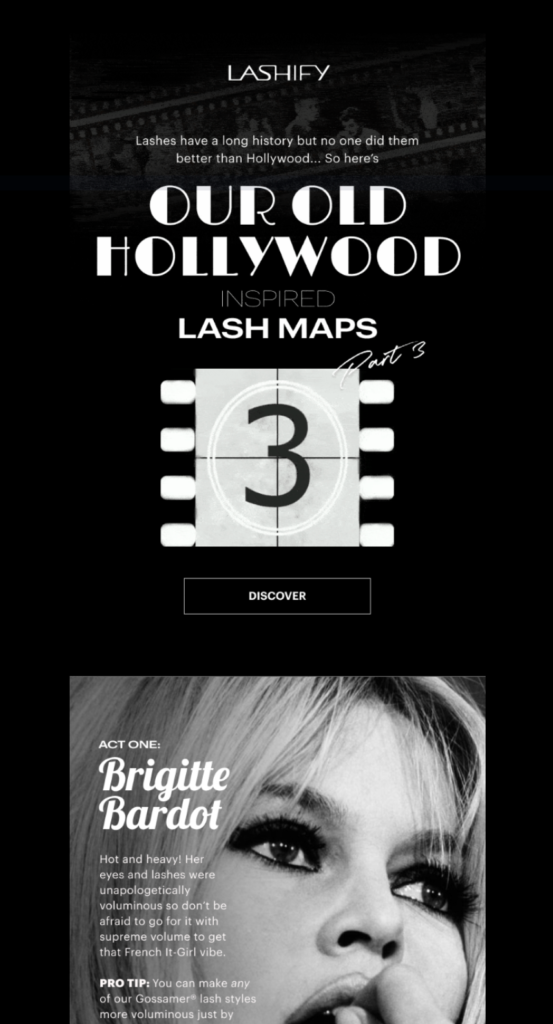
Lashify’s newsletter opens with a striking design and an all-caps subject line that lands immediately, then moves into product sections each with a direct CTA. Anyone who clicks but does not buy gets pulled into an automated abandoned cart follow-up through email marketing automation, so the campaign keeps working after the send.
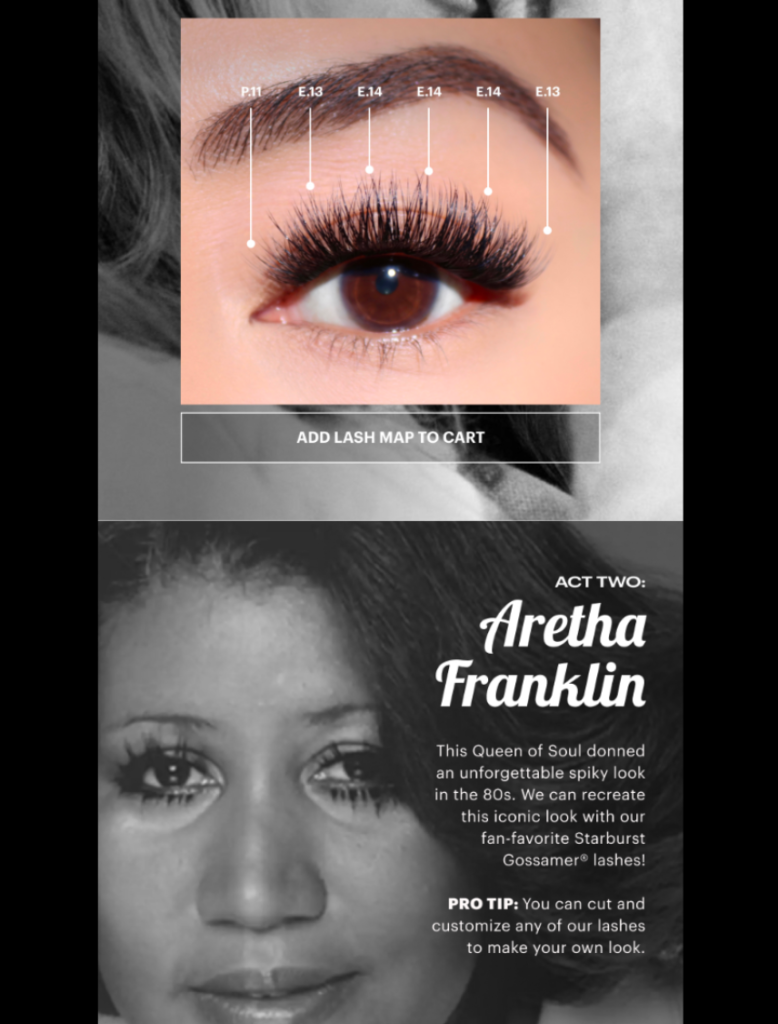
Takeaways: write a click-worthy subject line without tipping into clickbait; break the newsletter into scannable sections; give every section a clear CTA.
Email campaigns without any hassle? Sender makes it possible. Create emails in a few clicks and watch your sales soar.
Ad Email by Mitchell & Ness Nostalgia
Subject line: Just Dropped | NBA Reversible Bucket Hats & Melton Patch Snapbacks 🏀🧢
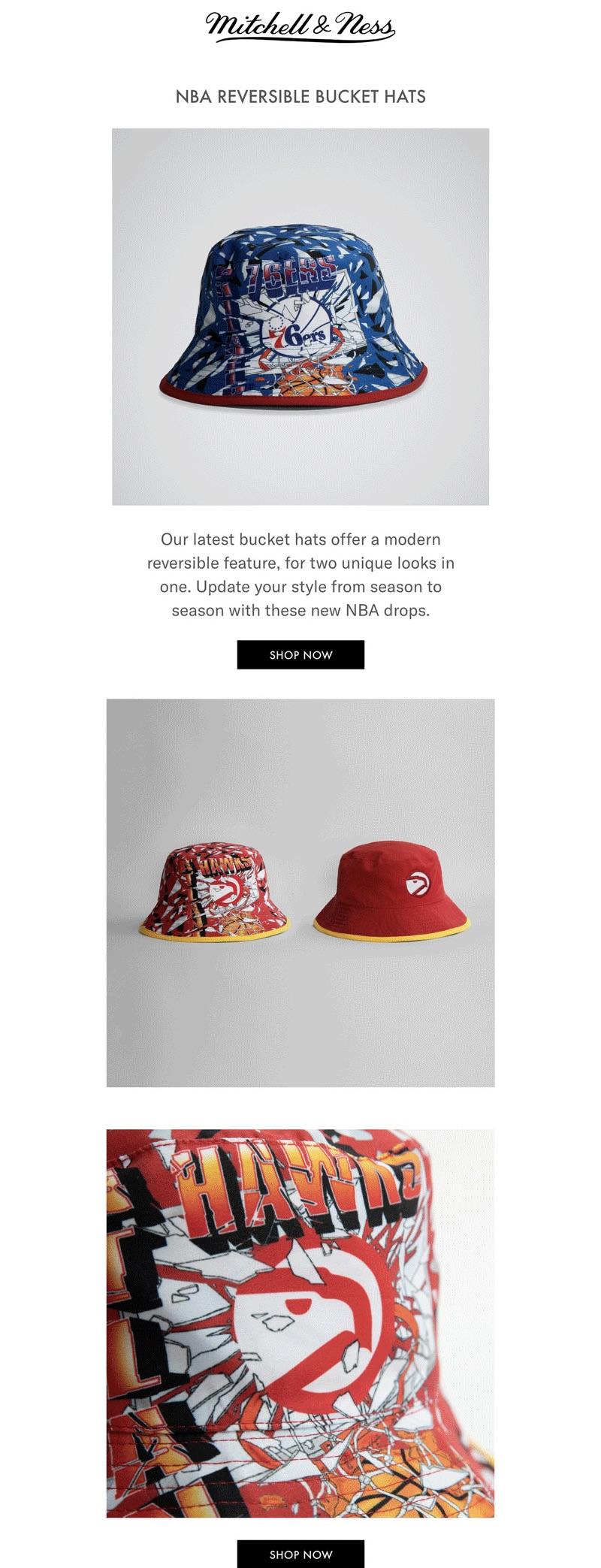
This is a new-product announcement kept deliberately simple. The layout tells the reader there is something new and pushes them to one CTA, with no competing distractions.
Takeaways: keep the layout simple and easy on the eye; use emojis in the subject line to stand out; show the product and its selling points up front.
Newsletter Advertising Example by H&M
Subject Line: This ’90s jeans trend is back 👖
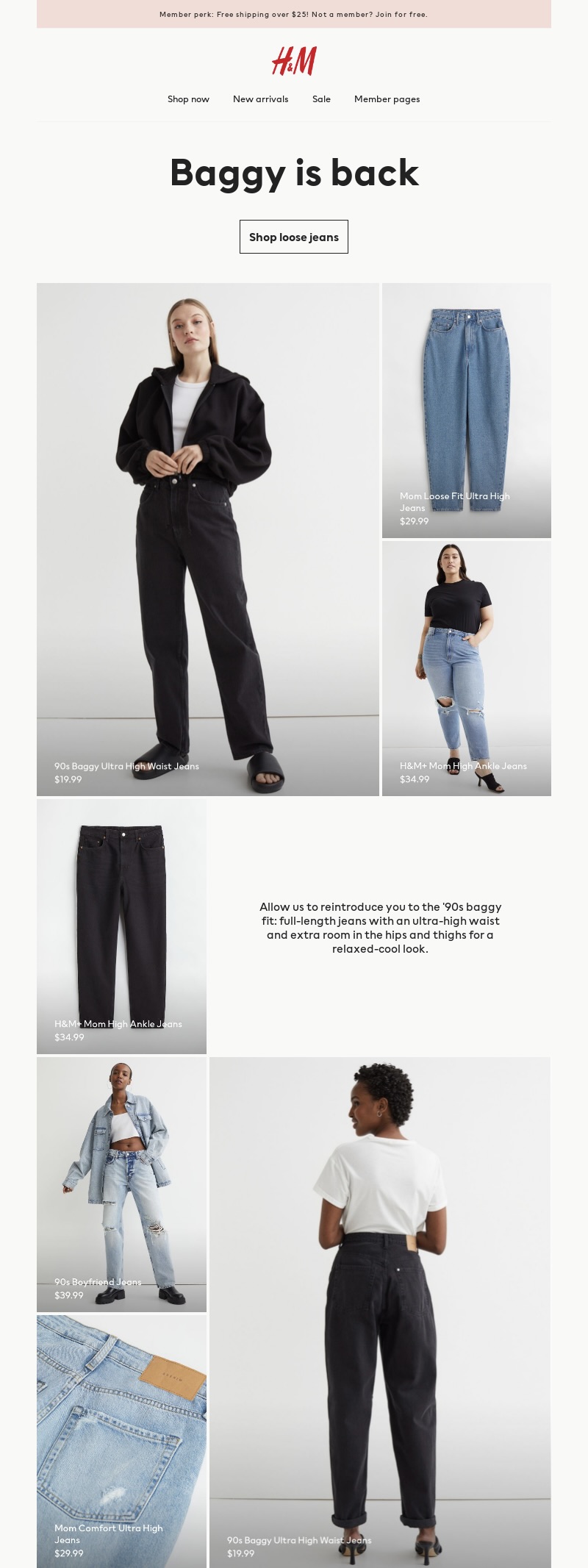
H&M frames a product push as a trend story, showing readers how to wear a returning style, then links to the collection through a dedicated styling section. The ad reads as content, which is why it gets engagement.
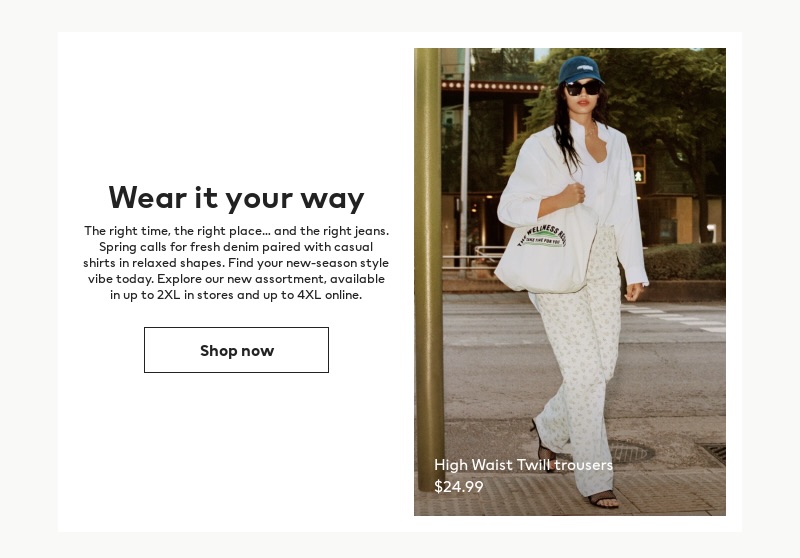
Takeaways: longer emails suit advertising newsletters; hold to one theme per send; publish on a regular cadence so readers expect you.
Winback Email Advertisement by Martha & Marley Spoon
Subject Line: Brian, we miss you!
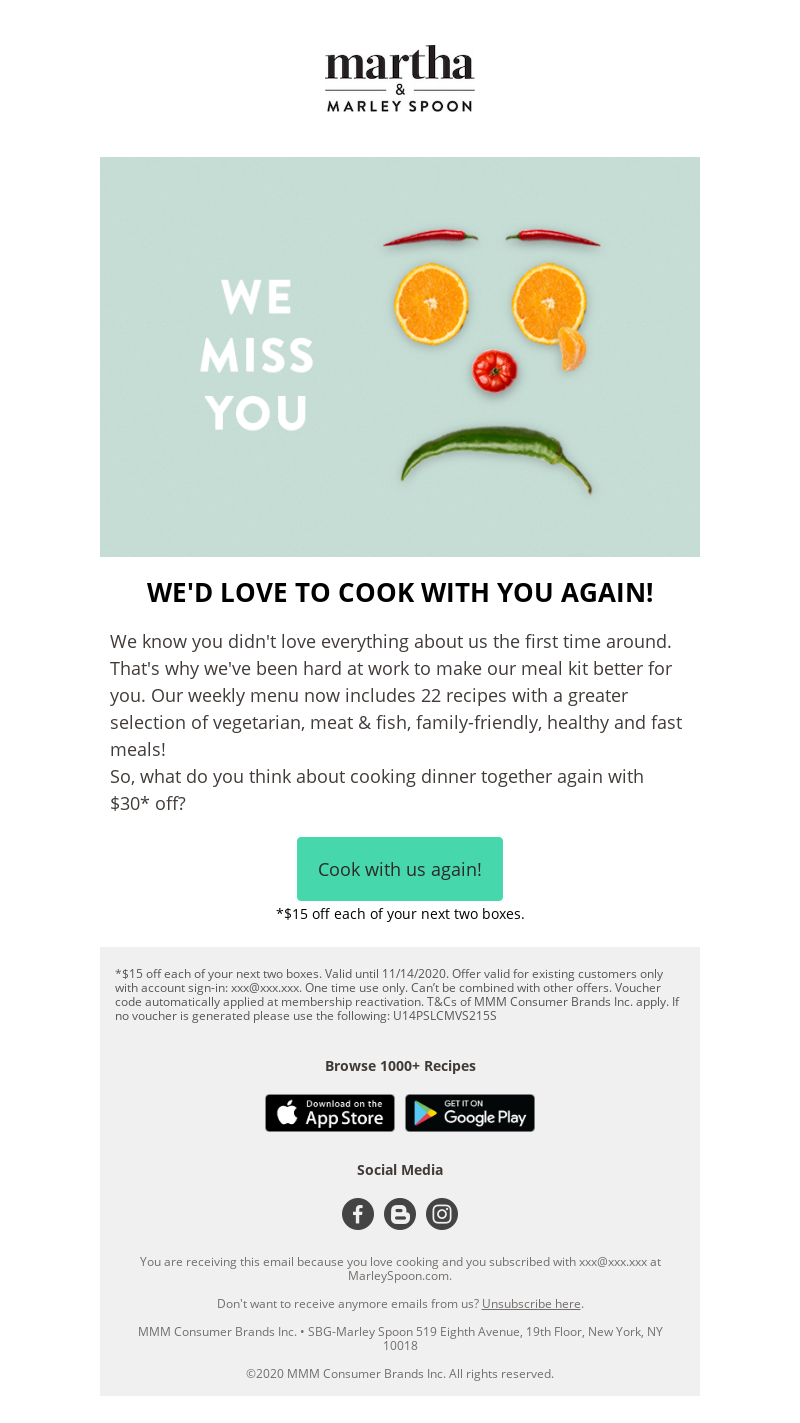
Sent to customers who ordered once and never came back, this re-engagement email pairs an emotional, personalized message with a comeback offer. The personalized subject line does a lot of the work getting it opened.
Takeaways: write nostalgic, emotional copy; personalize the subject line; attach a genuinely useful offer or discount.
Email Marketing Campaign by WeWork
Subject line: See what’s heating up on Black Friday
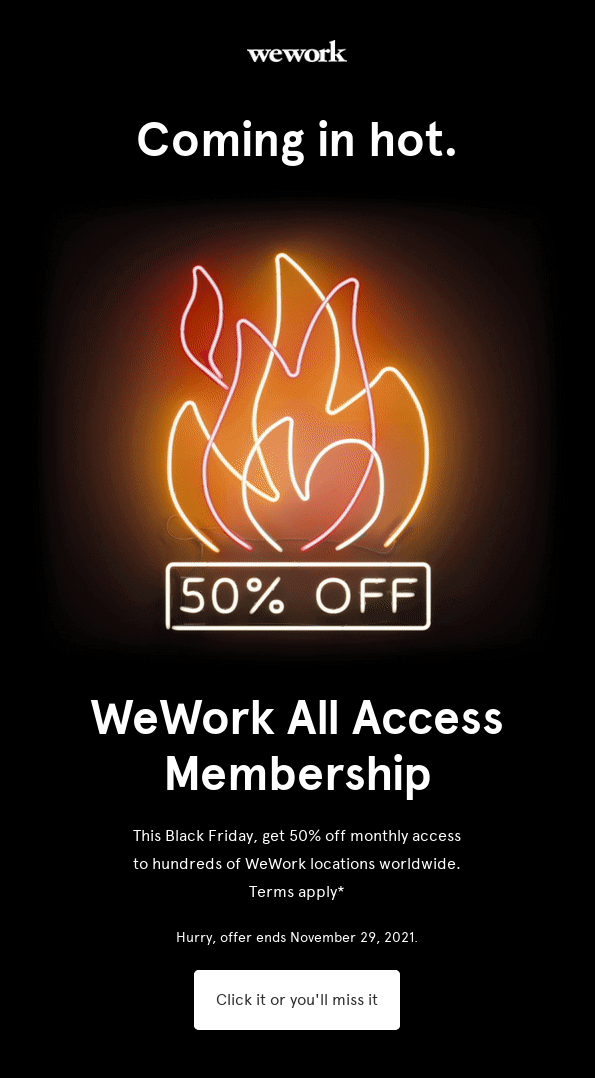
WeWork’s Black Friday send creates intrigue in the subject line, backs it with an eye-catching header, and closes with a strong offer, 50% off all-access membership, and CTA copy built to trigger FOMO.
Takeaways: lead with a subject line that earns the click; keep the body short and direct; write CTA copy that plays on urgency.
Abandoned Cart Advertising Email by OUAI Haircare
Subject Line: Forgot your OUAI?
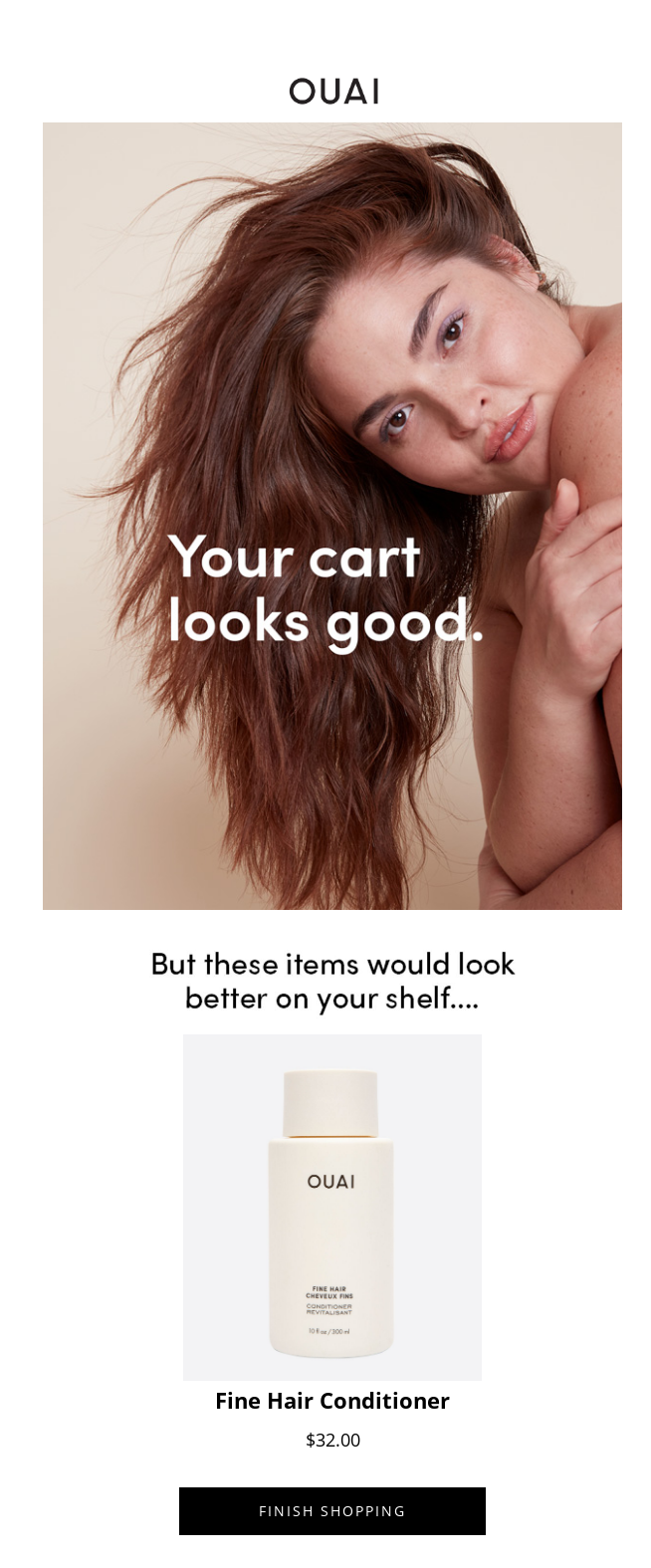
OUAI’s abandoned cart email uses a clean template, a single large image with a one-line hook, and a product block reminding the shopper exactly what they left behind. Timed well, it brings attention straight back to the cart.
Takeaways: schedule abandoned cart emails through automation so they fire at the right moment; keep the template simple; place a prominent CTA that returns the shopper to their cart.
How to Launch an Email Advertising Campaign in 7 Steps
Here is the process, start to finish. Each step stands on its own, so you can work through them in order.
Step 1: Define your email advertising goal
Set the goal before you write a word. Decide the single action you want subscribers to take, why they should care, who you are targeting, and how you will measure it. A campaign with one clear objective and one focused CTA beats a “batch-and-blast” send every time. Keep the content pointed at that single goal.
Step 2: Find an email marketing tool
You need an email service provider to send, segment, and track. Established email marketing services like Mailchimp sit at one end of the market, but compare email marketing tools on the features that matter for advertising, list segmentation, marketing automation, deliverability, and reporting, and start on a free plan where you can so you can test before committing budget. Good email marketing software lets you start small and scale as the list grows.
Step 3: Create/upload your mailing list
Put a signup form on your highest-traffic pages and give visitors a clear reason to join your email list. Import any existing opted-in contacts, then segment your target audience from day one by data like location, interests, or purchase history so later campaigns can be targeted rather than generic.
Step 4: Start a new campaign
Open a new email campaign, add your sending details, and write a subject line and preview text that earn the open. For the platform-specific walkthrough, our help center covers how to create a newsletter campaign step by step.
Step 5: Design an engaging email ad
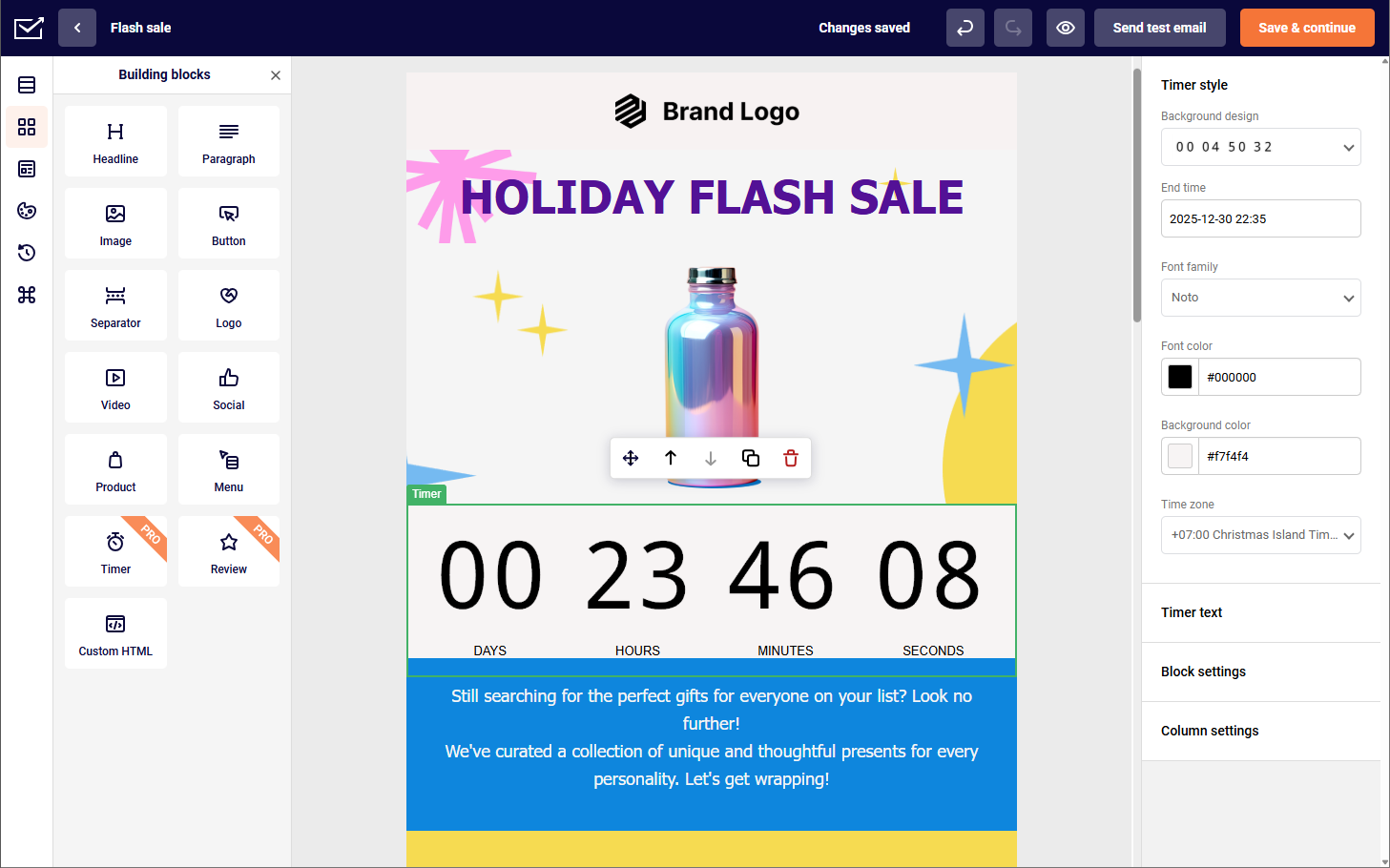
Build the email with a drag-and-drop builder or a pre-made template from a library of email marketing templates, then apply your brand colors, fonts, and layout. Keep it scannable: most readers skim, and your campaign has only seconds to hold attention against a crowded inbox. Interactive blocks like a countdown timer add urgency to a time-limited offer.
Step 6: Personalize your email content
Personalization is where advertising emails earn their return, and it goes well beyond a first name. You can tailor content to each subscriber’s behavior and data using dynamic content blocks that change by segment, product recommendations based on past purchases, and location-based offers. Send yourself a test, then run an A/B test on the subject line or copy to see what performs before the main send.
Step 7: Send advertising email and track results
Select your list or segment and send, then watch the email marketing metrics that tell you whether it worked: open rate, click rate, conversion rate, click-through rate, and unsubscribe rate. Connect Google Analytics to trace clicks through to on-site conversions and revenue, not just inbox engagement. Read the results by segment, not just in aggregate, and feed what you learn into future campaigns. Systematic A/B testing across your campaigns turns one-off wins into a repeatable process.
Email Advertising Best Practices (Quick List)
The fundamentals below apply to every advertising email. For the deeper playbook, see our email marketing best practices.
Make the subscription process easy. Keep the form short and the CTA obvious; a signup should take seconds, not minutes.
Always use double opt-ins. They confirm a real, willing subscriber and are standard practice for compliant signups under GDPR and the CAN-SPAM Act, which also requires a working unsubscribe link in every send.
Use segmentation for your email lists. Segmented campaigns consistently drive more opens and clicks than unsegmented ones; target by demographics, interests, and behavior.
Practice personalization. Use behavioral data, purchase history, and dynamic content to make each send relevant.
Optimize email titles. Subject and preview text decide whether the email gets opened; keep the sender name clear and honest.
Strategically schedule your emails. Send when your audience actually reads, accounting for time zones and buying patterns rather than guessing.
Implement email A/B testing. Test one element at a time, subject line, CTA, or layout, and let data pick the winner.
Ensure email deliverability. Set up SPF, DKIM, and DMARC, watch your bounce rate, and keep the list clean so you land in the inbox.
Email Advertising Mistakes to Avoid
Sending too many emails (frequency issues). Over-mailing drives unsubscribes and complaints; watch engagement and pull back when it drops.
Failing to segment your audience. The same offer sent to everyone is irrelevant to most of them; group subscribers by shared traits and match the message.
Using generic or spammy content. All-caps “BUY NOW!!!” copy and empty sales pitches get ignored or reported; write to a real need.
Ignoring mobile optimization. Most opens happen on phones, so a design that forces pinching and zooming gets deleted; use responsive templates.
Email Advertising FAQs
Email advertising is promoting a product, service, or offer through email, either by sending campaigns to your own opted-in subscribers or by paying to place an ad in another publisher’s newsletter. It is measurable, direct-response marketing aimed at a defined audience.
Sending to your own list is often free to start and commonly runs $10–$40 per month at entry level as your list grows. Buying newsletter sponsorships is priced on CPM, roughly $15–$30 per thousand for general audiences and $90 or more for niche B2B lists, or $1–$5 per click on CPC deals.
Email marketing is the whole discipline of building relationships with subscribers over time through any type of email. Email advertising is the promotional slice of it, the campaigns and placements specifically designed to push an offer and drive a direct response.
Key Takeaways
- Email advertising covers two distinct plays: sending to your own opted-in list, and paying to place ads in newsletters you do not own. Treat both as part of one email marketing strategy that sits inside your overall marketing strategy, and budget for them separately.
- The return is real but conditional. The $36–$42-per-dollar average depends on a clean list and real segmentation, not on sending more.
- Know your costs. Your own list is a software fee, often free to start; sponsorships are priced on CPM, from about $15 for general audiences to $90-plus for niche B2B.
- Match the audience before you look at the price. A well-targeted placement beats a cheap one on the wrong list every time.
- Segment, personalize, and test every send, and protect deliverability with proper authentication and list hygiene.
- For the full picture beyond advertising, work through our complete guide to email marketing.