



Email marketing best practices are the repeatable rules that keep messages out of spam and worth opening: permission-based list growth, segmentation, authentication with SPF, DKIM, and DMARC, mobile-first design, and measurement built on clicks and revenue rather than opens. Fourteen of them are below.
Key Takeaways
- Authentication is now a hard requirement, not a nice-to-have. Gmail, Yahoo, and Microsoft all reject unauthenticated bulk mail at the SMTP level. Microsoft has returned a permanent 550 5.7.515 rejection since May 5, 2025.
- Keep spam complaints under 0.1% of sends. Google’s published ceiling is 0.3%, but damage to inbox placement starts well before you reach it.
- Automated flows earn far more per send than campaigns. Klaviyo’s 2026 benchmarks, drawn from over 183,000 brands, found flows produced nearly 41% of email revenue from 5.3% of sends.
- Open rate is no longer a scoreboard. Apple Mail Privacy Protection pre-loads tracking pixels, so click rate, conversion rate, and per-send revenue are the metrics worth acting on.
- Segmentation and timing beat volume. Sending less to the right people protects the engagement signals mailbox providers use to sort your mail.
The 14 practices at a glance:
- Grow your email list the right way
- Segment your audience like a pro
- Send emails at the perfect time
- Write subject lines that earn the open
- Personalize every email campaign, not just the name
- Design emails people can actually read
- Boost deliverability and meet 2026 sender rules
- Test email marketing campaigns before you send
- Balance value and promotions in your emails
- Design mobile-first
- Track the metrics that still mean something
- Offer exclusive perks to your subscribers
- Automate the moments that matter
- Put AI to work without losing your voice
Why Email Marketing Still Wins in 2026
Email still wins because it is the only channel you own outright: no algorithm sits between you and the inbox, and the audience is enormous. Statista’s Radicati-sourced series put global volume at roughly 376 billion emails sent and received per day in 2025, growing at about 4% a year.
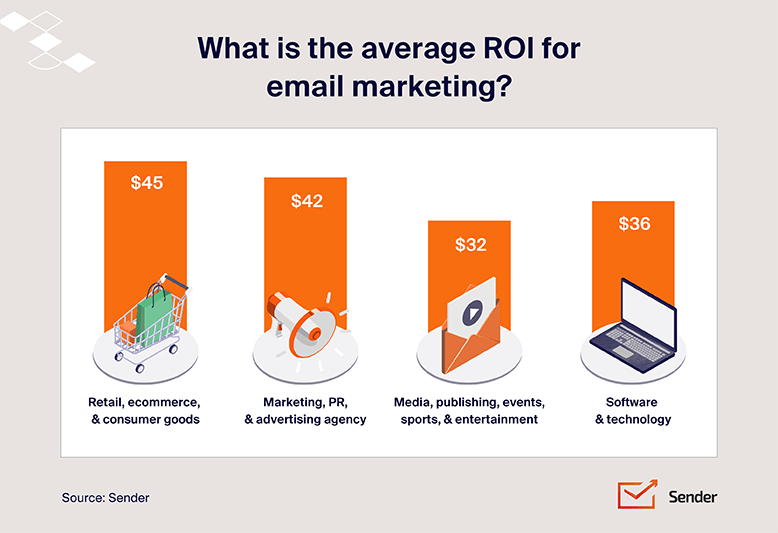
Return per dollar spent is the second reason. Published figures cluster between $36 and $42 for every $1 invested, depending on whose dataset you read, and the variation says more about industry mix and list size than about the channel. If you want the calculation behind those numbers, how email marketing return on investment is measured breaks down the inputs.
What changed since 2024 is the cost of doing it badly. Gmail, Yahoo, and Microsoft now enforce authentication and complaint-rate rules at the SMTP level rather than quietly filtering offenders into spam, which means sloppy senders lose delivery entirely instead of losing engagement gradually. That shift rewards the operators who treat email marketing as a permission-based discipline instead of a volume game.
The practical upshot: the gap between a good email marketing program and a mediocre one has widened. Automated, well-segmented sending to a targeted audience now carries most of the revenue, while broad untargeted blasts absorb most of the complaints.
14 Email Marketing Best Practices Backed by Research
The 14 practices below run roughly in the order most email programs should implement them: list growth and segmentation first, then timing, copy and design, then deliverability and measurement, then automation and AI. Each one names what to do, the setting or threshold involved, and where it commonly fails.
Grow Your Email List the Right Way
A small list that wants exactly what you’re offering is better than a bigger list that isn’t committed.
– Ramsay Leimenstoll, Investment Advisor and Financial Planner at Bell Investment Advisors
Growing an email list the right way means collecting every address with explicit permission, confirming it, and telling people what they signed up for. Bought lists and hidden sign-ups fill your database with addresses that never wanted your email.
Forget the shady tactics and focus on attracting genuinely interested subscribers:
- Ask people nicely. Get explicit permission before adding anyone to your email list. This means no buying lists or sneaky sign-ups, and using a double opt-in process. It’s about respecting people’s inboxes and following email marketing laws, like GDPR and CAN-SPAM compliance. Plus, with permission-based lists, you’ll be emailing people who actually care about what you offer;
- Make signing up frictionless. Keep your signup forms short and sweet. Ask for just the essentials like name and email address. Long, complicated forms scare people away;
- Offer a little something special. This is where lead generation for email comes in. Give people a reason to hand over their email address, like an eBook, discount code, or exclusive content;
- Set the record straight. Tell people exactly what they’re signing up for: the kind of content, how often you’ll email, and how to unsubscribe. Transparency builds trust;
- Double-check those email addresses. Ask people to click a link in a confirmation email to verify their address. It’s an extra step, but it weeds out typos and fake accounts, which keeps your email list squeaky clean and improves deliverability;
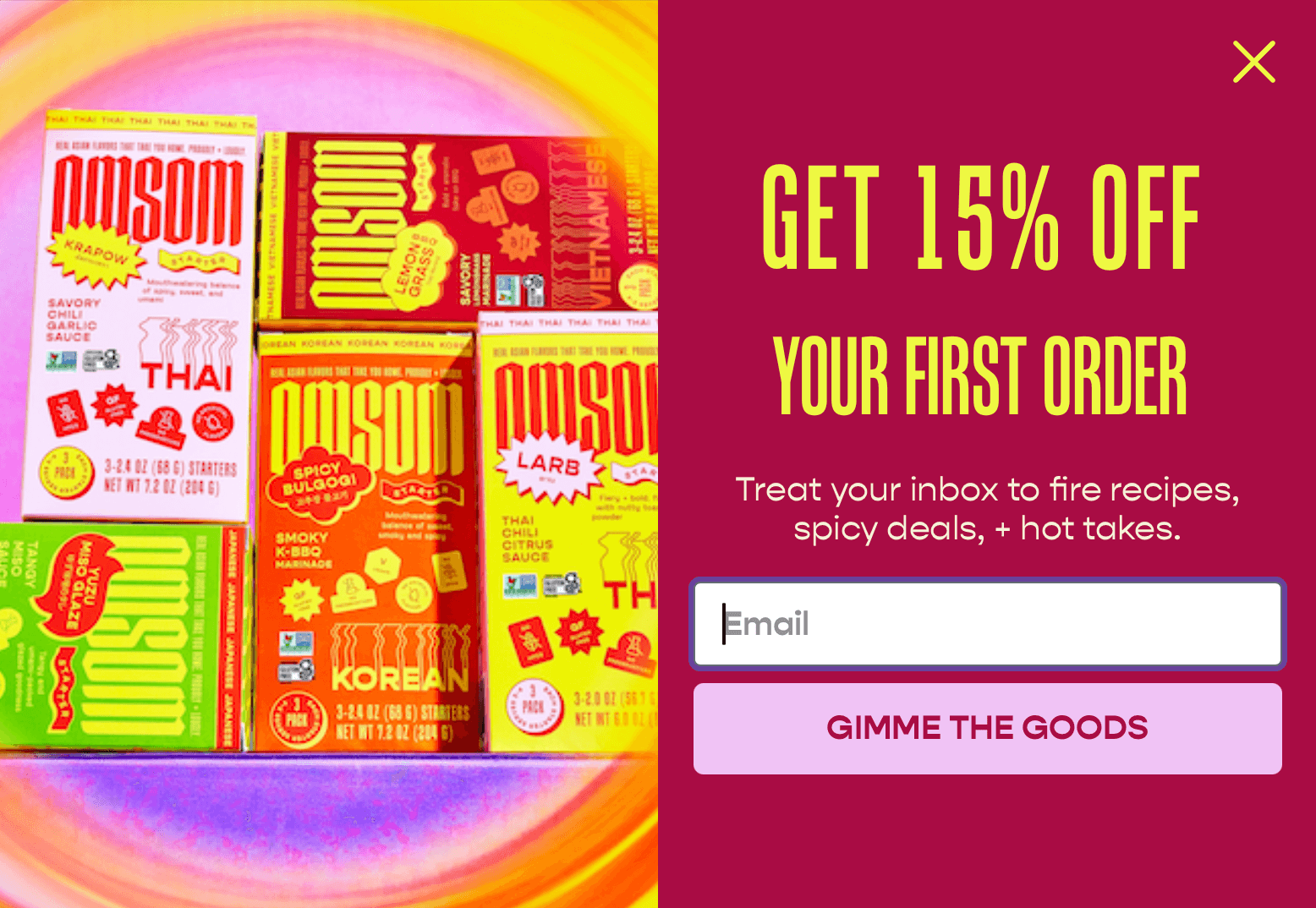
- Don’t become annoying. Instead of those in-your-face popups, try ones that appear when someone’s about to leave your site, or ones that pop up after they’ve spent a little time browsing. It’s a less intrusive way to get their attention.
Omsom’s exit-intent popup is a textbook example. It offers a 15% discount just right when the visitor is trying to leave, tempting them to order. And all they need to do to get the discount is enter their email address:
Segment Your Audience Like a Pro
Audience segmentation for emails divides your subscribers into smaller, segmented email lists based on demographics, interests, past purchases, or how actively they engage with your emails. There is no one-size-fits-all message in email marketing, so segmentation is what gets the right message in front of the right people.
The benefits of email segmentation strategies are undeniable. Consider these statistics:
- Segmented email campaigns drive 30%** more opens and 50% more click-throughs than unsegmented ones;
- 78%** of marketers state that the most effective strategy for email marketing campaigns is subscriber segmentation;
- 4 out of 5** marketers personalize subscriber profile data and 64% use customer segments.
Segmented campaigns outperform unsegmented ones for two reasons:
- Relevance is key. When you segment your audience, you can tailor your message to their specific needs and interests. This resonates more deeply than a generic message ever could, leading to higher engagement and conversions;
- Improved deliverability and engagement. Email providers use engagement rate signals like opens and clicks to determine whether your emails land in the inbox or the spam folder. Segmentation leads to higher engagement, signaling to email providers that your content is valuable and improving deliverability.
So, how do you segment your audience?
Effective segmentation relies on collecting relevant data and using it to group your audience based on shared characteristics. Here are some key segmentation methods:
- Demographics: age, gender, location, occupation, income level;
- Purchase history: past purchases, purchase frequency, average order value;
- Engagement levels: email opens, clicks, website visits, content downloads;
- Psychographic characteristics: values, interests, lifestyle, personality traits;
- By size: under 20K: 2-3 broad segments; 20K-400K: 5-7 behavioral segments; over 400K: predictive AI segments.
And here’s how you segment successfully:
- Collect relevant data. Use signup forms, purchase tracking, and website analytics;
- Start with three segments, not thirty. Engaged, lapsed and customers is enough on day one; add conditions once you see which splits change performance;
- Check your platform’s segmentation limits. Confirm it supports behavioral conditions (opens, clicks, purchase history), AND/OR logic, and dynamic segments that recalculate at send time;
- Don’t forget about data privacy. Be transparent about how you collect and use subscriber data;
- Test and learn. Continuously analyze campaign performance and adjust your segmentation strategy;
- Manage your subscriber list. Regularly clean your list, removing inactive subscribers and updating information.
Once you’ve segmented your audience, the real gains come when you tailor your messaging to resonate with each group:
- Demographics. Adapt language, tone, and offers based on age, gender, and location;
- Psychographics. Appeal to values, interests, and lifestyles with targeted content and messaging;
- Behavioral segmentation. Craft personalized messages based on engagement and purchase history;
- Lifecycle stage segmentation. Deliver lifecycle email marketing messaging that meets people exactly where they are by aligning content, calls-to-action, and offers with their stage in the customer journey.
Segmentation is not a one-time task. Review and refine your segment definitions as purchase history and engagement data change.
Send Emails at the Perfect Time
The best send time is the one your own campaign reports point to, not a published average. Sending when your audience is most likely to see and open your emails improves both open rates and click-through rates.
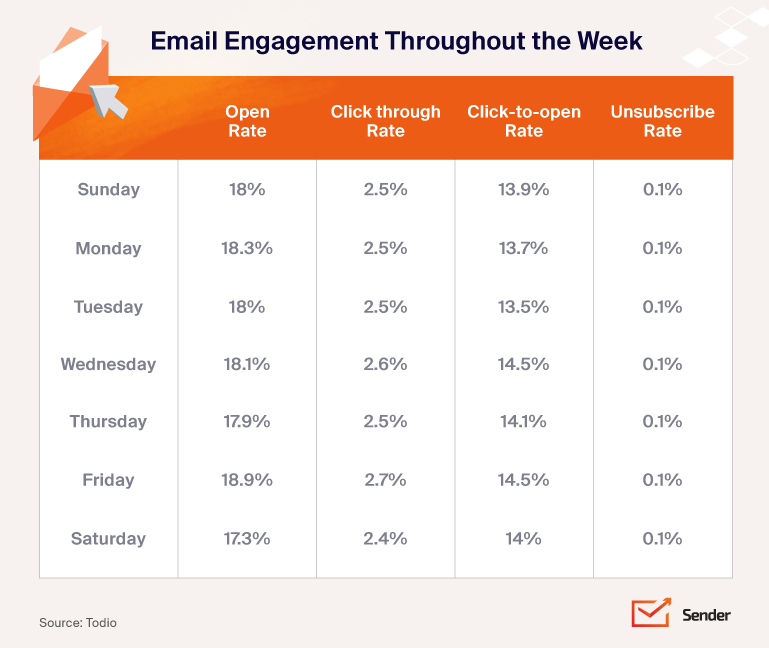
Become a detective with your data
Open the campaign reports in your email marketing software and read the open and click timestamps to see when your subscribers are most active. This will help you determine the optimal email frequency for your audience.
Analyzing your specific audience data beats any generic advice, as subscriber behavior can vary greatly depending on your industry, target audience, and email content.
That said, it’s equally important to know how many email campaigns you should aim for based on the size of your audience:
- Under 20K: 1-2 campaigns/week;
- 20K-400K: 2-3 campaigns/week;
- Over 400K: 3-7 campaigns/week.
Experiment like a scientist
Try sending emails at different times of day and week to see what works best (this is called A/B testing for email marketing). Don’t be afraid to test different email subject lines, content, and calls to action alongside your timing variations to find the winning combination for your audience.
Think global, act local
If you have subscribers worldwide, adjust your sending schedule to their different time zones. This requires segmenting your audience by location and scheduling emails accordingly.
Capitalize on weekday engagement
Research indicates* that weekdays, particularly Tuesday, Wednesday, and Thursday, often yield higher engagement. These days are associated with increased open rates and click-through rates.
Why? People are generally more settled into their work routines and less likely to be overwhelmed by weekend activities. However, avoid sending emails on Mondays, as inboxes tend to be flooded after the weekend, potentially burying your message.
Hit the morning hours
Sending emails during morning hours, especially around 10:00 AM, has been associated with higher open rates. This timing coincides with people checking their inboxes as they start their workday.
Use afternoon engagement
Afternoon send times, particularly between 1:00 PM and 3:00 PM, can also result in favorable engagement, as recipients often check emails during work breaks.s.
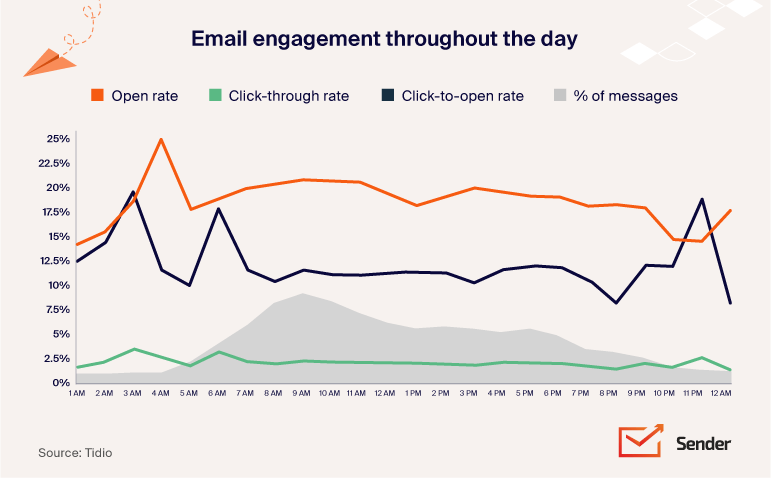
Pitfalls you should avoid:
- Ignoring your data. While general advice can be helpful, relying solely on it without analyzing your data can be detrimental;
- Static scheduling. Don’t be afraid to adjust your sending schedule based on ongoing A/B testing and seasonal changes in subscriber behavior;
- Neglecting time zones. Failing to account for different time zones can significantly impact your email visibility and engagement.
For the best time to send emails by email type and audience, see our deeper breakdown — it covers send-time optimization, time zone strategy, and industry benchmarks.
Write Subject Lines That Earn the Open
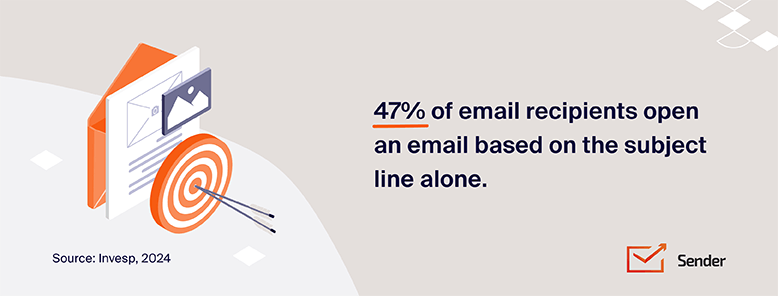
A subject line earns the open when it makes a specific promise the email then keeps. Roughly 47%** of recipients decide whether to open based on the subject line alone, and 69%** report an email as spam on the same basis, so the same 40 characters carry both your open rate and your complaint rate.
Rules that hold up when you write email subject lines:
- Write short subject lines, near 50 characters. Mobile clients truncate longer lines, and the truncation usually lands mid-promise;
- Write in your own voice. Corporate phrasing reads as bulk mail, and bulk mail is what people report;
- Personalize with data you actually have. A first name is the floor. A referenced product, city, or past order is the personalized content that changes results;
- Match the body. A subject line that over-promises against the content is the fastest route to a complaint, and complaints are the metric Gmail scores you on;
- Test before you commit. Two variants on a 10% sample tell you more than any swipe file.
What to test, in order of impact:
- Length. “Sale ends soon” against “Last chance: our biggest sale of the year ends tonight”;
- Personalization depth. First name only against a referenced product or category;
- Tone. Question against statement, urgency against no urgency, benefit against curiosity;
- Specificity. “Free shipping on orders over $50” against “A special offer just for you”;
- Format cues. Emoji against no emoji, numbers against no numbers;
- Preheader text. Preheader text that extends the subject line against preheader text that repeats it.
Test one variable at a time or the result tells you nothing. If you change the length and add an emoji in the same test, a win is unattributable. The mechanics of clean splits, sample sizing, and winner selection are covered in our guide to running A/B tests on email campaigns.
The honest limitation: subject line tests are scored on open rate, and open rate is inflated by Apple Mail Privacy Protection pre-loading pixels. Where Apple Mail is a large share of your audience, judge subject line tests on click rate instead, and accept that you are then measuring the subject line and the email body together.
Personalize Every Email Campaign, Not Just the Name
“Hi [Name]” is a good start, but customer email personalization goes much deeper. Imagine receiving an email that feels like it was written just for you: that’s the goal. Email personalization grounded in real subscriber data is what gets you there. Generic “Hi [Name]” emails don’t.
The benefits of email personalization strategies are backed by data:
- Personalized email marketing campaigns have a 30.26%** open rate, significantly higher than generic campaigns;
- Using personalization in the email body may lead to a 28.57% increase in click-throughs (2.7% rate with tailored content vs. 2.1% without);
- Research shows that personalized emails generate 6x higher** transaction rates compared to non-personalized versions;
- 88%** of users agree they are more likely to respond to an email favorably if it looks like it’s been specifically created for them;
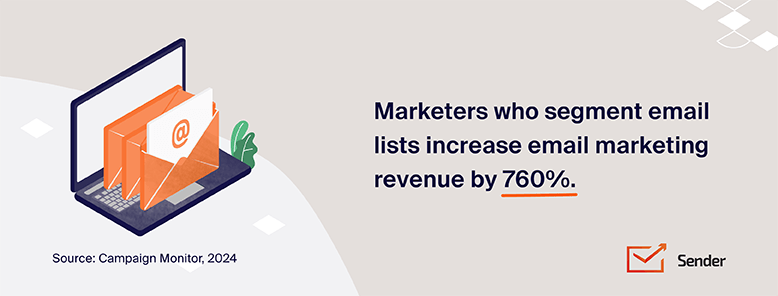
- Email marketers who segmented their audience before campaigning stated that the revenue generated increased to up to 760%**;
- 80%** of customers are more likely to purchase after a personalized experience.
Four personalization tactics do most of the work:
1. Personalized recommendations
Instead of generic product blasts, send emails showcasing items related to your subscribers’ past purchases or browsing history. This targeted approach, fueled by data, shows you understand your customer’s individual taste and preferences.
Potential pitfalls:
- Over-reliance on limited data. If a customer has only made one purchase, recommendations might feel repetitive. Offer diverse suggestions based on broader categories or trending items;
- Privacy concerns. Be transparent about data usage and provide opt-out options for personalized recommendations.
2. Dynamic content
Dynamic content takes personalization a step further. Email content shifts based on individual customer data: product recommendations update based on real-time browsing, special offers appear based on abandoned cart items, or content suggestions align with previously viewed articles.
Here’s how to implement such hyper-personalization:
- Use ESP features. Most major Email Service Providers (ESPs) offer dynamic content blocks. You can define rules like “If customer purchased X, show content Y” within the email template;
- Integrate with your CRM. A well-maintained Customer Relationship Management (CRM) system can feed behavioral data to your ESP, enabling detailed dynamic content delivery.
Potential pitfalls:
- Technical complexity. Setting up dynamic content requires technical expertise and careful planning to avoid errors;
- Over-personalization. Ensure dynamic content feels helpful, not intrusive. Avoid bombarding users with overly specific or sensitive data.
3. Campaigns based on behavior
Behavior-based campaigns segment your audience on engagement levels (opens, clicks, website visits) and purchase activity (buying frequency, average order value, product preferences), then tailor the email to each group. Not all subscribers are created equal, and this is how you stop treating them as if they were.
Here are a few of the most common segmentation and personalization examples:
- High engagement, frequent buyers. Reward customer loyalty with exclusive content, early access to sales, and personalized recommendations based on their purchase history;
- Engaged browsers, no purchase. Nudge them towards conversion with targeted discounts, product comparisons, or free shipping offers;
- Inactive subscribers. Trigger re-engagement campaigns with special offers, personalized recommendations based on past activity, or surveys to understand their needs.
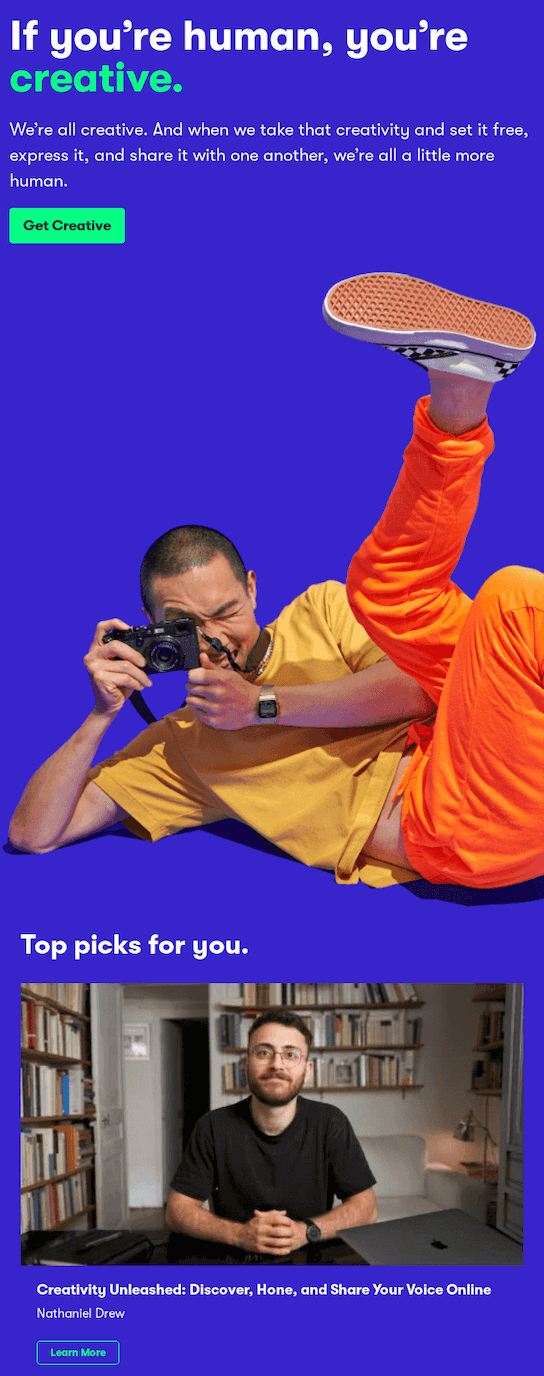
Skillshare is a master at personalization. Its newsletter regularly offers courses based on the courses I’ve previously shown interest in. Let me tell you, it’s hard to pick which one to start first every time:
4. Campaigns based on audience size
Match the depth of your personalization to your list size so the messaging feels intentional rather than overwhelming. Not every audience grows at the same pace or needs the same level of consistent communication.
Here’s our rule-of-thumb approach:
- Under 20K: name + basic preferences;
- 20K-400K: behavioral triggers + purchase history;
- Over 400K: predictive recommendations + dynamic content.
Design Emails People Can Actually Read
An email is readable when a subscriber can extract the offer, the reason, and the next step in about eight seconds of scanning. Everything below serves that one outcome, because people scan email rather than read it, and visually appealing content earns its place only when it survives that scan.
Nail the structure first
- Headline hierarchy. Use different font sizes and weights so the most important message is the largest and most prominent;
- Whitespace. Separate sections and give content room to breathe so the email is easier to scan;
- Visual flow. Guide the reader down the page with images, arrows or layout that lead to the call to action;
- One primary CTA. Multiple competing buttons split attention and lower the click rate on all of them.
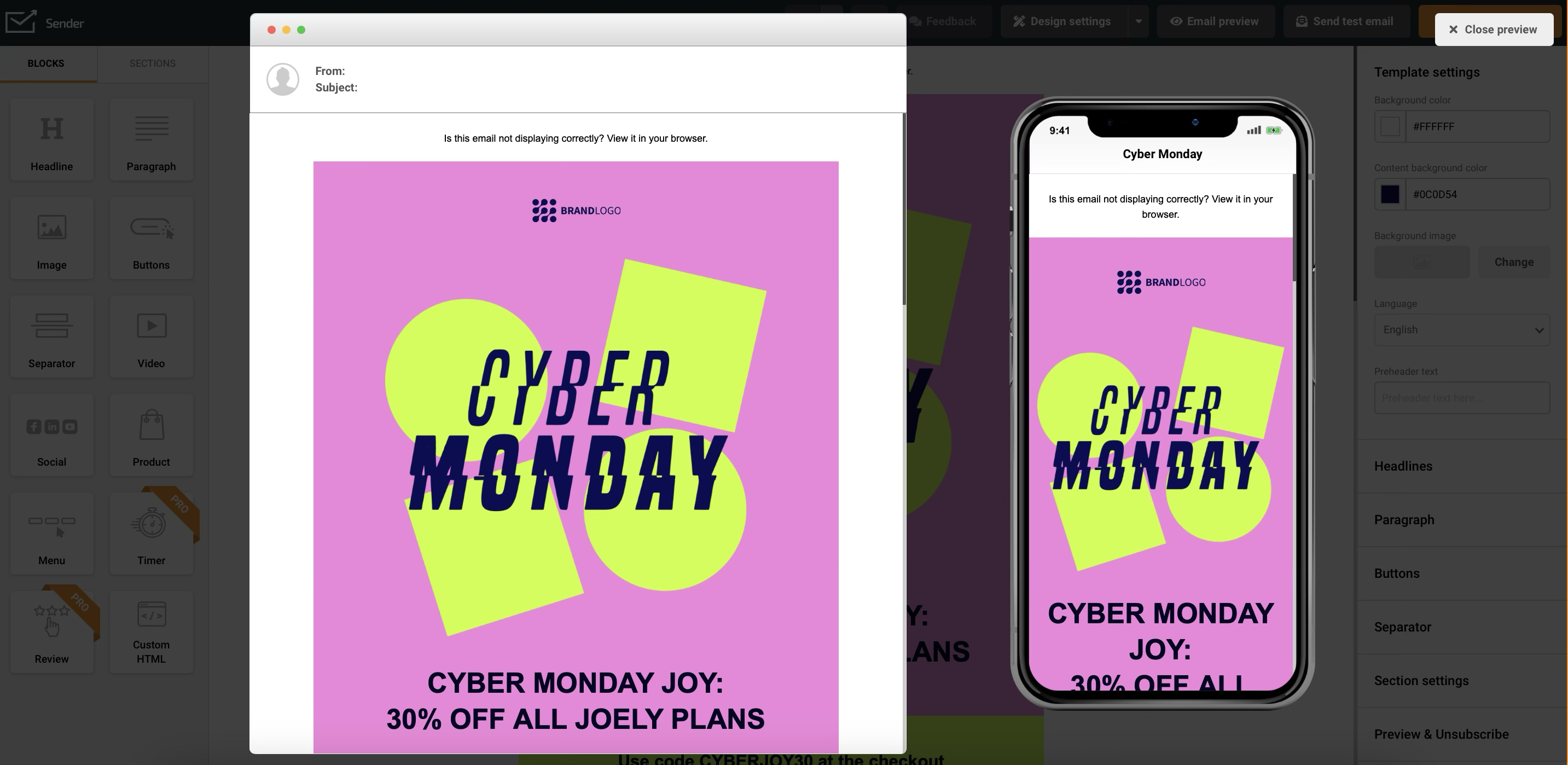
Save time and effort with Sender’s free, responsive email templates. Choose your favorite design, customize it, and we’ll make sure it looks stunning on every screen.
Get to the point
State the purpose of the email in the first two sentences, break text into bullets and short paragraphs, and bold the two or three phrases that carry the offer. Anything longer than three sentences per paragraph gets skipped on a phone.
Use images that load and mean something
- Use sharp, correctly sized images. Blurry or pixelated images make a brand look careless;
- Compress before uploading. Large files slow the load, and a slow email is a deleted email;
- Keep a sane image-to-text ratio. All-image emails render as blank boxes wherever images are blocked by default;
- Write descriptive alt text on every image. Screen readers depend on it, and it is what displays when an image fails to load;
- Add interactivity carefully. Animated GIFs and countdown timers work; embedded video mostly does not render.
Design for dark mode
Roughly a third of measurable opens now happen in dark mode, and an email that only works in light mode is unreadable for those subscribers.
- Avoid pure black and pure white. Off-black (#1F1F1F) backgrounds and off-white (#F6F6F6) text hold up better when a client inverts your palette;
- Check contrast ratios in both modes. A logo on a transparent background is the most common casualty;
- Preview in Gmail and Outlook specifically. Both handle color inversion differently from Apple Mail.
Keep the brand consistent
Use your brand’s color palette, a small set of web-safe fonts and a logo placed at the top of the email so subscribers recognize the sender before they read the subject line. Consistency across emails, your wider campaign assets and your landing pages is what makes an unfamiliar offer feel trustworthy.
Miro’s onboarding email is a good worked example. Notice how little text there is, how the visuals carry the readability, how the arrows lead your eye from one point to the next, and how the CTA button dominates:
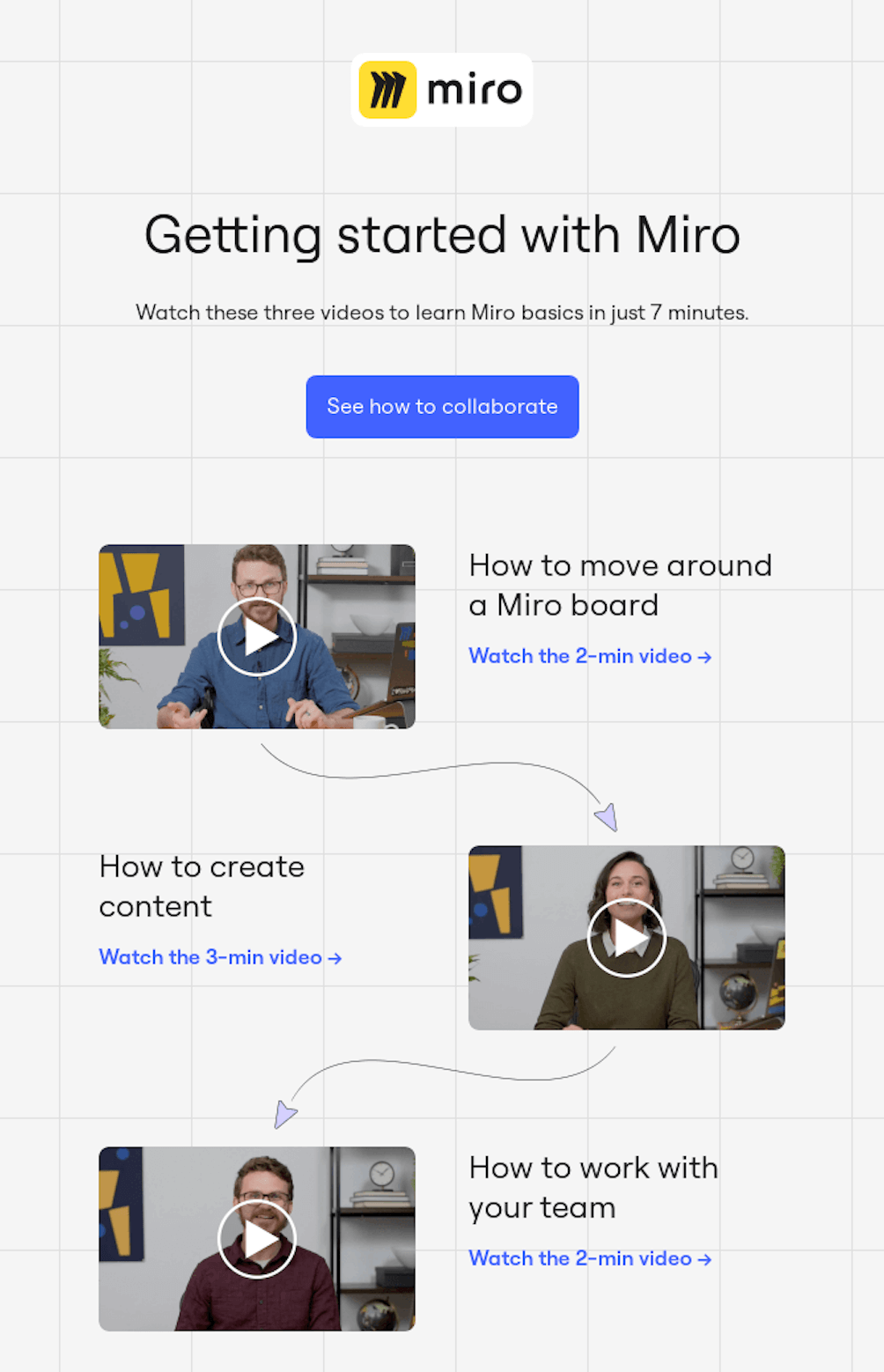
Common failure modes: a wall of text with no formatting, randomly placed elements with no visual hierarchy, and an email whose only CTA sits below three screens of scrolling.
Boost Deliverability and Meet 2026 Sender Rules
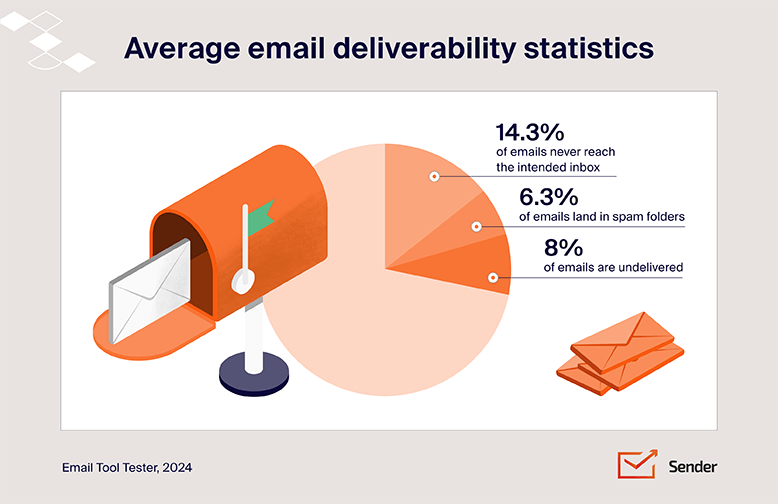
Email deliverability in 2026 is a compliance problem before it is a content problem. Gmail, Yahoo, and Microsoft now reject non-compliant bulk mail at the SMTP level rather than filing it in spam, so a misconfigured DNS record costs you the send, not just the open.
2026 sender requirements
The three providers that hold most consumer inboxes have converged on the same baseline. All three define a bulk sender as a domain sending roughly 5,000 or more messages per day to their consumer addresses.
| Requirement | Gmail | Yahoo | Microsoft (Outlook, Hotmail, Live) |
| SPF and DKIM | Both required for bulk senders | Both required for bulk senders | Both required |
| DMARC policy | Required, p=none accepted as a start | Required | Required |
| From-domain alignment | Must align with SPF or DKIM | Must align with SPF or DKIM | Must align |
| One-click unsubscribe (RFC 8058) | Required on promotional mail | Required on promotional mail | Functional unsubscribe required |
| Spam complaint rate | Under 0.3%, target under 0.1% | Under 0.3% | Not published as a numeric threshold |
| Unsubscribe processed within | 2 days | 2 days | 2 days |
| Rejection code when you fail | 550 5.7.26 | 550 5.7.9 | 550 5.7.515 |
Two dates matter. The Outlook sender requirements began enforcement on May 5, 2025, when Microsoft started issuing permanent 550 5.7.515 rejections to high-volume senders failing authentication. Google moved from deferrals to scaled permanent rejections from November 2025. Neither is a warning phase anymore.
Authenticate before you do anything else
Email authentication rests on three DNS records. Publish an SPF record listing every service that sends on your behalf, enable DKIM signing on your sending domain, and publish a DMARC record.
Start DMARC at p=none so you collect aggregate reports without blocking your own mail, read the reports for two to four weeks, then move to p=quarantine. The single most common failure is a second SPF record on the same domain, which invalidates both. Sender users can follow the SPF, DKIM and DMARC setup walkthrough for the platform-specific values.
Put the unsubscribe in the header, not just the footer
One-click unsubscribe means an List-Unsubscribe header paired with List-Unsubscribe-Post, so the mailbox client can process the opt-out without the recipient opening your email.
A footer link alone does not satisfy the requirement. You still need the visible unsubscribe link in the footer as well, and the opt-out has to be honored within two days. The unsubscribe compliance setup guide covers the header configuration.
Watch the spam complaint rate weekly
Google’s published ceiling is 0.3%, measured in Google Postmaster Tools, but placement degrades well before that. Treat 0.1% as your working limit, which is roughly one complaint per 1,000 sends. When the number climbs, the fix is almost never “send more carefully”: it is to stop sending to the segment generating the complaints.
Complaint spikes usually trace to one of three causes: a list segment that has not been mailed in six months, a signup source that never set expectations, or a sudden frequency increase.
Keep the list clean
List hygiene has two rules: suppress hard bounces and invalid addresses immediately, and remove subscribers with no opens or clicks in 180 days.
A list that shrinks is not a failure; a list full of dormant addresses drags your engagement signals and sender reputation down and pushes the rest of your mail toward the spam folder. Volume and reputation interact in ways worth understanding before you scale, which is covered in our breakdown of sending high-volume email safely.
Warm up new sending infrastructure
IP warming applies whenever you change email infrastructure by moving to a dedicated IP or a new sending domain. Start at a few hundred emails a day to your most engaged subscribers and roughly double the volume every two to three days over four to eight weeks.
If you send on a shared IP with an established provider, the IP is already warm and no warm-up is needed, though a brand new sending domain still benefits from a gradual ramp.
A minor hygiene note on spam trigger words: the standing advice to avoid spam triggers is overstated, because individual words like “free” or “guaranteed” do not trigger spam filters on their own. Filters score the whole message alongside your sending reputation.
Word choice only becomes a factor when it appears alongside weak authentication, a poor complaint history, or a list with low engagement, so fix those first and treat copy as the last variable.
Test Email Marketing Campaigns Before You Send
Start testing and stop arguing.
— Jon Correll, Email Marketing Expert
Testing an email campaign before you send it means checking how it renders across clients and devices, clicking every link, proofreading the copy, and sending a live test to your own inbox.
Before hitting that “Send” button, test your emails to fine-tune your campaigns for maximum impact. Email A/B testing built into your platform lets you compare versions without spreadsheets or manual tracking.
Here’s the lowdown on how to put your emails to the test and avoid low email click-through rates:
- Use email testing tools. Most email marketing platforms have built-in tools or integrations that let you preview text and the whole email in different inboxes like Gmail, Outlook, and Yahoo;
- Test on different devices. View your email on your phone, tablet, and desktop to ensure it looks fab on all screen sizes;
- Check links and buttons. Don’t trust anything without clicking it! Make sure every link and button leads to the right place, ensuring responsive email design;
- Proofread carefully. Read your email over and over again! Then, ask a friend to do the same for a fresh perspective;
- Send test emails. Most email marketing tools let you send test emails to yourself and your teammates using different email addresses and email clients. This way, you experience your future campaigns exactly like your subscribers will.
Balance Value and Promotions in Your Emails
Email marketing is like a first date. If you’re too pushy, you won’t get a second one.
— Neil Patel, Marketing Expert
Balancing value and promotion means about 80% of your emails inform or entertain and about 20% sell. No one stays subscribed to a constant stream of sales pitches, so the split protects your engagement and your unsubscribe rate.
Just follow these tips:
- Follow the 80/20 rule. Aim to make about 80% of your email content valuable and informative and save the remaining 20% for promotions. Sticking to this rule also keeps your list healthy by reducing unsubscribe rates and increasing engagement. People stay subscribed when they feel they’re getting something worthwhile, not just a constant stream of sales pitches. Then, when you actually do send a promotional message, it stands out more because it’s not competing with a flood of similar emails;
- Focus on providing value first. Before you ask for anything in return, consistently deliver content that educates, entertains, or solves a problem for your subscribers.
- Don’t be pushy with your offers. Weave your promotional messages naturally into your valuable content so they feel less like ads and more like helpful suggestions.
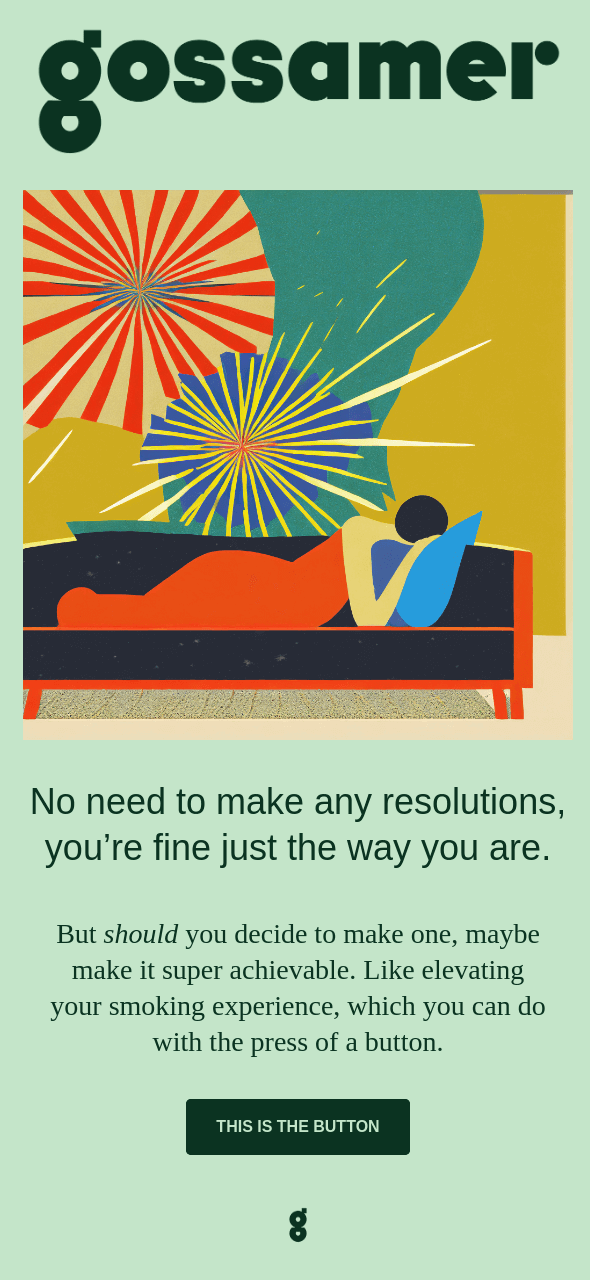
Like 99.99% of brands, Gossamer could have used New Year’s to promote its products. Instead, the brand chose to send a message of encouragement to the audience.
The result? Next time someone thinks where to buy THC products, they’ll remember the positive experience they had with the brand:
Design Mobile-First
Mobile-first email design is a stricter form of responsive email design: you build the single-column phone layout first and let the desktop version inherit it, not the reverse. Litmus, tracking more than a billion opens a month, puts mobile devices at roughly 55% of opens, webmail at 26% and desktop at 19%.
Mobile-first email design flips the script. Instead of designing for desktop first, you start by designing a mobile version.
— Matt Harris, CEO at Dyspatch
Build for a thumb, not a mouse
Use a single column. Side-to-side scrolling on a 375-pixel-wide screen is the fastest way to lose a reader, and multi-column layouts stack unpredictably across clients.
Size tap targets at 44 x 44 pixels minimum
A 44 x 44 pixel tap target is Apple’s published minimum touch target. Buttons smaller than that, or links stacked closer than about 10 pixels apart, produce accidental taps that read as engagement in your reports but as frustration for the subscriber.
Set body text at 14px minimum, headings at 22px or larger
Set body text at 14px minimum and headings at 22px or larger. iOS silently enlarges text below roughly 13px, which breaks tightly designed layouts, so setting the floor yourself keeps control of the rendering.
Front-load the offer
Assume the reader sees about 350 vertical pixels before scrolling. Your offer and primary CTA should both appear inside that space, or you are relying on a scroll that most subscribers on a phone will not make.
Test on real devices, not just a preview pane
Render checks in iOS Mail, Gmail on Android and Outlook mobile catch different failures. Gmail strips some CSS that Apple Mail honours, so an email that passes one is not guaranteed to pass the others.
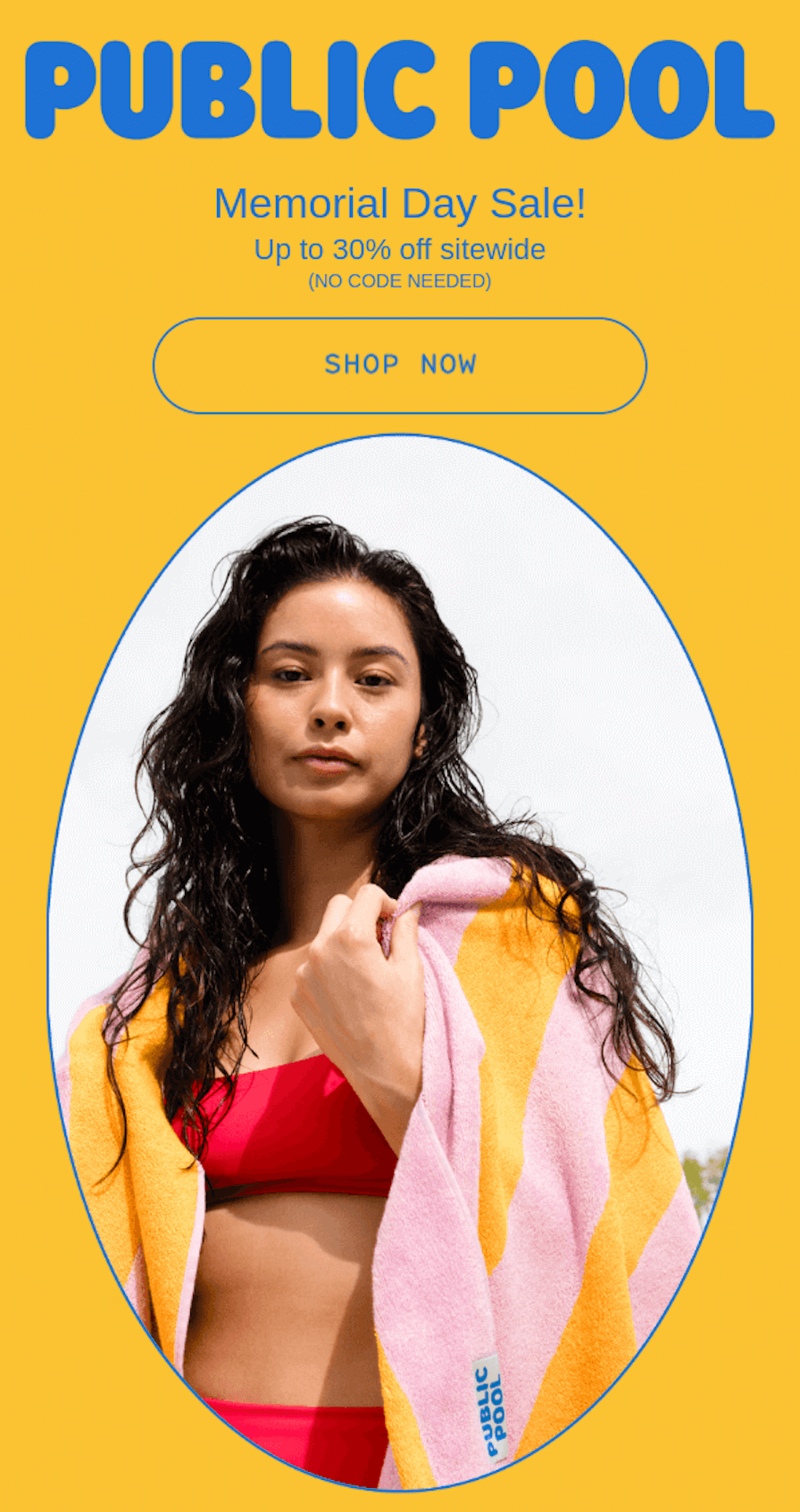
Public Pool’s newsletter is a clean example: short copy, a single oversized CTA button and a bright hero image, all legible on the smallest screen.y, giant CTA button, or bright image even on the smallest screen:
Track the Metrics That Still Mean Something
The email marketing metrics worth acting on in 2026 are click rate, conversion rate, revenue per email, and unsubscribe rate. Open rate has become a directional signal at best, because Apple Mail Privacy Protection pre-loads tracking pixels for opted-in users whether or not the message is ever read.
Open rate: use it for relative comparisons only
Apple Mail accounts for roughly half of tracked opens across most consumer lists, per Litmus, which means a reported open rate blends real human opens with proxy fetches. Compare this week’s open rate against last week’s on the same list and the noise is at least consistent. Compare it against an industry benchmark, and it is close to meaningless.
Click rate: your most reliable engagement number
Click rate tells you whether the content and the offer matched the promise in the subject line. Segment it by email type before drawing conclusions, because automated flows and broadcast campaigns are not comparable. A falling click rate on a stable list usually means the content drifted, not the audience.
Conversion rate and revenue per email: the numbers that decide budget
Revenue per email divides attributed revenue by emails delivered, which lets you compare a 2,000-person segment against a 50,000-person broadcast honestly. It is the only metric on this list that survives a conversation with a finance team. Definitions and calculation methods for the full set are laid out in our reference on the email marketing metrics and KPIs worth tracking.
Unsubscribe and complaint rate: your early warning system
An unsubscribe is a subscriber choosing the polite exit; a spam complaint is the same person choosing the damaging one. Watch the ratio. When complaints rise faster than unsubscribes, your opt-out is too hard to find. Rising unsubscribes on a specific segment usually points to frequency, and the fix is a preference center rather than a content change. Diagnosing the underlying pattern is easier with the framework in our guide to reading and improving email engagement.
Email marketing analytics best practices start with matching the metric to your list size:
- Under 20K: watch list growth rate and click rate;
- 20K-400K: focus on click rate and revenue per email;
- Over 400K: track program-level return on investment and customer lifetime value.
Offer Exclusive Perks to Your Subscribers
Exclusive subscriber perks are benefits the general public cannot get: early access, subscriber-only discounts, and members-only contests or events. Offering them builds loyalty and lifts subscriber retention.
Here’s how to cultivate that “inner circle” experience:
Promote early access
Early access means giving subscribers new product launches, sales, or exclusive content before the general public, which positions them as valued insiders. This taps into the scarcity principle, creating a sense of urgency and exclusivity that drives action.
But be careful not to overuse early access promotions. Too many can dilute the perceived exclusivity and reduce their impact.
Offer exclusive discounts and freebies
Rewarding subscribers with exclusive discounts, freebies, or special offers demonstrates your appreciation for their loyalty and gives them a reason to keep engaging with your brand. In fact, 80%* of American consumers say discounts and offers are a top reason they subscribe to brand emails.
But ensure your offers are genuinely valuable and relevant to your audience. Avoid generic discounts that might devalue your brand.
Build a community
Host subscriber-only contests, giveaways, or Q&A sessions, and create a dedicated Facebook group or online forum where subscribers can connect with each other. A community builds deeper connections than a broadcast list and makes subscribers feel part of something.
However, ensure your community-building efforts are authentic and engaging. Avoid creating a ghost town by actively moderating and nurturing the space.
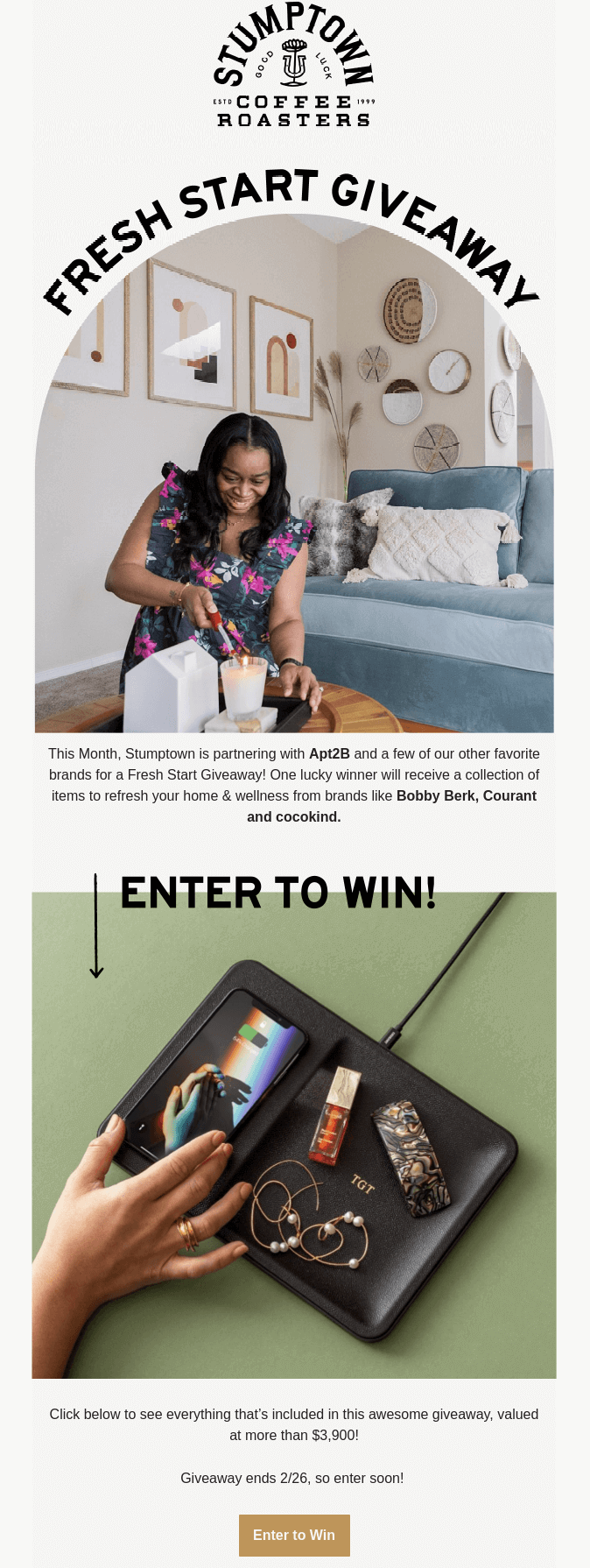
You can see that Stumptown Coffee Roasters really appreciates its subscribers. The brand organized not just any kind of subscribers-only giveaway, but one in partnership with a wellness brand and a chance to win a valuable prize:
Automate the Moments That Matter
Automated flows are behavior-triggered sequences that fire on a subscriber action rather than a calendar date, and they carry a wildly disproportionate share of email revenue. Klaviyo’s 2026 benchmark data, drawn from more than 183,000 brands, found flows generated close to 41% of email revenue from just 5.3% of sends.
Omnisend’s 2026 report, based on over 20 billion campaign emails and 470 million automated sends from 27,000+ brands, puts the per-send gap in plain money: automated emails earned an average of $2.87 each against $0.18 for scheduled campaigns.
Here are the flows worth building, in the order most programs should build them.
Welcome series
A welcome series is triggered on signup and sent within minutes. Omnisend’s 2026 dataset puts the average automated welcome email at a 35.53% open rate and $6.16 in revenue per email, which makes it the highest-earning single automation most brands will run. Set expectations for frequency and content in the first message, because that is what prevents complaints in month three. Step-by-step configuration is in the welcome series setup guide.
Abandoned cart
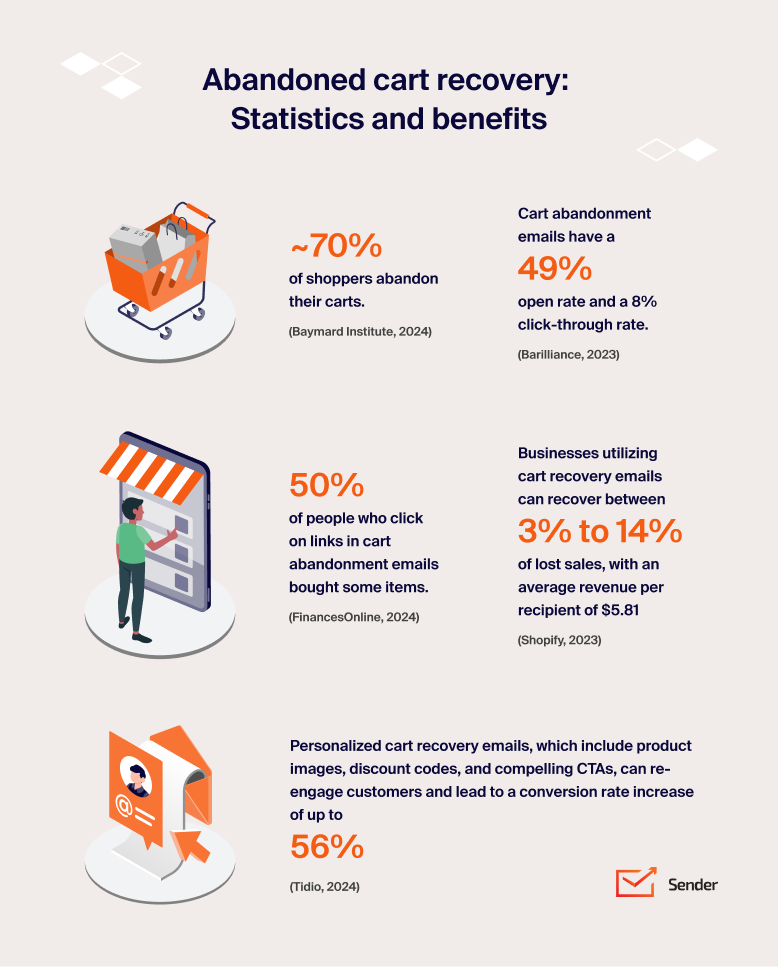
An abandoned cart flow is triggered when a shopper adds to cart and leaves without checking out, with the first message typically at one hour. Recovery rates of 2.3% to 5.4% of abandoned checkouts (2025 data) are realistic for a well-built series. Send three messages at most; a fourth reads as pressure and generates complaints.
Browse abandonment
A browse abandonment flow is triggered when someone views a product page repeatedly without adding to cart. Lower intent than cart abandonment, so lead with information rather than a discount. Together with cart and welcome flows, these three accounted for 87% of automated orders in Omnisend’s 2026 data.
Post-purchase
A post-purchase flow is triggered on order confirmation. Combine shipping updates with a review request and a complementary product suggestion. The expected outcome is a higher repeat purchase rate, not immediate revenue, so measure it over 90 days.
Re-engagement
A re-engagement flow is triggered by 90 to 180 days of inactivity. Send two or three messages, then suppress the non-responders. The point of this flow is not to win everyone back; it is to identify who to stop mailing, which protects the deliverability of everything else.
Transactional messages
Transactional messages are triggered by an account or order event: receipts, password resets, shipping notifications. Transactional emails are excluded from the one-click unsubscribe requirement, but only if they are genuinely transactional. Adding a promotional block to a receipt can reclassify it, and recipients decide what counts.
VIP and replenishment flows
VIP and replenishment flows are triggered by purchase count, spend threshold or a predictable reorder interval. Worth building once the five flows above are live and measured, not before.
The honest limitation: flow benchmarks come from ecommerce email marketing datasets. If you sell a considered B2B purchase with a six-month cycle, expect lower conversion and longer time-to-revenue, and map your flows to the stages of your customer journey rather than to an ecommerce template.
Match your automation depth to your list size:
- Over 400K: 10+ flows with predictive send-time and content optimization.
- Under 20K: five core flows (welcome, cart, post-purchase, browse, win-back);
- 20K-400K: add back-in-stock, cross-sell, birthday, review request, and price drop;
Put AI to Work Without Losing Your Voice
AI in email marketing helps most where the task is combinatorial rather than creative: generating test variants, predicting per-subscriber send times, and surfacing segments you would not have thought to query. Mailjet’s 2026 survey** of senders found copy generation the most common use at 41%, followed by content personalization at 36%, dynamic content at 29%, and send-time optimization and data analysis at 27% each.
Drafting and testing subject lines
Generate 8 to 10 compelling subject lines, discard the ones that misrepresent the email, and test the two strongest. The value is variant volume, not the writing itself. A model produces in seconds the range a copywriter would take an hour to reach, and the test still decides.
Send-time prediction
Per-subscriber send-time models schedule each recipient at their own historical engagement window instead of one clock time for the whole list. Check what signal your platform trains on first: models built on open-rate data are learning from Apple Mail proxy fetches, so prefer platforms that optimize on clicks.
Segment discovery
Ask the model to find patterns in your existing behavioral data, such as which purchase combinations predict a second order. Treat the output as a hypothesis to test on a small segment, not a segment to mail immediately.
The human review rule
Email marketing specialists should review every AI-drafted email before it sends, checking three things: factual accuracy of any claim or price, brand voice, and whether the subject line matches the body. Sender’s own automation and A/B testing tools sit alongside this workflow rather than replacing the review step.
When AI content hurts: if you publish unedited model output at volume, your emails converge on the same phrasing and structure as everyone else’s, and generic sameness is what subscribers report as spam. The tell is an email that could have been sent by any brand in your category. Where AI is heading next for the channel is covered in our roundup of current email marketing trends.
How Best Practices Change for B2B (vs B2C)
B2B email marketing follows the same technical rules as B2C and almost none of the same behavioral ones. The buying cycle runs weeks to quarters instead of minutes, several people read the same email, and nobody buys from a countdown timer.
Replace urgency flows with drip nurture
A B2C cart abandonment sequence closes in 48 hours. A B2B nurture sequence runs 6 to 12 touches over 8 to 12 weeks, each one advancing a specific question the buying committee has: fit, integration, security, procurement. Map the sequence to those questions rather than to a discount ladder.
Segment by business need, not demographics
Company size, industry, tech stack, and role are the axes that change the message. A security lead and a finance lead at the same account need different emails about the same product. Firmographic segmentation is the B2B equivalent of behavioral segmentation, and it does most of the work.
Educate rather than pitch
Benchmarks, teardowns, implementation guides, and worked examples earn replies from B2B lists. Promotional cadence that works in ecommerce burns a B2B list quickly, because the recipient is reading at work and measuring the cost in attention. The same principle governs outreach to prospects who have not opted in, where relevance is the only thing that prevents a complaint.
Send during business hours in the recipient’s timezone
Tuesday to Thursday, mid-morning local time, remains the reliable window for B2B. Weekend sends land in an inbox nobody opens until Monday, by which point they sit under 60 newer messages.
Match the compliance tone to the jurisdiction
B2B email is not exempt from CAN-SPAM, GDPR, or CASL. GDPR legitimate interest can cover some B2B outreach in the EU, but it requires a documented balancing test and an opt-out in every message. CASL in Canada has no broad B2B exemption and carries the highest penalties of the three.
One budget note: B2B lists are smaller and worth more per contact, which changes the platform maths. Our breakdown of what email marketing actually costs at different list sizes covers where per-contact pricing starts to bite.
Email Marketing Benchmarks to Track
Every figure below carries its source and its date, because email benchmarks diverge sharply depending on whose customer base was measured. Compare like with like: campaign against campaign, flow against flow, and ecommerce against ecommerce.
Campaign benchmarks
- Average campaign open rate of 31%, with the top 10% of senders at 45.1% (Klaviyo, 2026 benchmarks, 183,000+ brands);
- Average campaign click rate of 1.69%, top 10% at 3.38% (Klaviyo, 2026);
- Average campaign click rate of 2.27%, top 10% at 5.22% (Brevo, 2026 benchmark, 175,000+ customers, 2025 sending data);
- Median open rate of 43.46% and click rate of 2.09% across 3.6 million campaigns (MailerLite, 2025 data published 2026).
Automation benchmarks
- Flow click rate of 5.58% against 1.69% for campaigns, and a flow placed-order rate of 2.11% against 0.16% (Klaviyo, 2026);
- Flows generated close to 41% of email revenue from 5.3% of sends (Klaviyo, 2026);
- Automated emails earned $2.87 per send against $0.18 for scheduled campaigns (Omnisend, 2026 report on 2025 data);
- Welcome emails averaged a 35.53% open rate and $6.16 per email (Omnisend, 2026).
Deliverability and device benchmarks
- Mobile accounts for about 55% of opens, webmail 26%, desktop 19% (Litmus Email Analytics, 2026);
- Apple Mail and Gmail together represent close to 90% of tracked opens (Litmus, July 2026);
- Google’s spam complaint ceiling is 0.3%, with degradation starting below 0.1% (Google Postmaster Tools documentation).
The caveat that matters: open rates above 40% in any dataset include Apple Mail Privacy Protection proxy fetches. Klaviyo’s 31% and Omnisend’s 35.53% come from ecommerce lists; MailerLite’s 43.46% spans all industries. Neither is wrong, and neither is your number. For the wider dataset behind these figures, see our collection of current email marketing statistics.
Integrate Email with Your Marketing Channels
Email works best as the conversion layer of a channel stack, not a standalone program. Other marketing channels like social and paid media build reach, drive website traffic and generate first-party contacts; email is where you own the relationship and can measure revenue directly.
Three coordination mechanics do the work:
- Feed the list from every channel. Run lead magnets and signup offers on social and paid placements, then trigger a nurture sequence that continues the message;
- Repurpose in both directions. Promote a blog post on social, then send the takeaway by email with a link to the full piece. The email version must stand alone for anyone who missed the post;
- Sync the data. Pass ad engagement and site behavior into your segmentation so you can suppress recent purchasers and retarget non-openers on paid channels.
The measurable gain is usually suppression rather than reach: not mailing recent buyers, and not paying to retarget people who have already converted via email. A coherent approach across channels is what turns separate campaigns into one email marketing strategy.
Common Email Marketing Mistakes to Avoid
Even experienced marketers make mistakes, but being aware of common pitfalls can save you headaches (and lost subscribers) down the road. Here are a few blunders to avoid:
- Email overload. Bombarding your email recipients with daily emails is a sure way to send them running for the unsubscribe button. Find a frequency that provides value without overwhelming them;
- Ignoring mobile optimization. With most opens happening on a phone, failing to optimize your emails for mobile is a cardinal sin;
- Skipping segmentation. Sending generic blasts to your entire list is like shooting arrows in the dark;
- Misleading subject lines. Clickbait might get you opens, but it also leads to frustration, distrust, and spam complaints;
- Neglecting your email list. Your email list is a valuable asset, but it requires regular email list cleaning. Remove inactive subscribers and those who haven’t engaged in a while to maintain a healthy list and improve your deliverability rates;
- Shipping unedited AI output. Emails that read like every other brand’s emails get ignored first and reported second. Use AI for drafts and variants, then edit for voice and accuracy before sending.
For more field-tested email marketing tips, our collection of email marketing advice from practitioners covers what experienced senders do differently.
Email Marketing FAQs
The ideal sending frequency depends on your audience, industry, and the type of content you’re sharing. However, a good rule of thumb is to aim for quality over quantity. It’s better to send fewer, highly relevant messages than to bombard your subscribers with irrelevant ones.
You can also implement a preference center where subscribers can easily choose how often they want to receive emails from you. This lets them control their inbox experience and ensures they’re receiving engaging content they genuinely value.
You can run email marketing automation on most email marketing platforms, and several include it on a free plan. Compare tools on trigger types, conditional branching, and how many active workflows the plan allows.
For instance, Sender’s free plan gives you access to automation tools right away. And when you’re ready to scale, affordable paid plans often add SMS automation and A/B testing, helping you fine-tune your campaigns.
To measure the success of your email campaigns, keep a close eye on key metrics such as click-through rates, conversion rates, revenue per email, and unsubscribe rates. Most email platforms provide detailed analytics dashboards to track your progress.
Treat open rate as directional only. Apple Mail Privacy Protection pre-loads tracking pixels for opted-in users, which inflates reported opens without telling you whether anyone read the message.
The 5 T’s of email marketing are Target, Tease, Teach, Test and Track. Target means segmenting so the message fits the recipient. Tease is the subject line and preheader text earning the open. Teach is the body delivering something useful before it asks for anything. Test covers A/B testing subject lines, offers and send times. Track means acting on click rate, conversion rate and revenue per email.
Some versions swap in Timing, Trust or Tone. It is a memory aid rather than a standard.
There is no single agreed definition of the 3-3-3 rule, and two versions circulate widely. The attention version says you have 3 seconds to earn attention with a subject line or hook, 3 sentences to justify the next minute of reading, and 3 minutes to make the full case.
The campaign version says you focus on 3 core messages, aimed at 3 audience segments, delivered across 3 channels. Both are planning heuristics rather than researched rules, so ask which one is meant.
The 5 C’s of email etiquette are Clear, Concise, Correct, Courteous and Complete. Clear means one subject per email and an unambiguous ask. Concise means removing every sentence that does not change what the reader does. Correct covers names, figures, links and grammar. Courteous sets a tone that survives being forwarded. Complete means the recipient can act without a follow-up question.
These apply to marketing email as much as to one-to-one correspondence, and Complete is the rule most promotional emails fail.
Five practices carry most of the results: collect permission explicitly, authenticate your domain with SPF, DKIM and DMARC, segment before you send, design mobile-first, and measure clicks and revenue rather than opens.
If you only fix one thing, fix authentication. Gmail, Yahoo and Microsoft all reject unauthenticated bulk mail outright, so every other practice on this list depends on the message being delivered first. The remaining four decide whether it gets opened and acted on.
Best practices compound only when the foundations underneath them are solid. A successful email marketing strategy starts with those foundations, so if you are building a program from scratch rather than tuning one, begin with the full guide to email marketing, then layer these 14 rules on top.
Sources:
- https://support.google.com/a/answer/14229414
- https://techcommunity.microsoft.com/blog/microsoftdefenderforoffice365blog/strengthening-email-ecosystem-outlook%E2%80%99s-new-requirements-for-high%E2%80%90volume-senders/4399730
- https://www.klaviyo.com/uk/blog/email-marketing-benchmarks-open-click-and-conversion-rates
- https://www.omnisend.com/blog/email-marketing-benchmarks/
- https://www.brevo.com/blog/email-marketing-benchmarks/
- https://www.mailerlite.com/blog/compare-your-email-performance-metrics-industry-benchmarks
- https://www.litmus.com/email-client-market-share
- https://www.mailjet.com/blog/marketing/email-in-2026-strong-roi-rising-ai-adoption-and-a-measurement-problem-nobodys-fixing/
- https://www.statista.com/statistics/456500/daily-number-of-e-mails-worldwide/
- https://www.shopify.com/blog/email-marketing-statistics
- https://capitaloneshopping.com/research/discount-statistics
- https://www.convertcart.com/blog/ecommerce-email-marketing-statistics
- https://smartblogger.com/email-marketing-statistics/
- https://coschedule.com/content-marketing/best-time-to-send-email
- https://www.campaignmonitor.com/resources/knowledge-base/what-are-good-email-metrics/
- https://fluentcrm.com/email-marketing-conversion-rate/
- https://www.mckinsey.com/capabilities/growth-marketing-and-sales/our-insights/the-value-of-getting-personalization-right-or-wrong-is-multiplying
- https://fluentcrm.com/email-segmentation-statistics/
- https://human.marketing/blog/how-to-increase-email-conversion-rates