


CRM marketing is the practice of using the customer data stored in your CRM (contact records, purchase history, behavioral events, and consent status) to plan and send targeted campaigns instead of the same message to everyone.
It connects two systems that often run separately: the database that knows who your customers are and what they’ve done, and the tools that actually reach them by email, SMS, or ads. Done well, it replaces batch-and-blast sending with communication triggered by what a specific person did, when they did it.
This article is part of our marketing automation guide, and it covers what CRM marketing is, how the mechanics work, how it differs from marketing automation, and how to build a strategy step by step.
The numbers back the effort, with appropriate caution about their age: Nucleus Research put the average return at $8.71 for every $1 spent on CRM software in 2014, though the same firm’s later analysis revised that down to roughly $3.10 as the category matured, and CRM systems are associated with customer retention gains of about 27%.
What Is CRM Marketing?
CRM marketing is customer relationship management applied to your marketing, not just your sales pipeline or sales process. You will also see it called customer relationship marketing, and most CRM marketing initiatives share the same premise.
The CRM holds a unified record for each contact, and marketing uses that record to decide who receives which message and when. The distinguishing feature is the direction of the data: campaigns are shaped by what’s already known about the person, rather than by a calendar slot or a list upload.
That known-information layer is what people mean by a customer 360 or unified customer profile. It pulls together identity (name, email, phone), transactional history (orders, refunds, subscription status), and behavioral events (pages viewed, emails opened, carts abandoned) into one place tied to the customer lifecycle.
Consistent personalization across channels depends on this: when the data is scattered across tools that don’t share a profile, the same customer looks like several different people, and the message reflects none of them accurately.
The practical payoff is relevance. When a message reflects a customer’s actual stage and behavior, it performs better: personalized email campaigns built on CRM data show around 14% higher click-through rates than non-personalized sends.
The catch, and it’s a real one, is data quality. Duplicate contact IDs and missing fields quietly degrade every downstream campaign, and cleaning that up is often where the first measurable gains come from before any new automation is added.
What Does CRM Stand for in Marketing?
CRM stands for customer relationship management. In a marketing context, the term refers to both the software (the CRM tools that store customer data and record customer interactions) and the discipline (managing relationships across the full lifecycle rather than one transaction at a time).
The distinction matters because people use “CRM” loosely. Sometimes they mean a specific CRM platform like Salesforce CRM, HubSpot CRM, or Zoho CRM. These CRM platforms are all forms of customer relationship management software, whatever the vendor calls the product. Sometimes they mean the strategy of relationship management itself.
In marketing, the CRM meaning that counts is the second one: using the relationship data you’ve collected to communicate in a way that reflects each customer’s history, not their position on a spreadsheet. The software is the enabler; the relationship is the point.
How Does CRM Marketing Work?
CRM marketing works as a loop: collect data, unify it, act on it, then feed the results back in. Each stage depends on the one before, and the loop breaks wherever the data does.
Collection happens at every touchpoint. A signup form captures an email and consent; a purchase records order value and products; email engagement logs opens and clicks; site activity records product views. These flow into the contact record as fields and events. The quality of everything downstream is set here, which is why consent status and clean field mapping matter from the first form.
Unification resolves those inputs into a single profile per person. Identity resolution merges the same customer across devices and channels so you aren’t treating one buyer as three contacts. This is the step where segmentation becomes possible: you can only group people accurately if their records are accurate first. Strong audience grouping built on lifecycle and behavior starts here, and it’s the foundation the rest of the loop stands on.
Action is where marketing uses the profile. Segments feed campaigns; behavioral events fire triggers; scores route contacts into nurture sequences. A campaign might target everyone who bought in the last 90 days but hasn’t opened an email in 30, mapping each stage of the buying process to the customer journey so the message fits where the person actually is.
Measurement closes the loop. Opens, clicks, conversions, and revenue write back to the CRM, updating each profile and informing the next send. Where this write-back is missing or delayed, the loop degrades into one-directional sending, which is the most common way CRM marketing quietly fails: the data goes out, but nothing learns from what comes back.
CRM vs. Marketing Automation: What’s the Difference?
CRM and marketing automation are often bundled, but they do different jobs. The CRM is the system of record; marketing automation is the system of action.
The record-keeping side is what people mean by an operational CRM: it stores and organizes the relationship data, while the other side executes campaigns against it. Many platforms now combine both, which is why the line blurs, but the functions remain distinct.
The simplest way to think about it: the CRM answers “who is this person and what do we know about them?” while marketing automation answers “what should happen next, and when?” A CRM without automation is a well-organized database nobody acts on. Automation without a CRM is a sending tool firing at a static list with no memory of the customer.
| Attribute | CRM | Marketing Automation |
| Primary role | System of record for customer data | System of action for campaigns |
| Core function | Stores contacts, history, and events | Executes sends, triggers, and workflows |
| Data direction | Holds and updates the customer profile | Reads the profile to decide actions |
| Typical owner | Sales and marketing operations | Marketing teams |
| Without the other | Data nobody acts on | Sending with no customer memory |
In practice, you want both working together, with the CRM as the source of truth and automation as the engine that acts on it.
When they’re connected, a change in the record (a purchase, a churn signal) can trigger the right message automatically. When they’re not, someone is exporting CSVs and re-uploading lists, which is exactly the manual work the setup is supposed to remove.
Benefits of CRM Marketing
The benefits of CRM marketing come down to relevance, efficiency, and retention, and each one has evidence behind it rather than just intuition.
Relevance drives response. When messages reflect real customer data, engagement rises. HubSpot’s analysis of more than 330,000 calls to action found personalized CTAs convert 202% better than generic ones, and segmented, behavior-based emails consistently beat one-size-fits-all sends on open and click rates. The mechanism is straightforward: a message that matches what someone actually did feels less like noise.
Efficiency compounds. Automated flows built on CRM triggers pick the right moment without manual work, which is why they punch above their weight in orders relative to broadcast campaigns. You stop spending budget on messages certain customers will never engage with, and the team stops rebuilding the same audience by hand for every send. When sales teams and marketing work from the same records, that shared profile also keeps their marketing efforts aimed at the same person rather than duplicating outreach.
Retention is where the money is. The 27% retention improvement associated with CRM use (Aberdeen Group) matters because retention is cheaper than acquisition by a wide margin. Retention tracks customer satisfaction closely here: people stay when the messages they get reflect what they actually did, and they leave when the contact feels random. This is also why customer lifetime value sits at the center of most CRM marketing programs: keeping and growing existing customers usually returns more than chasing new ones.
The honest limitation: these numbers assume clean data and consistent execution. A CRM marketing program built on fragmented or stale records will underperform every benchmark above, and no amount of automation fixes bad underlying data. The benefit is real, but it’s conditional on the unglamorous work of keeping the record accurate.
How to Build a CRM Marketing Strategy (Step by Step)
A CRM marketing strategy is built in a sequence, and skipping steps early creates problems that surface later. Here’s the order that holds up in practice.
1. Set Goals and KPIs
Start with what you’re trying to move, then pick metrics that measure it. Vague goals (“improve engagement”) produce vague campaigns. Concrete ones (reduce 90-day churn by 5%, lift repeat purchase rate by 10%) tell you what to build and how to judge it. Goals also tell you which customer insights are worth pulling from the data and which are noise you can ignore.
Tie each goal to a small set of tracked numbers, and decide up front how you’ll attribute results, since attribution for personalized campaigns is genuinely hard and teams that skip this end up unable to prove what worked. Choosing the right email marketing metrics and KPIs before you launch anything keeps the whole program measurable rather than anecdotal.
2. Centralize Your Customer Data
Every downstream step depends on one accurate profile per customer, so this is where the real work is. Pull identity, transactional, and behavioral data into the CRM, and resolve duplicates before you do anything else with it. The goal is one place where all the customer information for a person agrees with itself, not three systems each holding a partial version.
This is also the stage where consent lives. Record how and when each contact opted in, because that status governs what you’re allowed to send and to whom. Data hygiene here isn’t housekeeping; it’s the difference between segments that work and segments that quietly target the wrong people.
3. Segment Your Audience
With clean data centralized, group contacts by attributes and behavior that predict what they’ll respond to. Segments can be static (customers in a region) or dynamic (anyone whose last purchase was over 60 days ago), and dynamic segments are usually the ones worth building because they update themselves as behavior changes.
Good segmentation is specific enough to change the message but not so granular that segments are too small to matter. A workable first cut is by lifecycle stage (new, active, at-risk, lapsed) layered with one behavioral signal. If you’re using a platform’s segmentation engine, its dynamic segmentation will re-evaluate membership automatically as records update.
4. Score and Nurture Leads
Not every contact is ready to buy, and treating them as if they are wastes both budget and goodwill. This is the lead management side of CRM marketing: sorting potential customers by how close they are to a decision. Lead scoring assigns points based on fit and behavior so you can tell a warm prospect from a cold one, and route each accordingly.
Scoring feeds nurturing. Contacts who aren’t ready enter a sequence that builds context over time rather than pushing for a sale immediately, and effective lead nurturing moves people toward readiness at their pace instead of yours.
The work here starts after lead generation has done its job: the contact already exists, and the task is moving them forward, not finding them. The common mistake is nurturing everyone identically; the score exists precisely so you don’t.
5. Automate Campaigns Across Channels
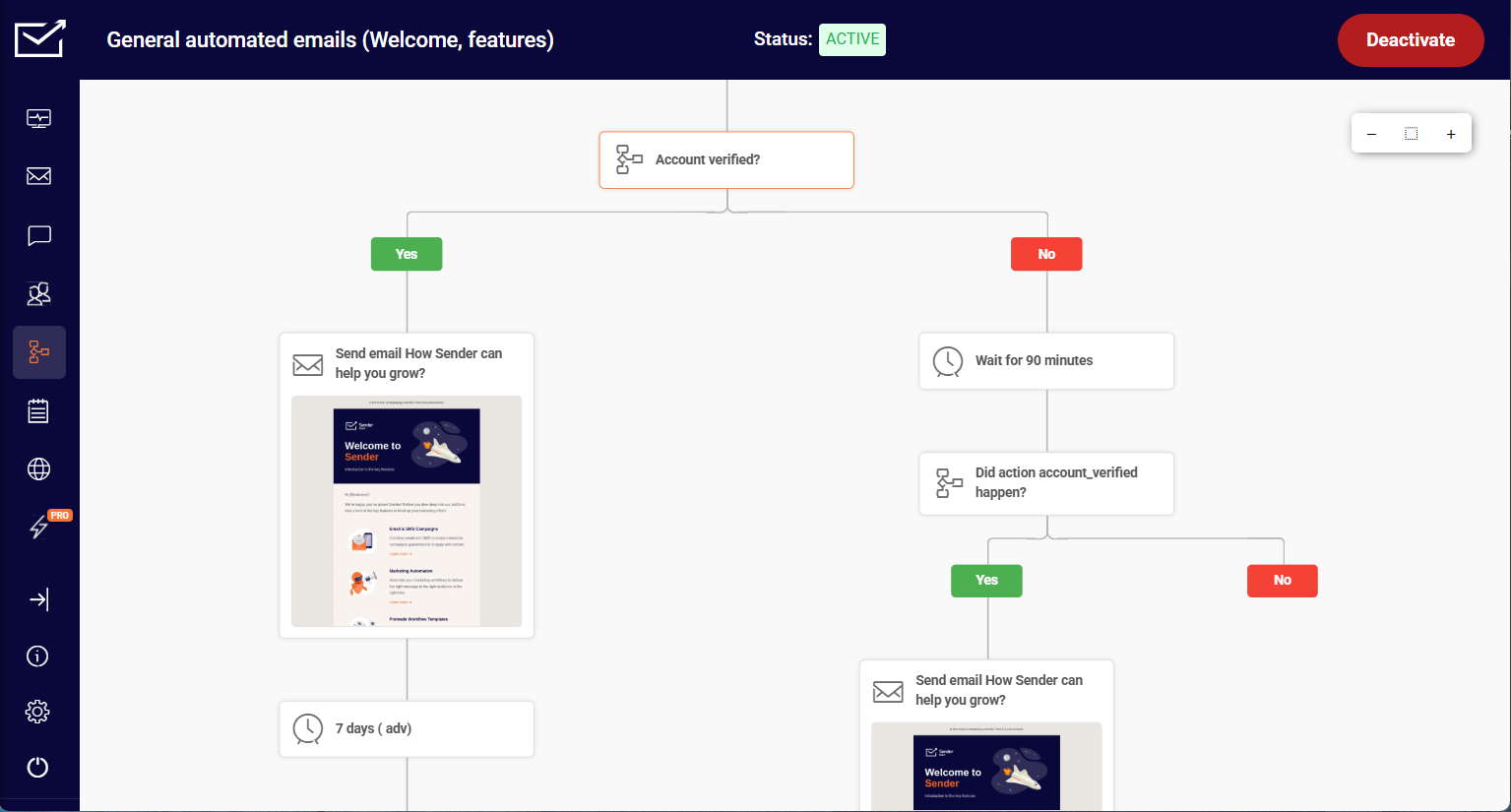
Once segments and scores are in place, connect them to automated workflows that act on events. A cart abandonment triggers a reminder; a first purchase triggers an onboarding sequence; a churn signal triggers a win-back.
With the workflow built once, you can automate a full multi-step sequence that runs on customer behavior without manual sends, across email and SMS where consent allows.
The discipline here is restraint. Automating too many triggers at once creates overlap, where a single customer gets three messages in a day from three different workflows.
Automation tools make it easy to fire across multiple channels at once, which is exactly why the overlap happens. Start with a few high-intent triggers tied to clear signals, confirm they don’t collide, then expand.
6. Measure, Test, Refine
Treat the strategy as iterative, not fixed. A/B testing on subject lines, send times, and offers tells you what actually moves your KPIs rather than what you assume will. Read campaign performance against the goal you set, not in isolation: a lift in opens means little if the metric you committed to was repeat purchases.
Set a threshold in advance: if a test doesn’t beat the control by a meaningful margin over a fair window, retire it rather than keeping it out of sentiment.
Layer in analysis that ranks customers by value and behavior so refinement targets the right people. Running RFM analysis (recency, frequency, monetary) surfaces your most valuable and most at-risk segments, which is usually where the highest-impact refinements live. Then feed what you learn back into segmentation and scoring, and run the loop again.
7 CRM Marketing Examples
These seven examples show CRM data driving a specific action. Each one uses a known signal to send a relevant message, which is the whole idea in practice rather than theory.
Personalized Email Campaigns
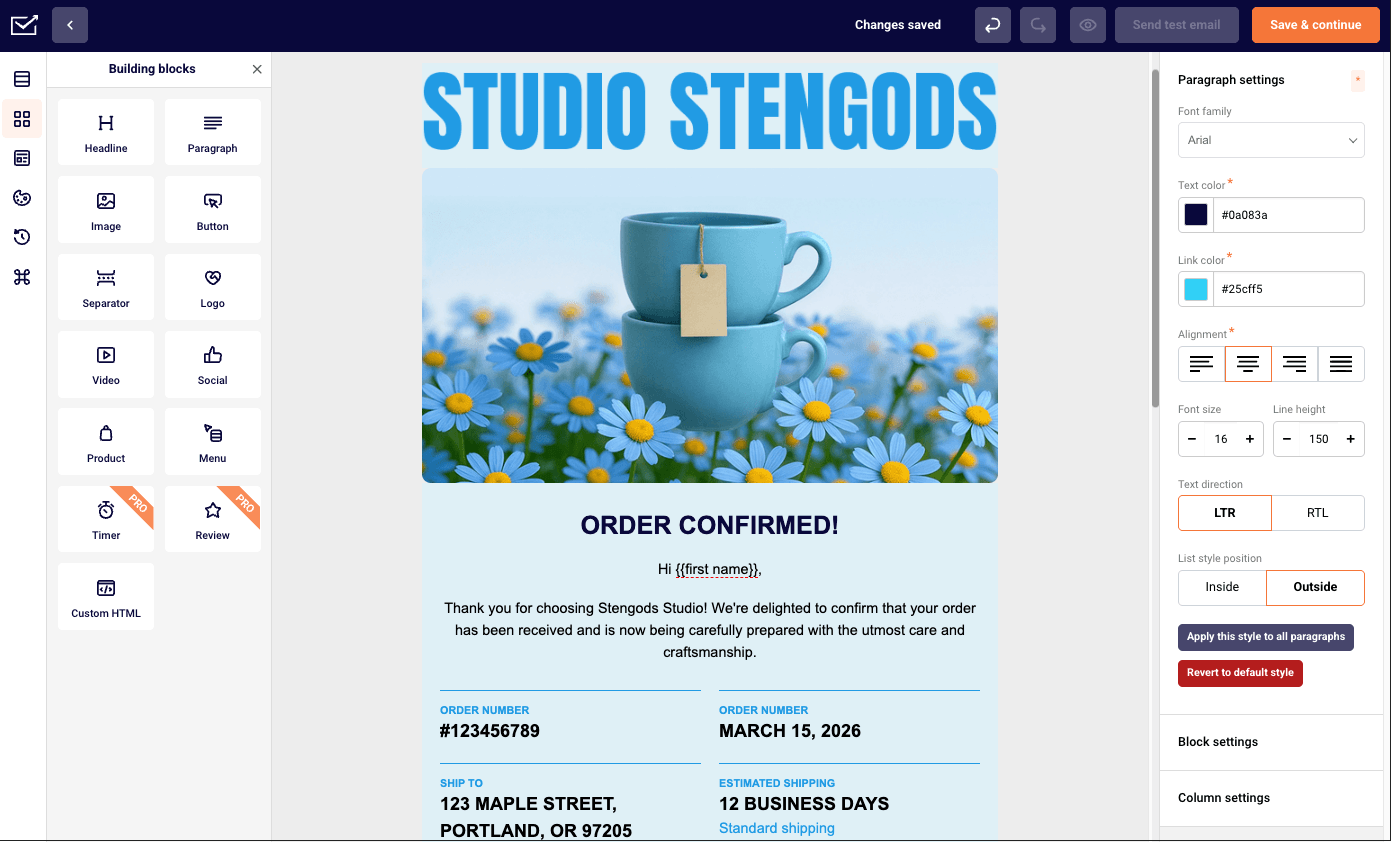
The base case: email content shaped by CRM fields and behavior. Most email marketing campaigns built on a CRM start here. A campaign might insert the customer’s name, reference their last purchase category, and recommend complementary products.
Effective email personalization goes past a merge tag in the subject line and uses actual history to change what the email contains, which is what produces the click-through lift over generic sends.
Cross-Sell/Upsell
CRM purchase history identifies who owns what, so you can offer the logical next product. Someone who bought a camera is a candidate for a lens; a customer on a starter plan nearing usage limits is a candidate for an upgrade. The signal comes from the record; the offer follows it.
Event-Triggered Campaigns
These fire on a behavioral event rather than a schedule. A triggered email sends the moment a customer acts (abandons a cart, hits a milestone, lets a subscription lapse) so the message lands while the behavior is fresh.
This is where CRM data earns its keep on timing: timely and relevant communication depends on catching the event, not on a send calendar. The same email is far more effective sent within an hour of the trigger than the next day.
Automated Lead Nurturing
A scored lead enters a sequence that delivers context over days or weeks, adjusting based on engagement. These timed sequences are also called drip campaigns. Open and click behavior can move a contact forward faster or hold them in an earlier stage, so the nurture reflects response rather than running blind on a fixed timer.
Win-Back Campaigns
CRM data flags customers who’ve gone quiet (no purchase or engagement past a defined window) and triggers a re-engagement sequence. The message often includes an incentive or a “still interested?” prompt, and a suppression rule matters here: don’t win-back someone who just contacted support with a complaint.
Account-Based Marketing
In account-based marketing, CRM data coordinates messaging across every contact within a target company rather than treating them as isolated leads.
An account-based marketing CRM setup is one of the clearest cases of CRM digital marketing, since the account record drives every channel at once. The record ties individuals to the account, so marketing and sales work the same set of stakeholders with consistent context instead of crossed wires.
Omnichannel Campaigns
The CRM profile lets a single campaign span email, SMS, and ads while respecting each customer’s channel preferences and consent. The same profile keeps a person’s history consistent across marketing channels, so what they saw in one place informs the next.
Omnichannel done right means the channels coordinate (an SMS follows an unopened email, not duplicates it) rather than each firing independently at the same person. That coordination is what makes the customer experience feel like one conversation instead of three departments talking over each other.
CRM Marketing Use Cases at a Glance
| Use Case | CRM Data It Uses | Trigger | Channel | Metric to Watch |
| Personalized Email Campaigns | Name, purchase history, engagement | Segment membership | Click-through rate | |
| Cross-Sell/Upsell | Products owned, plan/usage | Purchase or usage threshold | Email, in-app | Revenue per recipient |
| Event-Triggered Campaigns | Behavioral events | Real-time action (cart, milestone) | Email, SMS | Conversion rate |
| Automated Lead Nurturing | Lead score, engagement | Score threshold reached | Lead-to-customer rate | |
| Win-Back Campaigns | Last purchase / activity date | Inactivity window passed | Email, SMS | Reactivation rate |
| Account-Based Marketing | Account-to-contact mapping | Account stage change | Email, ads | Account engagement |
| Omnichannel Campaigns | Channel preference, consent | Cross-channel sequence step | Email, SMS, ads | Multi-touch conversion |
CRM Email Marketing: Connecting Your CRM to Email and SMS
CRM email marketing is the connection point where the CRM holds the data and the email or SMS platform acts on it. The CRM is the source of truth; the sending tool reads from it and writes results back.
These are two separate tools doing two jobs: the email or SMS platform sends and reports, but the customer records live in the CRM, so you connect an existing CRM to your sending tool rather than expecting the sending tool to be one. Getting this sync right is what turns stored data into sent campaigns.
Four things need to sync: contacts (the profiles themselves), segments (the groups you’ve built), events (behavioral triggers like purchases or cart abandonment), and consent (who agreed to what, on which channel). Consent is the one people underweight, and it’s the one that carries legal and deliverability consequences if it’s wrong, so it has to flow accurately in both directions.
There are three ways to connect the two systems. A native integration is a prebuilt connection between two platforms, the least work to set up and the most limited in what it can pass. Middleware (a tool like Zapier sitting between them) is more flexible and adds a dependency and sometimes a delay. A direct API connection offers the most control over exactly what syncs and when, at the cost of engineering time.
Most teams start native and move to API only when they hit its limits. Whether you’re using HubSpot, Salesforce, Zoho, ActiveCampaign, or Mailchimp, the same choice applies, and platform documentation on connecting your store and data sources is the place to confirm which method each supports.
What to automate first: the highest-intent, clearest-signal triggers. Cart abandonment and a welcome sequence are the usual starting points because the signal is unambiguous and the payoff is quick.
Leave AI features like send-time optimization or predictive scoring for later, once the basic triggers are proven. Prove those work, confirm the data is syncing cleanly in both directions, then expand to lower-intent triggers once you trust the pipe.
Frequently Asked Questions
A CRM marketing strategy is a plan for using the customer data in your CRM to run targeted, lifecycle-based campaigns. It typically covers goals and KPIs, data centralization, segmentation, lead scoring and nurturing, cross-channel automation, and ongoing measurement. The aim is to replace generic broadcasts with communication shaped by what you actually know about each customer.
CRM stands for customer relationship management. In marketing, it refers both to the software that stores customer data and to the discipline of managing relationships across the full customer lifecycle rather than one transaction at a time. The marketing use of CRM is applying that stored relationship data to decide who gets which message and when.
Centralize your customer data into one accurate profile per person, segment contacts by attributes and behavior, then connect those segments to automated email and SMS campaigns triggered by customer actions. Measure results, write them back to the CRM, and refine. The core idea is letting known data drive each send instead of sending the same thing to everyone.
CRM email marketing is email marketing driven by CRM data, where the CRM holds the customer record and the email platform sends based on it. It connects the two systems so that contacts, segments, events, and consent stay in sync, which lets you trigger emails on real behavior rather than manual list uploads.
Connect the two systems using one of three methods: a native integration (prebuilt, easiest), middleware like Zapier (flexible, adds a dependency), or a direct API connection (most control, most setup). Make sure contacts, segments, behavioral events, and consent status all sync, ideally in both directions so campaign results update the CRM record.
Several platforms combine CRM and marketing functions, including HubSpot, Salesforce, Zoho, and ActiveCampaign, along with tools that pair contact management with email and SMS sending. Some run marketing on a separate layer, such as Salesforce Marketing Cloud, and many offer a free CRM tier to start on before you pay for higher sending volume.
The right fit depends on your list size, the channels you use, and how much automation depth you need, which our complete guide to marketing automation covers alongside the workflows that sit on top of your CRM data. Compare each against your specific data and consent requirements before committing.