



Email personalization is the practice of tailoring email content to individual subscribers using data such as names, preferences, purchase history, location, and behavioral signals. That data can change subject lines, copy, offers, product recommendations, send timing, and other email elements so each recipient receives a more relevant message.
What is Email Personalization?
Email personalization is a form of marketing personalization that uses subscriber data – such as name, location, preferences, purchase history, and behavior – to tailor messages to individual recipients. Unlike batch-and-blast email marketing, which sends the same message to an entire list, personalized email marketing adapts content to each subscriber’s needs and interests.
This article is part of our Email Segmentation Guide.
Email Personalization vs Segmentation
Email segmentation and email personalization work together but serve different purposes: segmentation is a one-to-many approach that groups subscribers based on shared attributes or behaviors, such as purchase history, website activity, or engagement. While personalization is a one-to-one approach that adapts content for an individual recipient.
Segmentation helps you decide who should receive a message, and personalization helps tailor what each person sees within that message.
Why Email Personalization Matters
Personalization in email marketing can improve engagement, revenue, retention, and the quality of customer insights. There’s more than one reason for that:
- Higher open and click rates. When an email speaks directly to the recipient’s interests, behavior, or preferences, it’s more likely to catch their attention. 81% (Optimove, 2025) of consumers are more likely to open emails tailored to their interests.
- More revenue per send. Personalization helps you get more value from the emails you’re already sending. Showing the right products, offers, or content to the right subscribers can lead to more purchases without increasing your sending volume. No wonder why 3 in 4 (Deloitte, 2024) customers consider personalization a great motivator.
- Better customer retention and customer lifetime value. Personalized emails aren’t only useful for making the first sale. Relevant follow-ups, recommendations, loyalty offers, and re-engagement campaigns can keep customers interested and encourage them to buy from you again.
- More useful customer data. Every open, click, and purchase tells you something about what a subscriber is interested in. You can use those insights to improve future emails, which gives you even more data to work with. Over time, this creates a cycle where your personalization becomes more accurate and effective.
What Data You Need Before You Personalize
Good email personalization starts with good customer data. The more you know about your subscribers, the easier it is to send messages that match their needs, interests, and behavior.
Here are the main types of data you can use:
- Profile fields. Basic information such as a subscriber’s name, location, company, job title, or birthday can help you personalize individual parts of an email and create more relevant segments.
- Behavioral events. Actions like visiting a product page, clicking an email, downloading content, or abandoning a cart show what a subscriber is interested in right now. You can use these signals to trigger timely, relevant emails.
- Purchase history. Past purchases can tell you what products or categories a customer prefers. This data is useful for product recommendations, replenishment reminders, cross-sells, and customer loyalty campaigns.
- Zero-party data. Information customers intentionally share through forms, surveys, quizzes, or preference centers can give you direct insight into what they want to hear about.
As third-party cookies become less reliable, first-party data collected through your own website, emails, and customer interactions gives you a more direct and dependable way to personalize your campaigns.
If your customer data is spread across several tools, a customer data platform (CDP) can bring it together into a single customer profile that you can use for segmentation and personalization.
Types of Email Personalization
Email personalization can take different forms depending on the data you have available. Rather than thinking about it as basic or advanced, it’s more useful to look at what information drives the personalization and what changes as a result.
Type
Data it needs
What changes in the email
Example
How to do it in Sender
Field insertion
A stored field per contact: first name, company, city
Subject line, greeting, “from” name
“Robert, welcome to All Things Sonic”
Insert a personalization tag in the subject or body → /help/email-campaigns/personalization-basics/
Segment-based content
Contact attributes: location, interests, plan, purchase category
The whole email – copy, images, offer – differs by group
A pet-food brand sends dog-owner content to dog owners and cat content to cat owners
Build a dynamic segment, then send a version per segment → /help/subscribers-and-segmentation/dynamic-segmentation/
Behavior-triggered
Events: signup, cart abandoned, purchase, 90 days inactive
When the email sends and what it references
Cart reminder a few hours after checkout is abandoned; win-back after a quiet quarter
Start an automation from a trigger → /help/automation/triggers-explained/ and /help/automation/create-abandoned-cart-series/
Conditional / dynamic content
Any field or event, evaluated per subscriber at send or open
Blocks shown or hidden; live elements update on open
A countdown that reads correctly in every subscriber’s time zone; a VIP-only offer block
Wrap blocks in Liquid conditions; add a countdown timer → /help/subscribers-and-segmentation/liquid-tags/ and /help/email-design-and-templates/add-countdown-timer/
Recommendation / predictive
Browsing history, purchase history, clicks, and engagement data
Which products, content, or offers are selected for each subscriber
A customer sees recommendations based on products they viewed or bought before
Use subscriber data, segmentation, and automations to send recommendations based on previous activity
Field insertion is the simplest form. It uses stored profile data to replace individual details, such as a name or company, within otherwise identical email content.
Segment-based personalization goes further by changing the message for groups of subscribers who share certain characteristics, preferences, or behaviors.
With behavior-triggered personalization, an action determines when the email is sent. These triggered emails can follow a browse, click, purchase, or abandoned cart flow while the subscriber’s interest is still fresh.
Conditional and dynamic content lets different subscribers see different parts of the same email. For example, one content block may appear for existing customers while another is shown to prospects.
Finally, recommendation and predictive personalization use past behavior to decide what a subscriber is most likely to want next. This can include relevant products, content, or offers based on browsing, purchase, or engagement history.
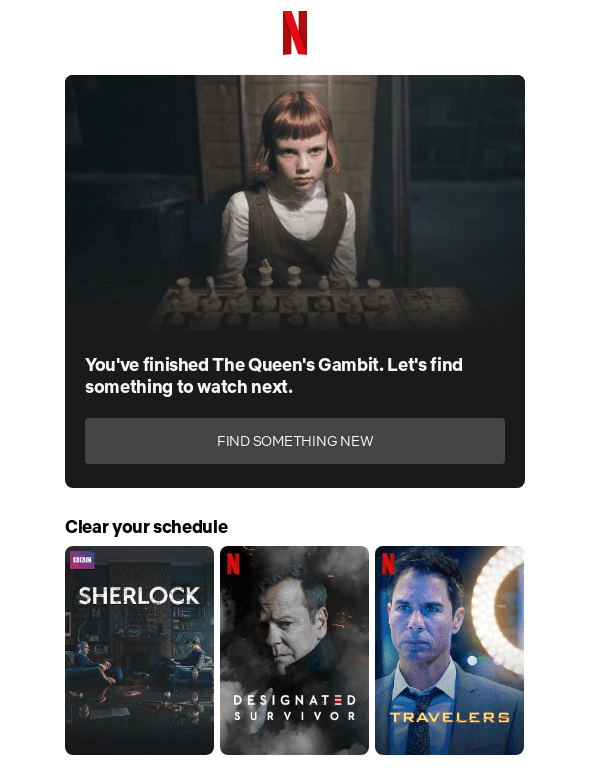
Here are great examples from Airbnb and Netflix:
Airbnb personalized their email header based on the recent lodging orders of subscribers on their site, showcasing an excellent way to engage their audience.

Here you can see that Netflix sent new show suggestions only after the viewer finished their last series.
How to Personalize Emails (Step-by-Step)
You don’t need to personalize everything at once. Start with one clear use case, make sure the right data is available, and build from there.
Here’s the personalization flow in the Sender app (steps checked on August 2026):
- Collect the fields you need. Decide what data will drive the personalization, such as first name, location, interests, purchase history, or engagement activity.
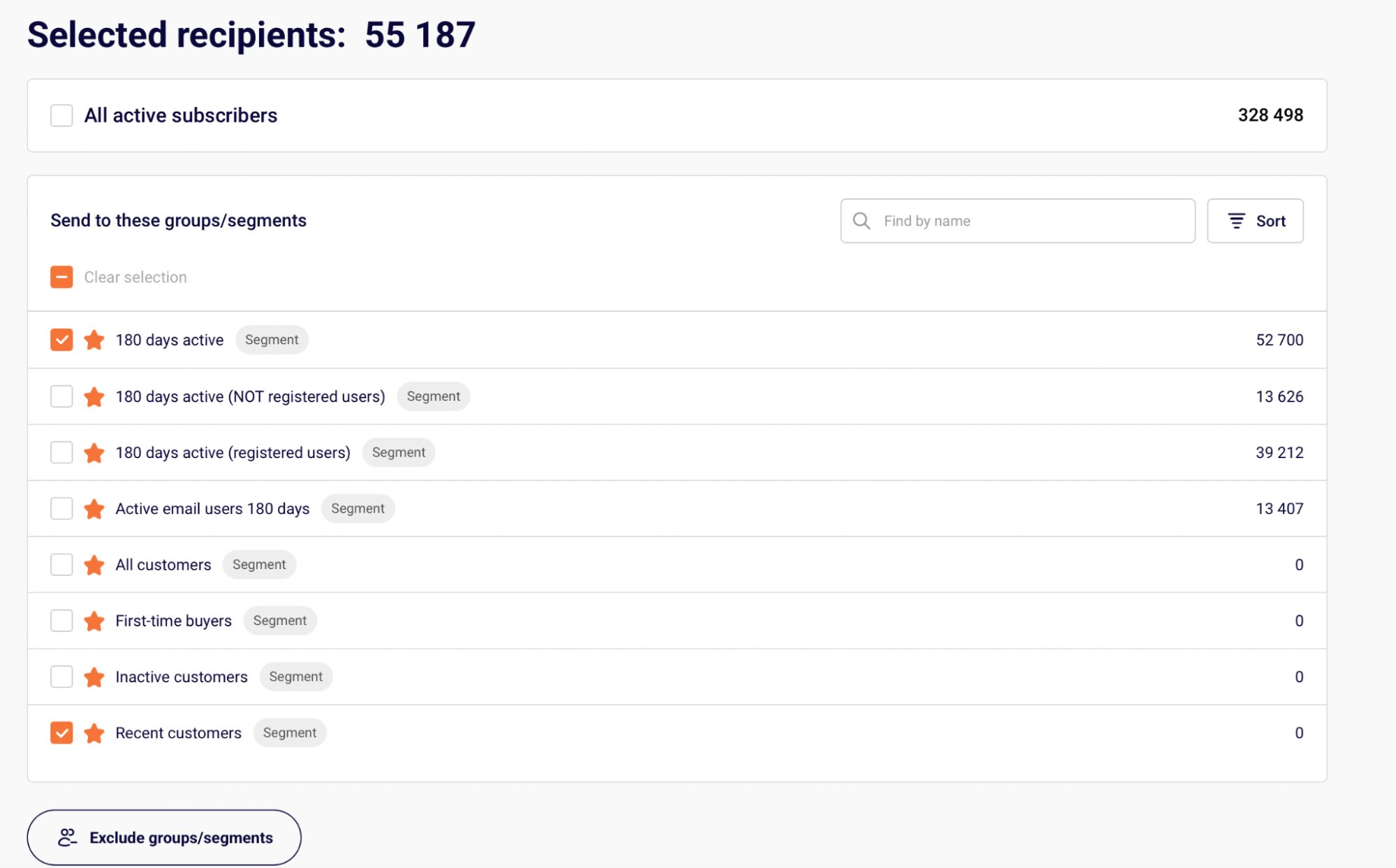
Result: each subscriber has the fields needed for the campaign. - Build a segment. Group subscribers based on a shared attribute or behavior, such as recent buyers, inactive subscribers, or people interested in a specific category.
Result: you have a defined audience for the personalized message.
- Choose the personalization type. Decide whether the campaign needs field insertion, segment-based content, a behavioral targeting trigger, dynamic email content, or another personalization method.
Result: you know exactly what will change for each recipient. - Add the personalization. Insert personalization tags (also known as merge tags) for stored fields, or use a Liquid condition when different subscribers should see different content blocks.
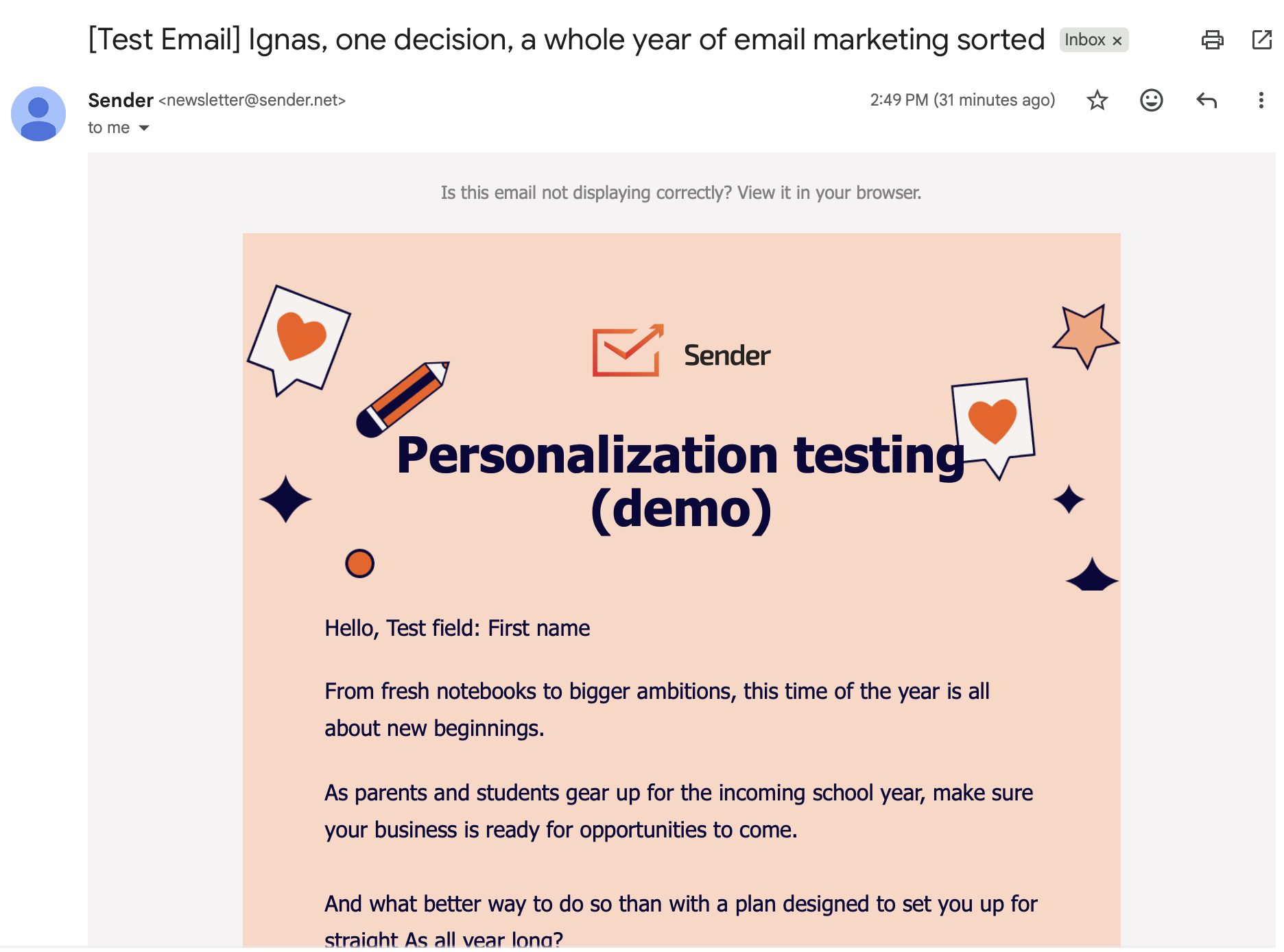
Result: the email displays content based on subscriber data. - Send a test email. Test the campaign with personalization enabled and check that names, fallback values, conditions, links, and content display correctly.
Result: you can see what the recipient will actually receive before sending.
- Measure the results. Track opens, clicks, conversions, and other campaign goals, then compare the personalized version with a control where possible.
Result: you can see whether personalization actually improved performance and use those insights in the next campaign.
Email Personalization Best Practices
Good email marketing personalization should make an email more relevant without making it feel forced. These email personalization best practices can help you get better results while keeping the experience useful for subscribers.
Use subject line personalization when it adds context
Personalized subject lines work best when the detail actually makes the message more relevant. Use a subscriber’s name, interest, recent activity, or offer when it fits naturally rather than adding personalization just for the sake of it. A subject line such as “[Name of the item customer opted to be informed about] is back in stock!” can feel more useful than a generic promotion.
Use a personal sender name when there’s a real relationship
A personal sender name can work well for B2B or account-managed lists, where subscribers know their sales representative, account manager, or customer success contact. For B2C campaigns, a recognizable brand name may be more effective because subscribers can immediately identify who the email is from.
Localize content for audiences in different markets
Localization matters when you email subscribers across countries, languages, currencies, or time zones. Adapt details such as language, local holidays, prices, units, and send times where appropriate. The goal is to make the message fit the recipient’s context, not simply translate the copy.
Test personalization against a control
Use A/B testing when you want to know whether a personalized element actually improves results. Compare the personalized version with a non-personalized control and measure opens, clicks, conversions, or revenue per send. This helps you separate real improvements from assumptions.
Adjust frequency and send time to subscriber behavior
Frequency and send-time optimization is useful when engagement differs across your audience. Someone who regularly opens weekly emails may respond well to that cadence, while less active subscribers may need fewer messages. Send-time data can also help you reach subscribers when they’re more likely to engage.
Build customer profiles gradually
Progressive profiling works best when you need more information but don’t want to ask for everything at signup. Start with essential fields, then collect additional preferences through later forms, surveys, purchases, and interactions. This keeps forms shorter while improving your personalization data over time.
Respect consent and always use fallback values
Consent and fallback values matter whenever customer data is used in an email. Personalize only with data subscribers have agreed to provide or that you can appropriately use, and respect their preference settings. For personalization tags, add a sensible fallback so missing or outdated data never results in an awkward greeting or empty field.
Where AI fits (and where it doesn’t)
AI can make personalization easier when you already have reliable customer data to work with. AI email personalization can help identify patterns, suggest relevant products or content, optimize send times, and create message variations for different audience segments. This is especially useful when you’re working with large lists that would be difficult to personalize manually.
But AI doesn’t replace the basics. It can’t fix missing or inaccurate customer data, decide what subscribers have consented to, or guarantee that a message will feel relevant. Use it to support your email personalization strategy, not to run it on autopilot. Keep clear rules, fallback values, and human review in place before sending personalized campaigns at scale.
Email Personalization Examples
Your brain must be brimming with email campaign personalization ideas by now. We’ve gathered some great examples of personalized email campaigns if you need some inspiration. Let’s have a look at how brands are using different types of personalized email campaigns:
Welcome email with a personalized subject line (Sonic)
Welcome emails set the tone for a new subscriber relationship. Sonic adds a simple personal touch by including the subscriber’s first name in the subject line:
Subject Line: Robert,🎉 Welcome to All Things Sonic 🎉
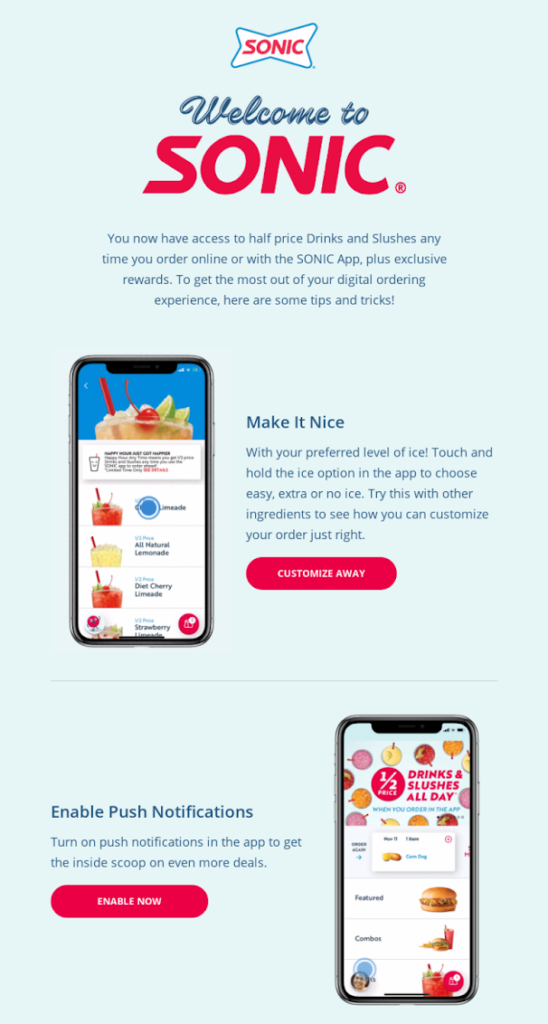
Using a first name is basic personalization, but it can make an otherwise standard welcome email feel more relevant. The same tactic can also be used naturally within the email copy.
Browse-based recommendations (Air New Zealand)
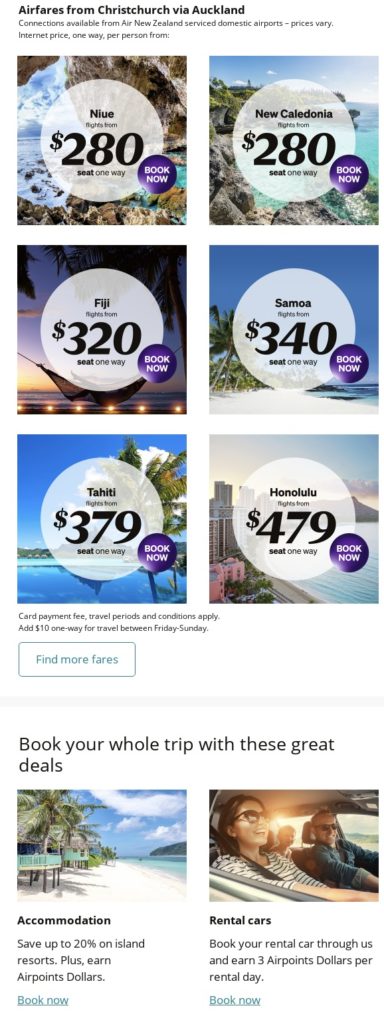
Air New Zealand uses browsing behavior to make its promotional emails more relevant.
Subject Line: Lisa, The Islands are Calling
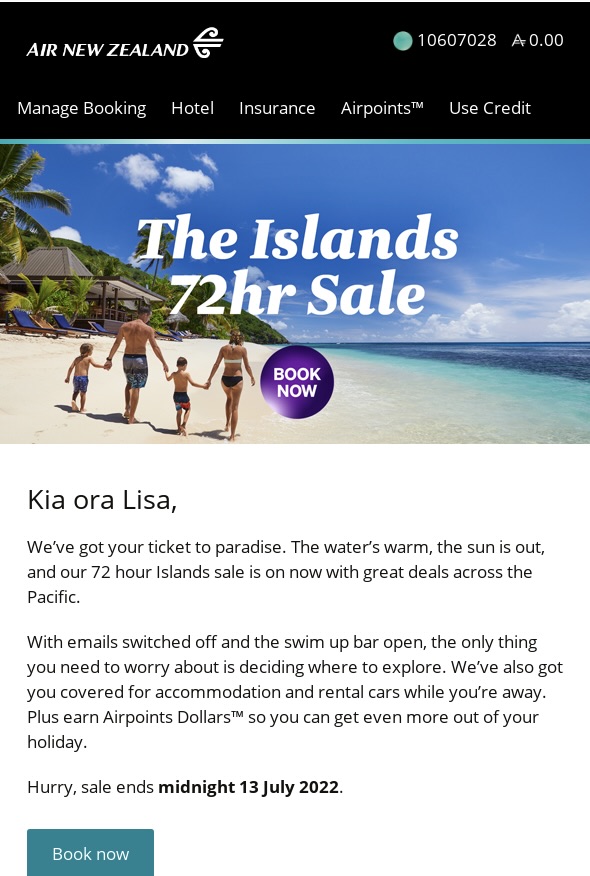
The email combines a personal greeting with destination offers based on the recipient’s browsing activity, helping connect the promotion with destinations they have already shown interest in.
Content recommendations from reading history (Food Network)
Content recommendations can also be personalized using website activity. Food Network, for example, pairs a featured recipe with “Top Picks” based on the user’s interests and browsing history.
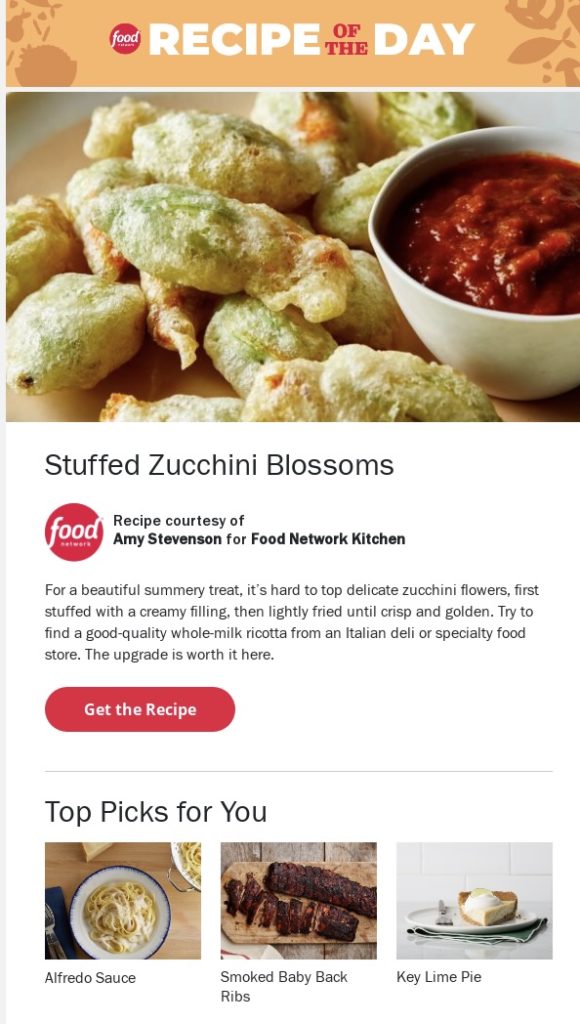
This approach can help publishers surface more relevant content and encourage subscribers to return to the website.
Cart recovery tiered by cart value (Selkirk Sport)
Abandoned cart emails can change based on what shoppers leave behind and the value of their cart.
Subject Line: Time is ticking
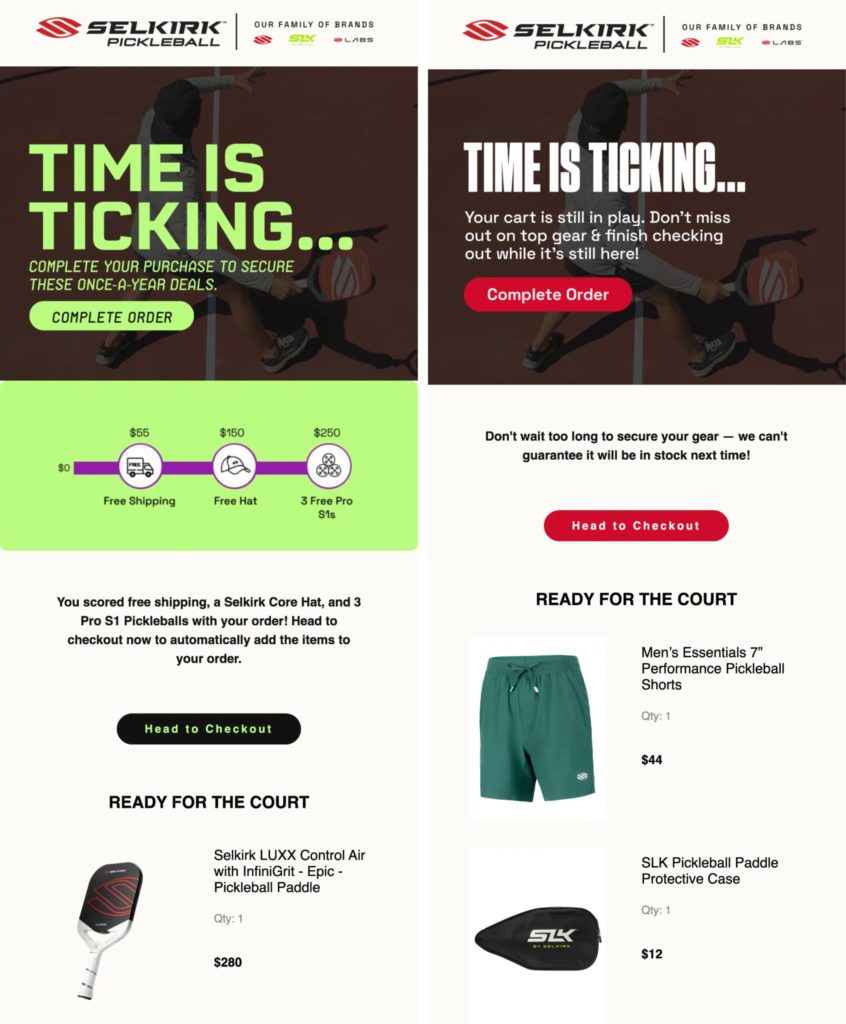
Selkirk Sport adjusts its abandoned-cart flow on Maestra using these signals. High-value shoppers with a paddle in their cart see incentives increase as the order grows, starting with free shipping and adding free gear at higher cart values.
Shoppers who abandon accessories instead receive messaging that those items may run low or sell out. This recovery flow contributed to a 55% jump in email-attributed revenue.
Win-back for inactive subscribers (Mountain Hardwear)
Win-back emails target subscribers who have stopped engaging.
Subject Line: Just checking in with you, Lori
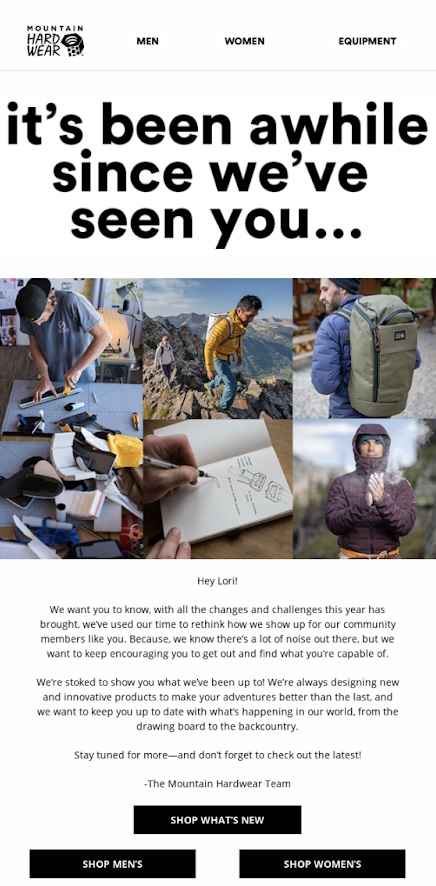
Mountain Hardwear combines a personalized subject line with a personal note and relevant CTAs to reconnect with inactive subscribers and encourage them to return.
Time-zone countdown (Ask and Embla)
Dynamic content changes based on subscriber data, behavior, or context. Some real-time content is selected at send time, while live elements can update when an email is opened.
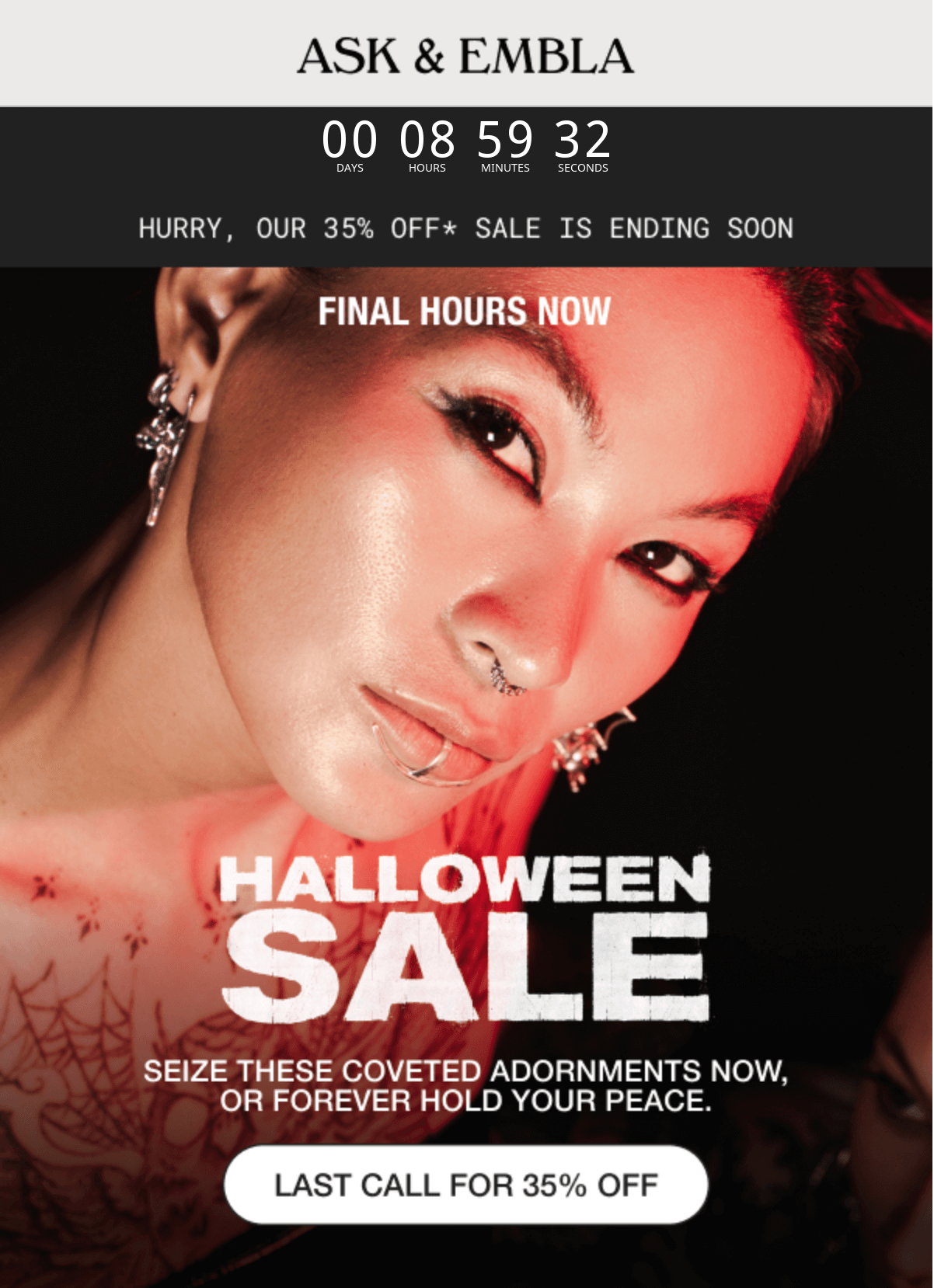
Ask and Embla uses a countdown timer customized to the subscriber’s time zone, so recipients see the correct amount of time remaining when they open the email.
Common Email Personalization Mistakes
Relying on first-name personalization alone
Using a subscriber’s name is a good start, but it doesn’t make an email truly personal. If the rest of the message is generic, the effect is limited. Use interests, behavior, purchase history, or preferences to make the content more relevant.
Using stale or incorrect data
Personalization only works when the data behind it is accurate. An outdated location, misspelled name, or empty field can make an email feel careless. Keep customer data updated and always set a fallback value for personalization tags in case a field is missing.
Over-personalizing the message
There’s a fine line between relevant and intrusive. Mentioning too much about a subscriber’s browsing activity or behavior can make the email feel like surveillance. Use only the data that helps make the message more useful, not everything you happen to know.
Ignoring consent and preferences
Just because you have customer data doesn’t mean you should use all of it. Respect consent, subscription choices, and preference-center settings when deciding what to personalize and which emails to send.
Personalizing without a control
If every subscriber receives a personalized version, you won’t know whether personalization actually improved the result. Test personalized emails against a non-personalized control and compare metrics such as opens, clicks, conversions, and revenue per send. That way, you can see which email personalization techniques are worth keeping.
Next Steps
If you haven’t segmented your list yet, start with our customer segmentation guide to get going. If your segments are already in place, make sure your email platform supports the automation and personalization you’ll need, then start with a simple personalized subject line or tag – our guide on personalization basics walks you through the setup.
Once you’ve covered the basics, use more customer and behavioral data to build increasingly relevant funnels, dynamic content, and behavioral triggers – our personalization-focused page shows exactly what those advanced features look like in practice. From there, keep reviewing your results and revisiting your personalization strategy to spot new opportunities and improve what you send.