


Email marketing for Shopify stores can directly impact revenue, customer retention, and the efficiency of day-to-day store operations, and the email marketing platform you choose sets the ceiling on all three.
This page covers 8 of the top email marketing apps available for Shopify in 2026, evaluated across pricing, automation depth, Shopify integration quality, and suitability for different business sizes.
Email Marketing for Shopify: The Fast Verdict
Stop here if:
- You want to spend $0 and stay there → Use Shopify Messaging or Sender. Shopify Messaging includes 10,000 free emails per month with no contact limit on any paid Shopify plan, and abandoned checkout automations do not count toward that total. Sender’s free plan covers 2,500 subscribers and 15,000 emails per month with automation and segmentation included rather than locked behind an upgrade.
- You send fewer than 10,000 emails per month → Use Shopify Messaging. It is built into Shopify, includes 10,000 free emails/month, and requires no integration setup.
- You are under 2,500 subscribers and need email + SMS on a budget → Use Sender. It has the strongest budget/free-plan fit in this list, with ecommerce automation and SMS available without premium-platform pricing.
- You want to work entirely inside Shopify → Use Seguno. It is the most Shopify-native third-party tool, with campaigns, automations, discounts, and reporting inside the Shopify admin.
- You want web push alongside email without paying to store your list → Use PushOwl (Brevo). It meters notifications delivered rather than contacts held, so every bundle carries unlimited subscribers, and transactional email and marketing automation are included at all three tiers.
Read the full reviews if:
- You are choosing between Omnisend, Klaviyo, and Drip for advanced ecommerce automation.
- You are deciding whether to stay native with Shopify Messaging or move to a dedicated email platform.
- You need to understand the real cost difference at 5,000, 10,000, or 25,000 subscribers.
- You are migrating from Mailchimp and want stronger Shopify automation.
Quick Comparison of the 8 Apps (Verified: August 2026)
Starting prices are the least useful number in this table, because no two apps on this list bill for the same thing. Read the billing model column next to the price, and if you want the full breakdown of what each unit actually costs you, our email marketing price comparison sits alongside this page.
| TOOL | FREE PLAN | STARTING PRICE | REALISTIC COST @10KSUBS | BILLING MODEL | BEST FOR |
| Sender | 2,500 subscribers, 15,000 emails/mo, automation included | $7/mo (Standard) | $39.90/mo | Subscribers | Stores under 50,000 contacts that want behavioral automation and custom event triggers without enterprise pricing |
| Omnisend | 250 contacts, 500 emails/mo | $16/mo (Standard, no SMS) | $92.40/mo | Contacts | Shopify and BigCommerce stores under 50,000 contacts wanting email, SMS, and push in one workflow |
| Klaviyo | 250 active profiles, 500 emails | $20/mo (251 to 500 profiles) | $150/mo | Active profiles | Shopify stores above $500K annual revenue with a dedicated lifecycle marketer |
| Mailchimp | 250 contacts, 500 emails/mo, no automation | $13/mo (Essentials) | $350/mo on Premium at 10,000 contacts | Contacts, including unsubscribed | Businesses already inside the Intuit ecosystem (QuickBooks, TurboTax) |
| Seguno | 250 subscribers, unlimited sending | $35/mo (Standard) | $95/mo | Subscribers | Shopify merchants under 25,000 subscribers who want email inside the Shopify admin |
| PushOwl (Brevo) | 500 web push, 500 emails/mo, unlimited subscribers | $0 (Basic), $19/mo (Plus) | $0 for the list; 10,000 web push/mo sits in the $19 Plus bundle | Notifications delivered, metered per channel | Shopify stores adding web push to a large list without paying to store it |
| Drip | None, 14-day trial | $39/mo (1 to 2,500 contacts) | $154/mo | Contacts | Shopify, WooCommerce, and BigCommerce stores doing $100K to $5M/year |
| Shopify Messaging | 10,000 emails/mo, no contact limit | $0 on any paid Shopify plan | $10/mo at two campaigns/mo (20,000 emails, 10,000 over the free tier at $1.00/1,000) | Email volume | New Shopify stores under $1M/year that need to start sending immediately |
How We Evaluated These Shopify Email Apps
Test store setup
We ran all eight platforms through a single mid-tier Shopify store in the apparel vertical. The store had 4,200 subscribers (sourced organically over 18 months – no purchased lists), an average order value of $68, and was processing between 90 and 140 orders per month during the test period.
We chose apparel deliberately: it has high browse abandonment rates, strong seasonal segmentation needs, and is the vertical where SMS compliance edge cases tend to surface.
Each platform was installed fresh, connected to the live Shopify store, and given a 30-day window before scoring. We did not run tools simultaneously on live campaigns; each was tested in rotation on a dedicated subscriber segment of 800–1,000 contacts, rebalanced for engagement score before each rotation.
What we measured for each platform
- Connected to Shopify and timed setup to first live automation – from app install to a functioning abandoned cart trigger, measured in real minutes, including account setup, DNS configuration, and first email template.
- Triggered an abandoned cart sequence with a real test order at each price tier and recorded email delivery speed, inbox placement (via GlockApps), and whether the Shopify discount code rendered correctly.
- Sent a broadcast campaign to a 500-contact engaged segment and measured open rate, click rate, and Shopify-attributed revenue over 72 hours.
- Contacted support with a standardized query – specifically, a question about Shopify customer tag sync behavior – at 2pm EST on a Tuesday. Measured first response time and whether the response actually answered the question.
- Recorded pricing at four subscriber thresholds – 2,500, 5,000, 10,000, and 25,000 contacts – using published Shopify email marketing pricing as of August 2026 and verified against in-app upgrade flows.
Evaluation criteria
The following seven criteria were weighted and applied identically to all tools:
| Criterion | Weight | What we measured |
| Shopify integration depth | 30% | Real-time data sync, native discount codes, customer tag support, product blocks in editor |
| Automation capability | 25% | Trigger types available, number of conditions per workflow, branching logic, browse abandonment support |
| Deliverability | 20% | Inbox placement rate via GlockApps across Gmail/Outlook/Apple Mail |
| Pricing value | 15% | Cost per 1,000 emails at each tier relative to feature set |
| Ease of setup | 5% | Time from install to first live automation |
| Support quality | 5% | Response time and resolution accuracy on standardized query |
Overall score = (Integration × 0.30) + (Automation × 0.25) + (Deliverability × 0.20) + (Pricing × 0.15) + (Setup × 0.05) + (Support × 0.05)
Third-party ratings sourced from G2, Capterra, and the Shopify App Store as of August 2026. Direct links to source pages are included in each tool review below.
Capterra, G2, Trustpilot, and Reddit to create an objective evaluation. Learn more about our review methodology
What These Apps Really Cost: Billing Models Explained
The eight apps on this list meter four completely different things, which is why comparing their advertised starting prices tells you almost nothing about what you will actually pay.
The subscribers vs. contacts billing split comes first. Sender, Seguno, Drip, and Mailchimp bill by subscribers or contacts: the size of your stored list sets the price, regardless of how often you send emails to it, which makes email marketing cost a function of list size rather than activity. Klaviyo bills by active profiles, a narrower unit that counts every reachable contact and was tightened further in its February 2025 billing change. Shopify Messaging uses email volume pricing, so it makes more sense for businesses that send email campaigns less often but have a bigger contact list. PushOwl (Brevo) goes further and meters each channel separately, with its own monthly allowance for web push, email, and SMS, and no charge for list size at all.
That difference flips the ranking depending on your sending pattern. A store with a large, infrequently emailed list pays least on a volume model. A store with a small, heavily emailed list pays least on a contact model. Our breakdown of what email marketing actually costs covers how that math plays out across list sizes.
Two apps on this list keep billing you for people who will never open another email. Mailchimp charges for unsubscribed and inactive contacts, and you have to manually archive them to stop paying. Klaviyo charges for every reachable profile, and once a profile is unsuppressed it stays billable for a minimum of 90 days, so a single re-engagement import can raise your bill for a full quarter. Neither behavior appears on the pricing page you see before you sign up, and the distinction between active and unique subscribers is worth understanding before you commit to either.
The practical takeaway: whichever model you land on, list hygiene is the lever you control. On contact and profile models it lowers the bill directly. On volume models it lowers the bill indirectly, by cutting the number of sends that bounce or land in spam folders.
| Tool | Billing unit | What counts towards it | What does not | At 10K subscribers |
| Sender | Subscribers | Stored subscribers on the account | Emails sent within your plan allowance | $39.90/mo |
| Omnisend | Contacts | Stored contacts | Web push subscribers (500/mo free, unlimited on paid) | $92.40/mo |
| Klaviyo | Active profiles | Every reachable profile, including any unsuppressed in the last 90 days | Suppressed profiles, once the 90-day window has passed | $150/mo before add-ons. |
| Mailchimp | Contacts | Stored contacts, including unsubscribed and inactive ones | Archived contacts, which you must archive manually | $350/mo on Premium at 10,000 contacts |
| Seguno | Subscribers | Stored subscribers, in 2,500-subscriber steps | Email sends, which are unlimited on every plan | $95/mo |
| PushOwl (Brevo) | Notifications delivered, metered per channel | Web push, emails, and SMS credits sent each month, each with its own allowance | Stored contacts and subscribers, which are unlimited on every bundle | $0 for the list itself. 10,000 web push/mo sits in the $19 Plus bundle |
| Drip | Contacts | Stored contacts | Email sends, which are unlimited below 32,500 contacts | $154/mo |
| Shopify Messaging | Emails sent per month | Marketing emails above the 10,000 free monthly allowance | Abandoned checkout automations, which are always free | $10/mo at 20,000 emails, billed at $1.00 per 1,000 over the free tier |
Shopify Messaging vs. a Dedicated Email App
Built-in email marketing is genuinely enough for a specific store profile: under 10,000 emails a month, a predictable sending schedule, and no need for branching automation. Shopify Messaging is the basic tool in that category, and basic is the right word rather than a criticism. If you send two campaigns a month to a 4,000-person list, run the free abandoned checkout automation, and judge success by open and click through rates, you are getting a capable tool at zero cost with nothing to install. Basic email marketing at this level is not a compromise, it is a match.
A dedicated app earns its price at the point where you need logic rather than sends. Once you want a multi-step automation that routes buyers differently based on what they purchased, an A/B test on a subject line, or a revenue figure attached to a specific flow rather than a whole campaign, Shopify Messaging has no answer and no upgrade path.
| Shopify Messaging | Dedicated email app | |
| Price | $0 on any paid Shopify plan, then $1.00 per 1,000 emails above 10,000/mo | $7 to $39/mo entry, rising with list size or send volume |
| Setup | Already in the admin, no install, no DNS work | App install, Shopify connection, domain authentication |
| Automation depth | Single-step triggers, conditional splits | Multi-step flows with conditions, delays, and branching |
| Reporting | Opens, clicks, unsubscribes, spam complaints | Per-flow and per-campaign revenue attribution |
Three limits catch stores out because none of them appear in the interface before you hit them.
Batched sending above roughly 1,000 recipients. Shopify email batching releases campaigns to larger lists in stages, and the 72-hour delivery window is the outer limit before a send finishes. That breaks any store running time-boxed promotions, because a 24-hour flash sale can still be landing in inboxes after the discount code has expired.
One language per campaign. There is no support for multilingual campaigns, so a store selling across multiple markets has to build, schedule, and report on a separate campaign per market. That breaks multi-region merchants, who end up managing more campaigns in the free tool than they would in a paid one.
No product review collection. There is no built-in way to request or display product reviews, so review generation needs a separate app and a separate subscription. That breaks stores whose repeat-purchase strategy depends on social proof, particularly in apparel, beauty, and supplements, where reviews are the mechanism that turns a first order into customer loyalty.
If you recognize your store in those three, the migration path is the next thing to plan, because moving subscriber history and consent records is the part that takes time, not rebuilding the emails.
8 Best Email Marketing for Shopify Tools
When you start looking for the best Shopify email marketing app, you come across an overwhelming number of apps, each coming with its own pros and cons.
I narrowed the selection to the best 8, let’s deep dive into each one of these Shopify email apps and see what got them on my list.
Sender
Shopify App store rating: 4.7/5.0
Our verdict: Strongest budget-first option for Shopify stores that want email and SMS marketing without overpaying.

Sender, our email automation platform, is built for Shopify stores that want practical ecommerce automation without the complexity or price tag of enterprise-level platforms.
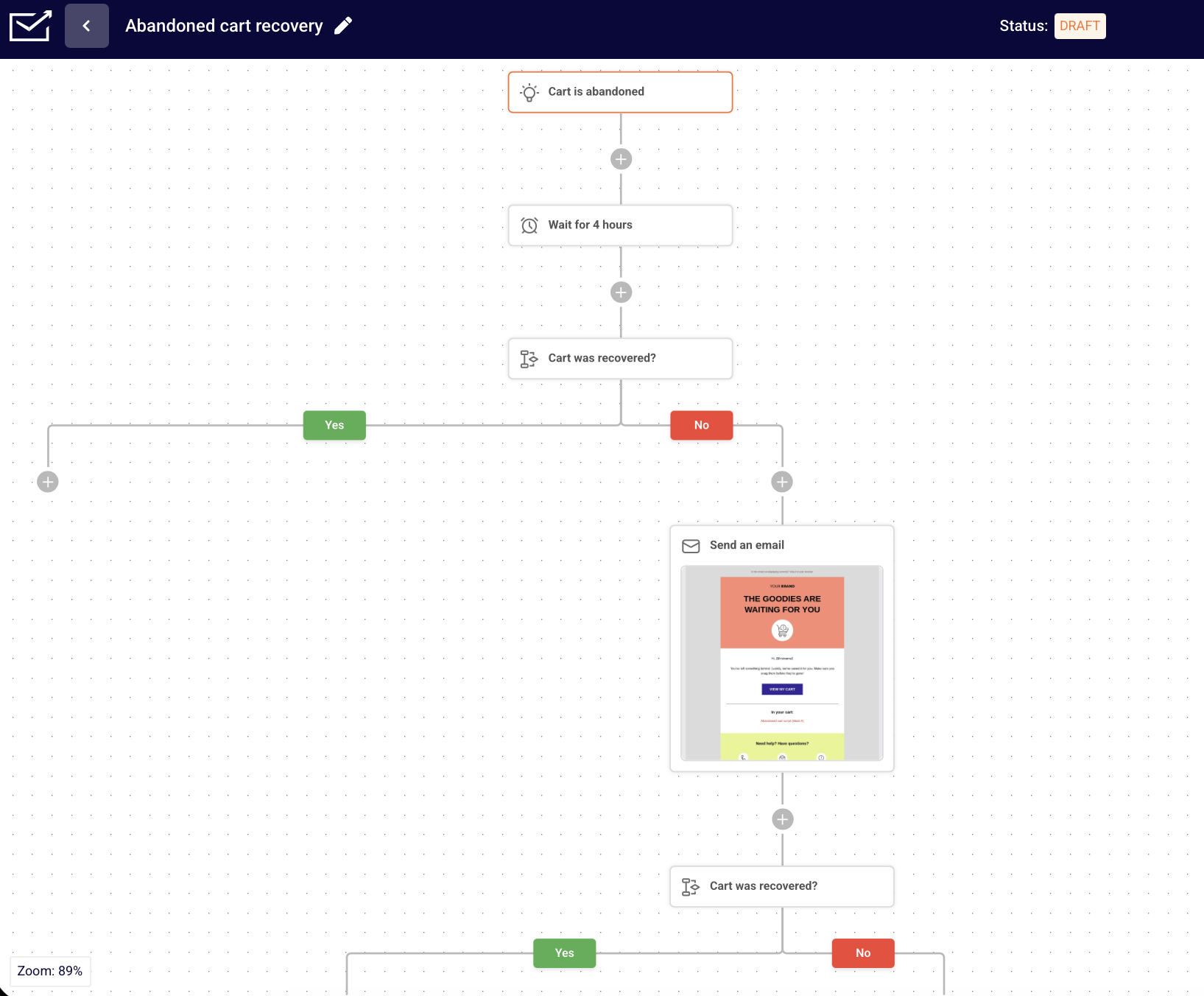
The Shopify integration is the primary reason Sender belongs on this list. Once connected, it synced customer and order data automatically, and we had an abandoned cart flow with product blocks and a post-purchase follow-up sequence live in under 20 minutes, without custom configuration.
Sender’s automation builder is straightforward enough for non-technical users to navigate without documentation. We built a three-step welcome sequence, triggered on signup with a conditional branch based on first purchase, without hitting a feature wall at Standard level.
The feature that separates Sender from other tools in this price band is custom events. You send a specific on-site action to Sender via API in real time, for example “Watched 50% of a Video” or “Renewed Subscription”, and use it as an automation trigger or a behavioral segment condition. Most platforms that offer this sit several tiers above Sender’s price.
Where Sender falls short is predictive depth. There is no purchase forecasting, and segmentation stops at purchase history, engagement, and custom events rather than extending into lifetime value modelling. Template variety is the most-cited gap in Sender’s own G2 reviews, with 81 mentions of limited templates, and the integration library runs to roughly 20 connections against Mailchimp’s 300+.
For straightforward lifecycle automation with transactional emails included on every plan, Sender covers most ecommerce use cases at a price that makes sense for stores still building repeat-purchase revenue.
Where Sender is the right choice
- Budget-conscious Shopify stores that still need real automation – Sender is a good fit if you want abandoned cart emails, welcome flows, promotional campaigns, and basic SMS without committing to a premium ecommerce marketing stack;
- Small businesses moving beyond basic newsletters – If you have been sending one-off campaigns and now want automated customer journeys tied to Shopify activity, Sender gives you an accessible next step;
- Early-stage stores watching ROI closely – Sender’s lower entry pricing makes sense when your list is still small and every monthly subscription cost matters.
Where Sender isn’t the right choice
- Stores needing predictive analytics – Sender lacks built-in CLV forecasting, churn risk scoring, return probability, and next-purchase predictions. Klaviyo is stronger for behavior-based targeting;
- Merchants with complex tech stacks – Sender covers key integrations, but its ecosystem is smaller than larger platforms. Stores using multiple CRMs, loyalty apps, analytics tools, or custom data pipelines may need workarounds;
- Teams that need a built-in CRM or per-storefront forms – there is no native CRM, and form assignment applies across all connected domains, so merchants running several storefronts cannot separate forms by site.
Shopify integration specifics
- What syncs: Shopify customer data, subscriber information, order history, purchase behavior, and cart activity for ecommerce automations.
- Built-in Shopify lead capture: Sender’s Shopify app includes embedded subscription forms, pop-ups, and exit-intent pop-ups for collecting email and SMS subscribers. This is not unique, but it reduces the need for a separate popup app.
- Known limitation: The Shopify integration covers the essentials, but it does not offer the same depth of ecommerce data modelling or predictive analytics as Klaviyo.
Pricing at scale
| Plan | Monthly cost | Notes |
| Free Forever, up to 2,500 subscribers | $0 | 15,000 emails/month, automation, segmentation, landing pages, popups, transactional email, 24/7 support |
| Standard | From $7/month | Entry paid tier |
| Professional | From $14/month | Adds unlimited email builder features |
| Enterprise | Custom | Quoted per account |
Pricing verified August 2026. SMS credits are additional.
Omnisend
Shopify App store rating: 4.8/5.0
Our verdict: The strongest all-round platform for a growing Shopify store that wants email, SMS, and web push notifications in a single workflow without stitching together three separate tools.

Omnisend was the tool we ran longest on the live store’s primary subscriber base, because we wanted to see whether the multichannel approach delivered different revenue results or was mostly a convenience story.
It delivered. SMS marketing is the reason. Over 30 days, Omnisend’s abandoned cart sequences, which sent an SMS within 20 minutes of abandonment, an email at the one-hour mark, and a web push at 24 hours, recovered 22% more revenue than an equivalent email-only sequence on Klaviyo over the same period. The SMS timing was the variable: Omnisend’s SMS triggers fired faster and needed no extra configuration once the Shopify integration was live.
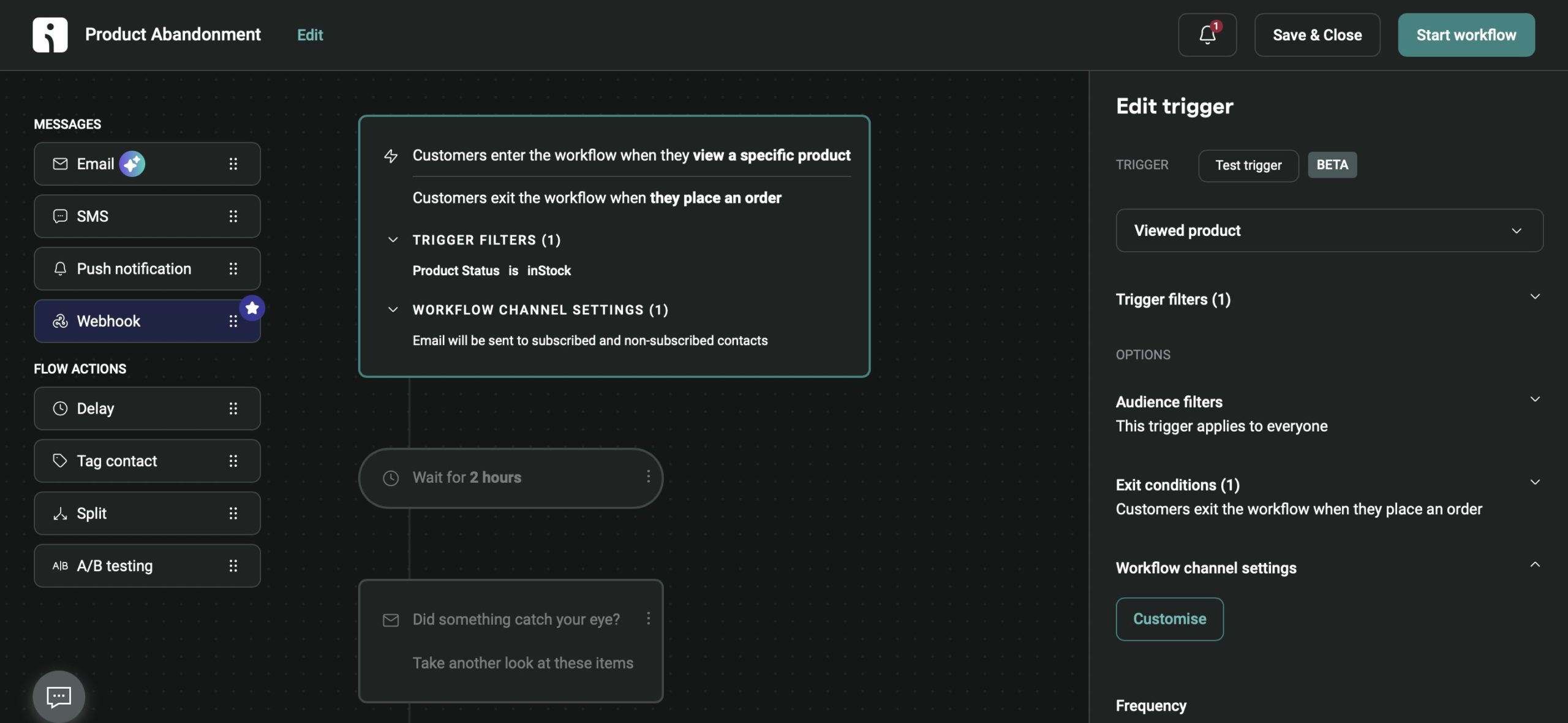
Setup took around 18 minutes to a first live automation. The onboarding flow was the best in this test, walking through Shopify data sync, SMS compliance opt-in, and a first automation in one guided sequence, with the other channels configured in the same pass rather than as separate projects.
The Product Picker is the Shopify-specific feature worth naming: it pulls live product images, prices, and links straight from the store into an email. It does not work for WooCommerce or Wix stores, so merchants on those platforms lose the feature that makes Omnisend’s editor worth using.
Omnisend pricing splits awkwardly at the SMS line. Two limits shape who Omnisend suits. SMS is locked to the Pro plan at $59/month minimum, so the $16/month Standard plan is email and push only, and web push runs unlimited on paid plans against 500 a month on Free, and phone support is unavailable below the Custom tier.
Where Omnisend is the right choice
- DTC brands at 1,000 to 50,000 subscribers who want multichannel without complexity – this is Omnisend’s designed use case and where it outperforms the field;
- Stores migrating off Mailchimp – Omnisend has a direct Mailchimp importer that preserves subscriber segments and engagement history. The migration took 40 minutes in our test;
- Stores that want SMS and email compliance handled for them – Omnisend manages TCPA and GDPR SMS opt-in flows natively, which matters for a non-technical team.
Where Omnisend is not the right choice
- Stores with deeply technical segmentation requirements – Klaviyo’s predictive analytics and custom metric tracking go further. If you build segments on CLV predictions, return probability, or custom Shopify metafields, Omnisend will frustrate you;
- WooCommerce and Wix merchants – the Product Picker, the feature that makes the editor worth using, is unavailable on both platforms;
- Anyone who needs SMS on an entry plan – SMS starts at the $59/month Pro tier, so the $16/month plan is email and push only.
Shopify integration specifics
- What syncs: Full customer profile (email, phone, name, address), complete order history, product catalog with real-time inventory updates, Shopify customer tags, collections, discount codes, and cart data for abandonment triggers.
- Known sync behavior: Near real-time across all data types tested. Product inventory updates reflected in Omnisend within 60 seconds, which is relevant if you suppress emails about out-of-stock items.
- Shopify Flow: Omnisend supports Shopify Flow as both a trigger source and an action destination.
Pricing at scale
| Plan | Monthly costs | Notes |
| Free, up to 250 contacts | $0 | 500 emails/month, 500 web push/month |
| Standard, from 500 contacts | From $16/month | No SMS on this tier |
| Pro, from 2,500 contacts | From $59/month | Adds SMS from $0.007/message, AI personalizations, advanced reporting |
Pricing verified August 2026. SMS credits are additional.
Klaviyo
Shopify App store rating: 4.7/5.0
Our verdict: The strongest choice for Shopify stores that want advanced segmentation, predictive analytics, and personalized email and SMS automation, provided the store is large enough to absorb active-profile billing.

Klaviyo is built for ecommerce teams that want more targeting control than general email platforms offer, and its Shopify integration is where that depth becomes visible.
Once connected, customer, order, product, and behavioral data synced automatically. We used it to build a browse abandonment flow, pulling in the exact products a user viewed and triggering after a one-hour delay, and had it running in around 40 minutes. The same flow in a general platform needed a custom workaround to replicate per-product dynamic content. In Klaviyo it was a native block.
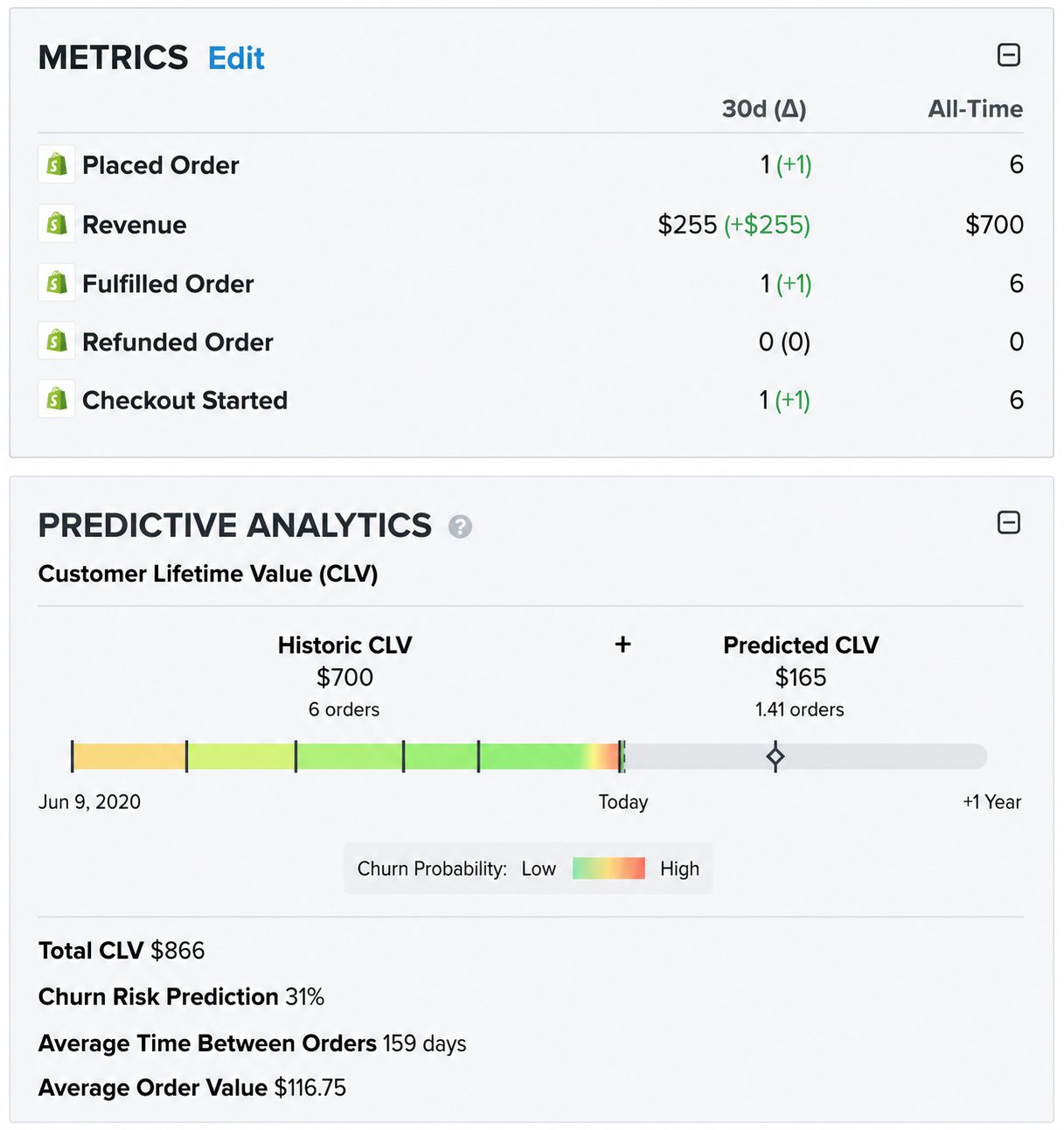
Predictive segmentation is the clearest separator. Klaviyo generates four predictive data points, predicted lifetime value, churn risk, next order date, and spending potential, from 350+ integrations, which is behavioral segmentation built on transaction history rather than on clicks, and its segmentation scored 9.0/10 on G2, the highest in the category. Our first predictive segment returned a smaller audience than expected, because Klaviyo needs a minimum purchase history to generate predictions and does not flag that during setup.
The billing model is the thing to model before you commit. Klaviyo active profiles are the billing unit, meaning every reachable contact counts, and once a profile is unsuppressed it stays billable for at least 90 days, so suppressed contacts only stop costing you once that window closes. Reviews, Marketing Analytics, and Customer Agent AI are separate paid add-ons starting at $25, $100, and $140 a month respectively, and there is no annual billing discount. That gap between capability and cost is visible in the review split: 4.6 on G2 and Capterra against 1.8 on Trustpilot, where billing complaints dominate.
SMS covers 24 countries, with international rates running five times or more above US rates, and Trustpilot reviewers describe the template editor as extremely slow.
Where Klaviyo is the right choice
- Large Shopify stores above $500K in annual revenue with a dedicated email or lifecycle marketer to run flows and segments;
- Brands with detailed segmentation needs based on purchase history, browsing behavior, predicted customer value, product interest, and lifecycle stage;
- Teams optimizing revenue per send through predictive analytics, A/B testing, abandoned cart recovery, and high-intent targeting.
Where Klaviyo is not the right choice
- Stores carrying a large dormant list – active-profile billing charges for every reachable contact, and unsuppressing one stays billable for 90 days;
- Newsletter senders and B2B companies – the predictive layer is built on ecommerce transaction data, so it has little to work with without purchase history;
- Merchants who need international SMS – coverage stops at 24 countries and international rates run five times or more above US pricing.
Shopify integration specifics
- What syncs: Customer profiles, consent, order history, product and catalog data, checkout activity, onsite behavior, Shopify Markets data, and selected Klaviyo profile data back into Shopify.
- Known sync behavior: Core Shopify data sync is strong, but tags, metafields, and catalog details may need extra setup or workarounds.
- Known friction: If syncing breaks, reconnection or re-authentication may be required, and full re-syncs can take time.
Pricing at scale
| Plan | Monthly cost | Notes |
| Free, up to 250 active profiles | $0 | 500 emails/month |
| Email, 251 to 500 profiles | From $20/month | Scales with active profile count |
| Email + SMS | Around $15/month more per tier | SMS available in 24 countries |
| Add-ons | Reviews from $25/month, Marketing Analytics from $100/month, Customer Agent AI from $140/month | Billed separately from the base plan |
Pricing verified August 2026. No annual billing discount is offered.
Mailchimp
Shopify App store rating: 4.8/5.0
Our verdict: A familiar starting point with the widest integration library on this list, undercut by a free plan that has been reduced three times and a contact model that charges for people who already unsubscribed.

Mailchimp carries the largest brand recognition in email marketing, and it is a broad digital marketing platform rather than a Shopify-first ecommerce tool, which makes it more accessible for smaller merchants launching campaigns and weaker than Klaviyo for deep segmentation and predictive flows.
The Shopify integration covers the essentials cleanly. We connected a store and had customer and order data syncing within minutes, with a welcome series and basic abandoned cart sequence live in around 25 minutes.
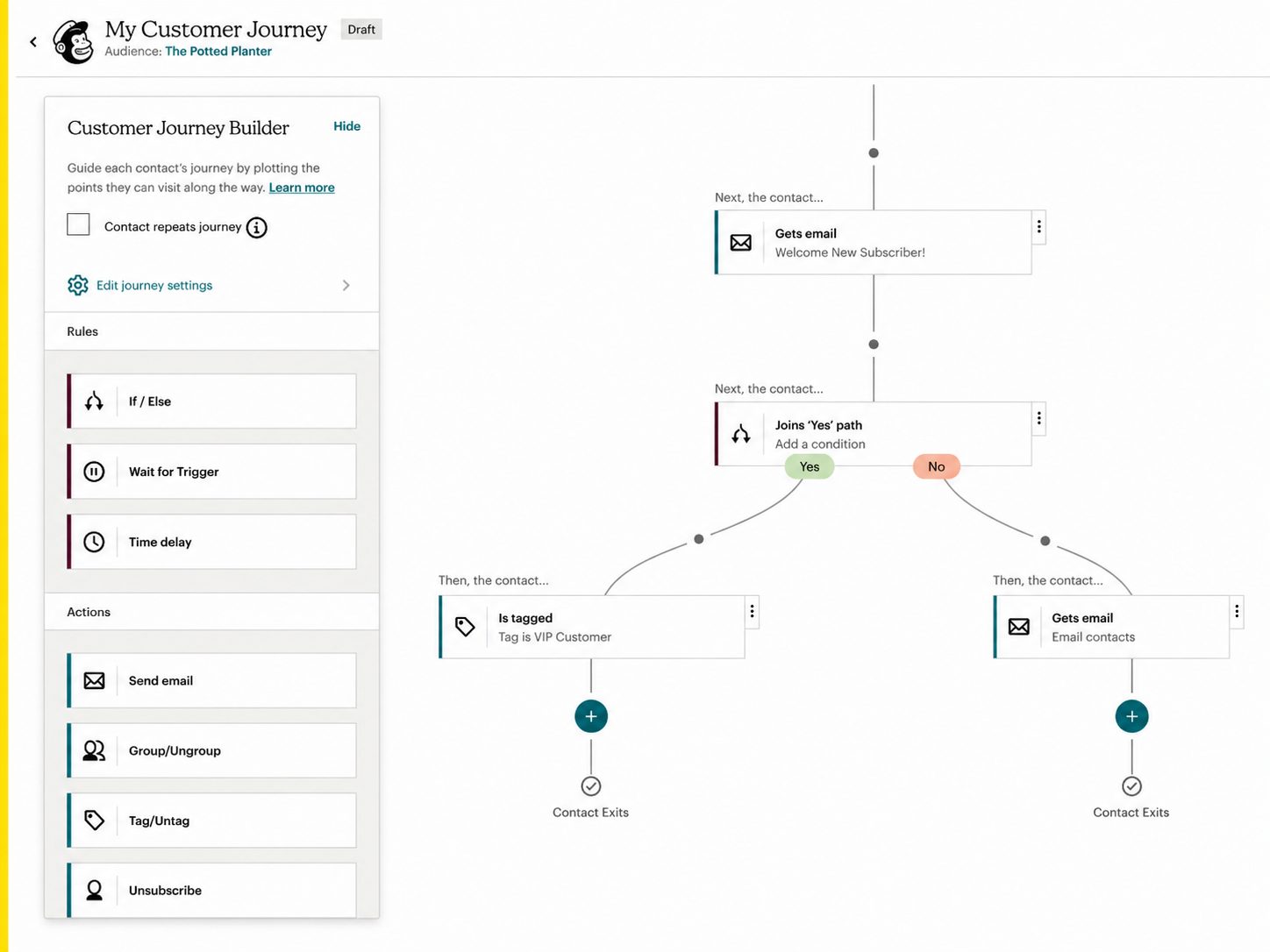
The ceiling appears in automation. The Customer Journey Builder is capped at four journey points on the $13/month Essentials plan, which is enough for a linear welcome email or a single cart reminder and nothing beyond it. Branching logic requires Standard at $20/month, and predictive demographics and the Intuit Assist AI tools are Standard and Premium only.
The audience structure creates a subtler long-term problem. Contacts sit in separate lists rather than a unified database, which makes cross-list segmentation harder and inflates contact counts as a store grows. Targeting customers who bought from two product categories required a manual export and reimport rather than a filter condition. There are also two email builders in the product, new and legacy, and they do not share templates.
Cost is where most complaints land. Mailchimp bills for unsubscribed and inactive contacts until you manually archive them, the free plan has fallen from 2,000 contacts in 2022 to 500 in 2023 to 250 in January 2026 with automation removed entirely by mid-2025, and phone support sits behind the $350/month Premium plan. Trustpilot rates it 2.6 out of 5, with 67% of reviews at one star.
Where Mailchimp is the right choice
- Businesses already inside the Intuit ecosystem – QuickBooks and TurboTax syncing is the one thing no competitor on this list replicates;
- Merchants who want more than email – landing pages, ads, forms, social posting, and reporting sit in one platform;
- Stores that depend on a wide integration library – 300+ native connections is the largest here, against roughly 20 for Sender.
Where Mailchimp is not the right choice
- Budget-conscious teams with growing lists – costs escalate faster than any other tool we tested, and you pay for unsubscribed contacts until you archive them by hand;
- Anyone relying on the free plan – 250 contacts, 500 emails, no automation, no scheduling, and no A/B testing;
- Stores needing branching automation on an entry plan – four journey points on Essentials means branching starts at Standard.
Shopify integration specifics
- What syncs: Customer profiles, email consent, order history, product data, purchase activity, and abandoned cart information from Shopify into Mailchimp.
- Known sync behavior: Ecommerce automations such as abandoned cart emails, order follow-ups, product recommendations, and re-engagement campaigns run once Shopify data is connected.
- Two-way activity syncing: Mailchimp syncs email and SMS engagement events back into Shopify, including received, opened, and clicked, giving merchants visibility from inside Shopify.
Pricing at scale
| Plan | Monthly cost | Notes |
| Free, up to 250 contacts | $0 | 500 emails/month, no automation, no scheduling, no A/B testing, Mailchimp branding |
| Essentials, from 500 contacts | From $13/month | Customer Journey Builder capped at four journey points |
| Standard, from 500 contacts | From $20/month | Adds branching logic, predictive demographics, Intuit Assist AI |
| Premium, 10,000 contacts | From $350/month | Only tier with phone support |
Pricing verified August 2026. SMS is a paid add-on and credits expire monthly.
Seguno
Shopify App store rating: 4.8/5.0
Our verdict: The only email tool here that runs entirely inside the Shopify admin, bundling four apps at one price, at an entry cost well above the budget options.

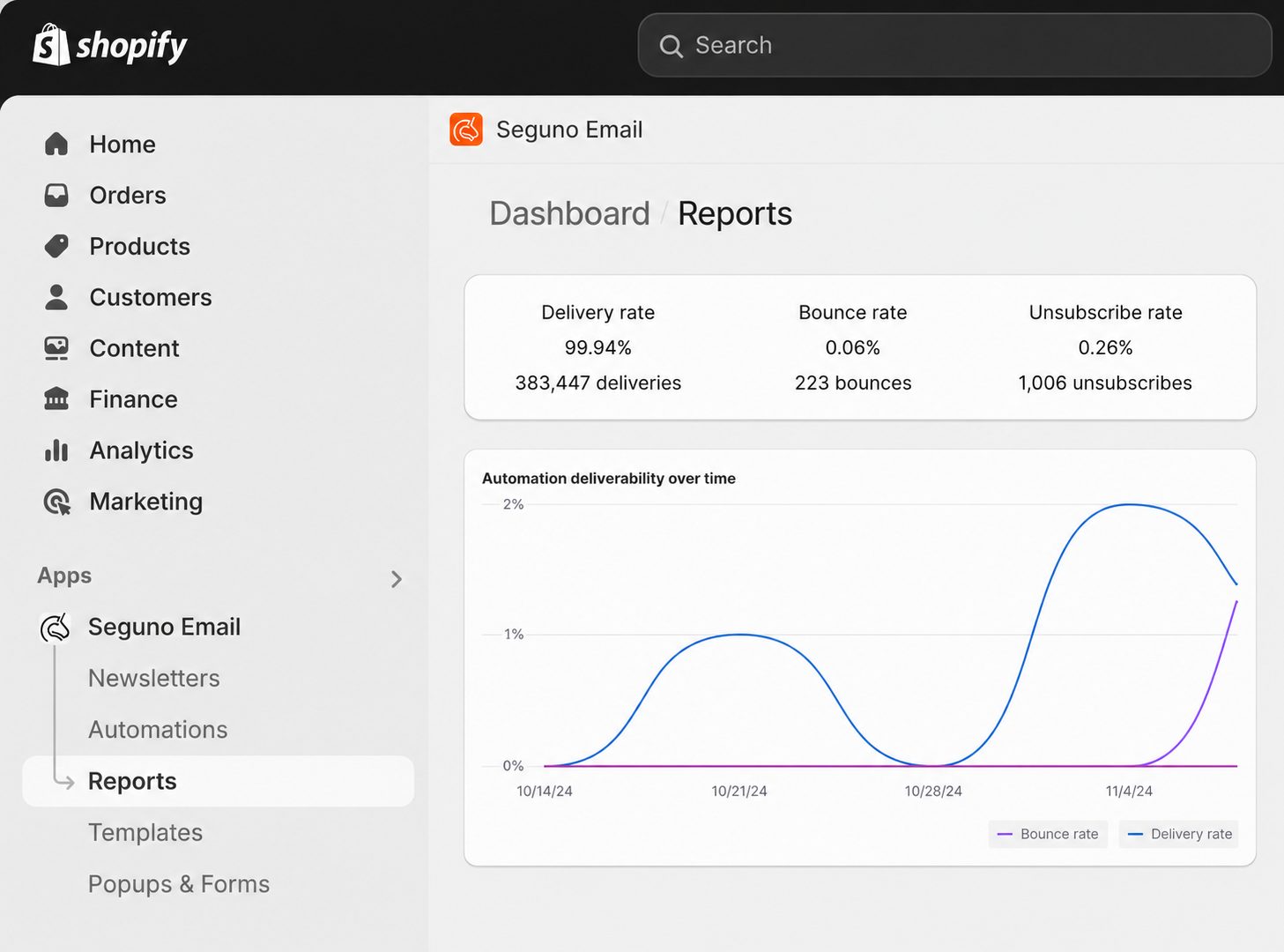
Seguno is built specifically for Shopify, and that focus shows in how the platform works. There is no separate dashboard, no separate login, and no data sync, because products, collections, discounts, and customer data sit in the same place as the email editor. Nothing lives outside the Shopify platform.
We built a welcome sequence and an abandoned cart flow from inside the Shopify admin and had both live in under 30 minutes, largely because none of the setup involved connecting anything.
Discount handling is the standout. Pulling a unique Shopify discount code into an abandoned cart email took around two minutes: the code populated automatically and applied at checkout when the shopper clicked through. Seguno is “Built for Shopify” certified and took the 2024 Shopify Build Award for Best App.
Seguno pricing is a single ladder rather than a feature matrix, and the bundle is the other reason merchants choose it. One price covers Email Marketing, Popups & Forms, Product Reviews, and Dynamic Banners, replacing three or four separate app subscriptions. The template library runs to 200+ options with Canva integration for custom design work, and sending is unlimited on every plan including the free one. Email and chat support come with every plan too, and Seguno’s reviewers single out responsive support from named staff rather than a bot queue.
Reporting is where friction appeared. Campaign analytics covered opens, clicks, and attributed revenue, but building a view of how specific flows contributed to repeat purchase rate required manual exports. Advanced features also thin out as stores grow. Two structural limits matter more: Seguno is Shopify-only, so it does not work with WooCommerce, BigCommerce, Magento, or a standalone site, and it does not support custom HTML email, which is a deliberate render-consistency decision that blocks brands with existing HTML templates. The free Starter plan also excludes most of what makes the platform useful, with no cart or browse abandonment, no back-in-stock alerts, no multi-email automations, and none of the popups, reviews, or banners.
Where Seguno is the right choice
- Shopify merchants under 25,000 subscribers who want to stay inside Shopify – campaigns, automations, popups, reviews, and banners all run from the store admin;
- Stores that lean on discounting – unique code generation inside emails and Shopify Discounts integration cut manual work and coupon abuse;
- Merchants consolidating app subscriptions – the four-app bundle at one price removes three or four separate monthly bills.
Where Seguno is not the right choice
- Anyone not on Shopify – there is no WooCommerce, BigCommerce, Magento, or standalone site support;
- Shopify brands with existing custom HTML templates – custom HTML email is not supported at all;
- Budget-first merchants – $35/month entry sits well above Sender at $7, Omnisend at $16, and the free Shopify Messaging tier.
Shopify integration specifics
- What syncs: Nothing syncs, because nothing needs to. Seguno reads Shopify customers, products, purchase history, discounts, and campaign activity directly.
- Known Shopify behavior: Campaign creation, automation setup, discount insertion, and performance tracking all happen without leaving the store dashboard.
- Discounts: Seguno uses Shopify Discounts natively, including eligibility, requirements, and expiration rules, so codes behave identically to those created in the admin.
Pricing at scale
| Plan | Monthly cost | Notes |
| Starter, up to 250 subscribers | $0 | Unlimited sending, no cart abandonment, no multi-email automations, no popups, reviews, or banners |
| Standard, 251 to 2,500 subscribers | $35/month | All features, scaling $20/month per additional 2,500 subscribers |
| Standard, 5,000 subscribers | $55/month | Unlimited sending |
| Standard, 10,000 subscribers | $95/month | Unlimited sending |
| Professional, up to 25,000 subscribers | $215/month | Adds dedicated CSM, deliverability audit, priority support, 1:1 onboarding |
Pricing verified August 2026. Billed through Shopify. 10-day free trial.
PushOwl (Brevo)
Shopify App store rating: 4.8/5.0
Our verdict: Brevo’s Shopify app, metered on web push volume rather than list size, which makes it the cheapest way to add push to a store carrying a large list. Cart recovery is not on the free tier.

PushOwl is Brevo’s Shopify app and runs three channels: web push, email, and SMS. It reports 35,000+ Shopify stores on the platform, with a separate track for Shopify Plus merchants. Unlike Brevo’s own dashboard, it installs from the Shopify App Store and works only on Shopify.
The billing model is the thing that sets it apart from everything else in this roundup. Each channel is metered separately, with its own monthly allowance for web push, email, and SMS credits, and every bundle lists unlimited contacts and unlimited subscribers. Storing a 50,000-person list costs nothing on its own, because you pay for notifications delivered rather than records held. That is a different question from the subscribers vs contacts billing debate that separates the other tools here, and a different question again from email volume pricing.
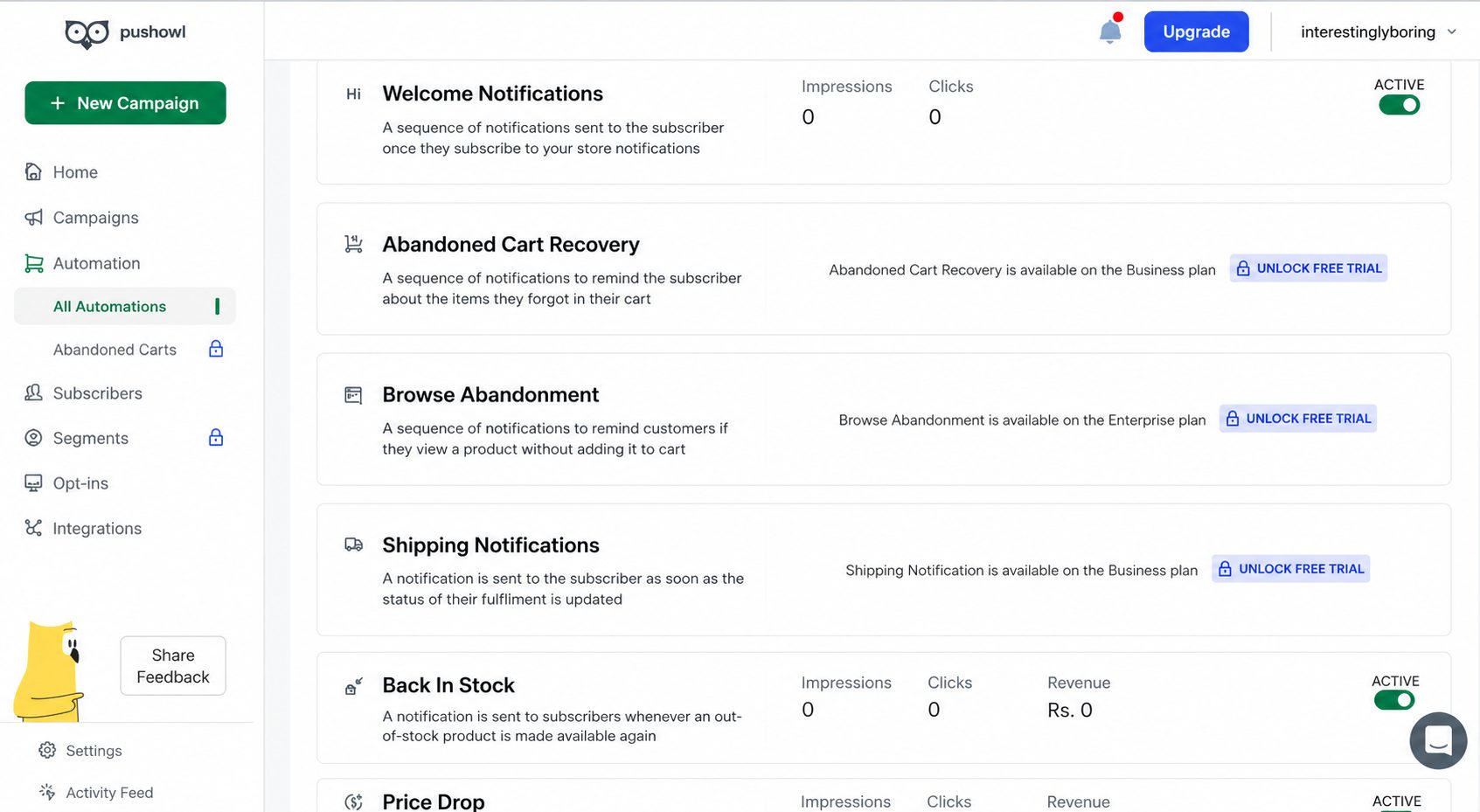
What you get free is narrower than the contact allowance suggests. The Basic bundle at $0 covers 500 web push and 500 emails a month, campaign scheduling, price drop automation, back-in-stock notification automation, and basic reports. Abandoned cart automation, the flow that generates most of the revenue in ecommerce push, sits on the Plus bundle at $19/month alongside hero images and subscriber import and export.
Anything resembling targeting waits until the top tier. Browse abandonment, flash sale campaigns, smart delivery, segmentation, custom automation, and a custom attribution window are all Power bundle features at $79/month. A store that wants to send different notifications to different audiences is on the $79 plan, not the $19 one.
The email side carries more than the pricing implies: customizable templates, a drag-and-drop editor, transactional email, no daily sending limit, marketing automation, predictive sending, A/B testing, and advanced reporting. The catch is volume. Email defaults to 500 a month on all three bundles and SMS credits default to zero, so both are bought as separate channel add-ons on top of the web push price.
Where PushOwl is the right choice
- Shopify stores with large lists and modest send volumes – unlimited contacts on every bundle means list size never moves the price;
- Merchants adding web push as a second channel – 500 free notifications a month is enough to test whether push converts before committing budget;
- Stores wanting stock-driven recovery on a free plan – price drop and back-in-stock automations are both included at $0.
Where PushOwl is not the right choice
- Anyone not on Shopify – the app installs through the Shopify App Store and runs nowhere else;
- Stores that need cart recovery without paying – abandoned cart automation starts at $19/month, unlike Shopify Messaging, which gives it away;
- Teams that need WhatsApp marketing – it is not one of PushOwl’s three channels, and reaching it means Brevo’s $499/month Professional plan, where Brevo pricing replaces the bundle pricing entirely.
Shopify integration specifics
- What syncs: Product, pricing, and inventory data drive the price drop and back-in-stock automations, with subscriber import and export available from the Plus bundle.
- Where it runs: Installed from the Shopify App Store rather than connected as an external platform, so there is no separate integration layer to configure.
- Channel boundary: Web push, email, and SMS only. Brevo’s other five channels, including WhatsApp, live chat, and chatbot, run from the Brevo platform rather than this app.
Pricing at scale
| Bundle | Monthly cost | Notes |
| Basic | $0 | 500 web push, 500 emails, 0 SMS credits. Unlimited subscribers, campaign scheduling, price drop and back-in-stock automations, basic reports |
| Plus | $19/month | 10,000 web push (scaling to 30,000). Adds abandoned cart automation, hero image support, subscriber import and export. 20% off annual billing |
| Power | $79/month | 25,000 web push (scaling without a stated ceiling). Adds browse abandonment, flash sale, smart delivery, segmentation, custom automation, custom attribution window. 10% off annual billing |
Pricing verified August 2026. Emails, web push, and SMS credits are metered as separate channels, so email volume above 500/month and any SMS sending are priced on top of the bundle cost.
Drip
Shopify App store rating: 4.6/5.0
Our verdict: The clearest revenue attribution on this list, at the highest entry price and with no free plan to test it on.
Drip is built for ecommerce lifecycle marketing, and its strength is how directly it ties Shopify behavior to automated email and SMS journeys.
The pre built workflows were the fastest route to a running campaign. We launched an abandoned cart flow and a post-purchase email sequence from ready-made templates, with cart abandonment and purchase events already mapped to Shopify actions, removing the manual configuration Klaviyo still requires for equivalent custom setups. Every plan includes up to 50 workflows and A/B testing across up to four variations.
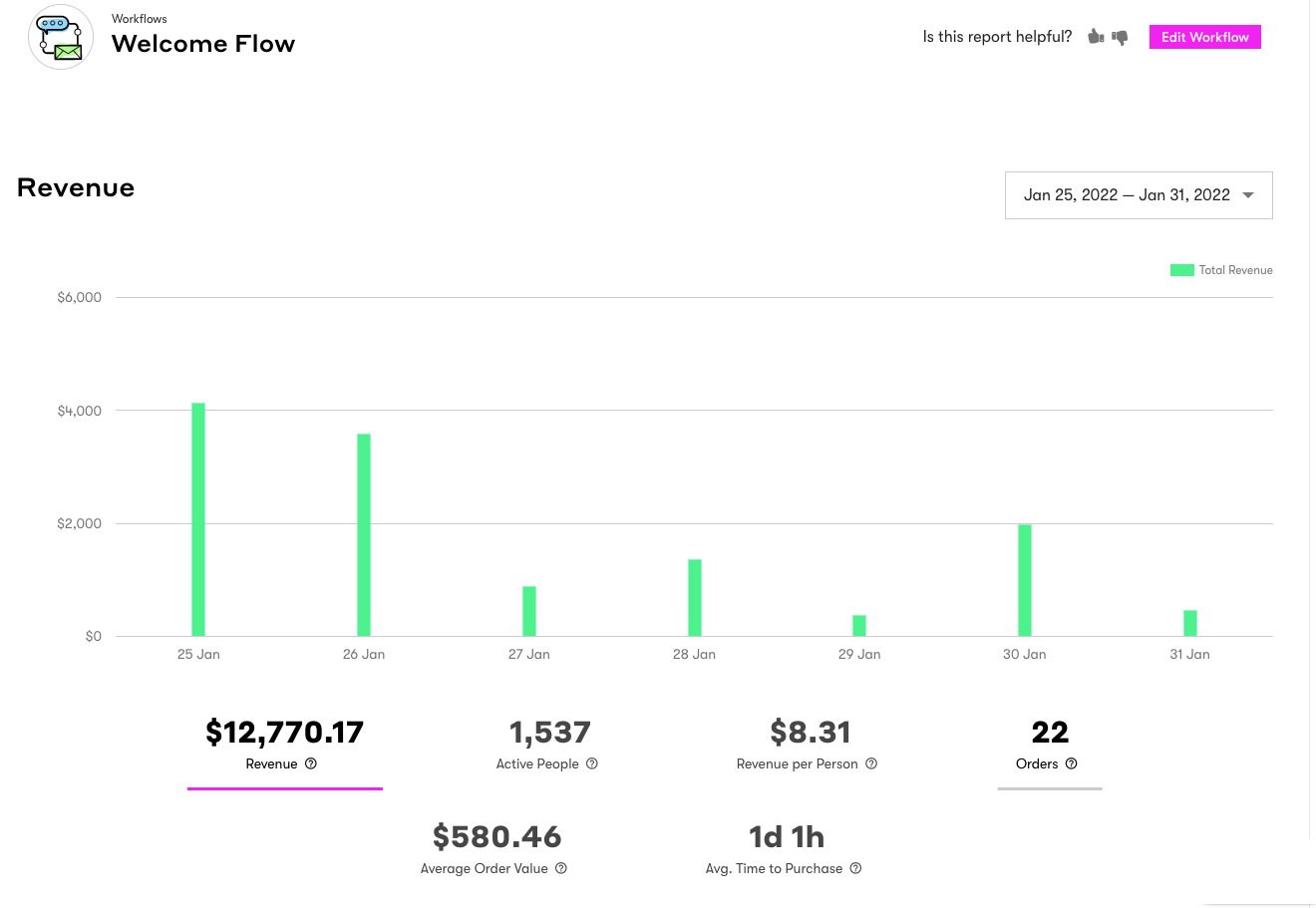
Revenue reporting is the separator, and it is the feature that tells you which flows drive revenue and which only look busy. Every workflow reports the revenue it generated rather than engagement alone, and Revenue Per Person tracking runs at the contact level. Drip reports $1.5B+ in attributed revenue across 6,000+ brands. Where attribution hit its limit was inside a sequence: the dashboard reports revenue per workflow, not per individual email within a multi-step flow, so per-email reporting still needs a workaround.
Segmentation updates itself before each send, rebuilding from purchase history, browsing, and spending, which removes the stale-segment problem on scheduled campaigns. Onsite pop-ups and embedded forms with behavior-triggered targeting are included on all plans.
The trade-offs are cost and reliability, and Drip pricing is where most shortlists end. There is no free plan, only a 14-day trial, and $39/month is the highest entry price here. Pricing then climbs steeply: around $89/month at 5,000 contacts, $154/month at 10,000, and around $699/month at 50,000. The template library is 50+ against Mailchimp’s 260+, integrations number 90+ against ActiveCampaign’s 900+, and MailCon reports workflows getting stuck or failing to fire. Migration is free, which Drip values at $3,250.
Where Drip is the right choice
- Shopify, WooCommerce, and BigCommerce stores doing $100K to $5M a year – this is the band where revenue attribution pays for the subscription;
- DTC brands running lifecycle programs – abandoned carts, post-purchase, repeat-buyer, and win-back campaigns all ship as playbooks;
- Teams that want branching without enterprise weight – the visual builder handles complex logic more comfortably than heavier platforms.
Where Drip is not the right choice
- Anyone who needs a free plan – there is a 14-day trial and nothing else;
- Non-ecommerce senders – newsletter publishers and B2B teams get little from a product built around purchase events;
- Stores that cannot absorb steep scaling – $154/month at 10,000 contacts against $95 for Seguno at the same size.
Shopify integration specifics
- What syncs: Shopify customer data, purchase history, product data, tags, discount usage, checkout activity, browsing behavior, and ecommerce events for segmentation and automation.
- Known sync behavior: Real-time syncing for customer and store activity, which is what makes abandoned cart and behavior-triggered workflows fire on time.
- Shopify-specific feature: Drip converts Shopify customer, product, order, checkout, and browsing data into ready-made ecommerce segments and triggers, so flows for first-time buyers, repeat customers, VIPs, and win-backs are available without building conditions from scratch.
Pricing at scale
| List size | Monthly cost | Notes |
| No free plan | $0 for 14 days | Trial only |
| 1 to 2,500 contacts | $39/month | One plan, all features included |
| 5,000 contacts | Around $89/month | Unlimited email sends |
| 10,000 contacts | Around $154/month | Unlimited email sends |
| 50,000 contacts | Around $699/month | 600,000 emails (unlimited email sends below 32,500 contacts) |
Pricing verified August 2026. SMS is separate from $39/month. Free migration valued at $3,250.
Shopify Messaging (formerly Shopify Email)
Shopify App store rating: 4.7/5.0
Our verdict: The cheapest capable option for a store under $1M a year, with a hard ceiling at branching automation, A/B testing, and revenue attribution.

Shopify Messaging is built for convenience rather than lifecycle marketing, and the distinction shows within the first hour of using it.
We set up a promotional campaign and an abandoned checkout reminder from inside the Shopify admin and had both live in under 20 minutes, because product blocks, discount codes, and customer segments were already there. Nothing was installed and no DNS records were configured. Email and SMS marketing campaigns both run from the Growth section of the admin, Campaign Autopilot suggests tactics, and WhatsApp is listed as coming soon.
Native data access is the practical advantage. Purchase history, customer segments, and the product catalog were immediately usable as both targeting conditions and email content. An abandoned checkout reminder pulling the exact products left behind took around three minutes to configure once one of the pre built templates was selected, and those automations are always free, excluded from the 10,000-email monthly allowance.
The ceiling arrives at automation depth. The workflow builder is relatively basic compared to dedicated ESPs, though recent addition of conditional splits shows that it’s improving. There is no A/B testing on subject lines or content, no revenue attribution per campaign or automation, and segmentation capabilities stop at Shopify’s native customer filters with no RFM, predicted CLV, or churn scoring. Landing pages, advanced popups, and signup forms are available but the segmentation capabilities are limited. And if you leave Shopify, the tool does not come with you. Stores that outgrow it typically move to a platform with premade automation workflows rather than rebuilding flows by hand.
Unused free emails do not roll over, so a quiet month is a lost allowance rather than banked credit.
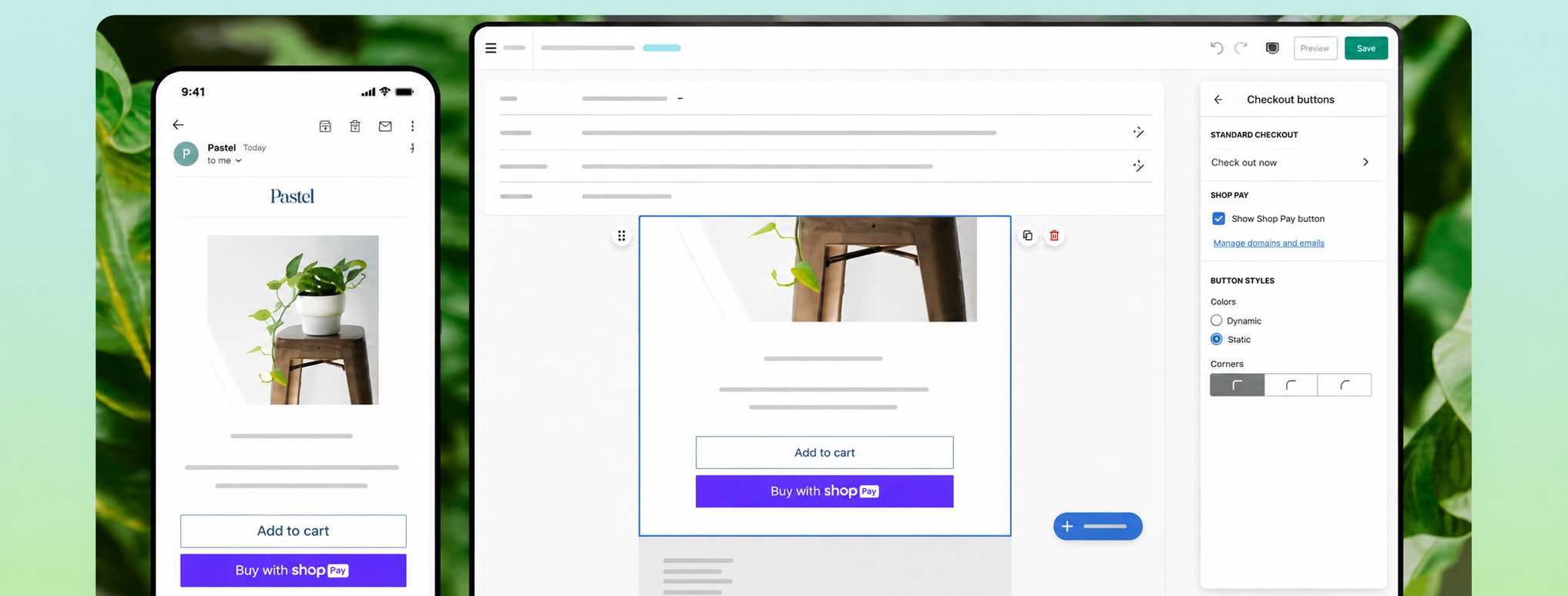
Where Shopify Messaging is the right choice
- Small Shopify stores under $1M a year – 10,000 free emails a month with no contact limit is the most generous free tier here;
- Merchants who want zero setup – no app install, no account creation, no domain authentication;
- Stores running simple promotions and announcements – single-step campaigns and basic triggers work cleanly.
Where Shopify Messaging is not the right choice
- Stores needing branching automation – no multi-step journeys, at any spend level;
- Anyone measuring revenue per flow – there is no revenue attribution per campaign or automation;
- Multi-region and review-driven merchants – campaigns send in one language and there is no native review collection.
Shopify Messaging integration specifics
- What syncs: Native Shopify customer segments, products, discounts, subscriber data, purchase history, and campaign performance.
- Known sync behavior: Because it runs inside Shopify, store data is available without an integration layer at all, and campaign reporting sits in the admin next to Shopify analytics rather than in a separate tool.
- Express checkout: Shopify Messaging can add an express checkout section directly into marketing emails, sending subscribers straight to checkout for a featured product, which is the shortest path from email to drive sales on product launches, flash sales, and single-product promotions.
Pricing at scale
| Monthly email volume | Monthly cost | Notes |
| Up to 10,000 emails | $0 | Included with any paid Shopify plan: Basic, Grow, Advanced, or Plus |
| 10,001 to 300,000 emails | $1.00 per 1,000 extra emails | Usage-based billing |
| 300,001 to 750,000 emails | $0.65 per 1,000 extra emails | Lower high-volume rate |
| Over 750,000 emails | $0.55 per 1,000 extra emails | Lowest listed volume rate |
Pricing verified August 2026. Abandoned checkout automations are always free and do not count toward the monthly limit. Unused free emails do not roll over. SMS is billed separately per message.
Which Shopify Email Marketing App Is Right for You?
There is no single best email marketing app for Shopify, because the right answer changes with list size, send frequency, and how much automation logic you actually need. Match your situation to the row below.
| Your situation | Recommended tool | Primary reason |
| Just launched, low budget, want to stay native | Shopify Messaging | 10,000 free emails/month, no integration setup, campaigns run inside Shopify |
| Under 2,500 subscribers, need email + SMS affordably | Sender | Most capable budget/free option with ecommerce automation and SMS included |
| Growing Shopify store, want email + SMS + push | Omnisend | Best multichannel mix; email, SMS, and web push in one workflow |
| Data-driven DTC brand with 10k+ subscribers | Klaviyo | Strongest segmentation, predictive analytics, and ecommerce revenue targeting |
| Beginner-friendly marketing beyond email | Mailchimp | Simple campaigns, landing pages, ads, forms, and basic automation in one tool |
| Shopify-only merchant, non-technical team | Seguno | Most Shopify-native third-party app; campaigns run directly inside Shopify admin |
| Need transactional email plus marketing automation | PushOwl (Brevo) | Transactional email, marketing automation, predictive sending, and A/B testing are on every bundle, including the free one |
| Complex behavioral journeys, lifecycle-focused team | Drip | Visual workflow builder with ecommerce-ready Shopify segments, triggers, and per-flow revenue reporting |
| Heavy discount-led campaigns inside Shopify | Seguno | Shopify Discounts integration and bulk discount code tools reduce manual work |
| Large subscriber list, low send frequency | PushOwl (Brevo) | Unlimited contacts and subscribers on all three bundles, because pricing follows notifications delivered rather than list size |
| Migrating off Mailchimp | Omnisend | Direct Mailchimp importer plus stronger Shopify-focused automation |
| Already on Klaviyo and using predictive segments | Stay on Klaviyo | Migration cost rarely justifies switching when data history and flows are working |
FAQs
Yes, and there are six of them on this list, but they cap in three different ways. Every free email marketing app Shopify merchants can install from this list runs real email marketing campaigns rather than a trial that expires. Shopify Messaging is the most generous at 10,000 emails a month with no contact limit, abandoned checkout automations excluded from the count. Sender’s Free Forever plan covers 2,500 subscribers and 15,000 emails with automation and segmentation included.
Seguno’s free tier allows 250 subscribers and unlimited sending but strips out cart abandonment and popups. Omnisend, Klaviyo, and Mailchimp all cap at 250 contacts, and Mailchimp’s carries no automation. Brevo stores up to 100,000 contacts on 300 emails a day. Drip has none. Compare each against Sender’s plans before choosing.
The number on the pricing page is not the number on your invoice, because Klaviyo bills active profiles rather than subscribers. An active profile is any reachable contact, and unsuppressing one keeps it billable for at least 90 days, so a single re-engagement import raises your bill for a full quarter.
Three costs then stack on the base tier, all easy to miss when scanning Klaviyo pricing 2026 tiers. SMS adds roughly $15 a month per tier across 24 countries. Reviews starts at $25, Marketing Analytics at $100, and Customer Agent AI at $140, billed separately. There is no annual discount.
At 10,000 subscribers Klaviyo runs for $150/mo, and at 25,000 it runs for $400/mo. Count how many contacts are genuinely reachable, not how many rows sit in your export. That gap is where the surprise lives.
No app on this list can fairly be called the best, because the app is not the main variable. Domain authentication, list hygiene, customer engagement history, and sending consistency account for more of your inbox placement than the platform you send from.
The third-party figures are thin and not directly comparable. One independent test measured Omnisend’s inbox placement at 75.1%. The 99% delivery rate quoted for PushOwl (Brevo) belongs to Brevo’s transactional infrastructure, and it measures acceptance rather than inbox placement, so treat it as a vendor claim. Seguno ships a deliverability checker; Klaviyo, Drip, Sender, and Mailchimp publish no comparable figure.
The defensible answer: authenticate your domain with SPF/DKIM/DMARC records, remove unengaged contacts on a schedule, and run your own seed tests through GlockApps on the platform you are considering.
Switch when you need logic rather than volume. Shopify Messaging suits stores from launch to around $1M a year and becomes a constraint above that, though revenue is a rough proxy. The precise triggers are capability gaps: multi-step branching automation, A/B testing, revenue attribution per flow, and segmentation beyond Shopify’s native customer filters. None of those exist at any spend level, and no dedicated email marketing platform on this list is missing all four.
The three operational limits covered earlier, batched sending, single-language campaigns, and no product review collection, usually force the decision sooner than the revenue number does. If none apply and you send under 10,000 emails a month on a predictable schedule, staying native is cheaper and simpler.
Klaviyo is better above roughly $500K in annual revenue with someone whose job includes running it; Omnisend is better below that. Klaviyo’s advantage is the predictive layer, with segmentation scoring 9.0/10 on G2, the highest in the category, and six native channels including RCS and WhatsApp.
Omnisend’s advantage is that email, SMS, and web push sit in one drag-and-drop workflow, and its Product Picker pulls live product data into emails for Shopify and BigCommerce stores. In our test, a three-channel cart sequence recovered 22% more revenue than an email-only equivalent.
Cost decides it. Klaviyo bills active profiles, so a large dormant list is expensive and add-ons are separate. Omnisend bills contacts, but SMS is locked to the $59/month Pro plan.