


Email marketing automation software sends emails and manages subscriber journeys automatically based on predefined rules, so a welcome message, a cart reminder or a renewal notice goes out without anyone building the campaign by hand.
Premade marketing automation tools and templates cover the common cases, while the rules decide who enters a workflow, what happens next and when.
In this guide, I cover 14 email marketing automation platforms and look only at automation: which triggers each one offers (signup, purchase, abandoned cart, date), whether a workflow can split into different paths, what the free plan allows, whether the tool connects to a CRM, and how long our standard test workflow took to build.
I also cover real limitations and cost at five contact counts, from 1,000 to 50,000, so you can match a platform to your broader email marketing strategy. Every review follows the same four parts, and Sender went through the same test workflow as the other 13 platforms.
In short, Klaviyo fits Shopify revenue recovery, ActiveCampaign fits B2B lead scoring, Kit fits creators with lists under 10,000, and the Fast Verdict table below matches four more situations.
Email Marketing Automation Software: The Fast Verdict
The table matches eight common situations to one recommended platform each. All 14 platforms, including those not in the table, are reviewed in the platform-by-platform breakdown below.
| Your situation | Platform we recommend | Why, in one sentence |
| Ecommerce store on Shopify, primary goal is revenue recovery | Klaviyo | Native Shopify integration with revenue attribution at the individual email level and predictive repeat-purchase timing |
| B2B team needing lead scoring and a CRM handoff | ActiveCampaign | Branching, lead scoring and deal pipelines sit in one workflow canvas on Plus and above, so no third-party sync is needed |
| Creator or newsletter operator with a list under 10,000 | Kit | Tag-based logic matches how creator audiences behave, and the free plan covers up to 10,000 subscribers but includes no automations |
| Small business where budget is the main constraint | Sender | Automation, custom events and an MCP server run on the free plan for up to 2,500 contacts |
| Mid-market business aligning sales and marketing | HubSpot | One contact record across sales and marketing means no data sync failures between teams |
| Omnichannel ecommerce (email, SMS, push) | Omnisend | Pre-built ecommerce flows put email, push and SMS steps on one canvas (SMS needs the Pro plan) |
| International business needing WhatsApp and SMS | Brevo | WhatsApp campaigns on Professional and above, alongside email and SMS |
| Building SaaS or Shopify lifecycle automations with AI | Sequenzy | AI drafts sequences; store, billing, and product events trigger them |
How We Evaluated Email Automation Software (And What We Didn’t Test)
Each platform was tested on its entry-level paid plan (or the most comparable tier to Mailchimp’s Essentials plan, unless stated otherwise), with a standardized 1,000-contact list that had interacted with a newsletter in the last 90 days. Contacts were not purchased or scraped.
Every platform also ran the same standard test workflow, a welcome-to-purchase automation, and we recorded how long it took to build.
Features evaluated per platform:
- Email builder
- Automation depth (trigger types, conditional logic, branching)
- List and segment management
- Form builder and landing pages
- Deliverability (third-party testing data)
- Support responsiveness on the entry-level plan
- Customer reviews (G2, Capterra, Trustpilot, Reddit)
- Pricing model
For this guide, automation criteria carry the most weight: the triggers a tool offers (signup, purchase, abandoned cart, date), whether a workflow can split into paths, what the free plan allows, whether the tool connects to a CRM, and the build time for the standard test workflow.
Deliverability testing: We used third-party data to evaluate deliverability, relying on tools like GlockApps and EmailTooltester to benchmark inbox placement, spam rates, and domain reputation. Tests were conducted in-house using identical campaign setups across platforms to ensure consistency.
User reviews: We gathered customer feedback from G2, Trustpilot, Capterra, and Reddit, analyzing recurring themes such as ease of use, support quality, pricing transparency, and feature reliability. To avoid cherry-picking, we focused on patterns across a large volume of recent reviews and balanced positive and negative feedback to reflect real user sentiment.
What was not tested: Enterprise features (SSO, dedicated IPs, custom SLAs), SMS sending at volume, and transactional email infrastructure beyond basic SMTP. This review is aimed at SMBs, independent creators, and agencies with lists of up to 50,000 contacts.
Pricing methodology: All pricing was checked October 2026. Annual billing discounts are noted separately from monthly pricing, and all prices are shown in USD. We recommend checking each platform’s pricing page directly before purchasing a subscription.
Capterra, G2, Trustpilot, and Reddit to create an objective evaluation. Learn more about our review methodology
Email Marketing Automation Tools Compared
The table summarizes how the 14 platforms compare on the structural differences that decide most evaluations: free-plan terms, native integration with major ecommerce platforms such as Shopify and WooCommerce, built-in CRM, channels and AI email automation features.
Automation depth, from basic automation to advanced automation workflows with multi-branch logic, is covered in each review.
| Platform | Best for | Free plan | Native ecommerce | Built-in CRM | Multichannel | AI features |
| ActiveCampaign | B2B teams managing leads in a pipeline | No (14-day trial) | Shopify, WooCommerce | Yes | SMS, site messaging, WhatsApp (separate plan) | Predictive sending (Pro and above) |
| Brevo | Large lists, low send frequency | Yes, 300 emails/day | Shopify, WooCommerce | Yes | SMS, WhatsApp, chat | Content generation, send-time optimization |
| Drip | Ecommerce stores under 5,000 contacts | No (14-day trial) | Shopify, WooCommerce, BigCommerce | No | SMS | None documented |
| EngageBay | Small teams combining CRM and email | Yes, up to 250 contacts | Shopify, WooCommerce | Yes | SMS, live chat | AI assistant, response generator, predictive deal analysis |
| Flodesk | Visual brands needing simple sequences | Yes, no sending or automation | Shopify | No | Email only | Flodesk Studio, a standalone AI-powered email design app |
| HubSpot | Mid-market sales and marketing alignment | Yes, limited tools | Shopify, WooCommerce, BigCommerce | Yes | SMS, live chat, ads | Predictive lead scoring (Enterprise) |
| Kit | Creators selling digital products | Yes, up to 10,000 subscribers, no automations | Shopify, Gumroad, Teachable | No | Email only | AI subject lines, Kit MCP |
| Klaviyo | Ecommerce stores needing revenue attribution | Yes, up to 250 contacts | Shopify, BigCommerce, WooCommerce | No | SMS, push | Predictive LTV, churn risk, next purchase date |
| Mailchimp | Businesses needing a specific integration | Yes, no automations | Shopify, WooCommerce | Limited | SMS, social ads | Generative AI (Standard) |
| MailerLite | Small budgets, simple automation | Yes, 250 subscribers, 3 automations | Shopify, WooCommerce, Stripe | No | Email only | AI writing assistant, MCP server |
| Omnisend | Omnichannel ecommerce | Yes, up to 250 contacts | Shopify, BigCommerce, WooCommerce | No | SMS, web push | Omnisend AI (writing, send-time optimization) |
| Sender | Small businesses wanting automation on a free plan | Yes, up to 2,500 contacts | Shopify, WooCommerce, PrestaShop | No | SMS | MCP server |
| Sequenzy | AI-built SaaS and Shopify lifecycle emails | Yes, 2,500 emails/month | Shopify; WooCommerce beta | No | Email; SMS/MMS beta add-on | AI sequences, AI campaigns |
| Zoho Campaigns | Teams already on Zoho | Yes, up to 2,000 contacts, no automation | Shopify, WooCommerce | Yes (Zoho CRM) | SMS via Zoho integrations | Predictive Insights |
Email Marketing Automation Software: Deliverability
Inbox placement is the metric most platform comparisons skip, and the one that determines whether the rest of your platform decision matters. I tested all 14 platforms across Gmail, Outlook, Apple Mail, and Yahoo, and the spread between best and worst was wider than the difference between any two automation builders.
Why Deliverability Matters More than Features
An email automation software that constantly ends up in spam is worse than no platform at all, as it creates the illusion of functioning while quietly damaging your sender reputation. A platform with a 10-percentage-point lower inbox placement rate erases any workflow advantage it might hold.
According to EmailToolTester’s 2026 Email Deliverability Benchmark Report, the global average inbox placement rate sits at approximately 83.1%, meaning roughly one in six commercial emails never reaches the inbox before open rates enter the picture.
Email deliverability isn’t a fixed property of a platform. It depends on sending domain reputation, list hygiene, authentication setup, and sending cadence.
But platforms differ in how well they support good practice: whether email authentication (SPF, DKIM, and DMARC) is mandatory, whether spam testing is built in, and at what tier dedicated IP access becomes available. Two platforms with identical advertised features can produce materially different inbox results based on these structural decisions alone.
Deliverability Setup Compared
The table compares the setup options each platform provides: dedicated IP access, authentication setup, and built-in spam testing. For the steps that matter most, see our guide on how to improve email deliverability.
| Platform | Dedicated IP | Authentication setup | Built-in spam testing |
| ActiveCampaign | From Plus ($750 one-time fee) | Wizard-guided | No (third-party) |
| Brevo | From Professional ($251/year) | Wizard-guided | Yes (Litmus) |
| Drip | Not available | Manual setup | No |
| EngageBay | Not available | Partial (SPF/DKIM only) | No |
| Flodesk | Not available | Wizard-guided | No |
| HubSpot | From Marketing Hub Pro ($300/month) | Wizard-guided | Yes (built-in) |
| Kit | From Creator ($250/month) | Wizard-guided | No |
| Klaviyo | Included in paid plans (from 100,000 monthly emails) | Mandatory at setup | No (Litmus add-on) |
| Mailchimp | From $30/mo available as an add-on | Wizard-guided | Yes (Inbox Preview) |
| MailerLite | Upon request for high senders (50,000+ emails sends/month) | Wizard-guided | No |
| Omnisend | Not disclosed | Wizard-guided | No |
| Sender | From Professional (20,000+ subscribers) | Wizard-guided | Yes (spam check) |
| Sequenzy | Available at $30 per IP per month | Not verified | Not verified |
| Zoho Campaigns | Not available on Standard | Wizard-guided | No |
What to Do if Your Platform Has Poor Deliverability
If your platform is consistently placing below 80% in your own testing, the problem is more likely list and domain health than the platform. Verify SPF, DKIM, and DMARC at MXToolbox before changing anything else. Remove contacts who haven’t engaged in 90 days, because unengaged subscribers drag down sender reputation.
If you’ve recently increased send volume, slow it back down and ramp gradually over two to three weeks. Only after working through these steps should you consider whether the platform is the bottleneck.
How Email Workflow Automation Works (3 Example Workflows)
Most email workflow automation follows a trigger, condition, action structure. A trigger starts the workflow when a subscriber joins a list, clicks a link, abandons a cart, buys a product or reaches a date. Behavioral triggers, such as link clicks, website visits, cart activity and purchases, let the platform react to customer behavior.
Each email automation workflow then checks conditions and performs an action: sending an email, waiting, updating a field or starting a branch.
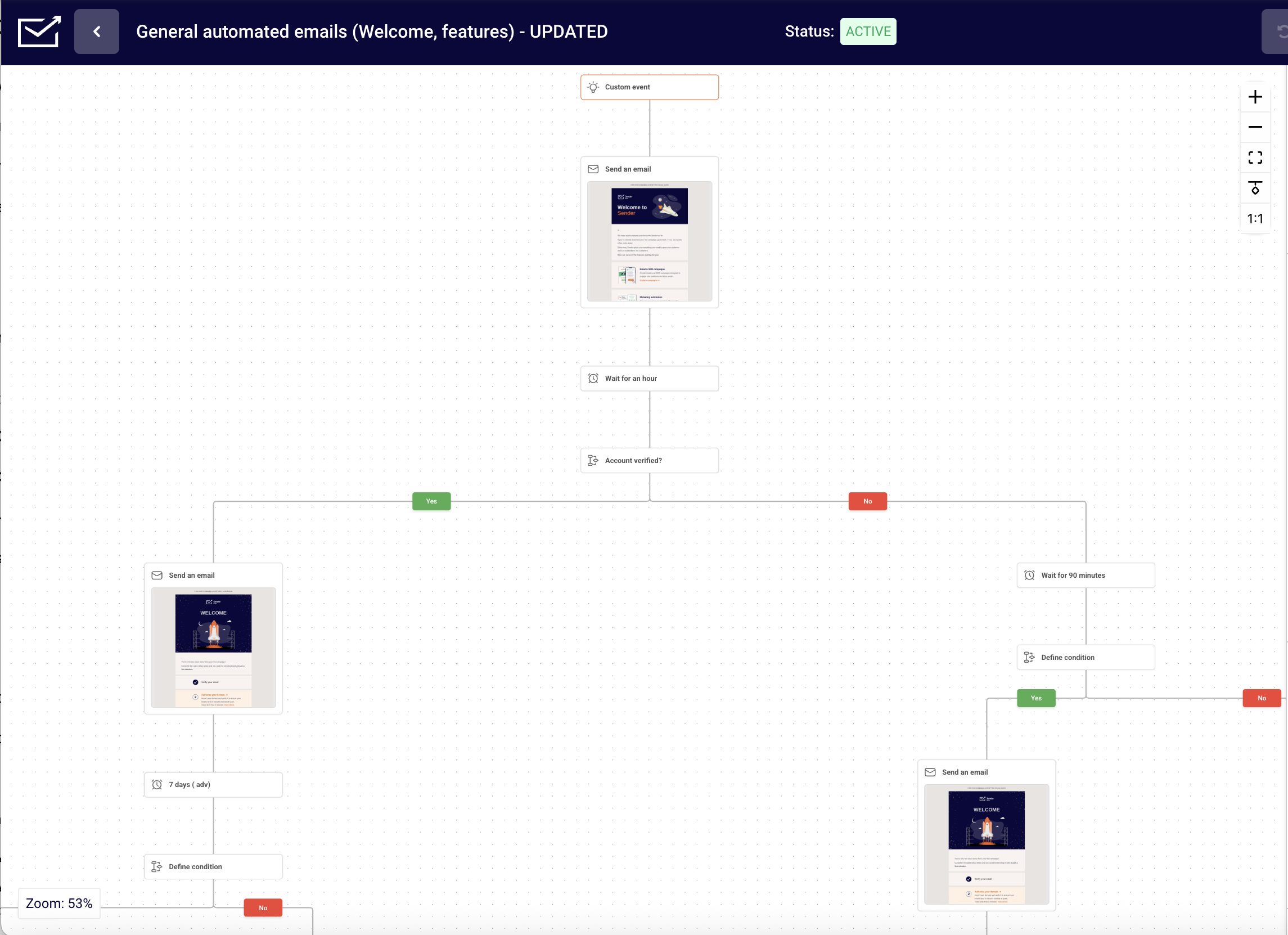
Welcome workflow. A subscriber joins through a signup form, triggering the first welcome email. After two days, the platform checks for a link click and sends one of two welcome emails: a deeper offer or a simpler follow-up.
Abandoned-cart workflow. A shopper leaves products in the cart. After a delay, the platform checks for an order and, if none exists, sends the first of several abandoned cart emails.
Lead-nurture workflow. A contact downloads a guide and receives educational emails. After each step, the platform checks engagement, forms or lead score and moves qualified contacts to sales.
Automated email software tracks customer interactions and runs these checks continuously, which separates automated email marketing from a scheduled broadcast. A marketing automation workflow built this way is the unit we timed in every review below.
14 Best Email Marketing Automation Software & Tools Reviewed
The reviews cover 14 platforms in three groups: Creator and Small Business Platforms (Brevo, Flodesk, Kit, Mailchimp, MailerLite, Sender, Sequenzy), CRM-Integrated Platforms (ActiveCampaign, EngageBay, HubSpot, Zoho Campaigns), and Ecommerce Platforms (Drip, Klaviyo, Omnisend).
Tools are listed alphabetically within each group, not ranked. Every review has the same four parts, and every tool, including Sender, was timed on the same standard test workflow.
Creator and Small Business Platforms
Four of these seven platforms (Brevo, MailerLite, Sender and Sequenzy) include automation on the free plan, while Flodesk, Kit and Mailchimp start automation on paid plans.
These seven platforms are built for solo operators, small teams, and growing brands, and each supports email automation for small business budgets without a dedicated marketing operations resource.
Brevo
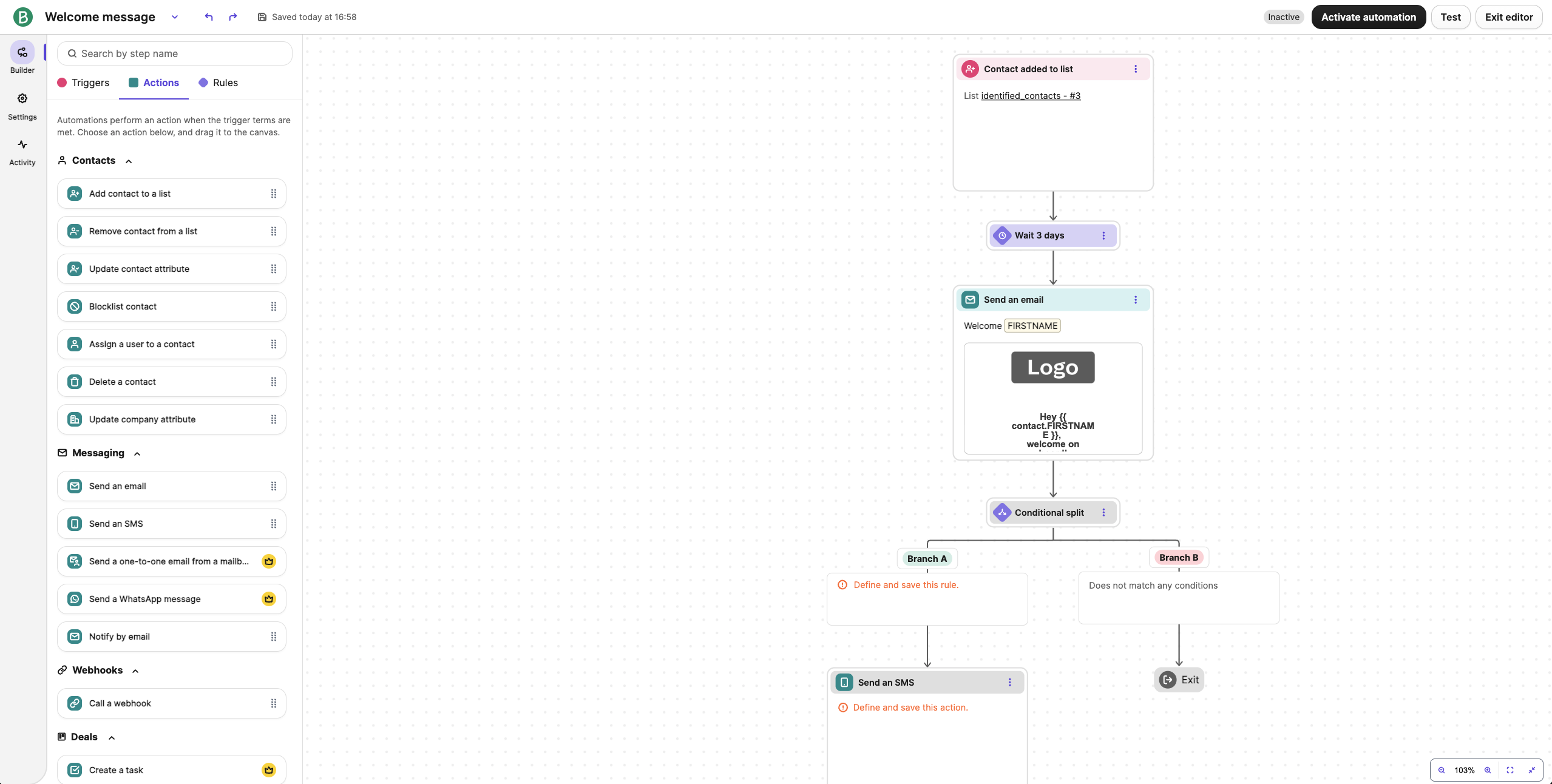
Brevo prices on emails sent rather than contacts stored, which lowers cost for large lists with moderate send frequency, and one workflow builder handles email and SMS marketing automation alongside WhatsApp and web push steps. Its free plan includes automation, limited to 2,000 automation contacts, and a lightweight built-in CRM feeds deal-stage triggers.
Pricing tested: Starter plan, 1,000 contacts, 5,000 emails per month, $9/month on monthly billing. Checked October 2026.
Automation Capabilities & Key Features
- Send-volume pricing. Pay per email sent, not per contact stored, with up to 100,000 contacts on the free plan.
- SMS campaigns. Send promotional and transactional texts from the same dashboard (though SMS credits are purchased separately).
- Built-in CRM. Deal pipelines, contact scoring, and task management on paid plans.
- Transactional email automation. Order confirmations and system notifications from the same account, on a separate sending infrastructure.
- Multi-step automation builder. Conditional logic, time delays, and branching from the Standard tier.
Pros and Cons
- Email, SMS, WhatsApp and push steps share one workflow builder.
- Volume-based pricing suits large lists that send infrequently.
- The free plan includes automation, with 300 emails per day.
- Automation on the Free and Starter plans reaches 2,000 contacts at most.
- WhatsApp campaigns require Professional or Enterprise, with message credits charged separately, and the step from Standard $18/month to Professional ($499/month) has no tier in between.
- Branching beyond two levels is limited, so complex conditional journeys outgrow the builder.
Our Experience with Brevo
Brevo took 28 minutes to build our standard welcome-to-purchase workflow, the same timed test every platform in this guide ran. The conditional split handled the second branch natively, where Sender, Kit and Flodesk required workaround flows. Adding WhatsApp as a fallback channel took three extra clicks inside the same workflow. CRM data fed back into the automation without extra mapping.
Best For
Brevo is best for: international businesses that need WhatsApp campaigns alongside email and SMS, and companies with large lists and moderate send frequency. WhatsApp campaigns are available on Professional and above, checked October 2026.
Brevo is not right for: high-frequency senders who mail a full list weekly, and teams that need a deep CRM with pipeline reporting.
Flodesk
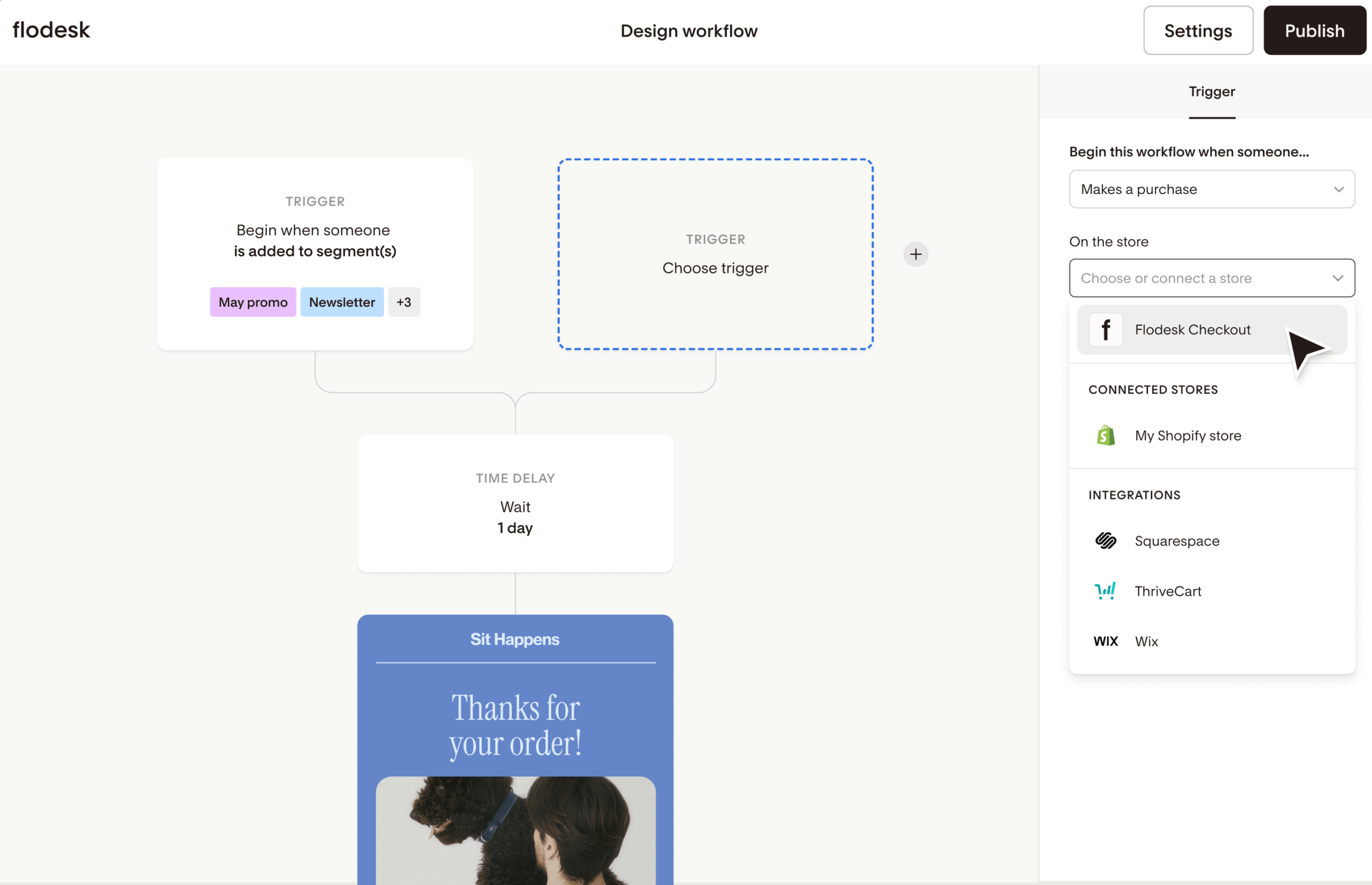
Flodesk handles simple linear automations: welcome sequences, drip courses and product follow-ups, with one workflow on the Lite plan and one branch per workflow. Triggers include segment joins, form submissions, purchases and cart abandonment, and there is no built-in CRM.
Pricing tested: One price. Unlimited Subscribers. Starting at $38/month (annual billing). Free plan available. Verified November 2026.
Automation Capabilities & Key Features
- Design-led email builder. Typography controls, layout flexibility, and template aesthetics that no other platform replicates.
- Single-branch workflow logic. Yes/No conditions per branch, sufficient for a welcome series, limiting for ecommerce or multi-segment journeys.
- Flodesk Checkout (Everything plan). Sell digital products without a separate platform, but does not integrate with Shopify or WooCommerce.
- Tag-based segmentation. Manual tag assignment via signup forms, link clicks, or workflow steps.
Pros and Cons
- Link Actions let a click tag a subscriber, change a segment or start another workflow.
- The workflow editor uses email, delay and yes/no condition steps, which are clear for users without automation experience.
- Only active and soft-bounced contacts count toward billing.
- The Lite plan allows one automation workflow, and unlimited workflows need Pro.
- No AI features for content generation, segmentation or send-time optimization.
- Conditional logic applies at the email level rather than inside content blocks, so two audience segments need two separate emails.
Our Experience with Flodesk
Flodesk took 22 minutes to build our standard welcome-to-purchase workflow, the same timed test every platform in this guide ran. The drag and drop editor handled the linear sequence without problems.
Adding a conditional branch required creating a second workflow instead of branching inside the first, which added steps, and the lack of in-email conditional blocks meant building separate emails for two audience segments.
Best For
Flodesk is best for: designers, photographers, and visual brands with lists under 5,000 subscribers where email aesthetics drive subscriber engagement.
Flodesk is not right for: ecommerce stores, B2B teams, and anyone needing multi-branch automation, A/B testing, or revenue attribution.
Kit (formerly ConvertKit)
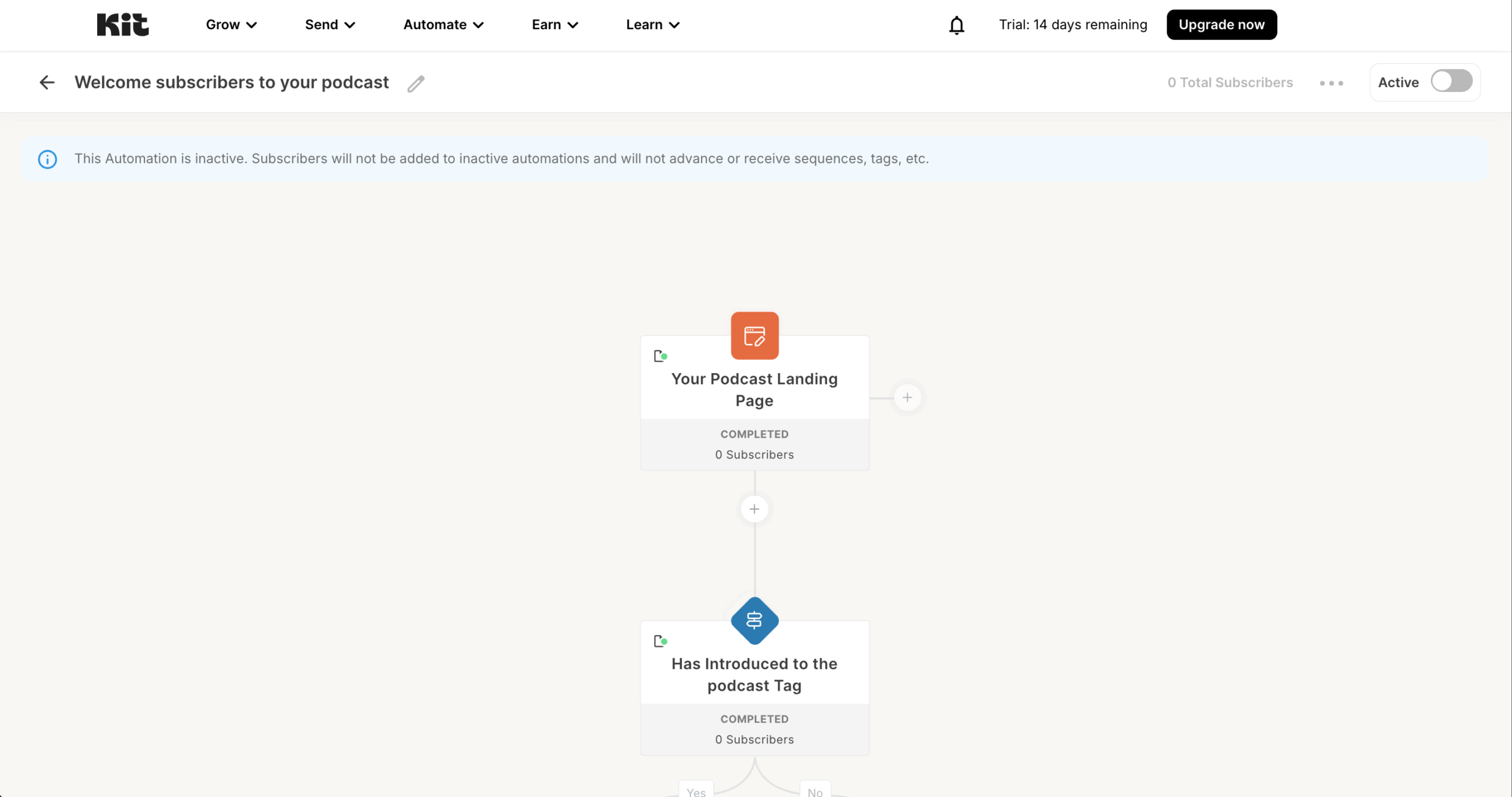
Kit runs tag-based automations for creators, and automations start on the Creator plan: the free plan covers up to 10,000 subscribers for broadcasts only. Triggers fire when a subscriber joins a form, receives a tag, clicks a link or buys a product, and there is no built-in CRM.
Pricing tested: Creator plan, 1,000 subscribers, $39/month on monthly billing. Checked October 2026.
Automation Capabilities & Key Features
- Tag-based automation logic. Subscribers receive tags from opt-in source, link clicks, or purchases, and sequences fire accordingly.
- Visual automation canvas. Drag-and-drop builder with event, condition, and action blocks.
- Free plan up to 10,000 subscribers. Broadcast functionality only, automations require the Creator plan.
- Native digital product sales. Sell digital downloads, courses, and paid newsletters; integrates with Teachable, Gumroad, Thinkific.
- Conditional paths on subscriber behavior. Yes/no branches on tag presence, link clicks, or form completions.
Pros and Cons
- Tag triggers cover form joins, link clicks and purchases.
- A conditional branch on link clicks took two steps to add.
- Digital product delivery after purchase runs through Kit Commerce without a separate checkout tool.
- No automations on the free plan: visual automations and email sequences require Creator at $39/month.
- A second condition needs a separate automation instead of stacked conditions, which is less compact than ActiveCampaign.
- Pricing rises steeply with list size, and Creator Pro costs $79/month at 1,000 subscribers.
Our Experience with Kit
Kit took 20 minutes to build our standard welcome-to-purchase workflow, the same timed test every platform in this guide ran. Tag-based triggers worked as expected, and the visual rules engine kept the workflow readable. I also built a five-step nurture sequence with a conditional branch at step 3. Adding a second condition required a separate automation.
Best For
Kit is best for: newsletter writers, course creators, podcasters, and solo operators with lists under 10,000 subscribers who need tag-based automation without CRM complexity.
Kit is not right for: ecommerce businesses needing purchase-event triggers, B2B companies needing lead scoring, and brands where visual email design is the primary purchase driver.
Mailchimp
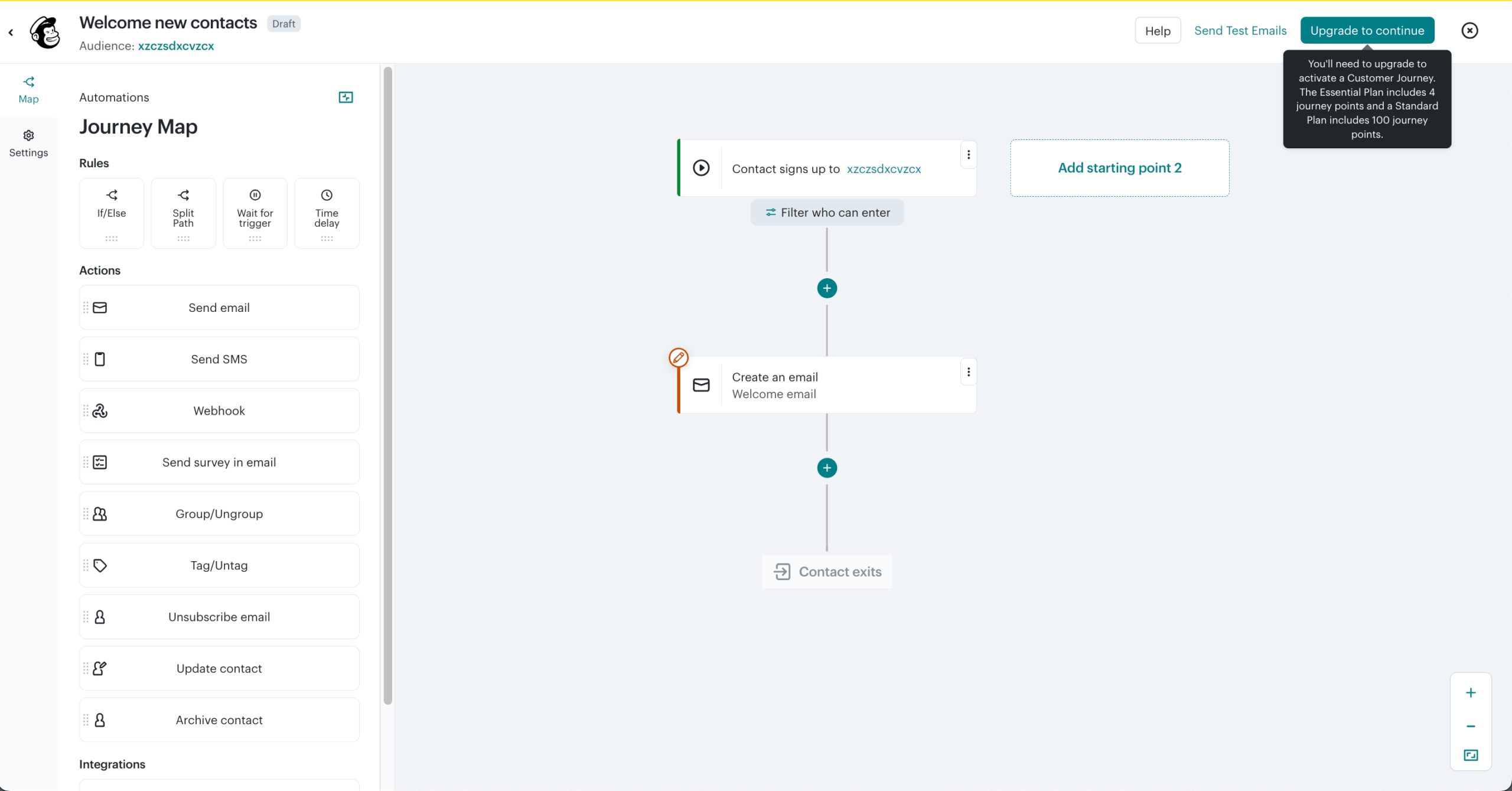
Mailchimp’s Customer Journey Builder supports branching, conditional waits and if/else logic, but only on Standard and Premium; the free plan and Essentials include basic autoresponders and no automations.
Pricing tested: Standard plan, 500 contacts, $20/month on monthly billing, an introductory price that lasts 12 months. Checked October 2026.
Automation Capabilities & Key Features
- 300+ native integrations. Shopify, WooCommerce, Salesforce, Stripe, QuickBooks, Canva, and most major business tools without Zapier.
- Customer Journey Builder. Multi-step automations with conditional branching on Standard and Premium plans.
- A/B and multivariate testing. Subject line, content, and send-time testing on paid plans.
- Pre-built templates for customer journeys. Welcome, abandoned cart, post-purchase, and re-engagement sequences pre-configured.
- Social and ad management. Run Facebook’s and Instagram’s social media ads from the same dashboard.
Pros and Cons
- Pre-built journeys cover welcome series, abandoned cart, post-purchase, re-engagement and birthday emails.
- Branching, conditional waits and if/else logic are available on Standard and above.
- Predicted analytics (customer lifetime value, purchase likelihood) can target automations.
- Journeys require Standard, from $20/month at 500 contacts, while Free and Essentials get basic autoresponders only.
- Billing counts unsubscribed and dormant contacts, and Standard costs $135/month at 10,000 contacts.
- The $13 and $20 entry prices last only 12 months before the price rises.
Our Experience with Mailchimp
Mailchimp took 24 minutes to build our standard welcome-to-purchase workflow, the same timed test every platform in this guide ran. Pre-built journey templates saved time on the initial structure, and a conditional branch on email engagement (opened or not opened) took two clicks.
A second branch ran natively inside the same journey. Predicted analytics segments took about 24 hours to populate. Reporting was clear at campaign level but lacked per-email revenue attribution, which Klaviyo provides natively.
Best For
Mailchimp is best for: businesses where a specific Mailchimp-native integration is the deciding factor, and users prioritizing ecosystem breadth over price-per-feature efficiency.
Mailchimp is not right for: cost-sensitive small businesses, marketing teams leaving Flodesk specifically over pricing, and ecommerce stores needing email-level revenue attribution.
MailerLite
MailerLite runs trigger-and-action automations at one of the lower price points in this guide: the free plan includes 3 active automations, Comfort allows 50, and multiple triggers per automation need the Power plan. It has no built-in CRM.
Pricing tested: Comfort plan, 500 subscribers, $12/month on monthly billing. Checked October 2026.
Automation Capabilities & Key Features
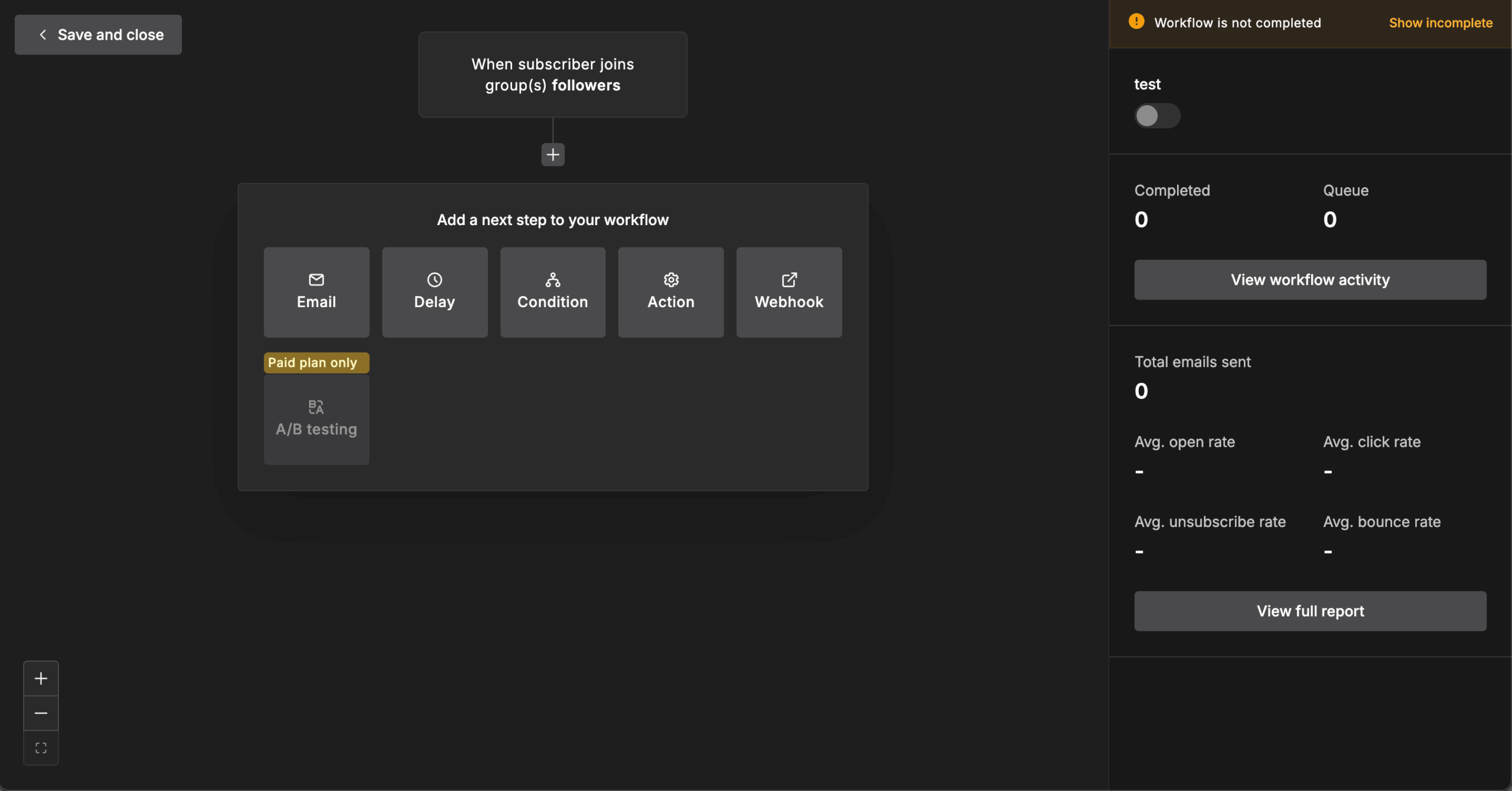
- Triggers. Joins a group, completes a form, clicks a link, updates a field, abandons a cart, buys a product, and date triggers for birthdays, anniversaries and renewals. A signup runs through a group or form trigger rather than a standalone signup trigger.
- Branching. Condition rules split paths by campaign activity, group or segment membership, automation activity and custom fields, with A/B test and delay rules available.
- Free plan automation. 3 active automations of up to 5 steps, 250 subscribers, 2,500 emails per month.
- Plan limits. Comfort allows 50 active automations of up to 100 steps; Power allows unlimited automations and multiple triggers per automation.
- Ecommerce integrations. Shopify, WooCommerce and Stripe, with abandoned cart and purchase follow-up automations.
Pros and Cons
- Automation is included on the free plan, with date and ecommerce triggers in the same builder.
- Comfort starts at $12/month for 500 subscribers and $19/month for 1,000.
- Billing excludes bounces and unsubscribes from your subscriber count.
- The free plan is capped at 250 subscribers and 3 active automations of 5 steps.
- Comfort does not support multiple triggers per automation, so one workflow cannot start from both a form and a group.
- Plan names changed (Growing Business to Comfort, Advanced to Power), so older reviews are hard to match.
Our Experience with MailerLite
MailerLite took 19 minutes to build our standard welcome-to-purchase workflow, the same timed test every platform in this guide ran. Adding a delay plus a clicked or did-not-click condition was simple. Comfort has no multi-trigger automations, so we duplicated the workflow to start it from both a form submission and a tag addition.
Best For
MailerLite is best for: small businesses and creators on a tight budget who need welcome sequences, abandoned cart and date-based follow-ups.
MailerLite is not right for: teams needing multi-trigger automations on a lower tier, complex conditional workflows, or a built-in CRM.
Sender
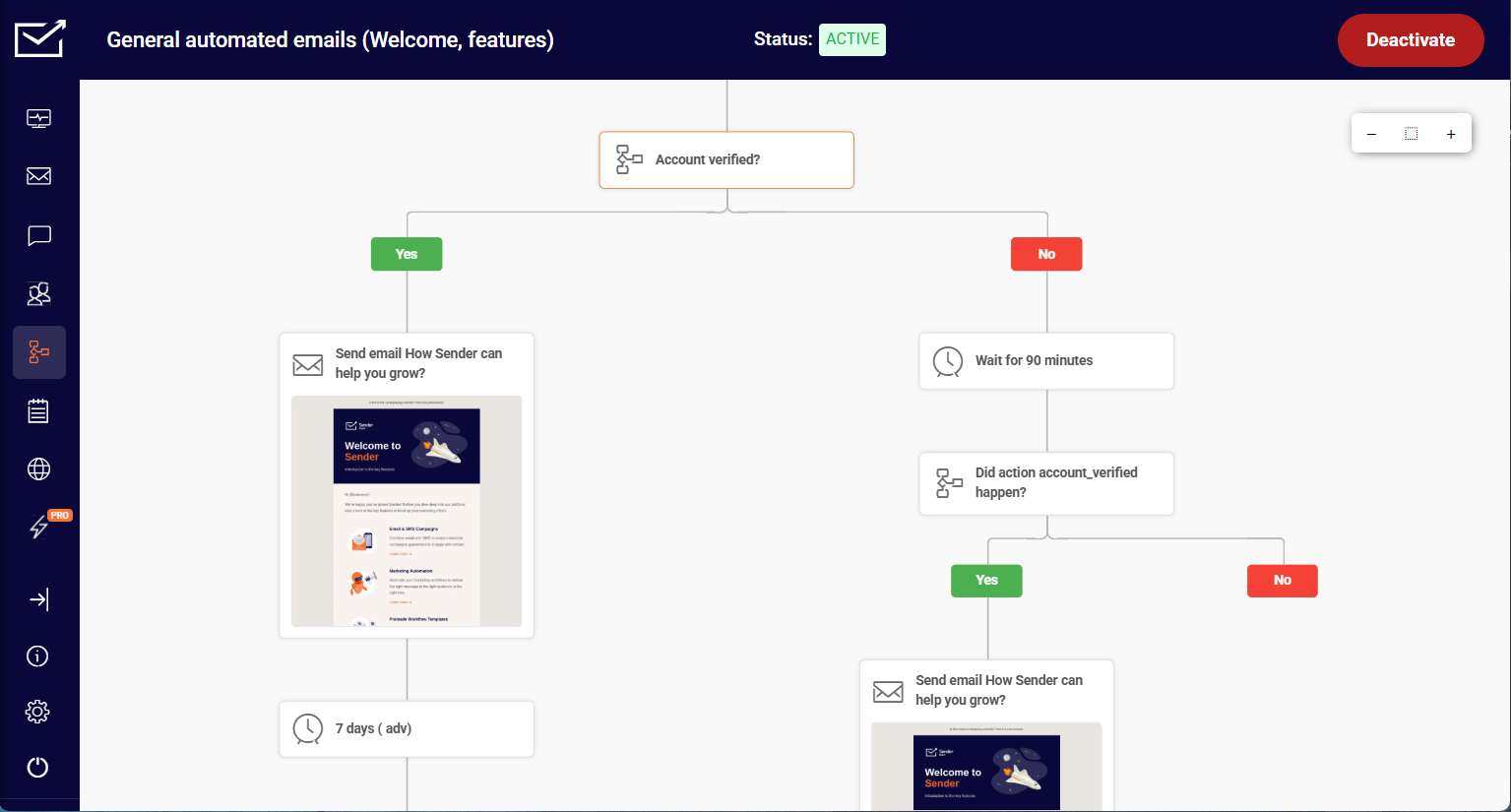
Sender runs automation on its free plan, including custom events that send user actions to Sender in real time to trigger automations or build behavioral segments. In our test, branching worked in “If/Then” (Yes/No) conditions; Sender has no built-in CRM.
Pricing tested: Standard plan, 1,000 contacts, $10/month on monthly billing. Checked October 2026.
Automation Capabilities & Key Features
- Free plan automation. Email automation runs on the free plan, with Sender branding on emails and 24/7 support.
- Triggers. Subscriber joins a group, form submission, link clicked, date and anniversary dates, cart abandoned, product purchased, order fulfilled, and custom events sent through the API.
- Custom events. Actions such as “Watched 50% of a Video” trigger automations or build segments.
- Branching. Yes/No condition steps and splits; two branch conditions need separate automations.
- MCP server. The Sender MCP server connects Sender to AI assistants through the Model Context Protocol on all plans.
- SMS steps. SMS steps run inside workflows from the Standard plan, with SMS credits bought separately on Standard and monthly credits included on Professional.
Pros and Cons
- The free plan allows 15,000 emails per month to 2,500 contacts with automation, against 500 on Omnisend’s free plan and 2,500 on MailerLite’s.
- Unlimited triggers and steps on every plan.
- Advanced segmentation is available on every plan, including Free
- Email A/B testing and SMS steps start on Standard, and the automation builder supports A/B splits inside a workflow.
- No built-in CRM and no lead scoring, which ActiveCampaign, HubSpot and Brevo include.
- No AI writing assistant, send-time optimization or predictive analytics, and ecommerce triggers do not include predicted lifetime value or next-purchase date.
- Native CRM integrations run through Zapier only.
Our Experience with Sender
Sender took 18 minutes to build our standard welcome-to-purchase workflow, the same timed test every platform in this guide ran. The conditional branch on link-click behavior worked on the first test, and custom event triggers connected in under a minute.
I then built an abandoned-cart flow with two branch conditions; it needed two separate automations, which added about 15 minutes and split reporting. Adding an SMS step to a workflow took one click on Standard.
Best For
Sender is best for: small businesses and store owners wanting automation, custom events and SMS steps on a free or low-cost plan, and teams outgrowing Mailchimp’s free tier.
Sender is not right for: teams that need a built-in CRM with lead scoring, and ecommerce stores that need predictive analytics as automation triggers.
Sequenzy
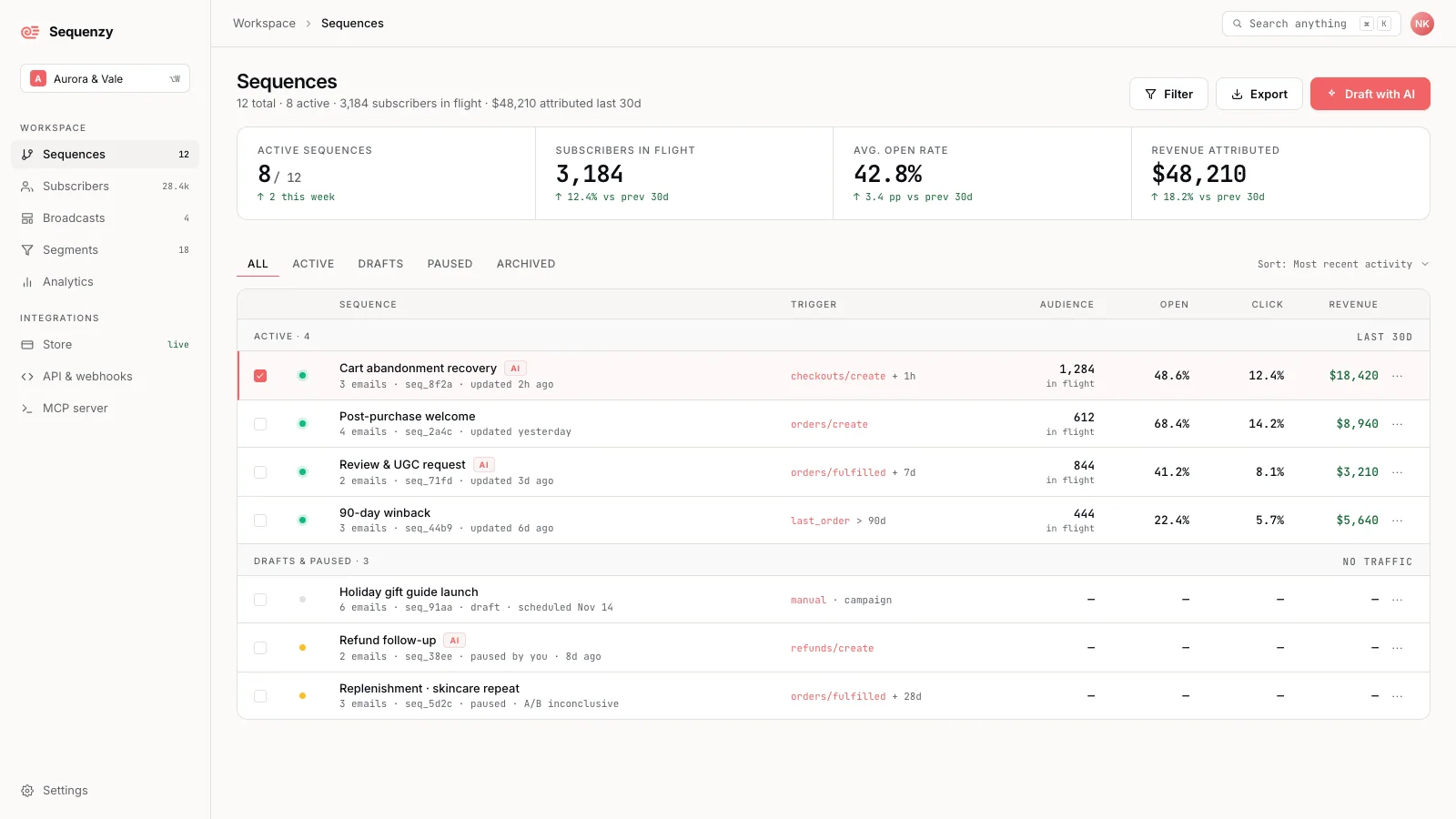
Sequenzy is an AI-native lifecycle automation platform for SaaS and Shopify teams. You can turn a plain-English goal into a draft sequence with email copy, delays, triggers, and audience segments, then review before launch. Stripe, Shopify, and custom product events power onboarding, cart recovery, and retention flows.

AI assistants can work through MCP, CLI, and API access, while the visual builder supports conditions and branching. Marketing and transactional email live in one platform.
Pricing tested: Free: 2,500 emails/month and unlimited contacts. Paid plans start at $19/month. Pricing scales with email volume, not stored contacts. Checked October 2026.
Automation Capabilities & Key Features
- AI-built sequences. Generate copy, delays, triggers, and segments from a plain-English goal.
- Event-driven journeys. Connect Stripe billing, Shopify store activity, and custom product events.
- Visual control. Edit delays, conditions, branches, and stop conditions before activation.
- Agent workflows. MCP, CLI, and REST API provide access to email operations and reporting.
Pros and Cons
- AI sequence generation and visual automation included on the free plan.
- Native Stripe and Shopify integrations plus custom event triggers.
- Marketing and transactional email with unlimited contacts.
- Free usage is limited to 2,500 emails per month.
- SMS/MMS is a beta paid add-on, not part of the free plan.
- Generated workflows require review of triggers, recipients, and content before activation.
Our Experience with Sequenzy
Sequenzy was not timed on the standard welcome-to-purchase workflow, so no build time is reported. I generated a SaaS onboarding sequence using the AI Sequence Builder rather than building it step-by-step, and the setup felt considerably lighter than what a manual build takes in ActiveCampaign or Klaviyo.
Connecting Stripe and firing a dunning trigger off a failed test payment worked without needing a separate automation or workaround, which is the kind of native billing logic none of the other platforms in this guide handle without custom configuration.
Where Sequenzy showed its limits was on the ecommerce visual tools. While it handles standard triggers like cart and browse abandonment, it lacks Klaviyo’s visual drag-and-drop product catalog block inside the email builder, and there is no equivalent to dropping live product feeds or dynamic recommendation grids directly into a layout with a click.
For a straightforward store, that gap barely surfaces. For a DTC brand leaning on predictive analytics or complex cross-sell rules, it’s a real ceiling.
Best For
Sequenzy is best for: SaaS and Shopify teams using AI to build event-driven onboarding, recovery, and retention emails.
Sequenzy is not right for: teams primarily looking for sales CRM and deal-pipeline management rather than lifecycle email automation.
CRM-Integrated Platforms
These four platforms combine email automation with a built-in CRM in a single subscription, meaning contact records, deal pipelines, lead scoring, and email workflows share the same data layer rather than syncing across separate tools.
ActiveCampaign
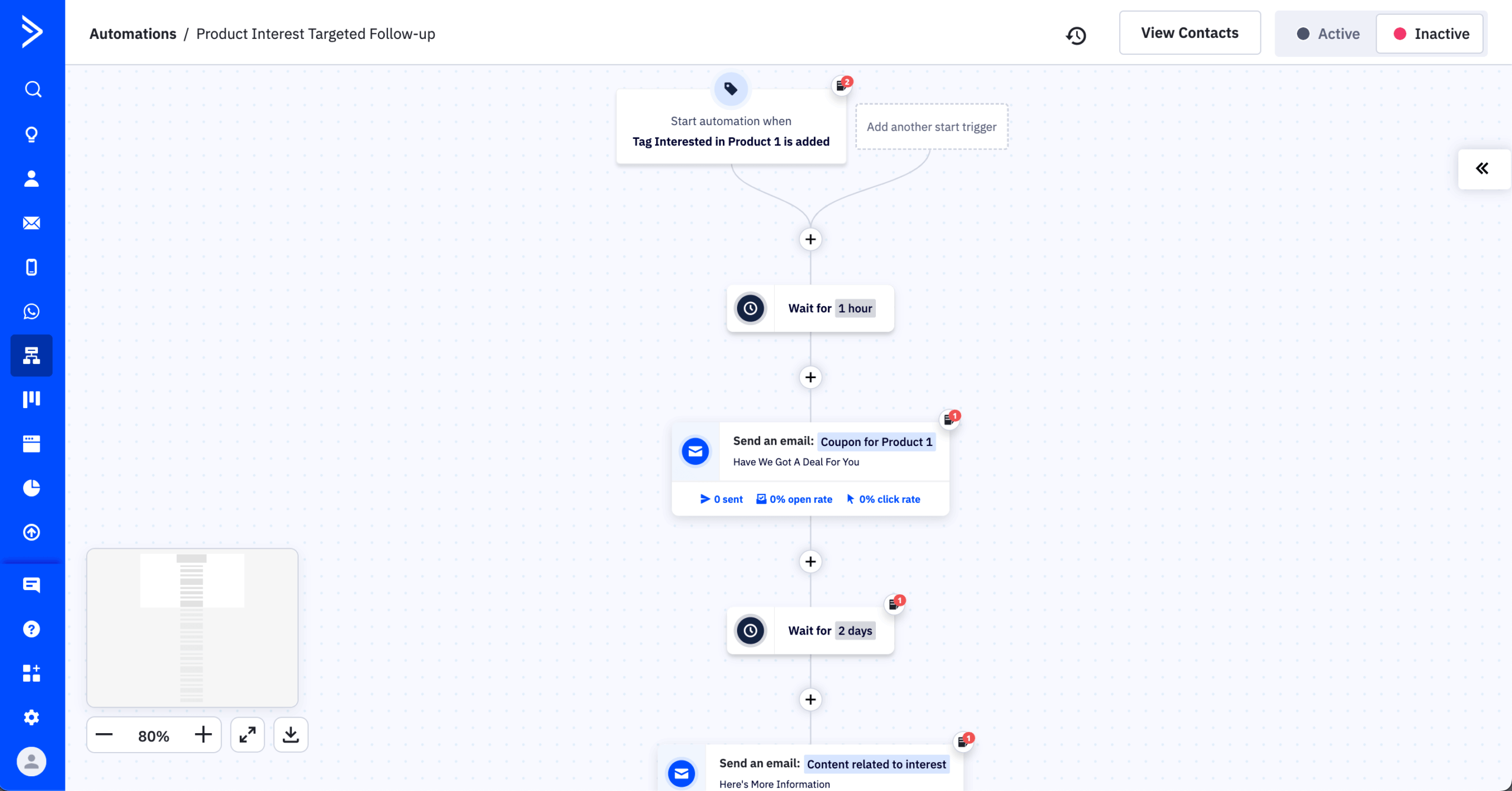
ActiveCampaign branches workflows on contact behavior, deal stage, lead score, custom fields and site tracking data, with a built-in CRM on Plus and above. There is no free plan, and the Starter plan allows 5 actions per automation with no if/else logic.
Pricing tested: Plus plan, 1,000 contacts, $49/month on monthly billing. Checked October 2026.
Automation Capabilities & Key Features
- Multi-branch conditional automation. Goal steps, wait-until conditions, split testing, and stacked conditions inside a single workflow.
- Built-in CRM with lead scoring. Deal pipelines and contact scoring on Plus and above; scores update automatically based on engagement, website tracking, and form submissions.
- 900+ native integrations. Salesforce, HubSpot, Calendly, Typeform, Shopify, and WooCommerce; Zapier is rarely required.
- A/B testing across automation paths. Split test entire flows, not just subject lines or content blocks.
- SMS, site messaging, and conversations. SMS marketing, on-site triggered messaging, and a chat inbox connected to automation.
Pros and Cons
- Branching works on behavior, deal stage, lead score and custom fields from Plus upward.
- A marketing-qualified lead can create a deal, assign a rep and start a sales sequence from one automation canvas.
- 950+ pre-built automation workflow templates, which ActiveCampaign calls recipes, give a starting structure for common workflows.
- No free plan.
- Starter is restricted to 5 actions per automation, with no if/else logic, no CRM and no landing pages.
- Configuration takes longer, and the builder makes it easy to introduce broken logic that is hard to spot.
Our Experience with ActiveCampaign
ActiveCampaign took 32 minutes to build our standard welcome-to-purchase workflow, the same timed test every platform in this guide ran. Multi-branch conditional splits worked as expected on the Plus plan, and starting from a welcome-series recipe was faster than building from scratch. CRM deal creation from a marketing trigger needed no setup beyond field mapping. Each branch needs its own test.
Best For
ActiveCampaign is best for: B2B teams, agencies, and service businesses needing CRM-connected automation in one platform, and teams with dedicated marketing operations capability.
ActiveCampaign is not right for: solo operators without setup time, businesses running primarily broadcast newsletters, and ecommerce stores where revenue attribution is the priority, where Klaviyo is the stronger alternative.
EngageBay
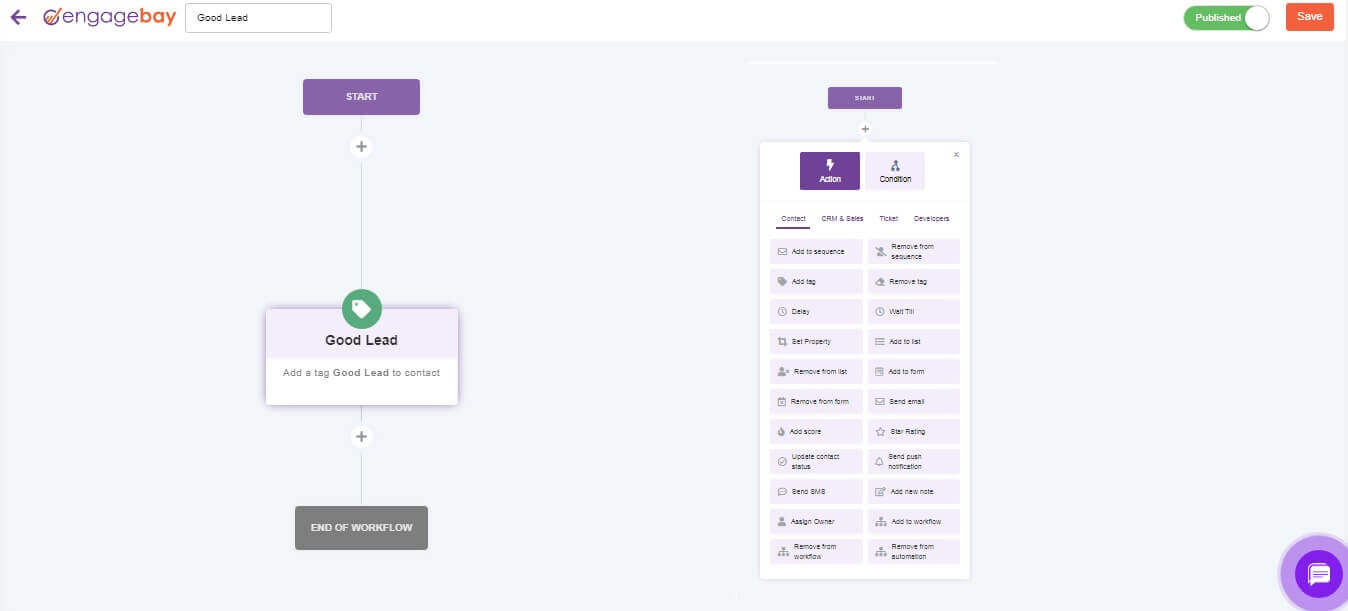
EngageBay combines email marketing, email automation, a CRM, helpdesk and live chat. The visual workflow builder with branching starts on the Growth plan, lead scoring starts on Basic, and the free plan covers up to 250 contacts with basic autoresponders.
Pricing tested: Basic plan, 500 contacts, $12.99/user/month on monthly billing; Growth is $49.99/user/month. Checked October 2026.
Automation Capabilities & Key Features
- All-in-one bundle. Email, CRM, helpdesk, and live chat in one subscription on All-in-One plans.
- Visual automation builder. Conditional branching, time delays, and tag-based triggers.
- Built-in CRM with lead scoring. Deal pipelines, contact scoring, and task management on paid plans.
- A/B testing on paid plans. Subject line and content split testing from the Basic tier.
- Free plan up to 250 contacts. Includes basic email, CRM, and helpdesk modules.
Pros and Cons
- The free plan includes the CRM, basic autoresponders and sequences, and up to 250 contacts with no time limit.
- Lead scoring is available from Basic ($14.99/user/month), where HubSpot requires Professional.
- CRM contact records update in real time as contacts move through a workflow.
- Visual workflows with branching require Growth at $64.99/user/month, and Basic and Free are limited to sequences and autoresponders.
- The builder lagged 3 to 5 seconds when adding nodes to workflows over 10 steps.
- The integration ecosystem is smaller than ActiveCampaign or HubSpot, so more connections go through Zapier-type tools.
Our Experience with EngageBay
EngageBay took 30 minutes to build our standard welcome-to-purchase workflow, the same timed test every platform in this guide ran. Conditional branching executed correctly on the first send. CRM contact records updated in real time as test contacts moved through the workflow, with no integration to configure between sales and support.
Best For
EngageBay is best for: small businesses wanting marketing, CRM, and helpdesk in one budget; teams who would otherwise stitch together three separate tools.
EngageBay is not right for: teams needing advanced tools in any single module, brands prioritizing email design, and businesses planning to scale past mid-market complexity.
HubSpot
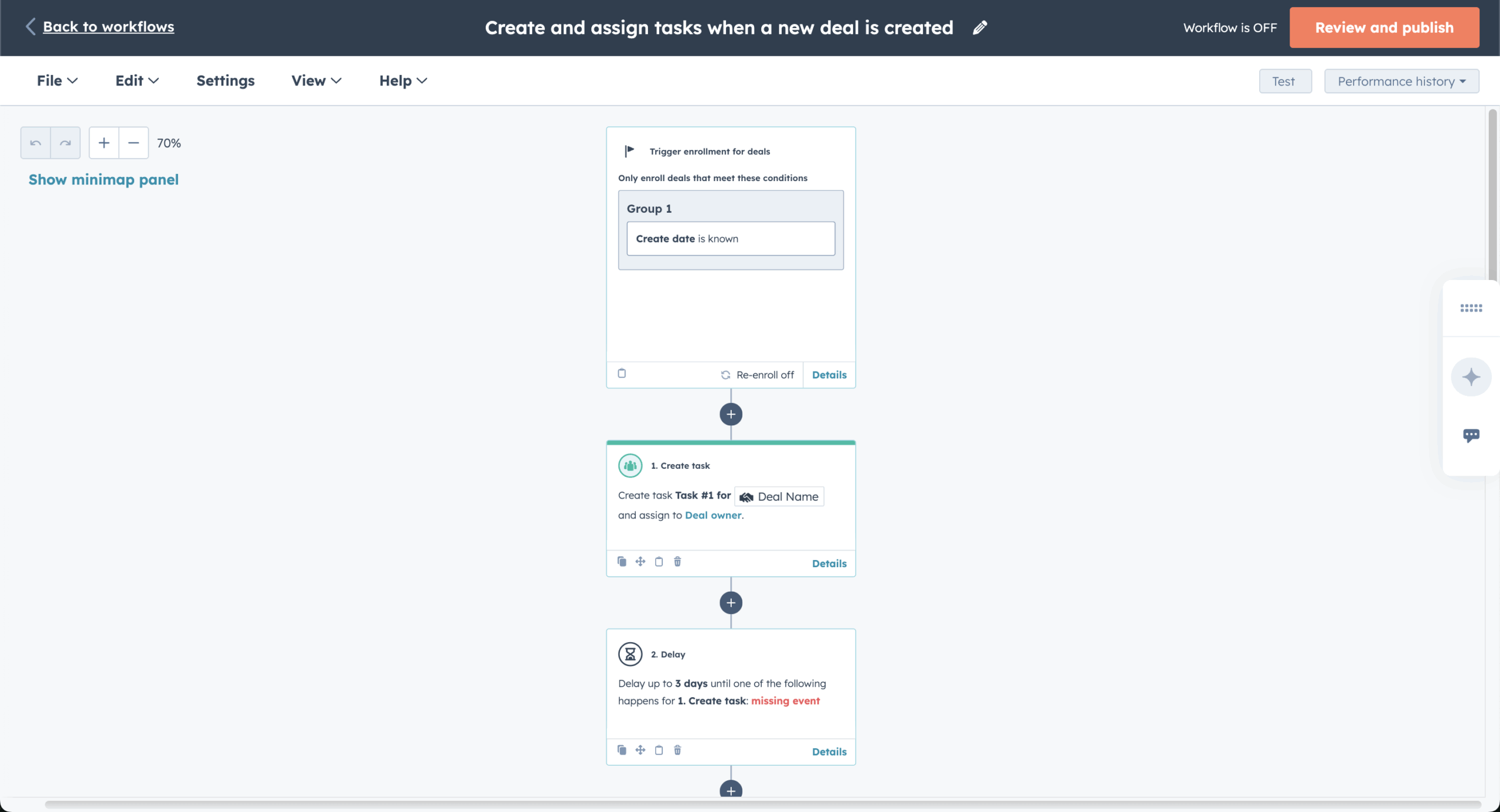
HubSpot is a CRM with email automation that keeps marketing, sales and support data in one contact record, but full visual workflows start on Marketing Hub Professional. Starter ($20/mo per seat, monthly billing) includes up to 10 automated actions, not workflows.
Pricing tested: Marketing Hub Starter, 1,000 marketing contacts, $20/mo per seat on monthly billing. Checked October 2026.
Automation Capabilities & Key Features
- Unified contact record with native CRM email integration. Marketing engagement, sales activity, and support history visible in one timeline per contact.
- Multi-branch workflow automation. Conditional logic, goal-based steps, and re-enrolment triggers from the Professional tier upward.
- Free CRM at base tier. Contact records, deal pipelines, and task management included with Marketing Hub Starter.
- Lead scoring and predictive analytics. Predictive lead scoring on Enterprise; manual scoring on Professional and below.
- Smart content and personalization. Dynamic content blocks based on lifecycle stage, list membership, or contact properties.
Pros and Cons
- Marketing, sales and service data share one database, so there are no sync failures.
- The workflow builder (Professional and Enterprise) supports branching, A/B testing inside workflows, and enrollment rules based on contact, company or deal properties.
- Triggers include form submissions, page visits, deal stage changes and custom events.
- Starter excludes most workflow automation, including multi-step ones.
- Professional costs $890/month on monthly billing and requires a $3,000 one-time onboarding fee and an annual commitment.
- Contact-based pricing scales quickly: moving from 1,000 to 1,500 contacts raises Starter from $20 to $70 per month.
Our Experience with HubSpot
HubSpot took 38 minutes on the Professional plan to build our standard welcome-to-purchase workflow, the same timed test every platform in this guide ran, after I tested Starter first.
The unified contact timeline showed test-contact activity updating in real time, so a sales rep could see which emails a lead opened before booking a demo. Attribution reporting requires Professional, and the onboarding fee is paid before any automation can be tested.
Best For
HubSpot is best for: mid-market companies aligning sales and marketing in one platform; teams with a budget for Professional or higher tiers.
HubSpot is not right for: small businesses on tight budgets, solo operators, and teams whose primary need is basic email marketing rather than full marketing automation.
Zoho Campaigns
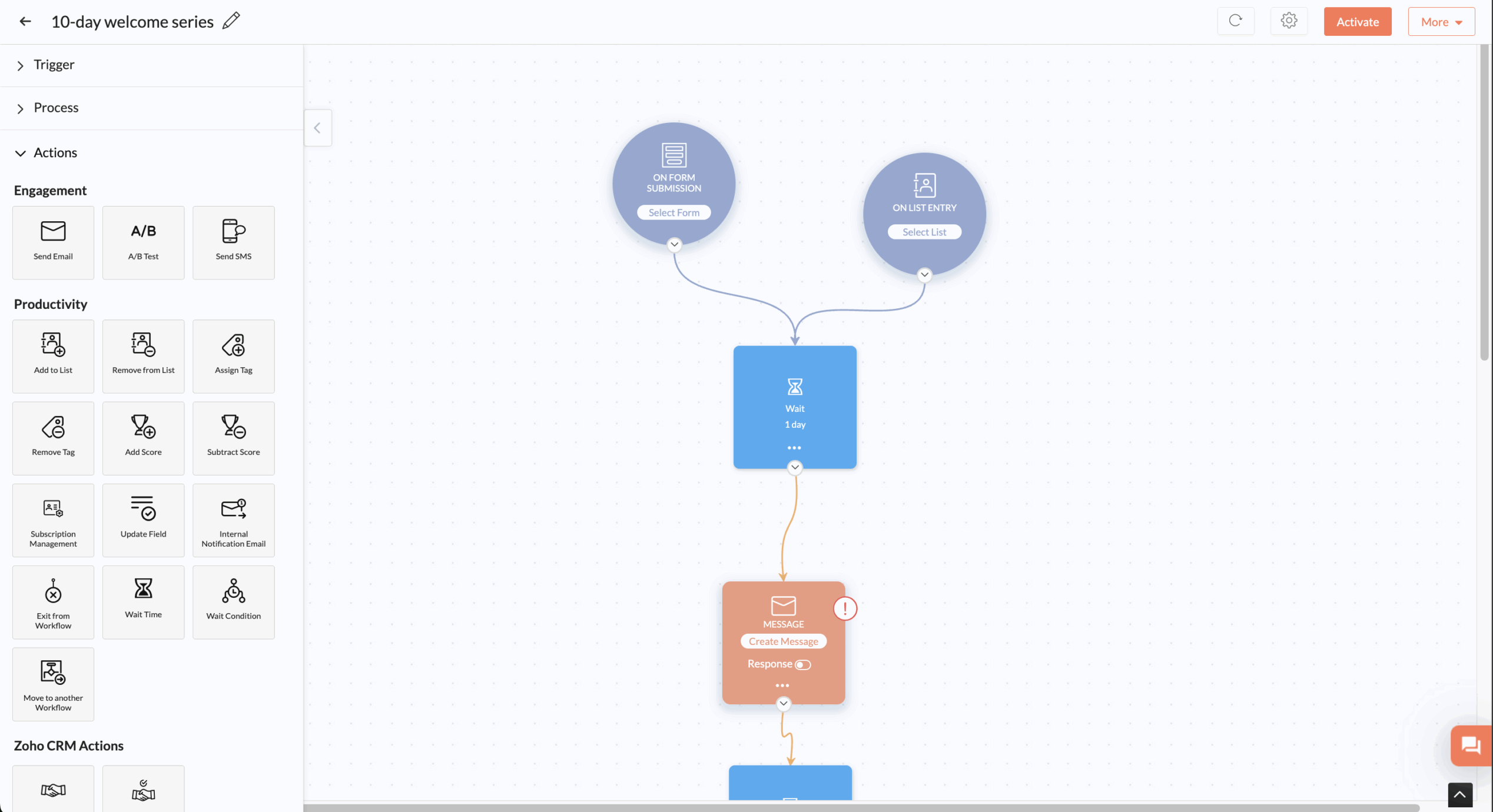
Zoho Campaigns syncs two ways with Zoho CRM, and its workflow builder with conditional branching sits on the Professional plan. The free plan has no automation, and Standard covers basic automation sequences at $4.70/month for 500 subscribers.

Pricing tested: Standard plan, 500 subscribers, $4.70/month on monthly billing; about $26/month at 5,000 contacts. Checked October 2026.
Automation Capabilities & Key Features
- Native Zoho CRM sync. Two-way sync with Zoho CRM contacts, leads, and deal stages without a third-party connector.
- Visual workflow builder. Drag-and-drop with conditional branches, time delays, and tag-based triggers.
- A/B testing on paid plans. Subject line and content split testing from the Standard tier.
- Multi-language email support. Build and send email marketing campaigns in 20+ languages from one campaign.
- SMS via Zoho integrations. SMS automation through Zoho’s broader product suite, not natively in Campaigns.
Pros and Cons
- Standard costs $4.70/month at 500 subscribers, the lowest entry price for a paid automation plan in this guide.
- Native Zoho CRM integration removes sync tools for Zoho users.
- Unlimited emails on Standard and Professional plans.
- The free plan (2,000 contacts, 6,000 emails per month) has no automation.
- Advanced features such as contact scoring, dynamic content and send-time optimization require Professional.
- The workflow builder stacks fewer conditions than ActiveCampaign, and the benefit shrinks for businesses outside the Zoho ecosystem.
Our Experience with Zoho Campaigns
Zoho Campaigns took 26 minutes to build our standard welcome-to-purchase workflow, the same timed test every platform in this guide ran. The CRM sync worked immediately for contacts already in our Zoho account, and leads created in CRM appeared in automated email campaigns within seconds.
Best For
Zoho Campaigns is best for: businesses already using Zoho CRM, Zoho Books, or other Zoho products; teams wanting a low-cost entry into CRM-connected email.
Zoho Campaigns is not right for: businesses outside the Zoho ecosystem, brands where email design quality matters, and teams needing deep multi-condition automation.
Ecommerce Platforms
These three platforms are built specifically for online stores. Every feature assumes you have a product catalog, purchase events, and revenue you want to attribute to specific email sends.
Drip
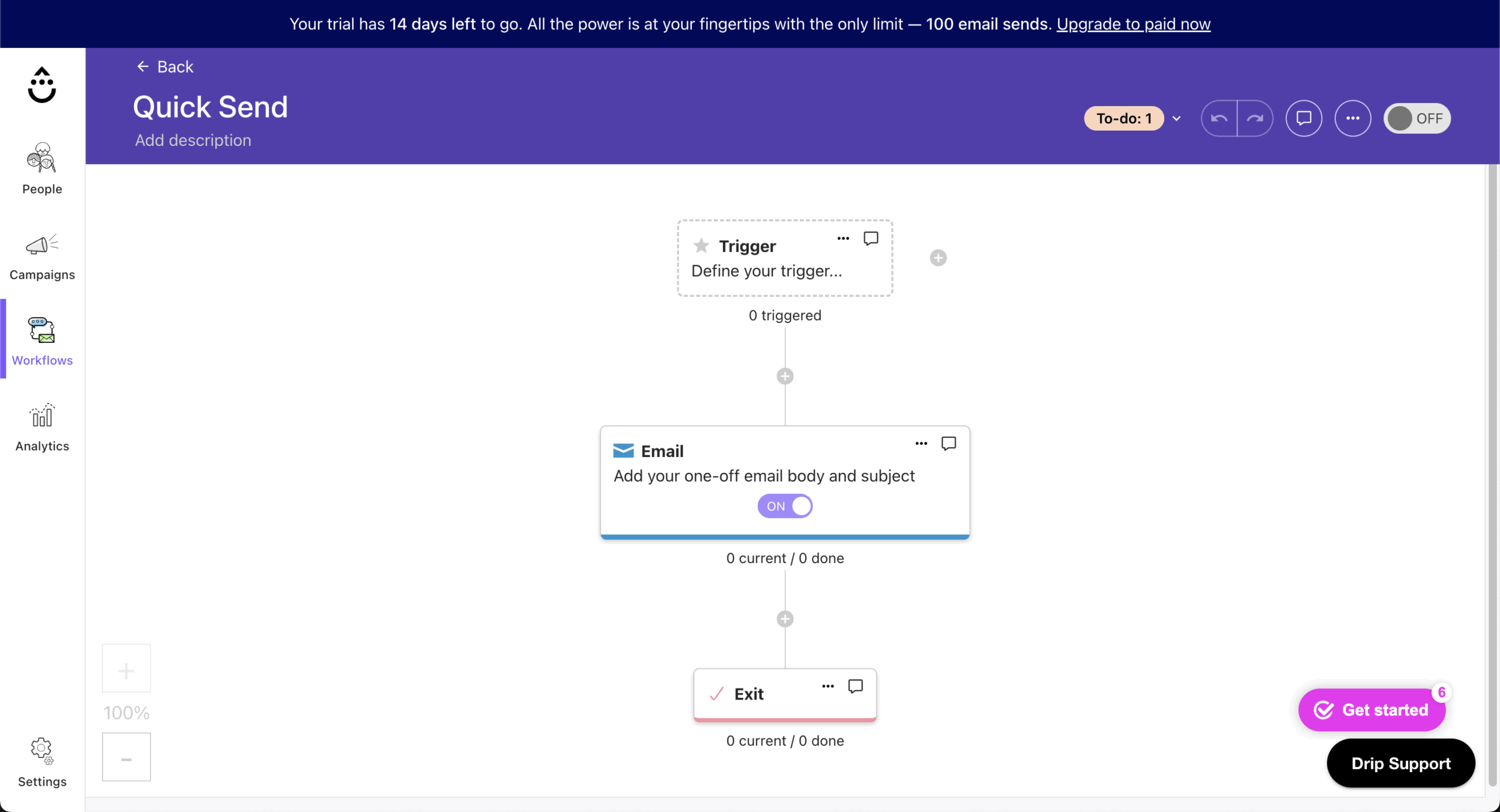
Drip builds ecommerce workflows, including Shopify email automation, with conditional splits, time delays and parallel paths, triggered by cart, browse and purchase events. Every plan includes all features, and there is no free plan, only a 14-day trial.
Pricing tested: 2,500 contacts, $39/month on monthly billing. Checked October 2026.
Automation Capabilities & Key Features
- Visual workflow builder with conditional branching. Multi-step automations with tag-based and behavior-based triggers.
- Native Shopify, BigCommerce, and WooCommerce integration. Order, product, and customer data sync without third-party tools.
- Behavioral triggers from store events. Cart abandonment, browse abandonment, product-viewed, and purchase-event triggers fire natively.
- Email + SMS automation. Combined sequences from the Standard tier; SMS credits sold separately.
- Liquid-based content personalization. Insert dynamic product, customer, and order data into emails using Liquid templating.
Pros and Cons
- Store data flows into segments and workflows without heavy configuration, and cart abandonment triggers fire within minutes.
- Every plan includes all features, so no feature gates appeared during testing.
- Revenue attribution per automation populated within hours of the first test sends.
- No free plan: a 14-day trial only, where Klaviyo and Omnisend offer free tiers.
- Email-level revenue attribution exists, but reporting depth sits below Klaviyo.
- Liquid templating raises the learning curve for non-technical users.
Our Experience with Drip
Drip took 26 minutes to build our standard welcome-to-purchase workflow, the same timed test every platform in this guide ran. The visual builder was straightforward for ecommerce sequences, branching logic worked natively, and the Shopify integration synced product data and customer events in real time.
Revenue attribution populated within hours of the first test sends. Inserting dynamic product recommendations based on purchase history with Liquid took ten minutes of configuration.
Best For
Drip is best for: ecommerce stores under 5,000 contacts wanting Klaviyo-adjacent automation depth at lower entry cost; teams comfortable with Liquid templating.
Drip is not right for: stores above 10,000 contacts where Klaviyo’s pricing gap closes, non-ecommerce businesses, and teams without technical resources for Liquid setup.
Klaviyo
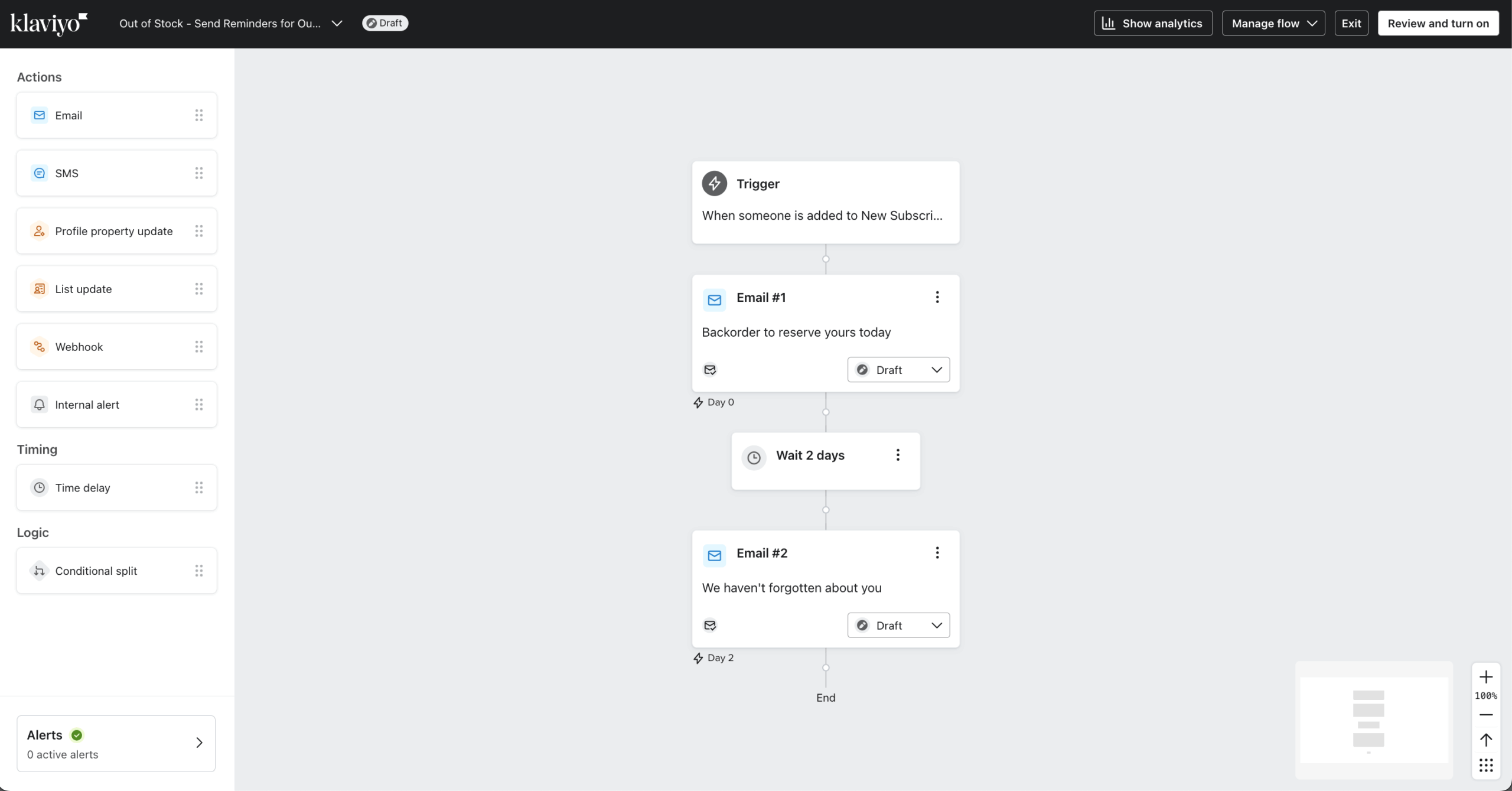
Klaviyo starts flows from store behavior and predictive data such as next order date, predicted lifetime value and churn risk.
Pricing tested: Marketing plan, 1,000 contacts, $30/month on monthly billing. Free plan available (250 contacts, 500 emails per month).
Automation Capabilities & Key Features
- Revenue attribution at the email level. Native Shopify, BigCommerce, and WooCommerce integrations track which specific email drove which purchase.
- Predictive analytics. AI-driven customer lifetime value scoring, churn risk flagging, and predicted next-purchase date, without manual configuration.
- Behavioral triggered emails beyond engagement signals. Browse abandonment, cart abandonment, predicted-value thresholds, and cross-sell sequences fire from store behavior.
- A/B testing across flows. Split test subject lines, send times, content, and entire flow paths.
- Audience segmentation depth. Combine purchase history, engagement, predicted value, browsing behavior, and custom properties in one segment.
Pros and Cons
- Email-level revenue attribution for Shopify, BigCommerce and WooCommerce stores.
- Predictive segments (churn risk, next purchase date) feed flows, and A/B tests run across entire flow paths.
- The feature set does not change across paid tiers, so you pay for list size only.
- Billing counts all active profiles since February 2025, including contacts you do not message, so ecommerce brands with large dormant lists pay more.
- A 90-day suppression lock prevents re-suppressing contacts within 90 days of unsuppressing them.
- Add-ons raise the total: Marketing Analytics ($100/month), Reviews($25+/month), and Advanced Data Platform ($500/month).
Our Experience with Klaviyo
Klaviyo took 22 minutes to build our standard welcome-to-purchase workflow, the same timed test every platform in this guide ran. Pre-built flow templates included recommended timing and branching logic, and the Shopify integration synced historical purchase data on connection.
I also built a three-branch post-purchase flow (first-time, returning and high-value customers) and every branch fired correctly on the first test. Predictive segments appeared after about 48 hours.
Best For
Klaviyo is best for: Shopify, BigCommerce, and WooCommerce stores where email drives measurable revenue and you need per-email attribution.
Klaviyo is not right for: non-ecommerce businesses, service providers, B2B teams, and brands where email is primarily relationship rather than revenue-driven.
Omnisend
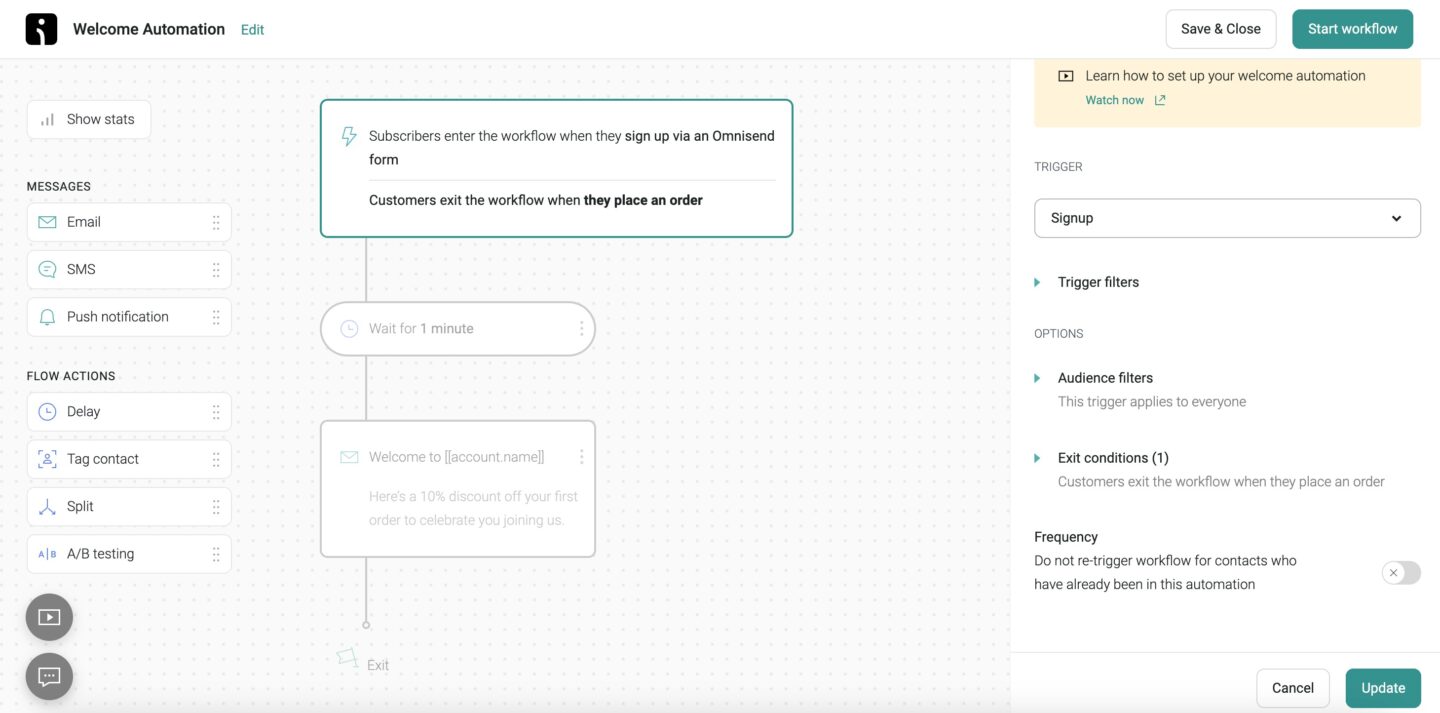
Omnisend ships pre-built ecommerce automations (welcome, cart and browse abandonment, post-purchase, win-back) that put email and push on one canvas on Standard. SMS steps need the Pro plan and separately bought credits, and the free plan includes automations for up to 250 contacts.
Pricing tested: Standard plan, 500 contacts, $16/month monthly billing. Checked October 2026.
Automation Capabilities & Key Features
- Cross-channel flows in one workflow. Email, SMS, and web push steps configured inside the same automation canvas.
- Pre-built ecommerce flows. Premade automation templates for welcome series, abandoned cart, browse abandonment, post-purchase, and win-back, ready to deploy.
- Native Shopify, BigCommerce, and WooCommerce integration. Product catalog, order events, and customer data sync without third-party tools.
- Built-in product picker. Insert specific products with live pricing and inventory data into emails.
- A/B testing on paid plans. Subject line, content, and send-time testing from the Standard tier.
Pros and Cons
- Pre-built automation templates for ecommerce flows need few edits, and a Shopify abandoned cart flow launched in under five minutes.
- Email and push steps share one workflow on Standard, and on Pro the canvas adds email and SMS automation across multiple marketing channels.
- The free plan includes automations for up to 250 contacts, with 24/7 support.
- SMS requires the Pro plan and a separate SMS Credits Subscription, and new Standard subscribers no longer have SMS access (since May 2026).
- Contact-based pricing bills for non-subscribers, such as abandoned carts and unconfirmed imports.
- Segmenting by predicted customer value is shallower than Klaviyo.
Our Experience with Omnisend
Omnisend took 15 minutes to build our standard welcome-to-purchase workflow, the same timed test every platform in this guide ran. The pre-built templates did most of the work. The SMS fallback for unopened emails required Pro and ran in a cross-channel sequence (email, SMS if unopened, then web push).
Best For
Omnisend is best for: Shopify, BigCommerce, and WooCommerce stores running email, SMS, and push as coordinated channels; ecommerce teams wanting Klaviyo-adjacent capability at a lower entry cost.
Omnisend is not right for: non-ecommerce businesses, stores needing the deepest predictive analytics, and teams running primarily email-only programs.
Email Marketing Automation Software: Pricing Comparison
All prices below are monthly-billing prices in USD, checked in October 2026, with annual discounts noted separately where a platform offers one.
The table shows cost at five contact counts, from 1,000 to 50,000, and the sections after it cover the structural costs of email marketing software that never appear on a pricing page. For a wider view of cost drivers, see our guide to email marketing costs.
Pricing at Key Subscriber Thresholds
| Platform (plan) | 1,000 subscribers | 5,000 subscribers | 10,000 subscribers | 25,000 subscribers | 50,000 subscribers |
| ActiveCampaign (Starter) | $19 | $99 | $189 | $489 | No longer available |
| Brevo (Starter, by email volume) | $17 (10,000 emails) | $32 (20,000 emails, 500,000 contacts) | $32 | $32 | $32 |
| Drip | $39 | $89 | $154 | $369 | $699 |
| EngageBay (Growth, per user) | $65 | $65 | $120 | N/A | N/A |
| Flodesk (Email) | $46 | $46 | $46 | $46 | $46 |
| HubSpot (Starter, per seat) | $20 | $210 | $410 | $1,010 | $2,010 |
| Kit (Creator) | $33 | $75 | $116 | $166 | $316 |
| Klaviyo (Marketing) | $30 | $100 | $150 | $400 | $720 |
| Mailchimp (Standard) | $45 | $100 | $135 | $310 | $450 |
| MailerLite (Comfort) | $19 | $49 | $89 | $179 | $319 |
| Omnisend (Standard) | $20 | $81 | $132 | $282 | $413 |
| Sender (Standard) | $15 (free up to 2,500) | $39 | $69 | $149 | $259 |
| Sequenzy | $19 (2,500 emails) | $19 | $19 | $19 | $19 |
| Zoho Campaigns (Standard) | ~$6 | ~$26 | ~$37 | ~$66 | ~$105 |
Several figures need explanation:
- Brevo does not price by contact count. Starter costs $9/month for 5,000 emails, so the cost at each contact count depends on how often you send.
- Sequenzy bills by emails sent and allows unlimited contacts, so contact count does not change the price.
- Flodesk Lite costs $25/month at 1,000 subscribers but allows one automation workflow; the table shows Pro, which removes that limit.
- HubSpot figures are Starter per seat; full workflows need Professional at $890/month.
- Mailchimp pricing scales above the listed figure once unsubscribed contacts count toward billing.
Hidden Cost Warnings
Headline pricing pages tell you what a tier costs at the listed contact threshold. They don’t tell you what counts as a billable contact, which features sit behind which paywall, or what add-ons most users discover only after migrating.
HubSpot: Contacts receiving marketing emails count as “marketing contacts” toward billing. Contacts originally imported as CRM records become marketing contacts the moment they receive a campaign. The recategorization cannot be reversed without removing and re-importing the contact.
Klaviyo: Active profile counts include unsubscribed and bounced contacts. A list of 25,000 with 7,000 unsubscribed still bills at the 25,000 tier unless suppressed contacts are deleted manually. Klaviyo recommends quarterly list cleaning specifically to manage this.
Mailchimp: Archived contacts continue to count toward list size for billing, even if they no longer receive emails. The 2024 billing change made this universal, and there is no “exclude unsubscribed” toggle. The $13 and $20 prices last only 12 months before the price rises.
ActiveCampaign: Predictive sending, split automations, and advanced CRM automation are more advanced features that only unlock on the Pro tier and above, not on the Starter plan at which most comparison articles evaluate the platform.
Flodesk: New users since December 2025 pay tiered pricing rather than the legacy flat rate. The $22 flat figure that circulates in older comparison articles applies only to grandfathered accounts, and the Pro plan at 10,000 contacts now costs $79/month.
Sender: SMS steps start on the Standard plan, but SMS credits are bought separately on top of the plan price. Professional includes monthly SMS credits equal to the subscription fee.
Email Automation Platform Migration Guide
Most migrations between email automation tools fail not because the new platform is wrong, but because teams underestimate what doesn’t transfer.
What Migrating Between Platforms Actually Involves
Subscriber data, such as email addresses, custom fields, tags, and segments, usually transfers cleanly through CSV import and field mapping. Campaign reports can be exported, but historical performance data typically cannot be added to the new platform’s analytics.
Automations, templates, forms, landing pages, tracking pixels, and design systems usually need to be rebuilt manually. A mid-complexity migration may take 15 to 25 hours, followed by two to four weeks of running both platforms in parallel.
Deliverability also requires care. Configure SPF, DKIM, and DMARC before sending, then gradually warm up the new infrastructure by starting with your most engaged subscribers for 7 to 10 days.
even on the free plan.
When to Migrate vs. When to Stay and Upgrade
The decision is rarely about features alone. It’s about whether the friction of staying exceeds the friction of migrating.
Consider migrating when:
- You’ve hit a structural feature ceiling that an upgrade doesn’t resolve, for example Flodesk’s single-branch automation, which no Pro upgrade fixes
- Inbox placement has dropped below 80% in your own testing and remains there after list cleaning and authentication troubleshooting
- Per-contact pricing has grown disproportionate to automation value, such as paying Mailchimp Standard for weekly broadcasts only
- A critical native integration has appeared on a competitor that your current platform handles only via Zapier
- Support response times are blocking time-sensitive automations
Consider staying and upgrading when:
- You’ve hit a tier limit but not a feature limit, and the next tier on your current platform unlocks the specific capability you need
- Migration cost exceeds the annual savings from switching
- Automations are running well, and the issue is volume scaling, not a capability gap
- Saving $30/month rarely justifies 20 hours of rebuild and three weeks of deliverability ramp
- You’re approaching a high-traffic period (Black Friday, product launch) where migration risk outweighs benefit
FAQ
The best email marketing platform depends on the constraint, so the best email automation tools differ by business type. Sender suits budget-constrained operators who need automation on a free or low-cost plan, with custom events and an MCP server available on every plan. Kit suits creators and newsletter operators, Mailchimp fits where a specific native integration decides, and ActiveCampaign suits small businesses needing CRM-connected advanced marketing automation. MailerLite is a budget alternative at $12/month for 500 subscribers.
Among entry-level paid subscriptions, the cheapest with automation is Zoho Campaigns Standard at $4.70/month for 500 subscribers, followed by Brevo at $9, Sender at $10 and MailerLite at $12. The cost at 5,000 contacts on monthly billing runs from roughly $26 (Zoho Campaigns) to $210 (HubSpot Starter), with Sender at $33, Mailchimp and Klaviyo at $100 each, and ActiveCampaign at $179. Budget a 15 to 20% buffer for billable-contact creep, add-ons and tier paywalls.
Among free email marketing tools that include automation, Sender includes the automation builder, custom events and an MCP server for up to 2,500 subscribers and 15,000 emails per month. Omnisend includes automation for up to 250 contacts, Brevo for up to 2,000 automation contacts at 300 emails per day, and MailerLite offers 3 active automations. Zoho Campaigns has a free plan (2,000 contacts, 6,000 emails per month) without automation.
Flodesk, Kit and MailerLite have the simplest builders: linear sequences with one or two branches. A second branch needs a separate workflow in Flodesk and Kit, and MailerLite needs a duplicated workflow when a flow has two triggers. Mailchimp and Omnisend are quick to start because their pre-built journeys and ecommerce flows cover common cases. ActiveCampaign and HubSpot, the more advanced automation tools in this guide, take longer to learn because every step has more configuration options, which also allows multi-branch and CRM-driven workflows.
Klaviyo for Shopify, BigCommerce, and WooCommerce stores where email-level revenue attribution drives optimization. Omnisend for stores running coordinated email + SMS + push channels at lower entry cost than Klaviyo. Drip for stores under 5,000 contacts wanting Klaviyo-adjacent automation depth without Klaviyo’s pricing scale.
People are leaving Mailchimp because its costs rise quickly as contact lists grow, and unsubscribed or archived contacts still count toward billing. Mailchimp still has a free plan (250 contacts, 500 emails a month, no automations). Its $13 and $20 prices last only 12 months before the price rises. If you decide to switch, see how migrating from Mailchimp works.
Yes. Four tools reviewed here offer free email automation, so you can automate email campaigns on a free plan. Sender allows unlimited triggers and steps, custom events and an MCP server for up to 2,500 subscribers and 15,000 emails a month. Omnisend includes automated workflows for up to 250 contacts, Brevo includes automation on 300 emails a day for up to 2,000 automation contacts, and MailerLite includes 3 active automations of up to 5 steps for up to 250 subscribers. Kit and Zoho Campaigns free plans do not include automation.
No, email blasting isn’t illegal. However, you must follow applicable anti-spam and privacy laws, such as CAN-SPAM, GDPR, or CASL. This generally means obtaining valid consent where required, identifying your business, avoiding misleading subject lines, and providing a clear unsubscribe option. Sending unsolicited bulk emails without meeting these requirements can lead to penalties and damage your sender reputation.