

Ever feel like your email newsletter is just there? Sitting quietly in inboxes, barely opened, rarely clicked?
That disconnect is easier to fix once you see the upside: 41% of marketers already say email is their most effective marketing channel, twice as effective at generating leads as social media or PPC.
We’ve worked with thousands of brands, and here’s what we know for sure: a high-converting newsletter isn’t just a “nice-to-have”. It offers a huge ROI of up to $36 for every $1 spent.
But most businesses still get it wrong. They focus on pretty templates without understanding what goes into creating an effective email newsletter. In this guide, we’ll share how to create a conversion-focused newsletter that feels personal, looks great, and actually gets results.
Ready to turn your subscribers into loyal customers? Let’s begin.
What is an Email Newsletter?
An email newsletter is an email that goes out to your subscribers again and again, usually on a set schedule like daily, weekly, biweekly, or monthly. Its job is to deliver content, not to confirm a single transaction.
Transactional emails work differently: things like a receipt, a shipping update, or a password reset are sent once, and only because of something specific the customer just did. A newsletter is the opposite. It keeps the relationship with your audience going between purchases, sign-ups, or visits.
Newsletters vary more in format than most people expect once you look past “here’s our latest blog post.” A B2B company sending a curated digest of links, a solo creator writing 2,000 words in their own voice, a retail business promoting a seasonal collection, and a nonprofit mapping disaster response data are all running newsletters aimed at completely different goals.
| Type | Goal | Typical Cadence | Best For | Examples in This Guide |
| Promotional / product-centric | Drive sales from a specific offer or product | Weekly to monthly, tied to launches or sales | Ecommerce, retail | Taylor Stitch (#1), Apple (#2), Pangaia (#4), Puma (#9) |
| Educational / informational | Build authority and stay useful between purchases | Weekly to biweekly | SaaS, coaches, service businesses | Everyday Oil (#5) |
| Digest / roundup | Curate content from multiple sources into one send | Weekly | Media sites, blogs, B2B/SaaS brands | Refinery29 (#3), AirOps (#6) |
| Event | Drive registration, then extend the event’s reach afterward | Tied to event dates | B2B, conferences, communities | Salesforce (#10) |
| Creator / personal | Build a direct relationship around one person’s voice | Weekly | Solo creators, newsletter-first businesses | Tom’s Marketing Ideas (#7) |
| Nonprofit / mission-driven | Build trust through impact storytelling | Monthly to quarterly | Nonprofits, advocacy groups | Canadian Red Cross (#8) |
Knowing which goal you’re building toward changes almost every decision below, from how often you send to what you put in the subject line.
It’s also worth remembering that a newsletter is one format inside a larger email marketing strategy, not a replacement for the rest of it: automated flows, one-off email marketing campaigns, and transactional email all still have their own jobs to do.
How to Create an Email Newsletter in 8 Steps
These eight steps run in the order most newsletters actually get built, from deciding why you’re sending one at all to what happens after you hit send.
1. Set Your Newsletter Goals and Strategy
Before you touch a template or write a subject line, decide what this newsletter is for and how it supports your broader marketing goals. A newsletter without a stated goal tends to drift toward whatever’s easiest to produce that week, usually a product plug, and subscribers notice. Unsubscribe rates climb the more one-note the content gets.
Five goals cover most newsletter programs, and each pulls the rest of your email marketing strategy in a different direction:
- Engagement. Optimizing for opens, clicks, and reply rates, usually because sender reputation and long-term deliverability matter more than any single send.
- Traffic. Routing subscribers to specific blog posts, landing pages, or product pages, since traffic to a landing page is easy to measure end to end.
- List growth. Using the newsletter itself, or a lead magnet promoted inside it, to bring potential customers into the funnel as new subscribers.
- Retention and brand recall. Publishing on a fixed schedule so the brand stays top of mind with existing customers between purchases, nurturing leads and building brand loyalty over time.
- Revenue. Promoting products or services directly. This is the one that backfires fastest if it’s the only goal: newsletters that are only promotional see the highest unsubscribe rates of the five.
Pick one primary goal and one metric that proves it (a specific click-through rate, a specific number of leads, a specific reduction in unsubscribes). Everything from cadence to content mix should trace back to that single number, not to five goals pulling in different directions at once.
2. Pick Your Email Newsletter Software
The platform you pick determines what’s actually possible in every step that follows, so it’s worth a real evaluation instead of picking whatever’s cheapest or most familiar.
Run a short checklist against any email marketing software before committing:
- Deliverability track record. Ask for (or independently test) inbox placement data, not just a features list.
- Automation depth. Can it branch on subscriber behavior, or only send on a timer? An effective automation builder should do both.
- Pricing model. Per-contact pricing scales differently than per-send pricing as your list grows; model your cost at 3x your current list size before you sign up.
- Template flexibility. Can you build a genuinely single-column, minimal layout with complete control over structure, or does the editor force a heavier, pre-made template?
- Support responsiveness. Test this before you buy by opening a real support ticket during the trial period, not after.
Platforms like Mailchimp, HubSpot, and MailerLite sit at different points on price and complexity: Mailchimp and MailerLite are built for small businesses and solo creators just getting started, HubSpot leans toward teams that already run marketing automation and CRM together.
Comparing a handful of newsletter platforms side by side before you commit saves a migration headache later, since moving a list, its automations, and its templates to a new platform is rarely a quick job.
3. Build Your Newsletter Subscriber List
Everything above assumes you have a list. If you don’t yet, or need to grow it, list-building strategy matters more than any single tactic: a list built entirely on paid discount popups behaves differently (and churns faster) than one built through content people actually chose to follow.
Four placements consistently outperform a single generic “Subscribe” link buried in a footer:
- Embedded signup forms in the header, footer, or sidebar, for visibility without interruption.
- Inline blog forms, placed mid-article or at the end, for a reader who’s already engaged.
- Popups, including exit-intent triggers that fire only when a visitor’s cursor moves toward the browser’s close button.
- Gamified forms, like a spin-to-win wheel, which trade a small discount for a meaningfully higher opt-in rate than a static form asking for the same email address.
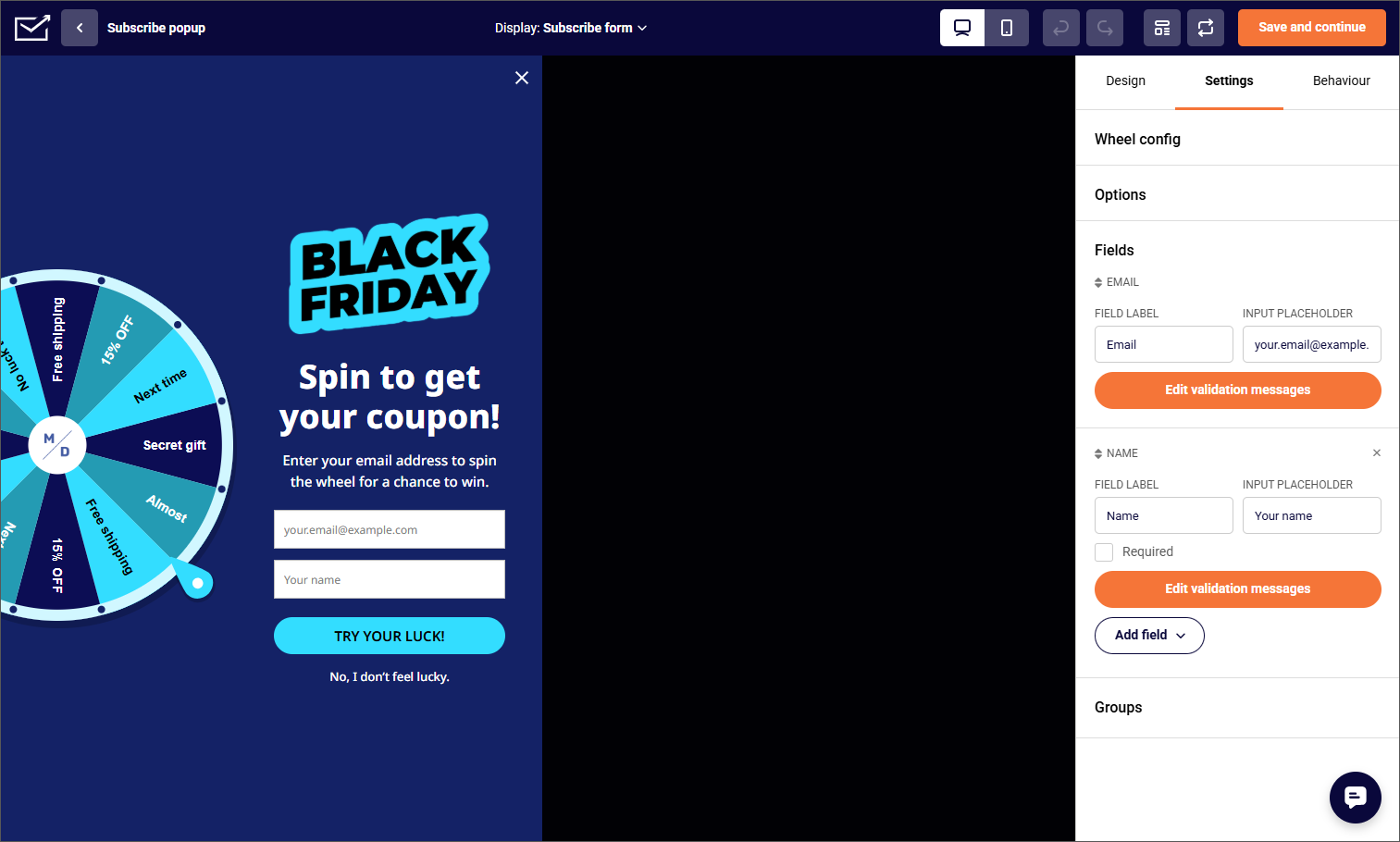
Where you place a signup form matters as much as its design. A form that only appears after someone scrolls past the point where they’d actually want more content converts better than one that interrupts on page load.
If you’re bringing over an existing list rather than starting from zero, most platforms support a direct file import (CSV, TSV, or XLSX) or a migration tool that pulls contacts and their engagement history from your old platform.
Either way, confirm your list is permission-based before you import it: contacts who never opted in specifically drive up bounce and spam-complaint rates from the first send, which is a bad way to start a new sending domain’s reputation.
A double opt-in step, where a new subscriber confirms via a follow-up email before they’re added to the list, costs you some volume up front but protects that reputation long-term.
4. Design Your Newsletter Template
Newsletter design has one job: get the reader to the next piece of information without friction. That means responsive, single-column design, not a multi-column layout, since most email clients render one column more reliably across devices and most opens now happen on a phone screen.
On the specific dimensions question: most newsletter templates run 600 to 680 pixels wide. That range is a genuine constraint, not a style preference.
Outlook’s desktop rendering engine (still built on Microsoft Word’s HTML renderer in many versions) struggles with anything wider, while modern webmail clients on high-resolution displays render the wider end of that range without issue. Building at 600px is the safer default if you’re not sure which clients your list uses.
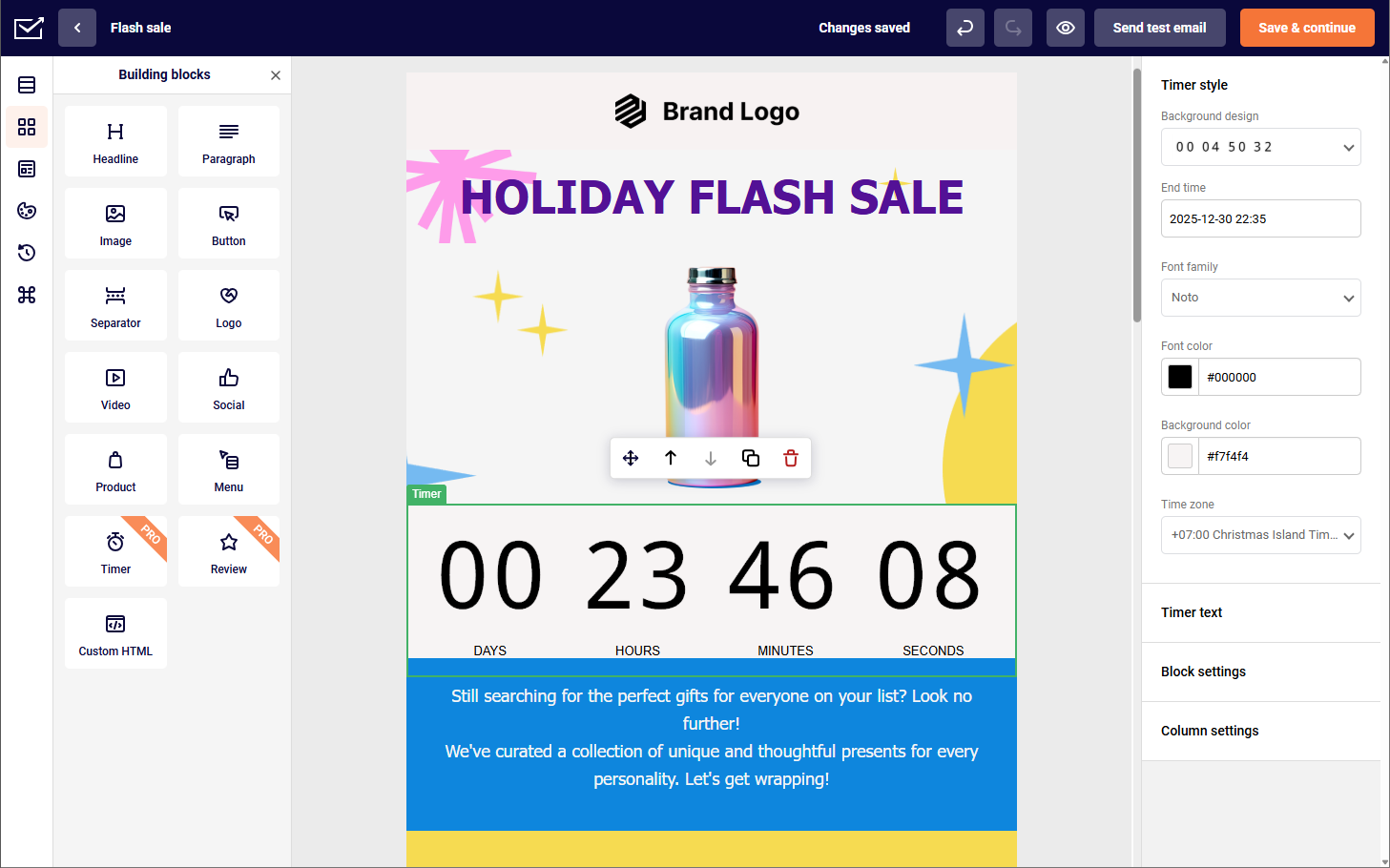
A few structural choices matter more than color palette or font pairing, though both should still follow your brand guidelines:
- One clear hierarchy. Header, one dominant message, supporting content, a single call-to-action (CTA), footer, in that order.
- Consistent brand blocks. Reusing the same header, footer, and company logo across sends saves rebuild time and reinforces recognition, and keeping those elements aligned with your brand identity is what makes a newsletter recognizable at a glance.
- Alt text on every image. Several major clients, Outlook chief among them, still block images by default for new senders, so a newsletter with no alt text and no readable text underneath the images shows up as a blank page for those readers.
Most email marketing platforms include a drag-and-drop email builder [LINK MISSING] for this, letting you place image, text box, and button blocks without hand-coding HTML tables, which is still how email templates render under the hood no matter how modern the editor looks.
5. Write the Content and Subject Line
Newsletter content is the reason someone keeps a subscription instead of unsubscribing after the second send. A useful starting ratio: roughly 80% valuable content, 20% promotional content. A newsletter that’s promotional in every send reads like an ad list, not engaging content worth opening.
Six formats reliably fill a newsletter without padding: company updates and behind-the-scenes glimpses into your company culture, product spotlights paired with customer feedback, a user’s photo, or your own product photography for social proof, curated roundups of your own or third-party content, customer case studies, light interactive elements like a one-question poll, and early access or subscriber-only offers.
Roundups and digests remain a popular format for teams without time to write long-form copy every send. Pick two or three per program rather than trying to include all six in a single send.
Plan themes at least a month ahead on a shared calendar rather than deciding the topic the morning you’re scheduled to send. A content plan built the day of send is the single most common reason newsletter quality drops off after the first few months, once the initial burst of ideas runs out.
If the subject line doesn’t get opened, none of the writing above matters. Keep it to 40-60 characters so it doesn’t truncate on mobile, where the majority of opens happen, and use the preview text (typically 40-100 characters, depending on client) to add information the subject line didn’t have room for, not to repeat it.
Specific subject line techniques, like leading with a number or a direct question, consistently outperform vague, clever-sounding lines in testing.
“Testing” is the operative word: don’t guess which subject line works better when you can split-test two versions against a portion of your list and send the winner to the rest. Test one variable at a time (subject line, sender name, or send time), since testing several at once makes it impossible to know which change actually moved the number.
6. Personalize and Segment Your Audience
A newsletter sent to everyone on your list the same way is competing with every other generic send in the inbox. Email segmentation is what lets you send fewer, more relevant emails instead of more, less relevant ones.
Knowing your target audience starts with the customer data you’re already gathering, before building anything complex:
- Behavior. Customer behavior like opens, clicks, and on-site activity signals what a subscriber actually cares about, as distinct from what they said they cared about when they signed up.
- Purchase history. Past orders support upsell, cross-sell, and replenishment timing.
- Engagement level. Separating an actively opening subscriber from one who hasn’t opened in 90 days lets you run a re-engagement sequence for the second group instead of quietly dragging down your overall open rate.
- Signup source. Someone who joined from a blog post has different intent than someone who joined for a 10%-off popup, and the first email they receive should reflect that.
- Demographics. Age range, location, or other demographic data collected at signup, worth using only when your content genuinely varies by group rather than as a segmentation criterion for its own sake.
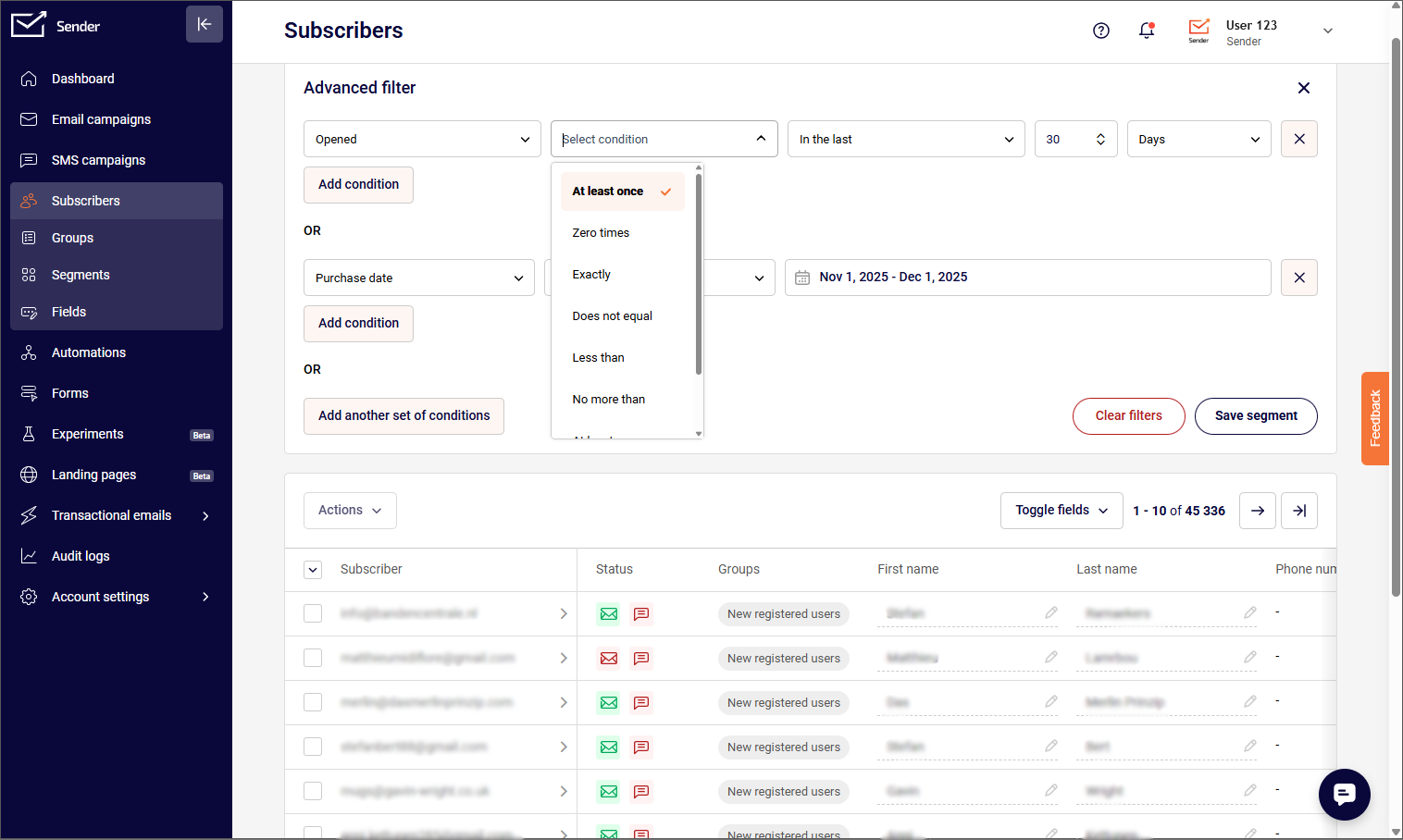
The difference between a static and a dynamic segment matters here: a static segment is a fixed snapshot from the day you built it, while a dynamic one recalculates its membership every time you send, so a subscriber who becomes inactive (or re-engages) moves in or out automatically.
For anything based on rolling behavior, like “opened in the last 30 days,” a dynamic segment is the only version that stays accurate.
7. Run the Pre-Send Checklist
Every newsletter has a moment right before “send” where a small, avoidable mistake either gets caught or goes out to your whole list. Most generic pre-send advice stops at “check your links.” A tighter, practitioner-level check covers the failure modes that actually happen:
- Personalization tags render with real data, not the literal merge tag (“Hi {{first_name}}” reaching an inbox is one of the most common and most embarrassing sending errors, and it happens when a segment includes contacts missing that field).
- Every link and button goes to the intended, live URL, tested by clicking, not just glancing at the href.
- Images display correctly and load from a stable host, since a broken image block looks worse than no image at all, and large images that push a template past an inbox provider’s clipping limit get cut off entirely.
- Mobile and desktop previews both look intentional, not just “not broken.”
- Footer includes a physical business address and a working unsubscribe link, both legally required in most jurisdictions, plus any social media accounts you want linked.
- Segment selection actually matches who you meant to send to, confirmed by checking the recipient count against your expectation.
- A test send goes to at least one real inbox (not just the platform’s built-in preview) before the live send.
Run through a written pre-send checklist every time, even on your hundredth newsletter. Skipping it because “we’ve done this before” is exactly when a merge-tag error or a stale segment slips through.
8. Automate, Schedule and Send
You have three sending options once a newsletter is built: send immediately, schedule it for a specific future time, or trigger it automatically based on a subscriber action or a recurring rule.
Scheduling in advance is standard for a recurring newsletter, since it lets you batch-produce content ahead of a busy week. Automated sending goes further: a welcome series that fires the moment someone subscribes, or a recurring digest that assembles itself from your latest posts, removes the manual step of remembering to hit send on a fixed day.
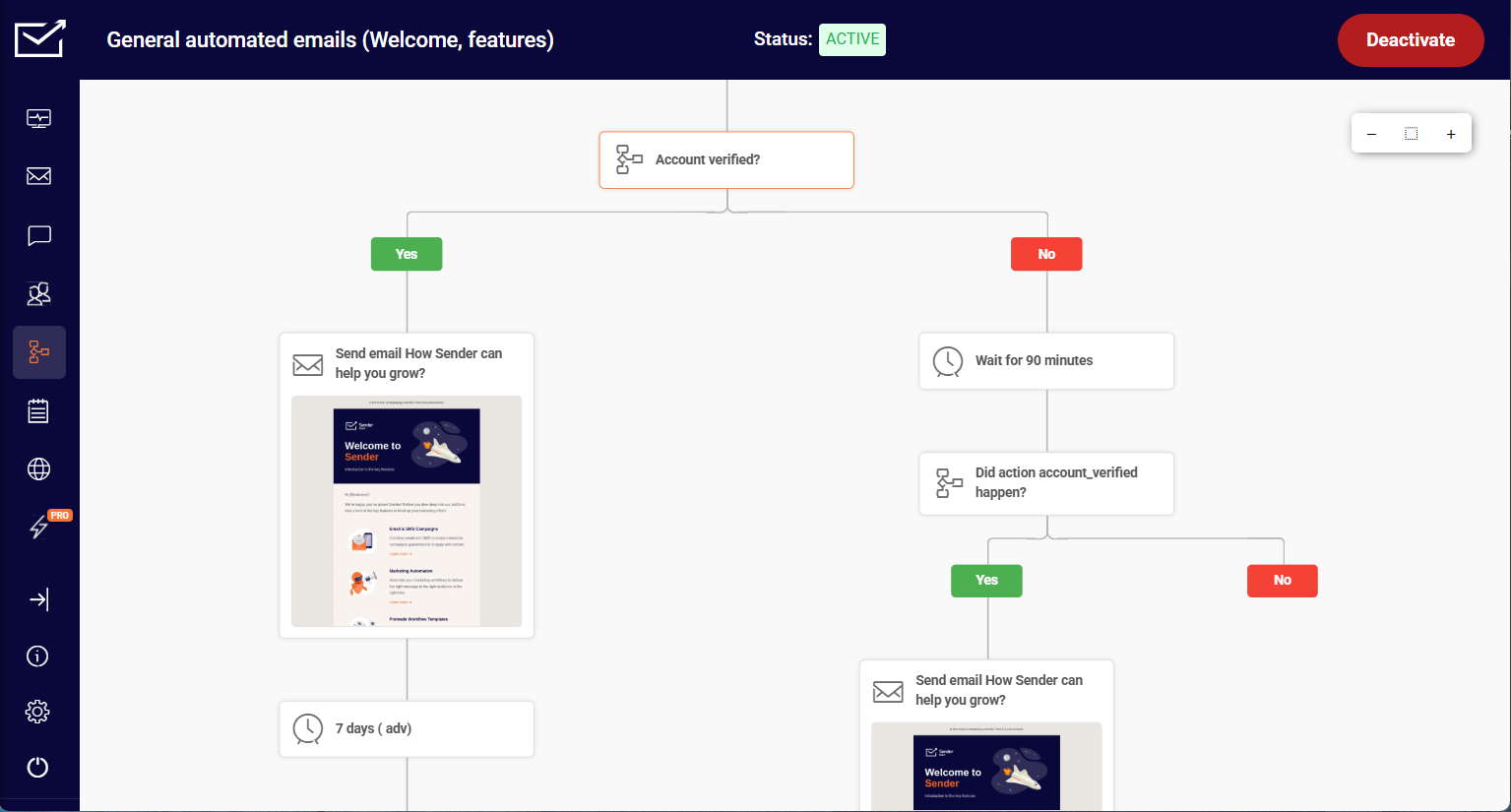
Whichever method you use, account for time zones before you lock in a schedule; a send scheduled for 9 AM in your own time zone might land at 2 AM for a meaningful share of an international list. The next section covers exactly when your send time should land.
Best Time to Send an Email Newsletter (Our 2026 Data)
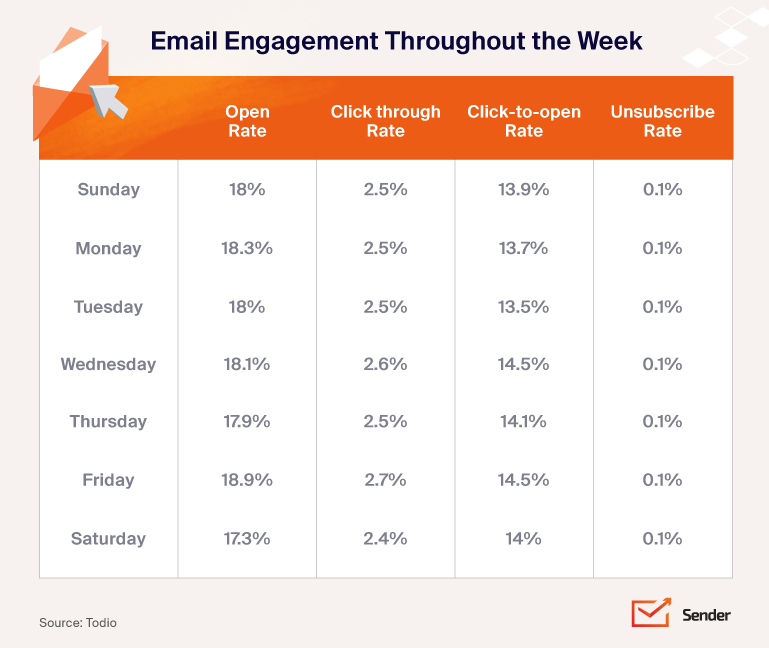
Three variables matter more than chasing the exact hour:
- Time zone spread. A list split across regions needs time-zone-aware sending, not one blanket send time for everyone.
- Content type. A short promotional nudge and a long-form digest earn attention at different points in someone’s day.
- Send history. A newer list has less data to learn from than an account with two years of sends to compare against.
Use the figure above as a starting point, then check it against your own send-time data after a handful of sends. Your own open-rate curve, by day and hour, tells you more than any industry-wide number.
Email Newsletter Best Practices That Actually Move Metrics
Beyond the step-by-step process, a handful of rules show up consistently in what separates a newsletter that performs from one that doesn’t:
- Protect the value-to-promotion ratio. The 80/20 split from step 5 isn’t a suggestion; it’s one of the most reliable levers on unsubscribe rate over a 6-month period.
- Send on a schedule you can actually sustain. A weekly newsletter that quietly becomes biweekly, then monthly, then stops, trains subscribers to stop expecting it before you’ve even decided to quit. Consistency compounds; missed sends don’t just cost that week’s opens, they lower engagement on the sends that follow.
- Keep one CTA per send. A newsletter with four competing buttons splits clicks across all four and converts on none of them as well as a single, clear next step would.
- Clean your list on a schedule, not a one-time basis. Contacts who haven’t opened in 90-180 days should move to a re-engagement sequence, then out of your regular send, rather than sit on the list dragging down your engagement rate against every inbox provider’s algorithm.
- Write preview text on purpose. An empty preview text field gets auto-filled with whatever text (often “view this email in your browser”) sits first in your template’s HTML, which wastes valuable inbox real estate.
- Design for the image-blocked reader. Alt text and a text-based fallback aren’t accessibility extras; a meaningful share of subscribers see your newsletter with images off by default.
None of these require a bigger budget. They require picking a standard and holding to it past the first few sends, which is where most newsletter programs actually fail.
How to Measure Newsletter Performance
You can’t improve what you don’t measure, and a newsletter’s email marketing metrics and KPIs tell a more specific story than a single “did it do well” impression.
Five key metrics matter most, and each one isolates a different part of the funnel:
- Open rate reflects your subject line and sender reputation more than your content, since it’s measured before anyone reads a word of the body.
- Click-through rate (CTR) reflects whether the content and CTA inside actually earned attention once the email was opened.
- Bounce rate flags list health: a rising bounce rate usually means stale or invalid addresses, not a sudden change in your content.
- Conversion rate ties the newsletter to an actual outcome, a purchase, a signup, a download, rather than just an open or a click.
- Unsubscribe rate is a leading indicator of content fatigue; a spike after a specific send is a clear signal about what that send got wrong.
Most of these live in your platform’s own reporting, though conversion rate is often more reliable when pulled from Google Analytics or your store’s own reporting, since a click inside the inbox doesn’t always get tracked accurately once someone lands on your site.
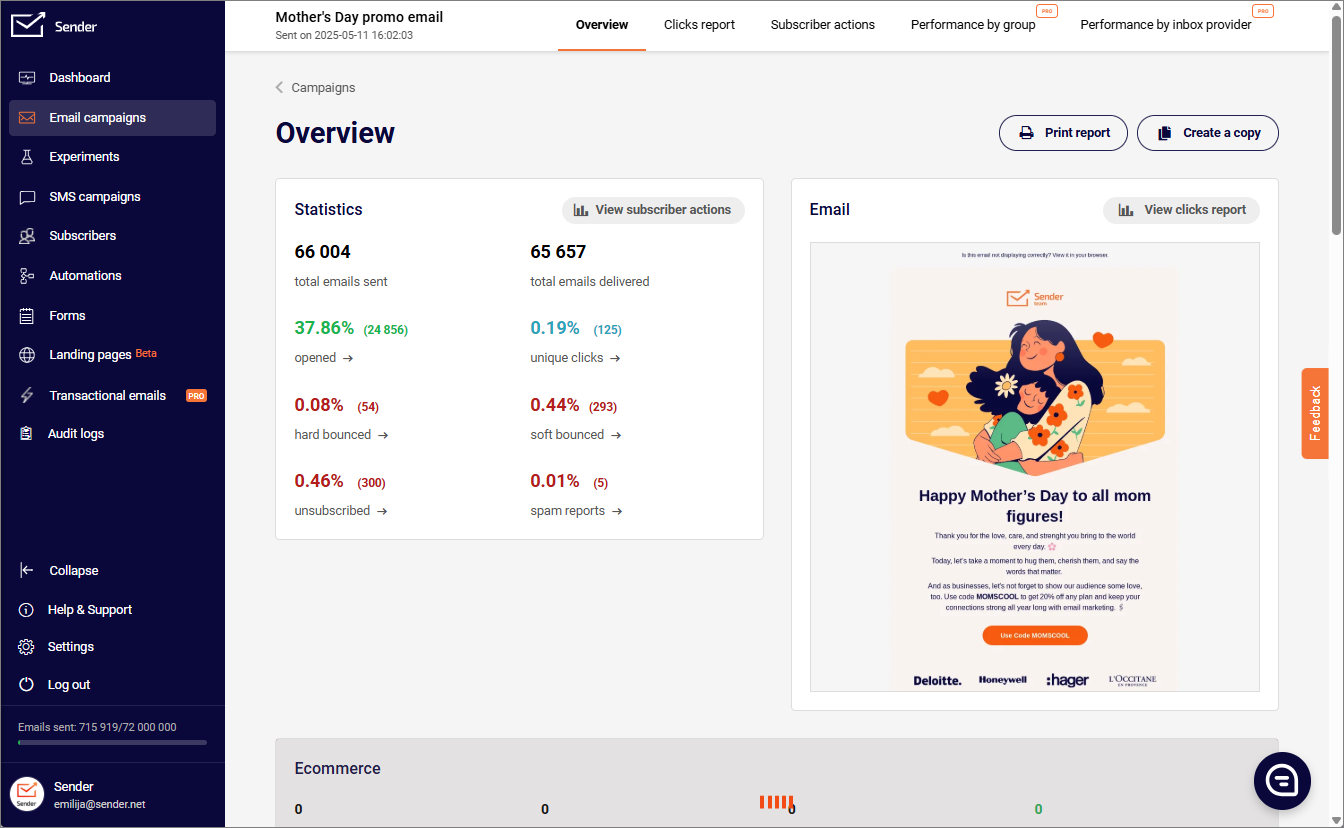
Resist comparing your numbers to a single industry-wide “good” benchmark. Open and click rates vary enormously by industry, list size, and how the underlying platform measures them, to the point that a benchmark from a different vertical is close to useless.
Track your key metrics over time and across segments instead of chasing a single benchmark: a 15% drop in open rate for your own list, on your own platform, is a real signal. A gap between your number and a benchmark pulled from an unrelated report usually isn’t.
Deliverability: Getting Into the Inbox
None of the metrics above mean anything if the email never reaches the inbox. Authentication is the baseline, not an advanced tactic: publish an SPF record, add DKIM signing, and set a DMARC policy so inbox providers can verify you’re the domain you claim to be, rather than a spoofed sender.
Deliverability requirements have tightened considerably over the past few years, and as of 2026, authentication isn’t optional for anyone sending real volume. Gmail and Yahoo classify any domain sending 5,000 or more emails a day to their addresses as a bulk sender, a classification that doesn’t expire even if your volume later drops.
Bulk senders are required to authenticate with all three records, keep spam complaints under a 0.3% threshold, and support one-click unsubscribe.
Since November 2025, Gmail moved from temporarily deferring non-compliant mail to rejecting it outright with a permanent bounce, so a misconfigured record now costs you the send entirely rather than just delaying it. A few list-hygiene habits protect that authentication investment:
- Warm up a new sending domain (or a dedicated IP address) gradually rather than sending full volume from day one; ISPs weigh a sudden volume spike from an unfamiliar domain or IP as a spam signal.
- Remove hard bounces immediately and soft bounces after repeated failures, since a dirty list is the fastest way to trip a spam-complaint threshold regardless of how good your content is.
- Match content to the segment it’s sent to, since relevant content earns fewer spam complaints than the same material blasted to an unsegmented list.
Setting up SPF, DKIM, and DMARC correctly the first time avoids re-doing this under pressure once a provider starts rejecting your mail.
10 Email Newsletter Examples to Steal From
Every brand approaches its newsletter differently, from a weekly product update to a once-a-quarter impact report. These ten newsletter examples show what that range actually looks like in practice, and what’s worth borrowing from each.
1. Weekly Newsletter Example by Taylor Stitch
Weekly newsletters are a great way to stay on top of your subscribers’ minds. Brands plan weekly newsletters to share new blog posts, the latest brand news, collections, product launch news, and exciting things planned for the week ahead.
Here’s an example of a weekly newsletter by Taylor Stitch:
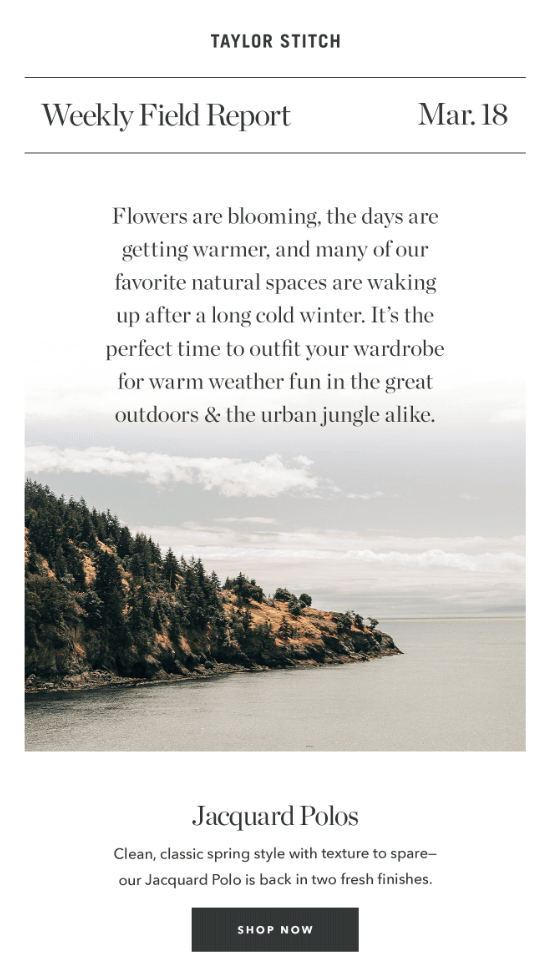
The newsletter reminds users about the upcoming summer season — warm weather and preparing for a wardrobe upgrade. The next section shares some outfit ideas for summer with a CTA to shop the products from the brand’s store.
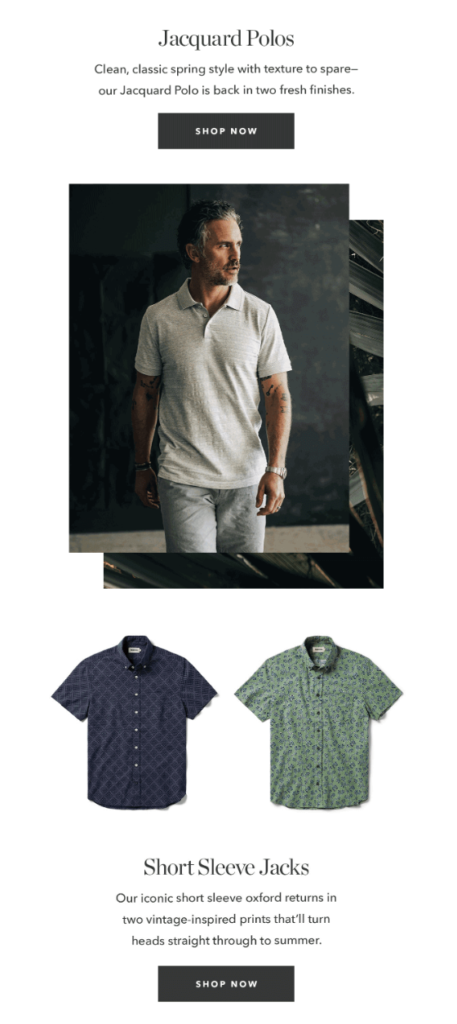
The contextual discussion about changing weather and summer collection fits the right image in the reader’s mind — they need something for summer, and the CTA entices them to check out the summer collection.
Key Takeaways
- Use a common theme for the weekly newsletter;
- Add contextual product links and CTAs to drive the discussion toward buying something.
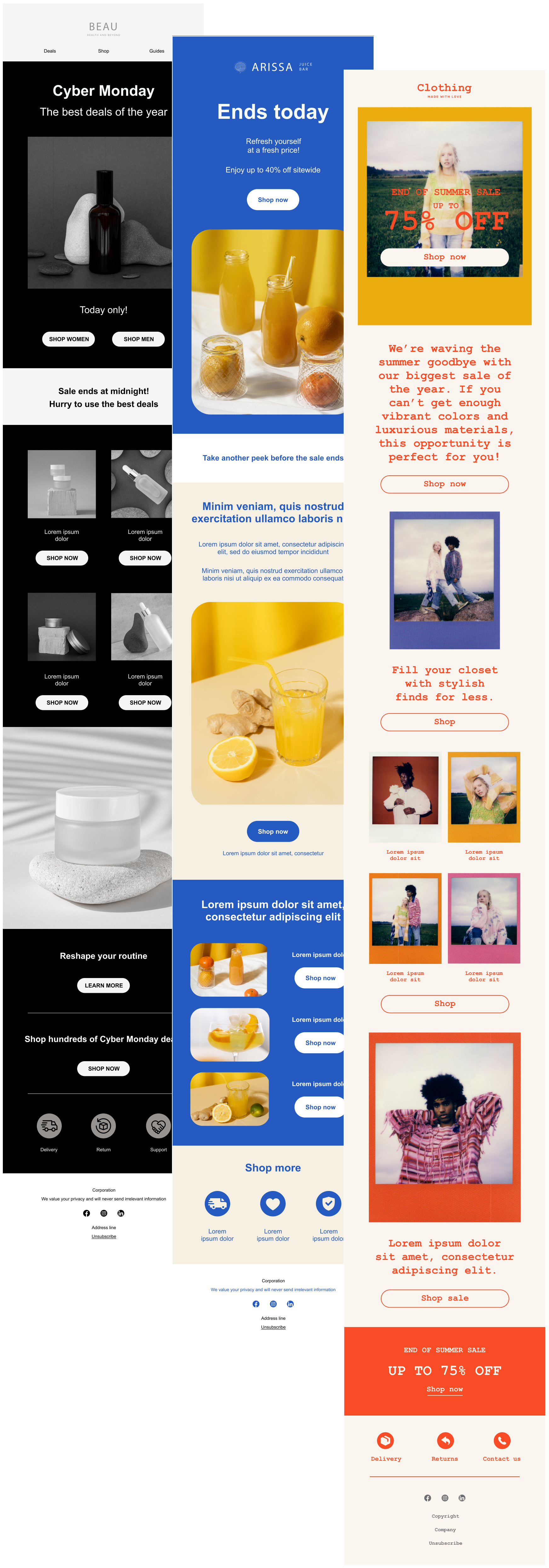
Save time and effort creating engaging newsletters with Sender’s drag-and-drop email builder and responsive email templates.
2. Monthly Newsletter Example by Apple
Sending a monthly newsletter is a great idea to keep subscribers engaged with the latest updates. In fact, maintaining consistency is one of the best practices for email marketing you should imbibe in your strategy. You can share the latest happenings, industry information, product updates, just like Apple did here:
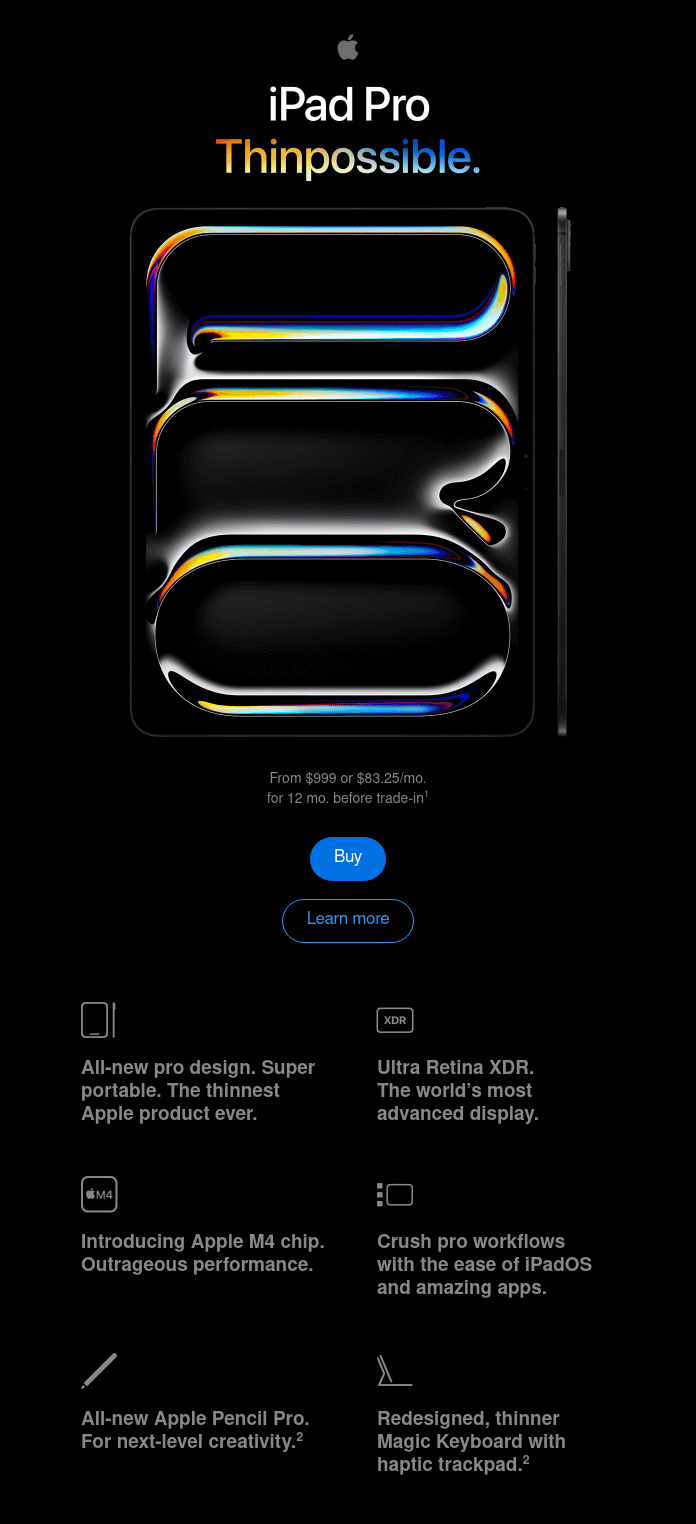
The minimalist layout makes reading easier and will motivate readers to explore. The short snippets of text nicely condense all the most important information about the new product and entice readers to explore more on the brand’s website.
Key Takeaways
- Send breaking news like product launches, important announcements, and brand updates via monthly newsletters to keep subscribers hooked;
- Focus on a single topic in your newsletter so as not to distract from the key information;
- Break information into short paragraphs and supplement with images to ease readability.
3. Blog Digest Newsletter by Refinery29
If you have a blog, a blog digest newsletter is an effective way to drive traffic to your website. By showcasing the newest or most popular articles, you arouse the readers’ curiosity and entice them to read more.
For instance, Refinery29, a digital media and entertainment website, uses a daily roundup to deliver curated content from its website:
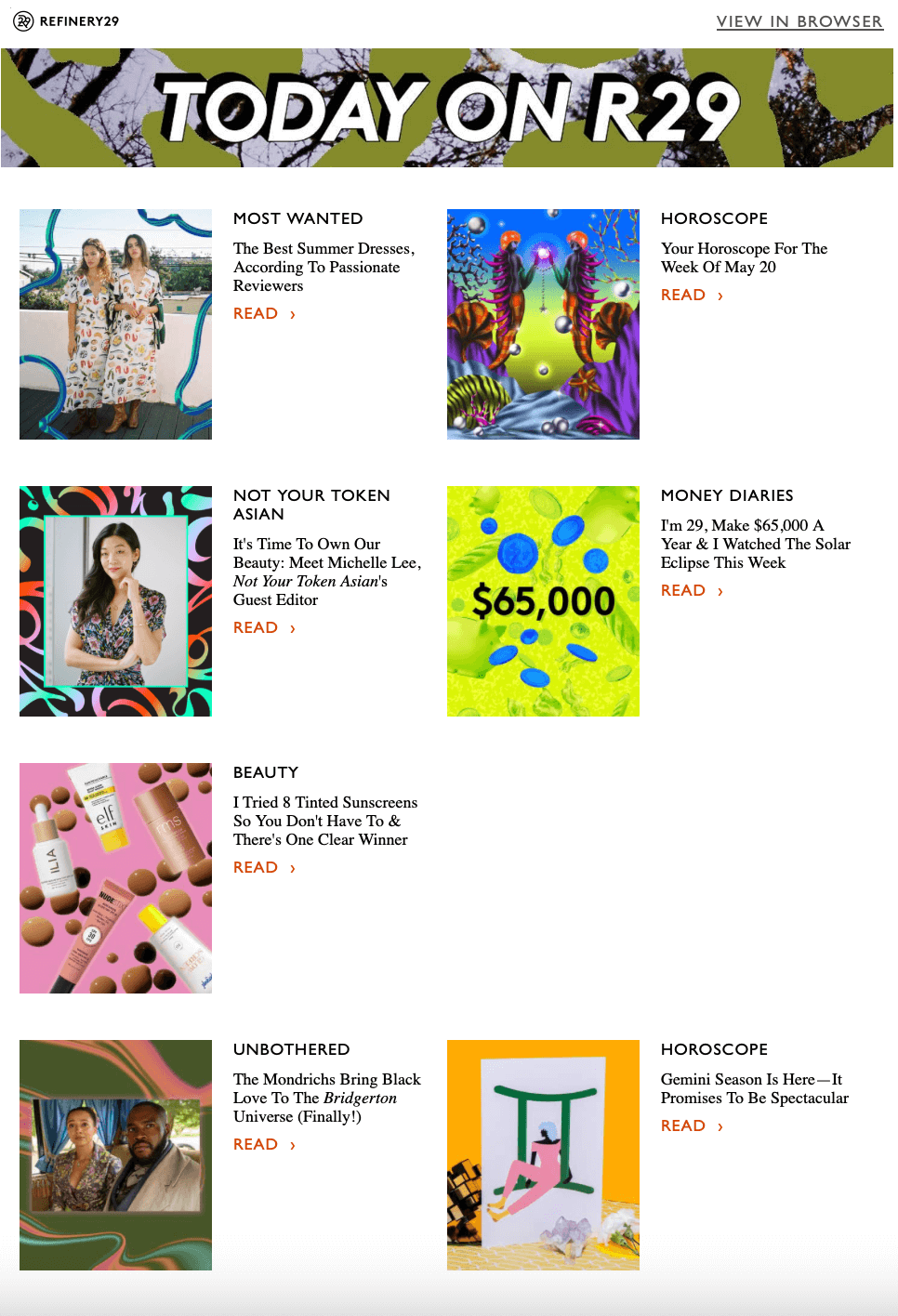
This format works because it treats the email like a homepage: visually curated, scannable, and full of click-worthy stories. The bold visuals paired with compelling headlines draw attention, while the modular layout makes it easy to browse and choose what interests you.
Key Takeaways
- Give your blog digest a distinct name to separate it from other types of newsletters;
- For better readability, keep your layout simple and minimalist with lots of white space;
- Add prominent CTA buttons to encourage readers to visit your website.
4. Promotional Newsletter by Pangaia
As with any newsletter, promotional sends need to stay relevant and valuable to the reader, not just discount-focused.
For example, understanding that in the winter season, subscribers mostly shop for others than themselves (hint: Christmas), sustainable fashion brand Pangaia presented their sale as a good opportunity to shop for gifts:
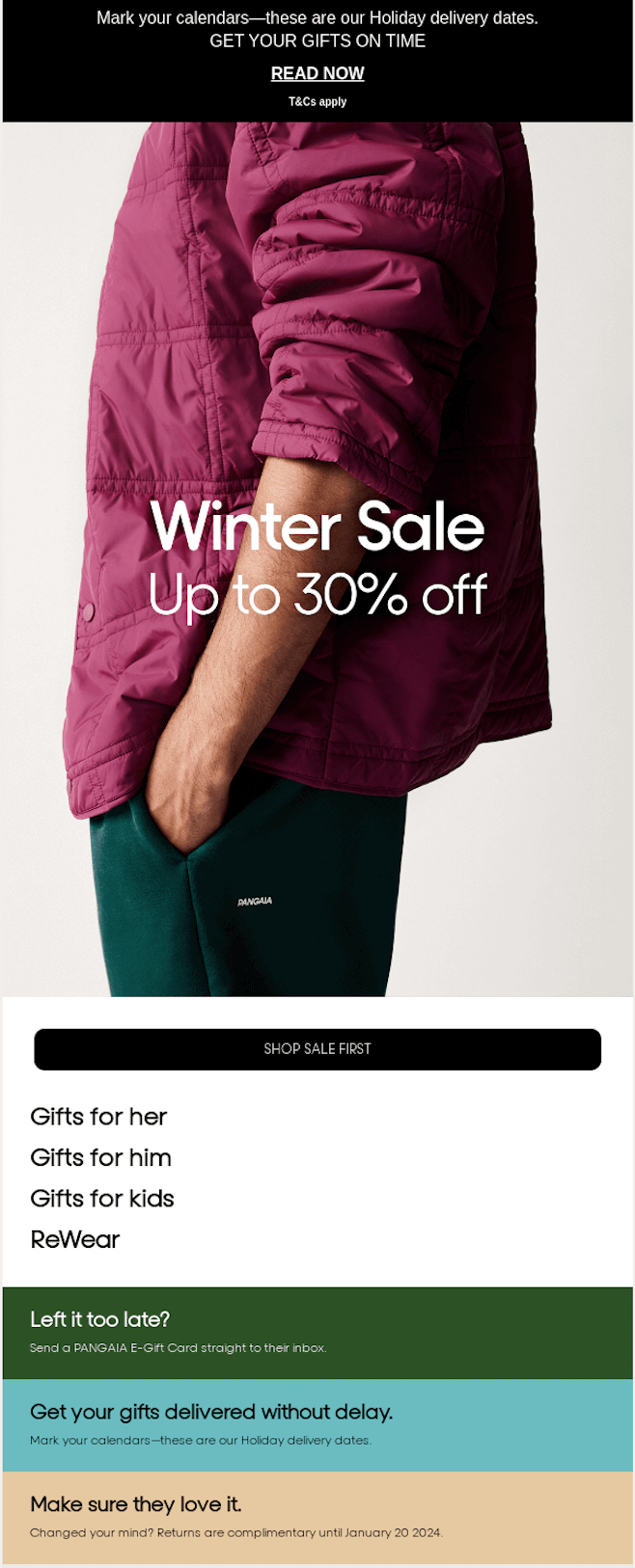
It’s not just the offer that makes this newsletter work. The brand included delivery details so buyers would receive their gift in time for the holiday, plus a backup plan (a gift card, delivered instantly) for anyone who missed the shipping cutoff.
Key Takeaways
- Keep the email body brief, action-oriented and highlight key details;
- Ease the navigation by providing links to specific product groups;
- You can add additional information, but use reading hierarchy to ensure that the main focus is kept.
5. Educational Newsletter by Everyday Oil
Educational newsletters showcase a brand’s expertise and thought leadership. This builds credibility and makes an audience more likely to turn to you for advice over time.
While often educational newsletters share how to get the most out of a brand’s products, it doesn’t mean you can’t go beyond, as natural cosmetic company Everyday Oil’s example shows:
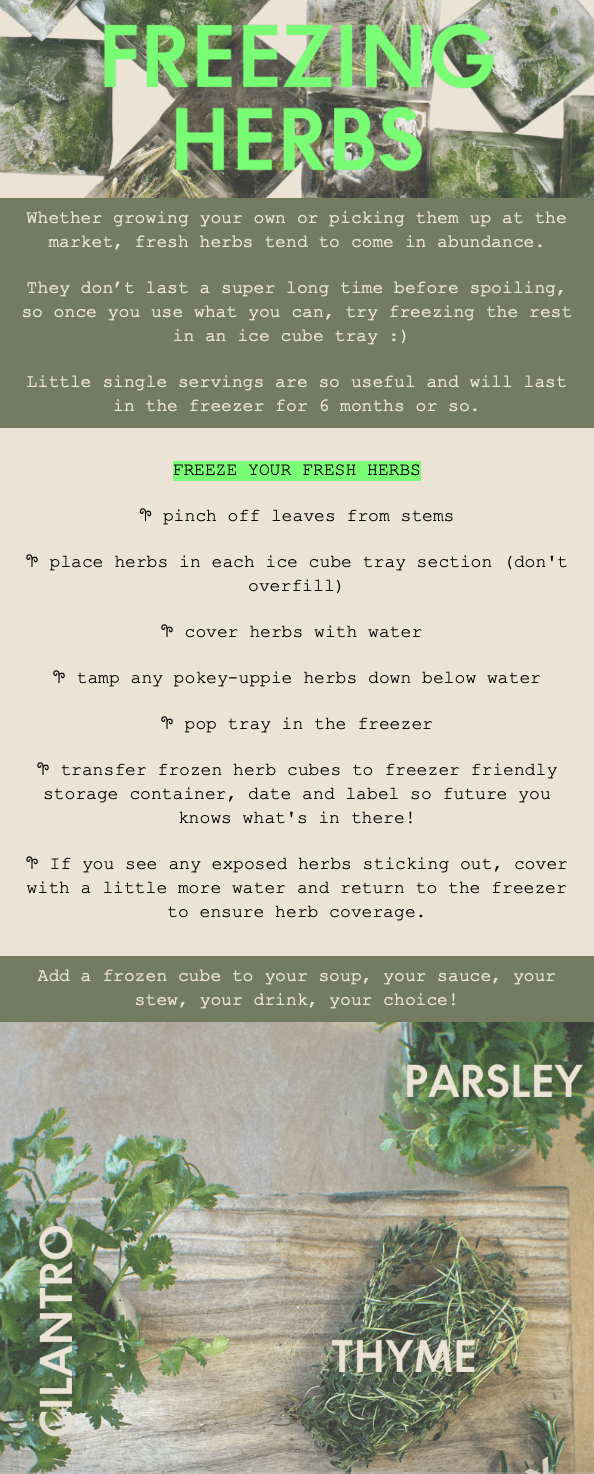
The brand occasionally shares practical tips on everyday topics unrelated to its products. That builds a friendly, trustworthy brand image without ever pitching directly, which is often what earns the sale later.
Key Takeaways
- Share educational content that can somehow enrich your subscribers’ lives;
- To make the content relevant, address seasonal topics or common pain points;
- Make the content easy to digest with illustrations and short paragraphs.
6. B2B/SaaS by AirOps
B2B and SaaS newsletters have a different job than an ecommerce send: the reader isn’t deciding whether to buy something today; they’re deciding whether your company is worth continuing to pay attention to.
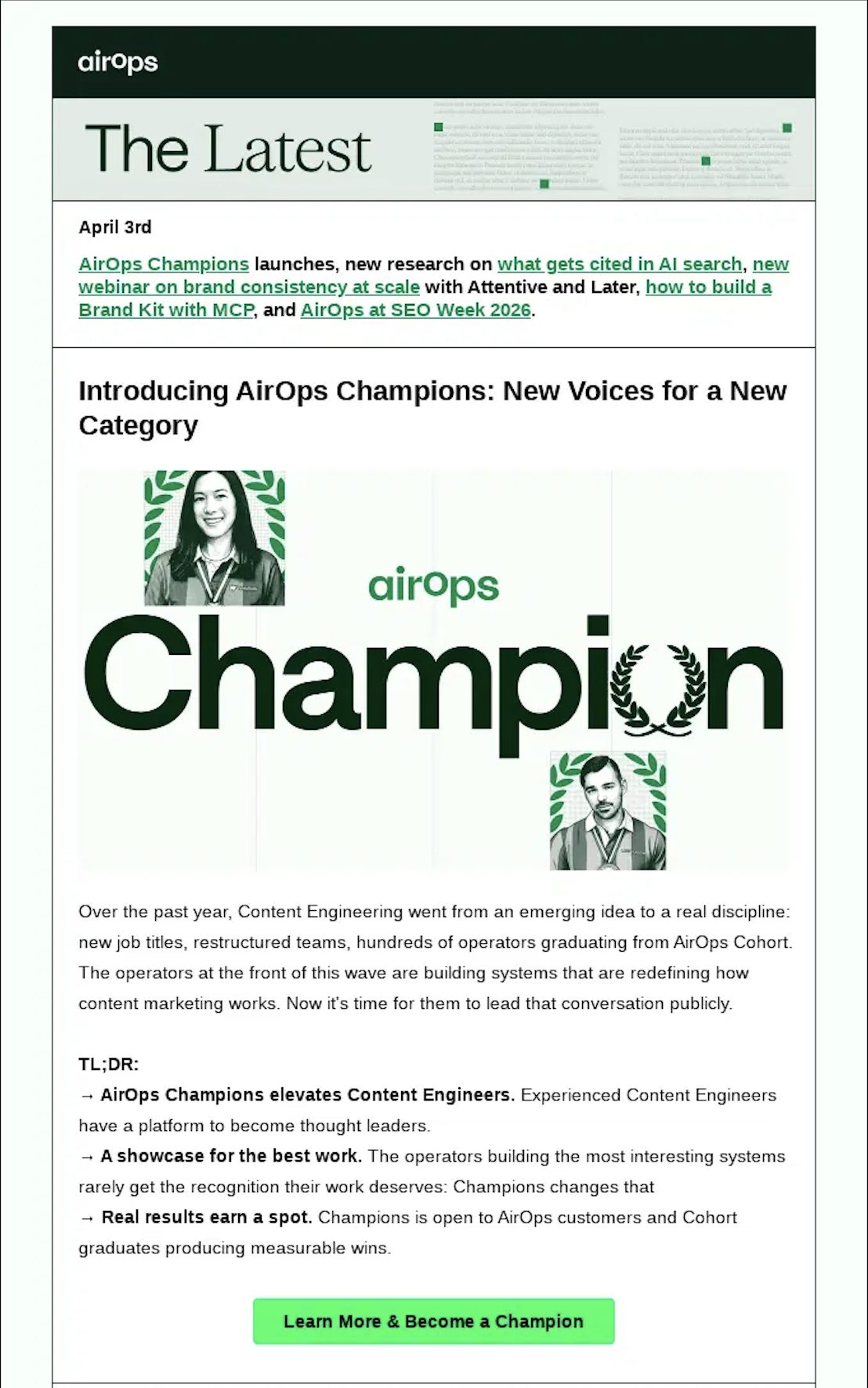
AirOps structures its “The Latest” send in two layers. It opens with a dated, linked roundup (“AirOps Champions launches, new research on what gets cited in AI search…”) that works like a table of contents for readers who only have thirty seconds.
Below that sits a single feature story, introducing the AirOps Champions program, broken down into a TL;DR block that leads with the key points in three bolded, arrow-led bullets before the reader ever gets to a CTA.
Key Takeaways
- Open with a scannable, linked roundup for readers who won’t read the full send.
- Follow the roundup with one feature story instead of splitting attention across several.
- A bolded TL;DR block lets a skimming reader extract the point without reading the full paragraph above it.
7. Creator/Substack-style by Tom’s Marketing Ideas
Creator-run newsletters sell the writer’s judgment, not a product, which changes the format entirely.
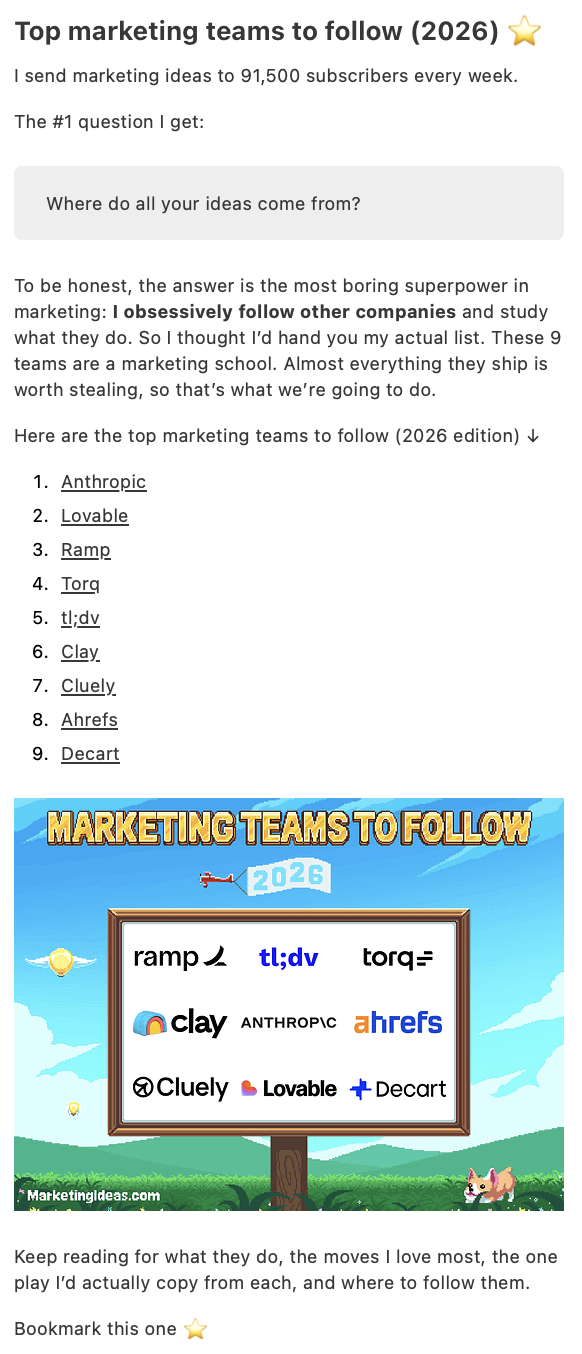
This send opens in first person (“I send marketing ideas to 91,500 subscribers every week”) and frames the whole email as an answer to a question the writer says they get often.
The body is a numbered list of nine companies worth following, paired with a promise of specific value further down (“the one play I’d actually copy from each”), plus a custom illustrated graphic built specifically for shareability rather than a stock photo.
Key Takeaways
- Write in first person and address the reader directly; it’s what makes a creator newsletter feel different from a company one.
- Frame the email as answering a specific, real question rather than as a generic update.
- A subscriber count and a “bookmark this one” close both build a habit of returning, not just opening once.
8. Nonprofit by Canadian Red Cross
Nonprofit newsletters rarely sell anything directly; the job is building trust in the organization’s impact, backed by a specific, verifiable result.
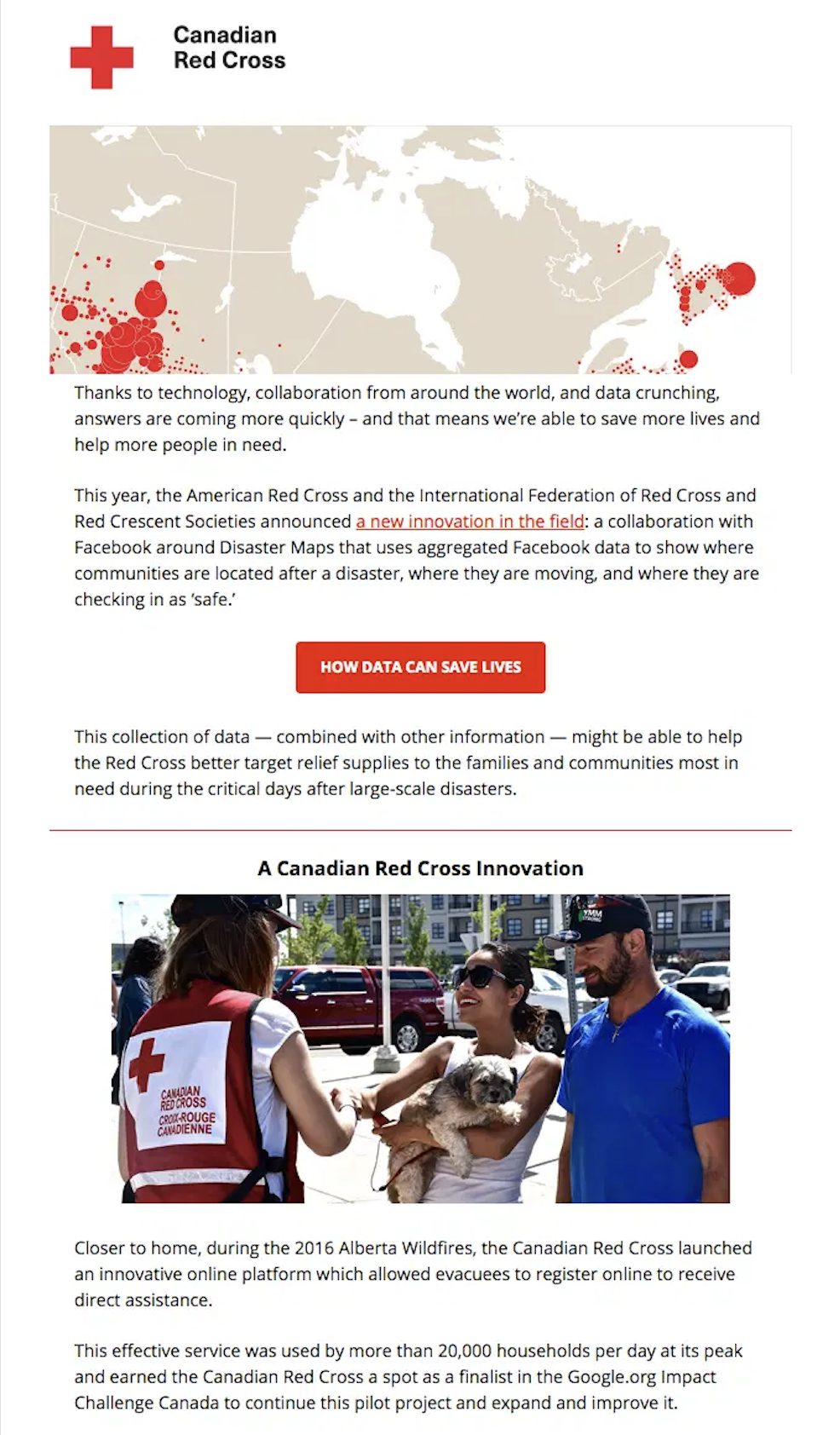
The Canadian Red Cross opens with a data visualization: a map of disaster-response activity, tied to a specific partnership (an aggregated-data collaboration for locating communities after a disaster).
It then narrows from that global initiative to a local, specific case study: the 2016 Alberta wildfires, where an online registration platform served more than 20,000 households a day at its peak, a detail specific enough to be credible in a way a vague “we helped many people” claim wouldn’t be.
Key Takeaways
- Lead with data or a visual that makes impact concrete, not just descriptive.
- Narrow from a broad initiative to one specific, local story with a real number attached.
- A single CTA tied to a story converts better in this format than a direct donation ask up top.
9. Ecommerce Digest by Puma
Ecommerce newsletters built around one hero product need to do more than show the item; they need to give the reader a reason the product is different.
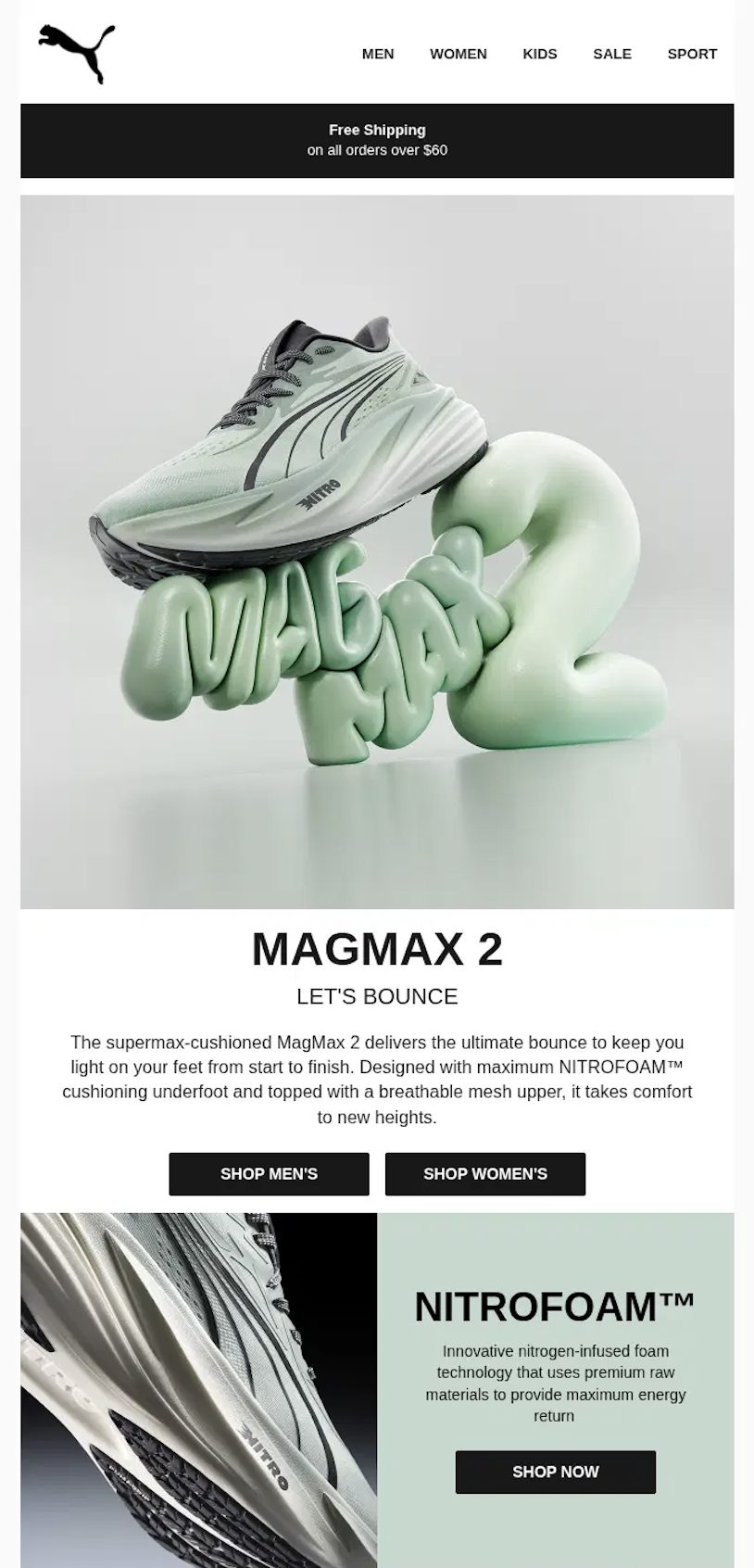
Puma’s MagMax 2 launch email keeps the site’s full navigation and a shipping-threshold banner at the top (unlike many stripped-down promotional templates), then leads with a hero product shot and a two-word tagline (“Let’s Bounce”).
It backs the tagline with a named material (“NITROFOAM™”) and a dedicated callout section explaining what that material does, before splitting the CTA into “Shop Men’s” and “Shop Women’s” rather than one generic button.
Key Takeaways
- Name the specific technology or material behind a product claim instead of a vague quality claim.
- Split CTAs by audience segment when a product serves more than one shopper group.
- Keeping site navigation in the email works when the goal is browsing, not just a single conversion.
10. Event Newsletter by Salesforce
Event newsletters have a shelf life problem: the event ends, and so does the reason to open the next email, unless the follow-up gives readers a new reason to engage, whether that’s on-demand content or a nod to upcoming events.
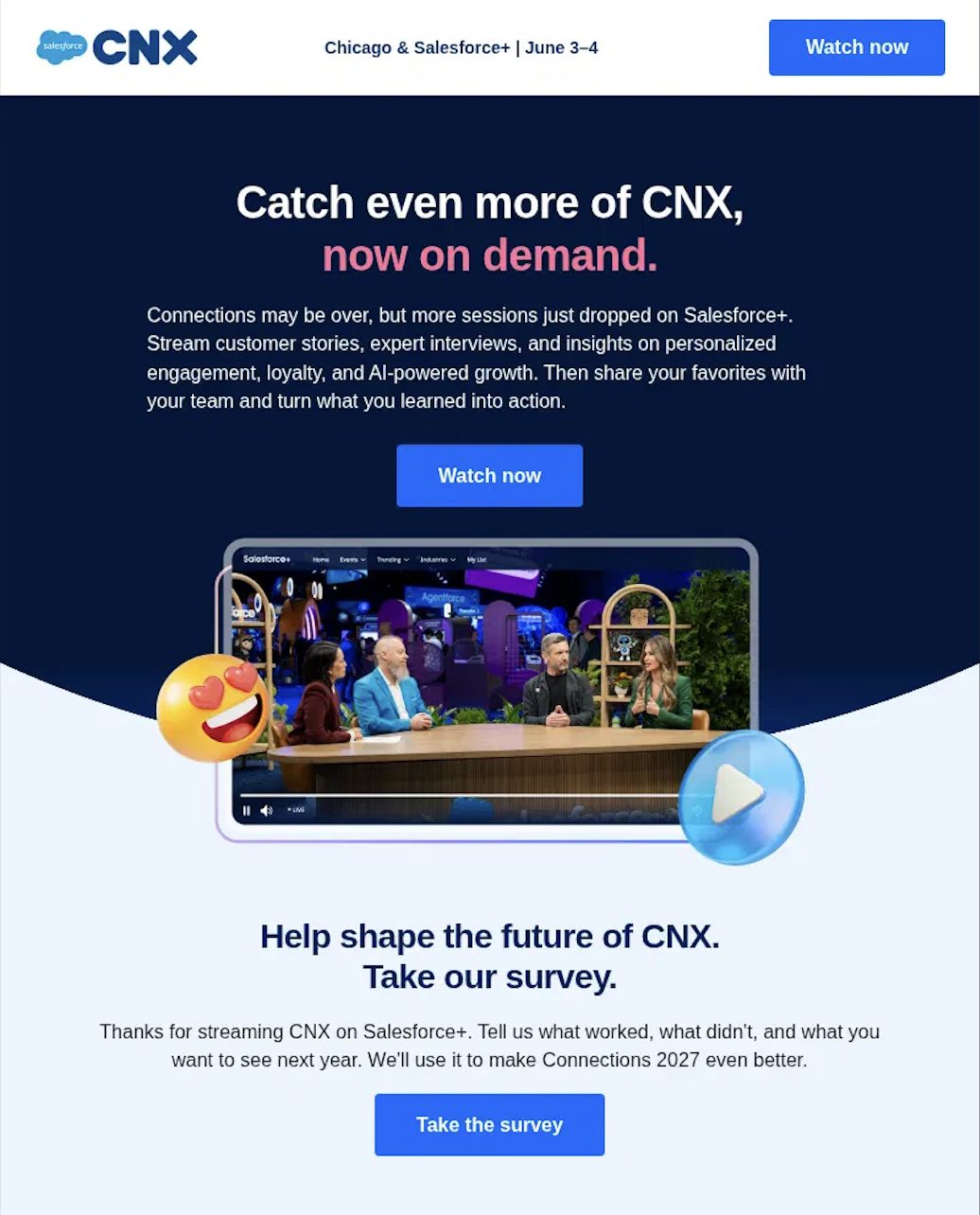
Salesforce’s CNX follow-up newsletter solves this by extending the event past its dates (“Connections may be over, but more sessions just dropped on Salesforce+”) rather than treating the send as a simple thank-you.
It pairs the on-demand content offer with a second, separate ask: a survey, framed around shaping next year’s event rather than generic feedback.
Key Takeaways
- Give a post-event email new content to offer, not just a recap of what already happened.
- Separate the content CTA from the feedback CTA instead of combining them into one crowded ask.
- Naming next year’s event, even briefly, keeps the relationship open past this year’s send.
Email Newsletter FAQs
Pick one goal, choose newsletter software that fits it, build a permission-based subscriber list, design a single-column template, write toward one primary message and a specific subject line, segment where your data supports it, run a pre-send check, then send on a schedule you can sustain. Each step is covered in detail above.
A single-topic newsletter usually runs 200 to 500 words, scannable in under two minutes. A digest or roundup format, covering multiple stories or products, can run 600 to 1,000 words, since readers skim rather than read it start to finish. The reading time it implies matters more than the raw word count; anything that reads like a 3-4 minute commitment tends to get saved for “later” and never opened again.
Most newsletter templates run 600 to 680 pixels wide. That range renders reliably across older email clients like Outlook’s desktop rendering engine, while still looking sharp in modern webmail on high-resolution screens. Building at 600px is the safer default if you’re not certain which email clients your list uses.
Weekly is the most common cadence and the easiest to stay consistent with. Biweekly or monthly works for brands that don’t have enough content to fill a weekly send without padding it out. Consistency matters more than frequency itself: a list that gets a newsletter every Tuesday learns to expect it, while a list that hears from you three times one month and zero times the next tends to see both declining opens and rising unsubscribes, regardless of content quality.
GDPR and CAN-SPAM are data security laws that require you to get clear consent before sending marketing emails and provide an easy way for subscribers to opt out. Your emails must include a valid business address and an unsubscribe link. The email marketing platform you choose should have compliance features built in, like consent checkboxes and a subscriber preference center, to stay on the right side of the law. For more on choosing a compliant platform, see this comparison of newsletter platforms reviewed for 2026.
Start Your Email Newsletter Today
You’ve now got the strategy, design, content, and timing decisions covered, along with ten real examples of newsletters built around different goals. The last step is the one most guides skip: actually shipping the first send, then treating every send after it as a small experiment you can learn from.
Pick the one goal from step 1, build against it, and give yourself a few sends before judging the results. A newsletter program that improves steadily over ten sends beats one that’s perfect on paper and never goes out.
For the fuller picture of how a newsletter fits into everything else on your calendar and in your automations, our complete guide to email marketing covers the rest of the strategy this piece builds on.