

Most marketing teams outgrow basic autoresponders long before they outgrow their contact lists. Choosing the right drip email software comes down to how much automation depth, segmentation control, and multi-channel capability your workflows actually require.
This page compares ten email drip campaign software platforms across trigger flexibility, conditional logic, deliverability infrastructure, and pricing models, covering options from free-tier tools suited to startups through enterprise-grade systems built for CRM-integrated sales pipelines.
Whether you need dedicated email workflow software for simple sequences, full-featured marketing automation tools for complex funnels, or lead nurturing software that bridges marketing and sales, the breakdown below will help you match a platform to your use case.
As of October 2026, Sender is the pick for drip automation on a free plan, Klaviyo is best for predictive ecommerce flows, ActiveCampaign for CRM-driven SMB funnels, Brevo for budget-friendly high-volume sending, HubSpot for CRM-led B2B teams, and Omnisend for pre-built ecommerce email and SMS flows.
Each platform is evaluated with current pricing, key features, and a verdict block identifying its strongest use case and who should skip it. I tested each one on its entry-level paid plan with the same 1,000-contact list. Prices checked October 2026; monthly-billed unless marked.
Quick Picks: Choose Email Drip Campaign Software Fast
Sender is our free-plan pick, and each of the other nine wins for one business type or goal:
- Best free plan for drip campaigns: Sender
- Best for ecommerce lifecycle automation: Drip
- Best for CRM-driven SMB funnels: ActiveCampaign
- Best for pre-built ecommerce email and SMS flows: Omnisend
- Best budget option for high-volume sending: Brevo
- Best for content creators: Kit
- Best for CRM-led B2B teams: HubSpot
- Best for beginners: Mailchimp
- Best for simple visual automation on a small budget: MailerLite
- Best for predictive ecommerce flows: Klaviyo
How We Evaluated the Best Email Drip Campaign Software
Our team tested each email marketing platform on its entry-level paid plan, or the tier closest to Mailchimp’s Essentials plan, using a standardized list of 1,000 contacts who had interacted with a newsletter in the last 90 days. None of the contacts were purchased or scraped. Prices, plan limits and features were checked in October 2026.
For every tool, we evaluated:
- Email builder
- Automation depth: trigger types, conditional logic and branching
- List and segment management
- Form builder and landing pages
- Deliverability, using third-party testing data
- Support responsiveness on the entry-level plan
- Customer reviews on G2, Capterra, Trustpilot and Reddit
- Pricing model
Deliverability testing: We used third-party data from tools like GlockApps and EmailTooltester to benchmark inbox placement, spam rates and domain reputation, and ran our checks with identical campaign setups across platforms.
Each review quotes a deliverability score and an inbox placement rate where data exists, with the source and the month it was checked. Scores from different testers aren’t directly comparable, and your own sending practices affect inbox placement as much as the platform does.
User reviews: We read customer feedback on G2, Trustpilot, Capterra and Reddit, looking for recurring themes in ease of use, support quality, pricing transparency and feature reliability. To avoid cherry-picking, we focused on patterns across a large volume of recent reviews and weighed positive and negative feedback together.
What we didn’t test: Enterprise features (SSO, dedicated IPs, custom SLAs), SMS sending at volume, and transactional email infrastructure beyond basic SMTP. Our target audience for this review is SMBs, independent creators and agencies with lists of up to 50,000 contacts.
Pricing methodology: All prices were checked in October 2026 and are shown in USD, billed monthly unless marked. Annual discounts are listed separately. Vendors change plans often, so check each platform’s pricing page before you buy. For the full process behind our reviews, see how we test tools.
Capterra, G2, Trustpilot, and Reddit to create an objective evaluation. Learn more about our review methodology
Key Automation Features in Drip Campaign Software
Seven automation capabilities separate a basic email sequence builder from a platform that can run automated drip campaigns with real depth, including triggered email campaigns that respond to subscriber behavior in real time. Check for these before choosing a platform:
- Visual workflow builder. A drag-and-drop canvas for mapping every step (emails, delays, splits, exits) in a clear visual flow with in-line editing and path previews.
- Behavioral and event-based triggers. Rules that start or redirect sequences based on actions like email opens, page visits, cart abandonment, or custom events, not just “subscribed to list.”
- Conditional logic & branching. If/else splits that route subscribers down different paths based on attributes, engagement, or segment membership, turning generic series into personalized journeys.
- Time-delay and sequence control. Configurable wait steps (fixed intervals, specific days/times, or “wait until” conditions) with timezone-aware scheduling for sensible local delivery.
- Segmentation and dynamic personalization. Real-time segments paired with conditional content blocks, merge tags, or product feeds that tailor each email to the individual beyond basic first-name tokens.
- Integration & API-triggered automation. Connections to your CRM, ecommerce platform, or product analytics that feed live data into workflows and let external events kick off sequences automatically.
- Automation performance analytics. Per-step open, click, and conversion metrics within each workflow, plus revenue attribution and drop-off reporting to pinpoint exactly where subscribers disengage.
Email Drip Campaign Software – Comparison Table
Sender, Brevo and Klaviyo are the only email drip campaign software here with branching automation on a free plan, though Brevo caps automations at 2,000 contacts until Standard. The table compares all ten:
| Tool | Best for | Free plan | Paid from (monthly) | Branching workflows from |
| Sender | Free plan for drip campaigns | 2,500 subscribers, 15,000 emails/month | $9 (Standard) | Free plan |
| Drip | Ecommerce lifecycle automation | None (14-day trial) | $39 (2,500 contacts) | Every plan |
| ActiveCampaign | CRM-driven SMB funnels | None | $19 (Starter, 1,000 contacts) | Plus |
| Omnisend | Pre-built ecommerce email and SMS flows | 250 contacts, 500 emails/month | $16 (Standard) | Standard (Free has basic automations) |
| Brevo | High-volume sending on a budget | 300 emails/day | $9 (Starter) | Free plan (2,000-contact cap until Standard) |
| Kit | Content creators | Up to 10,000 subscribers, no automations | $39 (Creator, 1,000 subscribers) | Creator |
| HubSpot | CRM-led B2B teams | Free CRM, 2,000 emails/month, no workflows | $20 per seat (Starter) | Professional ($890) |
| Mailchimp | Beginners | 250 contacts, 500 emails/month | $13 (Essentials) | Standard ($20) |
| MailerLite | Simple visual automation on a small budget | 250 subscribers, 2,500 emails/month | $12 (Comfort) | Comfort (one trigger per automation) |
| Klaviyo | Predictive ecommerce flows | 250 contacts, 500 emails/month | $20 (Email, 500 contacts) | Free plan |
*Email drip campaign software compared and checked in October, 2026.
“Paid from” is the lowest monthly-billed price for the smallest list. The last column shows the first plan with branching workflows, which is the plan most drip users end up paying for.
Among the other email marketing software here, Kit, Mailchimp and MailerLite limit free-plan automation to nothing or basic autoresponders, and HubSpot’s workflow builder starts at Professional, which costs $890/month before the $3,000 onboarding fee.
If you already know your main constraint, narrow the list of drip campaign tools first. Ecommerce stores will mostly compare Drip, Omnisend and Klaviyo, which trigger on cart and order events. B2B teams that want a CRM with drip campaigns will compare ActiveCampaign and HubSpot, and creators will compare Kit and MailerLite.
How Much Does an Email Drip Campaign Cost?
At 5,000 contacts, most email-first platforms in this comparison land around 40-100 per month, so entry-level prices say little once your audience grows. The exact bill depends on whether the provider charges for contacts, active profiles, subscribers, or email volume.
To make the comparison more realistic, the table below looks at what each platform costs at roughly 5,000 contacts. Where automation is gated, I’ve used a drip-capable plan rather than the cheapest advertised tier.
| Tool | Plan used | Monthly billing at 5,000 contacts | Annual billing (per month) | Extra fees |
| Sender | Standard | $39 | $27.30 (first year) | None |
| Drip | Single plan | $89 | $89 (no annual plan) | None |
| ActiveCampaign | Plus (if/else branching) | $179 | $145 | None |
| Omnisend | Standard (email only) | $81 | $56.70 | Bills all active profiles |
| Brevo* | Standard, 20,000 emails | $69 | $62.80 | None |
| Kit | Creator | $89 | $75 | None |
| HubSpot | Marketing Hub Professional | $1,140 | $1,050 | $3,000 onboarding |
| Mailchimp | Standard (journeys) | $100 | – (no annual discount) | Paid SMS add-on |
| MailerLite | Comfort | $49 | $44.10 | None |
| Klaviyo | $100 | – (no annual discount) | Per-message SMS, paid add-ons |
*Cost at 5,000 contacts, checked October, 2026. Brevo is the only marketing automation platform on this list that sets the price based on monthly email cap, instead of selected contact limits.
Extra fees also shape drip email pricing, from per-message SMS to add-ons and billing for non-subscribers. Our breakdown of email marketing costs explains what drives these numbers.
If budget is the deciding factor, our roundup of affordable email marketing platforms compares more low-cost options.
Free Email Drip Campaign Software Compared
Several tools advertise free plans, but most limit automation or reserve full drip workflows for paid tiers. Here’s what you can actually drip for $0:
| Tool | Contacts | Emails per month | Automations on the free plan |
| Sender | 2,500 | 15,000 | Yes: visual workflows, branching, custom events |
| Brevo | 100,000 | 300 per day | Yes, reaching up to 2,000 contacts |
| Klaviyo | 250 | 500 | Yes, plus $5 of mobile messaging a month |
| Omnisend | 250 | 500 | Basic automations |
| MailerLite | 250 | 2,500 | Single-step autoresponders only |
| Mailchimp | 250 | 500 (250 per day) | Basic autoresponders only |
| HubSpot | Unlimited CRM contacts | 2,000 | No workflows |
| Kit | Up to 10,000 | No email sends | No automations |
Drip and ActiveCampaign have no free plan, so neither appears in this list of free drip campaign software. For drip email marketing, the automation column matters more than the contact limit: Kit allows up to 10,000 subscribers for free but no automations, and HubSpot’s free CRM holds unlimited contacts without any workflows.
Support differs too. Sender and Omnisend offer 24/7 email and live chat on their free plans. Klaviyo gives email support for the first 60 days, Mailchimp for 30 days and MailerLite for 14, and HubSpot’s free plan has no support.
Sender’s free email marketing plan also has no daily sending limit, while Mailchimp’s free plan caps sends at 250 a day.
Best CRM for Drip Campaigns
As of October 2026, ActiveCampaign is the best choice for email automation with a built-in CRM, HubSpot is the stronger option for teams that need a full sales-and-marketing CRM suite; while Sender and Brevo make more sense if your drips are driven by customer behavior rather than sales pipeline stages.
Choose ActiveCampaign for Email Automation + CRM
ActiveCampaign is the middle ground for businesses that need CRM data inside their drip campaigns but don’t want the breadth or cost of a full platform like HubSpot.
ActiveCampaign’s built-in CRM can feed deal stages, custom fields, and sales data into email workflows, while lead scoring helps identify contacts that are ready for sales follow-up. It also supports conditional branching, goal-based exits, and a large library of automation recipes.
ActiveCampaign is a strong fit when your drip sequence needs to follow the sales process, for example when messaging should change as a lead progresses through the pipeline. If email automation is still your priority and CRM functionality is there to support it, this is the more focused choice.
Choose HubSpot for a Full CRM-Led Customer Journey
HubSpot makes more sense when the CRM itself is central to how your business operates. Its workflows can use contact properties, deal stages, lifecycle stages, lead scores, and activity history to personalize drips and route prospects between marketing and sales. It also adds pipeline-level attribution and broader marketing, sales, and service functionality in one system.
The important catch is pricing: the Marketing Hub Starter tier, at $20/month per seat (promotional pricing for new customers varies), isn’t the tier for full email workflow automation.
For the CRM-driven workflows, you’ll need Marketing Hub Professional, listed at $890/month billed monthly or $800 billed annually, plus a $3,000 onboarding fee. That makes HubSpot easier to justify for established B2B teams than for businesses that simply want automated email sequences.
Skip the CRM for Behavior-Triggered Drips
Not every drip campaign needs a CRM. If your sequences start from actions such as signups, email clicks, form submissions, purchases, or cart activity, dedicated email automation tools can already handle the necessary contact data and segmentation.
Sender supports behavioral triggers, conditional workflows, and segmentation based on engagement, purchase data, and custom fields. Brevo similarly offers dynamic segments that update from engagement, purchase history, and other attributes, alongside built-in contact and CRM tools.
The decision rule is simple: pipeline-triggered drips need a CRM; behavior-triggered drips usually don’t. Paying for a larger CRM only makes sense when sales-pipeline data actually determines what happens next in the sequence.
10 Best Drip Campaign Software Review
Sender is listed first as our free-plan pick; the rest follow the Quick Picks order, not a ranking. Choosing the best drip campaign software means weighing feature combinations, ease of use, integrations, scalability and pricing.
Each review covers what matters for drip email campaigns: an overview, key features, pros and cons, who it fits, and pricing checked October 2026. Our guide to marketing automation workflows shows common flow layouts to compare against.
Sender – Affordable Onboarding & Marketing Automation
Sender is a marketing and transactional email platform that includes automation workflows, audience segmentation, and landing pages across all plans, including its free tier. The platform supports up to 2,500 contacts and 15,000 monthly emails at no cost.

Sender pricing: Starts at $9/month ($6.30/month billed annually, first year) for up to 500 subscribers and 6,000 emails/month | Free plan available.
Deliverability: 98%, tested in June 2026.
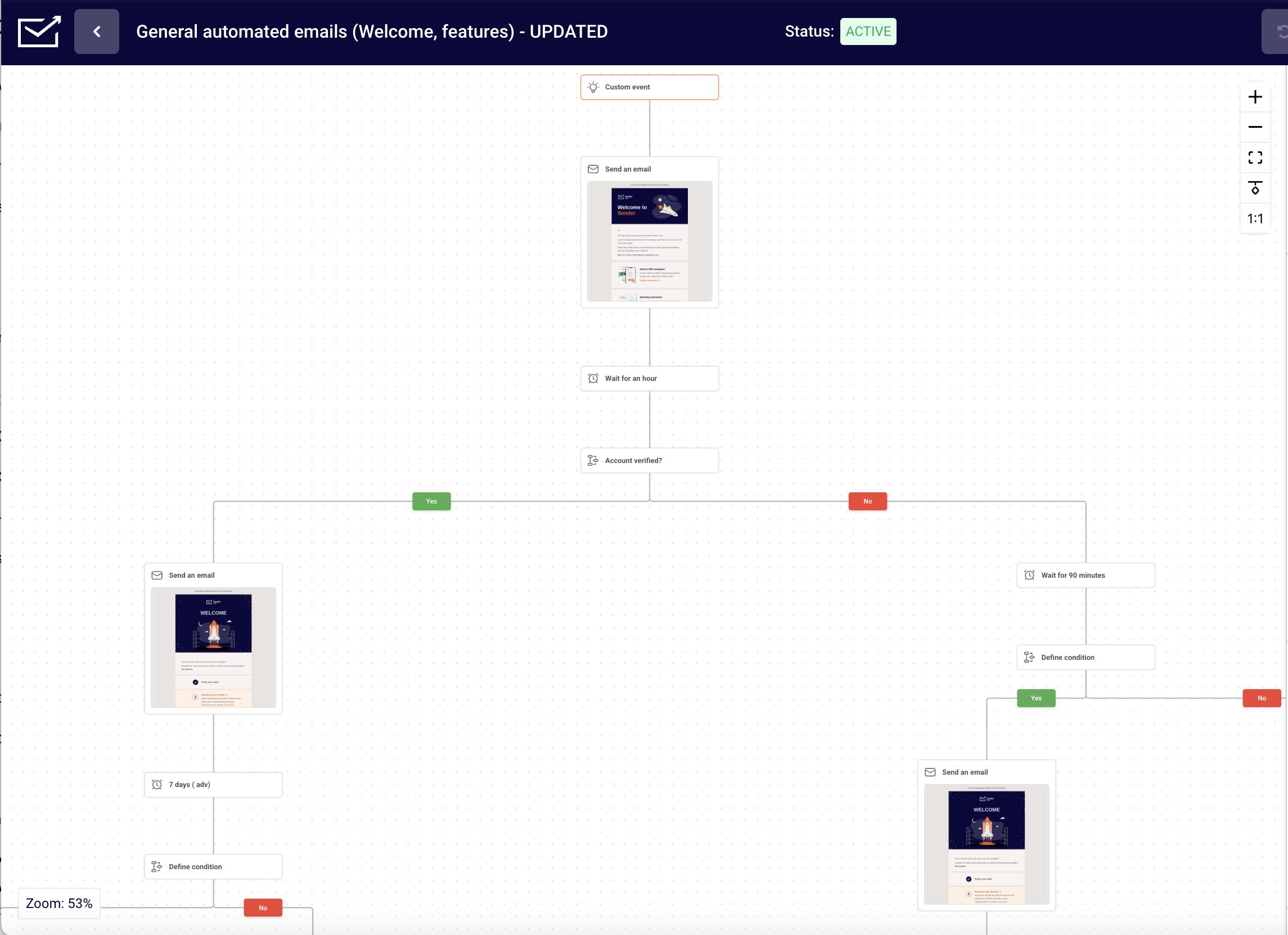
Sender’s automation tools cover standard drip campaign use cases: welcome email series, abandoned cart recovery, post-purchase follow-ups, and re-engagement flows. It also suits onboarding flows that guide new subscribers from sign-up to conversion.
Workflows are built in a visual drag-and-drop editor with support for delays, conditional splits, and behavioral triggers. Segmentation is available on every plan, with filters for profile fields such as country, engagement history, purchase data, and custom fields.
Custom events track specific user actions on your site, like “Watched 50% of a Video” or “Renewed Subscription,” and send them to Sender in real time to trigger automations or build behavioral segments, on every plan. Setting one up takes one API call per event.
SMS campaigns start on Standard, and SMS steps can run alongside drip campaign emails in the same workflow on Professional.
Key Features
- Visual automation builder. Drag-and-drop workflow editor lets you map out multi-step drip sequences, including delays, conditions, and branching paths, without writing any code.
- Behavioral triggers. Automatically start drip sequences based on actions like email opens, link clicks, form submissions, or cart activity, keeping messages timely and relevant.
- Advanced audience segmentation. Slice your contact list by demographics, engagement history, purchase behavior, or custom fields to send hyper-targeted drip content.
- Premade automation templates. Jump-start common drip flows (welcome series, abandoned cart recovery, re-engagement campaigns) with ready-to-use workflow templates.
- Integrated email and SMS. Combine email and SMS touchpoints within a single drip sequence (Pro plan) for multichannel nurture campaigns managed from one dashboard.
Pros & Cons
Pros:
- Generous free plan. Comes with up to 2,500 subscribers and 15,000 emails per month, with automation included;
- Full automation & segmentation access. Every plan includes automation workflows and advanced audience segmentation features;
- Affordable upgrades. Paid plans unlock advanced features as your contact list grows;
- Beginner-friendly. A simple interface and guided onboarding suit beginners testing the email marketing waters.
Cons:
- Branding on free plan. Emails sent on the free plan display Sender’s logo, which may detract from a fully professional brand appearance.
- No full CRM. Sender includes contact management and basic CRM-style tools, but it lacks the deeper sales pipeline, deal tracking, and lead management features.
Best For
Sender bridges the gap between basic free email tools and expensive enterprise platforms, delivering sophisticated automation capabilities to teams that want automation on a free plan, including those just beginning their email marketing journey.
- Shopify and WordPress/WooCommerce integrations, Salesforce and HubSpot via Zapier, and a custom events API;
- Simpler learning curve than enterprise alternatives while offering comparable segmentation capabilities.
Skip Sender if you need predictive analytics, send-time optimization or a deals pipeline; Klaviyo covers predictive segments, and ActiveCampaign or HubSpot covers pipelines.
Pricing
| Plan | Monthly billing | Subscribers | Emails/month |
| Free | $0 | Up to 2,500 | 15,000 |
| Standard | From $9 ($6.30 annual) | From 500 | 12x subscribers |
| Prof | From $15 ($10.50 annual) | From 500 | 24x subscribers |
| Enterprise | Custom | Custom | Unlimited |
*Sender pricing, checked October 2026. Annual prices include a 30% first-year discount for new customers. See the full Sender pricing by list size.
Drip – Advanced Ecommerce Lifecycle Automation
Drip specializes in ecommerce-specific automation, turning shopping behaviors into targeted content and marketing opportunities. As a lifecycle email marketing platform, Drip covers every stage from first visit to repeat purchase.
With ready-made templates for abandoned carts, browse abandonment, post-purchase follow-ups, and product recommendations, Drip streamlines the creation of revenue-generating sequences specifically designed for online stores, including flows that deliver a discount code to nudge hesitant shoppers toward conversion.
Drip pricing: Starts at $39/month for up to 2,500 subscribers | 14-day free trial available.
Deliverability: 87.3% score and 33.5% inbox placement (GlockApps, checked December 2025).
Drip’s behavioral segmentation captures the small shopping actions your customers take. Did they view a product three times? Add something to cart but not purchase? Drip tracks these behaviors and lets you build hyper-targeted segments based on what customers do, not just what they say they want.
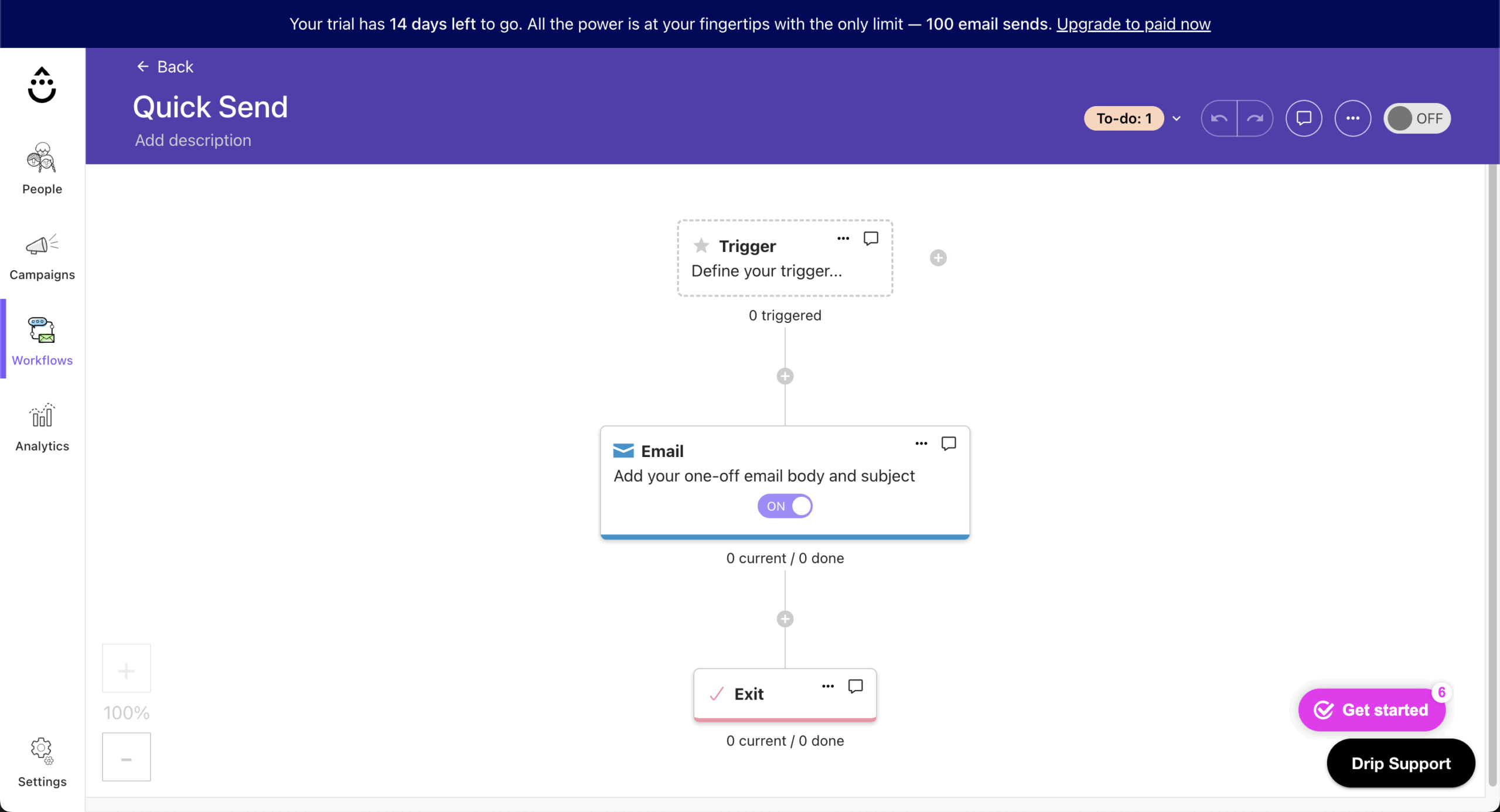
Drip’s visual drip campaign builder is quick to use. Want to create a post-purchase upsell flow? That’s just a few clicks away.
Shopify and WooCommerce integrations sync without missing data fields. According to Drip’s research, ecommerce businesses using their segmentation features “earn about 5x more revenue than those who don’t”.
Key Features
- Ecommerce-aware drip workflows. Pre-built automation templates for abandoned carts, post-purchase upsells, win-back campaigns, and browse-abandonment sequences tailored to online store funnels.
- Revenue attribution per sequence. Every drip flow reports its direct contribution to revenue, letting you compare sequence ROI and double down on what converts.
- Dynamic product recommendations. Automatically insert personalized product blocks into drip emails based on each recipient’s browsing and purchase history, with no manual curation required.
- Behavioral micro-segmentation. Build drip entry and exit rules around granular shopping signals (page views, add-to-carts, coupon usage, order frequency) for precision targeting.
- Multi-channel workflow actions. Add SMS, on-site pop-ups, and Facebook audience syncs as steps alongside email within a single drip workflow.
Pros & Cons
Pros:
- Ecommerce-focused automation. Designed specifically for online stores, Drip turns shopping behaviors into targeted emails like abandoned cart emails, post-purchase follow-ups, and product recommendations;
- Behavioral segmentation. Tracks key metrics, such as views, clicks, and abandoned carts, to build precise, data-driven audience segments;
- Visual workflow builder. The visual editor makes creating complex automation sequences, like upsell or re-engagement flows, quick and straightforward;
- Ecommerce integrations. Works with Shopify, WooCommerce, and other major platforms, ensuring smooth data syncing and accurate tracking.
Cons:
- Higher learning curve for beginners. Its advanced automation and segmentation tools may feel overwhelming to new users;
- Limited non-ecommerce appeal. The platform’s focus on online retail means service-based or content-driven businesses may find fewer relevant features;
- Pricing can scale quickly. Costs rise as contact lists and automation complexity grow, which might not suit smaller stores on tight budgets.
Best For
While general autoresponder software treats ecommerce as just another use case, Drip was built specifically for online sellers, with specialized features that understand customer shopping behavior and translate it into revenue-generating automation opportunities.
- Ecommerce-specific segmentation that captures micro-interactions most platforms overlook;
- Specialized workflow templates designed specifically for common ecommerce scenarios.
Choose Drip over Klaviyo if you want every feature on one plan priced by list size, instead of paid add-ons. Skip it for B2B, service or content businesses.
Pricing
| Contacts | Price | Notes |
| 14-day free trial | $0 | No credit card; sends are limited during the trial |
| 2,500 contacts | $39/month | Unlimited email sends on standard plans; high-volume plans have send limits |
| 5,000 contacts | $89/month | Third-party figure; confirm on drip.com/pricing |
*Drip pricing, checked October 2026. Drip prices by list size; every plan includes all features.
ActiveCampaign – Advanced Conditional Workflow Automation
ActiveCampaign combines email marketing with CRM functionality to create one automation platform. With 950+ pre-built automation recipes, it reduces setup time for multi-step campaigns.
ActiveCampaign pricing: Starts at $19 ($15/month billed annually) for up to 1,000 contacts and up to 10,000 emails/month | 14-day free trial available.
Deliverability: 63.6% score and 28.4% inbox placement (GlockApps, checked December 2025).
The platform coordinates marketing and sales efforts through unified customer data, advanced segmentation, and targeting across multiple channels. For teams focused on lead generation, the platform’s scoring and routing features (Plus and above) ensure every successful drip campaign feeds qualified prospects directly into the sales pipeline.
You can build audience segments from behavior, demographics and engagement history, ensuring your drip sequences target exactly the right people.
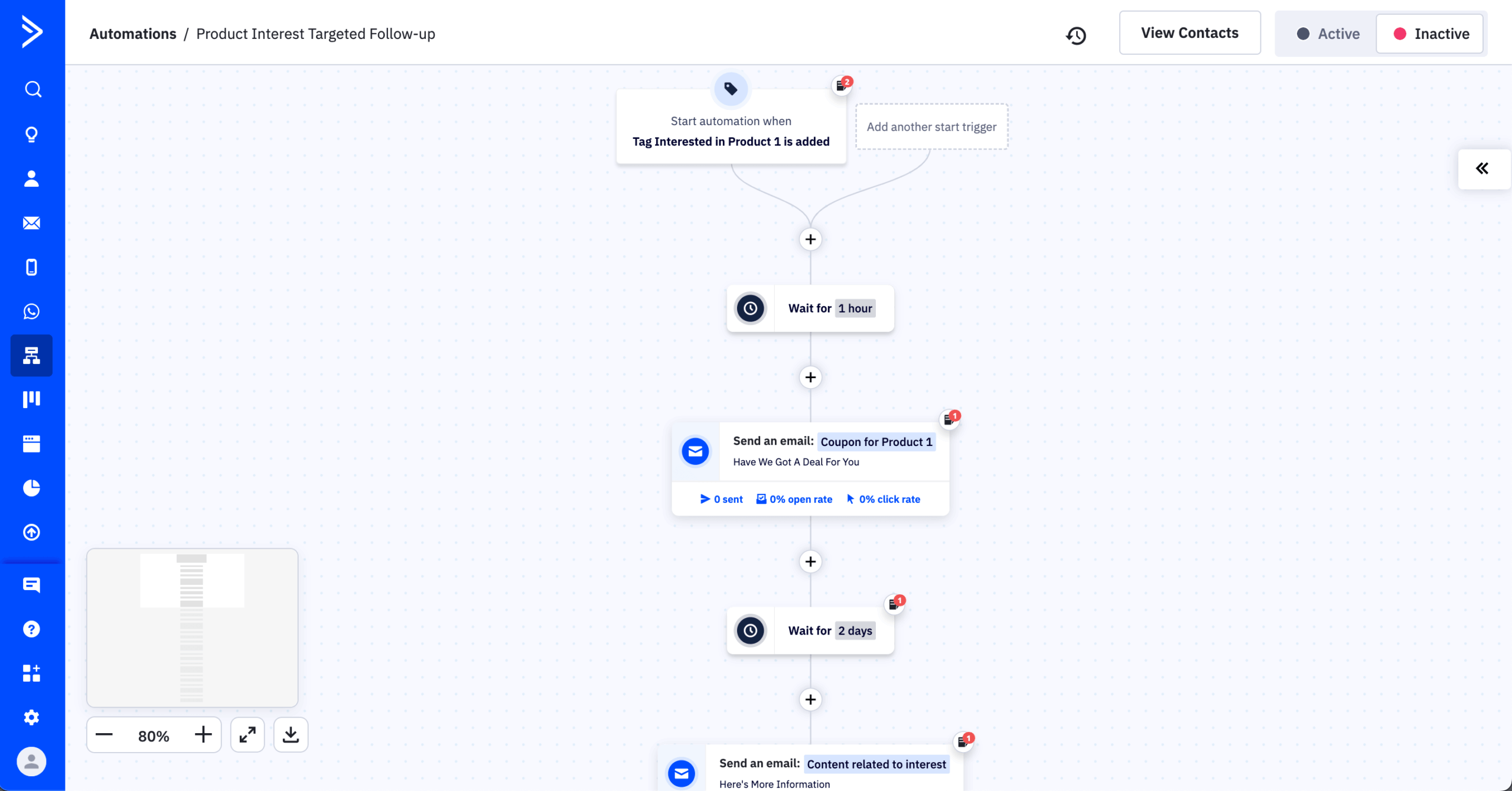
The visual workflow builder makes complex automation sequences manageable, even with conditional logic and branching paths (Plus and above). For sales teams, automated lead scoring flags which leads need human follow-up based on drip engagement.
Key Features
- Conditional workflow branching. Build drip sequences with if/else logic, wait conditions, and goal-based exits so each subscriber follows a path matched to their behavior (Plus and above; Starter allows 5 actions per automation and no if/else).
- Predictive sending and lead scoring. Machine-learning models optimize send times per contact (Pro and Enterprise) and score leads based on drip engagement, surfacing sales-ready prospects automatically.
- 950+ pre-built automation recipes. Browse and import community-contributed drip templates, from lead nurturing campaigns to event follow-ups, and customize them to your funnel in minutes.
- CRM-powered personalization. Pull deal stage, custom fields, and sales notes from the built-in CRM (Plus and above) directly into drip emails for highly contextual messaging.
- Split-action A/B testing. Test different email variants, wait times, or branching paths within a live drip workflow to continuously improve conversion at each step (Pro and Enterprise).
Pros & Cons
Pros:
- Built-in CRM. Deal stages and lead scores feed the same workflows as your drips (Plus and above);
- Flexible automations with conditional logic. Create dynamic workflows that adapt to subscriber behavior for more personalized engagement;
- Extensive integrations. Connect with CRMs, eCommerce tools, and other marketing platforms to streamline workflows;
- Precise audience targeting. Use segmentation, tags, and triggers to deliver highly relevant content to each subscriber.
Cons:
- Steep learning curve. The platform’s depth and advanced automation options can feel overwhelming for beginners;
- No actual free plan. Only a limited trial is available before committing to a paid subscription.
Best For
ActiveCampaign stands out by bridging the gap between marketing automation and CRM functionality, delivering enterprise-class capabilities at mid-market prices without requiring technical expertise or dedicated system administrators.
- Integrated CRM, marketing automation, and sales automation eliminate the need for multiple disconnected platforms;
- Machine learning capabilities that typically require enterprise budgets are available at much lower price points;
- 950+ pre-built automation recipes drastically reduce implementation time compared to competitors;
- More sophisticated segmentation options than competing platforms at similar price points.
Not for teams that want free-plan automation; ActiveCampaign has no free plan.
Pricing
| Plan | Price (1,000 contacts) | Key features |
| Starter | $15/mo annual | Email marketing, basic automation (5 actions) |
| Plus | $49/mo annual | CRM, landing pages, lead scoring, branching |
| Pro | $79/mo annual | Predictive sending, split automation, attribution |
| Enterprise | $145/mo annual | Custom objects, HIPAA support |
*ActiveCampaign pricing, checked October 2026. Prices shown for 1,000 contacts; costs increase with list size.
Omnisend – Ecommerce Email and SMS Automation Workflows
Omnisend is drip marketing software for ecommerce, built around pre-built automation workflows. Welcome, cart abandonment, browse abandonment and post-purchase flows come ready to switch on, with email, SMS and push notifications on one canvas.

Omnisend pricing: Starts at $16/month for up to 500 contacts | Free plan available.
Deliverability: 78.5% score (EmailTooltester, checked December 2025) and 64.1% inbox placement (EmailTooltester, checked January 2026).
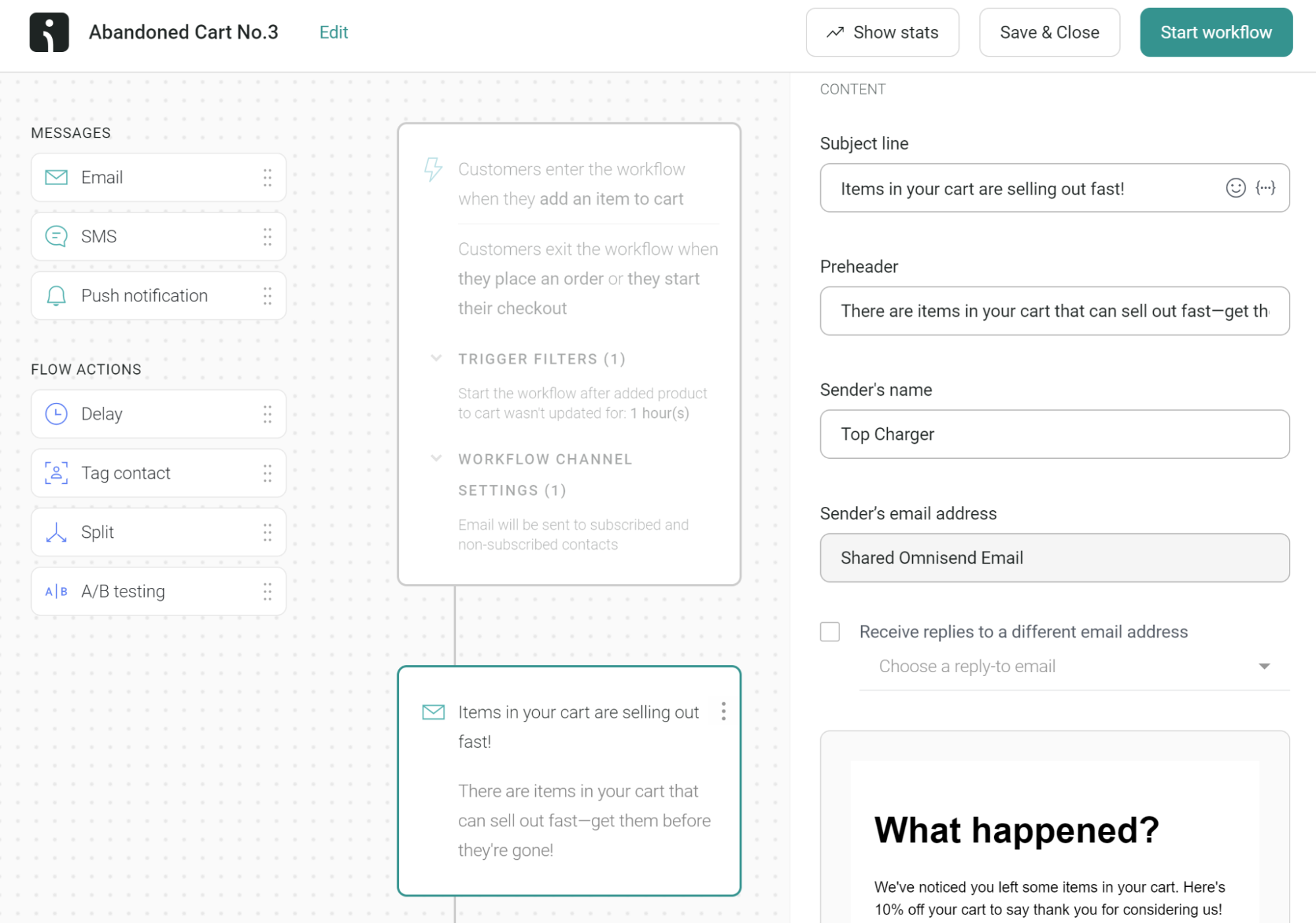
I tested Omnisend on Shopify and WooCommerce stores, and every channel runs on the same store data: cart activity, purchase history, browsing sessions and product views. On Pro, a cart flow can send an email, follow with an SMS if it goes unopened, then send a push notification. This kind of omnichannel marketing automation is Omnisend’s core use.
Omnisend sorts shoppers into lifecycle stages (active, at risk, lost) on its own, so a win-back flow built to increase customer retention reaches only at-risk shoppers.
SMS changed in May 2026: new Standard subscribers no longer get SMS, so email-and-SMS drips need Pro. Paid plans also bill every active profile, so cart abandoners and unconfirmed imports count toward your total.
Key Features
- Pre-built ecommerce workflows. Welcome, cart abandonment, browse abandonment, cross-sell and post-purchase flows arrive with default timing, content and conditional splits you can launch as-is.
- Email, SMS and push on one canvas. Add SMS and push notification steps alongside email in a single workflow; SMS needs Pro for accounts opened since May 2026.
- Lifecycle segmentation. Omnisend sorts shoppers into active, at-risk and lost stages automatically, so win-back and retention flows reach the right group.
- Live product picker. Pull current inventory, prices and images from your store into emails, with a unique discount code generated per recipient.
- Native store integrations. Connect Shopify, WooCommerce, BigCommerce and Wix so cart and order data reaches workflows without manual syncing.
Pros & Cons
Pros:
- Pre-built ecommerce automations. Workflows launch without building from scratch, with timing and splits already set;
- Three channels in one workflow. Email, SMS and push run from one canvas on Pro;
- Free plan with automations. Basic automations work on the free plan for up to 250 contacts.
Cons:
- Ecommerce only. Not suited to B2B, SaaS or content businesses;
- No SMS on Standard for new signups. Since May 2026, SMS drips need Pro at $59/month;
- Billing counts non-subscribers. Cart abandoners and unconfirmed imports count toward your bill.
Best For
Omnisend fits Shopify and WooCommerce stores that want pre-built email, SMS and push automations running without building each flow.
- Stores that want push notifications in the same flow as email and SMS;
- Small stores testing a cart flow on the free plan before paying;
- Teams that want retention flows driven by lifecycle stages.
Not for B2B, SaaS or content-driven businesses; if you want predictive segments, Klaviyo fits better.
Pricing
| Plan | Starting price | Email limit | Key difference |
| Free | $0 | 500/month (250 contacts) | Basic automations included |
| Standard | $16/mo | 12x contact count | No SMS for new signups since May 2026 |
| Pro | $59/mo | Unlimited | SMS, advanced reporting |
*Omnisend pricing, checked October 2026. Prices scale with billable contacts, including non-subscribers. At 5,000 contacts, Standard costs $81/month and Pro $90/month.
Brevo – Multichannel Drip Automation for Email and SMS
Brevo delivers multichannel campaign capabilities at price points accessible to any small business. And with visual workflow builders and flexible segmentation tools, Brevo makes drip email marketing achievable for growing companies with limited marketing budgets. Paid plans start at just $9/month.
Brevo pricing: Starts at $9/month for up to 500 subscribers & 5,000 emails/month | Free plan available
Deliverability: 70.6% score and 24.9% inbox placement (GlockApps, checked December 2025).
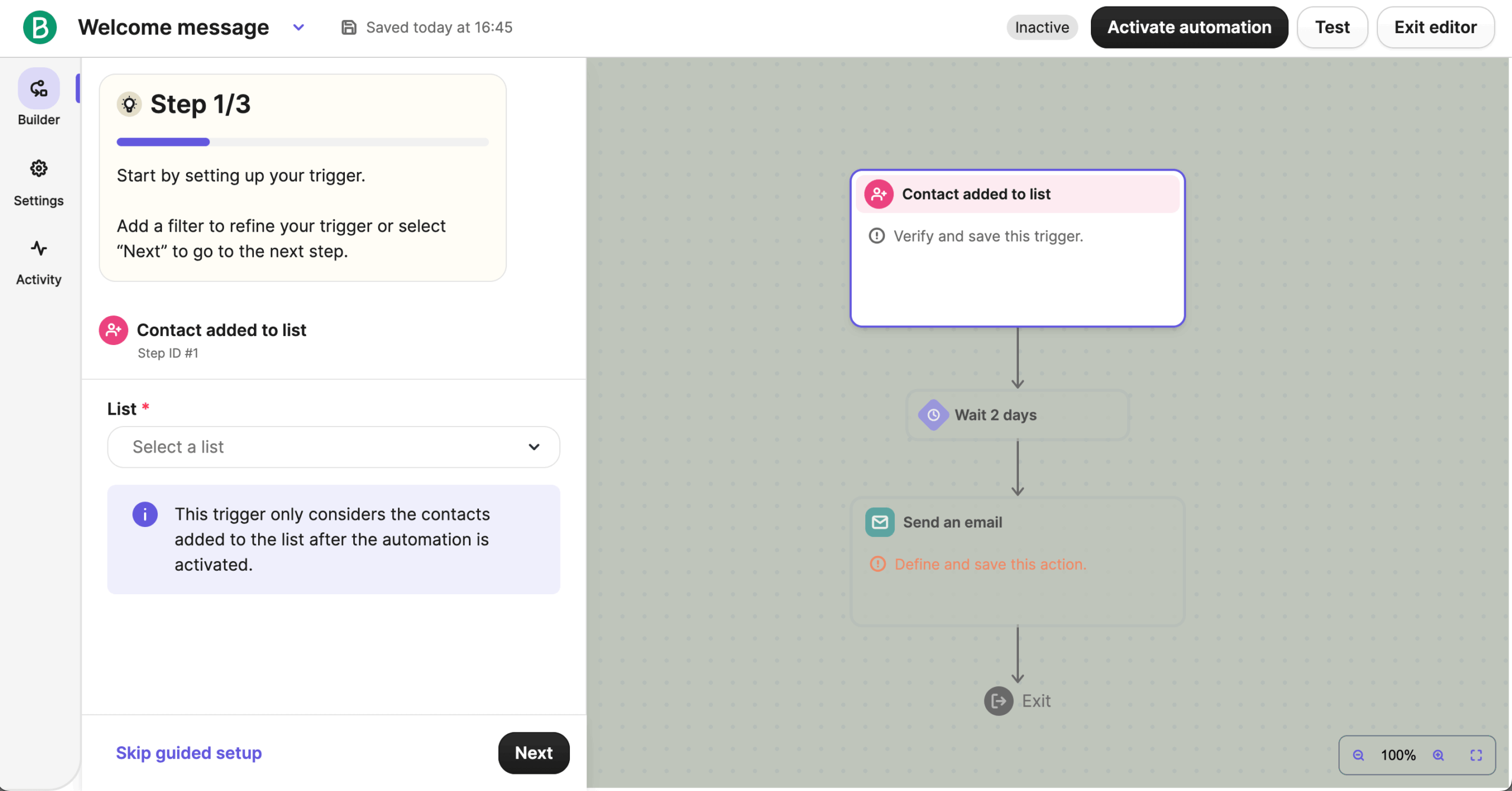
From one dashboard, you coordinate automated workflows across email, SMS, and chat messages, reaching your target audience on the channel it prefers. You can design automation sequences with conditional paths based on how recipients interact with your messages.
Create segments using demographic info, engagement history, and custom attributes, ensuring your drip marketing emails reach the right audience with relevant content.
Low tiers cap stored contacts (500 on the 5,000-email tier), so larger lists need a higher email tier.
Key Features
- Visual drip workflow builder. Design multi-step automation sequences with drag-and-drop ease: set delays, add conditions based on opens or clicks, and split paths without technical knowledge.
- Unified email + SMS drip sequences. Weave SMS touchpoints into email drip campaigns from a single workflow canvas, reaching contacts on whichever channel they prefer.
- Transactional and marketing email in one platform. Run drip nurture campaigns alongside order confirmations, password resets, and shipping updates without needing a separate transactional email provider.
- Send-time optimization. Brevo’s machine-learning algorithm delivers each drip email at the time a contact is most likely to open, boosting engagement across the sequence.
- Dynamic list segmentation. Create segments that update in real time based on engagement, purchase history, or custom attributes so drip entry and suppression rules always reflect current behavior.
Pros & Cons
Pros:
- All-in-one marketing platform. Brevo (formerly Sendinblue) combines email, SMS, chat, and CRM tools under one roof, ideal for managing multiple communication channels in one place;
- Affordable pricing. Its flexible pay-as-you-go and scalable plans make it one of the most budget-friendly options for small to mid-sized businesses;
- Strong automation features. Includes visual workflows for welcome sequences, abandoned cart reminders, and personalized follow-ups without needing coding skills;
- Built-in CRM. Helps track leads, manage contacts, and organize sales pipelines directly inside the platform;
- WhatsApp and push channels. Drips can add WhatsApp and web push steps alongside email and SMS.
Cons:
- Limited template variety. The email template library is smaller compared to competitors like GetResponse or Mailchimp;
- Slow interface at times. Some users report lag when editing emails or navigating large contact lists;
- Basic analytics on lower tiers. Deeper reporting and A/B testing features are reserved for higher-priced plans;
- SMS credits sold separately. SMS marketing costs extra and can add up quickly for frequent senders.
Best For
Brevo delivers multichannel marketing capabilities that typically require enterprise budgets but packages them at price points accessible to small businesses, with particular strength in combining email and SMS campaigns within unified automation workflows.
- Email and SMS marketing, managed from a single interface, where most competitors require separate platforms;
- More generous sending volumes at each price tier compared to similar platforms;
- Stronger transactional email capabilities than most marketing-focused automation tools;
- CRM integration is included without the steep learning curve of enterprise platforms.
Not for stores with large lists on a small budget, since lower tiers cap stored contacts.
Pricing
| Plan | Price | Emails/month | Automation limit |
| Free | $0 | 300/day | 2,000 contacts |
| Starter | From $9/mo | 5,000 | 500 contacts |
| Standard | From $18/mo | 5,000 | 500 contacts |
| Professional | From $499/mo | 150,000,000 | Multibranch testing, dedicated IP |
*Brevo pricing, checked October 2026. Standard removes the 2,000-contact limit on automations.
Kit – Simple Automation for Creator Funnels
Kit (formerly ConvertKit) specializes in serving content creators, course builders, and digital product sellers with straightforward automation tools.

Kit pricing: Starts at $39/month for up to 1,000 subscribers | Free plan available (free plan has no automations)
Deliverability: 97.8% score and 77.2% inbox placement (Email Deliverability Report, checked January 2026).
Kit suits non-technical users who need professional email marketing without much setup.
I liked Kit’s two-pronged approach to drip campaigns. “Sequences” create simple, linear email series (perfect for straightforward courses or welcome campaigns); while “Automations” enable complex, branching workflows responding to subscriber actions. This tiered approach welcomes email marketing beginners, but provides room to grow as your marketing sophistication increases. Since September 2026, both need the Creator plan.
The tagging system organizes subscribers effectively without the complexity found in some enterprise solutions.
The September 2025 price increase pushed it out of the most affordable drip campaign software category, but it remains a strong choice for creators who value simple automation, flexible tagging, and built-in tools for selling digital products, courses, and memberships.
Key Features
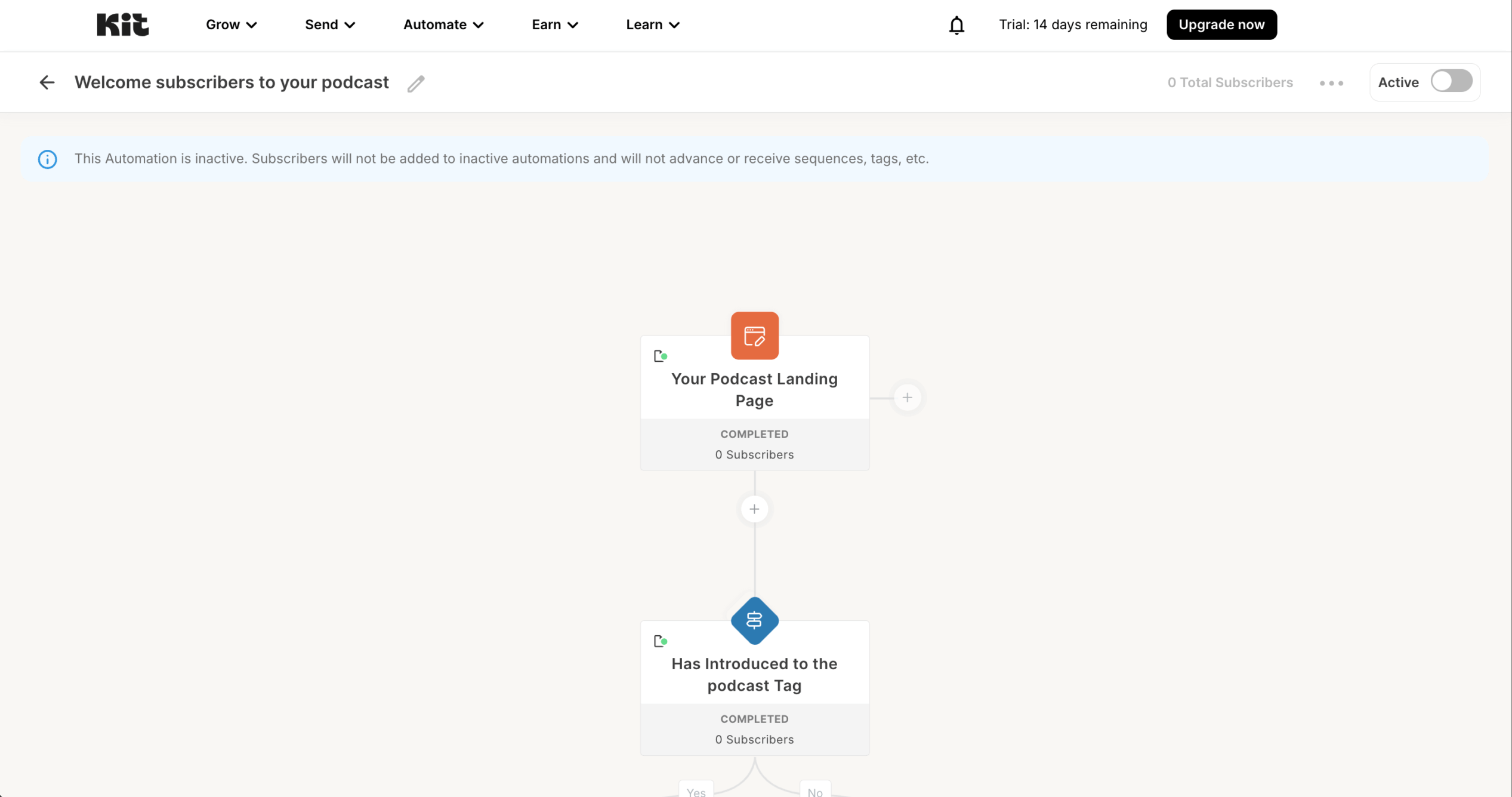
- Sequences and Automations: two-tier drip system. “Sequences” handle simple, linear email series (e.g., a 5-day welcome course), while “Automations” support branching, conditional workflows for more complex funnels.
- Tag-based subscriber management. Apply tags automatically when contacts enter, complete, or drop off a drip sequence, keeping your audience organized for future targeting without complex list management.
- Visual automation editor. Map out drip logic visually (add delays, if/else conditions, and trigger-based entries) in a clean, creator-friendly interface that doesn’t require technical skills.
- Built-in digital product and course delivery. Trigger drip sequences tied to product purchases or course enrollments, blending content delivery with upsell and engagement messaging in one flow.
- RSS-to-email automation. Automatically drip new blog posts or podcast episodes to subscribers as they’re published, keeping your audience engaged without manual sends.
Pros & Cons
Pros:
- User-friendly builder. The drag-and-drop editor requires no coding skills, making email creation simple for beginners;
- Wide template selection. A rich library of pre-designed templates helps you craft polished emails and newsletters quickly;
- RSS campaigns. Automatically turn new website content into newsletters with RSS-to-email automation;
- Advanced segmentation. Personalize campaigns easily for different audience segments using dynamic content.
Cons:
- No spam or inbox previews. Lacks built-in tools to check spam triggers or preview emails across clients;
- No automations on the free plan. Visual automations and email sequences need Creator (since September 2026).
- Slow support. Response times can be sluggish, especially for users on free or entry-level paid plans.
Best For
While general marketing platforms try to serve everyone, Kit focuses exclusively on content creators and course sellers, providing specialized features designed specifically for digital products, memberships, and audience monetization.
- Purpose-built for creators, not retrofitted from business-oriented drip marketing tools;
- Simpler product selling features without requiring separate ecommerce platforms;
- Simplified workflow creation that doesn’t sacrifice advanced capabilities;
- Creator-centric pricing model that scales more reasonably with audience growth.
Not for ecommerce stores or B2B lead generation; Omnisend or Klaviyo fits stores better.
Pricing
| Plan | Price (1,000 subscribers) | Key features |
| Free | $0 (up to 10,000 subscribers) | Landing pages, forms, no automations |
| Creator | $39/mo | Visual automations, sequences, priority support |
| Creator Pro | $79/mo | Subscriber scoring, advanced reporting, Facebook audiences |
*Kit pricing, checked October 2026. Prices shown for 1,000 subscribers; costs increase with list size.
HubSpot – CRM-Driven Marketing and Sales Drip Workflows
HubSpot integrates marketing automation with CRM capabilities, creating a unified platform for managing customer relationships. The native connection between marketing and sales data enables highly personalized drip campaigns based on detailed contact records and interactions.
HubSpot pricing: Starts at $20/month per seat for 1,000 marketing contacts | Free plan available.
Deliverability: 73.5% score and 48.1% inbox placement (GlockApps, checked December 2025).
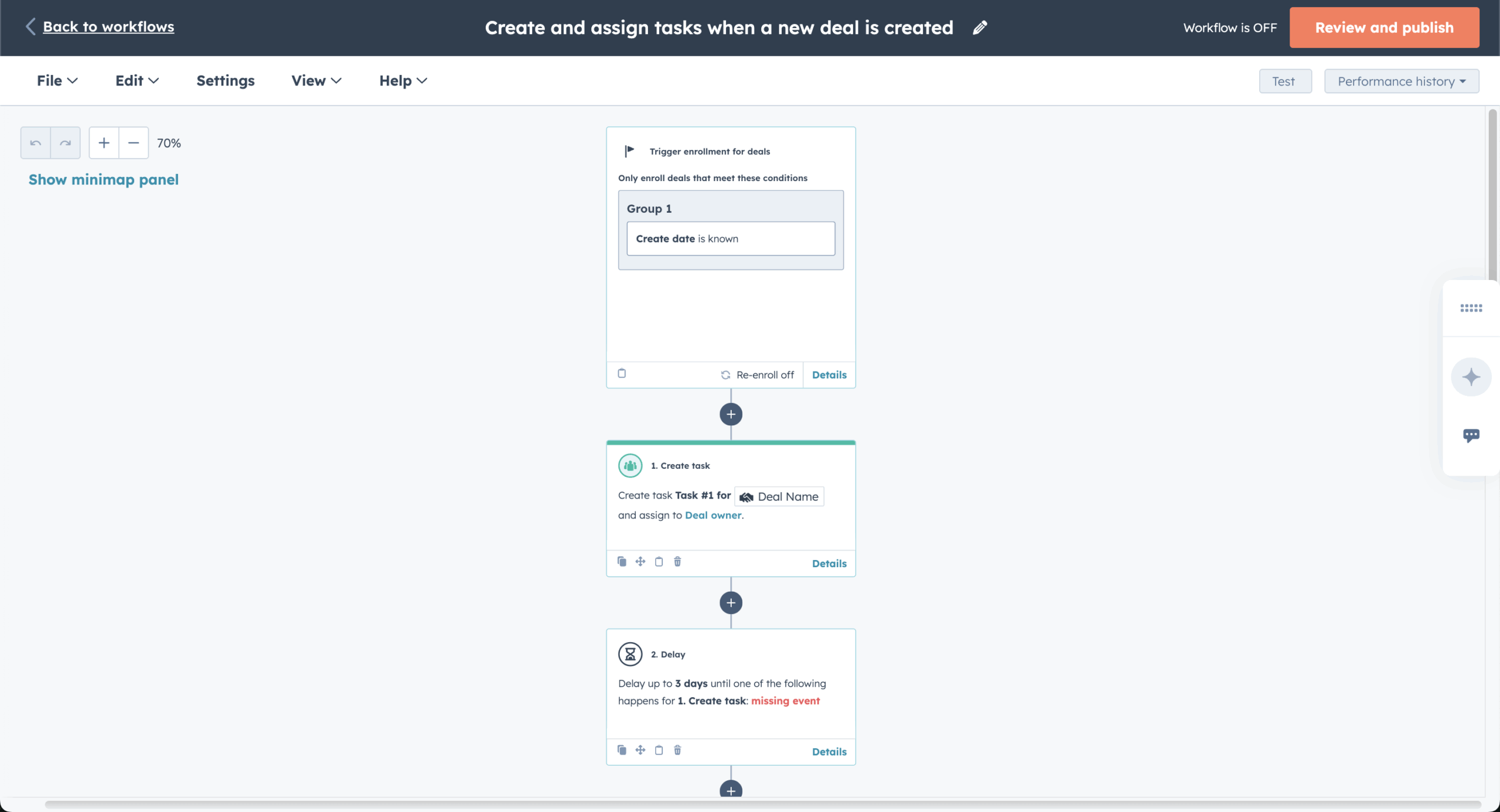
HubSpot’s native CRM connection simplifies email personalization from contact records. During my time with HubSpot, I couldn’t help but notice how user-friendly their workflow editor is (Professional and up). It also comes with premade drip campaign templates that save significant setup time.
For businesses implementing full inbound marketing strategies, HubSpot offers integrated tools for content management, social media, landing pages, and forms, all triggering or supporting drip campaign sequences. The built-in CRM lets agents nurture new leads over long sales cycles.
Key Features
- CRM-powered drip personalization. Pull contact properties, deal stages, lifecycle stages, and activity history directly from HubSpot’s CRM into drip emails for deeply contextual messaging.
- Visual workflow editor with goal criteria (Professional and Enterprise). Build multi-step drip sequences in a drag-and-drop canvas, set enrollment triggers from forms, ads, or CRM events, and auto-exit contacts once they hit a conversion goal. Starter gets up to 10 automated actions, not workflows.
- Lead scoring integrated into drip logic. Assign scores based on drip engagement (opens, clicks, content downloads) and route high-scoring leads to sales reps or different nurture paths automatically.
- Multi-touch attribution reporting. Track which drip touchpoints contribute to pipeline and closed revenue, giving marketers data-backed insight into which sequences actually drive business outcomes.
- Smart content and dynamic tokens. Swap email sections, CTAs, and imagery inside drip messages based on list membership, lifecycle stage, or device type, with no duplicate workflows needed.
Pros & Cons
Pros:
- All-in-one platform. Combines CRM, email marketing, sales tools, and service features under one roof, reducing tool sprawl for teams that want unified customer data without juggling multiple subscriptions;
- Strong lead capture and lifecycle tooling. Built-in forms, landing pages, lead scoring, and CRM tie-ins create one B2B funnel from first touch to closed deal;
- Deep reporting and attribution. Multi-touch attribution and pipeline-level analytics go well beyond open and click rates, giving marketers real visibility into which drip sequences drive revenue.
Cons:
- Pricing complexity scales quickly. Seat-based billing combined with contact tier add-ons and onboarding fees can push costs well above email-first platforms, especially as teams and lists grow;
- Email sending limits on lower tiers. Starter plans come with sending caps and packaging constraints that may not suit businesses with high-volume email needs;
- Overkill for simple drip campaigns. Teams that just need automation workflows and newsletters may end up paying for CRM, sales, and service breadth they never use.
Best For
HubSpot stands alone by fully integrating marketing, sales, and service tools in one platform, eliminating the fragmentation and data silos that plague businesses using separate systems for different customer-facing departments.
- Complete integration between marketing, sales, and service platforms;
- Consolidated customer data, providing true 360-degree views.
Best for CRM-led B2B teams that nurture leads over long sales cycles. Not for small teams that only need email drips, since workflows start at $890/month.
Pricing
| Plan | Price | Contacts | Automation |
| Free | $0 | Unlimited CRM | 2,000 emails/mo, no workflows |
| Starter | $20/mo per seat | 1,000 marketing | 10 automated actions |
| Professional | $890/mo ($800/mo annual) | 2,000 marketing | Full workflows, A/B, attribution |
| Enterprise | $3,600/mo | 10,000 marketing | Custom objects, predictive lead scoring |
*HubSpot Marketing Hub pricing, checked October 2026. Professional requires a $3,000 one-time onboarding fee. At 5,000 contacts, it costs $1,140/mo ($890 plus $250 for an extra 5,000 contacts), or $1,050/month billed annually.
Mailchimp – Beginner-Friendly Drip Campaign Automation
Mailchimp suits beginners who want pre-built automation journeys, though branching needs the Standard plan. The platform features an extensive template library, a visual customer journey builder, and an analytics suite.

Mailchimp pricing: Starts at $13/month for up to 500 contacts and up to 5,000 emails/month | Free plan available.
Deliverability: 78.4% score and 32.3% inbox placement (GlockApps, checked December 2025).
Mailchimp’s template library contains over 130 pre-built email templates easily customizable for different drip scenarios. Whether you need a welcome series, abandoned cart automation, or post-purchase follow-up, Mailchimp has ready-to-use designs that save hours of work.
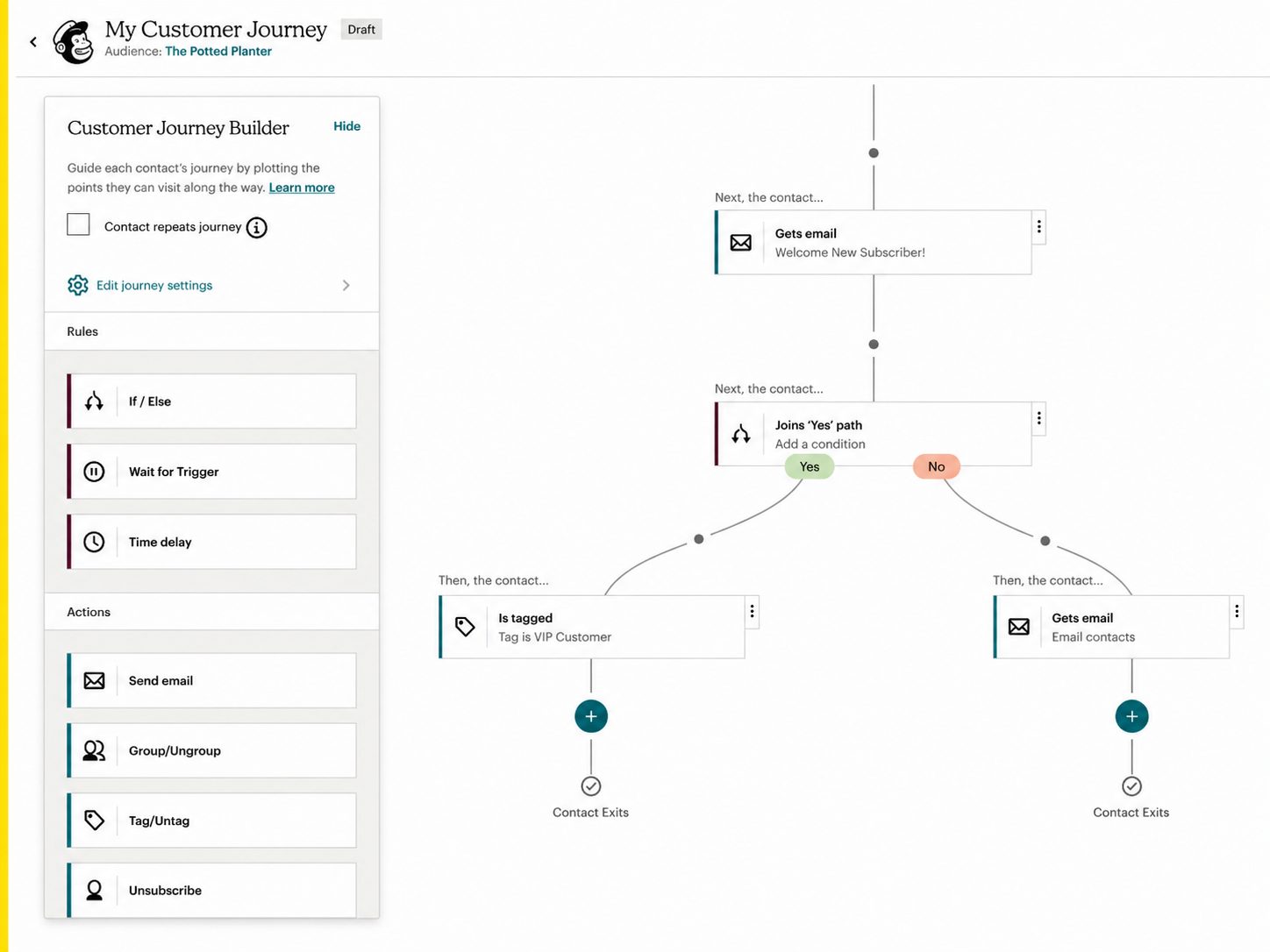
Mailchimp’s customer journey builder (Standard and above) provides a visual interface for creating automated email sequences. Trigger these based on specific user actions or schedule them based on time intervals, giving flexibility in how you structure campaigns.
The analytics dashboard lets you track key metrics like opens and clicks without separate analytics tools. This shows which sequences need optimization and guides future campaigns.
Key Features
- Customer Journey Builder. Create branching drip sequences with a visual map: set triggers, add if/else conditions, and combine time delays with behavioral rules to guide subscribers through tailored paths.
- 130+ pre-designed email templates. Choose from a large library of responsive, customizable templates for welcome series, abandoned carts, re-engagement drips, and more to speed up campaign setup.
- Predictive segmentation. Mailchimp’s AI identifies high-value segments, like likely buyers or churn risks, that you can feed directly into drip entry criteria for smarter targeting.
- Subject line helper and send-time optimization. Get AI-generated subject line suggestions and per-contact send-time predictions to maximize open rates across every step of your drip sequence.
- Built-in A/B and multivariate testing. Test subject lines, content, send times, or from names within drip emails and let Mailchimp auto-select the winning variant.
Pros & Cons
Pros:
- User-friendly. Mailchimp features a clean interface and helpful setup guides, making it easy for beginners to get started;
- Predictive analytics. Leverage behavioral data to forecast subscriber actions, improve targeting accuracy, optimizing campaign performance with data-driven insights;
- Extensive integrations. This marketing solution integrates with a wide range of platforms, including Shopify, WordPress, and various CRMs.
Cons:
- Clunky form builder. The signup form tool takes time to learn and can be difficult to customize or embed effectively;
- Slow and limited support. Customer support can be sluggish, particularly for free users, making troubleshooting more difficult.
Best For
Mailchimp balances sophisticated features with a beginner-friendly interface, making advanced marketing automation accessible to non-technical users while providing scalability to grow from solopreneurs to enterprises without platform migrations.
- Template editor that produces consistently responsive designs without technical knowledge;
- Strong ecommerce functionality without requiring the complexity of dedicated ecommerce platforms;
- Superior mobile app for campaign management compared to most competitors’ mobile experiences.
Not for teams that need branching on a small budget: the Customer Journey Builder starts on Standard, while Sender, Brevo and Klaviyo include branching on their free plans.
Pricing
| Plan | Price (500 contacts) | Emails/month | Automation |
| Free | $0 (250 contacts) | 500 | Basic autoresponders only |
| Essentials | $13/mo | 5,000 (10x) | Basic autoresponders only |
| Standard | $20/mo | 6,000 (12x) | Customer Journey Builder (200 flows) |
| Premium | $350/mo | 7,500 (15x) | Unlimited automations |
*Mailchimp pricing, checked October 2026. Costs increase with list size. At 5,000 contacts, Standard costs $100/month. SMS is billed separately as an add-on.
MailerLite – Simple Visual Automation for Small Budgets
MailerLite is drip email marketing software for small businesses and creators, with a trigger-then-action automation builder, a website builder and landing pages. It costs less than most tools on this list, and its automation depth matches the price.

MailerLite pricing: Starts at $12/month for up to 500 subscribers | Free plan available.
Deliverability: 92.7% score (EmailTooltester, checked December 2025) and 79.8% inbox placement (Email Deliverability Report, checked June 2026).
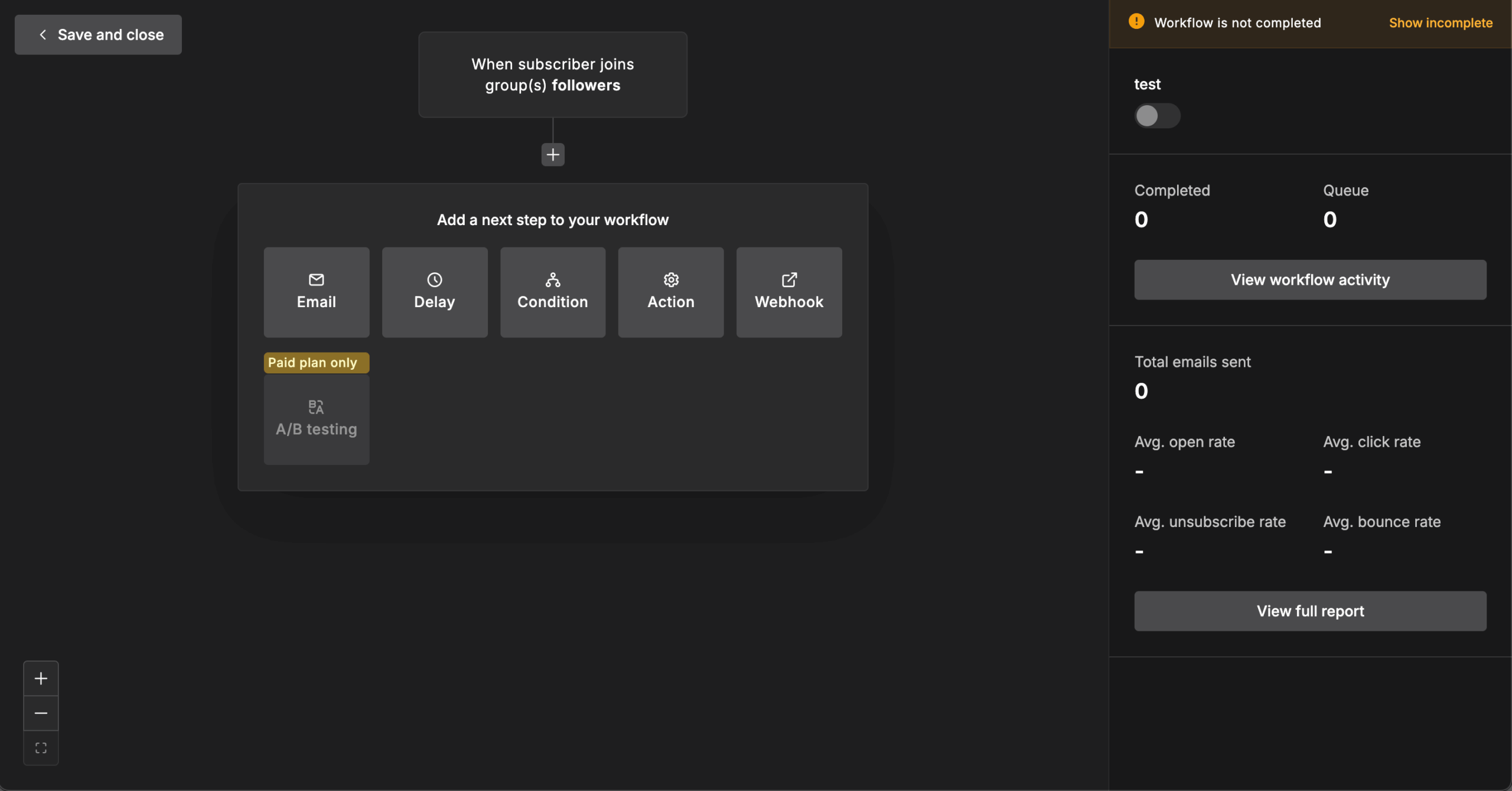
I tested MailerLite’s drip email automation on welcome, cart abandonment and re-engagement flows. Its automation editor uses triggers (joins a group, completes a form, clicks a link, reaches a date) followed by actions (send email, delay, condition, update a field, move to a group). Comfort allows unlimited automation sequences but one trigger per automation, so I built a separate workflow for each entry point, such as form signups and group joins.
A condition step splits a path in two based on user behavior, but there are no multi-branch workflows or lead scoring comparable to ActiveCampaign’s. The free plan stops at single-step autoresponders, such as one welcome email.
The email editor offers drag-and-drop, rich text and HTML modes. Landing pages, websites and embedded forms are built in, and Shopify, WooCommerce and Stripe integrations support abandoned cart emails and purchase follow-ups. MailerLite bills only for active unique subscribers, so bounces and unsubscribes don’t count toward your limit.
Key Features
- Trigger-action automation editor. Build workflows from triggers like group joins, form completions, link clicks and dates, then add emails, delays, conditions and field updates (Comfort and above).
- Three email editors. Write in drag-and-drop, rich text or HTML mode, depending on how much design control a campaign needs.
- Website and landing page builder. Build landing pages, embedded forms and websites, with 1 site on Free and 10 on paid plans.
- Ecommerce integrations. Connect Shopify, WooCommerce and Stripe to trigger abandoned cart emails, purchase follow-ups and product recommendation blocks.
- Active-subscriber billing. Pay only for active unique subscribers; bounced and unsubscribed contacts don’t count toward your plan.
Pros & Cons
Pros:
- Low entry price. Comfort starts at $12/month for 500 subscribers;
- Website builder included. Landing pages and websites come at no extra cost on every plan;
- Active-only billing. Bounced and unsubscribed contacts are excluded from your bill.
Cons:
- Smaller free plan. Free now covers 250 subscribers with single-step automation only;
- One trigger per automation on Comfort. Multiple triggers need Power, and branching is shallower than ActiveCampaign’s;
- No 24/7 chat on Comfort. Round-the-clock live chat support starts on Power.
Best For
MailerLite fits small businesses and creators on a tight budget who need simple email marketing automation plus a website builder.
- Welcome sequences and basic drips that start from one trigger;
- Store follow-ups for Shopify and WooCommerce shops;
- Teams that want landing pages and a website in the same tool.
Not for teams that need multi-trigger or deeply conditional workflows; ActiveCampaign Plus fits those better.
Pricing
| Plan | Price (500 subscribers) | Emails/month | Automation |
| Free | $0 (250 subscribers) | 2,500 | Single-step autoresponders only |
| Comfort | $12/mo | 5,000 | Unlimited automation sequences |
| Power | $25/mo | Unlimited | AI writing, custom HTML, 24/7 chat |
| Enterprise | Custom (200K+ subscribers) | Unlimited | Dedicated IP, success manager |
*MailerLite pricing, checked October 2026. Bills only for active unique subscribers. 30% nonprofit discount available. At 5,000 subscribers, Comfort costs $49/month.
Klaviyo – Data-Driven Email Automation for Ecommerce
Klaviyo fits ecommerce stores whose drips run on predicted customer behavior.

Klaviyo pricing: Starts at $20/month for up to 500 contacts | Free plan available.
Deliverability: no deliverability score in our data; GlockApps measured 43.7% inbox placement (checked April 2025).
In my test, Klaviyo synced quickly with Shopify and WooCommerce. Every product view, cart action, or purchase can trigger a flow, such as one to remind customers about an abandoned cart.
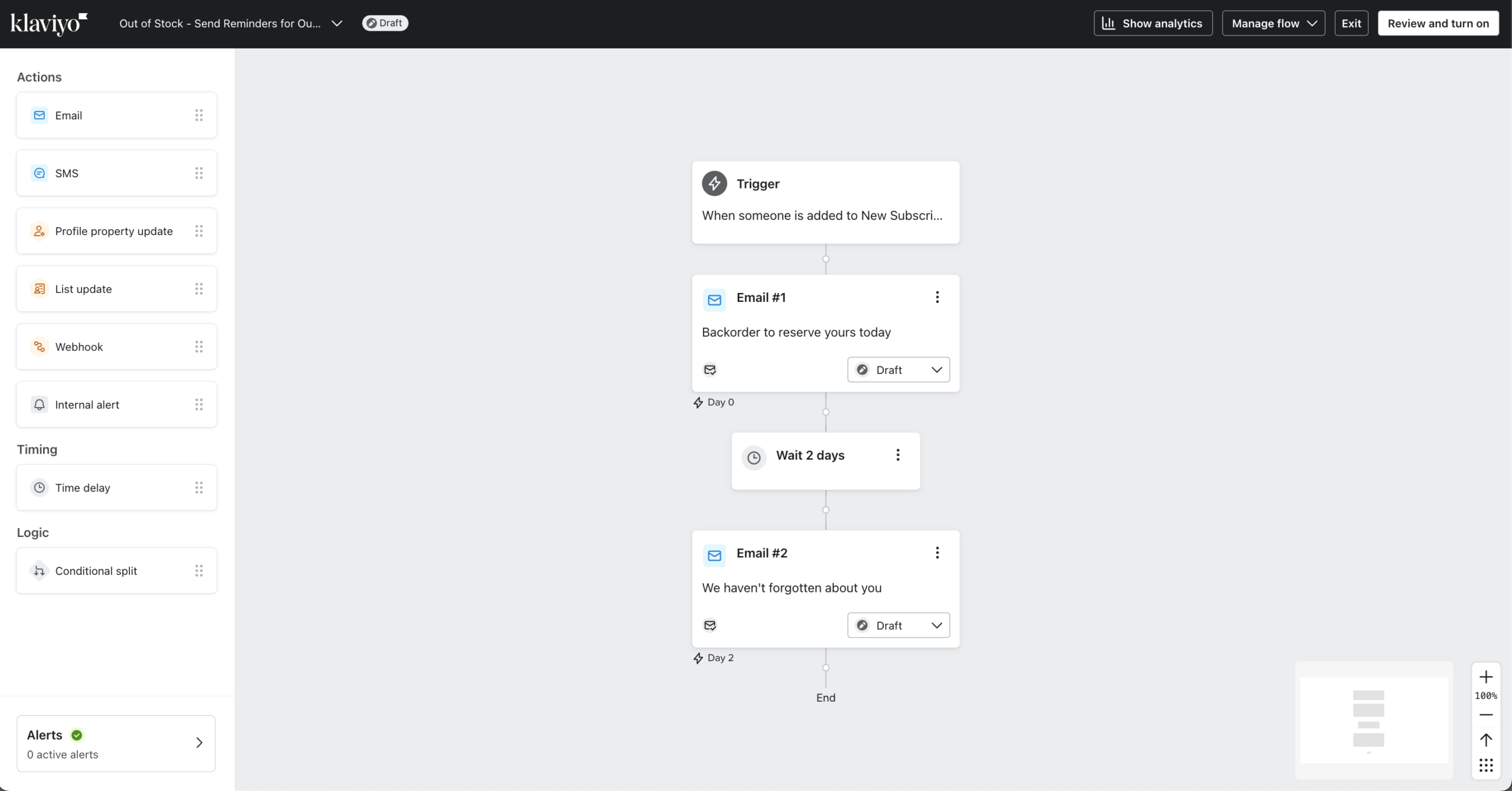
The workflow builder stays easy to follow despite Klaviyo’s sophistication. You can easily combine email and SMS into a single flow and visualize customer journeys without technical hurdles. In testing, the analytics showed how much revenue each campaign generated.
Pricing leans toward the higher side, covering segmentation, dynamic product recommendations, and native ecommerce integrations built for online stores. Since February 2025, Klaviyo bills for every active profile, whether you message it or not.
Key Features
- Predictive analytics for drip targeting. Klaviyo’s models forecast next order date, expected lifetime value, and churn risk, letting you build drip entry rules around predicted behavior, not just past actions.
- Unified email + SMS flow builder. Design drip sequences that blend email and SMS steps in a single visual canvas, with channel-specific branching so contacts get the right message on the right channel.
- Deep ecommerce data sync. Real-time integration with Shopify, WooCommerce, and BigCommerce feeds product views, cart contents, order history, and catalog data directly into drip personalization.
- Revenue-per-flow reporting. Every drip flow shows attributed revenue, conversion rate, and per-recipient value, making it easy to compare sequence performance and optimize for profit.
- Dynamic product blocks and back-in-stock triggers. Auto-populate drip emails with personalized product recommendations or trigger immediate alerts when a wished-for item is restocked.
Pros & Cons
Pros:
- Deep ecommerce integrations. Integrates smoothly with Shopify, WooCommerce, and BigCommerce, enabling real-time customer data syncs that fuel high-converting WooCommerce drip campaigns;
- Real-time personalization. Uses real-time behavioral data to send hyper-relevant messages that boost engagement and sales.
- Revenue-focused analytics. Tracks how much each campaign and automation flow contributes to total store revenue;
- Multichannel automation. Multichannel automation (email and SMS) combines sequences for unified customer journeys;
- Scalable for growth. Handles small shops and large enterprises alike with flexible automation and segmentation tools.
Cons:
- Steeper learning curve. The advanced data tools can feel overwhelming for beginners or those used to simpler platforms;
- Premium pricing. More expensive than entry-level tools, especially as contact lists expand;
- Limited value outside ecommerce. Best suited for online stores; service-based businesses may find its feature set excessive.
Best For
Klaviyo is ideal for ecommerce businesses ready to scale their email automation with serious data power. It excels at turning customer behavior into revenue-driven drip campaigns that feel genuinely personal.
If you rely on Shopify or WooCommerce and want to squeeze more value from every purchase, Klaviyo’s predictive insights and detailed reporting make it an easy top-tier choice. Not for B2B or content businesses, or stores that skip predictive segments.
Pricing
| Contacts | Email plan | Includes |
| Up to 250 | Free ($0) | 500 emails/month |
| 500 | $20/mo | All features, email only |
| 1,000 | $30/mo | All features, email only |
| 5,000 | $100/mo | All features, email only |
| 10,000 | $150/mo | All features, email only |
*Klaviyo pricing, checked October 2026. Since July 2026, SMS is billed per message, and every account gets $5 of mobile messaging a month. Reviews, Marketing Analytics and Advanced Data Platform are separate add-ons.
Email Drip Campaign Software FAQs
A drip campaign sends a pre-planned sequence of emails over time, triggered by a specific action or schedule, with each message building on the previous one. A regular email blast sends a single message to an entire list at once. Drip campaigns are designed for sustained engagement and lead nurturing, while blasts are suited for one-time announcements or promotions.
No, having a paid plan is not necessary to run drip campaigns. Several email marketing platforms include drip automation on their free tiers, though with limits on contacts, monthly sends, or available triggers. Sender, Brevo, Klaviyo, and Omnisend offer free plans with automation workflows; all but Omnisend include branching. Paid plans typically unlock A/B testing within sequences and higher sending volumes. Whether a free plan is sufficient depends on your list size and the complexity of your sequences.
Contact-based pricing charges by the number of subscribers stored, regardless of how often you email them. Send-based pricing charges by email volume, letting you store more contacts without additional cost. Businesses with large but infrequently emailed lists generally pay less on send-based models. Businesses that send frequent sequences to smaller lists may find contact-based plans more predictable.
Drip software is an email automation software that sends pre-planned messages based on timing, subscriber behavior, or specific events. It typically includes visual workflow builders, behavioral email triggers, conditional branching, segmentation, personalization, integrations, and campaign analytics. Drip campaign examples include automated welcome series, abandoned cart emails, follow-ups, and other multi-step customer journeys while adapting messages to each contact’s actions and interests.
A drip campaign is a predefined sequence of messages sent according to a schedule or specific triggers, such as a signup, click, or purchase. A nurture campaign is broader and focuses on moving leads through the customer journey using their behavior, engagement, lifecycle stage, or sales readiness. In practice, drip sequences can be part of a nurture campaign, while nurturing may involve more personalized paths, lead scoring, conditional logic, and marketing-to-sales handoffs.
Yes, you can combine email and SMS in the same drip workflow, since some platforms support both email and SMS as steps within a single automated workflow. Sender, Brevo, Klaviyo, and Omnisend each offer unified email and SMS drip sequences. Platforms that lack native SMS support typically require a third-party integration to add text messaging to a workflow.
At minimum, a platform should support form submissions, list joins, and time-based delays. More capable platforms add behavioral triggers such as email opens, link clicks, page visits, cart abandonment, purchase events, and custom API events fired from your product. Real-time event-driven triggers allow sequences to respond to user actions as they happen rather than relying solely on fixed schedules.
Effective drip campaigns start with one goal. Pick the trigger, write 3 to 5 emails, set the delays, and add a branch for people who click or buy. Set an exit condition, then test on a small segment. These drip campaign examples show sequences you can adapt.
Our marketing automation guide shows where drip marketing campaigns fit in a wider setup.