

Email marketing is the practice of sending commercial or informational email to people who have opted in to receive it, in order to drive a purchase, a signup, or a return visit. Retailers, publishers, nonprofits, SaaS companies, and individual creators send it to subscriber lists they own and manage themselves.
Written for beginners and small teams, this article covers the basics: the definition, how the mechanics work end to end, the main message types, and a five-step start. It does not cover deliverability engineering or platform reviews.
This article is a part of our email marketing guide.
What Is Email Marketing?
Email marketing has three parts: permission, message, and measurement. Permission means every address on the list arrived through a signup form, a checkout consent box, or a confirmation click, and every message gives the recipient a way to leave.
The message is either a campaign, which is one email sent to a chosen segment at a chosen time, or an automation, which is an email triggered by something the subscriber did. Measurement is the reporting layer: delivered, opened, clicked, converted, unsubscribed, and marked as spam, attributed back to individual subscribers.
Email marketing is not the same as email advertising. With paid placement in someone else’s newsletter, you rent attention from a list you do not own; you never receive the addresses, and the relationship ends when the invoice is paid.
It is also not the same as transactional email. A message triggered by an account action, such as an order confirmation, a password reset, or a shipping notice, is sent because the recipient did something that requires a response, and it goes out whether or not the person consented to marketing.
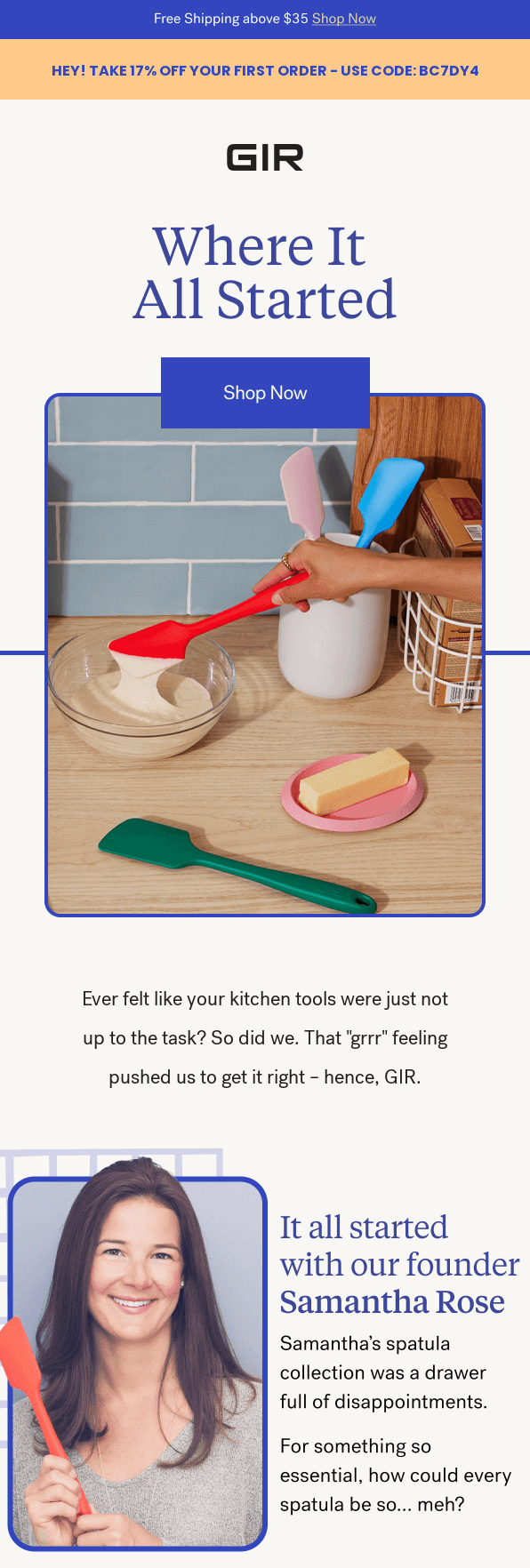
A concrete example: someone enters their address in a footer form to get 10% off, confirms the address by clicking a link, and receives a welcome email with the discount code four minutes later. The permission is the form and the confirmation click. The message is the automated welcome email. The measurement is whether that code gets redeemed.
How Does Email Marketing Work?
The email marketing process runs as a loop with six stages: collect the list, connect an email service provider, send a campaign or automation, land in the inbox, read the engagement data, and feed it back into segmentation.
- Collect an opt-in list. Addresses come from signup forms, popups, checkout boxes, landing pages, and offline signups. Each record stores the address plus first name, signup source, and purchase history where captured.
- Connect an email service provider. An email service provider (ESP) is the email marketing software that stores your subscriber list, builds the email, sends it over authenticated infrastructure, and reports results. A personal Gmail or Outlook account has no unsubscribe handling, no bounce processing, and a hard daily send cap.
- Send a campaign or trigger an automation. Email automation means an email that sends itself when a condition is met: a signup, a purchase, a 60-day gap in activity, or a birthday date field. Klaviyo’s 2026 ecommerce benchmark found automated flows produced roughly 41% of email marketing revenue from 5.3% of sends.
- Get through to the inbox. Email deliverability is whether the receiving mailbox provider accepts the message and where it files it, and it depends on domain authentication (SPF, DKIM, DMARC), sender reputation, complaint rate, and bounce rate. A message can be accepted and still sorted into spam folders by spam filters.
- Read the engagement data. Opens, clicks, conversions, bounces, unsubscribes, and spam complaints come back within minutes and keep updating for days. Click-through rate is the most reliable because Apple Mail Privacy Protection pre-loads tracking pixels for a majority of Apple Mail users and registers opens that never happened.
- Segment and send again. The engagement data from the previous send becomes the segment filter for the next campaign or automation. Subscribers who clicked a product link get a different follow-up than subscribers who opened nothing in 90 days.
The loop is what separates email marketing from a static mailing list.
Why Does Email Marketing Matter?
Within a wider digital marketing strategy, email marketing matters for four reasons: you own the distribution list, results are measurable per subscriber, cost per send stays flat as the list grows, and one send can carry different content per segment. These benefits of email marketing hold only while the list stays permission-based.
You Own the Channel
You hold your email subscribers’ addresses in your own database and can export them at any time. No algorithm decides how many of your subscribers see your marketing messages, and no platform policy change can remove your access overnight. The counterweight is that you also own the consequences: a damaged sending reputation is yours to repair, and there is no support team on a social platform to appeal to.
It Is Measurable
Every send reports delivery, opens, clicks, conversions, bounces, unsubscribes, and complaints, attributable to named subscribers rather than aggregate impressions. That makes it possible to tie revenue to a specific email rather than to a channel. Choosing which numbers to act on matters more than collecting them, and the email marketing metrics and KPIs worth watching are a shorter list than most reporting dashboards show.
It Is Cost-Effective
The marginal cost of one more email is close to zero, and ESP pricing scales with list size rather than send volume in most plans. Litmus puts email marketing ROI at an average of $36 for every $1 spent, though that figure covers mature programs and does not describe a first campaign to 200 subscribers. The return on investment email marketing produces depends heavily on list quality and send frequency.
It Personalizes at Scale
One send can carry personalized and targeted content, including different subject lines, product blocks, and offers, based on stored subscriber fields and past behavior.
A subscriber who bought running shoes six weeks ago can receive a sock recommendation while a never-purchaser receives a first-order discount, from the same campaign, which lets one send speak to potential and existing customers differently. The customer journey behind an email program determines what each segment should receive.
What Are the Main Types of Marketing Emails?
A campaign is an email you schedule and send once to a selected group. An automated email is one you build once and let a trigger send indefinitely, so it goes out at a different moment for every subscriber.
Most programs run both, and the types of email marketing below determine which model applies at each point in the customer journey: newsletters, promotions, and seasonal sends are campaigns, while welcome, re-engagement, and transactional messages are automated.
Deciding the mix is part of planning an email marketing campaign rather than a per-email choice.
| Type | When it’s sent (trigger) | Purpose | Metric to watch | Example brand |
| Welcome email | Immediately after signup or first purchase | Deliver the promised incentive and set expectations | Click-through rate | GIR |
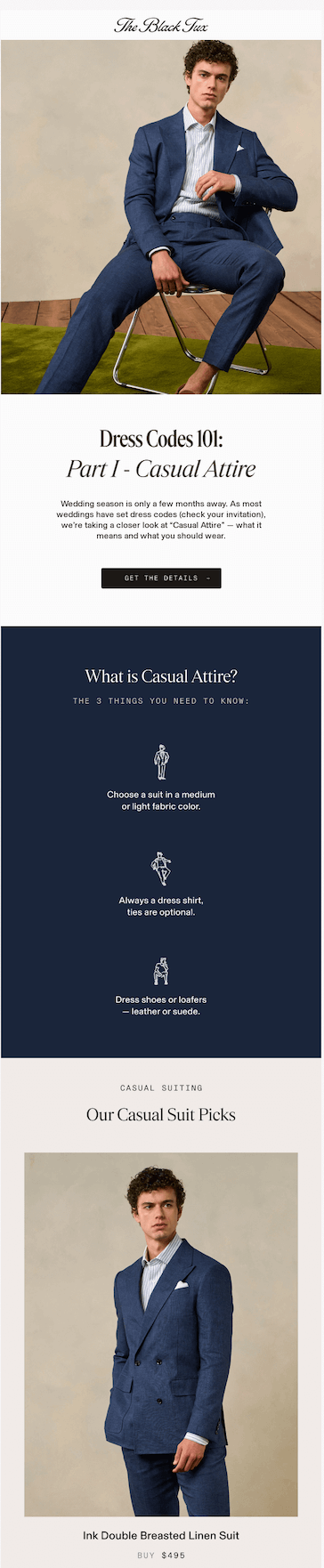
| Newsletter | Scheduled, on a fixed cadence | Keep the list warm with non-promotional content | Unsubscribe rate | The Black Tux |
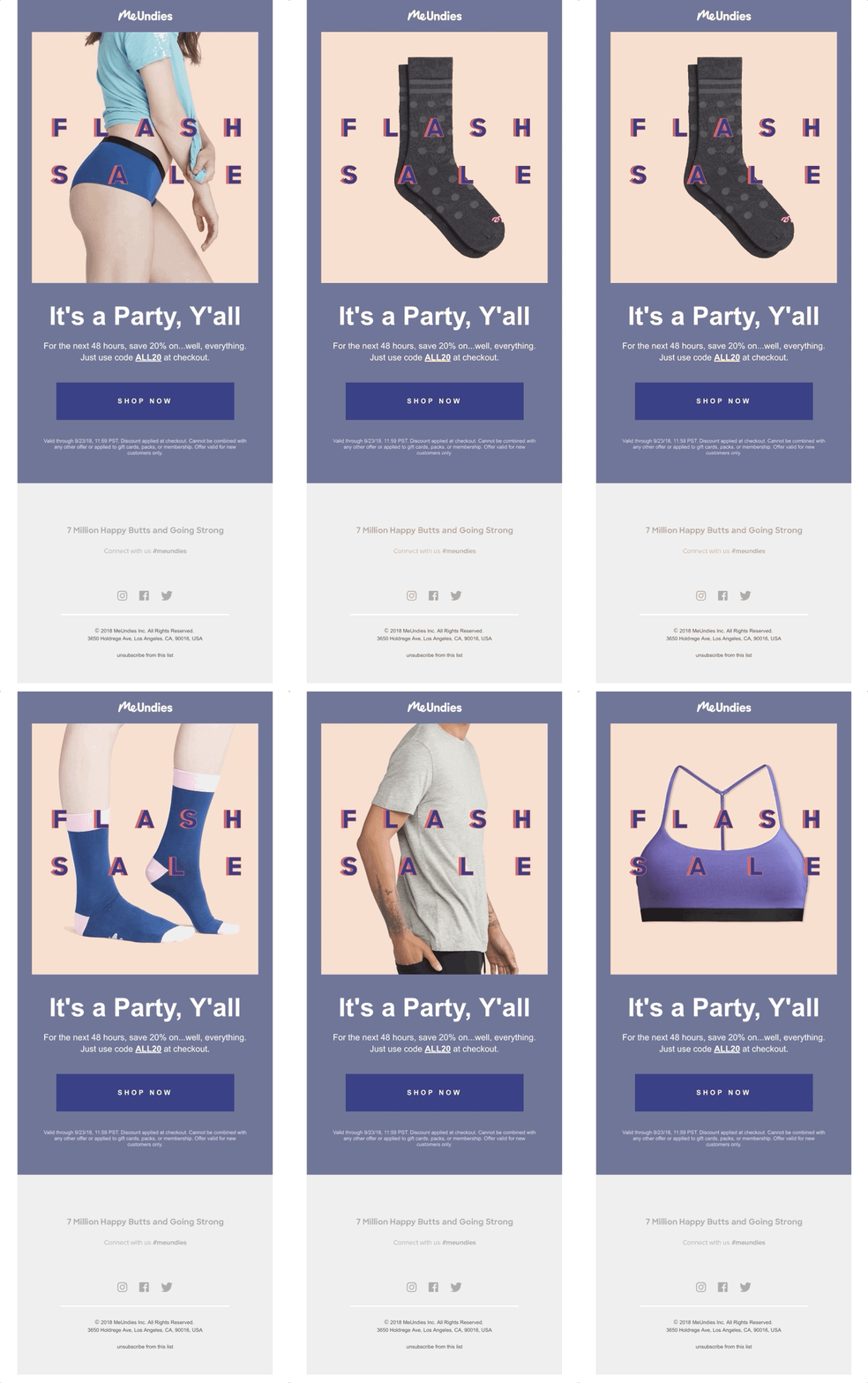
| Promotional / flash sale | Scheduled, tied to an offer window | Drive purchases inside a deadline | Conversion rate | MeUndies |
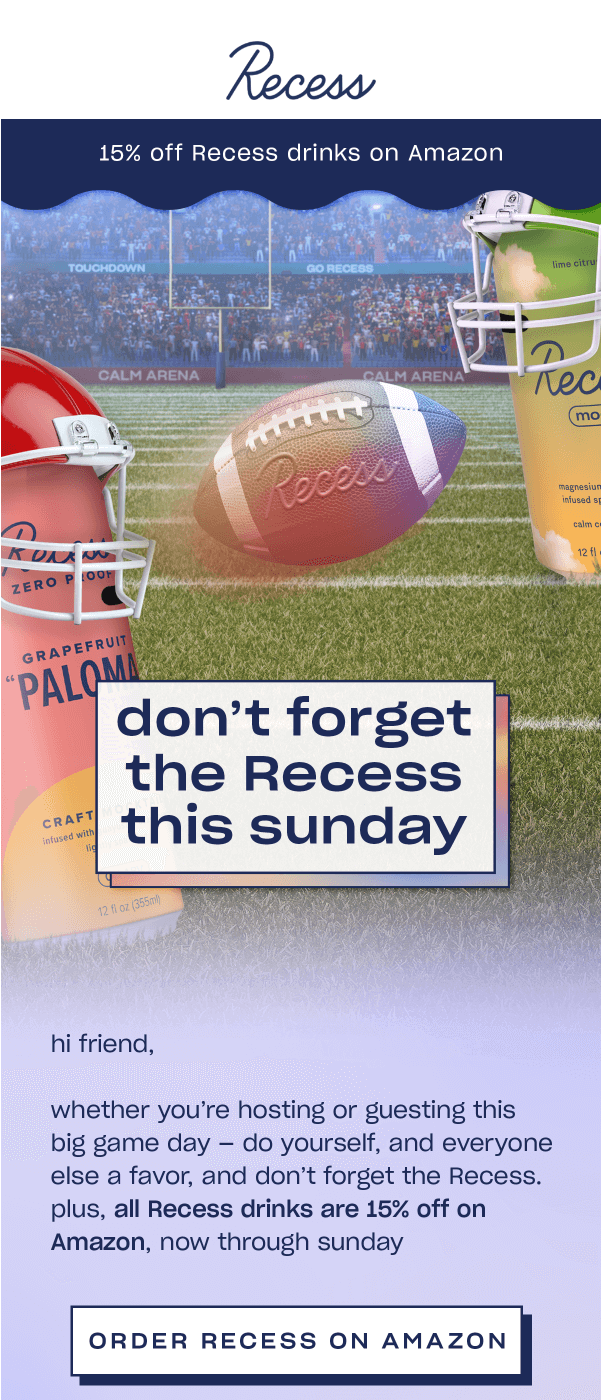
| Seasonal email | Scheduled, tied to a date or shopping period | Capture demand that already exists | Revenue per recipient | Recess |
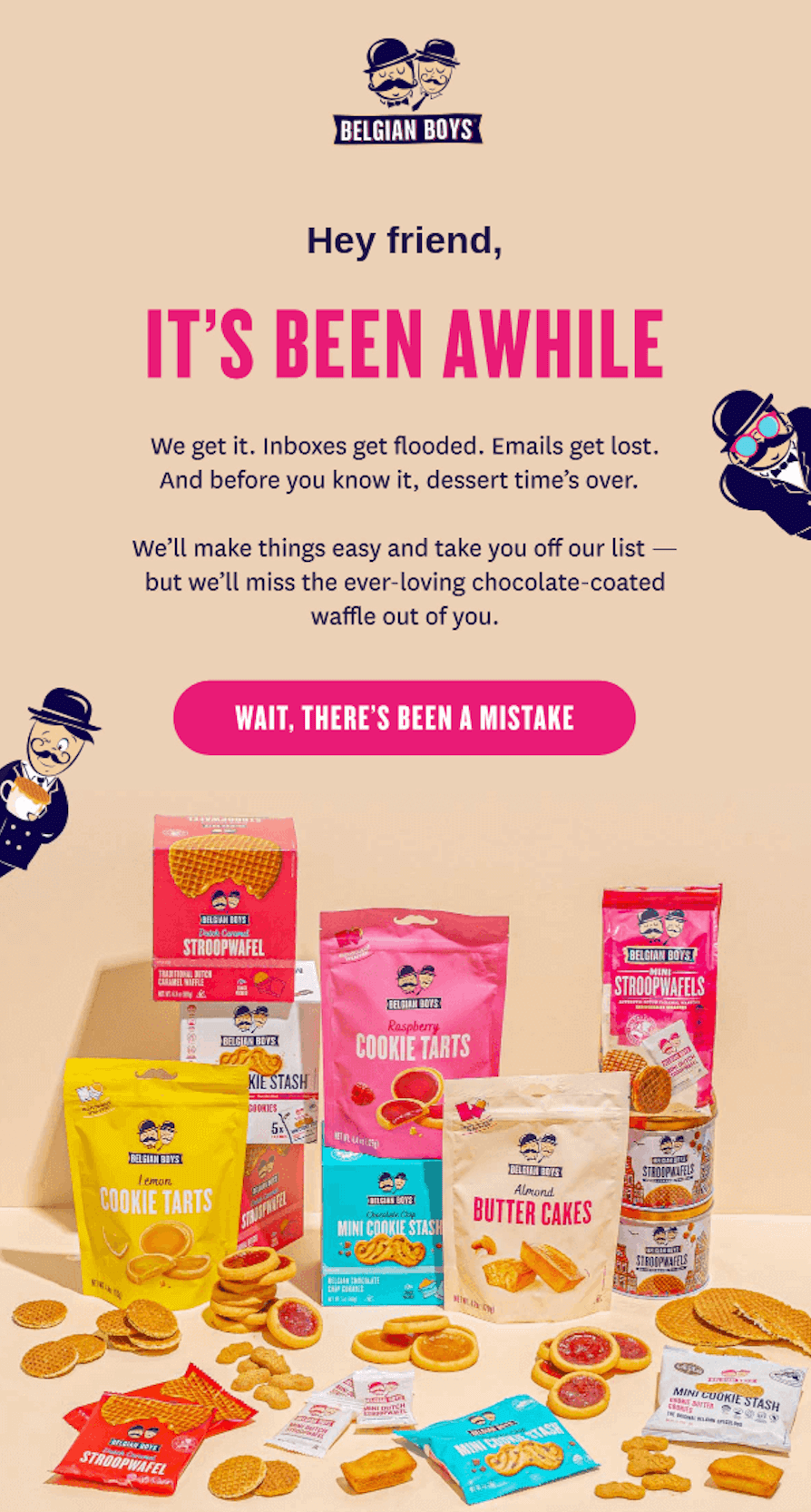
| Re-engagement email | Triggered by 60 to 180 days of inactivity | Reactivate or remove dormant subscribers | Spam complaint rate | Belgian Boys |
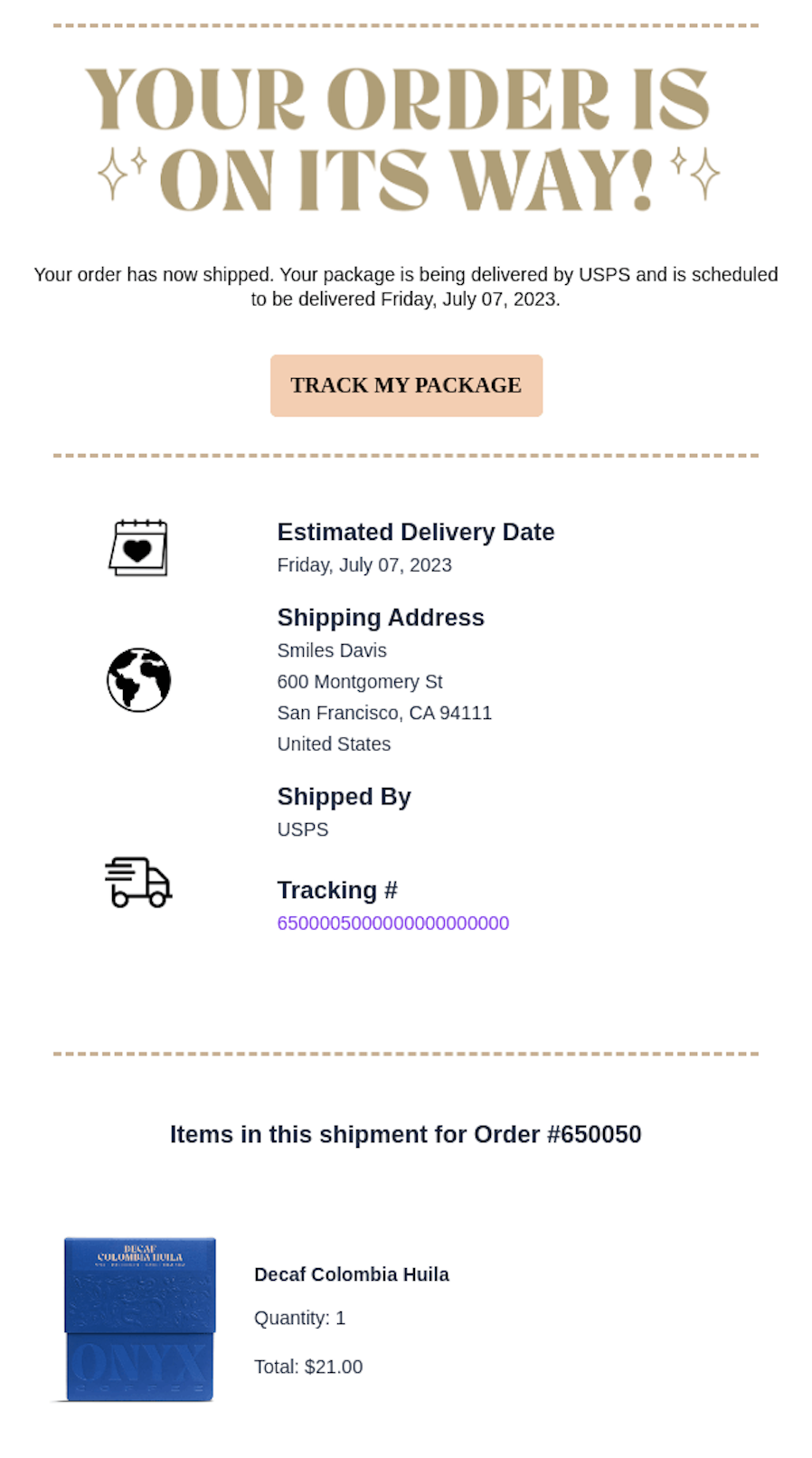
| Transactional email | Triggered by an account or order action | Confirm what just happened | Delivery rate | Onyx Coffee Lab |
Welcome Emails
A welcome email is an automated message sent within minutes of a signup or first purchase, and it is where customer relationships start.
Its job is to deliver whatever was promised at the form, usually a discount code or download link, and to state what the subscriber will receive next and how often. Send it immediately: the address is confirmed, and the incentive is the reason the person subscribed.
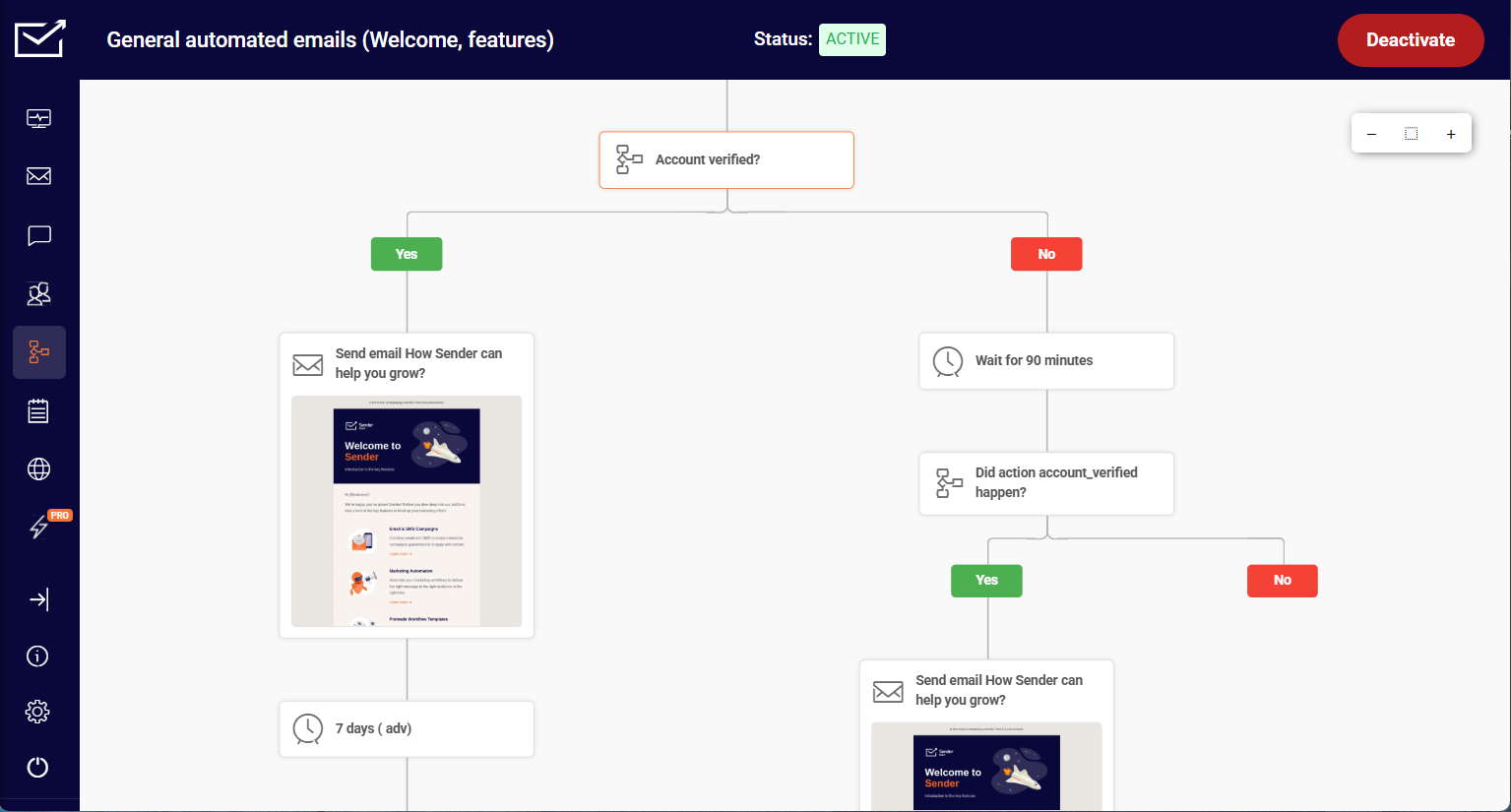
Save time and grow faster. Automate your emails with Sender’s prebuilt workflows — effortless, effective, and ready to go.
Newsletters and Informational Emails
A newsletter is a scheduled campaign sent on a fixed cadence, weekly or monthly, that carries content rather than an offer: curated links, company news, how-to guidance, or product release notes.
It informs customers and keeps the list familiar with the sender between promotional campaigns, which encourages customer loyalty. Watch unsubscribe rate rather than conversions, because a rising rate is the first sign the cadence has outrun the content.
Promotional and Flash-Sale Emails
A promotional email is a scheduled email marketing campaign built around a single offer with a deadline, such as a percentage discount, a bundle, or a launch price, sent to drive sales from existing customers inside a fixed window.
Without a stated end date, the email competes with every future email you will send. Flash-sale variants compress the window to 24 or 48 hours and run as an announcement plus a closing reminder.
Seasonal Emails
A seasonal email is a scheduled campaign timed to a holiday, shopping period, or recurring cultural moment, such as Black Friday, Valentine’s Day, or back-to-school. It works because demand already exists and the recipient is already shopping.
Seasonal marketing emails run into one constraint, inbox volume: during Black Friday week, send frequency across every brand a subscriber follows rises sharply, which pushes complaint rates up.
Re-engagement Emails
A re-engagement email is an automated message triggered when a subscriber has not opened or clicked for a set window, commonly 60 to 180 days. It asks a direct question or warns that the address will be removed; the purpose is list hygiene, not revenue.
Suppress or regularly remove inactive subscribers who do not respond, because mailing dormant addresses raises complaints and bounces. Reactivation is one part of email engagement.
Transactional Emails
A transactional email is triggered by an account or order action and confirms what just happened: order confirmations, shipping notices, password resets, receipts. It goes to a single recipient, requires no marketing consent, and is often sent through a separate sending stream or subdomain.
Keep promotional content out of the body, because adding an offer to a receipt can reclassify the message as commercial and pull it into consent and unsubscribe rules.
How Do I Start Email Marketing?
Starting an email program takes five steps: set one goal, choose an email service provider, build a permission-based list, write and design the first email, then send, measure, and test. Work through them in order.
Choosing a platform before you know the goal produces a subscription you do not use, and building a list before you have a signup form produces addresses with no consent record attached.
1. Set One Goal and Pick a Strategy
Pick a single measurable goal for the first 90 days: 500 confirmed subscribers, 20 orders attributed to email, or a 15% click-to-open rate on a monthly newsletter.
One goal decides the rest of the setup and keeps email tied to your overall marketing strategy, because a list-growth goal needs forms and lead magnets while a revenue goal needs product data and purchase automations.
Writing the goal down before choosing tactics is the first step in an email marketing strategy that survives past the first month.
2. Choose an Email Service Provider
An email service provider stores your list, builds and sends the email, handles unsubscribes and bounces, and reports results. Widely used providers include Mailchimp, Constant Contact, Klaviyo, ActiveCampaign, AWeber, MailerLite, Brevo, and Sender.
They differ mainly in email marketing automation depth, how contacts are counted for billing, and whether the free tier allows automations. Sign up for a free tier and build one automation before paying, because automation limits are where entry plans differ most.
What to Look for in a Platform
Choosing the right email marketing platform comes down to seven things:
- Editor. Drag-and-drop with mobile and dark-mode preview.
- Templates. A rebrandable library of email marketing templates.
- Automation. Triggers, delays, and conditional branching.
- Segmentation. Behavior and custom-field filters that update automatically.
- Reporting. Per-link clicks, bounce types, and Google Analytics tagging.
- Deliverability tooling and authentication setup. Guided SPF and DKIM records, domain verification, complaint-rate reporting.
- Pricing model. Whether billing counts total contacts or only active ones.
3. Build a Permission-Based List
A permission-based contact list contains only addresses whose owners actively asked for your email, which makes this permission-based marketing rather than cold outreach.
Use double opt-in, which sends a confirmation link and adds the subscriber only after the click. Expect a gap between form submissions and confirmed subscribers, traded for fewer addresses that bounce and complain later.
Add Signup Forms to Your Website
Signup forms are the main list-building mechanism: embedded forms, popups triggered by scroll depth or exit intent, and gamified forms such as spin-to-win. Ask for the email address and at most one other field, since every added field lowers completion.
Place forms on the homepage, blog sidebar, end of posts, and about page. The help center walkthrough for creating signup forms covers each form type.
Use Lead Magnets
A lead magnet is something specific given in exchange for an address: a checklist, a template, a discount code, or a short course. Specific beats generous, because a niche resource attracts subscribers who match the product. Deliver it in the welcome email rather than on the thank-you page, which gives the first send a reason to be opened.
4. Write and Design the First Email
The first email needs one purpose, one primary call to action, and a layout that reads on a phone. Write the call to action first and build the copy backward from it. Use a drag-and-drop email builder rather than hand-coding HTML, because email clients render CSS inconsistently and hand-built templates break in Outlook.
Subject Line, Preheader, and Sender Name
The subject line, preheader, and sender name are all that a recipient sees before deciding whether to open an email. Keep an email subject line to roughly 40 characters, since mobile clients truncate beyond that in portrait view.
The preheader is the preview text pulled from the top of the body; set it explicitly, or the client shows whatever text comes first, often “View in browser.” Use a consistent sender name, because recipients recognize it before the subject line. Personalization tokens need a fallback value, or the send goes out reading “Hi ,”.
Design for Mobile First
Build the email template as a single column at roughly 600 pixels wide for mobile devices, with a tap target of at least 44 by 44 pixels for buttons. Assume images are blocked on first open and write alt text that carries the message.
Test in dark mode before sending: transparent PNG logos with dark text disappear against an inverted background, the most common rendering failure in mobile email.
5. Send, Measure, and Test
Send the first campaign to a small segment of engaged subscribers, then review campaign performance after 48 hours, since clicks keep arriving for days. MailerLite’s analysis of 3.6 million email marketing campaigns put the 2025 median click rate at 2.09%, and Klaviyo reported 1.69% across ecommerce email marketing senders in 2026. The best time to send emails varies by audience.
Change one variable at a time once you have a baseline to optimize future campaigns. Running A/B tests in email marketing on a list under about 2,000 subscribers rarely produces a meaningful result on click rate, so start with subject line tests.
What Mistakes Should Beginners Avoid?
Three mistakes account for most failed early email marketing efforts: buying a list, skipping authentication, and sending every email to everybody. Each damages sender reputation, which is slow to rebuild. Working through the best practices for email marketing prevents the rest.
Buying Email Lists
Never buy or scrape an email list. Purchased lists routinely contain harvested addresses, opted-out addresses, and spam traps, which are dead addresses mailbox providers monitor to identify senders with no consent process, so the send becomes unsolicited emails.
Under the CAN-SPAM Act, each non-compliant email carries a civil penalty of up to $53,088 (FTC compliance guide, 2025 inflation adjustment, still operative in 2026). GDPR is stricter: it requires documented prior consent, so a bought list is never lawful for EU recipients. The FTC’s 2024 Verkada settlement, at $2.95 million, covered roughly 30 million commercial emails.
Skipping Authentication
Publish SPF, DKIM, and DMARC records before your first send. Since February 2024, Gmail and Yahoo have required all three from senders of over 5,000 messages a day to personal accounts, plus a one-click unsubscribe link under RFC 8058 and a spam complaint rate below 0.30%.
Microsoft did the same for outlook.com, hotmail.com, and live.com on 5 May 2025, rejecting non-compliant mail with error 550 5.7.515. Two failures are common: an SPF record over the 10-DNS-lookup limit returns a PermError, and p=reject set without reading aggregate reports silently drops legitimate mail. Start at p=none, then tighten using the SPF, DKIM, and DMARC setup guide.
Sending the Same Email to Everyone
Segment before you send. A bulk email to an unsegmented list mails the same offer to first-time subscribers, repeat buyers, and people dormant for a year instead of relevant content for your target audience, and the dormant group is where complaints originate.
One workable starting segment: subscribers who opened or clicked in the last 90 days. Mail that group at full frequency and everyone else monthly. Keep the call to action singular in each version, because two competing buttons split clicks.
Overlapping segments are the common failure: a subscriber matching two saved filters receives the campaign twice unless the ESP deduplicates, which dynamic segmentation with mutually exclusive conditions avoids.
Email Marketing FAQs
The email marketing basics take a few hours to learn: creating a list, building an email in a drag-and-drop editor, and scheduling a send are point-and-click tasks in most email marketing tools. Email marketing for beginners gets harder at DNS authentication, which requires domain registrar access, and at segmentation logic. Small marketing teams should expect a week to a first competent send.
Most email marketing services bill monthly by contact count, with free tiers covering early list sizes and paid tiers rising in bands as the list grows. Additional costs sit outside the subscription: a domain, template design, and SMS credits.
One detail worth checking is whether unsubscribed contacts still count toward your tier. The full breakdown of email marketing costs compares how providers count.
Yes, with the caveat that measurement has changed. Email marketers can no longer trust open rates, because Apple Mail Privacy Protection pre-fetches tracking pixels for a growing majority of Apple Mail users and breaks any automation triggered by an open.
Click rate, conversion rate, and revenue per recipient remain accurate as customer engagement signals. The email marketing statistics behind the channel show click rates flat at roughly 2% for three consecutive years.
Five key metrics cover email marketing performance:
– Open rate. Percentage of recipients who opened. Inflated by privacy pre-fetching, so treat it as a deliverability signal rather than an engagement one.
– Click-through rate. Percentage of recipients who clicked a link. The most reliable engagement measure available.
– Conversion rate. Percentage who completed the intended action after clicking. Ties the send to revenue.
– Bounce rate. Percentage undelivered. Misspelled email addresses and abandoned accounts push this up, and above 2% indicates list quality problems that will affect inbox placement.
– Unsubscribe rate. Percentage who opted out. A median campaign sits near 0.22%; a sustained rise signals frequency or relevance problems before complaints appear.
Next Steps
Do three things in order. Set up domain authentication first, because SPF, DKIM, and DMARC records take up to 48 hours to propagate, and every later step depends on them.
Second, put one signup form on your highest-traffic page and connect it to a welcome automation, which gives the list a growth mechanism and a first send at the same time. Third, send one campaign to subscribers active in the last 90 days and record the click rate as your baseline.
After the first month, review what changed against current email marketing trends rather than against last year’s benchmarks, since deliverability requirements shift faster than engagement norms.
For a full email marketing strategy, from planning through campaign optimization, work through the full guide to email marketing.