

If you’ve ever stayed late sending the same welcome email for the hundredth time, watched high-value leads go cold because no one followed up fast enough, or hit a wall the moment your subscriber list outgrew your manual capacity, you already know the problem.
Marketing doesn’t break because the ideas are bad; it breaks because there are only so many hours in a day, and human effort doesn’t scale the way inboxes do. You’re likely drowning in repetitive sends and manual data entry, leaving your most promising opportunities to wither in the gaps.
This guide is a walkthrough for marketers, founders, and operators who want to move past the bottleneck of manual work. You will walk away with a clear understanding of each platform’s underlying logic, the essential message types you need to build, and a step-by-step plan to get a working system in place without burning a whole quarter on setup.
What is Marketing Automation?
Marketing automation is software that sends the right message to the right person at the right time, automatically, based on what that person actually does.
Here’s the simplest example. Someone signs up for your newsletter. Two minutes later, they get a welcome email – without you touching anything. You wrote that email once, weeks ago, and the system handles every signup from now on. You went to bed; the email still went out at 2 a.m.
That’s the core idea, and it’s worth being clear about what automation is not. It’s not a mass email blast – that’s a broadcast, and we’ll get to those later. It’s not just scheduling a post for tomorrow morning. And it’s definitely not a bot writing whatever it wants to your customers. Automation is a set of rules you design once, that respond to real customer behavior, across email and other channels, every time it happens.
Modern platforms can chain these messages into long sequences, branch them based on conditions, and pull in AI to optimize timing and copy. But it all starts from that one idea: a behavior happens, a message fires. The next section breaks down the mechanics.
How Marketing Automation Works
Every automation platform – whether it’s an all-in-one suite or a focused email tool – uses the same four-part loop under the hood: trigger, condition, action, timing. Once you understand this loop, every workflow you ever build is a remix of these four ingredients.
Here’s a walkthrough that uses all four. A visitor fills out a form on your site (that’s the trigger). The system checks: is this their first time signing up? (that’s the condition). If yes, it sends them a welcome email (the action). Then it waits two days (the timing) before sending the next message in the series. If the answer to the condition was “no, they’ve signed up before,” the system might skip the welcome and send a different message instead.
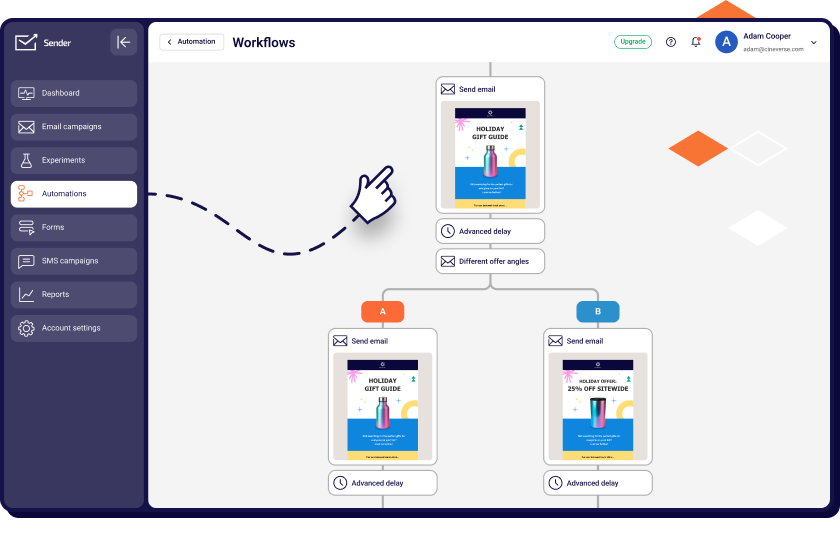
That tiny loop is why automation scales where manual work hits a ceiling. A human can’t check every signup against a database, send a personalized email within ninety seconds, and remember to follow up two days later for ten thousand people. A workflow can. And once it’s running, it costs you roughly the same effort whether ten people sign up this week or ten thousand.
The entry point to all of this – the moment that kicks off everything – is something called a trigger email. That’s the building block we’ll look at next.
Triggers, Conditions, and Actions
Let’s break down each of the three pieces with a single example threaded through all of them: a customer making their first purchase.
A trigger is the event that starts a workflow. It’s the “something just happened” signal – a form submission, a purchase, a page visit, a click on a specific link, even inactivity (like “this person hasn’t opened an email in 60 days”). In our example, the trigger is the order being placed. The system sees that event and says, “okay, time to do something.”
A condition is the rule the system checks before deciding what happens next. Conditions sort people into different paths so the same workflow can handle different situations – Is this a first-time buyer? Is the order over $100? Did they buy a subscription or a one-off? Each “yes” or “no” sends them down a different branch. In our example, the condition might be: “is this their first order ever?”
An action is what the system actually does once the conditions are met. Actions are the visible output – sending an email, adding a tag to the contact, notifying a salesperson on Slack, updating a field in your CRM, or starting another workflow entirely. For our first-time buyer, the action could be sending a thank-you email plus a discount code for their next order, while a returning customer gets a different message entirely.
Triggers start the loop, conditions decide the path, actions deliver the result. Chain enough of them together and you’ve got a system.
Why “Trigger Emails” are The Building Block
A trigger email is a message that fires in response to a specific behavior – the atomic unit every sophisticated automated system is built from. Unlike a broadcast email, which goes to everyone on a list at a time you pick (like a weekly newsletter), a trigger email only exists because an individual took an action. Because these messages are so timely and contextually relevant, they generate a massively outsized share of engagement and revenue compared to the outdated “mass mailing” methods of the past.
This shifts the dynamic from a “batch and blast” corporate announcement to a timely, 1-to-1 conversation. Whether a user clicks a high-intent link, visits a pricing page multiple times, or hits a milestone in their journey, the trigger ensures you respond instantly. For a deeper walkthrough of how trigger emails are structured and the behaviors that fire them, see our guide to trigger emails.
By mastering these event-driven responses, you move away from basic scheduled sends and toward a system where every message is contextually relevant. This ensures your brand stays at the top of the inbox exactly when it matters most, turning passive subscribers into active participants in your brand’s story.
Why Marketing Automation Matters in 2026
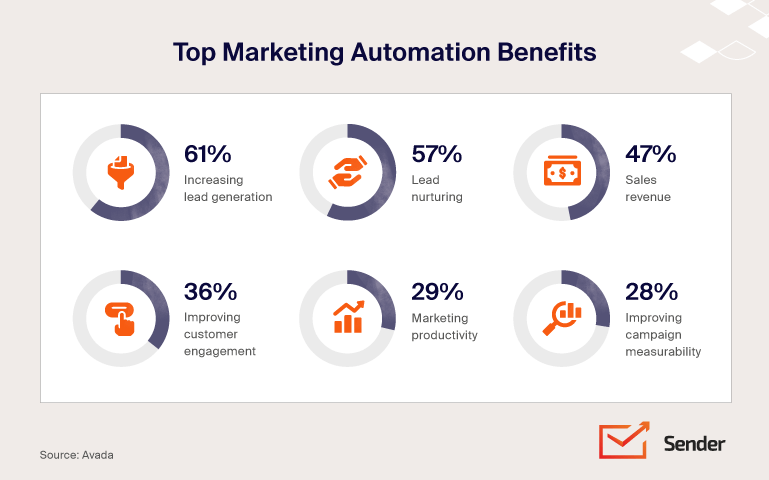
The business case for automation has become impossible to ignore. On average, marketing automation programs return $5.44 for every dollar spent, with high-performers seeing returns upwards of $8.70. Beyond the revenue, the productivity lift is massive: teams report saving over six hours per week on routine tasks – time that is redirected into high-level strategy and creative work.
But the real story in 2026 isn’t just the ROI; it’s that automation has moved from a competitive edge to a baseline requirement. Three primary forces are pushing this adoption.
First, customer expectations have hit an all-time high. Buyers now expect brands to remember their preferences across every channel; generic mass emails no longer just underperform – they feel like a lapse in service.
Second, tighter margins and leaner headcounts mean teams must deliver more pipeline with fewer resources. Mature automation programs allow companies to spend 12% less on overhead while generating 50% more sales-ready leads.
Finally, AI has drastically lowered the build cost of sophisticated workflows. What once required a dedicated specialist to build can now be drafted and deployed in a fraction of the time, making advanced tech accessible to businesses of all sizes.
The flip side is the cost of not automating. Without automation, leads go cold while your team is buried in data entry, and your ability to personalize is capped by your manual bandwidth. While your competitors gain compounding returns from their automated systems, manual teams stay stuck pasting names into mail merges.
In 2026, automated teams aren’t just ahead — they’re pulling further away every month their workflows keep running.
Core Email Types That Power Automation
Building a high-performing automation system doesn’t require starting from a blank canvas. Instead, most successful strategies rely on a small, core group of message types designed to serve specific customer needs. By mastering these six categories, you can see how individual automated email campaigns fit into a larger, automated journey that transforms a total stranger into a loyal brand advocate.
Welcome Emails
The welcome email is the first message a new subscriber or customer receives, usually within minutes of an action. Its job is to set clear expectations, deliver promised incentives like discounts or guides, and make a strong first impression while your brand is fresh in their mind.
Because the recipient just opted in and is actively checking their inbox, these messages consistently post the highest open rates in any stack – often between 50% and 80%. This massive engagement makes it the highest-leverage single email you own.
For copy examples and subject line patterns that work, see our collection of welcome message examples, as no other automated send will ever benefit from this much built-in goodwill. By delivering immediate value, you capitalize on the peak moment of customer interest before it begins to fade.
Confirmation Emails
Confirmation emails verify that a specific action occurred – whether a subscription was confirmed, an account created, or a booking finalized. The primary purpose is providing reassurance and a formal record, ensuring the user that the system didn’t quietly fail.
Because customers are actively waiting for these messages, they consistently post the highest open rates of any email type, often exceeding 80%. This intense engagement makes them a significantly underused surface for brand-building and subtle upsell or cross-sell opportunities.
To help you get started, we’ve put together a library of confirmation email templates covering the most common triggers. By treating these as more than just a functional necessity, you can turn a routine verification into a high-value touchpoint that deepens the customer relationship right at the moment of their highest intent.
Reminder and Appointment Emails
These two message types are essential for cutting no-shows and ensuring deadlines are met. The key distinction is that reminder emails nudge a recipient toward a pending action they haven’t taken, while appointment emails confirm and re-confirm a meeting already on the calendar.
Reminders typically fire for unfinished tasks like an abandoned cart, a looming subscription renewal, or an unanswered event RSVP. In contrast, appointment emails handle the logistics of a booking, providing an immediate confirmation, a 24-hour heads-up and a day-of nudge to keep the event top-of-mind.
See our breakdown of reminder email examples and formats that reduce no-shows, plus a dedicated guide on writing appointment confirmation emails. By surfacing these pending items at the moment a recipient is most likely to act, you significantly reduce the operational friction of missed appointments and stagnant leads.
Thank You Emails
Thank-you emails do exactly what the name says: acknowledge an action the customer took. A purchase, a signup, a form submission, a referral, a piece of feedback – anything where the customer gave you something. The point is the relationship, not the transaction. You’re not asking for anything; you’re just saying thanks.
That’s why they work. Because the framing isn’t “buy now” or “click here,” recipients drop their defenses, and engagement tends to outperform straight promotional sends. A thank-you also creates a small emotional anchor – the kind of moment people remember a brand for. It’s the cheapest retention tool you have, and most teams underuse it.
For templates and real-world examples, see our guide on thank you emails. This simple step humanizes your brand, shifting the tone from a sterile business exchange to a genuine partnership with your audience.
Win-back and Re-engagement Emails
Subscribers go quiet. It happens to every list – they opted in once, circumstances changed, and now they haven’t opened an email in months. Left alone, this decay quietly damages your deliverability because inbox providers track engagement; a list full of dead weight eventually drags down your reach even with active fans.
Win-back emails attempt to flip this by showing up with a fresh value proposition, a question, or a last-chance offer to bring the subscriber back. A “we miss you” email is a specific tone variant – a softer, more relational approach that leads with emotion before making any ask.
While win-backs broadly aim for reactivation, “we miss you” sends specifically prioritize the relationship over the transaction. For subject lines and body copy, see our library of win back email examples and a dedicated breakdown of the we miss you email format. Using these targeted touches allows you to salvage lapsing interest before it turns into permanent list decay.
Invoice and Transactional Emails
Transactional emails built around billing – invoices, payment confirmations, overdue notices, receipts – are often treated like an afterthought. They’re not. These are some of the most-opened emails any business sends, because the customer is actively looking for them. That makes them a real branding and retention touchpoint, not just a piece of accounting plumbing.
A clean, well-designed invoice email signals professionalism. A generic plain-text receipt signals you don’t care. It is worth distinguishing that an invoice email is the specific message landing in an inbox, while email invoicing refers to the broader practice of systematically managing billing communications.
Start with our guide on writing an invoice email, and for the broader workflow, see our overview of email invoicing as a practice. A professional, well-designed transactional send signals that you care about the customer experience at every stage, turning a routine billing event into a moment of brand reinforcement.
Marketing Automation Workflows & Sequences
Once your individual email types are ready, it’s time to chain them into a workflow. This “brain” of your system uses pacing, branching, and conditions to turn single messages into a cohesive customer journey.
To build a complete system, we’ll look at four key angles: mastering drip campaigns, distinguishing sequences from broadcasts, using premade templates to save time, and deploying remarketing flows to recover lost revenue.
Drip Campaigns Explained
A drip campaign is a pre-scheduled sequence of emails sent on a fixed cadence – Day 0, Day 2, Day 5, and so on – usually regardless of how the recipient behaves. The steady rhythm is the whole point.
Drips are ideal when you need to deliver a specific body of content over a set timeline, making them the perfect shape for user onboarding, lead nurturing in long sales cycles, or course delivery. This structure trades real-time reactivity for total predictability; you know exactly what is going out on Day 10, and so does your team.
For instance, a five-email post-signup drip might include an initial welcome, a “first win” tutorial, a customer use case, a feature deep-dive, and an invitation to a live walkthrough. For the full concept and when to use it, see our guide on drip marketing, and for inspiration, browse our roundup of drip campaign examples.
By using a “drip” approach, you ensure that every prospect receives the same foundational education at the same pace, regardless of when they joined your list.
Email Sequences vs. One-off Campaigns
The distinction is simple but it trips a lot of teams up. A one-off broadcast goes to a list at a moment you pick – your Tuesday newsletter, a Black Friday announcement, a launch email. Everyone gets it at roughly the same time. A sequence is multi-step and tied to either a trigger (a behavior) or a timeline (Day 1, Day 3, Day 7) – different recipients hit different points of the sequence at different times depending on when they entered.
Both have their place. Broadcasts are right for news, time-sensitive promos, and announcements where the relevance is the timing itself. Sequences are right for nurture, onboarding, retention, and any situation where the relevance is “where this person is in their journey.”
Most teams fall into the trap of over-relying on broadcasts because they are easier to execute. However, this leaves significant revenue on the table, as every new signup could be entering a multi-step automated flow that compounds over time. For a step-by-step on structuring one, see our guide to building an email sequence.
Premade Workflow Templates
Most teams stall the second they sit down to design an automation from scratch. The blank workflow builder is a notorious productivity black hole – what’s the first email? How long do I wait? What if they don’t open it? Three hours later, you’ve built nothing, and your tab count has tripled. That’s the problem premade templates solve.
A template gives you the skeleton – trigger, sequence, timing, decision points – already wired up. Instead of building the architecture, you spend your time simply polishing the copy and adjusting the schedule to fit your brand.
The most common template categories cover the bulk of what most businesses need. Welcome series templates handle new-subscriber onboarding across three to five emails. Cart recovery (or browse abandonment) templates handle the abandoned-purchase pattern. Re-engagement templates handle the inactive-subscriber problem. Post-purchase templates handle thank-you, shipping updates, review requests, and replenishment cues. These four cover roughly 80% of the sequences a typical business runs.
Browse our library of premade automation workflow templates to skip the blank-page problem entirely, or read our deeper guide on building a marketing automation workflow from scratch if you’d rather understand the design choices first.
Email Remarketing Flows
Email remarketing consists of sequences triggered by behaviors that signal immediate interest or sudden drop-off. Unlike general win-back campaigns – which target subscribers who have been inactive for months – remarketing focuses on in-session drop-off where timing is measured in minutes or hours. The customer hasn’t gone cold; they are walking away mid-decision, and a well-timed flow re-engages them while the intent is still warm.
The three most common remarketing triggers are cart abandonment (adding items but not checking out), browse abandonment (viewing specific products without adding to cart), and high-intent page visits, such as visiting a pricing page multiple times without taking action.
Each of these behaviors fires a sequence designed to surface common objections, restate the value proposition, and lower the barrier to returning. Because these recipients are already deep in the funnel, remarketing often produces the highest revenue per recipient of any automated flow.
For the full playbook on setting these up, see our guide to email remarketing. By closing the gap between interest and exit, you recover revenue that would otherwise be lost to simple distraction.
Omnichannel & AI: The 2026 Shift
Two big shifts are reshaping marketing automation right now, and they’re tightly connected. Most of what you’ll read in 2026 about “the future of automation” is one of these two stories.
The first is omnichannel orchestration. For years, email was the primary focus of automation, but in 2026, it is just one piece of a broader set including SMS, push notifications, in-app messages, and web personalization.
The bar has shifted from “we have email and SMS” (multichannel) to true “omnichannel,” where the system coordinates the full set so a customer doesn’t get hit across three different channels with the same message. Modern platforms now recognize where a customer is responding and choose the next best channel for the touchpoint. For a deeper look at coordinating channels end-to-end, see our guide to omnichannel marketing automation.
The second shift is the rise of agentic AI. We have moved past the “copilot” era where AI simply suggested a subject line. Automation has transitioned into an “operator” role, where AI agents can plan, execute, and adjust campaigns in real-time within human-set guardrails. This moves the marketer from an operator building every step to a strategist who sets the goals and quality bars while the agent handles the heavy lifting of execution.
In 2026, features like predictive send times, generative copy variants, multi-armed bandit testing, and AI-assisted segmentation are baseline standards. What remains emerging are fully autonomous campaign agents that run end-to-end without any human review. Most successful deployments today are narrow, focusing on one supervised workflow at a time.
Both of these shifts depend on the same thing – zero-party data. This is the information customers proactively share – like their preferences and intentions – combined with their actual behavior on your owned channels.
Now that third-party cookies are functionally gone, the brands winning in 2026 are those that have built the habit of asking customers what they want and storing those answers where the automation can actually use them. This shift toward direct, consented data is what allows these sophisticated systems to remain personal and relevant without relying on invasive tracking.
Choosing Marketing Automation Tools
Selecting a tool can feel overwhelming, but implementation quality matters far more than a software name. However, picking the wrong category of tool makes the right implementation impossible. To find the right fit, we’ll look at the category split between all-in-one platforms and specialist tools, followed by the evaluation criteria that apply to any choice. You should avoid picking based on a long feature list alone – a complex system that sits idle is always less valuable than a simpler tool your team actually uses.
All-in-one vs. Specialist Platforms
There are two broad categories of platforms, and they trade off in opposite directions:
All-in-one platforms – such as HubSpot, Salesforce Marketing Cloud, or ActiveCampaign – bundle email and automation with a full-suite CRM, landing pages, and social media publishing. The pitch is operational simplicity: one login, one customer record, and one set of permissions. The downside is that no suite is best-in-class at everything; you typically accept “good enough” social or CMS features in exchange for a unified stack. For most mid-sized teams, the time saved not stitching tools together outweighs the rougher edges.
Specialist platforms – Klaviyo for ecommerce email, Iterable for cross-channel orchestration, ESP-first tools like Sender for email and SMS automation – go deeper in one domain but they generally don’t include a full sales CRM or social media management suite. Instead, they expect you to integrate with your existing tools. The pitch here is depth: more sophisticated workflows, better deliverability, and richer segmentation in their core area. For teams where one channel drives the bulk of their revenue, the extra performance is usually worth the integration work.
The shortcut: all-in-one = simpler ops + CRM/Social; specialist = better depth + channel-specific performance. For a side-by-side comparison of the leading options, see our rundown of the best marketing automation tools.
What to Evaluate (Fit, Integrations, AI Features)
Once you’ve picked a category, five criteria should drive the actual decision in 2026.
Use-case fit for the workflows you need this quarter. Don’t buy for the workflows you might build next year. If your immediate need is cart recovery and welcome flows, evaluate platforms by how well they handle those specific workflows. If sequences are central to how you’ll use the platform, read up on drip campaign software options before committing.
Integration depth. Prioritize native connections over middleware. A native integration with your store, CRM, or support tool will outlast and outperform a Zapier-style connection by syncing more data fields with fewer breakages.
AI features that actually move metrics. Every platform now claims AI. Predictive send-time optimization should measurably lift open rates. Generative subject-line variants should beat your control. Segment suggestions should surface audiences you’d otherwise miss. If a vendor can’t show you the lift on real customer accounts, it’s a marketing veneer. Since the broader email marketing automation software landscape moves fast, prioritize vendors who can show real performance lift on existing accounts.
Deliverability and compliance built in. A workflow that lands in spam doesn’t convert at any rate. Look for built-in authentication setup (SPF, DKIM, DMARC), reputation monitoring, and consent management for GDPR, CAN-SPAM, and the growing pile of US state privacy laws.
Pricing that scales with value. Avoid platforms that lock essential automation behind “Enterprise” paywalls while penalizing you for list size. Look for a model where your investment scales with functionality and results. You want full access to advanced features – like multi-step branching and autoresponder tools – without a price jump just because your database grew.
Picking deliberately matters more than picking the “best” tool. A B-tier platform that fits your workflow and that your team actually uses beats an A-tier platform that nobody touches.
How to Get Started: a 5-step Rollout
The single most common reason automation projects fail isn’t tooling – it’s trying to build ten flows before any of them work. The order below is what successful rollouts actually look like. It’s deliberately boring, and that’s the point.
1. Audit what you already send. Before you turn anything on, write down every manual email and repeat task your team currently does. The Tuesday newsletter, the welcome email someone sends from their personal inbox, the “did you see this?” follow-up your salesperson sends every Friday, the weekly report you copy-paste together. You’re looking for patterns already happening – those are the workflows worth automating first, because the use case is proven and the copy is already written. Skip this step and you’ll automate flows nobody actually needed.
2. Pick one workflow to build first. The instinct is to start with the impressive one (a six-branch lifecycle nurture with AI personalization). Resist it. The first workflow should be the one with the clearest trigger, the smallest scope, and the highest known ROI. For most businesses, that’s a welcome series or, for ecommerce, a cart recovery flow. Both have well-understood mechanics, fast feedback loops, and direct revenue tied to them. You’ll learn the platform’s quirks on a low-risk workflow before stakes rise.
3. Clean your list and segments before switching anything on. Automation amplifies whatever data you point it at, including the bad parts. If your list has typos in email fields, duplicate contacts, broken tags from two CRMs ago, and people who haven’t engaged since 2019, your shiny new welcome flow will hit unsubscribe spirals and deliverability problems on Day One. Spend a week sunsetting dead contacts, fixing tag taxonomies, and confirming the segments you’ll use actually contain who you think they contain. This unglamorous work disproportionately determines whether the rollout succeeds.
4. Launch, measure against one primary metric. Pick one metric per workflow that defines success – for a welcome series, it might be 7-day activation rate; for cart recovery, it’s revenue per recipient. Launch, watch the metric for at least two full cycles (often two to four weeks depending on volume), and only then start optimizing. Teams that change all things at once, like the subject line, the send time, the offer, and the sequence length in week one have no idea what moved the metric. Change one variable at a time, and let the data accumulate.
5. Expand to the next workflow only after the first is stable. “Stable” means the metric has settled into a predictable range, deliverability is healthy, and you’re not actively firefighting. Then – and only then – add the next workflow. Repeat. Most successful automation programs have five to ten meaningful workflows running, not fifty. Depth and reliability beat breadth, especially in year one. Teams that build slowly end up with systems that compound; teams that build everything at once end up with brittle messes.
Conclusion
If you take one thing away from this guide, let it be this: marketing automation in 2026 is less about sending faster and more about being relevant at scale. The mechanics – triggers, conditions, actions, timing – haven’t changed much. What’s changed is the bar for what “good” looks like. Customers expect coordinated, well-timed, personally relevant messages across email, SMS, and the rest of the channels they use.
The teams pulling furthest ahead are the ones investing in clean first-party and zero-party data, picking tools that fit their actual workflows, and starting small enough that the first flows actually work before they build the next ten. Agentic AI will keep changing what’s possible, but the fundamentals – relevance, timing, respect for the recipient – are the same as they’ve ever been.
Once you’ve got the basics down, dig deeper into specific moving parts: the trigger emails that start every workflow, the marketing automation workflow frameworks for designing flows from scratch, the premade automation workflow templates that get you live faster, and the omnichannel marketing automation playbook for coordinating across channels. When you’re ready to evaluate platforms, our roundup of the best marketing automation tools lays out the trade-offs side by side.