


The most expensive number in your email reporting dashboard is the one labeled “delivered.” It looks like a green light. It usually isn’t. Delivered just means a server somewhere accepted the handoff — it says nothing about where the message ended up: primary inbox, Promotions tab, spam folder, or some quiet quarantine the recipient will never check.
How wide is the gap? Unspam.email‘s 2025 benchmark found that only about 60% of emails reach a visible mailbox location, 36% are filtered into spam, and 4% are blocked outright. That’s a reach problem, a trust problem, and a revenue problem stacked together — and most senders never see it, because their ESP only reports the green light.
This guide covers what deliverability actually is, why the rules tightened through 2024 and 2025, what “good” looks like in 2026 across email marketing and transactional sends, and the practices that keep mail in the inbox now that Gmail, Yahoo, and Microsoft have moved from filtering to active rejection.
What is Email Deliverability?
There’s a quiet gap in email reporting that trips up most senders. Your platform says 99% of emails were delivered. Your open rate is in the basement. Both numbers are true. Both are telling you different things.
Delivery is the easy half. An email is “delivered” the moment a receiving server accepts the handoff from your sending server and doesn’t bounce it. Server said yes. Message accepted. Done.
Deliverability is what happens next — the part your ESP can’t see. Once accepted, the receiving provider decides where to put the message: primary inbox, Promotions tab, Updates folder, spam, or quarantine. Deliverability is the percentage of your accepted mail that lands somewhere the recipient is likely to see and engage with.
The gap can be brutal. Validity’s 2025 Email Deliverability Benchmark Report found global inbox placement averages around 84% — meaning roughly one in six emails never reaches the inbox. You can hit a 99% delivery rate and still have 15-16% of your audience never see the message.
Five forces decide where a message lands:
- Sender reputation — the trust score mailbox providers have built about your domain and IP;
- Email authentication — SPF, DKIM, and DMARC, which prove the mail is really from you;
- Engagement signals — whether real humans open, reply, scroll, and don’t hit “report spam”;
- Content — links, images, copy patterns, attachments;
- List quality — how many recipients are real, active, and want to hear from you.
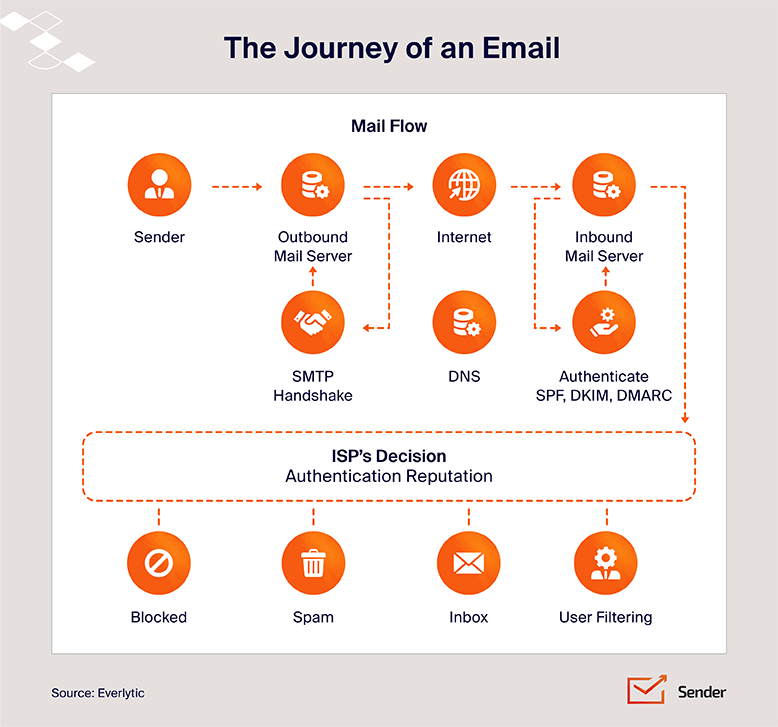
Each gets its own treatment below. The thing to hold onto: deliverability is not a setting you configure once. It’s an ongoing reputation score, recalculated with every send.
Why is Email Deliverability Important?
Most email problems look like other problems first. A campaign underperforms and the team blames the subject line. Open rates drift down for a quarter and someone proposes a redesign. Sales says the leads stopped converting. The actual culprit, often, is that fewer messages are reaching the inbox in the first place.
The business case comes down to three stacked issues:
Reach and engagement. Every email that lands in spam, Promotions, or corporate quarantine is a conversation that didn’t happen. Campaign metrics will still calculate, but against a shrinking denominator of people who actually saw the message.
Brand trust. Mailbox providers read consistent inbox placement as legitimacy and keep delivering your future sends. Subscribers read it the same way. If your last three messages went to spam, the fourth starts in a hole.
ROI. Lost placement compounds into lost revenue. In one Attentive customer analysis, pruning unengaged subscribers led to a 50% increase in revenue while sending 70% fewer campaigns. Sends dropped to ~200,000 and revenue rose to ~$18,000. One case, not a benchmark — but the direction matters: fewer emails sent to people who actually want them often outperforms more emails sent to a bloated list.
The most visible cost of poor deliverability is bounced emails. They waste sends, drag down sender reputation, and skew every campaign metric. A 5% email bounce rate doesn’t just mean 5% fewer eyeballs; it tells mailbox providers you’re not maintaining your list, and they treat your future mail with more suspicion.
How Does a Good Email Deliverability Rate Look?
“Good” doesn’t have a single number attached to it. It depends on what you’re measuring (delivery rate vs. inbox placement) and what kind of email you’re sending. Marketing newsletters and password reset emails play by different rules and ISPs treat them differently. Here’s how to set realistic targets for each, and how to read the report your platform hands you.
Deliverability Rate of Marketing Emails
For marketing email in 2026, a practical delivery rate target is 95% or higher. Most reputable senders on a healthy ESP will hit it.
But delivery rate and inbox placement aren’t the same number. Inbox placement for marketing campaigns runs lower, because Gmail in particular routes a big chunk of promotional sends to the Promotions tab.
Drawing on Validity’s 2025 benchmark data, The Digital Bloom reports Healthcare achieves exceptional 94.7% inbox placement, reflecting time-sensitive communications with high inherent engagement. Software/SaaS industry’s 80.9% placement reflects aggressive promotional patterns and less rigorous list hygiene. Retail lands around 80.5%.
If your industry sends a lot of promos and discounts, expect tougher filtering. ISPs read promotional content as bulk traffic by default and ask it to earn its way into the primary inbox through engagement.
Deliverability Rate of Transactional Emails
Transactional email (order confirmations, password resets, receipts, shipping updates) sees much higher inbox placement and engagement than marketing email. The reason is structural: these messages are user-triggered. Someone hit “forgot password” and is staring at the screen. ISPs treat that traffic differently from a Tuesday newsletter blast.
The most common way senders blow this up is mixing promotional content into transactional streams – a receipt that upsells three products, a password reset with a “while you’re here” banner. ISPs notice. Once they reclassify your transactional stream as marketing, the engagement signals protecting your inbox placement start working against you, and password resets start landing in spam.
This is why many transactional email services encourage senders to separate transactional and marketing traffic entirely: different sending domains or subdomains, different IPs, different reputations being built in parallel. Transactional infrastructure is purpose-built for low-latency, high-trust delivery, and it shouldn’t share a reputation with your weekly newsletter.
Understanding Your Deliverability Report
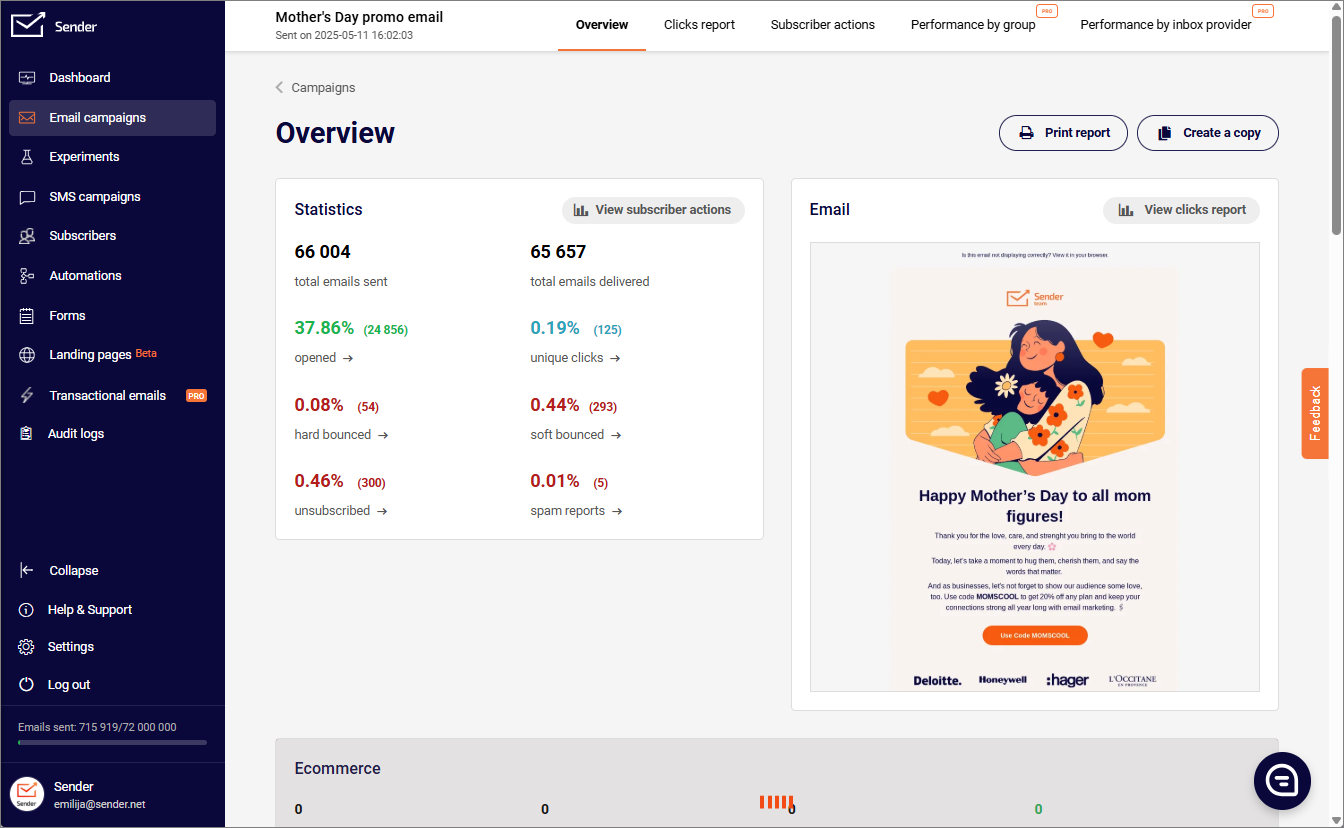
The two numbers to separate in any deliverability report:
- Delivery rate — confirms the receiving server accepted the message
- Inbox placement rate (IPR) — confirms it landed in the primary inbox rather than spam, Promotions, or quarantine
The math: IPR = (emails landed in inbox / emails sent) × 100. Most ESPs don’t show this natively, because they can’t see inside the recipient’s mailbox.
There’s a 2026 wrinkle. Litmus’s Email Client Market Share data reveals over 50% of email opens happen on a device with Apple’s Mail Privacy Protection activated. Apple MPP pre-loads images, which registers as an “open” whether the recipient looked or not. On any audience with significant Apple usage, a healthy open rate doesn’t reliably tell you the email reached the primary inbox.
Because ISPs don’t share IPR directly, senders rely on seed list testing (sending to a panel of monitored test addresses across providers) and dedicated inbox placement tools. Open rate alone won’t diagnose placement anymore. Click-to-open rate, reply rate, and seed test results will.
What Affects Email Deliverability?
Inbox placement isn’t decided by one thing. It’s a running tally across five categories that mailbox providers re-score every send.
Sender reputation. The trust score Gmail, Outlook, and Yahoo quietly maintain about you. Two reputations are in play:
- Domain reputation — tied to the domain in your “From” address; now the dominant of the two
- IP reputation — tied to the sending server
Domain became dominant partly because senders kept trying to escape bad IP reputations by switching IPs, and providers got tired of the game. Reputation is built slowly, lost quickly, and is the single biggest determinant of placement.
Authentication status. SPF, DKIM, and DMARC are the three email authentication records that prove the message is actually from the domain it claims to be from. Missing or misaligned records used to be a yellow flag. As of 2024, for any sender pushing meaningful volume, they’re a hard requirement. Mail that fails authentication doesn’t just get filtered, it can get rejected outright at the gateway.
Content and subject line signals. Spam filters look at the message itself:
- Image-to-text ratio
- Link density
- Attachment types
- Suspicious URLs and suspect HTML
- Patterns matching known spam or phishing templates
Subject lines play a smaller role than people think — the trigger-word panic of the 2010s is mostly outdated — but all caps, excessive punctuation, or oddly formatted subjects still get noticed.
List quality and engagement. Now the heaviest behavioral signal. A list of people who actually want your email papers over a lot of other sins. A bloated, neglected list sinks campaigns that are otherwise technically perfect.
Sending infrastructure. The unglamorous layer underneath everything else: the SMTP server, shared vs. dedicated IP, sending volume patterns, day-over-day consistency. Erratic spikes, sudden volume jumps, or sharing an IP pool with bad actors drags placement down regardless of how clean the rest of your setup is. If you’re new to the sending side, start with our piece on what an SMTP server is.
These five don’t operate in isolation. A weak score in one can be partially offset by strong scores elsewhere. Authentication failures combined with a stale list and erratic volume is how senders end up wondering why nothing reaches the inbox anymore.
How to Test Email Deliverability?
Before fixing anything, find out where you stand. The trap: treating your ESP delivery report as a verdict on placement. It isn’t. To actually diagnose where mail is landing, you need four tools doing four different jobs.
1. Google Postmaster Tools v2. The legacy v1 interface (with the old “High / Medium / Low” Domain Reputation bars) is gone as of late 2025. Postmaster Tools v2 retires the old Domain and IP Reputation charts and replaces them with a Compliance Status dashboard focused on whether you follow Gmail’s bulk sender rules and keep spam complaints low.
The new dashboard is binary: pass or fail on authentication, alignment, one-click unsubscribe, and spam rate. Watch:
- Spam complaint rate (Gmail’s sender guidelines call for under 0.1%, with 0.3% as the danger line)
- Authentication results
- Compliance Status indicator
According to deliverability providers tracking enforcement, Gmail escalated from soft enforcement to active rejection of non-compliant bulk mail in November 2025; Google’s official documentation confirms the underlying thresholds and Compliance Status mechanism. A fail status increasingly means SMTP-level rejections, not just folder routing.
2. Seed list and inbox placement testing. Google Postmaster Tools only shows you Gmail. To see where you land across Outlook, Yahoo, Apple Mail, regional providers, and corporate mail systems, you need seed testing.
Services like GlockApps, MailReach, Mailtrap, and Mail-Tester maintain panels of monitored test addresses across major providers. You send your campaign to the seed list, and the service reports back where each test message landed. It’s the closest thing to a true inbox placement rate you can get. Run a seed test before any major send.
3. Pre-send spam content checks. Tools like Mail-Tester score the message itself before it ships. They flag:
- Image-to-text imbalance
- Broken links
- Suspect HTML
- Missing alt text
- Blacklisted phrases
- Authentication misalignment
Useful as a sanity check on every new template, especially campaigns built from scratch rather than cloned from a known-good send.
4. SPF, DKIM, and DMARC record validators. These confirm your DNS records actually parse and align the way you think they do. MXToolbox is the workhorse, but most ESP dashboards include built-in record checks. A syntactically broken SPF record, a mismatched DKIM key, or a DMARC typo will quietly tank deliverability across every mailbox provider, not just Gmail.
One last caveat, because it’s the most expensive misunderstanding in email reporting: your ESP’s delivery rate is not your inbox placement rate. A 99% delivery rate combined with the testing tools above is what gives you an honest picture. Either one alone will mislead you.
Best Practices to Improve Email Deliverability
You’ve diagnosed the system. Now to fix it. Think of the practices below as a layered system: the foundational layer (compliance, email authentication, sender reputation, IP warming) keeps you in the inbox; the operational layer (list hygiene, personalization, content, sending cadence, monitoring) keeps you there.
A weak link in either layer drags the whole program down. You can have flawless DMARC and still tank your placement with a stale list. You can have a beautifully segmented list and still get rejected at the gateway because your DMARC policy never made it past p=none. For a tactical checklist version, see our guide on how to improve email deliverability.
Comply with 2026 Bulk Sender Rules
Gmail and Yahoo were first. Their bulk sender requirements went live in February 2024, and the soft-enforcement grace period ended in late 2025 when Google escalated to active rejection. The thresholds:
- 5,000 messages/day to Gmail addresses triggers bulk sender rules
- Spam complaint rate must stay below 0.1%, 0.3% is the line where things go bad fast
- SPF, DKIM, and a published DMARC record (p=none minimum) are required
- One-click unsubscribe and ongoing list hygiene are required
Microsoft followed in May 2025 with a near-identical ruleset for Outlook.com, Hotmail.com, and Live.com — same 5,000-per-day threshold, same authentication and unsubscribe requirements. Non-compliant messages were initially routed to Junk; in practice, mail that fails authentication may be rejected with a 550 5.7.515 error.
If you’d already adapted to Gmail and Yahoo’s requirements, Microsoft’s enforcement was mostly a non-event. If you hadn’t, your messages started landing in Junk or bouncing back. Microsoft’s version in our guide to Outlook’s new sender requirements.
The fourth requirement is the one most senders still get wrong. RFC 8058 requires the List-Unsubscribe-Post header, not just an unsubscribe link in the footer. The header lets the mailbox provider show a built-in unsubscribe button at the top of the email and process the opt-out automatically with a single click — no landing page, no confirmation flow.
Many ESPs still don’t implement it correctly by default. Per Google’s and Yahoo’s published requirements, subscribers must be removed within 48 hours of clicking.
Authenticate With SPF, DKIM, and DMARC
Three protocols, three jobs, all required:
- SPF (Sender Policy Framework) — the approved-sender list. A TXT record in DNS saying “these IPs and services are allowed to send mail using my domain.” Receiving servers check the incoming IP against your record. Stops the simplest form of email spoofing.
- DKIM (DomainKeys Identified Mail) — the tamper-proof signature. Your mail server signs each outgoing message with a private cryptographic key. The receiving server fetches your public key from DNS and verifies. If anyone modified the message in transit, the signature breaks.
- DMARC (Domain-based Message Authentication, Reporting, and Conformance) — the policy layer that ties the other two together. Tells receivers what to do with messages that fail SPF or DKIM:
– p=none — monitor only
– p=quarantine — route to spam
– p=reject — refuse outright
In 2026, p=none is the bare minimum to clear bulk sender rules; p=reject is where most security-conscious senders are working toward.
Without these three, your domain is wide open to email spoofing (the technique behind most phishing) and your legitimate mail is vulnerable to being filtered or rejected. Email authentication is the foundation of email security and deliverability. The two are no longer separable.
One reward: BIMI (Brand Indicators for Message Identification). With DMARC at p=quarantine or p=reject, you can publish a BIMI record that displays your brand logo next to your emails in supporting inboxes (Gmail, Yahoo, Apple Mail). Both a trust signal and a tangible payoff for tightening DMARC.
Build and Protect Your Sender Reputation
Sender reputation is recalculated with every send. It’s built from engagement, complaints, bounces, list hygiene, and consistency. You build it over months. You can lose it in a week.
Two reputations are in play:
- Domain reputation — travels with you regardless of infrastructure; now the dominant of the two
- IP reputation — tied to the specific sending server; still matters at scale but carries less weight than five years ago
The IP question splits into shared vs. dedicated:
- Shared IP pool (the default for low-to-medium volume) — you inherit the reputation of everyone else in the pool. If pool-mates are clean, this is fine and even beneficial. If they’re not, their bad behavior drags your placement down.
- Dedicated IP — sole responsibility for one IP’s reputation. Often not worth it below ~100,000 emails/month (some providers set the threshold at 250,000-300,000).
Below the dedicated threshold, an IP doesn’t generate enough engagement signal for ISPs to build reliable reputation on it, and a shared IP at a reputable provider is almost always the better choice. Infrastructure’s role covered in our guide to what SMTP relay is, and options compared in our guide to free SMTP servers.
Warm Up Dedicated IP Addresses
A new IP has no reputation. Send 50,000 emails out of the gate and you look exactly like a spammer launching from a fresh server. ISPs throttle, filter, or outright block until they have evidence you’re legitimate.
IP warming builds that evidence:
- Start small, sending only to your most engaged subscribers;
- Increase volume gradually (15-20%/week) as engagement and complaint rates hold steady;
- Full ramp from cold IP to full sending volume typically takes 4-8 weeks.
Your ESP will usually publish a recommended warmup schedule for their specific infrastructure; that’s the one to follow. Dedicated email warm-up tools can automate the inbox-to-inbox engagement that builds reputation during the ramp.
Skipping IP warming is the single fastest way to torpedo a new sending setup.
Clean and Segment Your Email List
A clean list is the most underrated lever in this entire stack. List hygiene means:
- Removing hard bounces immediately (an address that bounces twice is dead — keep sending and you’ll start hitting spam traps)
- Sunsetting subscribers who haven’t engaged in 90-180 days
- Using double opt-in at signup paired with email verification tools to keep invalid and mistyped addresses out
For lists past the point of in-house cleanup, email list cleaning services can run a bulk validation pass and flag risky addresses before they cost you placement.
Move sunsetted and bounced addresses to an email suppression list rather than deleting them, so you don’t accidentally re-import them later. Spam traps — addresses planted by ISPs and blocklist operators specifically to catch senders with poor list hygiene — are the worst-case outcome. One trap hit can quietly tank your reputation for weeks, and recovering from a blacklist takes longer than building it back from a clean slate.
Segmentation is the complement. Splitting your list by behavior, attributes, or lifecycle stage lets you send relevant content to each group instead of blasting one message to everyone. Engagement-based segmentation has become one of the strongest deliverability levers, partly because it’s a natural form of self-suppression.
The Attentive customer analysis makes the point concrete: pruning unengaged subscribers cut sends by 70% and lifted revenue by 50%. The feedback loop in action:
- Clean, segmented lists drive better engagement
- Better engagement strengthens sender reputation
- Stronger reputation lifts inbox placement
- Better placement makes the next send work harder
Less, sent better, beats more, sent worse.
Personalize Emails for Engagement
Personalization in 2026 is not “Hi {{first_name}}.” That’s been table stakes for a decade and ISPs don’t reward it as a deliverability signal. Real personalization uses:
- Purchase history
- Browsing behavior
- Lifecycle stage
- Engagement patterns
A back-in-stock alert for the item someone viewed twice. A re-engagement series triggered by 30 days of dormancy. A product recommendation based on what someone actually bought rather than what’s on sale this week.
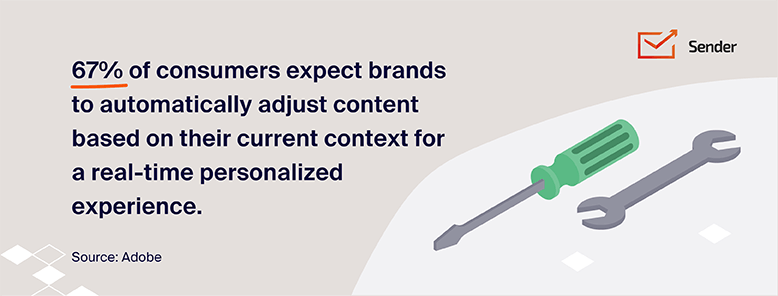
The deliverability connection is direct. ISPs weigh engagement heavily in placement decisions, and personalized mail consistently drives higher opens, clicks, and replies. Those engagement gains feed straight back into sender reputation, which lifts placement of your next send, which lifts engagement again. The math compounds in your favor when personalization is real and against you when it isn’t.
Segmentation is what makes personalization work at scale. You can’t manually craft a unique email for 50,000 people, but you can craft 12 variants for 12 segments and let dynamic content fill in the rest.
Avoid Spam Folder Trigger Phrases
The 2010s playbook said to avoid words like “free,” “act now,” and “limited time” because spam filters were keyword-matching. That’s mostly outdated. Modern filters are AI-powered and evaluate tone, structure, and intent — not just word lists.
What actually trips 2026 spam filters:
- ALL CAPS subject lines
- Excessive punctuation (“Don’t miss this!!!”)
- Misleading preview text that doesn’t match the body
- Deceptive subject lines that promise something the email doesn’t deliver
- Image-heavy emails with little text
- Pushy urgency stacked on pushy urgency
The pattern matters more than any individual phrase. The honest fix is the simplest: write like a human writing to humans. If your subject line would feel pushy in a one-on-one conversation, it’ll feel pushy to a filter trained on millions of those conversations.
Maintain a Consistent Sending Schedule
ISPs reward predictability. A sender who shows up every Tuesday morning with 10,000 emails looks legitimate. A sender who’s silent for three weeks and then dumps 100,000 emails on a Friday looks like a botnet warming up a stolen list.
Establish a cadence your subscribers come to expect (weekly newsletter, monthly digest, regular drip) and stick to it. When you need to scale volume, ramp gradually rather than spiking. Big seasonal campaigns (Black Friday, end-of-year fundraising) should be planned weeks in advance with a gradual volume increase, not a sudden 5x jump.
Monitor Engagement Metrics
Once your sends are going out, the work shifts to email analytics — watching what comes back. The metrics that matter most:
- Open rate
- Click-through rate
- Click-to-open rate
- Email bounce rate
- Unsubscribe rate
- Spam complaint rate
With over 50% of opens happening on devices with Apple’s Mail Privacy Protection activated, opens are inflated and unreliable as a standalone engagement signal. Treat opens as directional and lean on click-through rate, click-to-open rate, and reply rate instead.
The two metrics with hard deliverability thresholds:
- Bounce rate: keep under 2%. Sustained higher bounces tell mailbox providers your list is dirty.
- Spam complaint rate: keep under 0.1%, never let it cross 0.3%. Per Google’s published guidelines, 0.3% is where Gmail filters aggressively; Microsoft applies similar thresholds.
Google Postmaster Tools v2 is the free first-party view of how Gmail sees you. Shows spam rate, authentication results, encryption levels, feedback loop data, and the Compliance Status indicator. Check it weekly. Layer your ESP’s reporting and a third-party seed testing tool on top.
Read these metrics by slope, not threshold. A spam complaint rate of 0.05% is fine. A rate of 0.05% trending toward 0.15% over four weeks is a problem you need to address before it crosses 0.3%. Threshold thinking catches issues at the moment they break. Slope thinking catches them while there’s still time to fix the underlying cause.
Conclusion
Email deliverability isn’t one problem with one fix. It’s the running sum of five things working together:
- Authentication that proves you are who you say you are
- Sender reputation built slowly over months of consistent, clean sending
- List hygiene that keeps engagement signals honest
- Content that respects the recipient’s attention
- Monitoring that catches drift before it becomes damage
Get four right and let the fifth slip, and the whole program suffers.
What changed in 2026 is the floor. Gmail’s soft-enforcement window closed in late 2025, Microsoft’s bulk sender requirements took effect in May 2025, and Yahoo has been enforcing the same standards since 2024. The three providers now operate on a shared baseline:
- SPF, DKIM, and DMARC are required
- One-click unsubscribe is required
- Complaint rates above 0.3% trigger active filtering
“Needs work” on the Gmail Compliance Status dashboard is no longer a warning — it’s a delivery problem
The bar above that floor is engagement. Technically compliant senders still land in spam if their subscribers don’t open, click, or reply. 2026 is the point where engagement became the dominant signal, not a tiebreaker. Which is honestly the right outcome — the senders who deserve the inbox are the ones whose recipients actually want their mail.
What to read next: if your placement has dropped and you can’t pinpoint the cause, start with our diagnostic on why emails go to spam, lock down your sending setup with our guide on secure email practices, stay current with our rundown of the latest Gmail inbox changes, and for the transactional side, see our guide to email notifications.