

Campaigns Stuck in Sending Status
If your email campaign remains in Sending status for an unusually long time and does not transition to Sent, this guide walks through the most common causes and how to resolve them.
Where to Find This Feature
In the Sender dashboard, go to: Email campaigns (left sidebar). Your campaign list displays each campaign’s current status — Draft, Scheduled, Sending, or Sent — alongside delivery stats. Use the Filter button above the list to isolate campaigns by status and quickly locate any stuck in Sending.
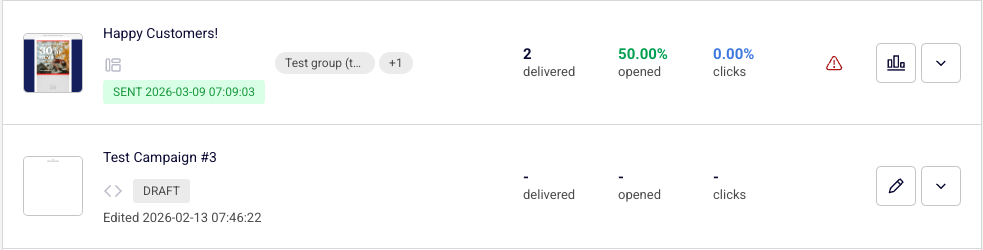
Steps to Resolve a Campaign Stuck in Sending
Step 1 — Check Your Plan Limits
Open Account settings → Billing from the left sidebar. Review the Email campaigns section at the top of the page. It shows your current usage for active subscribers, unique subscribers emailed, and emails sent against your plan limits. If any of these counters have reached their maximum, your campaign cannot finish sending. You will need to upgrade your plan or wait for your billing cycle to renew before the remaining emails can be delivered.
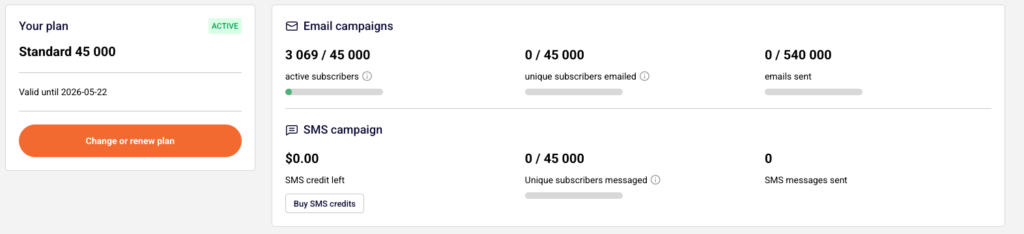
Step 2 — Verify Domain Authentication
Navigate to Account settings → Domains. Confirm that your sending domain shows green checkmarks under Ownership confirmed and Authentication. If any checkmark is missing or shows an error, your emails may be blocked or throttled. Click Recheck DNS records to refresh the status. If authentication is incomplete, update your SPF, DKIM, and DMARC DNS records with your hosting provider and recheck.

Step 3 — Review Recipient List Quality
Go to Subscribers in the left sidebar and click the Email status dropdown filter. Check how many of your subscribers are listed as Bounced, Unsubscribed, or Reported spam. If a large portion of the recipients in your campaign’s target group or segment fall into these statuses, the campaign may appear stuck because there are very few deliverable addresses. Open the campaign’s assigned group to verify it contains Active subscribers.
Step 4 — Wait or Contact Support
For large recipient lists, the Sending status is expected to persist while Sender processes and delivers each email — this can take minutes to hours depending on volume. If your plan limits are fine, your domain is authenticated, your list contains active subscribers, and the campaign has been in Sending for more than a few hours, contact Sender support via LiveChat or at support@sender.net for further investigation.
What Happens After Sending Completes
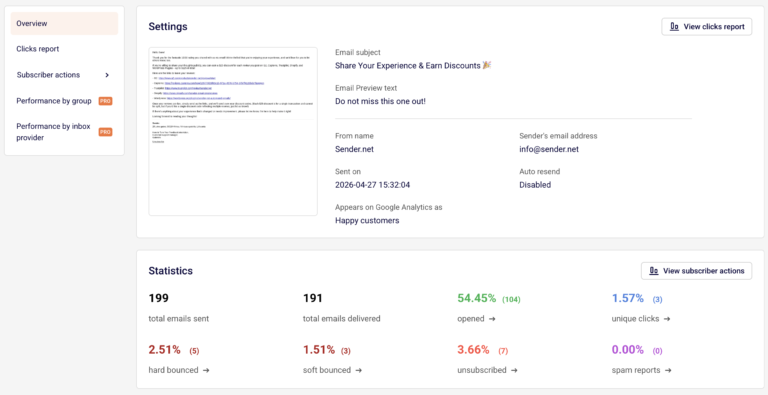
Once all emails have been processed, the campaign status changes from Sending to Sent in the Email campaigns list, and a timestamp appears beside the status label. Click the report icon (bar chart) next to a sent campaign to open the Campaign overview, where you can review total emails sent, total emails delivered, opened, unique clicks, hard bounced, soft bounced, unsubscribed, and spam reports.
Common Issues
Campaign stays in Sending for hours with 0 delivered — Your plan’s unique subscriber or email send limit has been exceeded. Check Account settings → Billing and upgrade or wait for renewal.
Domain authentication shows missing checkmarks — DNS records for SPF, DKIM, or DMARC are not properly configured. Update them with your hosting provider, then click Recheck DNS records on the Domains page.
Recipient count shows 0 active subscribers — All subscribers in the selected group or segment are bounced, unsubscribed, or marked as spam. Filter your Subscribers list by Email status → Active to confirm deliverable contacts exist.
Campaign sent but delivered count is 0 with 100% hard bounces — The email addresses in your recipient list are invalid. Clean your subscriber list by removing bounced contacts and re-import verified addresses.
FAQs
Can I cancel a campaign that is stuck in Sending?
No. Once a campaign enters the Sending status, it cannot be cancelled or edited. You must wait for it to complete or contact support for assistance.
Does Sender have a daily sending limit?
No. There is no daily limit. Sending is governed by your plan’s monthly email allowance and subscriber caps, visible under Account settings → Billing.
Will my campaign resume automatically after I upgrade my plan?
Contact support to confirm whether a stuck campaign will resume after a plan upgrade, or whether you need to duplicate it and resend.
How do I prevent campaigns from getting stuck in the future?
Before sending, verify your plan has sufficient email and subscriber headroom on the Billing page, confirm domain authentication is complete on the Domains page, and ensure your recipient group contains active subscribers.